In this review, we delve into the offerings of Rayobyte, a prominent player in the proxy services domain. From an extensive IP pool to diverse proxy types, we aim to explore the strengths and potential drawbacks of Rayobyte, providing you with valuable insights to make an informed decision about your proxy needs.
What is Rayobyte?
Rayobyte is a well-known proxy provider with 4 different types of proxies: Datacenter proxy, Residential Proxy, ISP Proxy, and Mobile Proxy. Their price is average, not that cheap but still affordable. You can buy Rayobyte proxy based on bandwidth or IPs, it’s up to which type of proxy you choose.
Rayobyte is suitable for many purposes such as web scrapping, SEO monitoring, ad verification, social media, market research, Travel Data Aggregation, Price Monitoring And Tracking, Review Monitoring, Non-Profit Data Collection, and Price Aggregation .....
Besides, Rayobyte also has a Resell program where you can partner with them and resell their residential proxies with a price as low as $0.5/GB.
Rayobyte Main Features
| Parameter | Feature |
|---|---|
| IP Type | - Datacenter Proxy: rotating, dedicated, shared- Residential Proxy- Mobile Proxy- ISP Proxy (shared, dedicated, rotating) |
| IP Pool | - Datacenter Proxy: 300 000 IPs- Residential Proxy: 100 000 IPs- Mobile proxy: Unknown- ISP Proxy: Unknown |
| IP Location | - Datacenter Proxy: 25+ countries- Residential Proxy: 150+ countries- Mobile proxy: 100 + countries- ISP Proxy: 4 countries (US, UK, Canada and Germany) |
| Filter/Target | Country/Region/City/ISP |
| Proxy Protocol | HTTP/ Socks5 |
| IP Rotation | Rotating and static |
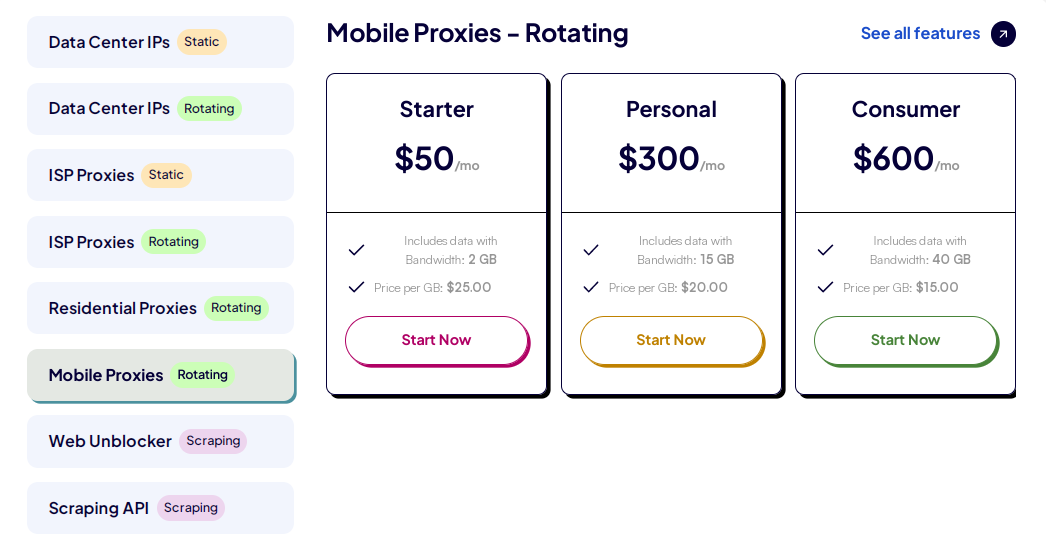
| Price Sample | - Datacenter Proxy: From $2.50/IP- Residential Proxy: From $1/GB- Mobile Proxy: From $50/month (2GB)- ISP Proxy: From $4.6/IP |
| Price Charged | - Datacenter Proxy: Quantity of IPs- Residential Proxy: Bandwidth- Mobile Proxy: Subscription bandwidth- ISP Proxy: Quantity of IPs |
| Payment Method | Visa, Mastercard, American Express, Discover card |
| Authentication | Username & password; Whitelist |
| Speed | Average |
| Free Trial | Available |
| Refund Policy | No |
| Support | Telegram, Twitter, Discord, Facebook, Email, Instagram, YouTube |
Rayobyte Pricing Package
Rayobyte provides 4 different types of proxy which is divided into different package to meet all your demand. Here are the detailed pricing package of Rayobyte
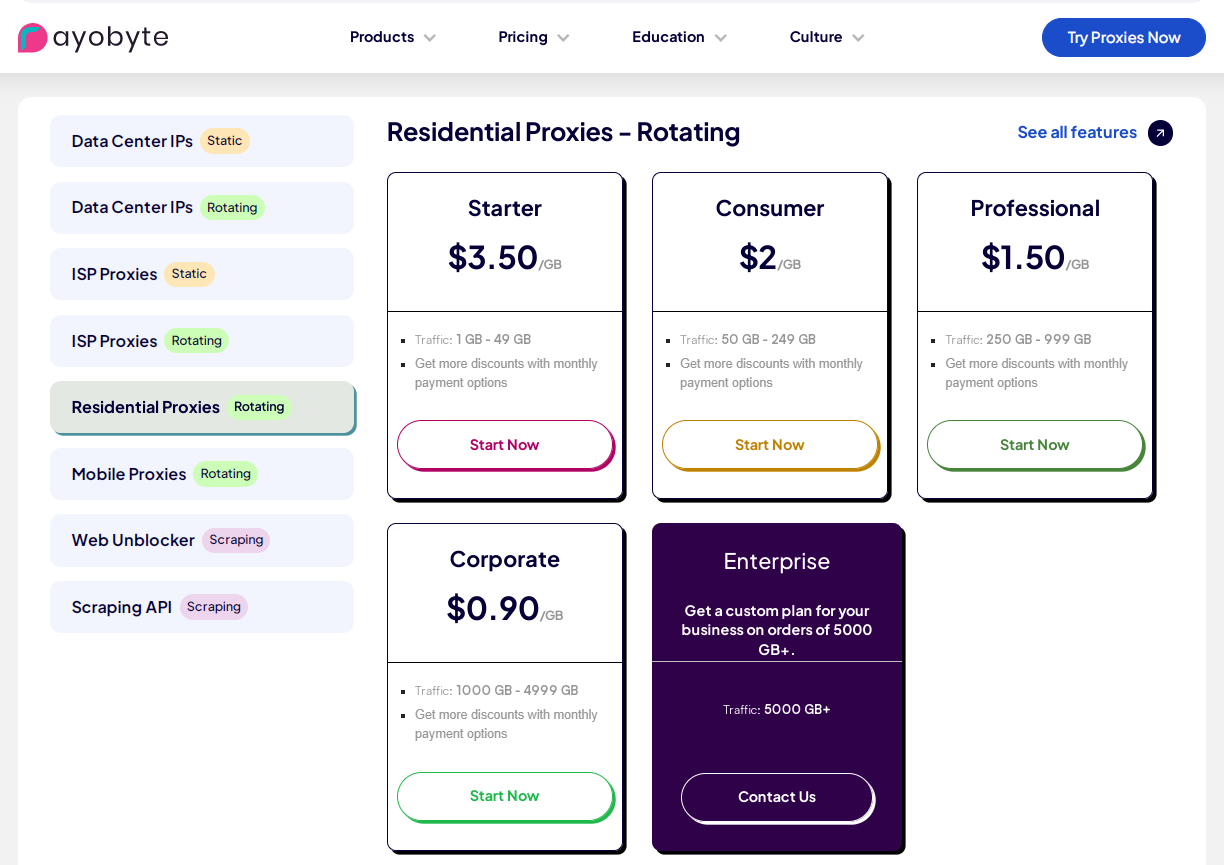
Rayobyte’s Residential Proxy
With Residential Proxy, you will buy proxies based on its bandwidth, you simply buy the amount of traffic you need, and it stays there until you use it. The price is based on how much bandwidth you’re willing to buy. The higher the bandwidth you choose, the lower the price you can buy.
Rayobyte’s Datacenter proxy
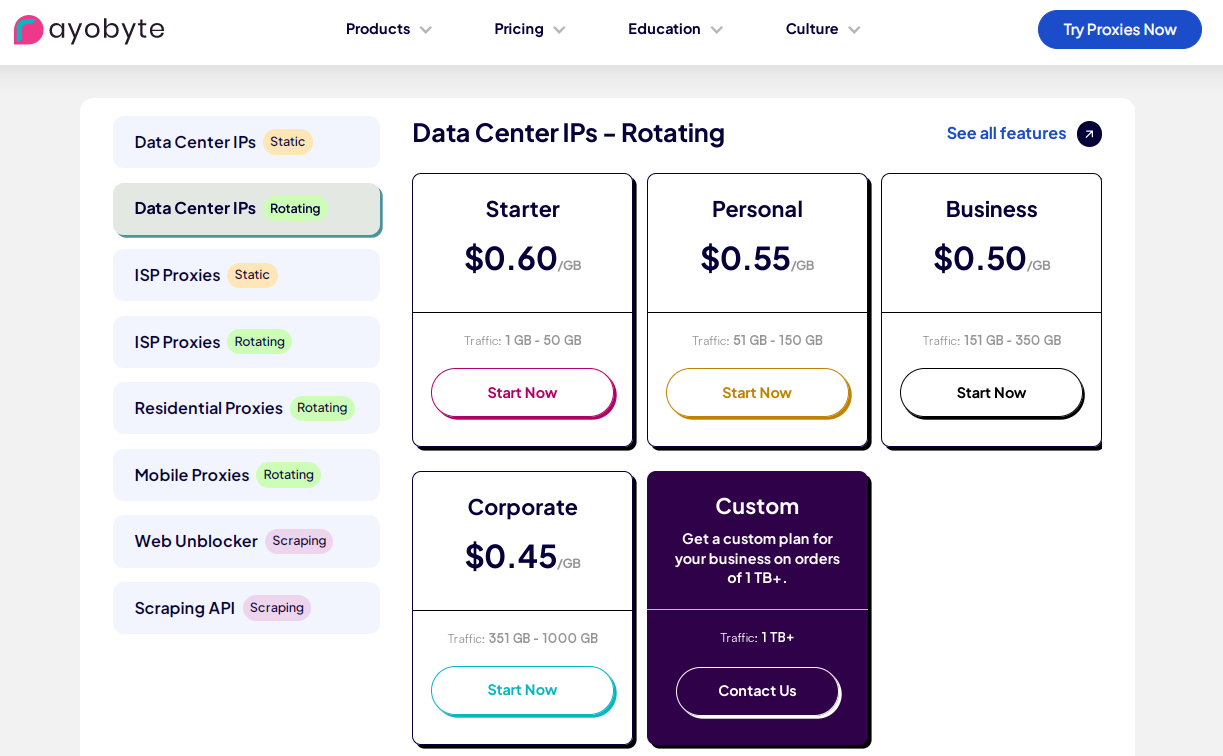
When acquiring datacenter proxies, you have the option to select from dedicated, rotating, semi-dedicated, or IPV6 types.
Rayobyte provides access to a vast network of over 300,000 IPs spanning across 20,000 unique subnets. Pricing is determined by the duration of your subscription and the quantity of proxies you wish to purchase.
Rayobyte’s Mobile Proxy
When opting for a mobile proxy, you can choose from three distinct packages: Starter, Business, or Enterprise. These are monthly subscriptions that come with varying levels of bandwidth.
Rayobyte’s ISP Proxy
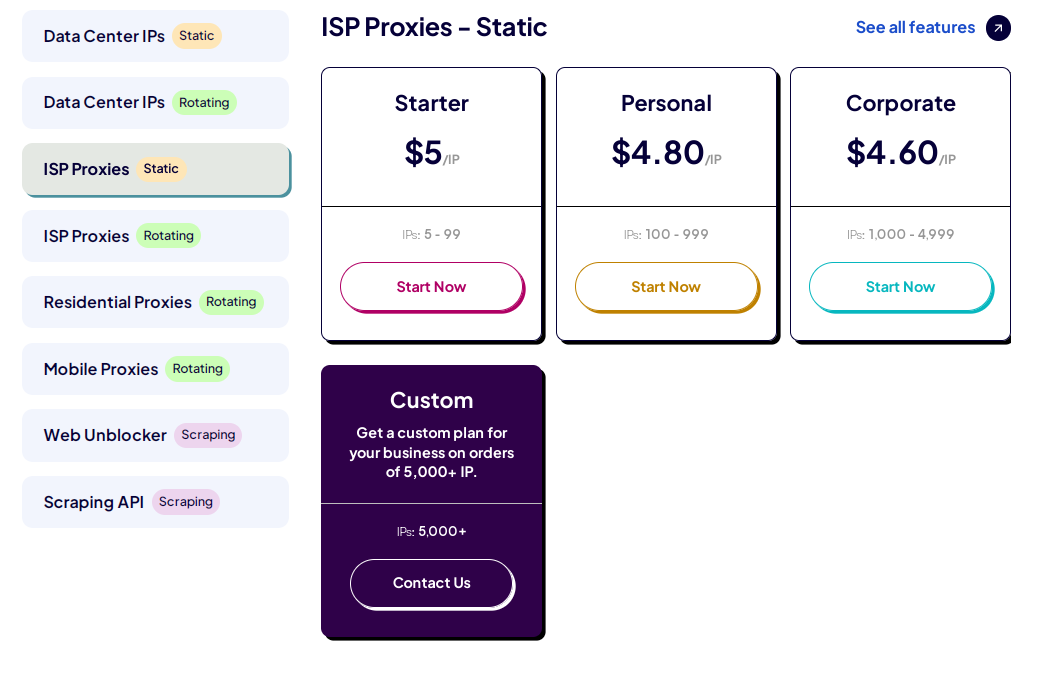
Rayobyte proxy offers an ISP proxy specifically designed for SEO monitoring, featuring 9 authentic IP ASNs. These proxies seamlessly blend the reliability of residential proxies with the swift performance of data center proxies. Rayobyte offers ISP IPs sourced from four diverse countries: the United States, the United Kingdom, Canada, and Germany.
When acquiring an ISP Proxy, you have the flexibility to choose the number of IPs you desire, with prices starting at $5/IP.
>>> Related Articles: Review Proxyma: A Comprehensive Review of Residential Proxy
How to set up Rayobyte on Hidemyacc profile
First, you need to generate proxies from Rayobyte dashboard. After logging into your accounts, navigate to the Proxy List Generator.
In this segment, provide the necessary details to generate a proxy, including the proxy country, region (optional), city (optional), IP session (sticky or random IP), connection type (hostname, IP (login/pass), IP (IP Authorization)), the desired quantity of IPs, and format (for compatibility with Hidemyacc, opt for the format hostname:port:username:password).

Subsequently, copy the generated proxy and paste it into your Hidemyacc profile.
To configure Rayobyte proxy in Hidemyacc, initiate a new profile within Hidemyacc. Under the Proxy section, select Your proxy pick the appropriate protocol, and then paste the proxy recently generated from Rayobyte.

You can verify the proxy status by clicking on the Check Proxy button. Finally, click on Createto complete the process. Now you have a new profile Hidemyacc that is configured Rayobyte proxy.
Rayobyte Performance Testing
Next, Hidemyacc will check how good and fast the proxy is. I use a tool called IPFighter for this. It tells us information about the proxy's performance, like where it comes from, which city, the Internet provider, and if there are any issues like DNS leaks or WebRTC status. It even gives the proxy a score.
IPFighter gave this proxy a score of 90 out of 100 due to its presence in the blacklists of 2/51. Please keep in mind that all this information is from IPFighter's database. If this proxy isn't banned on the websites you want to visit, you can use it without any problems.

To verify geolocation accuracy, you can conduct a Google Search using specific keywords and observe if the displayed results align with the country of origin for the purchased proxy. Additionally, you can visit various e-commerce platforms like eBay, click on different products, and confirm whether the default country aligns with the targeted geolocation.

To test the proxy speed, visit Whatismyip, and here are the results. The download speed is below average, which may cause some delays when accessing high-traffic websites or streaming platforms. Upload speed is strong, making it suitable for tasks that require sending data, such as form submissions or account actions. Overall, Rayobyte is adequate for general browsing and account management, but may not be ideal for bandwidth-heavy tasks.

Rayobyte Pros and Cons
Pros
- Diverse Proxy Types: Rayobyte offers a variety of proxy types such as residential, data center, mobile, and ISP proxies, and provides users with options tailored to their specific needs.
- Large IP Pool: Each type of proxy has a different IP Pool and they’re large enough to meet your demand.
- User-Friendly Interface: Rayobyte has an intuitive and easy-to-use interface for generating and managing proxies which is a significant advantage for you even though you never have generated a proxy before.
- Global Proxy Locations: Rayobyte offers proxies from various countries and regions, and provides users with flexibility and options for geo-targeting.
- Bandwidth Options: They have many flexible bandwidth options that allow users to purchase the amount of data transfer they need can be cost-effective.
Cons
- Speed and Performance: As the result Hidemyacc test on the speed test site, Rayobyte proxy has a quite slow speed. Even though it’s still meet your demand when accessing many site sometimes and somehow you’ll meet the latency
Conclusion
As we conclude our exploration of Rayobyte, it's evident that this proxy provider has both commendable features and areas for improvement. With a substantial IP pool and diverse proxy options, it caters to a range of user requirements.
By combining Rayobyte with Hidemyacc, you can ensure the utmost anonymity and privacy for your online profiles. Hidemyacc's software conceals your computer's original parameters and generates new ones for each profile. This feature is incredibly helpful for users who want to browse the internet without being tracked.
To experience the benefits of this combination, download Hidemyacc now and start your 7-day trial.
If you have any questions, comments, or suggestions, please don't hesitate to reach out to us via Telegram, Skype, or Facebook Messenger support. We're here to assist you.