Что такое Shadowrocket ? Shadowrocket — это мощное прокси-приложение для iOS, которое помогает защитить ваше соединение, получить доступ к заблокированному контенту и оптимизировать работу в интернете. Подробная информация о преимуществах, функциях, установке и использовании Shadowrocket будет опубликована Antidetect Browser Hidemyacc в статье ниже!
1. Что такое Shadowrocket?
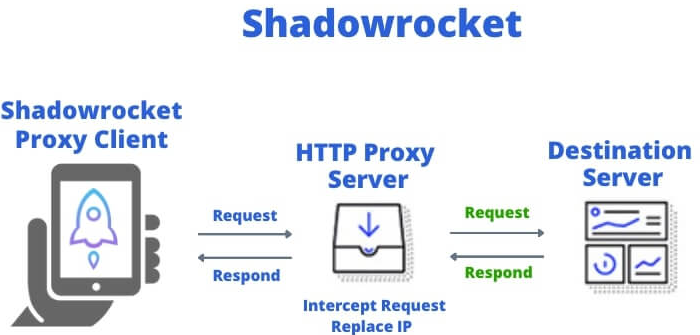
Shadowrocket — это VPN-приложение для iOS, которое позволяет пользователям безопасно устанавливать и управлять интернет-подключениями, обходя географические ограничения и интернет-цензуру. Используя Shadowrocket, вы можете шифровать трафик и получать доступ к заблокированным веб-сайтам, повышая конфиденциальность и безопасность при просмотре веб-страниц.
Приложение поддерживает несколько прокси-протоколов, таких как Shadowsocks, V2Ray, SOCKS5 и другие, что обеспечивает гибкую настройку подключения. Кроме того, Shadowrocket разработан с учётом удобства использования, поэтому даже неспециалисты смогут быстро и эффективно настроить подключение.
2. Для чего используется Shadowrocket?
Shadowrocket обладает множеством полезных функций, обеспечивающих безопасность и оптимизацию интернет-соединения пользователей. Ниже приведены некоторые из основных функций Shadowrocket:
- Безопасность и конфиденциальность: Одна из важнейших функций Shadowrocket — шифрование вашего интернет-подключения. Это помогает защитить ваши личные данные при использовании общедоступных сетей, предотвращая риск отслеживания или раскрытия конфиденциальной информации. Прокси-протоколы, такие как Shadowsocks и V2Ray, обеспечивают надёжную защиту вашего подключения.
- Доступ к контенту с географическими ограничениями: Shadowrocket помогает обойти эти барьеры, создавая анонимное прокси-соединение, которое позволяет получить доступ к заблокированным сервисам. Например, когда вы хотите смотреть видео на YouTube, Netflix или других онлайн-сервисах, недоступных в вашем регионе.
- Оптимизация сетевых подключений: с помощью Shadowrocket вы можете отслеживать сетевой трафик и настраивать параметры сети для оптимизации производительности подключения.
>>> Читать о прокси
- Что такое обратный прокси-сервер ? Основные преимущества и применение
- Почему следует проверять настройки прокси-сервера и брандмауэра для безопасного соединения
- Устранение неполадок с Интернетом ? Узнайте, как отключить прокси-сервер.
3. Некоторые выдающиеся особенности Shadowrocket
Shadowrocket — это не просто обычное прокси-приложение, но также обладающее рядом выдающихся функций, таких как:
- Поддержка нескольких прокси-протоколов: Shadowrocket поддерживает популярные прокси-протоколы, такие как Shadowsocks, V2Ray, SOCKS5 и HTTP/S Proxy. Это обеспечивает пользователям гибкость при настройке подключений, позволяя выбирать протокол, наиболее соответствующий их потребностям.
- Управление подключением и мониторинг: приложение предоставляет инструменты мониторинга трафика, помогая вам отслеживать скорость подключения и расход данных. Вы можете настроить уведомления о разрывах соединения или изменении трафика.
- Поддержка нескольких серверов: Одна из примечательных особенностей Shadowrocket — возможность использовать несколько прокси-серверов одновременно. Вы можете выбрать сервер с самой высокой скоростью или минимальной задержкой, оптимизируя работу в интернете.
- Удобный интерфейс: интерфейс Shadowrocket очень прост в использовании, что позволяет пользователям быстро освоиться с приложением. Для настройки и начала работы вам потребуется всего несколько простых шагов.
Примечание: Если вы новичок, настройка прокси-протоколов в Shadowrocket может показаться немного сложной. Однако приложение предоставляет подробные инструкции, которые помогут вам легко настроить прокси-сервер.
4. Подробное руководство по установке shadowrocket
Установка Shadowrocket проста, но вам потребуется устройство iOS и Apple ID. Выполните следующие действия:
Шаг 1: Загрузите и установите приложение.
Откройте App Store, найдите «Shadowrocket» и нажмите « Загрузить » . Дождитесь завершения загрузки. Поскольку Shadowrocket — платное приложение, перед его скачиванием необходимо оплатить его.
Шаг 2: Настройка подключения
. Откройте приложение и начните настройку подключения. Введите информацию о прокси-сервере (IP-адрес, порт и параметры безопасности, такие как пароль или шифрование).
Если у вас нет этой информации, вы можете воспользоваться бесплатными или платными прокси-сервисами от провайдеров.
Шаг 3: Проверьте соединение.
Подключитесь к веб-сайту, чтобы убедиться в его стабильности. Если соединение успешно, вы готовы использовать Shadowrocket для безопасного просмотра.
5. Как использовать Shadowrocket из AZ
Шаг 1: Откройте Shadowrocket на вашем устройстве iOS.
Шаг 2: Нажмите значок «Добавить сервер» (+ в правом верхнем углу), чтобы добавить прокси-сервер.
Шаг 3: Появится список типов прокси-серверов. Нажмите «Тип» , чтобы выбрать нужный тип прокси-сервера.
Шаг 4: Выберите протокол прокси-сервера, например SOCKS5 или HTTP.
Шаг 5: Введите IP-адрес и порт прокси-сервера. Убедитесь, что информация верна для успешного подключения.
Шаг 6: Нажмите « Сохранить» , чтобы сохранить конфигурацию прокси-сервера.
Шаг 7: Выберите добавленный сервер и нажмите «Подключиться» . Shadowrocket установит прокси-соединение, что позволит просматривать веб-страницы через настроенный сервер.
Шаг 8: Проверьте свой IP-адрес, чтобы убедиться в работоспособности соединения. Это можно сделать в приложении или на сайте проверки IP-адреса.
Выполнив эти шаги, вы успешно установили и настроили Shadowrocket для защиты и оптимизации вашего интернет-соединения.
Благодаря этому руководству вы теперь знаете, что такое Shadowrocket, как его скачать и как им пользоваться. Следуя инструкциям по установке и использованию, вы сможете безопасно просматривать веб-страницы, получать доступ к заблокированному контенту и оптимизировать свою работу в сети. Начните использовать Shadowrocket уже сегодня, чтобы исследовать мир интернета без ограничений!
>>> Тип прокси:
- Datacenter Proxy 101: все, что вам нужно знать о Datacenter Proxy
- Мобильные прокси : зачем они нужны и где купить
- Что такое прокси-сервер с ротацией IP-адресов ? Лучшие провайдеры прокси-серверов с ротацией IP-адресов
- Прокси-сервер: что это такое и как он работает?
6. FAQ
6.1. Безопасен ли Shadowrocket?
В целом, Shadowrocket безопасен при соблюдении базовых мер безопасности. Приложение обеспечивает надёжное шифрование (например, Shadowsocks) для защиты ваших данных, но вам следует всегда выбирать надёжные прокси-серверы и регулярно обновлять приложение. В конечном счёте, безопасность зависит от правильной настройки и использования качественных серверов.
6.2. Платный ли Shadowrocket?
Shadowrocket — платное приложение, требующее единоразовой покупки (около 2,99 $) в App Store. Дополнительные расходы могут включать плату за премиум-прокси-серверы в зависимости от провайдера, скорости и лимитов данных.