What is Shadowrocket ? Shadowrocket is a powerful proxy application for iOS, helping you secure your connection, access blocked content and optimize your internet experience. Details about the advantages, features, installation and usage of Shadowrocket will be updated by Antidetect Browser Hidemyacc in the article below!
1. What is Shadowrocket?
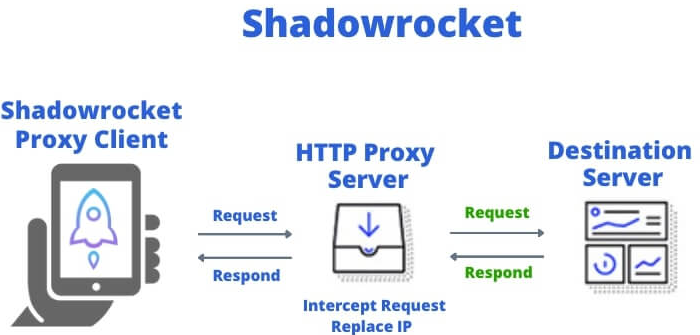
Shadowrocket is a VPN application for iOS that allows users to establish and manage internet connections safely and securely, bypassing geographic restrictions or internet censorship. By using Shadowrocket, you can encrypt your data traffic and access blocked websites, enhancing privacy and security while browsing.
The app supports multiple proxy protocols such as Shadowsocks, V2Ray, SOCKS5, and others, allowing flexible connection configuration. Additionally, Shadowrocket is designed to be user-friendly, so even non-experts can quickly and efficiently set up a connection.
2. What is Shadowrocket used for?
Shadowrocket is primarily used in three scenarios:
- Bypassing geo-restrictions: Access content unavailable in your region — streaming services (YouTube, Netflix), social platforms, or websites blocked by your ISP or government.
- Securing connections on public networks: When using public Wi-Fi (airports, cafes), Shadowrocket encrypts your traffic to prevent data interception or surveillance.
- Monitoring and managing network traffic: Users can track bandwidth usage, set routing rules for specific apps, and choose which traffic goes through the proxy and which connects directly.
>>> Read about proxy
- What is a Reverse Proxy? Key Benefits and Uses Explained
- Why You Should Check Proxy and Firewall Settings for a Secure Connection
- Troubleshooting Internet Issues? Learn how to disable proxy
- Proxy Server: What is it and how does it work?
3. Some outstanding features of Shadowrocket
Shadowrocket is not just a regular proxy application but also has some outstanding features such as:
- Multi-protocol support: Shadowrocket supports Shadowsocks, V2Ray, Trojan, SOCKS5, and HTTP/S — giving users flexibility to connect to different server types without switching apps.
- Rule-based routing: You can set custom rules to route traffic by domain, IP range, or app. For example, route only specific apps through the proxy while keeping others on a direct connection.
- Multiple server management: Add and switch between multiple proxy servers, test latency, and select the fastest one automatically.
- Traffic statistics: Real-time monitoring of upload/download speed and total data usage per session.
- Simple interface: Despite its technical depth, the dashboard is clean enough for first-time users to configure a basic connection in under 5 minutes.
Note: If you are a beginner, Shadowrocket can be a bit complicated to configure proxy protocols. However, the application provides detailed instructions to help you set up easily.
4. How to install and use Shadowrocket
Step 1: Purchase and download
Shadowrocket is a paid app (~$2.99). Open the App Store, search for "Shadowrocket," purchase, and install it.Step 2: Add a proxy server
Open the app and tap the + icon (top-right). Select Type to choose your proxy protocol (SOCKS5, HTTP, Shadowsocks, etc.).Step 3: Enter server details
Fill in the server's IP address, port, and authentication credentials (username/password or encryption key depending on protocol). Tap Save.Step 4: Connect
Select the server you just added and tap the toggle at the top to connect. Shadowrocket will activate and route your traffic through the configured proxy.Step 5: Verify the connection
Check your IP via an IP-checking website (e.g., whatismyip.com) to confirm the proxy is working correctly.Note: Shadowrocket is iOS only — it is not available on Android.
With this guide, you now understand what Shadowrocket is, how to download it, and how to use it. Following the installation and usage instructions, you can safely browse the web, access blocked content, and optimize your online experience. Start using Shadowrocket today to explore an unrestricted internet world!
>>> Type of proxy:
- Datacenter Proxy 101: All You Need To Know About Datacenter Proxy
- Mobile Proxy: Why you need them and where to buy
- What is rotating IP address proxy? Top providers for rotating proxy
6. FAQ
6.1. Is Shadowrocket Safe?
Overall, Shadowrocket is safe if basic security practices are followed. The app provides strong encryption (e.g., Shadowsocks) to protect your data, but you should always choose trusted proxy servers and keep the app updated. Ultimately, safety depends on proper setup and using high-quality servers.
6.2. Is Shadowrocket Paid?
Shadowrocket is a paid app, requiring a one-time purchase (around $2.99) from the App Store. Additional costs may include fees for premium proxy servers, depending on the provider, speed, and data limits.