

Antidetect browser for Affiliate marketing | Hidemyacc
Run multiple affiliate network accounts, test offers and tracking links by GEO, and share campaigns with your team, each in its own browser profile.




Web3 users often run several MetaMask wallets for different purposes: a main wallet, a test wallet and wallets for individual project campaigns, along with the Discord and OpenSea accounts that go with them. When everything runs in one browser, wallet extensions, cookies and login sessions all get mixed together. A single malicious extension or one connection to a phishing site can put every wallet in that browser at risk.
The Hidemyacc antidetect browser lets each wallet and Web3 account run in its own isolated browser profile, with a separate fingerprint, cookies, login session and wallet extension. Every wallet gets its own browser environment, and it is easy to confirm you are in the right wallet before you sign a transaction or complete an airdrop task.
For Web3 users, the number of wallets tends to grow with every project, campaign or snapshot. When they all run in the same browser, keeping each account's environment and data in order quickly gets complicated.
All of these problems share one root cause: your wallets do not have their own browser environment. The next section shows how Hidemyacc puts each wallet in its own isolated profile.
The Hidemyacc antidetect browser lets you create and manage many isolated browser profiles on one device. Each profile works like a separate browser with its own browser fingerprint, cookies, login session, extensions and proxy, so every wallet and Web3 account has its own workspace.
For Web3 and airdrops, this setup fits when you run multiple MetaMask wallets along with Discord, OpenSea or CoinList accounts. Instead of keeping everything in one shared environment, each wallet and account lives in its own browser profile, so you can track campaigns and open the right wallet and the right account for each project.
When several wallets run in one browser, they share cookies, login sessions and the same browser fingerprint. With Hidemyacc, you can create a separate browser profile for each wallet or Web3 account, and each profile stores its own cookies, cache, local storage and login session.
You can also set a separate browser fingerprint for each profile, including user agent, screen resolution, timezone and language, so every wallet keeps its own browser environment instead of sharing one fingerprint.
For profile isolation to actually protect you, each wallet should have its own seed phrase. If several wallets are derived from the same seed phrase, separate profiles cannot protect them once that seed phrase is exposed.
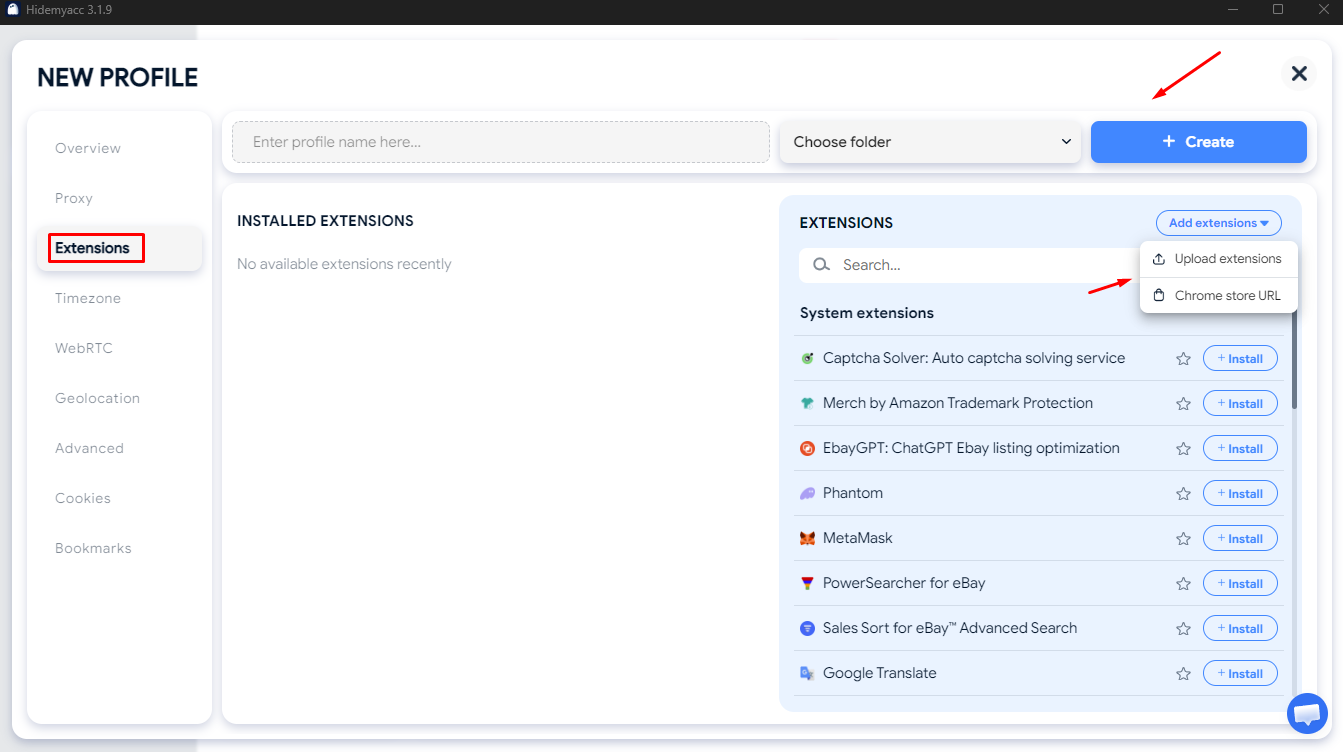
Reinstalling MetaMask for dozens of wallets takes a long time if you have to set everything up from scratch. Hidemyacc includes a library of more than 800 extensions, so you can install MetaMask and many popular Web3 extensions directly into each browser profile, or upload an extension package manually when needed. To keep your wallets and Web3 data safe, only upload extension files downloaded from the wallet developer's official source.
Extensions installed from the Hidemyacc library sync to the cloud with the profile, so you can reopen the wallet on another computer with just your wallet password. Extensions installed directly from the Chrome Web Store inside a profile are stored only on the current computer.
Along with its browser fingerprint, each profile can have its own proxy. The profile's timezone can follow the proxy's IP location, and you choose the language yourself. The proxy setting is saved with the profile, so the environment stays consistent every time you reopen it without any extra setup.
Combining a separate browser fingerprint and proxy gives each profile its own independent access environment. Proxy Manager shows how many profiles each proxy is assigned to, which keeps proxy allocation clear across many wallets and campaigns.
When you run dozens of wallets at once, it is easy to lose track of which wallet has finished its tasks or which project it belongs to. Hidemyacc lets you name, tag and organize profiles into folders by airdrop project, snapshot round or campaign.
This way, you can quickly open the profile you need and track the progress of many wallets from one management screen. Clear names and tags help you open the right profile before you sign a transaction and avoid signing with the wrong wallet.
One wrong connection should not compromise your whole wallet list
Put each MetaMask wallet in its own browser profile, with separate extensions, cookies and login sessions, so a problem with one wallet does not spread to the others.
Once your wallets and airdrop accounts are ready, set up their environments in Hidemyacc with these steps:
3.1. Create a profile for each wallet or Web3 account
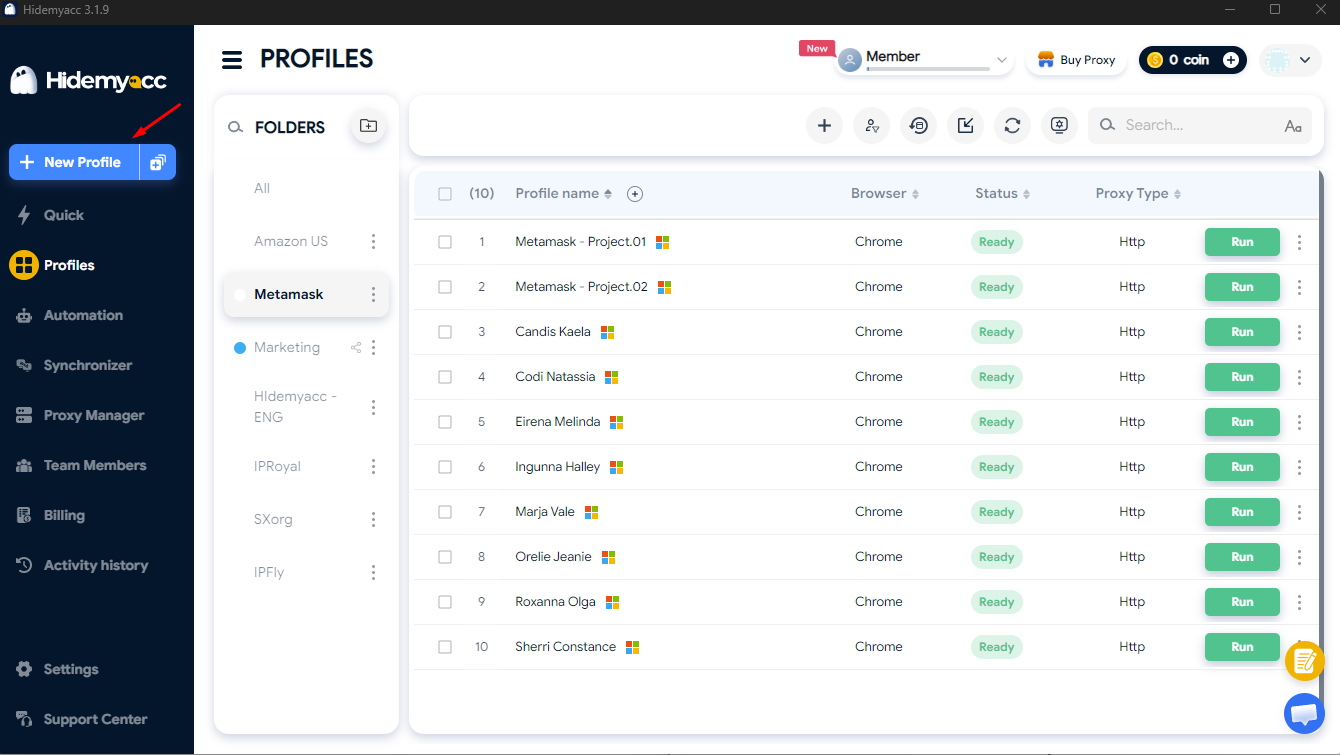
In the Profile screen, click New Profile and create a separate profile for each MetaMask wallet or Discord, OpenSea or CoinList account. Name it by project and account type, for example \"MetaMask Project A Wallet 01\", so it stays easy to identify as your profile count grows.
3.2. Install a separate wallet extension in each profile
In the profile's Extensions section, find the wallet extension in the library and click Install. If the version you need is not available, click Upload and drag in the extension file you downloaded from the wallet developer's official source. Once the profile launches, open the extension and set up the wallet as usual. Learn more in the Extensions tab guide.
3.3. Assign a proxy to spread out access
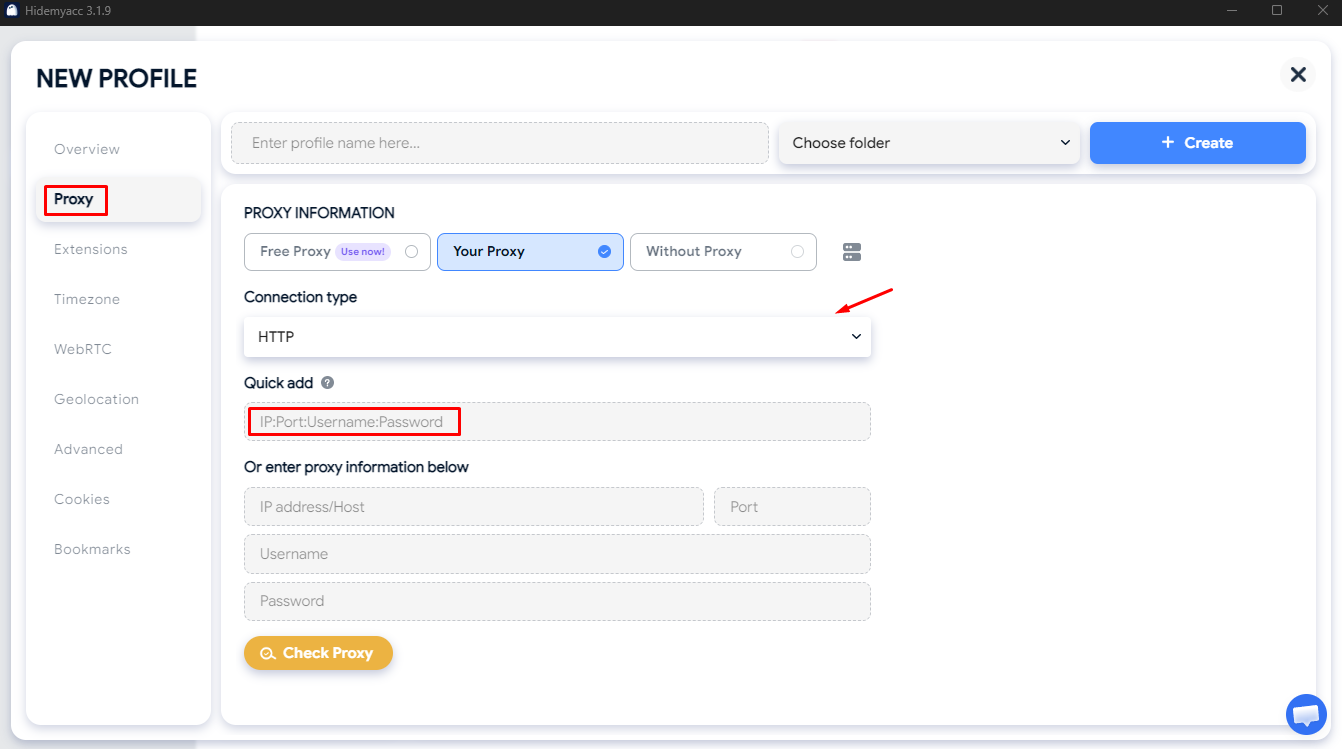
In the profile's Proxy section, choose the proxy type (HTTP, SOCKS4 or SOCKS5), enter the details in the format IP:Port:Username:Password and click Check Proxy to test the connection before saving. For a full walkthrough, read our guide on how to use a proxy in Hidemyacc.
3.4. Track airdrop progress from your profile list
In the Profile screen, create a folder for each airdrop project and move the related profiles into it. Open each folder to see at a glance which wallets and accounts are taking part in that project, so tracking task completion is much easier.
4.1. What is an antidetect browser for Web3?
An antidetect browser separates the browser environment of each wallet with its own browser fingerprint, cookies and session. However, it does not change onchain data such as funding sources, transaction history or the links between wallets, which Web3 projects may use to assess Sybil activity.
4.2. Where is my MetaMask wallet data stored in a profile?
Your private key sits in the wallet extension's vault and is encrypted by the wallet itself with the password you set. Where that vault is stored depends on how you install the extension. If you install it from the Hidemyacc extension library, the encrypted vault syncs to the cloud with the profile, so when you switch computers you only need your wallet password to unlock it again. If you install it directly from the Chrome Web Store inside the profile, the wallet data stays on the current computer only and will not be available on other machines. Either way, set a strong wallet password and keep your seed phrase somewhere safe, off your computer.
4.3. Can I sync wallet extensions between profiles?
There is no real time sync of login state between profiles, because each profile is designed to work independently. However, you can mark an extension to install automatically in every new profile you create, or use Duplicate to quickly create a new profile that already has the extensions from an existing one.
A separate environment for every wallet, the right wallet open before every signature
Create a profile for each MetaMask wallet and Discord or OpenSea account, and name and tag them by project so you always know which wallet you are using.
Every new account starts with a 7 day free trial with 30 profiles. After that, choose from 5 plans and get 50% off when you pay yearly.
Comparing tools? See Hidemyacc vs Gologin, or explore more ways to use Hidemyacc.

Read more
Run multiple affiliate network accounts, test offers and tracking links by GEO, and share campaigns with your team, each in its own browser profile.

Run Facebook, TikTok and Google ad accounts for every client from one device. One profile per account with its own fingerprint, cookies and proxy.
Try for FREE now !
Don't forget you have 7 days free trial
Test it first and love it later.
Do you wanna join our Affiliate program? Join now!