Instagram không có chế độ ẩn danh. Không có công tắc "xem ẩn danh" chính thức, không có cài đặt quyền riêng tư nào giúp ẩn hoạt động của bạn, và cũng không có cách nào để duyệt ứng dụng mà không để lại dấu vết. Điều đó không có nghĩa là việc xem ẩn danh là bất khả thi. Nó có nghĩa là các phương pháp thực sự hiệu quả được chia thành hai nhóm rất khác nhau: các mẹo nhanh chỉ hiệu quả đôi khi, và các giải pháp mang tính cấu trúc hoạt động ổn định.
Bài viết này sẽ phân tích chính xác những gì Instagram theo dõi, sáu phương pháp được xếp hạng theo độ tin cậy thực tế, và cách thực hiện điều này mà không gây rủi ro cho tài khoản chính của bạn.
1. Instagram thực sự theo dõi những gì khi bạn xem nội dung nào đó?
Trước khi thử bất kỳ phương pháp nào, bạn cần biết chính xác điều mình đang cố tránh. Instagram không theo dõi mọi hành động theo cùng một cách, và một trong những điểm gây nhầm lẫn lớn nhất xung quanh chủ đề này là giả định rằng nó theo dõi tất cả.
Dưới đây là những gì thực sự hiển thị với người ở phía bên kia, được phân loại theo từng loại nội dung.
- Lượt xem Story: Instagram hiển thị danh sách "Người xem" cho chủ Story, kèm theo tên người dùng và ảnh đại diện của bạn, cho đến khi Story hết hạn hoặc được lưu trữ.
- Lượt truy cập trang cá nhân: Instagram không hiển thị ai đã xem một trang cá nhân. Đây là hiểu lầm phổ biến nhất liên quan đến chủ đề này — bất kỳ ứng dụng hay trang web nào tuyên bố tiết lộ "người xem trang cá nhân" đều không lấy dữ liệu thật từ Instagram.
- Tin nhắn DM và yêu cầu nhắn tin: Những mục này có thông báo "đã xem" và, tùy vào cài đặt của bạn, trạng thái "Đang hoạt động".
- Lượt thích và bình luận: Luôn gắn liền với tên người dùng hiển thị của bạn. Không có tùy chọn ẩn danh nào ở đây, không có ngoại lệ.
- Story dành cho Bạn thân (Close Friends): Chủ tài khoản vẫn thấy danh sách người xem đầy đủ giống như Story thông thường. Việc nằm trong danh sách chỉ có nghĩa là bạn được phép xem nội dung, không có nghĩa là danh tính của bạn được ẩn khỏi người đăng.
Kết luận là: xem ẩn danh là mục tiêu khả thi đối với Story, bài đăng, và duyệt trang cá nhân. Đây không phải là mục tiêu khả thi đối với lượt thích, bình luận, hay tin nhắn DM, dù bạn dùng phương pháp nào đi nữa.
2. 6 cách xem Instagram ẩn danh (Xếp hạng theo độ tin cậy)
Không phải phương pháp nào ở đây cũng phù hợp với cùng một mục đích sử dụng. Việc kiểm tra tò mò một lần và một quy trình nghiên cứu định kỳ đòi hỏi những công cụ hoàn toàn khác nhau, vì vậy bảng dưới đây sắp xếp các phương pháp theo độ tin cậy thay vì mức độ phổ biến.
| Phương pháp | Áp dụng cho | Độ tin cậy | Chi phí | Rủi ro cho tài khoản chính |
|---|---|---|---|---|
| Mẹo xem một phần | Chỉ Story | Thấp | Miễn phí | Không |
| Mẹo tải trước ở chế độ máy bay | Chỉ Story | Thấp–Trung bình | Miễn phí | Không |
| Trang ẩn danh thứ ba | Story/bài đăng công khai | Trung bình | Miễn phí/Freemium | Rủi ro về dữ liệu riêng tư |
| Tài khoản phụ (không được bảo vệ) | Mọi loại nội dung | Trung bình | Miễn phí | Cao |
| Tài khoản phụ + hồ sơ trình duyệt tách biệt | Mọi loại nội dung | Cao | Công cụ trả phí | Thấp |
| Nằm trong danh sách Bạn thân | Chỉ Story Bạn thân riêng tư | Tùy tình huống | Miễn phí | Không áp dụng |
Mỗi phương pháp được giải thích chi tiết hơn dưới đây, bắt đầu từ phương pháp kém tin cậy nhất.
2.1. Mẹo xem một phần
Mẹo này dựa vào một đặc điểm kỹ thuật: lượt xem chỉ được ghi nhận khi Story được mở hoàn toàn, chứ không phải trong lúc nó vẫn đang tải trong thao tác vuốt.
Cách thực hiện:
- Giữ ngón tay ở mép của bản xem trước Story tiếp theo thay vì chạm trực tiếp vào nó.
- Kéo nó một phần qua màn hình mà không thả tay.
- Đọc những gì hiển thị mà không để nó tự động mở toàn màn hình.
Mẹo này chỉ hoạt động ổn định trên Story đầu tiên trong chuỗi của ai đó, và rất dễ vô tình kích hoạt lượt xem đầy đủ. Hãy coi đây là một mẹo mang tính tình cờ, thỉnh thoảng — không phải thứ để dựa vào cho các lần kiểm tra lặp lại.
2.2. Phương pháp tải trước ở chế độ máy bay
Instagram tải trước các Story vào bộ nhớ đệm cục bộ của thiết bị trước khi bạn thực sự mở chúng, đây chính là điều làm cho mẹo này khả thi.
Trình tự thực hiện:
- Để Story từ tài khoản bạn muốn xem tải đầy đủ trong nguồn cấp dữ liệu khi vẫn còn kết nối mạng.
- Chuyển thiết bị sang Chế độ máy bay trước khi chạm vào chúng.
- Xem Story ở chế độ ngoại tuyến, sau đó đóng hoàn toàn ứng dụng trước khi kết nối lại.
Cách này không ổn định trên các phiên bản Android và iOS khác nhau, và Instagram đã từng vá các lỗ hổng cache tương tự trong quá khứ. Nếu nó ngừng hoạt động sau một bản cập nhật ứng dụng, đó là điều bình thường, đừng nghĩ rằng bạn đã làm sai điều gì.
2.3. Trang web xem Story ẩn danh của bên thứ ba
Các công cụ này hoạt động bằng cách lấy dữ liệu từ các điểm cuối API công khai mà không yêu cầu bạn đăng nhập, đây cũng chính là hạn chế lớn nhất của chúng: chỉ hoạt động với tài khoản công khai.
Một số trang web này quảng cáo rằng có thể truy cập nội dung riêng tư hoặc chỉ dành cho bạn bè. Tuyên bố đó là sai — không có công cụ bên thứ ba nào có thể vượt qua cài đặt quyền riêng tư của Instagram mà không có thông tin đăng nhập của bạn.
- Không bao giờ nhập mật khẩu Instagram thật của bạn vào một trong những trang web này.
- Kiểm tra xem công cụ đó có được tài trợ bởi quảng cáo hoặc thu thập dữ liệu duyệt web hay không trước khi sử dụng.
- Xác minh các đánh giá hiện tại, vì độ tin cậy và mức độ an toàn của các công cụ này liên tục thay đổi.
2.4. Tạo tài khoản Instagram phụ hoặc dùng một lần
Tài khoản phụ là lựa chọn linh hoạt nhất trong danh sách này, vì nó hoạt động trên cả Story, bài đăng và trang cá nhân. Đây cũng là phương pháp được nhiều người mặc định lựa chọn cho việc nghiên cứu đối thủ, báo chí, hoặc đơn giản là theo dõi một tài khoản riêng tư mà không dùng danh tính thật của mình.
Vấn đề là hệ thống kiểm soát của Instagram không chỉ dựa vào thông tin đăng nhập. Nó liên kết các tài khoản thông qua ID thiết bị dùng chung, địa chỉ IP, dấu vân tay trình duyệt (browser fingerprint), và đôi khi cả số điện thoại, nghĩa là tài khoản "ẩn danh" thứ hai của bạn vẫn có thể bị truy vết ngược về tài khoản chính.
Meta cho phép quản lý nhiều tài khoản, nhưng hệ thống kiểm soát sẽ can thiệp ngay khi phát hiện hành vi phối hợp hoặc giống spam giữa các tài khoản, bất kể bạn có bao giờ có ý định tạo ra mối liên kết đó hay không. Nếu bạn đang vận hành nhiều hồ sơ vì lý do chính đáng, việc hiểu rõ cơ chế quản lý nhiều tài khoản Instagram đúng cách là điều đáng làm trước khi hệ thống của Instagram phát hiện ra sự trùng lặp đó.
2.5. Tạo tài khoản phụ và quản lý trên các profile riêng biệt
Đây là phương pháp duy nhất trong danh sách này được thiết kế cho việc sử dụng lặp lại hoặc chuyên nghiệp, vì nó giải quyết đúng điểm yếu thực sự của Phương pháp 4 thay vì bỏ qua nó.
Hai tín hiệu đóng vai trò chính khi các nền tảng liên kết các tài khoản với nhau: địa chỉ IP của bạn, và dấu vân tay trình duyệt (browser fingerprint), sự kết hợp giữa canvas rendering, đầu ra WebGL, phông chữ, độ phân giải màn hình, múi giờ, và hành vi WebRTC, đủ độc nhất để nhận diện một thiết bị ngay cả khi không có cookie.
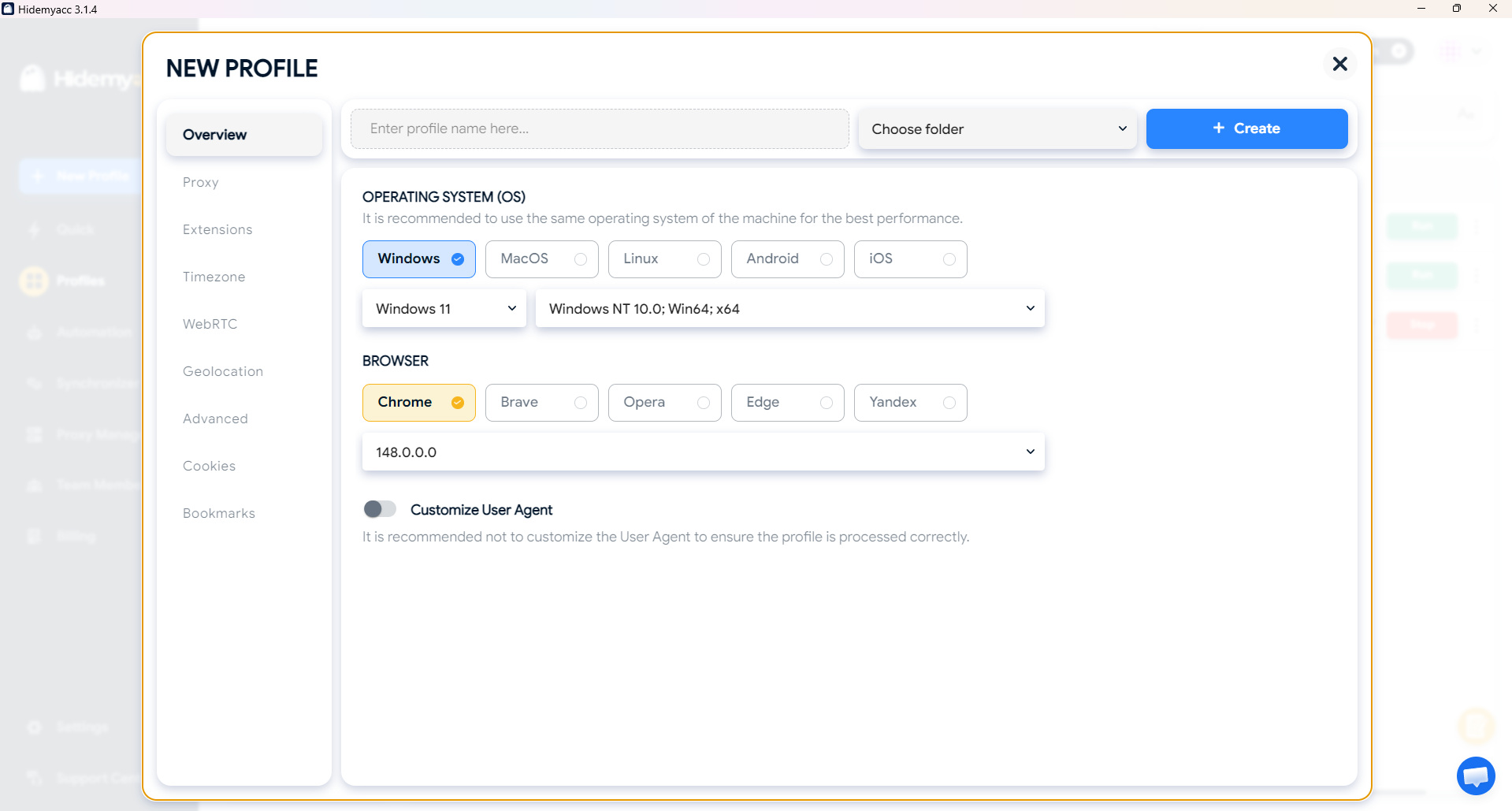
Antidetect browser như Hidemyacc giải quyết cả hai vấn đề này. Mỗi hồ sơ có dấu vân tay riêng, nhất quán và khác biệt, và có thể được kết hợp với proxy riêng, khiến tài khoản phụ trông như đang truy cập từ một thiết bị và vị trí thực sự khác biệt, chứ không phải tài khoản chính của bạn đăng xuất rồi đăng nhập lại dưới một tên người dùng mới.
Cách thiết lập khá đơn giản:
- Tạo profile trình duyệt trên Hidemyacc và thêm proxy cho profile đó.
- Đăng nhập vào tài khoản phụ chỉ trong hồ sơ đó, không bao giờ dùng tài khoản chính.
- Luôn khởi chạy lại cùng một hồ sơ cho các phiên sau này sự nhất quán mới là yếu tố ngăn chặn việc bị gắn cờ, không chỉ đơn thuần là sự tách biệt.
Cách tiếp cận này thực sự phù hợp với các nhà quản lý mạng xã hội, các nhà tiếp thị đang nghiên cứu đối thủ hoặc hashtag, và công việc điều tra kiểu OSINT, không phải để giám sát cá nhân. Nếu trường hợp sử dụng của bạn thiên về nghiên cứu, cùng logic hồ sơ tách biệt này cũng áp dụng trực tiếp nếu bạn từng cần thu thập dữ liệu trang Khám phá của Instagram ở quy mô lớn mà không gây ra giới hạn tốc độ gắn với một địa chỉ IP duy nhất.
2.6. Được thêm vào danh sách Bạn thân
Được thêm vào danh sách Bạn thân của ai đó là cách dễ nhất để xem nội dung đó, nhưng đây cũng là phương pháp kém ẩn danh nhất trong danh sách này, cách biệt khá xa. Nếu danh sách đó lớn, danh tính của bạn sẽ hòa lẫn với mọi người khác trong đó. Nếu danh sách nhỏ, người đăng thường có thể đoán ra — hoặc trực tiếp thấy — chính xác ai đã xem. Phương pháp này có mặt trong danh sách vì người tìm kiếm chủ đề này thường mong đợi nó được đề cập, chứ không phải vì nó mang lại sự ẩn danh thực sự.
3. Làm sao để bảo vệ tài khoản Instagram chính của bạn trong khi thực hiện điều này?
Mỗi phương pháp ở trên đều mang một mức độ rủi ro nhất định cho tài khoản chính nếu bạn bất cẩn về nơi thử nghiệm. Phần này đề cập đến những thói quen thực sự ngăn chặn điều đó, bất kể bạn chọn phương pháp nào.
- Không bao giờ thử mẹo vuốt một phần hoặc chế độ máy bay khi đang đăng nhập vào tài khoản chính gắn với danh tính của bạn, một lượt xem đầy đủ vô tình sẽ làm hỏng toàn bộ mục đích.
- Nếu bạn thường xuyên sử dụng tài khoản phụ, hãy giữ nó cố định trên hồ sơ trình duyệt riêng thay vì đăng nhập rồi đăng xuất trên cùng một phiên, việc này sẽ liên kết lại các tín hiệu thiết bị mỗi lần.
- Gán một proxy riêng cho mỗi hồ sơ để địa chỉ IP của bạn không liên kết tài khoản phụ về lại mạng nhà hoặc mạng văn phòng của bạn.
- Tránh follow hàng loạt, thích hàng loạt, hoặc bất kỳ hành vi giống bot nào trên tài khoản phụ, đây mới thực sự là nguyên nhân kích hoạt hệ thống kiểm soát tự động của Instagram, không liên quan đến việc phương pháp xem của bạn ẩn danh đến mức nào.
- Không bao giờ đưa mật khẩu thật của bạn cho một trang web "xem ẩn danh" của bên thứ ba; đó là rủi ro đánh cắp thông tin đăng nhập, không phải là một phương pháp xem.
Có hai vấn đề tiếp theo đáng biết trước, vì chúng thường xuất hiện bất kể nguyên nhân là phương pháp nào. Nếu bạn đang xóa dữ liệu ứng dụng để khắc phục sự cố với mẹo cache, bạn nên tìm hiểu điều gì xảy ra khi xóa bộ nhớ đệm của Instagram trước khi thực hiện. Và nếu một tài khoản bị gắn cờ, sự khác biệt giữa shadowban và bị đình chỉ hoàn toàn là điều quan trọng — cách khắc phục không giống nhau, và việc biết tại sao Instagram đình chỉ tài khoản ngay từ đầu sẽ giúp bạn biết mình đang gặp phải trường hợp nào.
4. Ranh giới đạo đức
Không phải mọi trường hợp sử dụng ở đây đều như nhau, và giả vờ ngược lại sẽ là không trung thực. Nghiên cứu đối thủ cạnh tranh, báo chí, bảo vệ thương hiệu, và sự tò mò thông thường đều là những lý do chính đáng để xem nội dung mà không bị liên kết ngược lại với bạn.
Sử dụng bất kỳ phương pháp nào trong số này để quấy rối, theo dõi, hoặc giám sát người khác lại là một vấn đề hoàn toàn khác và nó vi phạm cả chính sách của Instagram lẫn, ở nhiều khu vực pháp lý, cả luật pháp. Các công cụ như Hidemyacc được xây dựng cho các trường hợp sử dụng quản lý nhiều tài khoản hợp pháp: tiếp thị, thương mại điện tử, và các quy trình nghiên cứu, không phải để giám sát cá nhân.
5. Kết luận
Phương pháp phù hợp ở đây phụ thuộc hoàn toàn vào tần suất bạn cần điều này. Một lần kiểm tra tò mò không đáng để thiết lập bất cứ thứ gì, hãy thử các mẹo miễn phí trong phương pháp 1 đến 3 và chấp nhận rằng chúng có lúc hiệu quả có lúc không.
Việc theo dõi định kỳ hoặc chuyên nghiệp là một vấn đề khác, và nó cần một giải pháp khác. Một tài khoản phụ tách biệt, chạy qua hồ sơ trình duyệt và proxy riêng, là phương pháp duy nhất trong danh sách này chịu được việc sử dụng lặp lại mà không làm tăng rủi ro cho tài khoản chính của bạn.
Nếu đó chính là tình huống của bạn, bản dùng thử miễn phí của Hidemyacc cung cấp đủ hồ sơ để bạn kiểm tra chính xác thiết lập này, mỗi tài khoản có dấu vân tay và proxy riêng trước khi quyết định có nên đưa nó vào quy trình làm việc lâu dài hay không.
6. FAQ
1. Instagram có thông báo cho ai đó nếu tôi xem Story của họ ẩn danh bằng những phương pháp này không?
Không. Không có phương pháp nào trong bài viết này kích hoạt thông báo cho chủ tài khoản. Mẹo vuốt một phần và chế độ máy bay đặc biệt tránh việc ghi nhận lượt xem hoàn toàn, và tài khoản phụ đơn giản chỉ hiển thị như một người xem khác, không liên quan.
2. Tôi có thể xem ai đã truy cập trang cá nhân Instagram của mình không?
Không, và cũng không có ứng dụng hay trang web nào có thể làm được điều đó. Instagram chưa bao giờ cung cấp tính năng này, và bất kỳ công cụ nào tuyên bố tiết lộ người xem trang cá nhân đều không hoạt động thật hoặc đang lấy dữ liệu bịa đặt, không phải thông tin thật từ hệ thống của Instagram.
3. Việc sử dụng tài khoản thứ hai để xem nội dung có vi phạm quy tắc của Instagram không?
Không hẳn. Meta cho phép sử dụng nhiều tài khoản, nhưng hệ thống kiểm soát của họ theo dõi hành vi phối hợp hoặc giống spam giữa các tài khoản liên kết, và đó mới thực sự là nguyên nhân gây ra vấn đề, không phải sự tồn tại của một tài khoản thứ hai.
4. Cách an toàn nhất để xem Instagram ẩn danh về lâu dài, không chỉ một lần, là gì?
Một tài khoản phụ chạy qua hồ sơ trình duyệt tách biệt với proxy riêng. Điều này tránh được sự trùng lặp về IP và dấu vân tay khiến các tài khoản phụ thông thường bị gắn cờ theo thời gian.
5. Các trang web xem Instagram ẩn danh có hoạt động với tài khoản riêng tư không?
Không. Những công cụ này chỉ truy cập dữ liệu API công khai, nghĩa là chúng không thể xem bất cứ điều gì phía sau bức tường phê duyệt theo dõi của tài khoản riêng tư, bất kể quảng cáo của họ tuyên bố gì.
6. Instagram có thể phát hiện trình duyệt chống phát hiện (antidetect browser) không?
Instagram có thể phát hiện các mẫu hành vi đáng ngờ như follow hàng loạt hoặc hoạt động giống bot, bất kể bạn dùng thiết lập trình duyệt nào. Điều mà trình duyệt chống phát hiện thực sự ngăn chặn là việc liên kết tài khoản với tài khoản thông qua dấu vân tay thiết bị và địa chỉ IP dùng chung, đây là một vấn đề hoàn toàn khác so với việc phát hiện hành vi.