Many Facebook users have encountered situations where they are required to verify their identity during login or while using their accounts. This typically happens when the system triggers a facebook checkpoint to inspect and confirm the account owner after detecting unusual activity. Encountering a checkpoint can sometimes confuse users as they may not be clear about what issue the account is facing or why access is restricted.
In this article, Hidemyacc will help you understand what facebook checkpoint is, the reasons why accounts get checkpointed, and how to handle it to recover access.
1. What is Facebook Checkpoint?
Facebook checkpoint is a security mechanism established by Facebook to verify a user's identity when the system detects unusual activities on the account.
When a checkpoint is triggered, Facebook will temporarily restrict access and require the user to perform one or more verification steps to prove they are the true owner of the account. Once the verification is successfully completed, the user can continue using Facebook normally.
Signs that a Facebook account has been checkpointed:
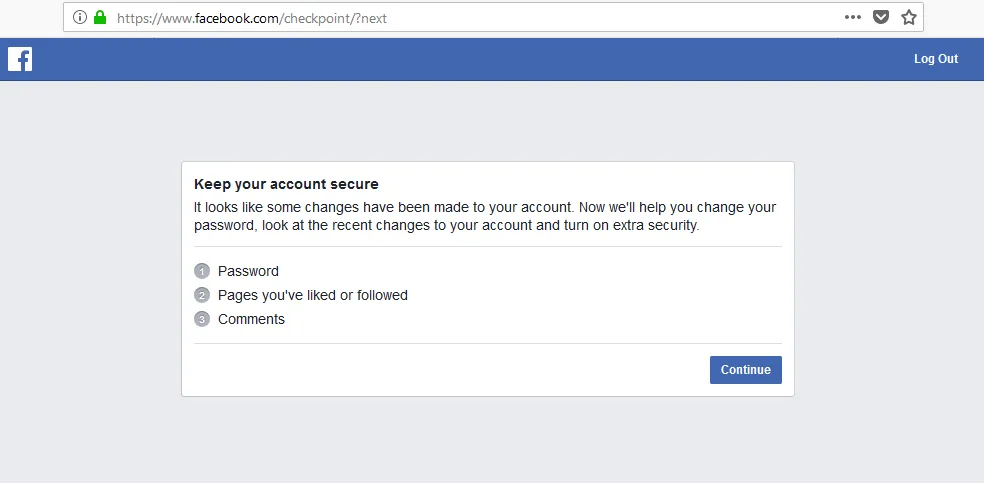
The most typical sign is the account being suddenly logged out on all devices. At this point, the login screen will switch to an identity verification interface, accompanied by notifications requesting account security or identity confirmation to continue, such as: Keep your account secure, Checkpoint required, Confirm your identity to continue.
2. Why does Facebook trigger a Facebook checkpoint?
Facebook uses an automated security system to detect activities that pose a risk to the account. When unusual signs are detected, the system activates a checkpoint to ensure the account is not being accessed without authorization.
2.1. Logging in from an unknown environment
Facebook tracks user login history via devices, browsers, and IP addresses. If an account suddenly logs in from an environment never used before, the system may suspect unauthorized access.
Common situations leading to this include:
- Logging in from a new device: For example, using a phone or computer that has never logged into Facebook before.
- Using a different browser: For instance, you usually use Chrome but this time you log in with a different browser.
- Logging in from an IP address in a different area: If the system detects a login from a different province or country compared to previous history, Facebook may suspect the account is being accessed illegally. To reduce the risk of checkpoints when logging in from multiple devices or IPs, you should apply methods to manage multiple social media accounts without getting banned using tools that create a safe login environment.
In these cases, facebook checkpoint acts as an additional confirmation step to ensure the account remains under the owner's control.
2.2. Sudden changes in security information
Information such as passwords, emails, or linked phone numbers is considered vital security data. When this information is changed repeatedly in a short time, Facebook may assume the account is at security risk.
Some changes that often cause a facebook checkpoint include:
- Changing password multiple times consecutively: This behavior can make the system suspect someone is trying to take over the account.
- Changing linked email or phone number: This is the information used for account recovery, so Facebook often requires re-verification upon changes.
- Changing important security settings: For example, enabling or disabling two-factor authentication (2FA) or editing other security settings.
If many changes occur successively in a short period, Facebook may view this as a sign that the account is being hacked. Therefore, the system temporarily triggers a facebook checkpoint to request identity re-confirmation.
2.3. Unusual activity
Facebook constantly monitors user behavior to detect fake accounts or automated bots. If an account performs too many actions in a short time or behaves like an automated tool, a facebook checkpoint may be triggered.
The following behaviors often get an account flagged:
- Rapid interactions: Liking, commenting, or sharing dozens of posts within a few minutes will violate speed limits.
- Mass friending and messaging: Sending requests or messages to too many strangers without mutual connections is often considered spamming behavior.
- Group abuse: Sharing the same content to too many groups in a short time causes the system to flag the account as a spam tool. Therefore, users should maintain a natural activity frequency to avoid being flagged. If you need to farm accounts in large quantities, learn about safe Facebook automation tools with Hidemyacc to maintain a natural pace and avoid violating platform policies.
These behaviors make the system suspect the account is being controlled automatically. Thus, Facebook will trigger a facebook checkpoint to check and verify the user.
2.4. Violating community standards or being reported
Beyond technical factors, user content and behavior can also cause a facebook checkpoint to appear. When an account is reported by many people or shows signs of policy violation, Facebook may request identity verification.
In some cases, users will need to upload ID documents to confirm their identity. This helps Facebook ensure the account belongs to a real person and restricts fake accounts.
>>> What is the Facebook algorithm? Update the latest changes
3. Common types of Facebook checkpoints and how to solve them
When an account is checkpointed, Facebook will require the user to perform several verification steps to prove they are the true owner. Depending on the case, the system may display different forms of verification. Below are the common checkpoint types and their corresponding solutions.
3.1. Verification via friends' photos
This is a fairly common type of facebook checkpoint for accounts with many friends. Facebook will display several images of your friends and ask you to correctly select the names of the people appearing in the photos. Usually, you need to answer correctly at least 5 out of 7 questions to complete the verification step.
This method is based on the account's real relationships. Account owners can usually easily recognize friends in photos, whereas strangers or unauthorized accessors would find it difficult to identify them accurately. Thanks to this, Facebook can verify identity and enhance account security.
After completing the verification step, the account will be allowed to continue logging in and using normally.
3.2. Verification via date of birth
In some cases, facebook checkpoint will require the user to re-enter the date of birth registered on the account.
This is a relatively simple form of verification, but if entered incorrectly multiple times, the system may require other more complex verification methods.
To avoid difficulties when handling a facebook checkpoint, users should accurately remember the registered date of birth and check this information in their personal profile before making any changes.
3.3. Verification via previously used browsers or devices
Facebook often stores information about devices and browsers that have previously logged into the account. If login from an unknown environment is detected, facebook checkpoint may require the user to confirm via a familiar device.
In this case, you should:
- Log in again using a phone or computer that has been used before.
- Use the same browser or internet network as before if possible.
This method helps Facebook determine that the user is logging in from a familiar environment, thereby reducing the risk of unauthorized access.
3.4. Verification via OTP code sent to email or phone number
This is one of the most common types of facebook checkpoint today. The system will automatically send a 6-digit confirmation code to the email address or phone number linked to the account. Users need to access their mailbox or check their phone messages to get this security code. Then, enter the code accurately into the verification page to complete the process.

When handling a facebook checkpoint with OTP, you should note:
- Check both the main inbox and spam folder if you haven't seen the email.
- Wait a few minutes before requesting the code again.
- Avoid requesting the code too many times consecutively.
If the code is valid, the account will be reopened immediately for continued use.
3.5. Verification via friends
In some cases, Facebook may require users to contact trusted friends to receive a verification code.
The system will display a list of several pre-set friends. You need to contact them to get the confirmation code and enter it into the verification page.
This method helps Facebook ensure the account is still under the owner's control.
3.6. Verification via ID documents
If simple verification methods fail, facebook checkpoint may require users to upload ID documents to confirm identity, such as: ID card, passport, or driver's license.
Facebook will cross-reference the information on the document with account data to confirm identity. The processing time usually takes 24 to 72 hours depending on the case.
3.7. Verification of recent comments
Another form of facebook checkpoint is requiring users to identify comments they have posted recently. Facebook will show several comments and ask you to select the ones you made. This helps the system confirm that you are the one directly using the account.
This form of verification is less common and usually only appears in specific cases.
3.8. Verification of sent messages
In some cases, facebook checkpoint will display a list of users and ask you to correctly select those to whom you have recently sent messages.
This form of verification relies on the account's chat history to confirm the owner's identity.
3.9. Verification via face photo
Facebook may require users to upload a face photo or record a selfie video to verify identity. Perform this in a well-lit area with a clear face, not obscured by accessories (sunglasses, masks).
If the verification process fails, you can try again with a different device or use a more stable internet connection. In some cases, the system may request to re-record the video if the image quality does not meet requirements.

Note: Although Facebook has a diverse verification system, in practice users will most often encounter 2 common checkpoint forms: verification via selfie video and verification via OTP code sent to email or phone number.
Understanding these verification forms clearly will help you handle facebook checkpoints more easily when encountered during usage.
4. Processing time for Facebook checkpoint
The time to unlock a facebook checkpoint is not fixed but depends on the verification form required by the system. With simple verification steps, the account can be reopened almost immediately. However, if a manual check is needed, processing time can take longer.
- Verification by code, photo, or date of birth: These are automated verification methods. If the user enters accurate information, the account is usually reopened after just a few minutes and can be logged into normally again.
- Verification by documents or video: In these cases, Facebook needs time to review and compare information before reopening the account. The processing time usually takes about 24–72 hours, depending on the volume of requests the system is handling.
- Verification deadline: After a checkpoint appears, users need to complete the verification steps within 30 days. If you do not perform or abandon the verification process within this period, the account may be permanently locked and very difficult to recover.
Overall, to make the process faster, you should fully perform the verification steps as instructed by Facebook and provide accurate information from the start.
If the verification process is unsuccessful, the account may be disabled and require an appeal. In that case, you can refer to how to handle a Facebook account disabled for 30 days.
5. Tips to limit Facebook checkpoints
Although facebook checkpoint is a security mechanism to protect accounts, users can still apply some simple ways to reduce the risk of checkpoints when logging in or using Facebook.
- Enable 2-factor security (2FA): Activating two-factor authentication helps increase account safety. When logging in from a strange device, Facebook will request an additional verification layer with a security code. You can use apps like Google Authenticator to generate login codes, thereby reducing the risk of checkpoints or unauthorized access.
- Maintain natural interaction: Limit bot-like behaviors such as sending too many friend requests, mass commenting, or posting continuously in a short time. These unusual activities can cause the system to flag the account as suspicious and trigger a checkpoint. Instead of performing too many actions in a short time, you should apply ways to increase Facebook engagement naturally and effectively to limit being flagged as spam by the system.
- Synchronize information: You should use a name and date of birth that match your ID documents. This will make the verification or appeal process with Facebook easier if the account encounters a security issue. Additionally, if you need to use multiple accounts for marketing or business purposes, setting up accounts correctly from the start is also very important. You can refer to the detailed guide on how to create multiple Facebook accounts to limit risks related to checkpoints.
- Keep each Facebook account logged in on a separate profile: To limit checkpoints, you should maintain each Facebook account on its own login environment. Instead of sharing a single browser, each account should be tied to a separate browser profile and IP address.In case you need to manage multiple accounts, antidetect browser Hidemyacc can support managing proxies and fingerprint configurations for each profile. When each account is tied to a different proxy, the system will recognize them as logging in from separate devices and IP addresses. Thus, accounts are isolated in their operating environments, helping reduce the risk of checkpoints or collateral bans when using multiple Facebook accounts.

Applying these methods not only helps limit the risk of facebook checkpoint but also contributes to increasing the security level and trust of the Facebook account during long-term use.
6. Notes on safety and security
Besides handling checkpoints, users should also pay attention to issues related to account safety and security. This helps limit the risk of account theft or unnecessary verification incidents.
- Phishing warning: Currently, there are many fake Facebook websites aimed at stealing user login information. Therefore, you should not enter email, password, or verification codes into websites with strange links or those that are not the official domain “facebook.com”. Before logging in, always check the URL carefully on the browser's address bar.
- Use primary email: The Facebook account should be linked to an email that you always have access to. This is very important in case you need to receive an OTP code, recover a password, or verify identity when encountering a checkpoint. If the linked email is old or no longer used, you should update it to avoid difficulties when account verification is needed.
Proactively protecting login information and using official verification channels will help you minimize the risk of losing your account and handle checkpoint quickly when needed.
7. Conclusion
Facebook checkpoint is a security mechanism designed to verify user identity when the system detects unusual activities on the account. When encountering this situation, users need to correctly perform the verification steps as requested to recover access and continue using the account normally.
Understanding the reasons why an account gets checkpointed as well as common verification forms will help you handle facebook checkpoint quickly and limit the risk of account lock. Besides, maintaining natural usage habits, avoiding bot-like behaviors and enabling security features like two-factor authentication will help the account be safer during long-term use.
8. FAQ
1. How long does a Facebook checkpoint last?
Processing time depends on the verification form. If verified by code or personal information, the account can reopen after a few minutes. With verification by documents or video, the time is usually from 24 to 72 hours.
2. What happens if I don't verify a Facebook checkpoint?
If the verification step is not completed, the account will be unable to log in and risks being locked after a period of time.
3. Can I skip a Facebook checkpoint?
No. Users need to complete the verification steps required by Facebook to continue using the account.
4. Why is my Facebook account frequently checkpointed?
Common reasons are logging in from a strange device or IP address, changing security information, spam-like activity, or being reported by other users.
5. Why is Facebook saying my OTP code is wrong even though I entered it correctly?
It could be that the code has expired or you requested the code too many times leading to a conflict. Wait about 15 to 30 minutes, clear the browser cache and request a new code.
6. What should I do if I forget my date of birth on Facebook?
You can ask friends who are connected with you to access your profile, go to the "About" section and view basic information to check the date of birth if this information is not hidden.
7. If I don't verify the Facebook checkpoint, will my account be lost permanently?
Facebook usually gives users about 30 days to complete verification. If not performed within this time, the account may be permanently locked.
8. Is it safe to send photos of ID documents to Facebook?
This is Facebook's official verification process. However, only upload document photos when on the official Facebook website and do not send information via strange links.
9. Can I ask someone else to help unlock a Facebook checkpoint?
It is best to do it yourself. External unlocking services often require providing a password or ID documents, which can lead to risks of account loss or personal information leakage.