



Are you trying to find a Reddit post but all you see is the word “Removed”? Don’t panic. In reality, removed Reddit posts can still be viewed or recovered in certain cases if you use the right methods.
In this guide, Hidemyacc will walk you through the most effective and easy-to-follow ways to recover removed Reddit posts, helping you quickly retrieve important content, verify old information, or safely archive necessary data.1. Why Does Reddit Remove Posts and What Does “Removed” Actually Mean?
When you see the status “Removed”, it does not always mean the post has completely disappeared from the system. In many cases, the content is only hidden from the subreddit but not permanently deleted from Reddit’s servers.
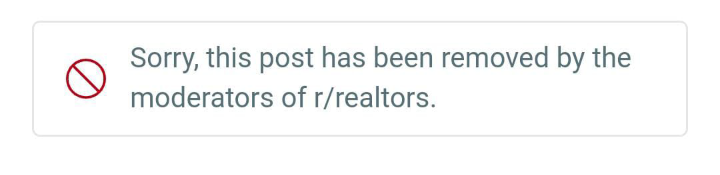
Common reasons a post gets “removed” include:
- AutoModerator flags it as spam due to sensitive keywords or unusual behavior
- Missing flair or incorrect title formatting based on subreddit rules
- Containing shortened links or affiliate links that trigger filters
- Violating specific subreddit rules listed in the sidebar
- A new account or shadowbanned account causing the post to be automatically hidden
Understanding why a post was removed is a crucial first step before attempting recovery, as each situation requires a different approach.
>>>> READ MORE: Why Reddit Accounts Get Suspended and How to Fix It
2. How to Recover Removed Reddit Posts
Before using external tools, you should first check within your own account. This is the simplest way to begin the process of recovering removed Reddit posts, as many posts are only hidden from the community but still exist in your personal history.
2.1. Check Your Post History on Your Reddit Profile
This is a basic but often overlooked step. If the post was only “removed”, the content may still exist in your profile.
Step 1: Go to Reddit → click your avatar → open your Profile page.
Step 2: Switch to the Posts tab (or “Submitted” if using the old interface).Step 3: Find the post you want to recover and click the title to open it.Step 4: Check the content status:- If the body shows [Removed] → the post was removed by a moderator or AutoMod.
- If the author name shows [deleted] and the content is empty → the post was manually deleted by the author.
- If the post does not load or shows an error → the link may be incorrect, the subreddit restricted, or access locked.
Step 5: Copy the URL of the post. This is the most important piece of data for using recovery tools in the next steps.
As long as you still have the original URL, there is still a chance to view the removed content.
2.2. Method 1: Recover Removed Reddit Posts Using Unddit
One of the most effective ways to recover removed Reddit posts is by using Unddit. This tool allows you to view deleted posts or comments, provided the data was captured before removal.

Step 1: Copy the link to the removed Reddit post. The full URL is essential for retrieving the content.
Step 2: Open your browser and replace reddit.com in the URL with unddit.com.
Example:
https://www.reddit.com/r/example/comments/xxxxx/...→ change tohttps://www.unddit.com/r/example/comments/xxxxx/...Step 3: Press Enter to open the archived version of the post. Unddit will display the content if it was captured before removal.
Step 4: Check the post and comments. If content appears instead of “Removed”, you have successfully recovered the post.
Step 5: Copy and save the important content to Notion or Google Docs to prevent future loss.
Note that Unddit only works if the post existed long enough before removal. If it was removed almost immediately by AutoMod or a moderator, the content may not appear.
2.3. Method 2: Recover Removed Reddit Posts Using Reveddit
Reveddit helps you check removed posts and is especially useful for identifying why a post was removed from a subreddit.

Step 1: Visit Reveddit and paste the removed Reddit post URL into the search box.
Step 2: Check whether the tool displays the title, content, or comments.Step 3: Review notes or additional information indicating the reason for removal, such as spam filters, moderator actions, or AutoMod rule violations.Step 4: If content is visible, copy and save it immediately.Reveddit may not always recover the full content. However, it is very useful for identifying the removal reason and choosing the appropriate recovery strategy.
2.4. Method 3: Recover Removed Reddit Posts Using Google Cache and Search Snippets
In many cases, even if the post has been removed from Reddit, Google may still store part of the content as a snippet or temporary cache.
Try searching with these queries:
- site:reddit.com "[post title]"
- site:reddit.com/r/subreddit "a phrase from the post"
- site:reddit.com "username" "post title"
If Google shows a “Cached” option or a long preview snippet, copy the content immediately. Google may update its index at any time and remove the cache without warning.
2.5. Method 4: Recover Removed Reddit Posts Using Wayback Machine (Archive.org)
Wayback Machine is a web archiving tool that allows you to view previously captured versions of a webpage.

Step 1: Visit Archive.org and open Wayback Machine.
Step 2: Paste the Reddit post URL into the search field.Step 3: If snapshots are available, choose a timestamp before the post was removed.Step 4: Open the snapshot and copy the saved content.Wayback Machine works best for older posts or those with high traffic. Newly posted and quickly removed content may not have been archived.
2.6. Method 5: Recover Removed Reddit Posts Using Browser History and Cache
In some cases, your browser may still store temporary page data, especially if you opened the post before it was removed.
Step 1: Open History in Chrome, Edge, or Firefox.
Step 2: Locate the Reddit post URL you previously accessed.Step 3: If the page still displays old content, copy it immediately before refreshing or closing the tab.Step 4: If not, try accessing the Google cache using cache:URL-of-the-post.This method only works if the cache has not been refreshed or cleared.
3. How to Restore a Removed Reddit Post by Contacting Moderators
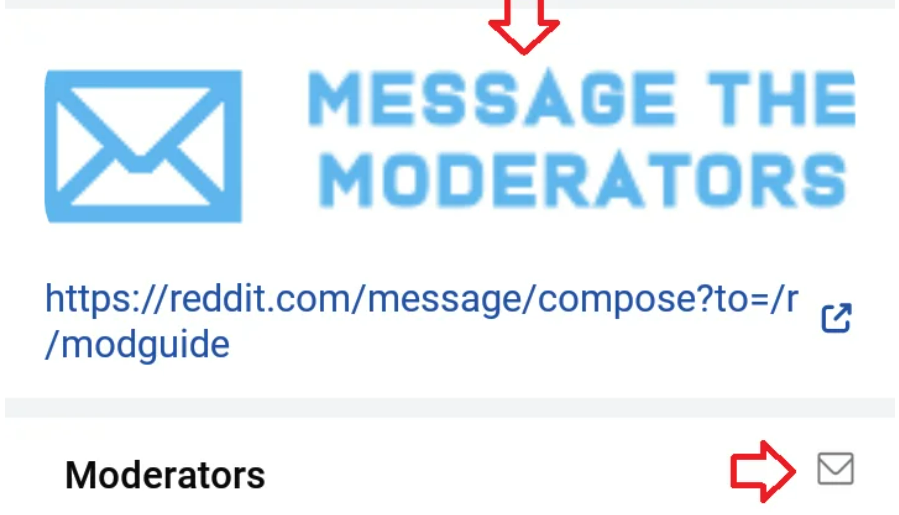
Recovering archived content is completely different from restoring a post’s visibility within a subreddit. If you want your post to appear again in the community, this can only happen if the moderators agree to restore it.
3.1. Step 1: Carefully Review the Subreddit Rules Before Messaging Moderators
Before sending modmail, make sure you clearly understand which rule your post may have violated. Check the following:
- Is the title formatted according to the subreddit’s requirements?
- Did you apply the correct flair?
- Does the post contain banned links, shortened URLs, or affiliate links?
- Does your account meet the required karma or account age threshold?
- Does the content violate rules related to self-promotion or spam?
Understanding the exact reason for removal will help you communicate professionally with moderators and increase the chances of having your post restored.
3.2. Step 2: Send Proper Modmail with a Polite Message
Once you identify the potential issue, send modmail instead of reposting immediately. The message should be concise, respectful, and to the point.
Sample modmail:
Hello mods,
I noticed my post was removed.
Here is the link: [dán link bài viết]Could you please let me know which rule it violated?
If possible, I am happy to edit the post to comply with subreddit rules.Thank you for your time.
A polite and cooperative approach is usually far more effective than arguing or repeatedly reposting the same content.
3.3. Step 3: Edit the Post and Request Re-approval
If moderators ask you to revise the title, adjust the content, or remove certain links, follow their instructions carefully and reply within the same modmail thread.
Avoid creating a new post immediately, as this may be considered spam or an attempt to bypass the rules. Communicating through modmail allows moderators to review and re-approve the original post more easily.
3.4. What If Moderators Do Not Respond?
Some subreddits have inactive moderation teams, so responses may be delayed or absent. In this case, you may:
- Repost the content after correcting it to fully comply with the rules
- Or choose a more appropriate subreddit for your content
Most importantly, ensure your post follows the rules and your account has sufficient credibility before posting again.
4. How to Find a Removed Reddit Post Without the Original Link
Even if you no longer have the original URL, you may still be able to locate the post using your username, comment history, or search engines.
4.1. Search Through Your Comment History
If you previously commented on the post, recovering it is often straightforward:
- Go to your Profile page
- Open the Comments tab
- Locate the comment you made on that post
- Click the comment to access the original thread
In many cases, even if the post was removed from the subreddit feed, you can still access it through direct links in older comments.
4.2. Search by Username + Subreddit + Keywords
You can use Google or Reddit’s search function to trace the post.
Useful Google search queries:
- site:reddit.com "username" "post title"
- site:reddit.com/r/subreddit "keyword"
- "username" "a phrase from the post" reddit
You can also search directly within a specific subreddit and filter by the author if you remember the exact username.
4.3. Check the Saved or Upvoted Sections
If you previously saved or upvoted the post, check:
- The Saved section in your account profile
- The Upvoted posts list, if still accessible
In some cases, posts can still be accessed through these sections even if they no longer appear in the subreddit’s main feed.
5. Why You May Not Be Able to Recover a Removed Reddit Post in Some Cases?
Even after trying multiple tools, it is not always possible to retrieve the content. This is not necessarily due to user error, but often because of technical limitations or how Reddit processes data.
Common reasons include:
- The post was removed almost immediately, so the system never archived it
- The subreddit was set to private or locked due to violations
- The post mainly contained images or videos that were not fully captured by archiving tools
- Reddit changed its data access policies, limiting third-party tools
- The post was removed by Reddit admins for serious policy violations and is no longer publicly accessible
In many cases, even after using all available recovery tools, no content appears. This usually means the post was never archived or is no longer available in any public state.
6. Is Unddit Legal and Safe to Use?
Unddit essentially displays content that was previously public or cached by the system. It does not hack Reddit but retrieves data that once existed publicly on the internet. Therefore, using it to view removed posts is generally not illegal.
However, there are privacy and ethical considerations. You should not use Unddit for doxxing, extracting personal information, or redistributing sensitive content. If a post was removed due to rule violations, copying and reposting it may lead to further account penalties.
7. How to Prevent Your Reddit Post from Being Removed Again
If your post has been removed before, instead of focusing only on recovery, you should adjust how you post to reduce future risks. Important guidelines include:
- Carefully read the subreddit rules before posting
- Use the correct flair and follow the required title format
- Avoid shortened URLs or affiliate links if the subreddit prohibits them
- Do not post identical content across multiple subreddits in a short period
- Build account credibility by participating in discussions, leaving quality comments, and increasing karma before posting new threads
In the long term, maintaining a natural activity history and earning positive community feedback is far more important than posting frequently. Once your account gains credibility, the likelihood of removal decreases significantly.
8. Conclusion
These are the most effective ways to recover removed Reddit posts. In many cases, you can still retrieve the content if you have the original link and use the appropriate tools. However, not every post can be fully restored, especially if it was never archived.
More importantly, understanding why your post was removed and building a trustworthy account will significantly reduce the risk of future removals. By following subreddit rules and engaging naturally with the community, you can protect both your content and your account over time.
>>>> READ MORE:
- How to create and manage multiple Reddit accounts safely (Step-by-step guides)
- Best proxy for Reddit sites in 2026
- How to fix “Sorry this post was removed by Reddit’s filters” error
FAQ
1. How can I recover a deleted Reddit post?
A post deleted by the author is different from one removed by moderators. If you delete your own post, it will no longer appear on Reddit. However, you may still try to retrieve it through Google cache, search snippets, or archive tools like Unddit and Wayback Machine if it remained public long enough to be indexed.
2. Do deleted Reddit posts disappear permanently?
It depends. If the post was never cached or archived, recovery is almost impossible. If it was indexed or archived before removal, you may still be able to retrieve it.
3. How can I recover a post I accidentally deleted?
First, check your drafts if you previously saved one. Then look for Reddit notification emails or try accessing Google cache. If the post was public for a while, archive tools may still have stored a snapshot.
4. What happens when a Reddit post is removed?
When a post is removed, it no longer appears in the subreddit feed. However, in some cases, it can still be accessed via direct links or through cached versions.
5. Can I view a deleted Reddit post?
Possibly. If the content was cached by Google or archived by third-party tools before removal, it may still be accessible. If not, recovery becomes very difficult.
6. Is using Unddit legal?
Unddit is generally considered legal because it only displays content that was previously public or cached. However, it should not be used to exploit personal information or redistribute content that violates policies.
7. Can I view a removed or private subreddit?
If a subreddit has been set to private or locked, you cannot access it directly. You may only attempt to view cached or archived versions if available.
8. Can Reddit admins restore deleted posts?
Post restoration is usually handled by subreddit moderators. Reddit admins rarely intervene unless the issue involves technical errors or serious policy matters.






