Does TikTok limit how many accounts one person can own? This question causes the most confusion among creators, sellers, and MMO operators. In reality, the number of accounts you can create is completely different from the number of accounts logged in on a single device. In this article, you will clearly understand TikTok limits across various scenarios—phones, computers, emails, phone numbers, and identity verifications—and learn when to isolate environments for safe multi-account management.
1. Does TikTok limit the number of accounts?
The short answer is: there is no official limit.
Currently, TikTok has not published any official rules stating a maximum number of accounts one person may own. You can freely register multiple accounts as long as each account complies with the Terms of Service and adheres to community guidelines.
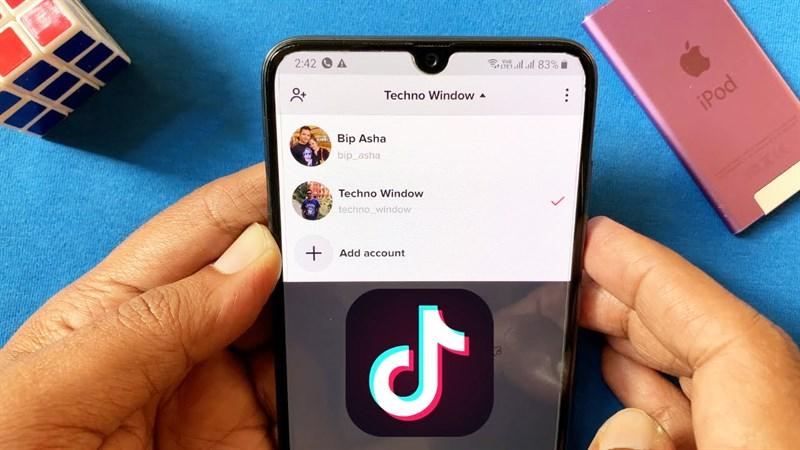
However, this is also where widespread misunderstanding arises. In many communities, people often claim that TikTok allows a maximum of 5 accounts. In fact, this number is not an ownership restriction; it originates from the technical limit of the in-app account switcher.
In other words, seeing only 5 accounts in the account switcher does not mean TikTok forbids you from creating a 6th or 10th account. These two concepts are entirely distinct.
Note that this information is drawn from practical platform observation rather than an official document. Consequently, technical thresholds may shift across app updates or regions.
For example, you can register 8 accounts using 8 distinct email addresses. All of them function normally. However, when logging in on a single mobile phone, the app only retains up to 5 accounts for quick switching. The remaining three are not banned—you simply log out and log back in whenever you want to use them.
Distinguishing 3 types of TikTok account limits
Most confusion around TikTok account limits stems from conflating three separate operational concepts:
- Number of accounts owned: The total number of TikTok accounts registered under your management. TikTok does not impose an official cap here, meaning you can operate numerous accounts provided each follows platform policies.
- Number of accounts logged in/switchable on the app: The accounts saved in TikTok's quick switcher feature. On most mobile devices, the app accommodates roughly 3 to 5 accounts for rapid switching.
- Number of concurrent active accounts on one device: Running multiple accounts simultaneously within isolated login environments. This is a common requirement for creators, e-commerce sellers, and agencies.
Note: In-app account switching does not equal an account ownership limit. They are two fundamentally different concepts. A single user owning 10 TikTok accounts does not conflict with the app saving only 5 accounts at a time.
2. How many TikTok accounts can one device log into?
The number of accounts usable on one device varies across mobile phones, computers, and tablets. The key distinction lies between switching accounts and operating multiple accounts simultaneously.
2.1. On iPhone and Android phones
TikTok features a built-in Add account option allowing users to add multiple profiles and switch without logging out repeatedly. In most scenarios, the app retains 3 to 5 accounts on a single device.
When you switch accounts too frequently within a short window, or log in from unusual locations and devices, TikTok may require verification via SMS OTP or email. This is a standard security checkpoint to verify ownership, not an automatic ban.
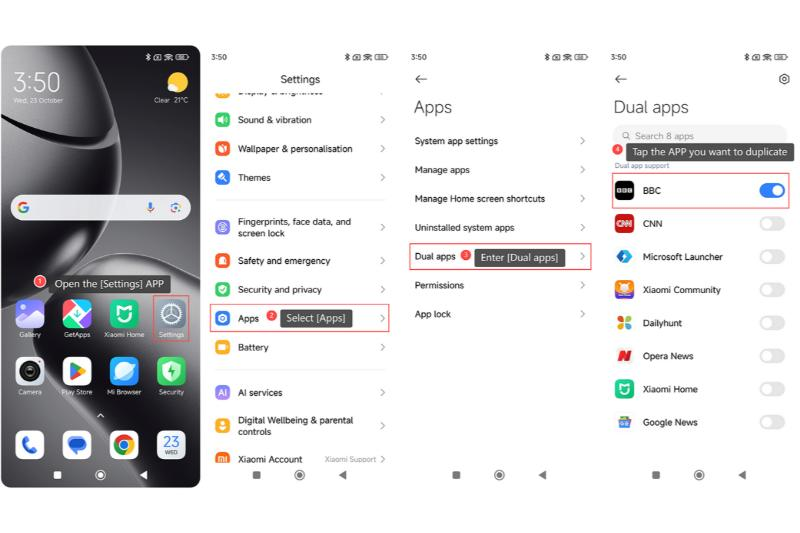
If you only need two concurrent sessions, Android offers an advantage because many manufacturers provide built-in app cloning features (Dual Apps, App Cloner). You can install two separate TikTok apps and log into two different accounts. iPhone users rely primarily on the in-app account switcher, as native TikTok app cloning is not supported on iOS.
2.2. On computers
On a PC, you can access TikTok via Chrome, Edge, or other browsers. However, a standard browser instance typically maintains only one active session because cookies and session data are shared globally.
Many assume opening incognito windows or multiple tabs is sufficient to operate multiple accounts. In reality, incognito mode only clears basic local cache upon closing; open windows still share device fingerprints and network information, allowing TikTok to detect that they originate from the same machine.
To manage multiple accounts reliably on a computer, a more effective solution is utilizing independent browser profiles where each account maintains separate cookies and distinct environments.
2.3. On tablets
Tablets function similarly to mobile phones. The in-app switcher applies the same limits and does not alter the total number of accounts you can legally own.
If the same account is logged into both a mobile phone and a tablet, TikTok treats it as a single account accessing from two endpoints, rather than two separate accounts.
3. How many accounts can 1 email, phone number, and ID verify?
When creating multiple TikTok accounts, emails, phone numbers, and IDs serve distinct purposes. Emails and phone numbers are used for registration and account recovery, while government IDs apply to identity-verified services like TikTok Shop. Understanding these boundaries avoids registration errors.
3.1. Limits for email addresses
One email address can link to only one TikTok account at any given time. If an email is already tied to an existing profile, TikTok will reject new registrations using that exact email.
In many cases, you can change the linked email of an existing account to a different address, freeing up the original email to register a new profile. However, this flexibility depends on TikTok's policies at the time and is not permanently guaranteed.
3.2. Limits for phone numbers
Similarly, each phone number can only link to one TikTok account at a time. Phone numbers are primarily used for SMS OTP logins, password recoveries, and two-factor authentication.
To use the same phone number for a different account, you must unlink it from the current profile first. Once successfully unlinked, the phone number can be attached to a new account.
3.3. Should you use virtual emails or virtual phone numbers?
Many operators use virtual emails or VoIP phone numbers to scale TikTok accounts without maintaining physical SIM cards. This approach is convenient for disposable test accounts or short-term channels.
However, the biggest hazard is account recovery. If you lose access to a temporary inbox or virtual phone number, retrieving two-factor authentication codes becomes impossible during security reviews. For long-term core assets, always prioritize durable, personally owned emails and phone numbers.
For accounts you plan to keep, a real non-VoIP number from a mobile carrier passes verification and stays reachable for future SMS checks, unlike VoIP numbers that get rejected or recycled.
3.4. How many TikTok accounts can 1 ID/passport verify?
For standard personal TikTok accounts, government ID verification is not required. An email or phone number is sufficient to create and run an account.
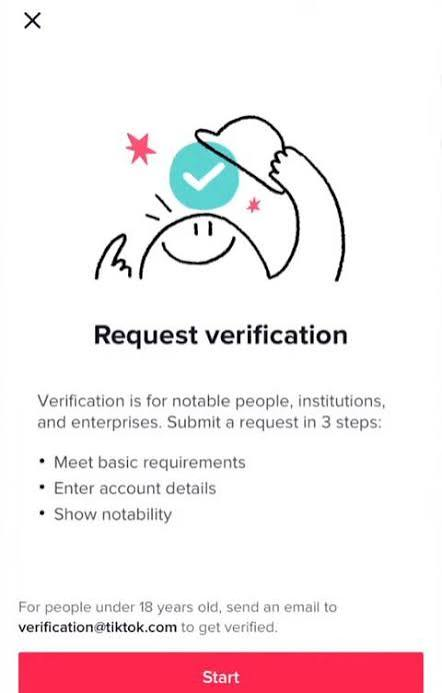
IDs are required when completing KYC verification for TikTok Shop, TikTok Ads, or business accounts. Under current rules, a personal national ID can verify only one individual TikTok Shop. To operate more shops, you must register corporate legal entities and meet corresponding merchant criteria.
Keep in mind that verification rules may vary across countries and periods. Check the latest guidelines on TikTok's official documentation before expanding commercial stores.
Learn more:
- How to get a TikTok Shop account to sell products
- Managing multiple TikTok Shop accounts effectively
4. Should you create multiple TikTok accounts?
Not every user needs multiple TikTok profiles. For everyday viewers, one or two accounts suffice. However, for creators, sellers, and agencies, segmenting content across multiple accounts offers distinct operational benefits.
Individual creators
For creators, running multiple channels allows testing new creative angles while keeping your primary brand intact:
- Build a primary channel focused on long-term personal branding.
- Launch niche channels to test experimental video formats or distinct topics.
- Maintain a backup account to safeguard audience reach if the primary profile faces issues.
By separating objectives, you can evaluate content performance without confusing the algorithmic targeting of your main channel.
TikTok Shop sellers
For e-commerce merchants, account segmentation streamlines brand management and marketing campaigns:
- Dedicate separate storefront accounts to different product categories or brand lines.
- Tailor content strategies to distinct geographic markets or demographics.
- Track video conversion rates, order volumes, and campaign ROI independently.
This structure is especially valuable when scaling multi-category catalogs or operating multiple regional shops.
Agencies and MMO teams
Agencies manage large account volumes where each asset represents an independent client or project:
- Manage multiple client accounts concurrently across isolated workspaces.
- Run parallel affiliate marketing and paid ad campaigns.
- Isolate client assets to prevent cross-contamination if one profile encounters restrictions.
As account volume scales, the core operational concern shifts from how many accounts you can make to how TikTok identifies them. Detection mechanisms dictate your safety when managing multiple profiles from a single setup.
5. What signals does TikTok use to detect multiple accounts?
Many believe simply logging into a new account or toggling a VPN keeps them completely undetected. In practice, the platform evaluates multiple telemetry signals simultaneously. When accounts share identical footprints or show unnatural activity, correlation algorithms trigger warnings.
5.1. IP address
The IP address indicates your device's network origin. When numerous accounts log in consecutively from the same IP within short intervals, TikTok flags this as anomalous activity, especially if using datacenter IP ranges.
While sharing an IP address does not automatically result in a ban, maintaining consistent network and device configurations can help reduce unnecessary account risks. For users managing multiple TikTok accounts, TikTok proxies can provide additional IP options for account management, depending on their specific needs.
Read more: Where to buy reliable TikTok proxies? Top providers
5.2. Cookies and session storage
Every time you log into TikTok, the browser saves cookies and session tokens to preserve authentication states. When multiple accounts rotate through the same browser profile, residual cookies create clear linkage trails across sessions.
Logging out and logging into another account on the same browser does not mean the two profiles are genuinely isolated.
5.3. Browser fingerprint
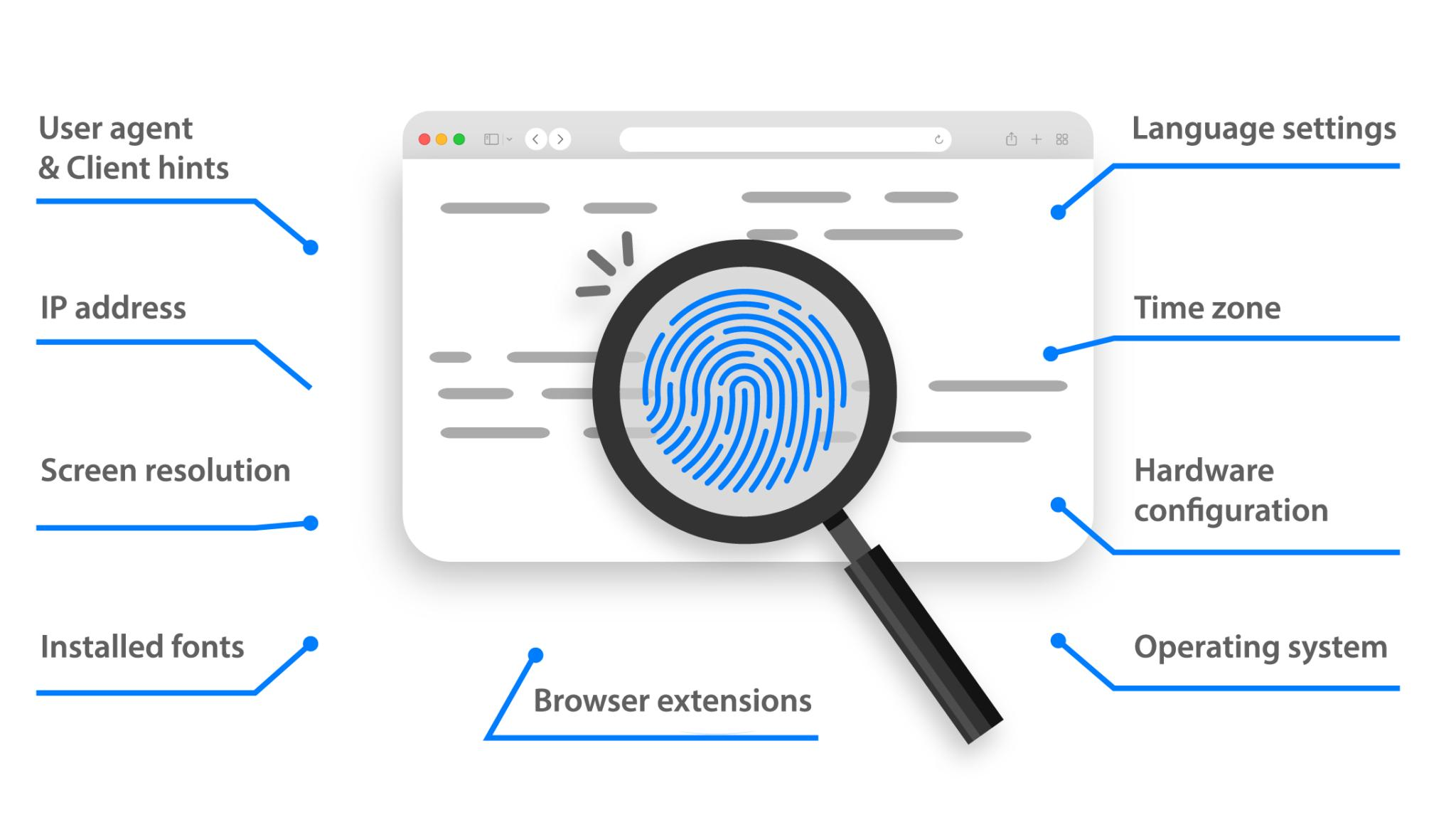
Beyond network IPs and cookies, TikTok evaluates your browser fingerprint. This constitutes a technical profile derived from device and browser attributes, including Canvas fingerprints, WebGL hashes, installed Fonts, User-Agent strings, and Timezone offsets.
Crucially, browser fingerprints do not change when you switch a VPN or open an incognito window. Consequently, platforms easily identify that separate accounts are operating within the exact same hardware environment.
5.4. User behavior
Alongside technical parameters, TikTok tracks behavioral patterns across account interactions. Common flags include:
- Logging into dozens of accounts in rapid succession on one machine.
- Automated, high-frequency mass following, liking, or commenting.
- Publishing duplicate, unedited video files across multiple handles.
- Deploying automated engagement bots at unnatural intervals.
Rather than just mass-producing accounts, focus on establishing organic interaction cadences and dedicated goals for each channel to minimize behavioral linking.
6. At what scale should you isolate environments?
TikTok does not specify an official threshold for mandatory environment isolation. However, operational experience across creators, sellers, and agencies demonstrates that risk compounds as account volume expands.
| Account Count | Risk Level | Target Profile |
|---|---|---|
| 1-3 | Low | Individual users |
| 4-10 | Medium | Content creators |
| 10-30 | High | TikTok Shop sellers |
| 30+ | Requires full isolation | Agencies & MMO teams |
Note: This table serves as an operational benchmark based on real-world testing, not an official guideline from TikTok.
Recommended setups based on account scale:
1 to 3 accounts: The native mobile app and standard account switcher are sufficient. For casual personal use, third-party software is unnecessary.
4 to 10 accounts: At this stage, begin assigning dedicated IPs to primary business accounts. Isolating environments early mitigates cross-account penalties when scaling channels.
10+ accounts: Managing large fleets through standard browser windows is dangerous. Segregating each account into an isolated browser profile with unique parameters is essential for operational stability.
7. How to manage multiple TikTok accounts safely
When operating multiple TikTok accounts, the key is not merely rotating IP addresses, but completely isolating the login environment for each profile. Isolating environments eliminates shared cookies, hardware fingerprints, and local device traces.
7.1. Separate browser environments for each account
Each account should operate within its own dedicated browser profile rather than sharing cache and cookies across tabs. This provides an independent sandbox for every account, preventing identification overlaps.
This fundamental separation is what distinguishes distinct browser environments from standard incognito tabs.
7.2. Assign dedicated IPs to each account
Alongside browser sandboxing, assign a dedicated IP address to each critical account. Residential or SOCKS5 proxies are the industry standard for stable multi-account operations.
Dedicated proxy routing ensures your accounts do not share identical network signatures, protecting business assets across client portfolios.
Related guides:
- Residential Proxies: How they work and why you need them
- What is a Datacenter Proxy? Complete overview
- Residential vs. Datacenter Proxies: Key differences and selection guide
7.3. Manage multiple accounts with the Antidetect Browser Hidemyacc
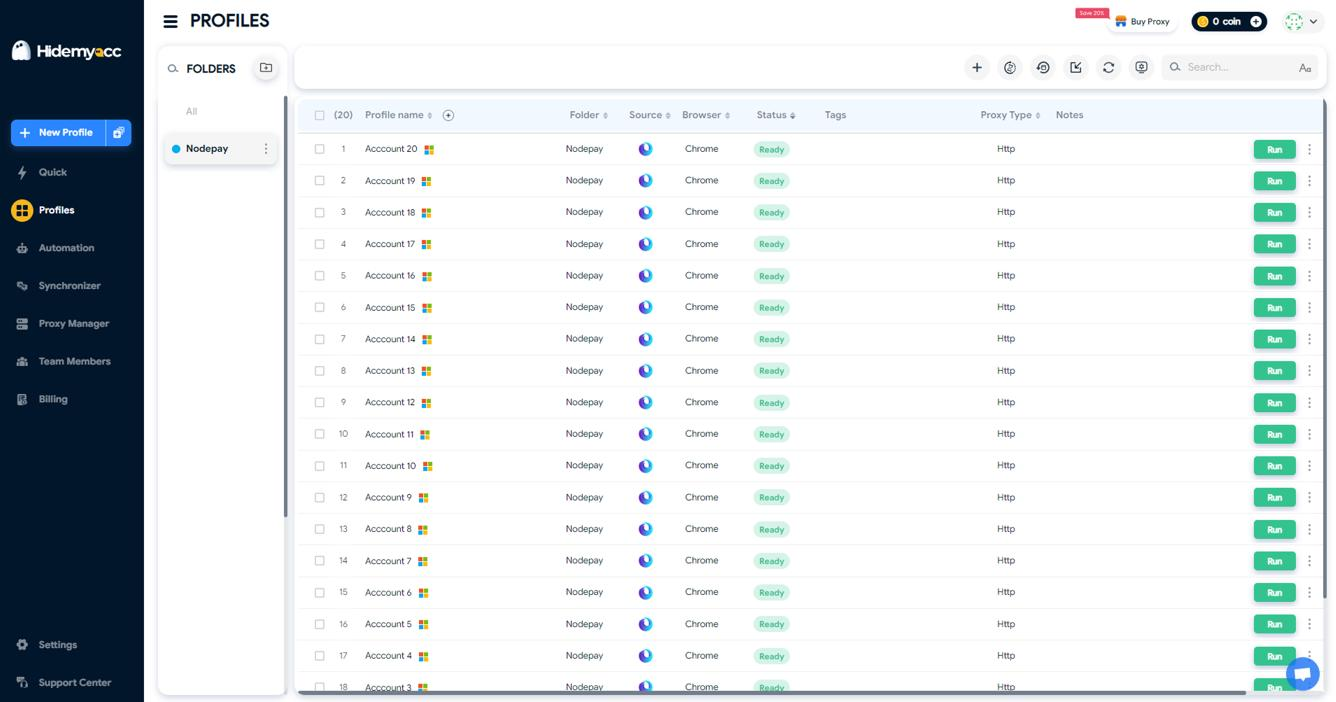
When account scaling exceeds manual management capabilities, antidetect browser Hidemyacc provides a secure, streamlined multi-accounting framework. It is engineered to build completely independent browser profiles, preventing shared session data.
Each profile inside Hidemyacc features a unique browser fingerprint, separate cookie storage, and dedicated proxy settings, making each profile appear as a genuine, distinct computer. You can preserve login sessions, switch accounts instantly, and control dozens of TikTok profiles on one computer without repetitive logins.
For a detailed setup guide, check out our tutorial on how to run multiple TikTok accounts without shadowbans.
8. Common misconceptions about TikTok account limits
Most account problems do not stem from owning multiple profiles, but from misunderstanding how platform security works. Here are the three most common myths:
TikTok only allows up to 5 accounts
This is the most widespread misconception. The number 5 is purely the threshold of the mobile app switcher, not a cap on personal account ownership.
You can create numerous accounts using separate emails or phone numbers, provided each profile adheres to TikTok policies.
A VPN alone provides complete safety
A VPN only modifies your public IP address and general routing location. It covers network identity, but leaves hardware identity untouched.
TikTok continues tracking profiles via cookies, browser fingerprints, and hardware parameters. Changing your VPN does not isolate your browsing environment.
Owning multiple accounts triggers instant bans
Holding multiple accounts is not an automatic policy violation. Thousands of creators, e-commerce brands, and marketing agencies manage account fleets daily.
Penalties result from spamming, abnormal login cadences, or running un-isolated accounts within an identical technical profile. How you operate accounts matters far more than how many you own.
Read more:
TikTok account banned? How to appeal and recover it fast
TikTok shadowban: Key signs and how to fix it
What is a spam account on TikTok?
9. Conclusion
TikTok imposes no official ceiling on the number of accounts you can own. However, real-world technical boundaries exist regarding devices, emails, phone numbers, ID verifications, and browser environments when running multiple profiles simultaneously.
For casual personal use with 1 to 3 accounts, standard mobile app management is completely safe. But when scaling multiple channels, managing TikTok Shops, or servicing marketing clients, isolating browser profiles and assigning dedicated proxies early prevents cross-account chain bans and ensures stable growth.
You may also find these helpful:
- How to monetize on TikTok for beginners
- Detailed guide to effective TikTok affiliate marketing
- Where to buy high-quality TikTok accounts? Top trusted platforms
10. FAQ
1. Does TikTok limit the number of accounts you can own?
TikTok publishes no official restriction on account ownership. You may register multiple profiles as long as each profile complies with the platform's Terms of Service.
2. How many TikTok accounts can log into one phone?
The native in-app account switcher typically stores 3 to 5 accounts depending on your OS and app version. To run more profiles concurrently, you can use app cloning tools on Android to install separate app instances.
3. Can you run 2 TikTok apps on the same phone?
Yes. On Android, many devices feature built-in app cloning (Dual Apps, App Cloner) to run a secondary, completely independent TikTok app alongside the original. On iPhone, this requires alternative Apple IDs or third-party enterprise tools. This differs from in-app switching because it maintains two distinct local sessions.
4. How many TikTok accounts can 1 email or phone number create?
Each email address or phone number can link to only one TikTok account at a time. To reuse an email or phone number, you must unlink it from the old account first.
5. How many TikTok accounts can 1 national ID/passport verify?
Standard personal TikTok accounts do not require ID verification. For TikTok Shop, one personal national ID can verify only one individual shop; scaling beyond that requires corporate business registrations.
6. Does creating multiple TikTok accounts violate policy?
Owning multiple accounts does not automatically violate policies. Risks arise when behavioral violations occur, such as spamming, extreme automation, or content strikes across linked accounts.
7. At how many accounts should you switch to an antidetect browser?
When managing 10 or more accounts, isolating environments with an antidetect browser significantly eliminates cross-contamination risks compared to manual management.