



Did you just open Instagram and were suddenly stopped by the notification "We suspect automated behavior on your account"? Feeling anxious about losing your account is understandable, but you should stay calm because this is usually just a temporary security warning from Meta's system. Instead of rushing to fix the error, you need a standardized handling process to avoid a permanent strike. This article will explain why your account was flagged and guide you through the specific steps to restore your account safely.
1. What is automated behavior on Instagram?
The term automated behavior Instagram refers to actions that Meta's AI system identifies as having characteristics more similar to machines or bots than natural human behavior. These behaviors often involve excessively high speed, high frequency of repetition, or are carried out simultaneously and lack natural interaction.
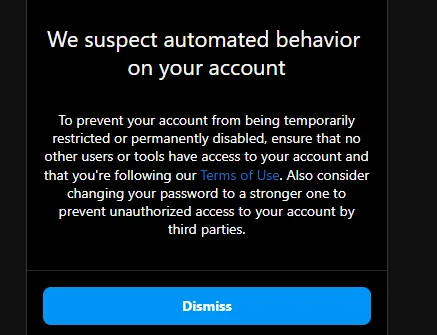
Basically, Instagram is constantly striving to implement mechanisms to detect automated behavior, spam, fraud, and activities that interfere with the user experience. However, since the assessment system is primarily based on data and behavioral models, in some cases, the algorithm can become overly sensitive and accidentally flag accounts controlled by real people, especially when they perform repetitive actions with high intensity in a short period. You need to be particularly careful, because if you continue to maintain suspected actions, your account may face more severe penalties.
2. Why did you receive the "We suspect automated behavior on your account" warning?
Instagram's security system operates by analyzing billions of data points every day. When your account shows unusual signs, Meta's AI will immediately flag it for inspection, triggering the warning. Below are the common reasons why accounts fall into the system's crosshairs:
2.1. High-frequency actions in a short period
Instagram has implicit limits on the number of likes, follows, and comments per hour. When users perform these actions too quickly or intensively within a short timeframe, the algorithm may evaluate this as machine-like behavior rather than natural human interaction.
2.2. Using unverified third-party applications
Many people have the habit of using apps to check unfollowers or cheap engagement services. These tools often require deep access to the account and perform actions directly from a third-party server, making the account's activity appear abnormal to Instagram's monitoring system. This is also why buying followers or using cheap engagement services poses many risks to your account.
Related article: Should you buy Instagram followers? Things to consider and reputable websites
2.3. Login data and device conflicts
This issue often appears when an account is used with high intensity or there is a constant change in devices and login locations. Instagram monitors information such as IP addresses, access devices, and browser fingerprints to assess the consistency of user behavior. Logging in from multiple locations, using a VPN frequently, or operating on multiple accounts at the same time can increase the risk of being flagged by the system.
Therefore, setting up multiple Instagram accounts on the same device in a separate and consistent manner from the beginning will significantly reduce risks related to the login environment.
2.4. Spreading repetitive content
Instagram's AI system is particularly sensitive to identifying duplicate content patterns. Sending the same DM content or leaving identical comments for many different users is one of the most common causes of the "We suspect automated behavior on your account" warning.
In cases where you need to send messages to many different users, you need to optimize your messaging methods and personalize the content so that each interaction looks like it was written by a real person.
Related Guide: How to send bulk DMs on Instagram without getting your account suspended?
3. How to fix the "We suspect automated behavior on your account" error
When an account receives a warning related to automated behavior, how the user handles it in the next phase can significantly affect the account recovery process. Here are the steps to help you recover your account safely:
3.1. Stop all interaction activities immediately
The first thing you need to do is let the account rest, pausing all interaction activities for at least 24 to 48 hours. Many people are often anxious to check if the error is gone by trying to like or comment again immediately, but this only causes the system to monitor the account for longer.
3.2. Refresh the login session by changing your password
Changing your password is the fastest way to disconnect from apps you might have accidentally installed. This operation helps to completely refresh the login session and protects the account from risks of suspension. After changing the password, you should log out of all old devices to ensure that only you have sole control.
3.3. Remove unsafe third-party applications
Check the list of linked apps in your security settings and revoke access for untrustworthy tools. Abusing engagement-boosting software or user trackers of unknown origin is a common cause of this warning. Ensure that only official Meta applications are allowed to maintain a connection with your account.
3.4. Check network address and login devices
When the IP changes constantly or too many accounts are logged in on the same browser, Instagram's AI often misinterprets the account as having automated behavior. During the period when the account is restricted, users should prioritize using a stable and familiar network connection, such as personal mobile data, and limit logging in on multiple different devices in a single day.
3.5. Enable Two-Factor Authentication to increase trust
Enabling 2FA is one of the clearest signals to Instagram that you are a real user with a high awareness of security. A profile with full verification information is often prioritized by the algorithm and is less likely to be blacklisted by automated filters. Follow these steps:
-
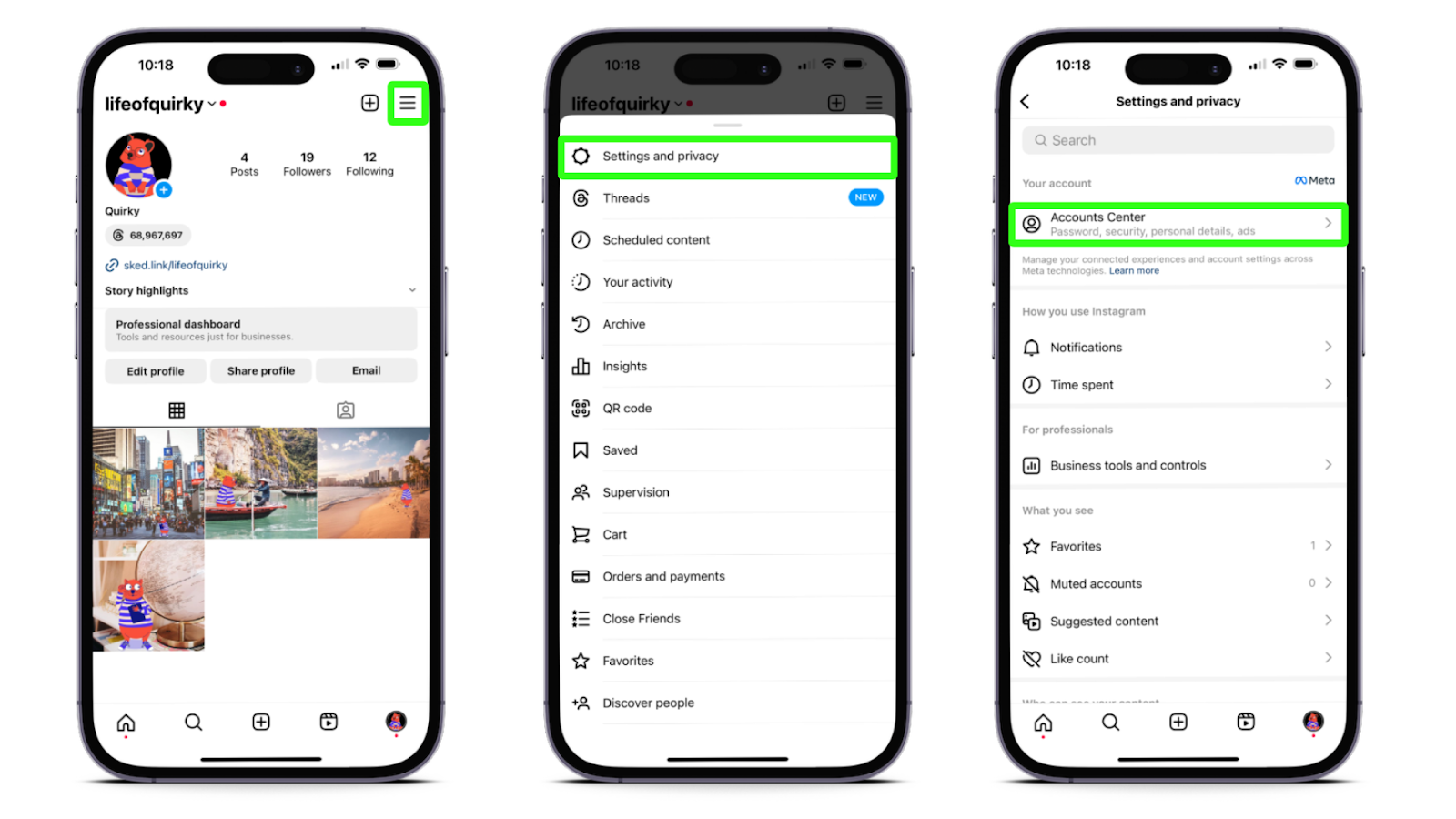
Step 1: Go to your profile, select the Menu icon (3 horizontal lines) in the top right corner. Then select Settings and Privacy > Accounts Center
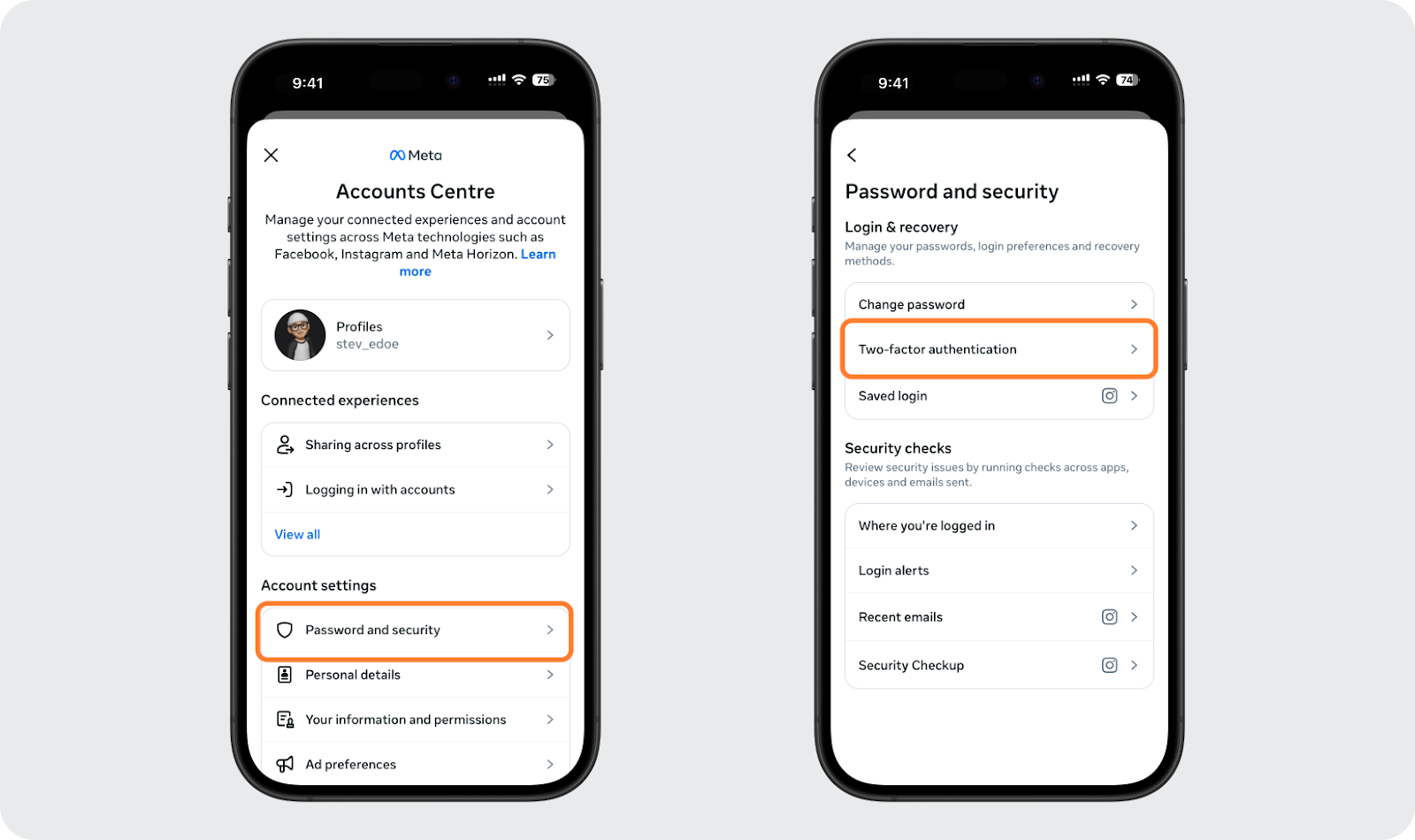
- Step 2: Select Password and Security > Two-Factor Authentication
-
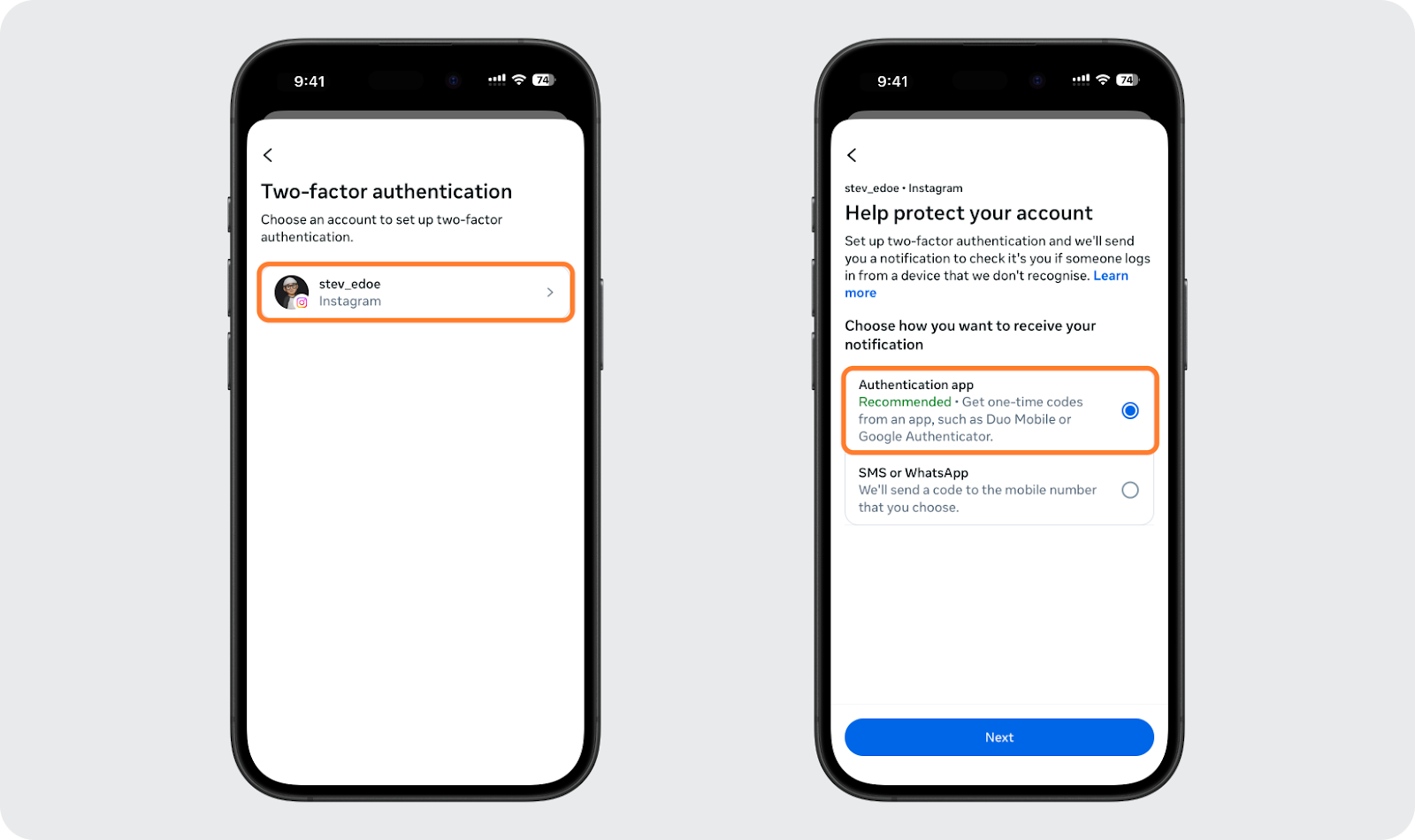
Step 3: Choose your method of receiving the code. Instagram encourages using an authentication app like Google Authenticator or receiving the code via SMS text message.
If you choose Authentication App:
-
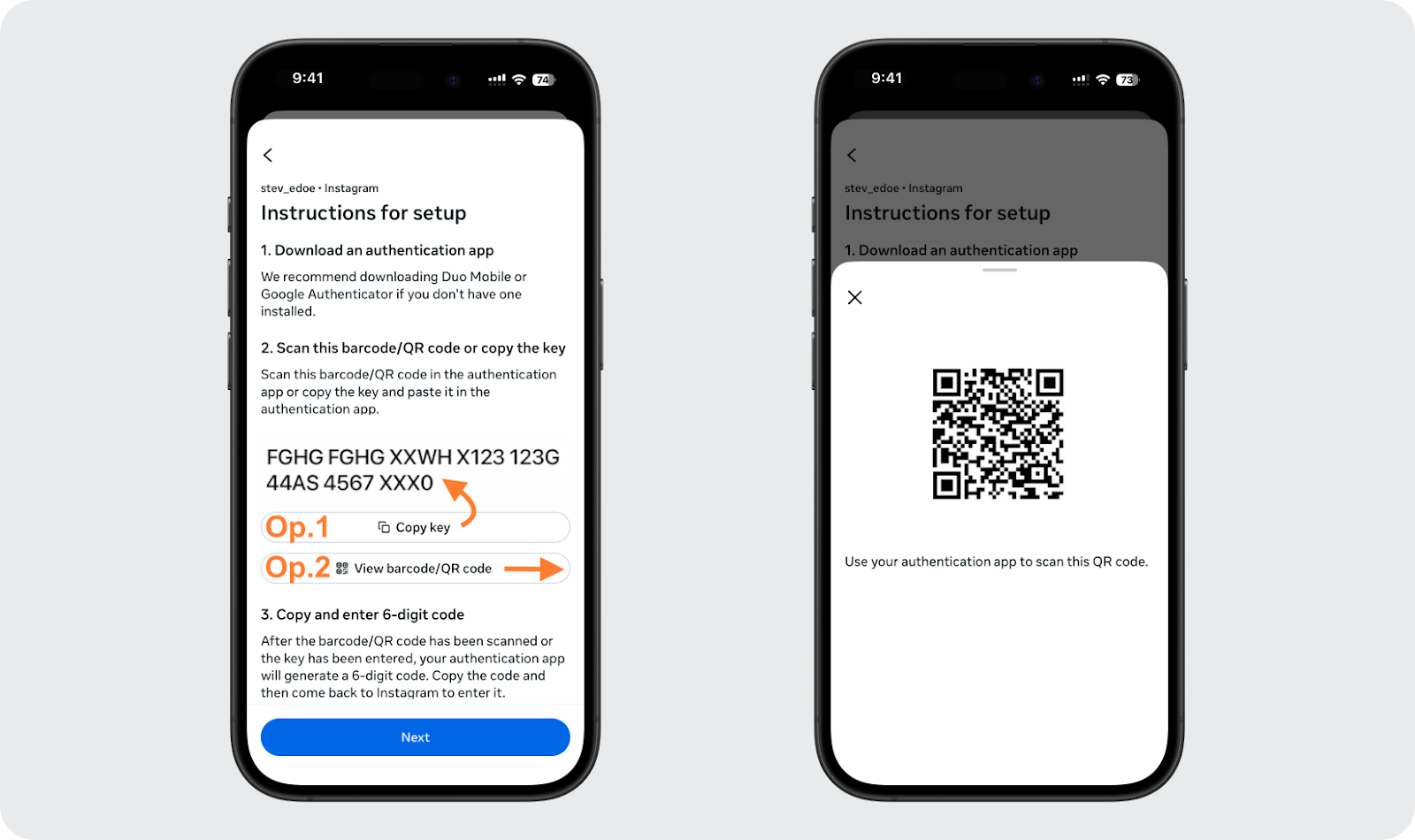
Step 4: Instagram will display a QR code or copy key.
-
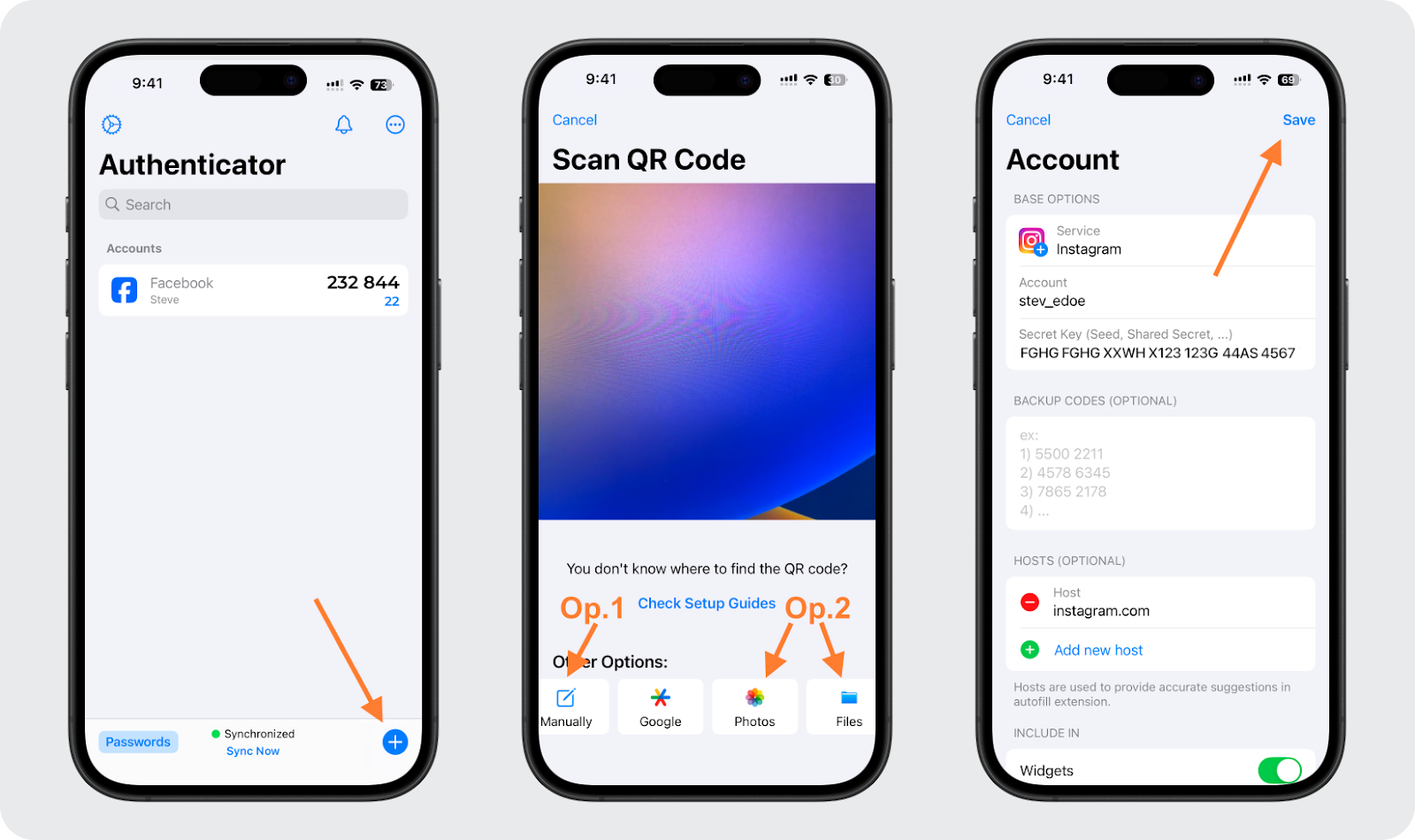
Step 5: Open an Authenticator app (Google Authenticator, Microsoft Authenticator...). Add the account by Scanning the QR code or entering the key manually.
-
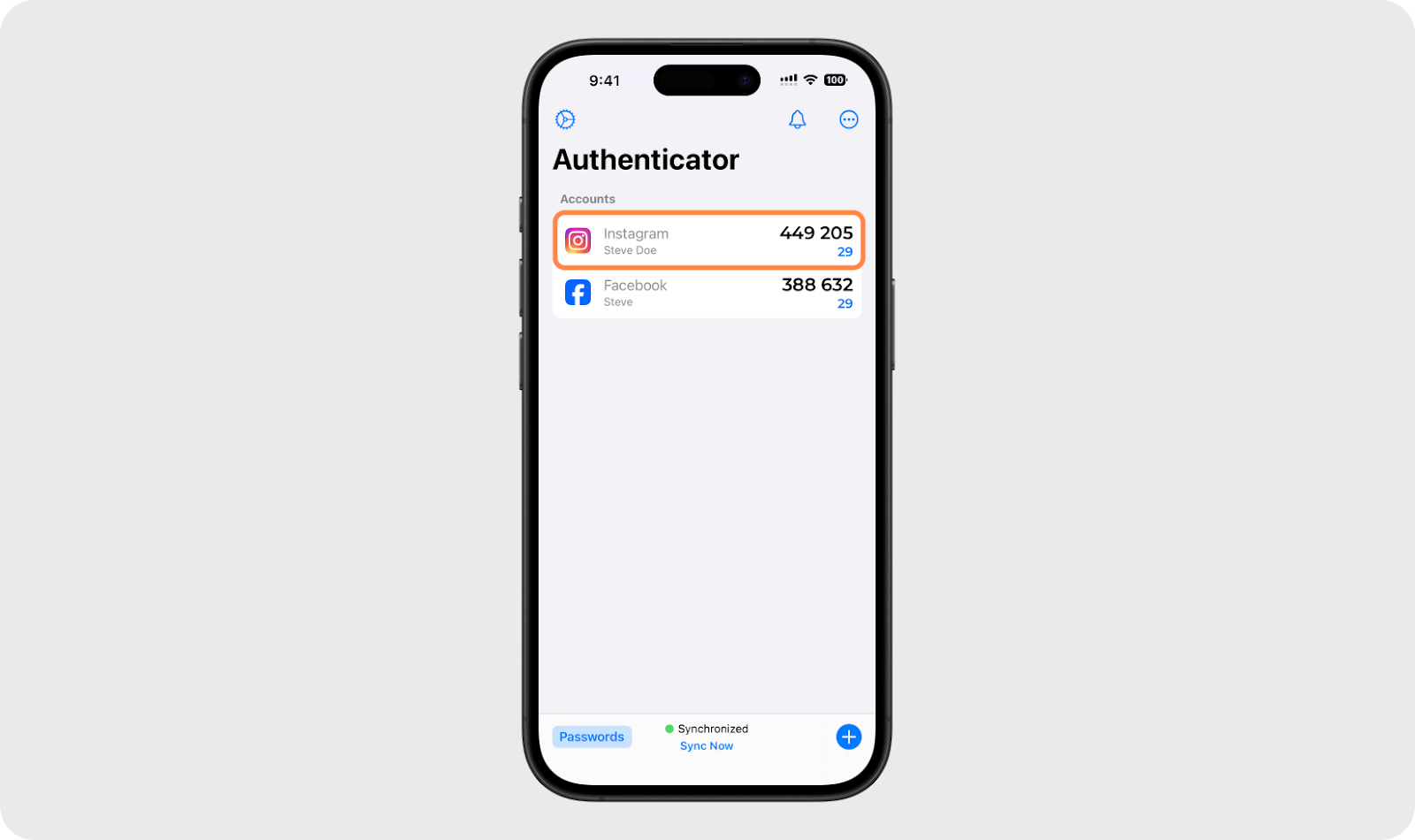
Step 6: Enter the 6-digit code from the Authenticator app into Instagram to confirm.
-
Step 7: Two-factor authentication has been successfully turned on.
3.6. Use the direct problem reporting feature
If you believe you haven't violated any regulations, use the in-app reporting feature. Briefly describe your situation so the technical support team can review it. This is the most official channel to prove transparency and request the removal of mistaken restrictions from the AI system. However, the review process can take time and not all cases receive an immediate response.
4. How long does the automated behavior suspicion error on Instagram last?
The warning duration is not fixed and depends on the severity of the behavior assessed by the system and the account's history. Typically, Instagram applies these milestones:
- 24 to 48 hours: This is the mildest case for accounts flagged with an automated behavior error for the first time. During this time, certain features like liking, commenting, or following may be temporarily restricted.
- 7 to 14 days: If suspected actions repeat immediately after the short-term warning ends, the system will extend the monitoring period. At this point, the account will be placed on a special watch list and restrictions will last longer to verify the user.
- Permanent Suspension: This is the most severe penalty if you intentionally use tools that interfere deeply with Meta's system or violate community standards. When an Instagram account is permanently suspended, the chance of recovery is very low.
In addition to the above cases, some accounts may experience a sudden drop in engagement without a specific notification. This could be a sign of a content distribution restriction mechanism, often referred to as Instagram shadowban.
5. How to limit being flagged by Instagram in the future
To maintain a stable account and stay off the Meta algorithm's blacklist, you can apply the following operational rules:
5.1. Maintain natural interaction speed
Avoid performing actions like liking, following, or commenting with high frequency in a short period. Instead of doing actions in bursts, you should spread your activity throughout the day. Distributing interactions evenly over time makes account behavior look more like a real user and reduces the risk of being assessed as automated by the system.
5.2. Prioritize official management tools
You should only use social media management platforms approved by Meta, such as Meta Business Suite. These official tools are designed to help businesses operate efficiently and optimize work while ensuring absolute adherence to community standards regarding user behavior.
5.3. Complete all profile information
An account with a complete profile picture, bio, contact information, and a stable activity history will have a higher trust level. This is a factor that helps the algorithm easily identify the account as a real user, rather than a profile created for automation purposes.
5.4. Upgrade login environment security with Hidemyacc
Sometimes, the cause of the warning doesn't come from actions on the account but stems from the login environment. Understanding and controlling this factor helps significantly reduce the risk of repeated flagging.
- Why common browsers are easily scanned: Popular browsers like Chrome or Safari are not designed to manage multiple accounts at once. When using the same browser, cookies, session data, and login memory can overlap, causing the system to link multiple accounts to the same environment. If this continues, automated behavior errors are likely to recur.
- How Hidemyacc creates a clean environment for each account: Hidemyacc is a professional multi-account management solution. Each account operates in a separate browser profile, with its own set of cookies, hardware parameters, and fingerprints, similar to using each account on a different physical device.
- Operational Benefits: Using Hidemyacc helps you keep your work environment trustworthy and safe in the eyes of Instagram. When each account operates in a consistent environment, you can implement social media management automation processes within allowed levels while maintaining a stable status and limiting the risk of being blacklisted by Meta's algorithm.
6. Conclusion
The automated behavior suspicion notification on Instagram is a reminder for you to review your account operations and security. Instead of worrying, understanding the cause and following the correct recovery path will help you quickly regain control and return your activity to normal. In the context of increasingly strict Meta algorithms, building a clean login environment and maintaining natural interaction is the key to long-term development on Instagram.
7. FAQ
1. Why does Instagram still report "We suspect automated behavior" even though I don't use bots?
Instagram's AI system can be mistaken if you perform rapid-fire actions, use low-quality VPNs, or log in on multiple devices simultaneously. Even browser extensions used for downloading photos can be scanned as bot malware, leading to the account being flagged.
2. Will my account be permanently locked?
Not necessarily. This is just a warning to adjust your activity. However, if you ignore it and continue suspected behaviors, a permanent lock is unavoidable. The best way to signal to Instagram that your account is safe is to change your password immediately and secure your login environment using Hidemyacc.
3. Does changing the password actually help fix the automated behavior warning?
Yes. Changing your password is the most effective way to remove third-party apps or malicious scripts running in the background without your knowledge. This action forces the system to refresh the login session and reset security authentication tokens for your account.
4. Can I get this error if I use a computer browser instead of the mobile app?
Yes, login sessions on browsers are often monitored more closely than the official app. Instagram can detect browser fingerprint conflicts if you use multiple accounts on the same web browser. This is why using an antidetect browser Hidemyacc is essential for safely managing multiple profiles at once.
5. How many likes or follows are considered "automated" by Instagram in 2026?
Instagram does not publish specific numbers, but any activity exceeding 150 actions (follow/unfollow) per day or liking too quickly (e.g., 50 likes in 5 minutes) will trigger security filters.






