“Why can't I follow people on Instagram?" This is a common question among many users when they encounter an "Action Block" notification or find the follow button automatically un-toggles after being clicked. This situation usually occurs when an account is suspected of spam or due to other system reasons. Let’s join Hidemyacc to find out why your account is restricted and how to handle it quickly in the article below.
1. Why can't I follow people on Instagram?
When you encounter a situation where you cannot follow others on Instagram, the cause usually stems from the platform's automatic anti-spam mechanism. The system will monitor follow speed, action frequency, and login abnormalities to assess risk.
The majority of cases are related to behaviors such as following too fast, following continuously in a short period, or logging in from many different IP addresses. Additionally, newly registered accounts will be more strictly limited to avoid abuse.
Some other causes come from third-party applications, poor quality VPN IPs, or temporary system errors. However, most issues can be resolved by adjusting usage habits and reducing interaction intensity in the short term.
2. The 5 most common reasons Instagram blocks you
When the system detects behavior that exceeds safety thresholds, Instagram will temporarily lock the follow function. This usually happens automatically and without prior warning. Below are the most common reasons along with specific handling instructions.
2.1. You have exceeded Instagram's follow limit
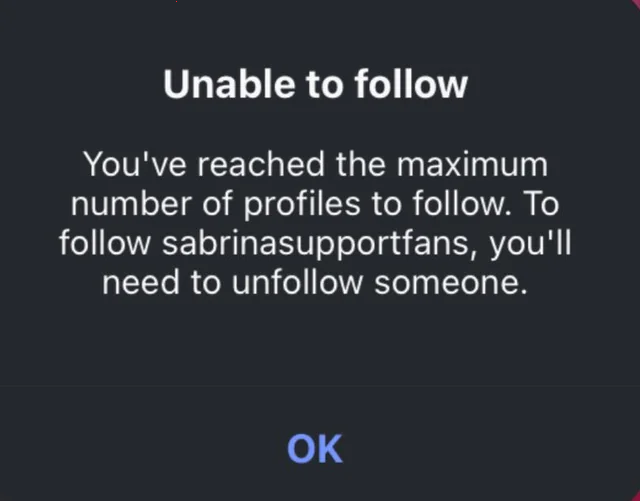
Instagram applies various limits to control spam. In addition to a maximum follow limit of approximately 7,500 accounts, the system also monitors follow speed by the hour, by the day, and by the activity cycle of each account.
For example, if you follow 30-50 people within a few minutes, the system may view this as abnormal growth behavior. Even if the total number of follows has not reached 7,500, you can still be blocked due to exceeding the speed threshold.
Some signs that you have hit a limit:
- An “Action Blocked” notification appears
- The Follow button is clicked but does not respond
- Following is successful but automatically canceled after a few seconds
- Being asked for security verification
The underlying cause is the algorithm evaluating behavior according to an anti-automation model. If the frequency of operations is too steady, repeats in a fixed cycle, or increases abruptly compared to previous history, the account's trust level will be temporarily reduced.
Here are the things you can do to fix the situation of being unable to follow others on Instagram:
- Stop all follow activities for at least 24-48 hours
- Do not try to repeat the action continuously as it will extend the block duration
- Check the total number of people you are following and reduce it if it is near 7,500
- After the restriction is lifted, split following into multiple time slots
- Combine with natural behaviors like watching stories or scrolling the feed before following
Most importantly, do not increase speed abruptly. If yesterday you only followed 5 people, today you should not increase to 50 people in an hour. Growth needs a roadmap so the system evaluates it as natural behavior.
2.2. Instagram suspects your account is a bot
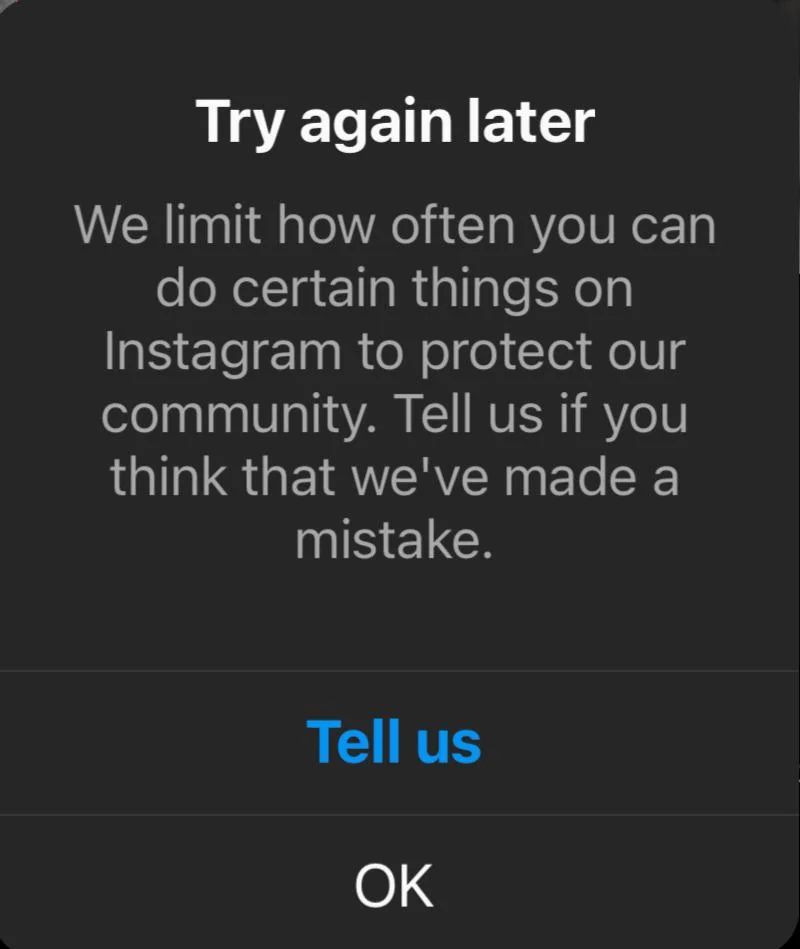
When the algorithm detects behavior with signs of automation, the account will be restricted from following even if the quantity limit has not been hit. The system analyzes operation speed, repetitive behavior patterns, login devices, and IP history to assess risk.
If you follow in bulk within a few minutes, perform actions in a fixed daily cycle, or log in from multiple different country IPs in a short time, the account's trust will decrease. Using auto-follow tools or third-party applications also makes the risk of being flagged higher.
Common signs include clicking Follow but getting no response, following and then having it canceled after a few seconds, or being asked for security verification.
Solutions you should try:
- Log in stably on one primary device
- Avoid changing IPs continuously, especially IPs from different countries
- Completely stop using auto or automation tools
- Turn on two-factor authentication to increase account reliability
- Reduce interaction speed for a few days so the system can re-evaluate behavior
Once the trust level is improved, the follow function will return to normal operation.
2.3. Your Instagram account is newly created
Newly created accounts are always subject to tight limits in the initial phase. The system's goal is to prevent spam and fake accounts. Because there is no stable activity history, the initial trust level is very low.
If you follow too fast in the early days, even if it's only 10-20 people in an hour, the system may still view it as abnormal behavior. An abrupt increase compared to an empty history is almost certain to trigger a temporary restriction.
In addition to follow speed, Instagram also evaluates factors such as daily active time, natural interaction levels, and login frequency. A new account that interacts regularly will be safer than an account that only focuses on following.
For new Instagram accounts, these are the steps you should take:
- Warm up the account for at least a few days before increasing follow speed
- Increase the number of follows gradually by the hour, not concentrated in a short interval
- Combine with natural behaviors like scrolling the feed, watching stories, and liking before following
- Avoid performing the same action repeatedly for the first several days
When the account has a stable activity history, follow limits will be more flexible and the risk of being blocked will significantly decrease.
2.4. The other person has blocked you
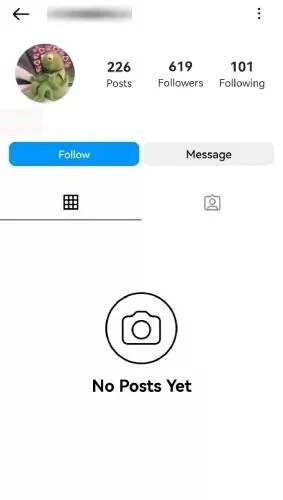
If an account has blocked you, you will not be able to follow them again even though the system does not display a clear notification. In many cases, the Follow button still appears but clicking it produces no response. In other cases, their profile displays very limited information or fails to load content.
When blocked, all interactions between the two accounts are cut off. You cannot follow, message, watch stories, or find them through regular searches. This is a direct restriction from the user side, unrelated to follow limits or anti-spam algorithms.
To check if you have been blocked, the simplest way is to check by accessing that account from another IG account. If you confirm you are blocked, contact them through another channel to ask the account owner to unblock you. Note that you should not click follow too many times to avoid being recorded as spam by the system.
In this case, only when the other person unblocks you can you follow them again normally.
2.5. Instagram glitch or server issue
Not every case of being unable to follow is due to a limit violation. Sometimes the cause comes from app errors, cache conflicts, or temporary server issues. In such cases, the Follow button may not respond even if your account is completely normal.
If many users are experiencing the same situation at the same time, there is a high probability that the system is malfunctioning. Additionally, an outdated app version or update errors can also cause some functions to work unstably.
Solutions you should try:
- Update Instagram to the latest version on the App Store or Google Play
- Log out and log back into the account
- Clear the app cache in the phone settings
- Try logging in on another device to check
- If the error persists, send a report by going to Settings → Help → Report a Problem and describe the incident in detail
In most cases of system errors, the follow function will automatically restore after Instagram finishes handling the server side.
2.6. You are using a VPN
Using a VPN, especially free VPNs or VPNs with public IPs, can reduce the trust level of the account. Many IP addresses have previously been used for spam or automation. When you log in from these IPs, the system may evaluate the account as high risk and temporarily restrict following.
Furthermore, if the IP changes continuously between multiple countries in a short time, Instagram will view this as abnormal behavior. A sudden change in location that does not match the previous login history often causes the algorithm to trigger additional controls.
Solution:
- Turn off the VPN if not strictly necessary
- Avoid using free VPNs or VPNs with public IPs
- Maintain stable login from one country and one primary device
- If a VPN is mandatory, prioritize private IPs and do not change locations continuously
When the login environment is stable, the account's reliability will gradually be restored.
>>>Other Instagram errors:
- What is Instagram shadowban? How to recognize if your account is shadowbanned
- Instagram account suspended: Reasons and how to handle it
3. What is the safe follow limit in 2026?
Instagram does not publish official figures regarding hourly or daily follow limits. Instead, the system applies dynamic thresholds based on the activity history and trust level of each individual account. Therefore, if you experience a situation where you cannot follow others on Instagram, you may have exceeded your personal safety threshold without realizing it.
Below are common reference levels:
|
Account type |
Safe follows per hour |
|
New account |
3-5 follows/hour |
|
Long-standing account |
10-15 follows/hour |
For new accounts, it is necessary to warm up thoroughly before increasing follow speed. You should not perform only one repeated action continuously.
To avoid being blocked from following on Instagram in the future, here are the things you need to keep in mind:
- Combine scrolling the feed before following
- Watch stories and like naturally
- Distribute follows evenly throughout the day
- Avoid bulk following within a few minutes
Since every account has its own warning threshold, for long-term safety, you should increase follow speed in stages rather than abruptly. The more stable an account's history and natural its behavior, the more flexible the follow limits will be and the less likely restrictions will be triggered.
>>>See more:
- How to manage multiple social media accounts without being banned?
- Guide to creating multiple Instagram accounts on one device
- How to increase Instagram followers for free
4. Conclusion
The inability to follow on Instagram is rarely a random error. In the majority of cases, the cause stems from exceeding follow limits, operating at an excessively fast speed, continuously changing IPs, or using automation tools.
New accounts need to be even more cautious because their initial trust level is very low. If you do not warm up properly and grow too hastily, the system will trigger restrictions even if you have not reached the 7,500 follow mark.
Hopefully, this article from Hidemyacc has helped you answer the question: "Why can't I follow others on Instagram?" You should maintain a reasonable speed, combine natural interactions, avoid spam, and comply with Instagram policies to avoid being blocked in the future.
5. FAQ
1. Why won't Instagram let me follow anyone?
You may have hit a follow limit, received an action block, used an unusual IP, or the system is experiencing a temporary error.
2. How do I remove follow restrictions on Instagram?
Stop following for 24-48 hours, turn off VPNs, remove third-party apps, change your password, and verify your account to increase trust.
3. How long until I can follow again on Instagram?
Usually from 24-72 hours; severe cases can last 7-14 days depending on the level of violation.
4. What is the hourly follow limit on Instagram?
New accounts are around 3-5 follows/hour, while long-standing accounts are around 10-15 follows/hour.
5. How do I know if Instagram is down?
Check DownDetector or try logging in on another device to determine if it is a system error.
6. Is my account shadowbanned?
Check hashtag visibility using another account and view the Account Status section in settings.
7. Why was I suddenly restricted on Instagram?
The cause is usually abnormal activity, being reported for spam, or using automation.
8. How do I know if my account is restricted?
Go to Settings, then Account Status to view warnings, violations, or restrictions applied to your account.