Having your Instagram account hacked is something no one wants to experience. When it happens, the first reaction is often panic, but the most important thing is to stay calm and handle the situation step by step. Being hacked does not mean your account is permanently lost, as in many cases it can still be recovered if you take the right actions.
In this article, Hidemyacc will guide you through the necessary steps to take when your Instagram account is hacked, while also analyzing common causes and sharing tips on how to secure your account to prevent it from happening again.
1. Common signs your Instagram account has been hacked
Before starting the recovery process, you need to determine whether your Instagram account has actually been compromised. Below are common signs that your Instagram account has been hacked:
- You cannot log in with your old password even though you are sure it is correct.
- The linked email or phone number has been changed and you receive a notification from Instagram about account updates.
- There are posts, messages, stories, or follows that you did not make.
- Your friends report receiving spam links, strange messages, or suspicious content from your account.
If one or more of these signs appear, it is very likely that your account has been accessed without permission and needs to be handled immediately.
2. How to distinguish between a hacked Instagram account and a suspended account
When you cannot access your account, many people are unsure whether they are facing a security issue or their account has been suspended due to policy violations. These two cases present differently and require completely different solutions.
|
Comparison Criteria |
Hacked account |
Suspended account |
|
Login notification |
Incorrect password even though you did not change it, or notification that email/phone number has been changed |
Clear notification that the account has been disabled due to policy violations |
|
Email received |
Email warning about password change, email change, or unusual login activity |
Email from Instagram informing that the account has been disabled or requesting an appeal |
|
Profile status |
Usually still exists and can still be found by others |
May not be accessible or hidden from search results |
|
Common causes |
Phishing, weak passwords, leaked login information, third-party applications |
Violating community standards, spamming, using automation tools |
If your account still exists but you cannot log in, it is highly likely that it has been hacked. Conversely, if Instagram clearly displays a policy violation notice, your account has most likely been disabled and you will need to submit an appeal.
>>>> READ MORE: What does a restricted Instagram account mean? A complete guide to Instagram’s Restrict feature.
3. How to recover your Instagram account when it has been hacked
Depending on whether you still control your email or phone number, the recovery process will differ. Below are three common scenarios and how to handle each one.
3.1. Case 1: You still have access to your linked email or phone number
If you still control the registered email or phone number, recovery is relatively simple.
You need to do the following:
-
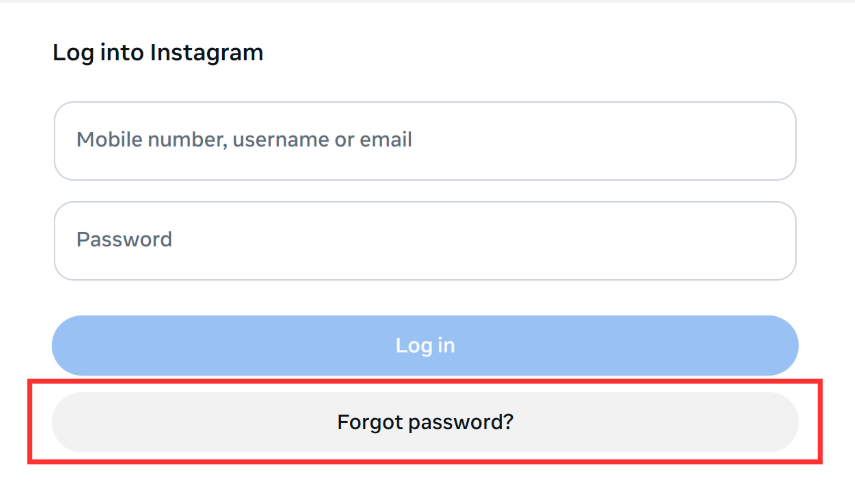
Select “Forgot password” on the login screen.
-
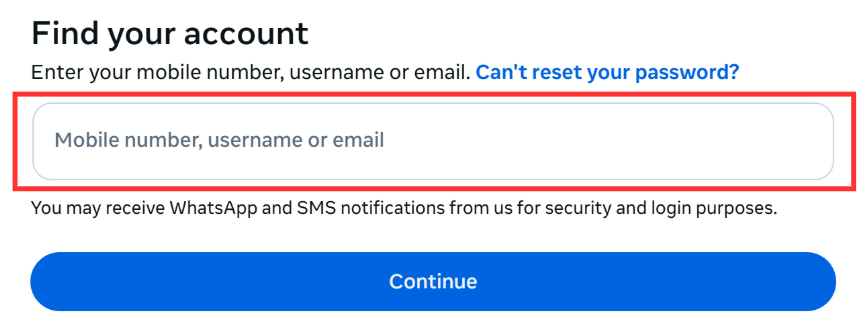
Enter the linked email or phone number to receive a reset link.
-
Check your inbox, especially emails from [email protected] to undo changes if necessary.
After successfully logging back in, you should:
- Change your password immediately.
- Enable two-factor authentication to increase security.
3.2. Case 2: The hacker has changed your contact information
If your email and phone number have been changed, you need to request identity verification support.
Follow these steps:
- On the login screen, select “Forgot password”
- Select “Try another way”
- Select “Verify your identity”
Video Selfie verification process:
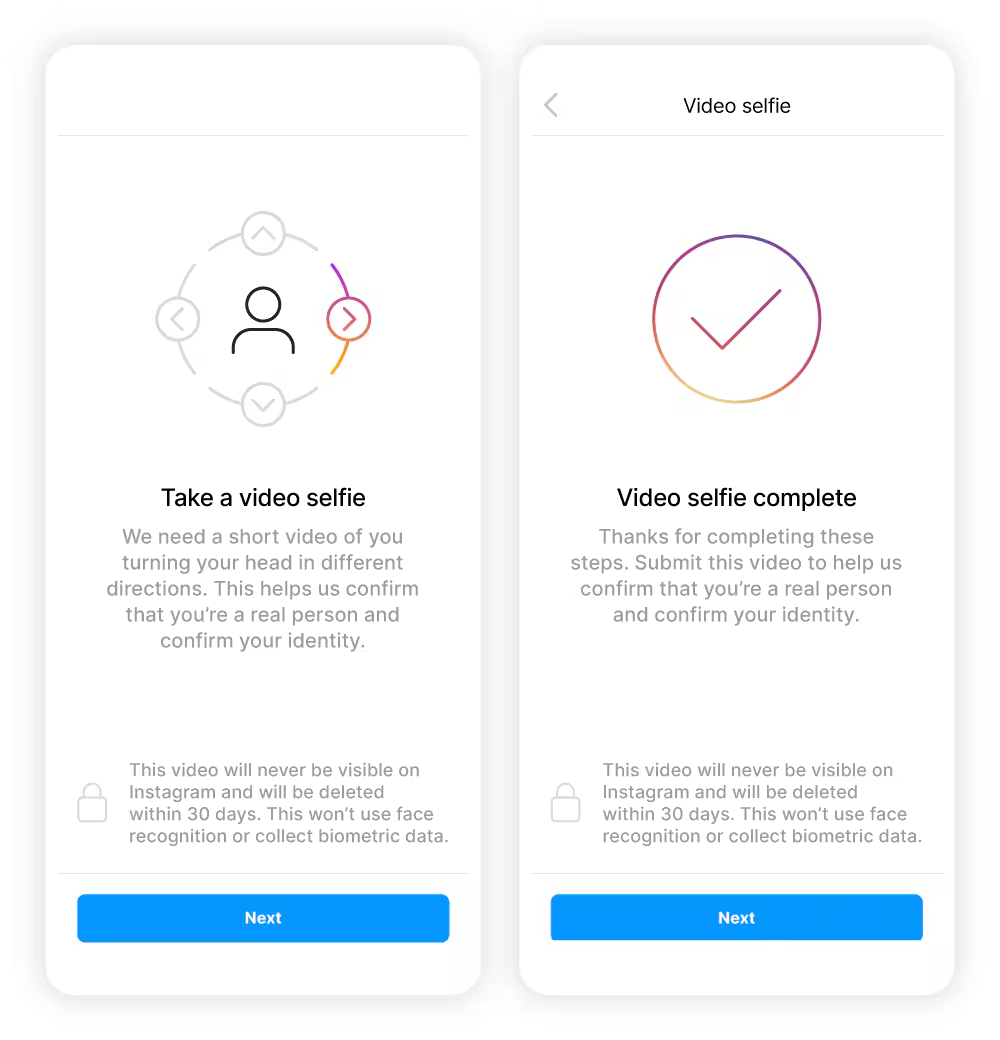
- Select “Verify your identity.”
- Record a video following the on-screen instructions.
- Perform the requested movements such as turning your face left, right, or looking up.
- Submit the video and wait for review.
The response time usually ranges from 24 hours to a few days.
3.3. Case 3: The account has been disabled
If your account has been disabled, you need to submit an appeal for review.
You should follow these steps:
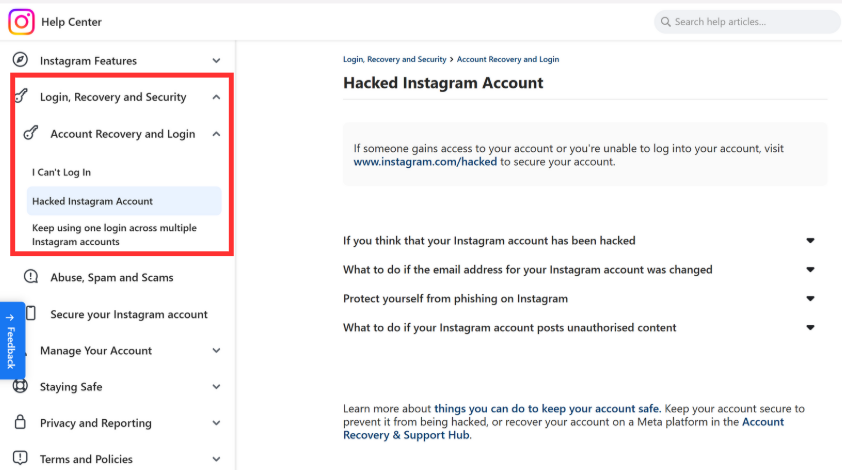
Step 1: Access the appeal page
- Access Instagram’s official Help Center here.
- Select Login, Recovery and Security > Account Recovery and Login > Hacked Instagram Account
-
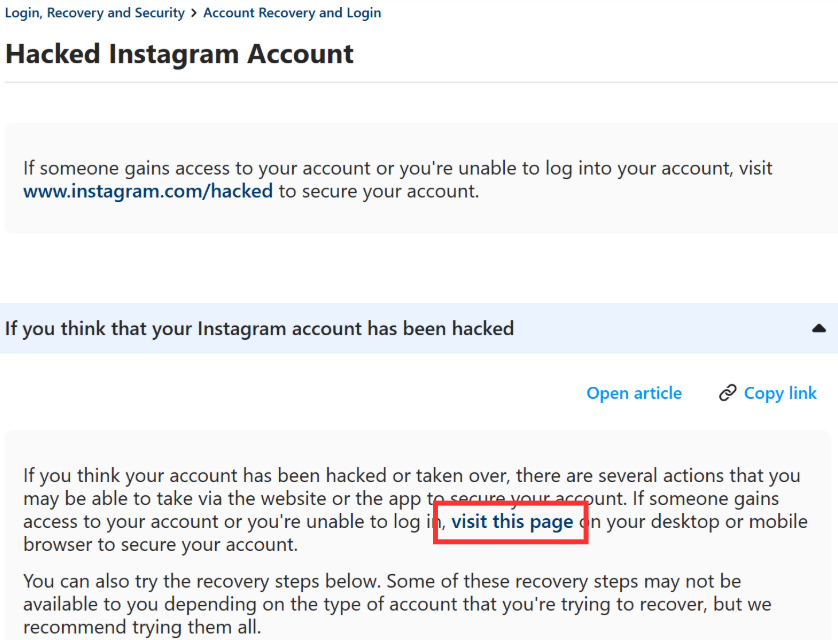
Select “If you think your Instagram account has been hacked” and access the linked page.
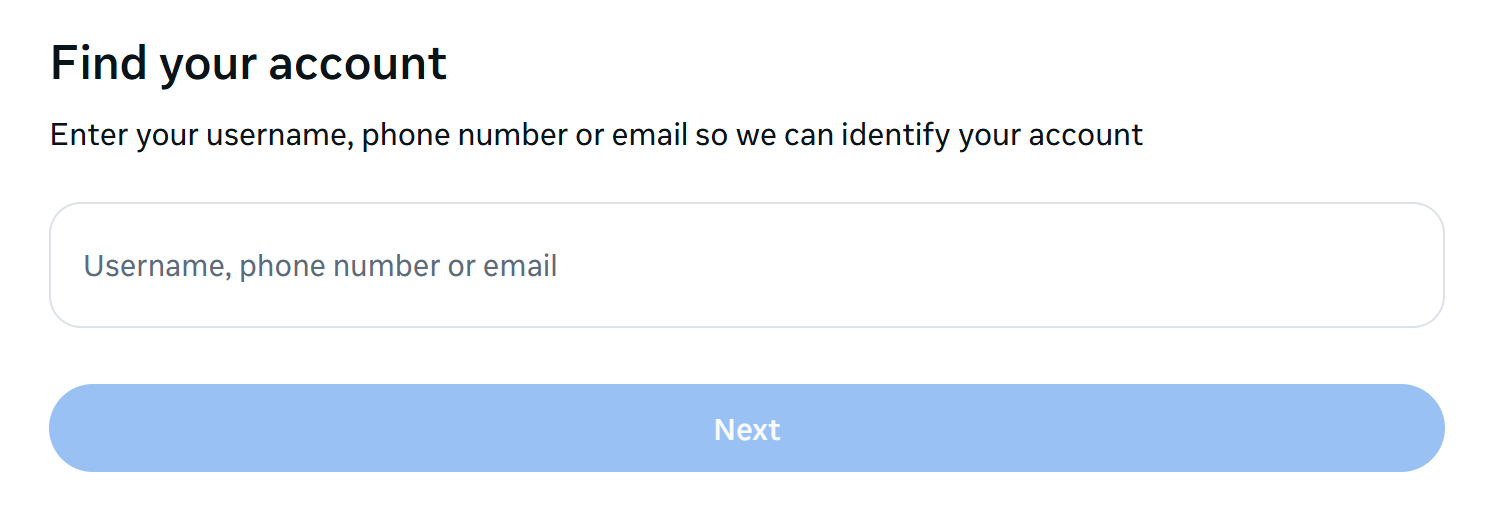
Step 2: Enter account information
Enter any information you remember about the account: username / email / phone number
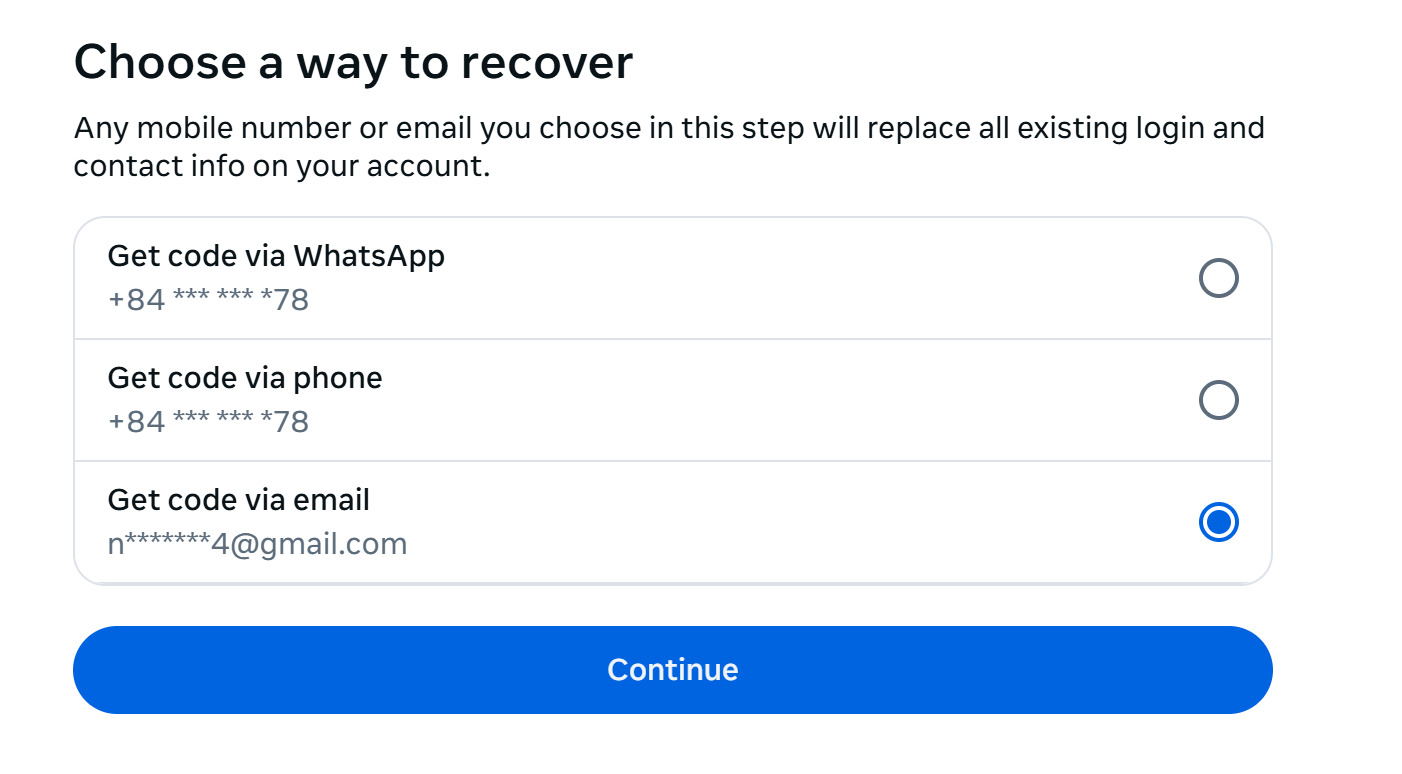
Step 3: Verify your information
-
Choose an appropriate contact method
-
Follow Instagram’s instructions sent to your contact information.
Processing time: 3-7 days.
4. Why do Instagram accounts get hacked?
Most hacked Instagram accounts are not due to system errors but unsafe usage habits. Below are the most common causes.
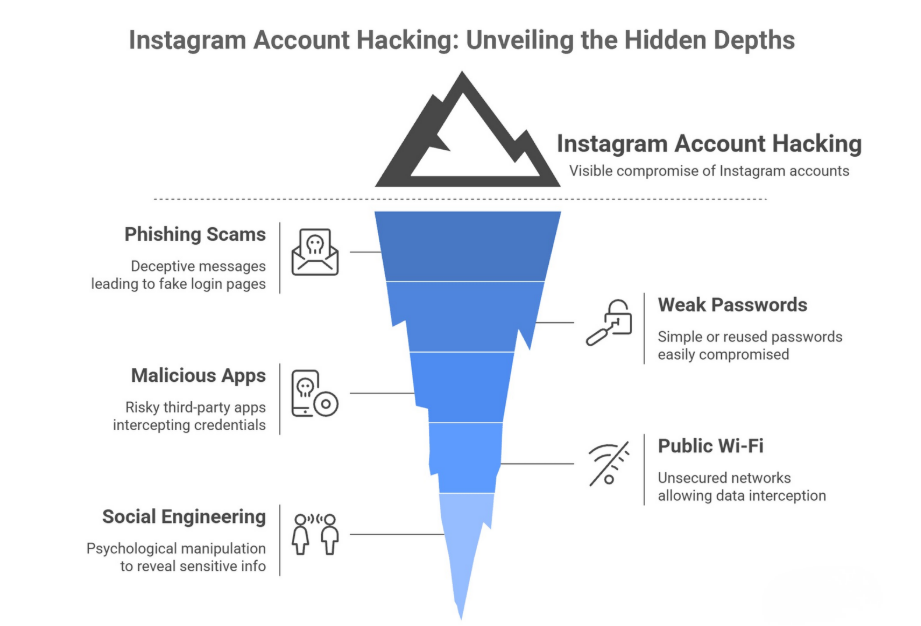
- Using weak passwords or the same password across multiple platforms: If one platform suffers a data breach, hackers may attempt to log into Instagram using that same password. Simple passwords such as birthdays, names, or predictable number sequences increase the risk.
- Clicking on phishing links: Hackers often impersonate emails or messages claiming “You violated copyright,” “Your account will be locked,” or “You won a prize.” Logging in through fake pages allows them to steal your credentials immediately.
- Granting access to untrustworthy third-party applications: Apps that increase followers, auto like, show profile visitors, or unofficial engagement tools may request account access. If the app is not trustworthy, your login information may be exploited.
Understanding these causes helps you not only handle a hacked Instagram account but also proactively prevent it in the future.
5. How to secure your Instagram account after recovery
Recovering your account is only the first step. If you do not strengthen security afterward, the risk of being hacked again remains.
- Enable two-factor authentication (2FA): You should use an authentication app such as Google Authenticator instead of SMS. Authentication apps generate codes directly on your device, making interception more difficult.
- Check login activity: Go to the security settings to review logged-in devices and locations. If you see unfamiliar devices, log them out immediately.
- Update contact information: Make sure the linked email and phone number are active and under your control. If necessary, change your email password as well.
- Save backup codes: Instagram provides backup codes for situations when you cannot receive authentication codes. Store them securely.
- Do not click on suspicious links or install unknown applications: Avoid logging in through intermediary websites or granting access to unofficial third-party apps.
Proactive security is the best way to prevent your Instagram account from being hacked again.
6. Conclusion
Having your Instagram account hacked is an unfortunate incident, but it is not impossible to resolve. In most cases, recovery is possible if you act quickly and follow the proper verification process.
To reduce future risks, use strong passwords, enable two-factor authentication, and avoid clicking on suspicious links or using unverified applications. At the same time, comply with Instagram’s policies to avoid unwanted account disablement.
Being proactive about security is the best way to protect your account in the long term.
>>>> READ MORE:
- How to create multiple Instagram accounts on one device: Complete A-Z guide
- What is Instagram shadowban? How to know if your account is shadowbanned
7. FAQ
1. Can I get my hacked Instagram account back?
Yes. If you can verify your identity through email, video selfie, or ID, Instagram may support account recovery.
2. What if the hacker changed my email?
Check the security notification email from Instagram to undo changes if still valid. If not, use identity verification to submit a recovery request.
3. How do Instagram accounts get hacked?
Common methods include phishing, weak passwords, data leaks, unsafe third-party apps, and phone number takeover.
4. What should I do immediately after being hacked?
Use Instagram’s official recovery tools and complete identity verification as soon as possible.
5. Is it guaranteed that I can recover my account?
Recovery depends on whether you still control your email, phone number, or can verify your identity.6. How long does account recovery take?
Usually 1-3 days. It may take longer if additional verification is required.
7. Can hackers delete my Instagram account?
They may request deletion if they control the account. However, Instagram typically provides a waiting period before permanent deletion.
8. Does Instagram help with hacked accounts?
Yes. You can visit instagram.com/hacked or use the in-app reporting system to request support.