
Twitter/X locks accounts primarily to protect the ecosystem from bots, spam, and unusual automation behavior. Most cases are not due to system errors but security signals or behavior deemed risky. This article explains clearly why a twitter account locked, provides step-by-step instructions to restore access, and how to rebuild trust after unlocking. You will also learn how to use Twitter/X safely to avoid being flagged again.
1. Why is your twitter account locked?
When a twitter account is locked, it doesn't happen randomly. Twitter/X uses an automated system to detect risks based on behavior, devices, and interaction patterns. If one or more signals exceed safety thresholds, the system will temporarily lock it for verification.
1.1. Security risks and unusual logins
This is the most common reason for a twitter account being locked. When the system detects signs of unusual access, protection mechanisms automatically trigger to prevent the risk of account takeover. The following situations often lead to a temporary account lock:
- Logging in from an IP or country that has never appeared before
- Changing devices continuously in a short period
- Using a VPN or Twitter proxy causing unusual location changes
- Logging into multiple accounts from the same risky IP address Twitter/X analyzes access history to build a behavior profile.
When there is a significant deviation from the old pattern, the twitter account will be locked and require owner verification. In most cases, you only need to confirm via email or SMS to reopen it. However, if unusual login patterns persist, the system may repeat the locking process multiple times.
1.2. Violation of platform rules
In addition to security factors, a twitter account locked often stems from behavior deemed as spam or automation. Twitter/X does not just rely on the number of actions but also analyzes the overall activity model. Behaviors easily flagged by Twitter include:
- Mass following or unfollowing in a short time
- Liking or retweeting with high frequency in repeating cycles
- Posting the same content or link multiple times
- Sending direct messages containing advertising links
Even if individual actions do not exceed public limits, performing them rapidly or repeating them in a fixed pattern can still be viewed as bot behavior. Additionally, being reported by many people in a short period is also a high-risk signal. When enough adverse data is gathered, the system will temporarily restrict or result in a twitter account locked to re-evaluate policy compliance.
1.3. Lack of verification and low trust
Not every case of a twitter account locked is due to spam. Many accounts are restricted simply because their initial trust level is too low. Twitter/X evaluates trust based on basic verification factors. If these factors are missing, the account is easily placed in a high-risk group. Common situations:
- Email not yet verified
- No linked phone number
- Incomplete profile, missing avatar or bio
- New account but rapidly increasing followers and posting heavily on the first day
The algorithm views this as an unnatural growth model. When risk signals exceed the threshold, the twitter account is locked and you need to verify the Twitter account to unlock it.
Therefore, before accelerating activity, you should fully complete information and verify security factors. This helps the system record the account as a real user rather than an automated account.
1.4. Unnatural interaction patterns
Twitter/X does not just measure the number of actions. The system analyzes the depth and quality of interaction to determine if the account is a real user. When the activity pattern is unnatural, the risk of a twitter account locked will increase. Signs that an account is sending risk signals include:
- Only retweeting without ever commenting
- Not participating in two-way conversations
- Interacting at fixed time slots every day
- Posted content is unrelated to following behavior
The algorithm looks for diversity and naturalness in behavior. A real account usually has varied responses, changes topics, and has personalized interactions. If all activity revolves only around mechanical engagement increases, the system may view this as automated behavior. In that case, the twitter account was locked to re-evaluate safety and policy compliance.
2. How to open a twitter account locked
When a twitter account locked, it is important to follow the correct process. Incorrect actions or sending multiple duplicate requests can prolong the review time. Below are the recovery steps in order of priority.
Step 1: Check the lock status
Log in to Twitter/X and carefully read the notification displayed on the screen.
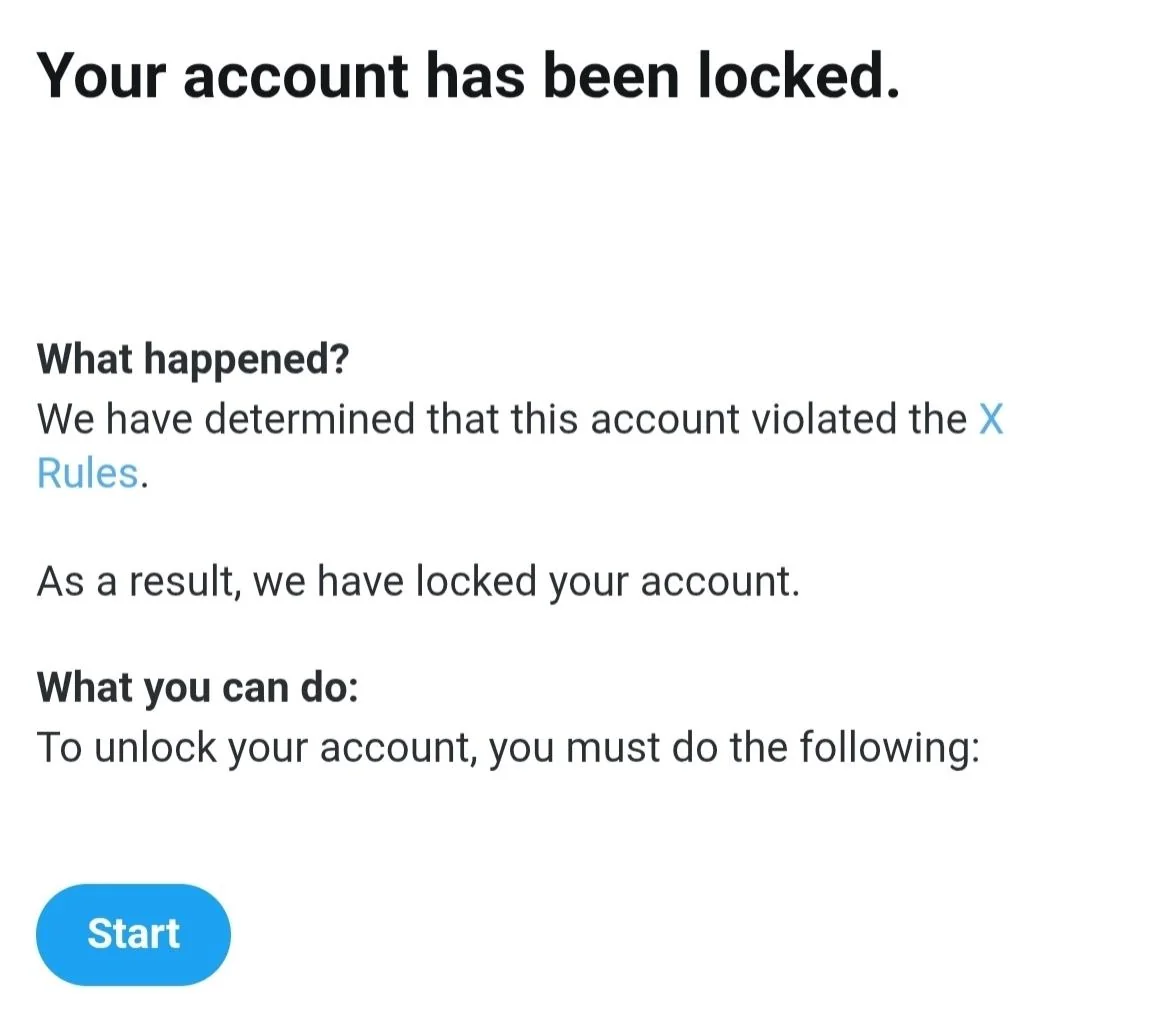
You need to distinguish between:
- Locked: Temporarily locked for verification
- Suspended: Suspended due to serious violations
The case of a twitter account suspended is more complex and requires a separate appeal process. If the account is only locked, the recovery rate is usually higher and processed faster.
Step 2: Perform identity verification
In most cases, a twitter account locked only requires owner verification. This is a mandatory step before the system restores full access. Common steps include:
- Receiving a verification code via SMS
- Receiving a code via email
- Completing a CAPTCHA
After entering the correct code, the system will reopen access within a few minutes or hours. If there were many previous unusual logins, you may have to change your password before continuing use.
Step 3: Submit an appeal when locked by mistake
If you believe that the account was flagged incorrectly, submit an official support form on the official appeal page.
When writing the appeal content, you should:
- Present it briefly
- Acknowledge that you have read the rules
- Commit to complying with policies
Example: “I am a real user and I believe my account was flagged by mistake. I have reviewed the rules and will comply fully.”
You should not write too long or show an aggressive attitude toward the system.
Special case: Not receiving the verification code
Some users do not receive the SMS or no longer have access to their old phone number. How to handle:
- Re-check the country code and number format
- Wait a few minutes and then request a resend
- Choose email verification if available If it still fails, you must submit a support form and wait for a response from Twitter/X.
During this time, you should not create multiple consecutive requests as it may slow down the processing. Following the above steps correctly will increase the chances of recovery when a twitter account locked without needing complex technical intervention.
You can refer to the following articles regarding similar account lock cases on other social networks:
- Facebook account temporarily locked
- Instagram account suspended
- Reddit account locked
- TikTok account locked
3. Common issues after unlocking
Regaining access does not mean the account is operating completely normally. After a twitter account locked and restored, the system may still apply a temporary monitoring mechanism. Common situations include:
3.1. Follower or following count showing as 0
Many users panic when they see all their followers disappear. In reality, this is usually a data synchronization error after the account is reopened.
Characteristics of this error:
- Follower/Following counts reset to 0
- Unable to view the follower list
- Numbers change constantly when reloading the page
In most cases, the system will automatically restore these within 24-48 hours. You do not need to submit additional support requests.
3.2. Temporary feature restrictions
After successfully unlocking a twitter account, users may be subject to a light Twitter shadowban to evaluate behavior.
Common manifestations:
- Reduced tweet visibility
- Not appearing in search results
- Limited number of follows or likes
This is a temporary restriction state. During this phase, you should avoid using automated tools and do not suddenly accelerate activity.
4. Account rehabilitation: Building trust with the algorithm
After a twitter account is locked and reopened, the system does not completely "trust" it immediately. The algorithm continues to monitor behavior for a certain period. If the previous activity pattern repeats, the risk of being restricted again is very high.
4.1. Stabilizing behavior after unlocking
After a locked twitter account is restored, you need to reduce activity intensity during the first few days. The Twitter/X algorithm is still monitoring behavior patterns to assess safety levels. If you continue mass following or posting dense content, the system may trigger restrictions again.
Maintain a stable device and IP. Keep posting frequency low, turn off Automatic follow Twitter or Automate Twitter outreach tools, and perform interactions manually. Stability during this phase is the key factor in rebuilding trust with the system.
4.2. Increasing real user signals
The algorithm prioritizes accounts with natural and diverse behavior. You should complete email verification, link a phone number, and enable two-factor authentication using a security app. This helps raise the technical trust level of the account.
In addition to security, focus on deep interaction. Participate in conversations, reply to comments, and post content related to a consistent topic. These signals help reduce the risk of a twitter account locked again.
4.3. Cleaning third-party app access
Many cases of a twitter account locked do not come from direct actions but because automation tools still have access permissions. Old applications may silently send API requests and create unusual behavior.
You should check the connected apps section in the Twitter/X settings. Remove auto-follow tools, auto-DM, or engagement boosting services that are no longer in use. Revoking all unnecessary access permissions will help eliminate risk signals and stabilize the account in the long run.
5. How to prevent a Twitter/X account locked in the future
Successful recovery is only the first step. If you do not change your usage habits, a twitter account locked situation may recur. Sustainable prevention requires a combination of both technical and behavioral factors.
5.1. Increasing security trust
Twitter/X evaluates trust levels based on verification information and security history. The more complete the authentication, the lower the risk of being flagged.
You should:
- Link a clean email with stable access
- Add a personal phone number not used for multiple accounts
- Enable two-factor authentication (2FA)
Prioritize using an Authenticator app instead of just receiving codes via SMS. This will help reduce the risk of account takeover and limit the status of a twitter account locked due to security suspicions.
5.2. Adjusting usage habits to avoid being locked again
Most cases of a recurring twitter account locked do not stem from system errors but because users continue to maintain old behavior patterns. The Twitter/X algorithm evaluates risk based on long-term data, not just a few individual actions.
You should control the growth rate. Do not follow too many accounts in one day. Do not like or retweet with high frequency in a short period. Sudden growth, especially for new accounts, is always a sensitive signal.
Additionally, maintain a stable login environment and limit continuous IP changes. Avoid logging into multiple accounts on the same device or network with a history of risk. If you are forced to manage multiple Twitter accounts on one device, you should consider using antidetect browser tools.
Most importantly, create a natural interaction model. Combine posting, commenting, and replying, rather than just focusing on increasing metrics. If you have to manage multiple social media accounts, you must know how to manage them correctly. When behavior resembles a real person, the risk of a twitter account locked will decrease significantly in the long run.
5.3. Controlling tools and automation
If using third-party tools, ensure they comply with Twitter/X policies. Not all automated services are safe.
Before using them, you should:
- Check the reputation of the provider
- Limit interaction speeds to human-like levels
- Monitor activity logs to detect abnormalities
Uncontrolled automation is the leading cause of a recurring twitter account locked. Tight control of this factor helps the account remain stable in the long term.
6. Conclusion
A twitter account locked usually stems from unusual security signals or behavior that the system evaluates as bot-like. Following the correct verification process, submitting an appeal when necessary, and patiently waiting for a response from Twitter/X are key factors in restoring access.
After unlocking, you need to stabilize behavior, increase real user signals, and clean up all third-party applications with access rights. Prevention is always more important than troubleshooting. By maintaining safe usage habits and complying with policies, the risk of a twitter account locked in the future will be significantly reduced.
7. FAQ
1. How long is a twitter account locked?
The duration a twitter account locked depends on the specific cause. If it is just a security verification, the account can be opened immediately after entering the confirmation code. For behavioral errors, the time can range from 12 hours to 7 days. In the case of a permanent lock, it will not automatically reopen unless you submit an appeal.
2. Can I unlock Twitter without a phone number?
Yes, but the process is more complex. You need to access the Twitter/X support center and submit a complaint. In the content, clearly explain that you no longer have access to the phone number or are not receiving the code in your area. The system may request verification via email or the provision of identification documents.
3. Why is the account locked for "suspicious activity" even though I did nothing?
The Twitter/X algorithm can flag an account when it detects continuous IP changes due to VPN or proxy for Twitter, logins from strange devices, or signs of unauthorized access. Even if you do not spam, unusual security signals can still result in a twitter account locked temporarily for verification.
4. Why are followers and following at 0 after unlocking?
This is usually a data display error after a twitter account locked or restricted. The system needs time to resynchronize information. The number of followers will automatically restore within 24–48 hours. During this time, you should not edit your profile or make major changes.
5. What should I do if I don't receive the verification code?
Check if the phone number is blocking messages from short-code senders. If the option is available, request the code via a voice call. You should wait at least 2–4 hours before trying again to avoid being restricted on the frequency of sending codes.
6. Does using third-party apps cause an account to be locked?
Possibly. If an application performs automated behaviors such as increasing followers, sending mass messages, or mass deleting tweets, a twitter account locked is a high risk. You should only use applications from official partners and regularly check access permissions in the security settings.
7. Should I create a new account while the old one is locked?
You should not. Twitter/X can track IP, device, and browser information. Intentionally creating a new account to bypass a lock can lead to both the old and new accounts being permanently suspended.
8. How many times can it be locked before being permanently suspended?
Twitter/X does not publish a specific number. However, if a twitter account locked repeats many times for the same behavior such as spam or automation, the algorithm will evaluate this as an intentional violation and move it to a permanent suspension status.






