



When watching videos on YouTube, sometimes you will encounter a black screen with the message “This video is unavailable - Error Code 4”. The annoying thing is that this situation can still happen even when your internet connection is working normally.
In this article, Hidemyacc will explain in detail the causes of the This video is unavailable. Error Code: 4 error, and guide you through effective ways to fix it on computers, phones, and web browsers.
1. What is "This video is unavailable. Error Code: 4"?
The message This video is unavailable. Error Code: 4 is actually a response from the system when the data communication process between your device and the server fails. This error usually occurs suddenly right after you click to play a new video, or when you are switching to a higher quality format.
The clearest sign is that the video player screen goes black, displaying a continuously spinning loading circle icon in the middle, and ending with a message that the video is unavailable along with error code 4.
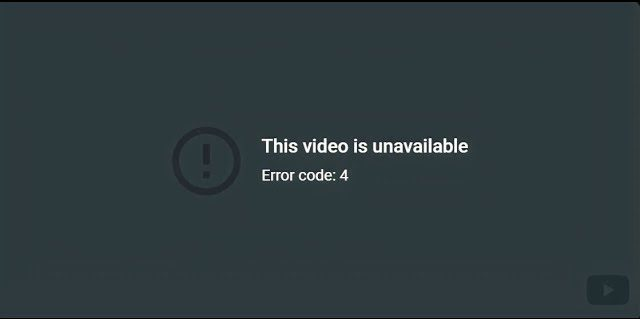
Technically, this error occurs when your device cannot establish or maintain a connection to Google's video hosting server. The core cause usually leans towards network routing issues or conflicts with local software running on the device, which is completely different from a video being removed due to copyright infringement.
2. Common causes making YouTube videos unavailable (Error Code 4)
There are many factors leading to this connection loss. Below are the most common reasons why the browser returns the message This video is unavailable. Error Code: 4.
2.1. Network connection and configuration errors
An unstable network connection is the main culprit. Incorrect or congested Domain Name System (DNS) server configuration on the device will cut off the connection. Besides, firewall systems, VPN software, and Proxies might mistakenly block the platform's data stream. Additionally, fiber optic cable breaks from the Internet Service Provider or overloaded routers can also prevent the device from loading the video.
For users using a local network or anonymity tools, misconfigured parameters can cause errors. In this case, you should learn how to set up and bypass YouTube proxy to ensure a stable video data stream.
2.2. Conflicts from browser extensions
If you are using ad blockers, they might interfere too deeply into the code and disrupt the data loading stream. Scripts from Tampermonkey, security plugins, or tracker blockers also have the potential to break the video player and cause the This video is unavailable. Error Code: 4 error.
2.3. Corrupted cache data or cookie files
When the current login session encounters a system error or the browser cache storing old records is corrupted, outgoing connection requests will be immediately rejected by the server.
2.4. Video decoder or graphics card driver errors
This issue occurs when your browser or operating system is incompatible and cannot decode the format of the video being played, leading to a black screen and the This video is unavailable. Error Code: 4 error.
2.5. Errors from YouTube's system or CDN
Sometimes the issue is not with your device. YouTube uses a Content Delivery Network (CDN) to host videos across many different servers. If a server cluster is overloaded or experiences a temporary error, the video may not play and display the message "This video is unavailable. Error Code: 4".
3. How to fix the "This video is unavailable. Error Code: 4" issue
When encountering the This video is unavailable. Error Code: 4 error, you should try troubleshooting methods from simple to advanced. In many cases, just a few basic actions can help the video work normally again.
3.1. Quick fixes
Before intervening deeply into the system, try the following three basic actions to see if the video works again:
- Reload the page: Use the hard refresh shortcut (Ctrl + F5 or Cmd + Shift + R) to force the browser to load fresh data from the server.
- Switch to a different network source: Temporarily disconnect from Wi-Fi and use a 4G/5G mobile hotspot.
- Change the video resolution: Increasing or decreasing the resolution will force YouTube to reload the video stream from another server. This sometimes helps the video play normally when one server is overloaded.
If the video still doesn't play after these quick fixes, the cause might lie in the network configuration or software on your device. Then you need to check deeper using the methods below.
3.2. Adjust network configuration
If the "This video is unavailable. Error Code: 4" error stems from the network connection, you can try adjusting some of the system settings below to restore the data transmission line.
- Change the DNS server: Switch to Google's system with IPs 8.8.8.8 and 8.8.4.4 or Cloudflare's 1.1.1.1 to increase response speed and reduce connection errors.
- Adjust VPN and Proxy: Temporarily disable the VPN or proxy software running on your machine. Conversely, if your regular network is limited by geographical barriers or administrators, using tricks to unblock YouTube combined with turning on a VPN will help reroute the data stream past the bottleneck.
- Restart the Wi-Fi Router: This action helps refresh the local IP address and free up the network device's memory.
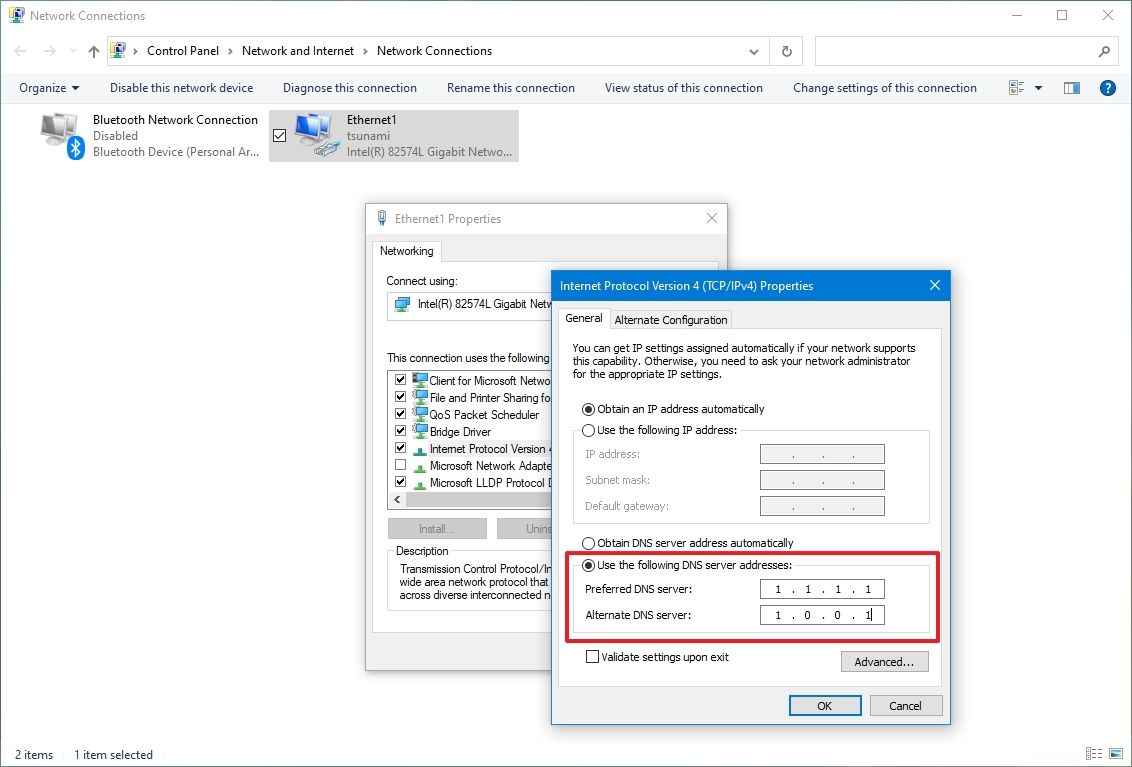
After changing these network settings, reload the video page to check if the "This video is unavailable. Error Code: 4" error still appears.
3.3. Manage extensions and the browser
Extensions sometimes interfere directly with the video player's code. Therefore, checking and temporarily disabling unnecessary plugins can help fix the error.
- Try playing the video in an incognito tab to disable browser extensions. If it plays normally, the error is caused by an extension.
- Temporarily disable ad blockers, Tampermonkey.
- Update the browser to the latest version.
If the video works normally after disabling extensions, you should re-enable the plugins one by one to determine exactly which extension is causing the error.
3.4. Clear YouTube's cache and cookies
Instead of clearing all browsing data, you should go to your browser settings and delete only the cookies for the YouTube domain. This helps fix connection errors without logging you out of other websites.
3.5. Update graphics card drivers
If you suspect the issue arises from a video decoder error, you need to download and install the latest graphics driver version from your hardware manufacturer's homepage.
3.6. Try playing the video on a different browser
In some rare cases, the This video is unavailable. Error Code: 4 error does not stem from your device but from YouTube's server system or Content Delivery Network (CDN). Therefore, cross-checking using the following methods will help you determine the cause more accurately.
- Open other videos on the same platform.
- Check system status pages like Downdetector.
- Try opening this platform using a completely different device or network.
If many people encounter the error at the same time, it is highly likely that the system is experiencing a temporary issue and you just need to wait for Google to fix it.
4. When can't you fix this error yourself?
Even after trying many troubleshooting methods, there are still some cases where users cannot handle the This video is unavailable. Error Code: 4 error themselves. The cause at this point usually lies within the video itself or settings from the channel owner.
- The video has been deleted or set to Private by the channel owner.
- The video is blocked from displaying due to geographical restrictions.
- The channel owner disabled the feature allowing embedding on third-party websites. Additionally, if a platform policy violation causes a YouTube account to be suspended, all videos belonging to that channel will also be disabled and return an error code.
In these cases, the This video is unavailable. Error Code: 4 error cannot be fixed from the viewer's side. The only way is to find a different version of the video or wait for the channel owner to change the content settings.
5. How to prevent the "This video is unavailable. Error Code: 4" error from recurring
To avoid interruptions in your video viewing experience in the future, you should establish and maintain safe device usage habits. Here are the things to do:
- Update software regularly: Always use the latest version of the web browser and mobile apps to ensure compatibility and receive timely system patches.
- Clear browsing data periodically: Clear your cache and cookies about once a month. This helps the browser run smoothly, without getting stuck on old login sessions or scripts that cause errors.
- Be selective with extensions: Only install truly necessary extensions from reputable developers. Absolutely avoid turning on two or more ad blockers at the same time as they will conflict with each other and break the video player.
- Lock in a stable network configuration: Set Google's or Cloudflare's DNS server as the default on your device instead of using the Internet Service Provider's default system to maintain smooth connection speeds.
These habits not only help avoid video errors but also increase your overall browsing speed. Especially for content creators who are managing multiple YouTube channels on one account, maintaining a clean and stable network connection following the steps above is vital to keep the system uninterrupted.
6. Conclusion
The This video is unavailable. Error Code: 4 error is usually related to network connection issues, extension conflicts, or corrupted browser data. In most cases, reloading the page, changing networks, or disabling extensions can solve the problem.
Additionally, to scale your presence across multiple platforms professionally, you can explore how to manage multiple social media accounts without getting banned.
7. FAQ
1. Does using Virtual Private Network (VPN) software directly cause this error?
Yes. This software can misroute IP addresses or congest the local network, interrupting the video data packet downloading process.
2. Will this connection error automatically disappear after a period of time?
It might resolve itself. If the cause is an overloaded Google server or an ISP connection issue, the error will automatically disappear when the network system stabilizes again.
3. Is Error Code 4 caused by YouTube crashing?
Very rarely. Although Google's content delivery system sometimes gets congested, most cases reporting error code 4 originate from the viewer's device, personal network, or browser extensions.
4. Why does only one video get the error while others can still be watched?
Because video data is distributed and stored across many different server clusters. The server cluster hosting the opened video might be overloaded or under local maintenance, while server clusters hosting other videos continue to operate normally.
5. Is Error Code 4 related to DNS?
Yes. A DNS server configuration that is faulty, incorrectly formatted, or slow to respond is one of the leading reasons why the browser cannot find the exact path to the video.
6. Does the "This video is unavailable. Error Code: 4" error fix itself?
Possibly. If the error stems from a temporary issue with the network system, Google's CDN servers, or the Internet connection, the video might start working again after a few minutes.






