Many people change their proxies, switch User-Agents, and still get challenged by Cloudflare or have their accounts flagged without understanding why. The reason might lie at the connection layer: a JA3 Fingerprint is a fingerprint generated as soon as the browser establishes an HTTPS connection, independent of cookies or JavaScript. This article explains how JA3 works, what websites use it for, and why certain common behaviors easily expose a client to detection systems via JA3.
1. What is a JA3 Fingerprint?
Before diving into the JA3 Fingerprint, you just need to know that JA3 is a type of TLS Fingerprint. When accessing a website that uses HTTPS, the browser and the server perform a TLS Handshake to establish a secure connection. During this process, the browser sends certain information about how it supports the TLS protocol. This information can be used to create a TLS Fingerprint.
If you want to learn more about TLS Fingerprints and the TLS Handshake, you can read the article "What is TLS Fingerprinting?" on the Hidemyacc blog. In this article, we will focus specifically on the JA3 Fingerprint and how websites use it to identify clients.
JA3 is one of the most common methods for generating a TLS Fingerprint. Instead of analyzing the entire TLS Handshake process, JA3 only extracts a few key fields from the browser's very first packet, then constructs a short hash string. This allows the website to quickly recognize the type of client connecting.
Simply put, every time you open a website, the browser sends specific information to the server to establish an HTTPS connection. The JA3 Fingerprint is the fingerprint created from this exact information.
It is crucial to understand that JA3 is not used to identify who you are. It only helps the website recognize what type of browser or tool you are using.
For example, two people using the exact same version of Chrome on the same version of Windows will typically share the identical JA3 Fingerprint. Conversely, if an automated tool configures its connection differently than standard Chrome, the website will easily detect the difference right as the connection is initiated.
Many also mistakenly assume that JA3 can collect comprehensive hardware information about the device. In reality, it does not. JA3 only records how the browser sets up the TLS connection and has nothing to do with details like IP addresses, cookies, or hardware specifications.
| What JA3 records | What JA3 does not touch |
|---|---|
| Security protocol version | IP address |
| List of ciphers the browser supports | Cookies |
| Accompanying security extensions | Browser drawing traces (Canvas) |
| Technical parameters of encryption keys | System fonts |
| Screen resolution |
2. How does a JA3 Fingerprint work?
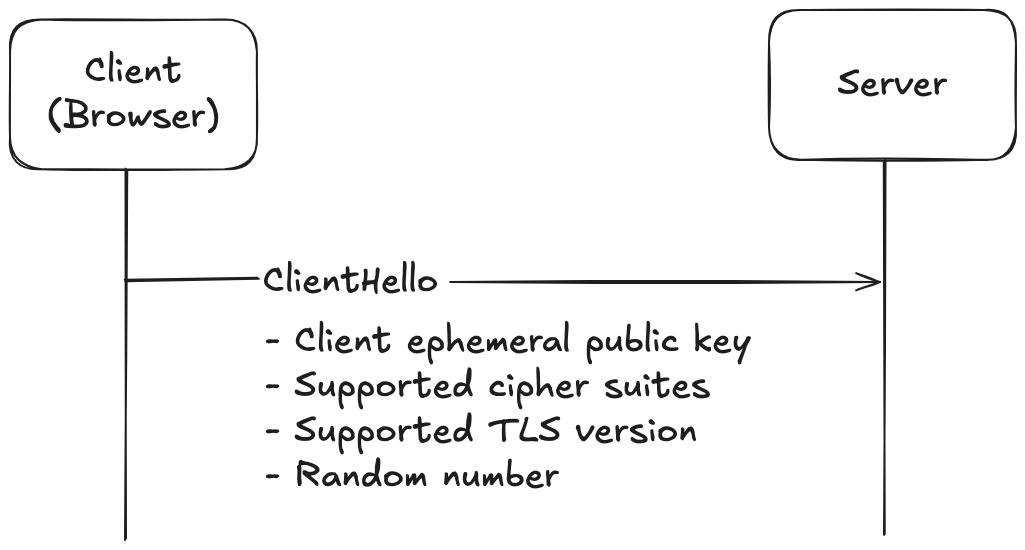
Step 1. The browser sends the ClientHello packet
Right at the start of an HTTPS connection, the browser sends an initial packet named ClientHello to the server.
This packet contains information about how the browser supports the TLS protocol, enabling the server to select the appropriate encryption method for secure data exchange. This is also the data source that JA3 uses to generate the fingerprint.
Step 2. JA3 extracts the required information
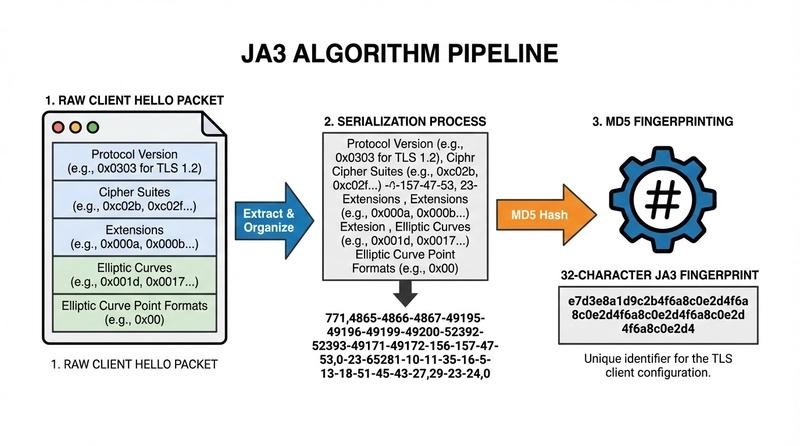
JA3 does not utilize all the data within the ClientHello packet. Instead, it extracts specific critical fields and concatenates them into a string following a precise order.
For example:
769,47-53-5-10,0-11-10-35,23-24,0
This raw string is not yet the final JA3 Fingerprint, but rather the input data used to construct it.
If you use Chrome, you might have heard of GREASE. This is a mechanism where Chrome inserts random values into the ClientHello packet to test server compatibility and fault tolerance.
However, JA3 automatically filters out these values before processing. Therefore, the same version of Chrome will produce a stable JA3 Fingerprint rather than changing on every single connection.
Step 3. Generating the JA3 Fingerprint
After joining the necessary fields, JA3 applies the MD5 hashing algorithm to produce a fixed-length hash string.
For example:
e7d705a3286e19ea42f587b344ee6865
Websites only need to store or compare this short hash string instead of parsing all the detailed fields in ClientHello. This speeds up the client identification process and saves server resources.
Notably, because the JA3 Fingerprint is created right as the HTTPS connection is established, it happens before the website even loads its content and does not require JavaScript. As a result, the website can identify the type of client from the very first seconds of the connection process.
3. Why do websites use JA3 fingerprints?
The core objective of a JA3 Fingerprint is not to track an individual user's identity. Instead, websites employ it to understand what type of client is connecting and spot anomalies immediately as the HTTPS connection forms.
Here are the most common purposes:
- Detecting automated tools: Many automation frameworks like Selenium, Puppeteer, or headless browsers generate a distinct JA3 Fingerprint compared to standard browsers. This allows websites to detect suspicious automated traffic the moment the connection starts, well before the client finishes downloading the page or performs any actions.
- Preventing fraud: JA3 Fingerprints are widely used to detect potential fraudulent activities. For instance, if hundreds of accounts log in or claim promotions using the exact same unusual JA3 Fingerprint, the system can flag it as automated bot traffic controlled by a single script or tool.
- Securing accounts: Certain platforms monitor JA3 Fingerprints during login attempts. If an account traditionally logs in via Chrome but suddenly connects with a totally different JA3 Fingerprint, the system might trigger additional verification steps or implement security measures to protect the account.
- Traffic analytics: Beyond security, JA3 Fingerprinting serves to categorize the types of clients accessing a website. This data helps businesses evaluate the proportion of traffic originating from real browsers, automated scripts, or other applications, providing insight for statistical analysis and infrastructure optimization.
While a JA3 Fingerprint is rarely the sole factor deciding whether to block or allow a connection, it serves as a critical early signal helping websites assess client trustworthiness in the first fractions of a second.
4. Why can a JA3 Fingerprint get you blocked by a website?
Many believe that simply rotating proxies or changing User-Agents will make them invisible to websites. In practice, it is not that simple.
Even when your IP address changes, the JA3 Fingerprint still signals to the website exactly what kind of client software is making the connection. If the JA3 does not mirror a typical browser or contradicts other parameters, anti-bot systems will flag the connection as high risk. Here are the main reasons why:
4.1 Using outdated TLS libraries or mismatched stacks
Many scripts or automated libraries do not utilize the native TLS stack found in Chrome or Firefox. Consequently, the resulting JA3 Fingerprint differs significantly from that of a standard browser.
For example:
- Python Requests and Scrapy rely on OpenSSL, producing a highly characteristic OpenSSL JA3 Fingerprint.
- Node.js, axios, or fetch use the internal Node.js TLS stack.
- cURL has its own unique, easily recognizable JA3 Fingerprint signature.
Even Puppeteer, Playwright, or Selenium can generate a different JA3 than standard retail Chrome in certain environments.
As a result, you could be using premium Residential Proxies and the absolute latest User-Agent, yet security layers like Cloudflare will still trigger a challenge or block the request because the JA3 reveals an underlying automated library.
4.2 Browser Fingerprint and JA3 mismatch
Websites rarely inspect a single fingerprint signal in isolation.
For example, if your User-Agent claims the connection is coming from the newest Chrome browser, but the JA3 Fingerprint matches OpenSSL or a known automation library, it indicates inconsistent browser signatures.
This blatant mismatch is one of the most reliable triggers for anti-bot systems to flag incoming traffic as suspicious.
4.3 Too many accounts sharing a single JA3
If dozens or hundreds of accounts connect using the identical JA3 Fingerprint within a short window, the website will assume they are all being orchestrated by the exact same automated software.
This typically occurs when multiple automated instances run out of the same coding library or standard environment configuration without any variation.
4.4 Proxies coupled with anomalous JA3 signatures
A proxy only alters your routing IP address; it does not change how your client application builds its TLS connection.
Therefore, even with a premium Residential Proxy, a website can still detect inconsistencies if your JA3 Fingerprint looks artificial or conflicts with the rest of your browser fingerprint.
In other words, a clean proxy profile does not automatically translate to a natural JA3 signature.
4.5 Websites look beyond just JA3
To avoid misunderstandings, it is worth noting that very few platforms rely solely on JA3 to block traffic. JA3 is generally one piece of the broader fraud and risk assessment puzzle.
Consider two scenarios. A browser that presents a natural Chrome trace, standard browser fingerprints, a high-quality residential proxy, and human-like browsing patterns will register as very low risk. Conversely, if the User-Agent claims to be Chrome but the connection trace reveals a programming library, paired with a datacenter proxy (datacenter proxy) and a few other anomalies, the system has multiple data points to flag the traffic as a bot.
That is why changing just a proxy or a User-Agent is rarely enough to clear modern anti-bot protections. All your digital identification signals must align consistently.
5. How does a JA3 Fingerprint differ from a Browser Fingerprint?
In addition to JA3, websites use Browser Fingerprinting to identify visitors. Although both are profiling techniques, they operate at completely different layers and collect distinct sets of information.
A JA3 Fingerprint is captured the moment the browser initializes the secure HTTPS connection. On the other hand, a Browser Fingerprint can only be compiled after the website content begins loading and the browser executes client-side JavaScript.
Put simply, the JA3 Fingerprint reflects how the client sets up its network connection, while the Browser Fingerprint reflects the internal characteristics of the browser environment and hardware.
The table below provides a clear comparison:
| Criteria | JA3 Fingerprint | Browser Fingerprint |
|---|---|---|
| Operating Layer | Operates at the TLS layer | Operates inside the browser engine |
| Initialization Time | Created at the start of the HTTPS handshake | Created after the page loads |
| Technical Requirement | Does not require JavaScript | Strictly dependent on JavaScript |
In practice, modern security firewalls combine both JA3 and Browser Fingerprinting. If these two signals don't match up logically, the chance of your connection getting flagged rises significantly.
6. How do you make a JA3 Fingerprint look natural?
Since the JA3 Fingerprint is derived from how a client handles TLS, making it look natural requires using a client implementation that behaves exactly like a common mainstream web browser.
6.1 Use a genuine browser
The most straightforward method is to use a regular retail browser like Chrome or Firefox.
These applications utilize their native, built-in TLS stacks, meaning the resulting JA3 Fingerprint naturally matches millions of other everyday internet users. You won't need any special configurations to achieve a natural connection profile.
However, this manual approach is highly impractical if you need to manage multiple accounts or automate tasks at scale.
6.2 Synchronize the TLS stack programmatically
If you are building scrapers or automation tools using Python, Go, or other development languages, you should use specialized packages designed to replicate browser TLS stacks.
Popular open-source libraries like tls-client or curl-impersonate can help structure network connections to mimic Chrome or Firefox, reducing discrepancies in the resulting JA3 Fingerprint.
While effective for developers, this route demands a deeper understanding of programming and custom TLS parameter configurations.
6.3 Avoid outdated TLS configurations
Some legacy libraries run on outdated TLS versions or utilize obsolete cipher suites. This makes their JA3 Fingerprints stand out dramatically compared to modern web browsers.
Make it a practice to update your development packages regularly and use standard, widespread TLS settings to avoid easy detection.
6.4 Maintain total fingerprint consistency
Remember that the JA3 Fingerprint is just one of many metrics tracked by modern anti-bot setups.
If your JA3 signature indicates Chrome but your browser canvas footprint or IP address point to a completely different environment, firewalls will catch the contradiction.
Ensure that parameters like JA3, hardware fingerprints, and IP data are structurally consistent with one another instead of tweaking only one isolated factor.
6.5 Use an antidetect browser
For operations requiring the management of multiple accounts simultaneously, an antidetect browser is a far more robust choice than standard retail software.
Antidetect browsers are built to isolate unique browser profiles for every individual account, ensuring that parameters like Browser Fingerprints, User-Agents, and other identification signals operate in complete, logical alignment.
Many modern antidetect choices are built directly on top of the Chromium source code. Because of this architecture, their underlying TLS connection sequence naturally replicates standard Google Chrome, providing a clean JA3 Fingerprint without requiring manual network tweaking from the user.
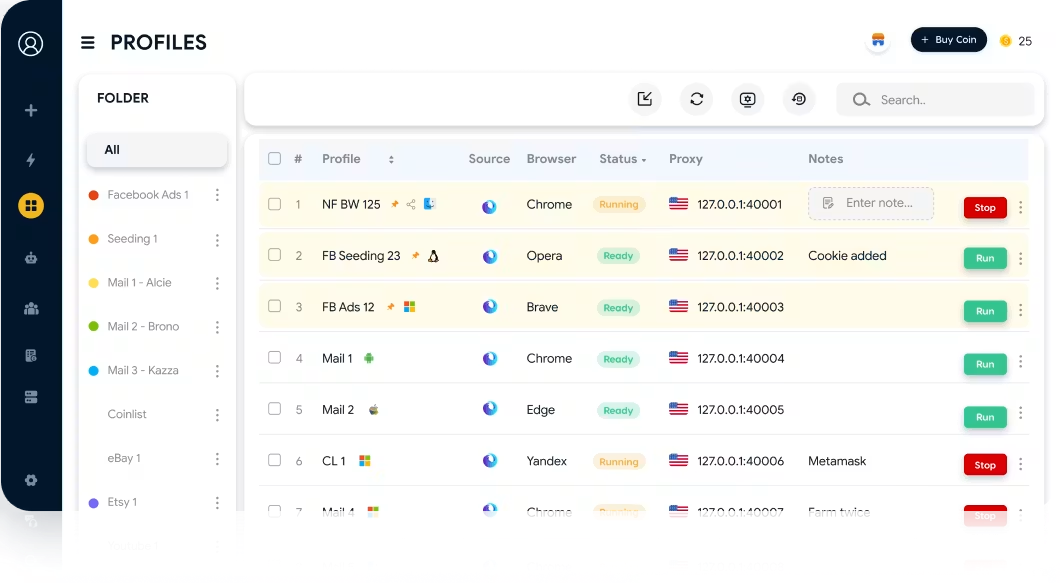
A highly popular solution in this category is the Hidemyacc antidetect browser. This tool allows you to launch multiple independent browser profiles, each configured with its own custom fingerprint environment isolated from the others. By maintaining absolute harmony between the JA3 Fingerprint, Browser Fingerprint, and related variables, Hidemyacc significantly cuts down the risk of being flagged by anti-bot frameworks while managing extensive account pools.
Download Hidemyacc here:
6.6 Test JA3 fingerprint before running operations
Before launching web scrapers or deploying large automation workflows, you should inspect your JA3 Fingerprint configuration to catch any potential anomalies early.
Common utility tools include:
- ScrapFly JA3 Fingerprint Tool to view the JA3 hash and underlying TLS parameters generated by the client.
- JA3er to lookup and map your current JA3 Fingerprint against a database of known client signatures.
- Wireshark to capture and dissect raw TLS ClientHello packets when deep low-level analysis is required.
Proactive auditing helps detect underlying TLS implementation discrepancies early on, minimizing the risk of getting flagged by target platforms when your system goes live.
7. Limitations of JA3 Fingerprint
While JA3 fingerprinting remains a highly popular detection technique, it is subject to several key constraints.
- Inability to pinpoint specific individuals: A JA3 Fingerprint purely captures how a client software establishes its network security handshake, not the unique identity of a person. Consequently, thousands of separate devices running the identical build of Chrome on the same operating system version will yield matching JA3 signatures. This means platforms cannot rely solely on JA3 to isolate a specific user entity.
- Susceptibility to browser updates: The signature remains bound to the browser's exact network implementation. If Chrome, Firefox, or other clients rollout updates to their underlying security protocols or alter how the ClientHello parameters are dispatched, the resulting JA3 Fingerprint shifts too. Thus, an unchanged machine can begin outputting a new JA3 hash after an automatic browser version upgrade.
- Degrading reliability over time: Since late 2023, Google Chrome introduced dynamic randomization regarding the exact sequence order of its TLS Extensions fields inside the ClientHello frame. As a consequence, a single browser instance can produce completely distinct JA3 Fingerprints across separate connections. This fragmentation has significantly reduced the stability of JA3, making it difficult to pinpoint a specific client type via a single static hash value.
Despite its ongoing wide implementation, JA3 no longer functions as the sole absolute standard in contemporary profiling environments. To compensate for these vulnerabilities, a successor methodology named JA4 was created and is being increasingly deployed by threat intelligence networks.
8. How do JA3 and JA4 differ?
It was Chrome's extension sequencing randomization that ultimately impaired the reliability of JA3 when inspecting modern web browsers. In response to this gap, a separate research group at FoxIO developed the JA4 standard, officially introducing it to the industry in September 2023.
The core concept behind JA4 is quite simple. Rather than formatting hashes based on the exact positional order of transmission data, it actively sorts and normalizes the structural parameters into predictable blocks before generating the footprint. Because of this pre-sorting protocol, Chrome's internal field randomization no longer corrupts the final fingerprint evaluation.
The structural variations between the two methods are summarized below:
| Criteria | JA3 | JA4 |
|---|---|---|
| Introduction Year | 2017 | 2023 |
| Data Utilization | Raw fields as they appear in ClientHello | Pre-sorted and normalized TLS metrics |
| Sensitivity to TLS Shuffling | High | Significantly lower |
| Signature Stability | Prone to break upon browser engine updates | Highly consistent across modern software versions |
| Deployment Rate | Still extensively integrated in global web layers | Experiencing rapid adoption across leading networks |
This technical evolution does not mean JA4 renders JA3 completely obsolete overnight. In real-world environments, a large volume of websites and defensive firewalls continue to evaluate JA3 hashes due to legacy configurations deployed over the past decade.
Moving forward, JA3 and JA4 are expected to operate side-by-side. Depending on their specific security architecture, applications will either parse a preferred standard or combine data points from both frameworks to calculate connection trust scores.
9. Conclusion
A JA3 Fingerprint serves as an early-stage client profiling tool extracted from how an application orchestrates its TLS connection layer. While it cannot uniquely track down an individual user's real identity, it remains a powerful early warning signal used by websites and automated firewalls to catch anomalous network behavior.
If your daily operations depend on managing large pools of online profiles, you must ensure your JA3 configurations, core hardware fingerprints, and network parameters remain logically unified. Professional software tools like the Hidemyacc antidetect browser streamline this challenge by creating isolated browser containers that maintain realistic digital footprints, successfully lowering the risk of getting caught by modern anti-bot setups.
We hope this overview provided a clear breakdown of what a JA3 Fingerprint is, its internal technical mechanics, and why it continues to play an integral role in contemporary bot detection frameworks.
10. FAQ
1. Can a JA3 Fingerprint uniquely track down a user?
No. A JA3 hash is computed exclusively from the low-level properties found inside the TLS ClientHello packet, which means it remains tied to the software client's network stack rather than the user's personal identity. You can swap proxies or connect via a different VPN, but your JA3 signature will remain unchanged as long as you use the same application executable.
2. Does changing my IP address modify my JA3 Fingerprint?
No. Your JA3 signature is an intrinsic property of the client's network stack implementation and operates independently of your routing IP address or standard HTTP header fields. An automated tool or specific browser build will output the identical JA3 hash regardless of the location endpoint you use.
3. Will turning on a VPN alter my JA3 signature?
No. A VPN simply encapsulates your traffic flow and reroutes your connection through a middleman server, without making any modifications to the actual browser TLS stack. Your JA3 fingerprint will remain identical before and after enabling the VPN tunnel.
4. Do two distinct machines running Google Chrome share the same JA3 hash?
In many scenarios, yes—particularly when both computers are running the exact same version of Chrome on matching operating system editions. However, with the integration of extension shuffling algorithms in recent releases, Chrome now dynamically alters the field sequence structure across connection sequences. Even though their raw JA3 hashes might differ, these connections still retain the core technical characteristics of standard Chrome profiles and behave exactly like real browsers.
5. Is JA3 still relevant now that JA4 has launched?
Yes. JA3 and JA4 are frequently evaluated concurrently within modern threat assessment systems. While JA4 provides superior reliability when handling modern browsers, JA3 remains highly effective at identifying legacy applications and varied custom clients. Comprehensive networks like Cloudflare actively combine both signals.
6. Does a JA3 Fingerprint change when updating Chrome?
Yes, it can. Any time the Chromium development team optimizes the application's underlying security protocols or updates how the TLS ClientHello parameters are dispatched, the resulting JA3 Fingerprint structure is likely to change. This explains why an unchanged system can begin outputting a completely new JA3 hash value following an automatic browser update.