You have changed your proxy to a US IP, but the timezone is still set to GMT+7, and you don't understand why your account keeps getting flagged. This is a common error that many people overlook when setting up a browser profile. It only takes one line of JavaScript for a website to read your timezone, and if it does not match your IP, the platform considers it an immediate anomaly. This article explains what spoofing a timezone is, why it is an indispensable part of fingerprinting, and how to spoof the timezone correctly so the system does not detect inconsistencies.
1. How do websites use timezone in browser fingerprinting?
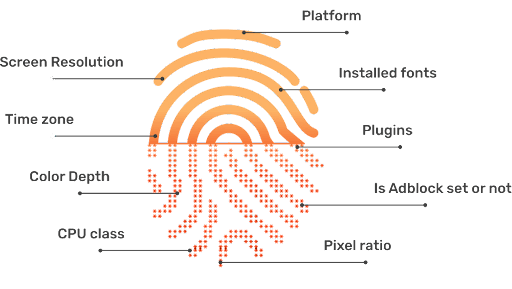
Timezone is not confidential information. It is one of the basic parameters that a browser always provides to a website to support the display of time, calendars, or content tailored to the user's geographical region. However, in browser fingerprinting, the timezone serves not only the user experience but also becomes a signal helping the website evaluate the consistency of the entire browser profile.
The reasons why timezone is always checked by anti-fraud systems.
1.1 Websites can check timezone very easily
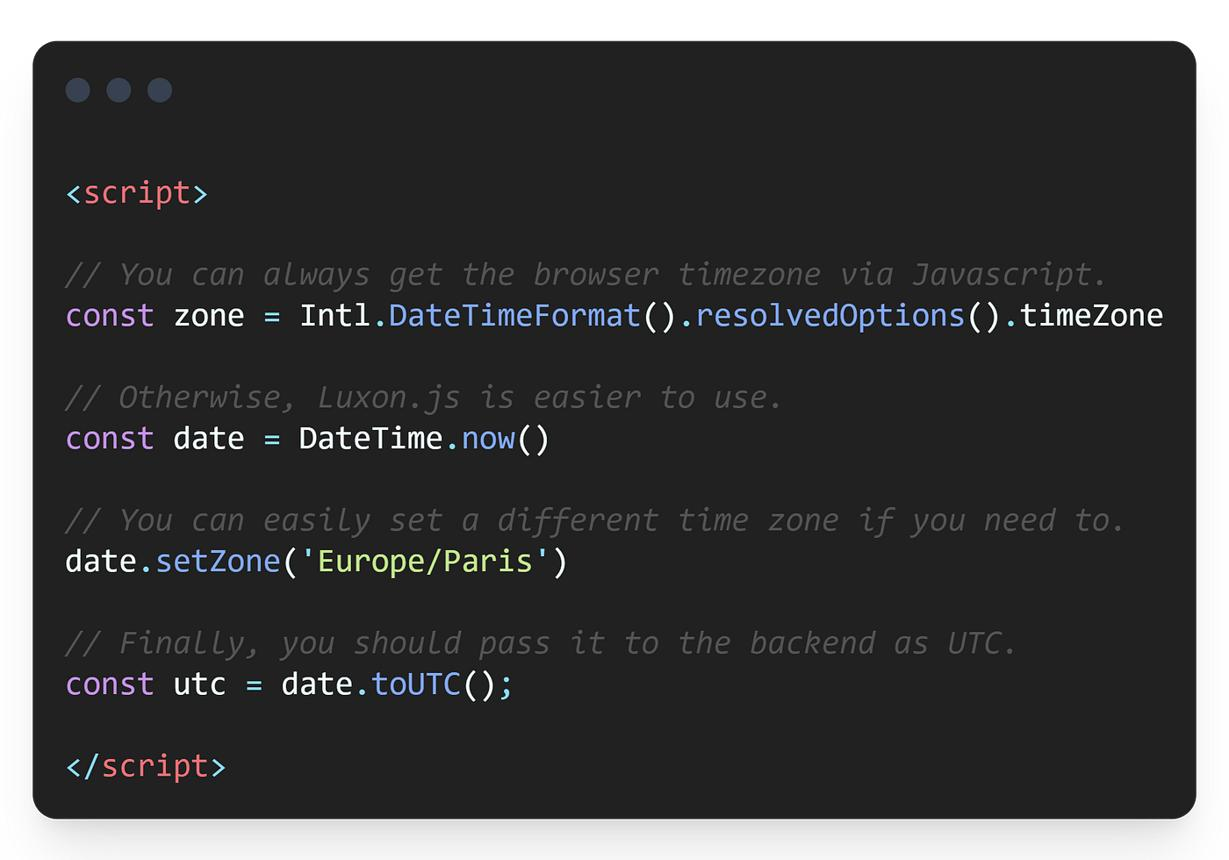
Unlike cookies or login history, websites do not need user permission to read the browser's timezone. With just a few lines of JavaScript, a website can obtain the timezone information the browser is reporting through APIs like Intl.DateTimeFormat().resolvedOptions().timeZone or new Date().getTimezoneOffset().
This process happens as soon as the webpage loads and requires absolutely no login or any action from the user. Therefore, timezone is often among the first parameters collected when a website builds a browser fingerprint.
1.2 A timezone mismatch with the proxy is a sign of anomaly
One of the most common configuration errors is a timezone mismatch, meaning the browser's timezone does not match the geographical location indicated by the IP address.
For example:
- The IP address is identified as being in New York.
- The browser reports the timezone as Asia/Ho_Chi_Minh.
For a website, this is a very easily recognizable anomaly. The system simply needs to compare the IP's location with the timezone returned by the browser, without needing complex analytical algorithms or long-term user behavior tracking.
To mitigate this issue, spoof timezone is used to change the timezone value that JavaScript returns to the website, instead of changing the operating system's timezone. When the browser timezone is synchronized with the proxy's location, the browser fingerprint becomes more consistent, reducing the risk of a timezone mismatch.
It should be noted that spoofing a timezone does not change the IP location. The goal of this technique is to ensure that what the website sees from the browser aligns with the geographical location the IP address represents.
1.3 VPNs change the IP but do not change the browser timezone
Many people assume that simply changing the proxy or turning on a VPN to protect their information completes the location spoofing process. In reality, a VPN primarily changes the routing of network traffic and the IP address the website sees, while the browser's timezone is usually still derived from the current operating system or browser configuration.
This leads to a fairly common situation: the IP is routed through the US, but the browser still reports a Vietnam timezone. Although the proxy is functioning normally, the browser fingerprint still exhibits an inconsistency between the IP location and the timezone.
1.4 DST is a complex layer that many tools overlook
When it comes to timezones, many people only think of the UTC offset, such as UTC+7 or UTC-5. However, in reality, many countries also apply Daylight Saving Time (DST) – a mechanism for adjusting clocks seasonally by adding an hour in the summer and reverting to standard time in the winter. This is a layer that many simple timezone spoofing tools overlook.
Why merely spoofing the UTC offset is not enough:
- The UTC offset is a fixed number (e.g., UTC-5), which does not reflect whether that country observes DST or not.
- During transition seasons, the actual offset changes (UTC-5 becomes UTC-4), but a tool that only spoofs a flat offset will report the wrong time.
If the browser always reports UTC-5 regardless of the time of year, the website can detect the inconsistency between the timezone and the actual time rules of that region.
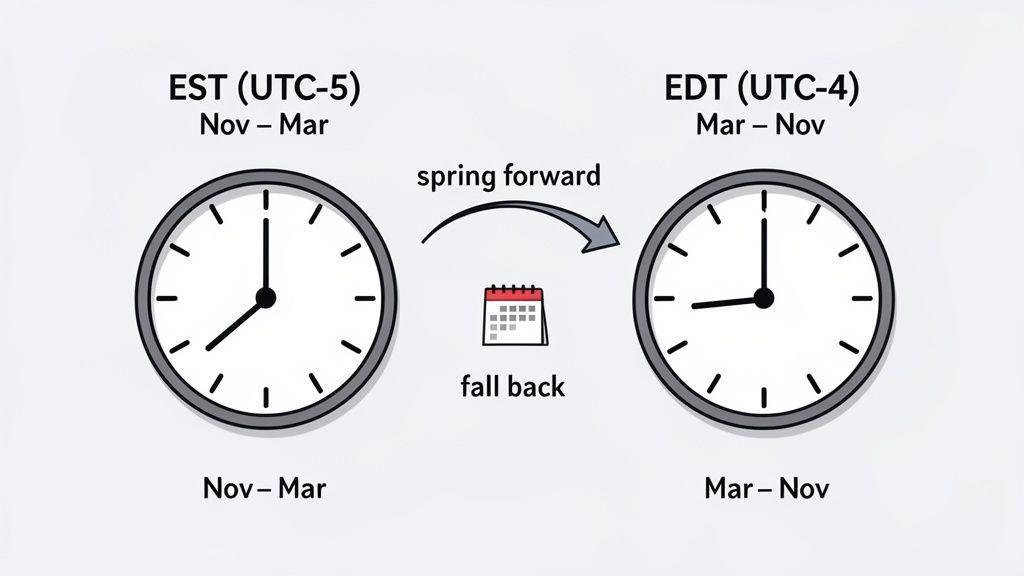
To handle this more accurately, modern browsers and many specialized tools use IANA timezones rather than just saving a UTC offset value.
The IANA timezone is a standard for naming timezones based on geographical regions, such as America/New_York, Europe/London, or Asia/Ho_Chi_Minh. Unlike the UTC offset, which only represents the time difference at a single point, the IANA timezone also encompasses rules regarding Daylight Saving Time and timezone changes for each specific region over time.
As a result, the browser can return timezone information that matches the actual time of the year, helping the browser fingerprint more accurately reflect the environment the website expects. This is also why many current tools prioritize spoofing the IANA timezone over simply changing the UTC offset.
2. How does IP-to-timezone mapping work? Why does the "right" proxy sometimes give the wrong timezone?
Having a proxy located in the correct country does not guarantee that the timezone the website sees will always be accurate. In reality, websites do not determine the timezone directly from the proxy but through an intermediate step called IP-to-timezone mapping.
Websites do not autonomously determine the timezone from the IP address but usually look it up through GeoIP databases such as MaxMind or similar services. These databases map IPs to their corresponding countries, cities, and timezones. This process is completely automatic and independent of the timezone you declare.
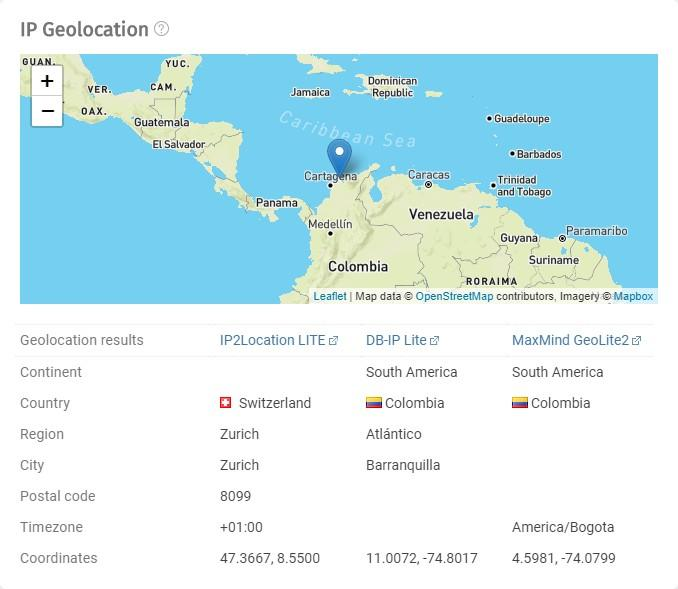
When a user visits, the website will compare the timezone inferred from GeoIP with the timezone reported by the browser. If the two values do not match, the browser fingerprint can be deemed inconsistent.
However, a correct country proxy does not necessarily mean the timezone will always be accurate. Some GeoIP databases may not be updated promptly or might contain inaccurate information.
Some common scenarios include:
- Mobile proxies: The carrier's IP address is often registered at the location of the network center or corporate headquarters, rather than the device's actual location. For instance, a SIM operating in Russia might still use an IP assigned to the US or another region by a GeoIP database.
- Datacenter proxies: An IP address might be registered in one state or city, while the physical server operates elsewhere. Depending on the GeoIP data source the website uses, the inferred timezone from the IP might not accurately reflect the actual location of the server.
- Slowly updated databases: When a new IP range is allocated or transferred to a different provider, GeoIP databases typically need time to update. During this period, websites might still identify the IP according to its old location, leading to inaccurate timezone results.
Therefore, even when using a proxy for the correct country, it is advisable to double-check the timezone the website sees rather than relying solely on the information provided by the proxy provider.
Read more:
- Residential Proxies - How they work and why you should use them
- What is a Datacenter Proxy? Everything about Datacenter Proxies
- Residential Proxies vs Datacenter Proxies: Distinctions and how to choose the right proxy type
3. When is it necessary to spoof timezone?
It is not always necessary to spoof a timezone. However, if a website or platform checks browser fingerprints, synchronizing the timezone with the proxy will help make the browser profile more consistent and reduce unnecessary configuration errors. Below are common situations where spoofing the browser timezone is recommended.
3.1 Managing multiple accounts
When managing multiple browser profiles, each profile is usually assigned a separate proxy. In this case, the timezone must also match the location of the respective proxy.
If 10 profiles use 10 different IPs but all report a GMT+7 timezone, the platform can detect the anomaly and link these profiles together. Besides the timezone, locale and language should also be appropriately configured so each profile accurately reflects the geographical region it is simulating.
3.2 Simulating users in other regions
Spoofing timezone is also useful when needing to simulate a user in a specific country or region.
Some common scenarios include:
- Testing website interfaces or experiences across different markets.
- Verifying landing pages, offers, or content that is only visible in certain countries.
- Checking search results or content personalized by region.
In these cases, merely changing the IP is insufficient. The website can still cross-reference the timezone with the proxy's location to evaluate the consistency of the browser fingerprint.
3.3 Running ads, affiliate marketing, and automation
Platforms like Facebook, Google, or TikTok do not just check the IP address; they evaluate numerous signals within the browser fingerprint. Beyond the timezone, the system can also collect parameters such as proxy, locale, language, WebRTC, Canvas fingerprint, and many other signals to assess the naturalness of the browser environment.
This also applies to automation tools like Selenium, Playwright, or Puppeteer. If the timezone is not synchronized with the proxy, the browser environment can appear less natural and easily result in a timezone mismatch.
It is important to note that spoofing the timezone does not simply help you "avoid detection." It is merely a step in the process of building a consistent browser fingerprint that matches the location the browser profile is simulating.
4. Why do Puppeteer, Playwright, and Selenium easily leak timezone?
Automation frameworks like Puppeteer, Playwright, and Selenium help automate browser operations, but by default, they do not automatically synchronize the timezone with the proxy.
When launching the browser, the timezone is usually inherited from the environment running the automation, such as the operating system on the computer or server (VPS/server). This means that even if a proxy is assigned to another country, the browser may still report the server's timezone.
For example, if you use a proxy in New York but run the automation on a VPS located in Germany or use the UTC timezone, the website might see:
- IP: New York
- Timezone: Europe/Berlin or UTC
This discrepancy easily leads to a timezone mismatch, even if the proxy itself is functioning perfectly.
This is why many people experience situations where the proxy is in the correct country and the IP is clean, but checking on Browserleaks reveals a mismatched timezone. The cause is not the proxy, but rather that the automation environment is still using the default timezone of the OS or server.
To fix this, you need to configure the timezone specifically for the browser instead of letting the framework inherit default settings. Some frameworks support timezone spoofing via API, while antidetect browsers allow you to assign a timezone to each browser profile and can sync it with the proxy, saving time on manual configuration when working with multiple profiles.
5. Common methods for spoofing timezone
Currently, there are multiple ways to spoof the browser timezone, from developer tools to specialized antidetect browsers. Each method has its own operation mechanism, scope of application, and suitability level. Choosing a solution depends on the intended use and the number of profiles to manage.
5.1 Chrome DevTools
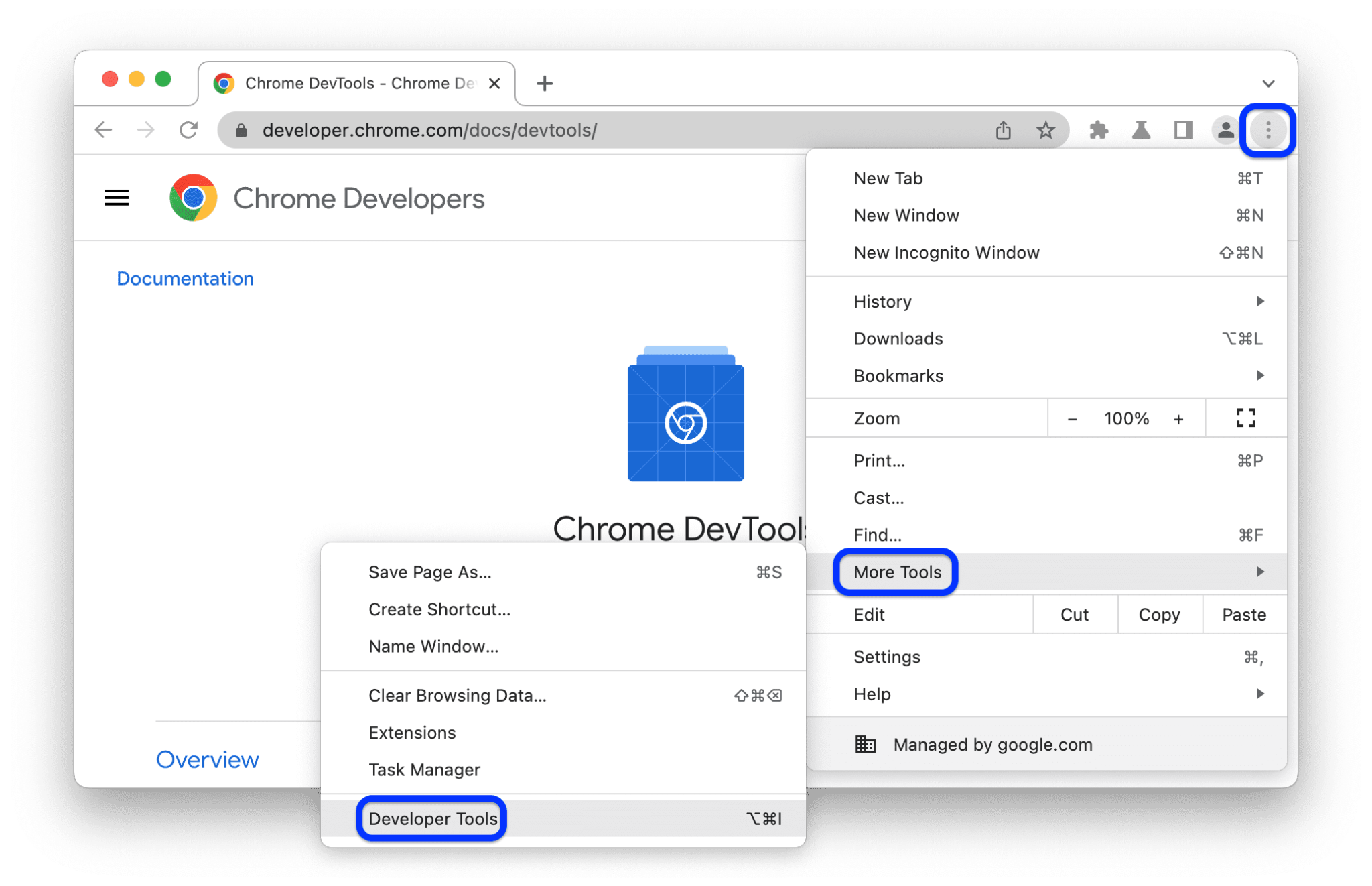
Chrome DevTools provides a timezone emulation feature to assist with website testing. You can open DevTools → More tools → Sensors and select the timezone you want to simulate. This setting is only effective within the currently open tab or DevTools session, does not alter the OS timezone, and will be lost after closing the browser.
Pros
Chrome DevTools is suitable for quick checks or testing during website development.
- Free and built into Chrome.
- Fast setup, no need to install extra software.
- Ideal for testing UI or functionality across different timezones.
Cons
Conversely, this method only serves testing purposes and is not suited for long-term usage.
- Must be reconfigured for every use.
- Does not auto-sync with the proxy.
- Unsuitable for managing multiple browser profiles or long-term use.
Best for: Developers, testers, and QA.
5.2 Browser extensions
Some Chrome extensions can change the timezone the browser reports to a website by interfering with returned JavaScript values. This solution is simple, does not require changing OS configurations, and can be used immediately after installation.
Pros
Browser extensions are suitable when you only need to change the timezone in one browser without wanting to modify OS configurations.
- Easy to install and use.
- Does not affect the entire computer.
- Suitable for testing or basic use cases.
Cons
Because it only processes a fraction of the information a website collects, extensions still have many limitations when dealing with platforms that employ complex fingerprint detection mechanisms.
- Does not auto-sync the timezone with the proxy.
- May not fully support IANA timezones or DST.
- If the locale, language, or other parameters do not match, the website can still detect anomalies.
Best for: Individual users or simple testing needs.
5.3 Changing the system timezone (OS)
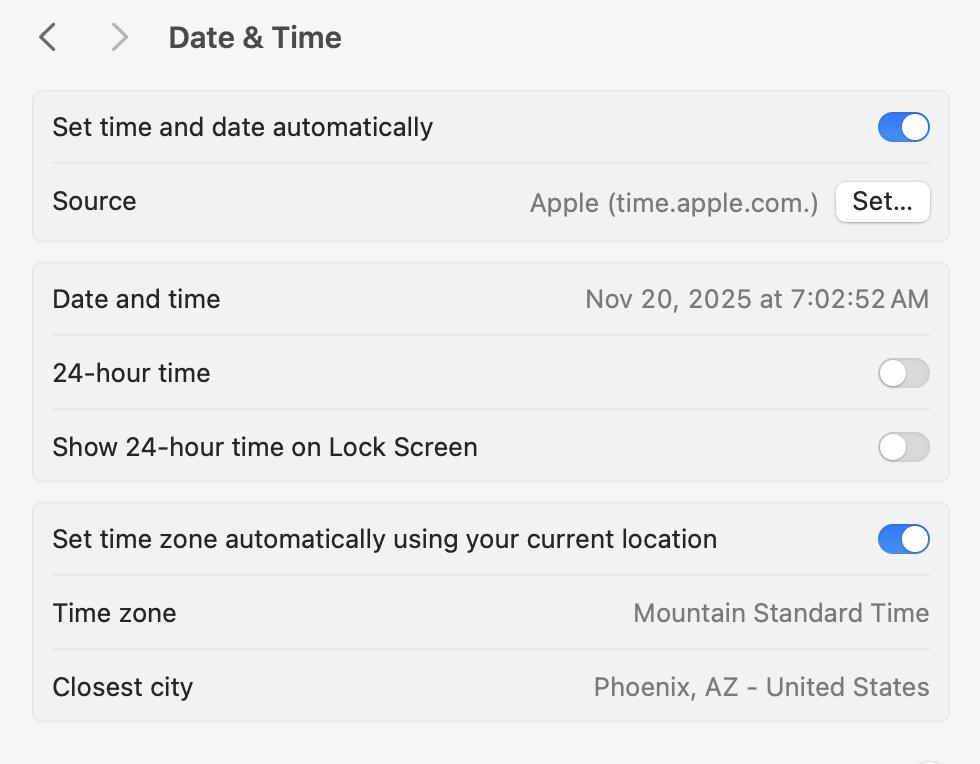
This involves directly changing the timezone of Windows or macOS. After the change, the browser and most applications on the machine will use the new timezone.
Pros
This method is appropriate if the entire device is dedicated to a fixed geographical region.
- Applies to all browsers and apps on the machine.
- No need to install extra extensions or software.
- Set up once and maintain until the user changes it again.
Cons
In return, all apps on the system are affected, making this method inflexible when working with multiple different regions.
- Alters the clock, calendar, and apps using system time.
- Cannot use multiple timezones simultaneously.
- Inconvenient if frequently switching between multiple proxies or markets.
Best for: Users working exclusively with one geographical region at a time.
5.4 Antidetect browsers
Antidetect browsers allow configuring the timezone for each individual browser profile instead of applying it to the entire OS. Depending on the software, the timezone can be set manually or automatically updated based on the proxy's location.
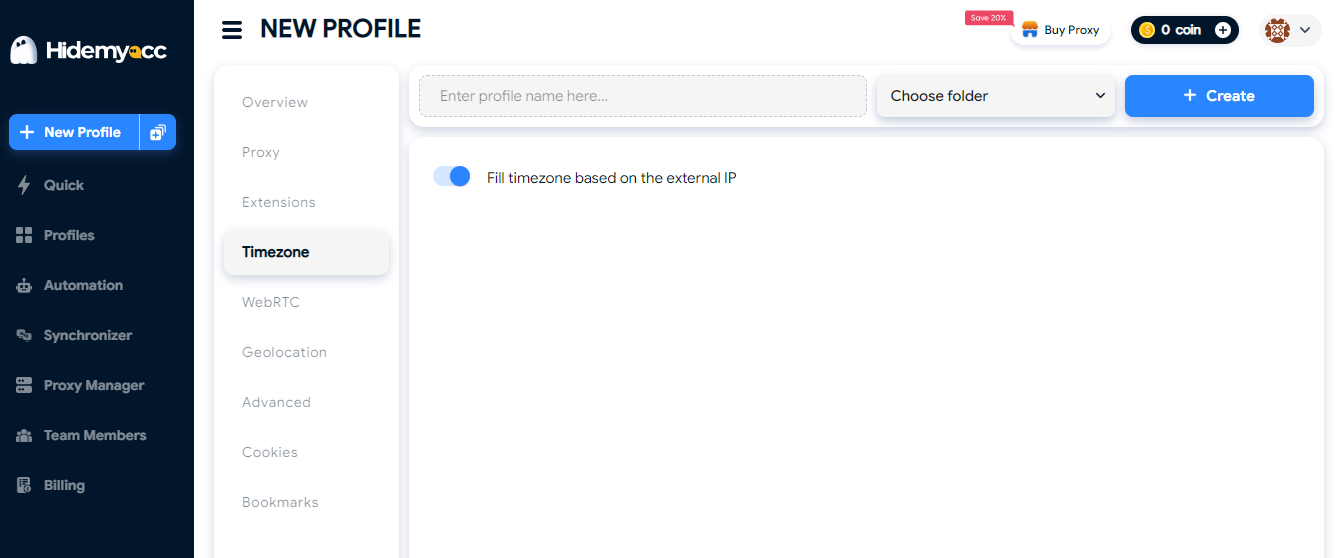
In addition to timezone, many antidetect browsers also support IANA timezone configuration, DST processing, and locale/language setup within the same browser profile. This helps reduce configuration time and limits inconsistencies between parameters collected by websites.
Pros
This is the ideal choice when needing to manage multiple browser profiles or frequently working with multiple proxies in different regions.
- Each browser profile can use its own distinct timezone.
- Supports managing multiple profiles simultaneously.
- Reduces manual configuration errors when working with many proxies.
- Easily maintains parameters suitable for the geographic location of each profile.
Note
Timezone processing capabilities vary among antidetect browsers. Before use, you should verify if the software supports automatic syncing with proxies, IANA timezones, and DST.
Best for: Users managing multiple accounts, running ads, affiliate marketing, or automation.
Comparison Table
| Criteria | Chrome DevTools | Browser Extension | Changing OS Timezone | Antidetect Browser |
|---|---|---|---|---|
| Scope of application | Current DevTools session | Browser with the extension installed | Entire OS | Individual browser profile |
| Syncing with proxy | Manual setup | Manual setup | Not supported | Automatic or manual (depends on software) |
| Support for IANA timezone and DST | Limited | Depends on the extension | Based on the OS | Based on software features |
| Manage multiple timezones simultaneously | No | No | No | Yes |
| Affects the entire system | No | No | Yes | No |
| Best suited for | Website testing | Basic needs | A single, fixed work environment | Managing multiple accounts and profiles |
No single method fits every need. If you only need to test a website, Chrome DevTools or a browser extension will work perfectly. Meanwhile, when managing multiple browser profiles or working with multiple proxies, solutions that support configuration per individual profile will help reduce setup time and limit manual configuration errors.
6. Important notes when spoofing timezone
Spoofing a timezone is not as simple as just changing the timezone the browser reports to the website. If related parameters are not appropriately set, the browser profile can still show signs of anomalies. Below are some important points to check before using an account or running automation.
6.1 Timezone must sync with other fingerprint parameters
Timezone is not the only parameter websites use to evaluate the browser environment. If only the timezone is changed while other data points reflect a different geographic location, the profile could still exhibit anomalies.
When configuring a profile, you should simultaneously check parameters such as:
- Proxy or IP address.
- Locale.
- Browser language.
- WebRTC.
- User-Agent (if modified).
The goal is not to change as many parameters as possible, but rather to ensure the data collected by websites do not contradict one another.
Read more: What is a WebRTC leak? Why using a VPN/Proxy can still leak your IP
6.2 Double-check after every configuration change
The timezone can change after swapping a proxy, importing or cloning a browser profile, updating software, or editing fingerprint settings. Therefore, you should verify everything again before using the account instead of assuming all parameters remained the same.
You can use Browserleaks or similar tools to confirm parameters. This check takes only a few minutes but helps catch configuration errors early before the profile is put into use.
6.3 Avoid creating inconsistent browser fingerprints
Most cases of a timezone mismatch do not stem from the proxy's quality but arise from an incomplete setup process.
Some common mistakes include:
- Only changing the timezone while forgetting to update the proxy, locale, or language.
- Assuming that a VPN or proxy will automatically change the browser's timezone.
- Using only a UTC offset when tools offer IANA timezone support.
- Failing to re-check after changing the proxy, cloning a profile, or updating software.
- Using the same browser profile with multiple proxies in different regions without re-adjusting the timezone and related parameters.
Simply avoiding the errors above will significantly reduce the risk of inconsistencies appearing in the data websites use to evaluate your browser.
7. Conclusion
Timezone is a small signal but is easily overlooked and highly detectable. The right approach is not treating timezone as an isolated setting, but as part of a unified fingerprint: your proxy, timezone, locale, and language must all point toward a single geographic region. Actionable advice: check your current profiles immediately to see if the timezone matches the proxy.
If you are managing multiple browser profiles, check right now if the timezone in each profile matches its proxy. Manual setups are prone to errors, especially as the number of profiles grows. With antidetect browser Hidemyacc, the timezone is synchronized according to the proxy directly inside the profile, along with the locale and language, keeping the browser fingerprint consistent without having to configure each parameter individually. Download Hidemyacc and check your browser profiles before using real accounts to ensure all parameters are set correctly.
8. FAQ
1. Is spoofing the timezone enough to avoid detection?
No. Timezone is just one piece; it needs to be synced with proxy IP, locale, language, and WebRTC. Missing any signal creates a contradiction.
2. Does a VPN automatically change the timezone?
Some VPNs automatically change the timezone, but many only alter the IP. You must check manually after turning on the VPN using tools like browserleaks.com.
3. What is the difference between UTC offset and IANA timezone?
The UTC offset is just the time difference (e.g., UTC-5). The IANA timezone provides the full name (e.g., America/New_York) along with DST rules. Using IANA is more accurate because platforms check for DST.
4. Why am I still detected when using an extension to spoof timezone?
Extensions only change returned JavaScript values but cannot handle DST, do not sync locale/language, and lack stability against major platforms.
5. Where can I check if my timezone matches my proxy?
Use browserleaks.com to see the timezone the website sees, and compare it with the location of the proxy you are using.
6. Does Chrome support spoofing timezone?
Yes. Chrome DevTools allows for timezone emulation to test websites, but this setting is only effective within the current DevTools session and is unsuitable for managing multiple browser profiles.