Have you ever changed your IP address, cleared your browser cookies, or operated inside an incognito tab only to find that a target website still instantly recognizes your workstation? That is because modern web platforms no longer look exclusively at basic data nodes to map user identities. Instead, they parse an extensive matrix of digital traits, including how your specific browser instance processes audio signals using the Web Audio API.
This technique is increasingly deployed inside sophisticated anti-fraud networks, ad tracking ecosystems, and security funnels. Within this article, you will explore the operational mechanism under the hood of an AudioContext Fingerprint, why it plays a paramount role in browser fingerprinting, and calculated blueprints to reduce your detection risks when browsing or managing extensive account matrices.
1. What is an AudioContext Fingerprint?
An AudioContext Fingerprint is a browser tracking technique derived from measuring how your local machine handles audio signal processing pathways through the Web Audio API. Rather than tracking cookie logs or public network IP vectors, this methodology records the numerical variance of your browser's internal audio manipulation engine to output a unique equipment dataset signature.
This operates as an active component of browser fingerprinting, a methodology where web hosts harvest vast arrays of device configurations to map unique user identities. Beyond AudioContext trackers, complete tracking matrices incorporate complementary indicators like a Canvas Fingerprint, deep system parameters used to verify and enable WebGL fingerprints, system font logs, screen canvas dimensions, and localized time zone offsets.
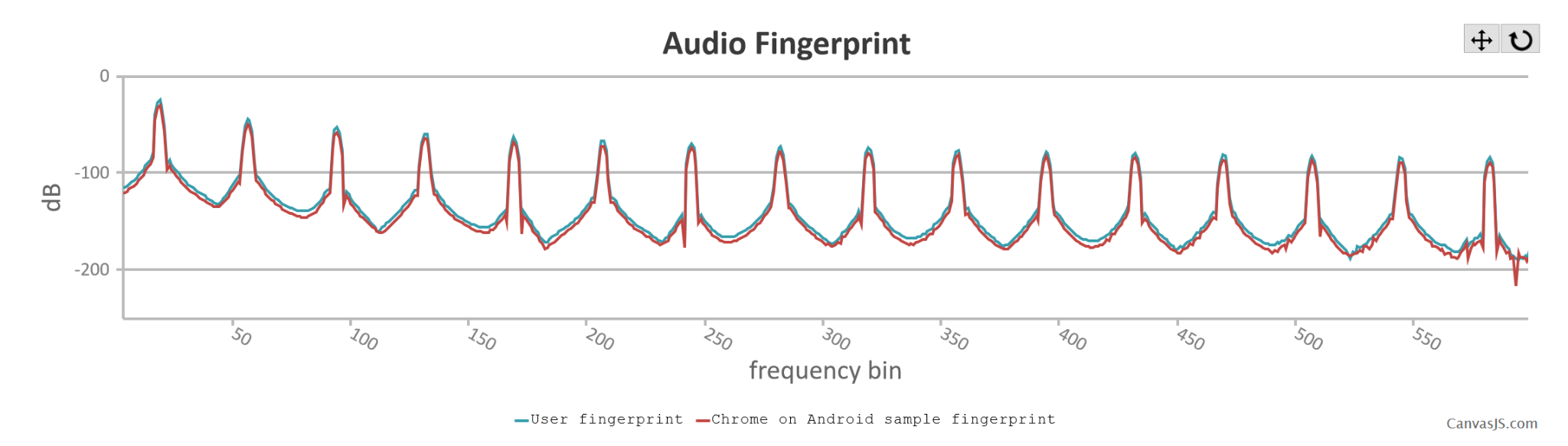
The distinctive trait separating AudioContext tracking from graphic canvas analysis is that it completely bypasses standard visual rendering pipelines, focusing strictly on how the browser core calculates data structures representing audio information.
When encountering the term "audio tracking," users frequently worry that a website is actively activating their microphones or recording environmental conversations. This is a common misconception. AudioContext Fingerprint collection does not capture real-world voice inputs or stream noise emissions through your physical speakers. Your web client simply instantiates an internal math-based audio processing node pipeline, runs standard signal calculations inside a closed memory sandbox, and formats the output data matrix into an analytical hash string used for machine indexing.
Consequently, this utility logs zero private data files like vocal recordings or room noise logs. However, when fused with surrounding device indicators, it functions as a highly accurate Trust Score vector for user profiling and multi-profile tracking checks.
2. How does an AudioContext Fingerprint operate under the hood?
To analyze why separate computers output unique AudioContext Fingerprint hashes under identical scripts, we must first map out the baseline flow of the Web Audio API infrastructure.
2.1. Demystifying the Web Audio API
The Web Audio API is a robust collection of native JavaScript interfaces allowing web documents to synthesize, process, and analyze complex audio data blocks directly within the browser engine without requiring heavy external media player software or native plug-ins.
Initially engineered to facilitate modern in-browser assets like web gaming audio nodes, advanced media streamers, and interactive synth modules, developers rapidly realized its architectural traits introduced an exceptional fingerprinting resource.
Because the mathematical processing of audio waveforms is offloaded onto underlying client layers, processing an identical audio waveform across different device ecosystems surfaces tiny numerical margins of error. These micro-deviations are perfectly measurable, supplying anti-bot script filters with an exceptional device signature.
2.2. The chronological profile generation sequence
The process of synthesizing an audio fingerprint carries a minimal local hardware footprint and executes within milliseconds during a page handshake:
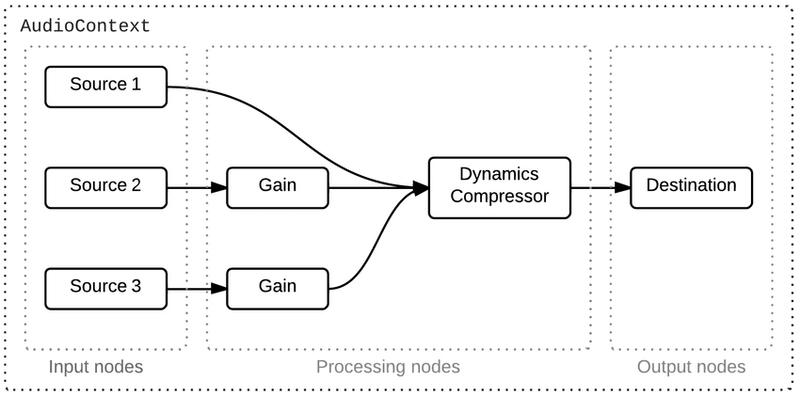
First, the target website commands the browser kernel to initialize an AudioContext container. This establishes your local browser's internal audio math workspace.
Next, the host script deploys an OscillatorNode to emit a standard baseline audio wave pattern tracking a fixed input frequency, ensuring all devices process an identical mathematical variable.
This generated frequency is then routed through a DynamicsCompressorNode alongside specialized filter structures. Inside this pipeline node, the browser engine executes extensive mathematical algorithms to alter the signal envelope variables.
Crucially, instead of pushing the final processed waveform out to your physical speakers, the entire operation is processed using an OfflineAudioContext asset. This means the client engine computes all data arrays strictly inside local volatile memory, completely muting any audible sound output to the end user.
The calculation sequence returns a precise array of floating-point numbers representing the altered waveform data. The website harvests this array and applies a standard hashing algorithm to compress the matrix into a clean alphanumeric string. This resulting string serves as your AudioContext Fingerprint.
The entire sequence completes in a flash, allowing external tracker networks to establish your device's audio signature without causing any performance lag or visible notification cues.
2.3. Key variables driving hash variance across different equipment
Once the offline rendering execution closes, the output is compressed into a definitive fingerprint value. Websites leverage this metric to categorize browser clients into explicit confidence pools.
The output value is governed by a combination of software engines and the broader operating environment of the host workstation. Critical metrics introducing hash variations include:
- Underlying CPU microarchitecture mechanics.
- The browser's JavaScript execution engine and kernel release build.
- The parent operating system tier.
- Installed audio driver packages and hardware sound card controllers.
- Workstation Hardware Acceleration toggles.
Even when a website deploys identical JavaScript code globally, structural discrepancies within these hardware and software layers cause the offline rendering calculation to output tiny numerical variances. These micro-deviations are imperceptible to human hearing, but produce distinct cryptographic hashes, resulting in varying AudioContext Fingerprint scores between different devices.
On a static workstation tracking fixed system parameters, this output remains exceptionally stable across recurring visits. However, updates to your browser build, OS patch installations, or audio driver modifications will alter the mathematical rendering context, shifting the final fingerprint signature.
Consequently, while an AudioContext Fingerprint is not a completely immutable variable, it delivers an incredibly reliable trust factor for user tracking. Security systems typically pair this metric with complementary elements like Canvas Fingerprints, WebGL characteristics, and Font logs to maximize device profiling accuracy.
3. Why do anti-fraud networks leverage audio fingerprints for user tracking?
Compared to basic web track markers like standard cookies or a public IP address, an AudioContext Fingerprint introduces structural properties that make it highly valuable for modern device tracking matrices.
First, the resulting mathematical hash exhibits exceptional consistency on a specific device configuration across numerous browser reboots. This allows external tracking servers to link profiles back to an identical workstation even after an extended time offline.
Second, AudioContext profile generation operates entirely outside local browser storage structures or cookie caches. As a result, purging cookie databases or initiating an incognito window does not block or alter this fingerprint data. Furthermore, because the waveform calculation runs silently in volatile memory layers, users remain unaware of the extraction process.
However, it is critical to realize that an AudioContext Fingerprint **is not powerful enough to isolate a unique machine when used as a standalone indicator**. Multiple consumer computers tracking identical CPU specs, OS builds, and browser client releases will naturally return matching hash parameters. For this reason, anti-fraud fraud networks merge audio фингерпринт metrics with neighboring indicators like Canvas variables, WebGL traits, font matrices, display metrics, and WebRTC leak leaks to optimize tracking resolution.
A practical deployment scenario
Imagine a digital marketer managing multiple separate Facebook business profiles from a single computer workstation. To mask their operations, they configure unique proxy lines for individual profiles to alternate public IP locations, while keeping cookie stores separated cleanly.
However, if these distinct browser sessions continue to output identical AudioContext Fingerprints alongside matching hardware indicators, Facebook's anti-fraud algorithms effortlessly deduce that all profile connections originate from a single physical workspace. Consequently, the entire account matrix is flagged for manual verification or blanket restriction.
This explains why two separate marketing profiles using clean proxy lines can experience wildly different outcomes, with one executing smoothly while the other triggers immediate security checkpoints under a unified hardware footprint.
4. How is the AudioContext Fingerprint deployed in real-world scenarios?
AudioContext Fingerprints are heavily utilized within automated system security frameworks, digital ad targeting networks, and enterprise risk scoring architectures. Let's analyze widespread deployment tracks:
4.1. Detecting multi-account networks on a single workstation
Extensive digital platforms enforce strict compliance policies limiting users to a single account or restricting the total number of profile registrations allowed per person.
If security networks rely entirely on IP data, users can simply rotate mobile networks or inject proxies to clear restrictions. Similarly, if they rely purely on cookies, executing browser data wipes allows bots to drop historical tracking nodes effortlessly.
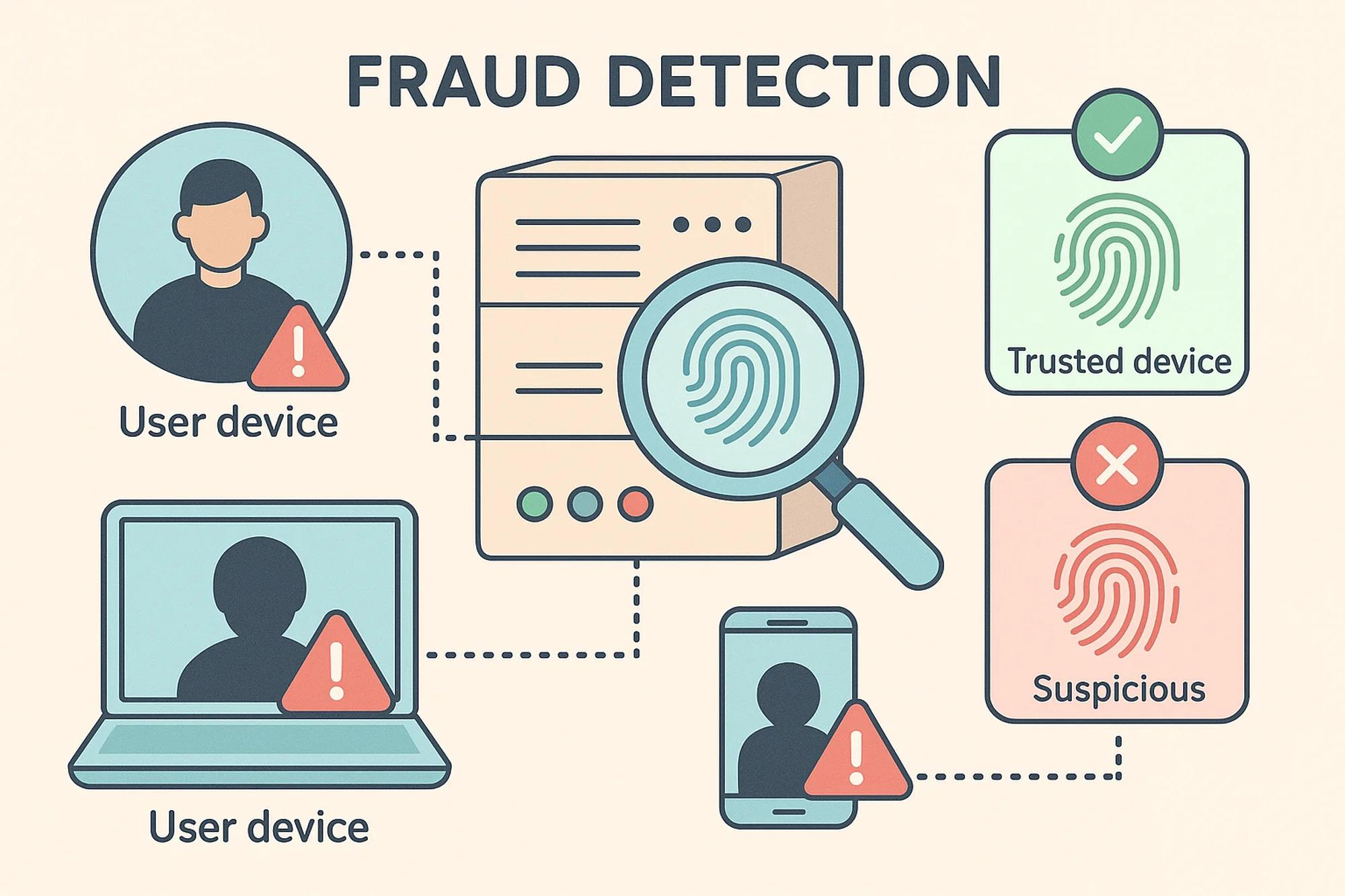
To counter this, platforms merge deep hardware tracking parameters. When numerous profiles access a network sharing identical hardware markers—such as matching AudioContext Fingerprint values—the platform flags the cluster as a single multi-account system operated by one entity.
For instance, an affiliate manager handling multiple TikTok profiles inside a single retail browser application can frequently rotate their IP addresses per session. However, the profiles remain highly vulnerable to link blocks if their underlying hardware fingerprints match identically.
4.2. Enhancing cross-site cross-site behavioral tracking
Digital advertising syndicates and metrics aggregators harness deep hardware tracking parameters to re-identify specific workstations as users navigate across completely unrelated web domains.
In this use case, the audio fingerprint functions as a reliable data point within a broader tracking index. By merging this metadata with surrounding traits, tracking networks can determine with high confidence whether distinct website visits originate from a single browser client, even after standard cookies are erased.
This explains why consumers continue to receive highly personalized ad recommendations after clearing their browser data caches or operating within incognito modes.
4.3. Powering programmatic anti-fraud decision engines
Modern enterprise anti-fraud platforms rarely base their risk assessments on an isolated technical metric.
Instead, they execute programmatic evaluation loops auditing IP trust marks, geolocation data, authentication frequency, hardware traits, and complete device fingerprints concurrently.
If an entity consistently authenticates using distinct persona data while passing an identical, static hardware signature, the fraud engine flags the activity as automated abuse and enforces mandatory secondary verification checkpoints.
This operational flow is highly standard across fintech payment gateways, social media ad panels, e-commerce stores, and high-payout affiliate program networks.
5. How to test and verify your browser's AudioContext Fingerprint
If you need to analyze how your active web client generates and shares its AudioContext Fingerprint signature, you can leverage several reputable, free testing resources:
Three highly trusted platform options include:
- BrowserLeaks: Provides clear readouts of your AudioContext metadata alongside accompanying hardware indicators like Canvas, WebGL, and WebRTC profiles.
- CreepJS: Delivers advanced, deep browser fingerprint analysis and scores your browser's overall visibility and trust rating.
- Fingerprint.com Commercial Demo: Illustrates how modern identification engines gather and stitch multiple hardware indicators together to isolate a single device index.
While individual tools display data structures via alternative interface designs, each resource lets you audit your active AudioContext Fingerprint signature for free directly inside your web client.
Recommended reading: In-depth BrowserLeaks audit guide: How to test browser profiles effectively
Baseline evaluation benchmarks for reading results
When analyzing test results, look past the raw alphanumeric hash string and focus on structural consistency indicators:
- If your computed hash string remains fully static across multiple manual page F5 reloads on a single browser, this represents normal behavior, showing that your hardware footprint outputs stable metrics.
- If the alphanumeric hash value alternates dynamically upon every single page refresh, your client application is utilizing loose spoofing scripts or a basic extension that modifies the Web Audio API raw data.
- If distinct browser profiles or alternative browser clients running on your physical machine return identical hash strings, it indicates your profiles share a unified hardware context, making them vulnerable to link suspensions.
If your audio hash displays erratic changes without an OS patch or browser update, verify if an active browser extension is modifying your Web Audio API pipelines.
6. Why standard methods to block AudioContext fingerprinting fail
When discovering audio fingerprint risks, operators often assume that simple actions like rotating IP connections or purging local caches can stop device profiling. In reality, these classic steps only modify a fraction of the data gathered by modern web engines.
Let's unpack the core structural reasons why casual defense methods fail to bypass audio fingerprint tracking:
- Clearing cookie data while ignoring the device footprint: Cookies and device fingerprints rely on entirely different tracking frameworks. Purging cookie caches simply erases local data chunks stored in the browser, while the underlying AudioContext signature is re-computed from scratch during the next page load. Consequently, web servers re-link your device if surrounding fingerprints remain static.
- Deploying shallow, uncoordinated extensions: Widespread retail browser extensions only modify a few surface-level browser variables. When accompanying hardware indicators remain unchanged or display conflicting traits, fraud prevention networks easily flag your workspace as an artificial environment.
- Injecting purely randomized parameter modifications: Basic privacy tools generate a completely random AudioContext fingerprint value upon every single browser launch. While this sounds protective, it contradicts the behavior of real computer workstations. Constantly changing signatures can actually spike your risk index within modern fraud scoring engines.
- Spoofing AudioContext variables in isolation: Audio processing parameters represent only a single node within complete fingerprinting matrices. Modifying your AudioContext traits while leaving your Canvas, WebGL, font lists, and WebRTC variables completely static creates clear data alignment contradictions, destroying spoofing efficacy.
- Assuming standard VPN networks mask hardware signatures: A VPN network strictly handles public IP address routing. Because your AudioContext fingerprint is generated from local client computing pipelines, changing your network path has zero impact on your underlying audio rendering output.
Instead of hunting for an uncalibrated solution, focus on understanding the trade-offs of different privacy setups. This understanding empowers you to choose a protection model that maps perfectly to your real business needs.
7. Tactical strategies to minimize AudioContext Fingerprint identification risks
There is no native method to completely eliminate an AudioContext Fingerprint footprint while keeping modern website features running smoothly. Instead, focus your operational strategy on minimizing identification risks by reducing leaked data depth or building a systematically consistent browser footprint.
7.1. Analyzing standard privacy protection tracks
Various defensive paths can reduce your AudioContext visibility. However, individual surface-level methods only solve a fraction of the tracking equation and introduce distinct functional downsides.
Purging local cookie caches
Erasing cookies drops standard storage nodes left by web servers, preventing basic cookie-based user tracking. However, because your AudioContext data is programmatically computed on-demand during a page handshake, this step has no defensive impact on your device fingerprint signature.
Deploying a VPN connection
A VPN alternates your public IP address and encrypts incoming/outgoing web traffic to secure your network path. However, a VPN cannot reach inside browser computing layers to alter your AudioContext signature or graphic canvas specifications. Thus, ad networks can easily re-identify your machine by matching your underlying hardware traits.
Recommended asset: How to configure a VPN on mobile and PC to spoof public IP locations effectively
Hardening native client settings or restricting JavaScript execution
Advanced privacy browsers allow users to restrict JavaScript execution on a per-domain basis. This stops tracking scripts from executing, completely blocking browser fingerprinting mechanisms like Web Audio API collection.
However, disabling JavaScript breaks the layout and functionality of modern interactive websites, rendering web applications, media players, and checkout screens unusable.
Injecting standalone anti-fingerprinting extensions
Shallow privacy extensions intercept select browser API requests to supply tracking scripts with dummy variables, aiming to reduce device profiling visibility.
On the downside, most basic extensions execute in isolation, modifying select data nodes while leaving surrounding variables untouched. This lack of data coordination creates clear structural contradictions that fraud prevention networks easily detect.
Transitioning to consumer privacy-focused browsers
Privacy browsers limit device tracking by applying generic, standardized configuration values across their entire user base to homogenize digital footprints.
While this is an excellent strategy for enhancing privacy during casual everyday browsing, these systems cannot generate distinct, separated device signatures when your business workflow requires managing massive, independent account clusters.
| Privacy Framework | Defense Efficacy | Functional Limitations |
|---|---|---|
| Purging local cookies | Negligible | Has zero impact on hardware-level fingerprints |
| VPN Networks | Negligible | Strictly alters network IP; leaves hardware data naked |
| Disabling JavaScript | Moderate | Breaks script rendering, causing critical website errors |
| Shallow Extensions | Moderate | Creates data conflicts easily flagged by fraud engines |
| Antidetect Browsers | High | Demands accurate initial configuration parameters |
For casual personal browsing, utilizing a mainstream privacy browser coupled with verified anti-fingerprinting extensions is a practical path to reduce tracking visibility. However, these surface-level methods cannot completely stop deep device profiling.
For professional growth teams managing large-scale multi-account systems, simply swapping IP paths or spoofing your AudioContext variables in isolation fails to deliver long-term protection. To bypass modern anti-fraud checks, your complete browser fingerprint must reflect total structural alignment to avoid flagging your workspace as anomalous.
7.2. Why professional operations rely on Hidemyacc for absolute isolation
While surface-level adjustments like cookie wipes, VPN networks, and privacy extensions enhance basic personal security, these frameworks are unsuitable for commercial multi-account management, as they cannot build fully separate, independent browser contexts.
For professional digital businesses, specialized antidetect browsers represent the gold standard path. Instead of adjusting shallow configuration values in isolation, anti-detection software is engineered to instantiate fully separate, independent browser profiles on a unified physical machine.
The antidetect browser Hidemyacc functions on this exact architectural principle. Every newly initialized browser profile container holds a fully separate, distinct browser fingerprint matrix. Within this matrix, your AudioContext variables are built with full mathematical consistency alongside neighboring indicators like Canvas layers, WebGL traits, system font lists, WebRTC configurations, and User-Agent strings. This ensures every container registers as an authentic, unique workstation rather than a modified browser instance.
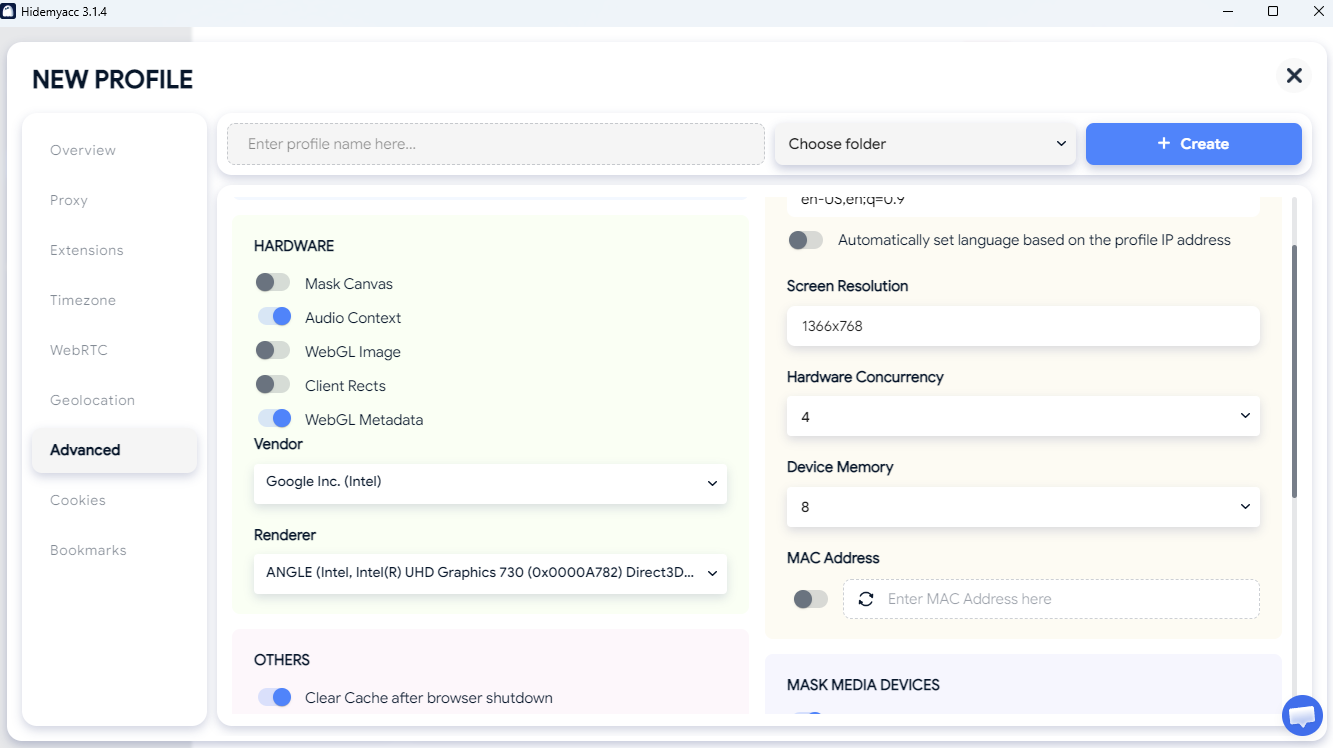
Furthermore, Hidemyacc features built-in connection tools to assign dedicated proxies per profile card, ensuring every distinct account drives down an independent network IP and hardware track. This capability is a vital growth engine for growth teams handling affiliate marketing networks, multi-store e-commerce brands, global social media channels, or data pipelines from a unified computer setup.
However, keep in mind that no software utility can offer an absolute guarantee against tracking filters in every single deployment scenario. Long-term campaign safety depends on accurate profile configuration settings, pristine proxy line choices, and keeping your user actions aligned with platform compliance guidelines.
8. Conclusion
An AudioContext Fingerprint represents an informative data point within modern browser fingerprinting matrices, rather than a standalone device identifier. Its real power is unlocked when tracking networks stitch this data together with neighboring traits like Canvas, WebGL, system fonts, and WebRTC variables to programmatic profile workstations with high precision.
Consequently, spoofing your AudioContext data in isolation is an incomplete defense strategy. True long-term protection requires choosing an infrastructure that secures your total browser environment while maintaining flawless data consistency.
For personal privacy targets, configuring strict native privacy controls or deploying a privacy-centric browser client is an excellent choice. However, when your operational scale expands to managing large-scale multi-account setups on a single network, an antidetect browser is the premier solution to engineer fully separate browser environments safely.
Ultimately, the performance value of Hidemyacc extends beyond the raw software client layer; it relies on accurate container parameters, clean proxy connection choices, and organic user behavior metrics. Aligning these technical variables builds a highly organic browser footprint, allowing your digital business to scale safely.
9. FAQ
1. Can websites actively track user activity using an AudioContext Fingerprint?
Yes. Because individual computers output distinct audio hash signatures that remain highly stable across multiple reboots, web servers leverage this data to re-identify browser clients even after cookies are completely erased. This stability makes hardware fingerprinting a far more persistent tracking asset than traditional consumer cookies.2. Is an AudioContext Fingerprint structurally identical to a standard internet cookie?No. A cookie is a tangible file block written straight to local client storage that users can manually view and clear at any time. Conversely, an AudioContext fingerprint is an environmental metric programmatically computed on-the-fly during a page load by evaluating your host hardware and software layers. Thus, wiping cookie stores has zero impact on your audio signature.3. Does the AudioContext Fingerprint function when browsing inside an incognito tab?Yes. Incognito mode strictly prevents the client from writing browsing history logs and saving cookie data to local disk, but does not alter how your underlying hardware architecture and audio drivers process mathematical signals. As a result, the offline audio calculation sequence executes normally, returning your standard fingerprint hash.4. Can a standard VPN connection mask my true AudioContext Fingerprint data?No. A VPN strictly changes your public network IP address parameters. Because your AudioContext signature is computed from internal browser rendering pipelines, changing your network connection path has zero impact on your underlying audio calculation metrics.5. Is it technically possible to completely disable AudioContext fingerprinting?Disabling the Web Audio API entirely breaks normal multimedia features on numerous mainstream websites that rely on web audio elements. Instead of disabling the API completely, advanced users deploy specialized environments to control, normalize, or securely manage their fingerprint output values.6. Does AudioContext fingerprinting present compliance risks for multi-account operators?Yes. If numerous profiles authenticate on a single platform sharing a single, static AudioContext signature, the tracking network easily links the profiles to a single machine. For this reason, multi-account managers utilize anti-detection tools to assign separate, isolated browser profiles per account.7. Which mainstream web client application limits audio fingerprint tracking best out of the box?Select security-focused browsers implement native noise injection or signal standardization filters to reduce device profiling classification visibility. However, protection depth alternates across software version releases and system setups, meaning operators should always audit their live profiles using verified fingerprint verification tools to confirm protection levels.