You switch your IP address and log into a second profile, yet the platform prompts for verification. Alternatively, two accounts run with identical setups experience divergent outcomes: one stays active for months, while the other is restricted within days. This divergence stems from multiple signals beyond your network address. Modern security engines evaluate diverse telemetry points—such as IPs, cookies, browser fingerprints, and account profile metadata—to assess session authenticity. However, the exact algorithms and scoring thresholds deployed across platforms are rarely disclosed in detail.
This guide explains how online platforms correlate multiple accounts, outlines the functional differences between an IP ban and an account ban, and analyzes 5 practical account management methods ranging from password managers to antidetect browsers. With this information, you can deploy an architecture tailored to your specific account volume and operational workflow.
1. Why is managing multiple online accounts necessary?
Administering multiple accounts is a standard operational requirement for individual specialists, businesses, and digital marketing teams. While operational goals vary, all users require a structured management workflow to prevent cross-account errors and reduce operational overhead.
For instance, a digital agency often operates ad accounts on behalf of multiple enterprise clients. An e-commerce seller may establish separate stores across specific regional marketplaces. Similarly, an individual operator might require dedicated email accounts to segregate work tasks, financial transactions, and private communications.
When account inventories expand, relying on unmanaged manual workflows introduces critical operational points of failure:
- Accidental cross-posting: Publishing content, dispatching client messages, or executing actions under the wrong account when multiple concurrent sessions overlap.
- Session data cross-contamination: Intermingled cookies and cached browser storage make it difficult to determine which account is active inside a given window.
- Access control vulnerabilities: Sharing cleartext login credentials directly across a team compromises security and creates administrative overhead during personnel transitions.
- Operational friction from manual switching: Constantly logging out and authenticating back into accounts disrupts focus, especially when rotating through multiple profiles daily.
- Disorganized tracking: Lacking a structured workspace makes it difficult to map credentials to corresponding clients, business units, or project goals.
An effective multi-account setup requires three primary operational foundations: robust credential security backed by unique passwords and multi-factor authentication, clear workspace segmentation to identify profiles instantly, and isolated session environments that remain compliant with target platform terms.
2. How do platforms correlate multiple accounts?
You might wonder how a service identifies connections between disparate accounts even when each is registered with a unique email address. The explanation is straightforward: email credentials are only one component of a platform's verification model.
Security engines collect an array of client telemetry during authentication and active browsing. While no individual indicator conclusively links accounts in all instances, the aggregation of these parameters creates a identifiable footprint.
2.1. IP Address
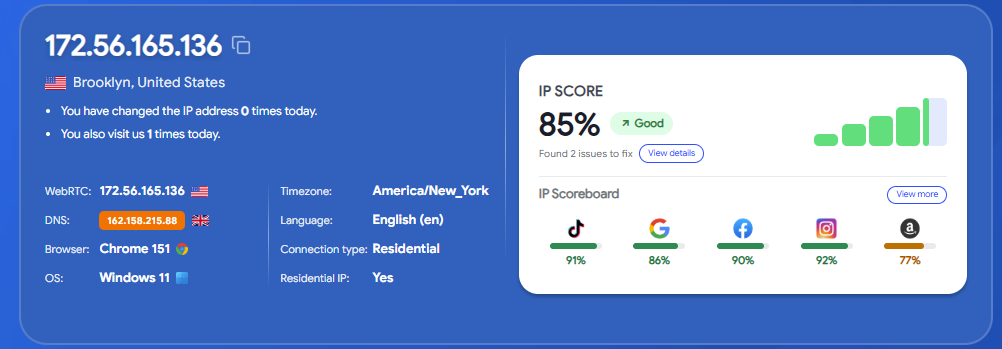
An IP address identifies the specific network connection utilized by your client hardware. Multiple accounts authenticating through an identical IP emit a shared network-level telemetry signal.
However, sharing an IP does not definitively prove that accounts belong to the same entity. Households, corporate office LANs, and public Wi-Fi hotspots route hundreds of independent users through identical public gateway IPs. Platforms therefore weigh network data alongside secondary telemetry points before flagging relationships.
2.2. Cookies and Local Storage
Cookies and local web storage preserve authentication tokens, UI preferences, and prior browsing histories. These local files allow web applications to maintain persistent sessions across visits without requiring constant re-authentication.
When multiple accounts are accessed inside a single browser profile, local storage tokens can overlap, causing session conflicts. Partitioning each account into an isolated profile keeps session cookies cleanly separated.
2.3. Browser Fingerprinting
Each time you interact with an online service, your browser transmits technical configurations detailing its runtime environment. When combined, these variables produce a device fingerprint that allows platforms to distinguish systems and identify correlated sessions.
This client fingerprint incorporates diverse parameters, such as:
- Browser language: Configured default languages applied to the user interface.
- System timezone: The operating system and browser's local time offset.
- Screen resolution: Available viewport dimensions, hardware aspect ratios, and color depths.
- Installed system fonts and browser extensions: Enumerable local font lists and browser plugin declarations.
- Operating system and user agent versions: Underlying platform versions and rendering core configurations.
While an isolated metric rarely pinpoints an identity, combining these data points forms a distinctive profile that platforms use to evaluate connection consistency.
Consequently, accessing separate accounts from an identical physical workstation—or authenticating a single account across multiple disparate machines—generates correlation signals. However, device fingerprinting is not the sole factor determining account restrictions; platforms weigh this data against broader security criteria and platform policies.

Read more:
- What is a Browser Fingerprint? Techniques to mitigate tracking
- What is a device fingerprint and how can it be adjusted?
- Understanding Canvas Fingerprinting and identity management
- The 9 best free browser fingerprint testing tools
2.4. Hardware, Location, and Usage Behavior
Security engines monitor underlying device attributes, estimated geolocations, historical access times, and behavioral deviations. A sudden login from an uncharacteristic location or novel device hardware often triggers automated verification challenges.
These verification prompts do not necessarily indicate a policy breach; they often serve as baseline protective measures to confirm the authentic user is attempting access.
2.5. Account Identity Metadata
Recovery email addresses, phone numbers, payment billing profiles, and registered identity details form direct operational links if recorded across multiple profiles.
Simply generating a new email or switching an IP address will not hide account relationships if payment details or recovery numbers overlap. Platforms evaluate these signals in tandem based on their internal risk models.
3. What is the difference between an IP ban and an account ban?
Both IP bans and account bans disrupt access to web services, yet they target entirely different layers of the connection. Distinguishing between them helps you take the right corrective action instead of troubleshooting the wrong layer.
| Evaluation Metric | IP Ban | Account Ban |
|---|---|---|
| Restricted Target | The source IP address or network subnet | The specific user account profile |
| Underlying Cause | Suspicious traffic patterns or subnet-level abuse | Direct policy violations or anomalous user activity |
| Effectiveness of Changing IP | May restore access if the ban was restricted to that network | Ineffective against direct account restrictions |
| Recommended Action | Verify network routing, error notices, and scope | Review restriction notices, complete verification, or appeal |
An IP ban restricts requests originating from a specific network gateway. Users behind that network encounter blocks across target endpoints. However, not all network errors stem from targeted bans; temporary ISP routing drops, CDN rate limits, and verification checkpoints can produce similar connection drops.
Conversely, an account ban applies directly to the user profile credentials. This restriction typically follows terms-of-service infractions, suspicious operational patterns, or unresolved verification requirements. Changing your IP address does not resolve an account ban, as the restriction resides at the account database level.
If you encounter access errors or restriction warnings, review the notification details, confirm the scope of the issue, and follow official support channels. Avoid immediately opening replacement accounts before identifying the root cause, as doing so often leads to linked restrictions.
4. How to manage multiple online accounts: 5 practical methods
Dedicated enterprise software is not always necessary for managing multiple profiles. For a handful of personal emails or social handles, native browser tools are often sufficient. As your inventory expands or requires distinct session sandboxes, other specialized approaches become more suitable.
4.1. Use a Dedicated Password Manager
A password manager centralizes credentials across all your accounts. You can categorize entries by service, generate unique high-entropy passphrases, and rely on auto-fill functionality to log in without memorizing passwords.
To secure your vault, use a strong master passphrase and enable multi-factor authentication. However, password managers only organize credentials; they do not isolate browser storage or separate active sessions between accounts.

Related guide: A complete guide on configuring 2FA to protect your accounts
4.2. Leverage Native Platform Account Switchers
Several online platforms support adding multiple profiles and toggling between them within the same UI. Rather than signing out and authenticating repeatedly, you simply select your target profile. This approach is well suited for routine personal switching within a single ecosystem.
This native approach is free and convenient. However, it depends entirely on whether a given platform supports account switching, and it does not provide custom browser environment isolation.
4.3. Configure Independent Browser Profiles
Standard desktop browsers like Google Chrome allow you to create distinct browser profiles, dedicating each to a specific client account or work task. Storage data, history, and active sessions remain partitioned by profile, helping prevent accidental cross-posting.
This setup works well for managing moderate numbers of accounts using free, built-in tools. However, these profiles still share your machine's public IP address, hardware properties, and core browser fingerprint parameters.
4.4. Deploy Virtual Machines or Dedicated Hardware
When tasks require complete separation at the operating system or hardware level, deploying virtual machines (VMs) or dedicated physical devices provides distinct environments. Each environment operates independently, offering granular control over local software configurations and stored session data.
The trade-off is substantial resource and operational overhead. Managing, updating, and provisioning multiple virtual operating systems demands significant computing power and administrative effort as account numbers scale.
4.5. Utilize an Antidetect Browser
Antidetect browsers are built for teams that need to run multiple web accounts within isolated environments. The software creates independent browser profiles with dedicated session storage, custom proxy routing, and adjustable hardware fingerprint parameters.
Profiles can be categorized by client, platform, or project. For distributed teams, these platforms support profile sharing and granular access controls, simplifying multi-account management at scale.
Note that antidetect software does not guarantee complete anonymity or immunity from platform restrictions. Services evaluate user authenticity across diverse behavioral and account signals. Use these tools to organize working environments, protect credential access, and maintain structured workflows in accordance with platform policies.
Comparing the 5 Multi-Account Management Methods
The table below summarizes the key trade-offs across each approach to help you match methods to your technical requirements and operational budget:
| Management Approach | Best Suited For | Environment Isolation Depth | Cost Profile | Primary Constraints |
|---|---|---|---|---|
| Password Managers | Centralizing and securing credentials | None (operates within standard browser windows) | Free tiers available; paid business tiers | Manages credentials only; does not isolate active browser sessions |
| Native Account Switchers | Platforms with built-in multi-login support | None (managed entirely within platform infrastructure) | Free | Limited to specific supporting platforms; lacks environment sandboxing |
| Standard Browser Profiles | Separating work and personal profiles at low volume | Partitions cookies and local cache; shares device fingerprints and IP | Free | Profiles share hardware configurations, network IPs, and OS signals |
| Virtual Machines / Dedicated Hardware | OS-level isolation and strict environment segregation | High (generates isolated virtual machines or hardware profiles) | Hardware costs, software licensing, and compute resources | Demands high system resources; difficult to scale smoothly |
| Antidetect Browsers | Managing high volumes of web accounts and agency teams | Configures independent fingerprints, cookies, and proxies per profile | Commercial subscription; proxy costs billed separately | Requires onboarding time; does not eliminate risk from policy violations |
Is changing your IP address alone sufficient?
Simply rotating an IP address is generally insufficient on its own. A VPN or proxy masks your network origin, but does not isolate local cookies or browser fingerprint configurations. Network routing should be treated as one layer of a broader isolation setup rather than a complete standalone solution.
For example, running two accounts within the same browser profile exposes identical cookies and system parameters, even if each account uses a different proxy. Proxies work best when paired with an isolated, dedicated browser environment.
Antidetect browsers address this by packaging cookies, browser fingerprints, and proxy configurations together inside distinct profiles. The next section covers how to configure and deploy these profiles step-by-step.
5. Managing multiple accounts with the Hidemyacc antidetect browser
Antidetect browser Hidemyacc enables users to configure and deploy isolated browser profiles. Each profile maintains its own session cache, cookies, and hardware fingerprint parameters. Paired with appropriate proxies, it allows you to run accounts within dedicated profiles, switch between environments quickly, and organize workflows by client or project.
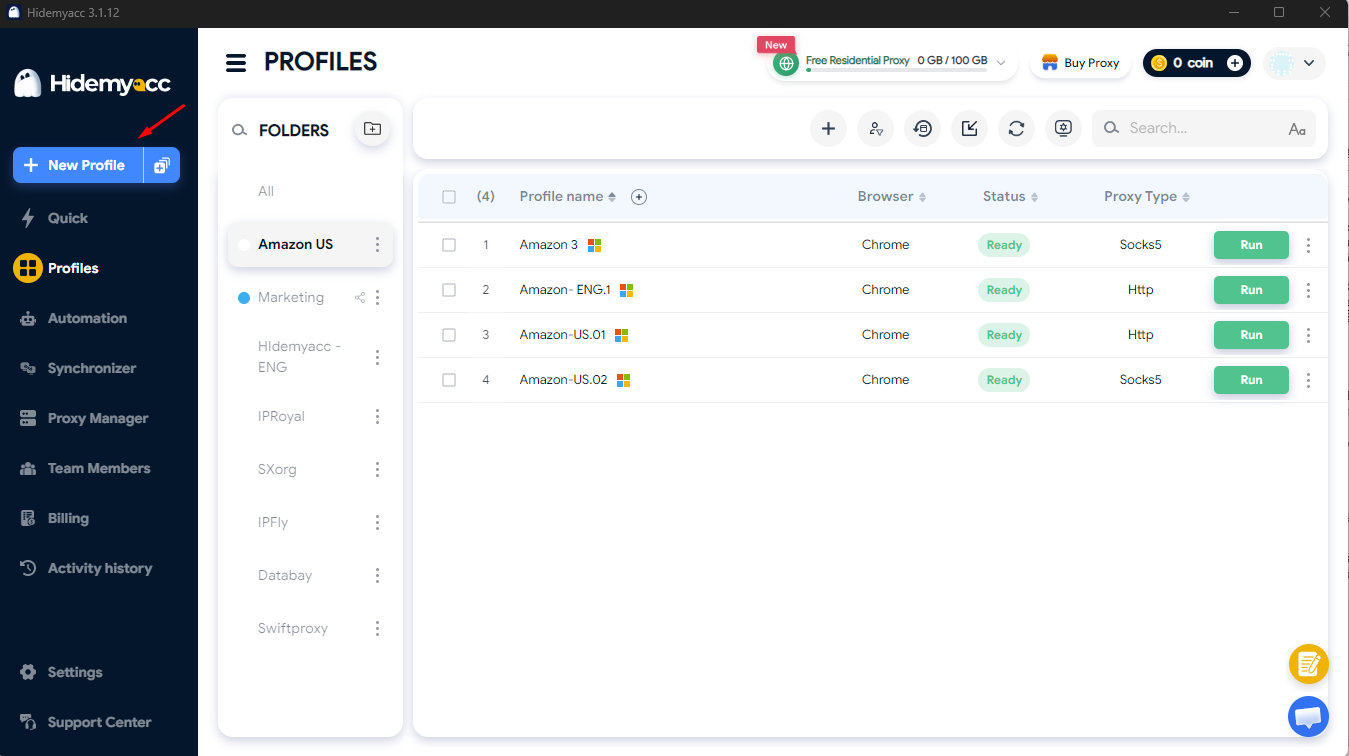
Step 1. Create a fresh browser profile
Open Hidemyacc and select New Profile. Assign a descriptive label indicating the target account, client, or workflow to keep large workspaces organized.
For instance, name profiles after specific stores or clients rather than using generic labels like Profile 1 or Profile 2. Clear naming helps prevent mistakes when launching and managing profiles.
Step 2. Configure proxy settings and profile parameters
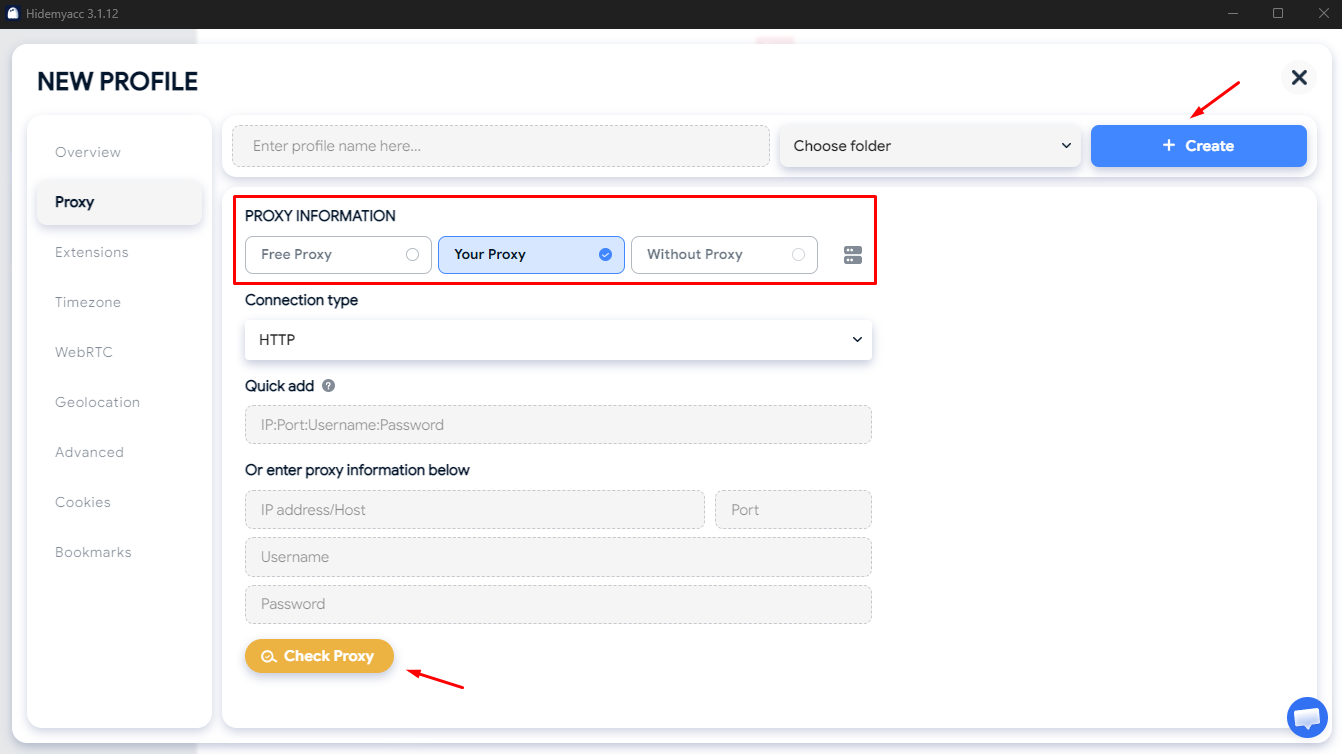
In profile settings, select Free Proxy to use built-in options or choose Your Proxy to attach custom credentials. Enter your host, port, and authentication details, then click Check Proxy to verify the connection. Once validated, click Create to finalize the profile.
Review your profile parameters before saving. When using external proxies, ensure your connection details match your target region. Proxies route network traffic through distinct endpoints, but do not replace the need for policy-compliant usage.
Read more: Step-by-step guide on using proxies in Hidemyacc
Step 3. Launch your browser profile
Once created, your new profile appears in the main dashboard list. Locate the profile and click Run to launch an isolated browser window.
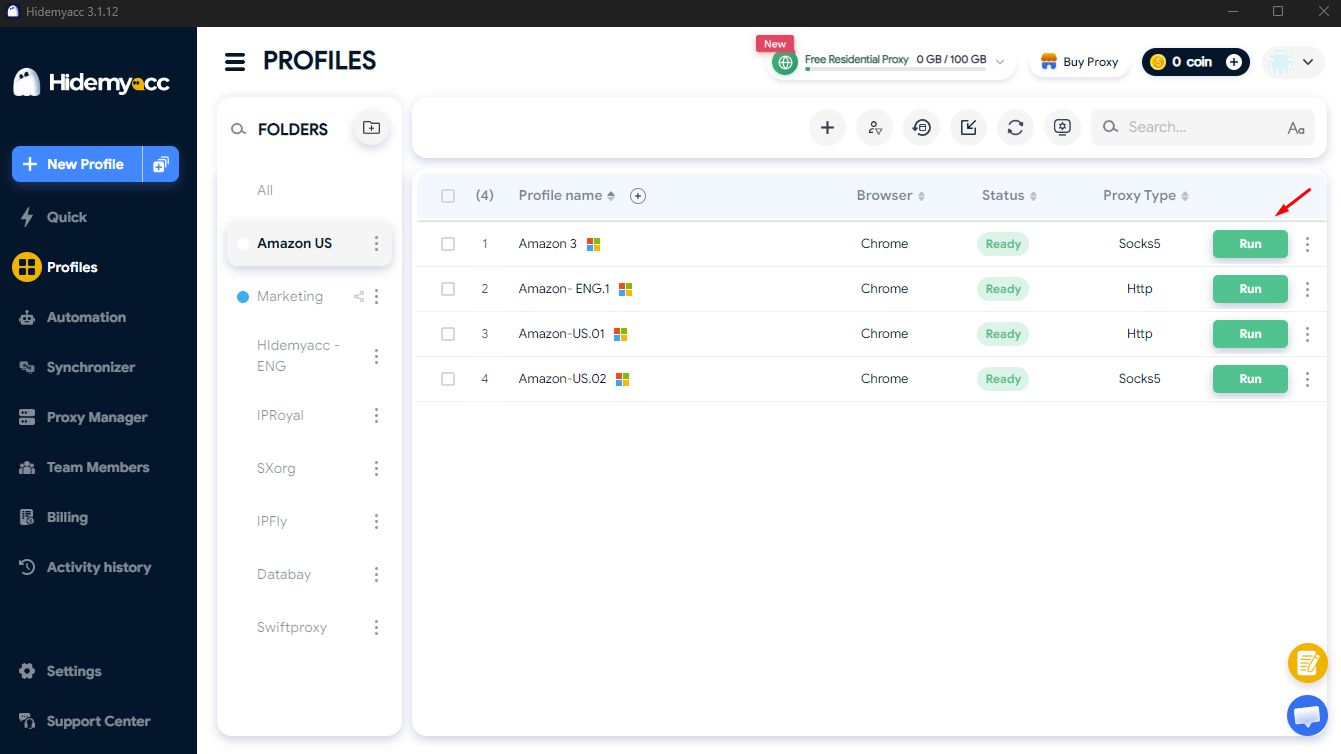
Step 4. Authenticate and manage accounts
Inside the newly opened window, navigate to your target platform and log in. Keep each account within its assigned profile to preserve session cookies independently. Repeat the profile creation steps for any additional accounts you need to manage.
Step 5. Organize and share profiles across your team
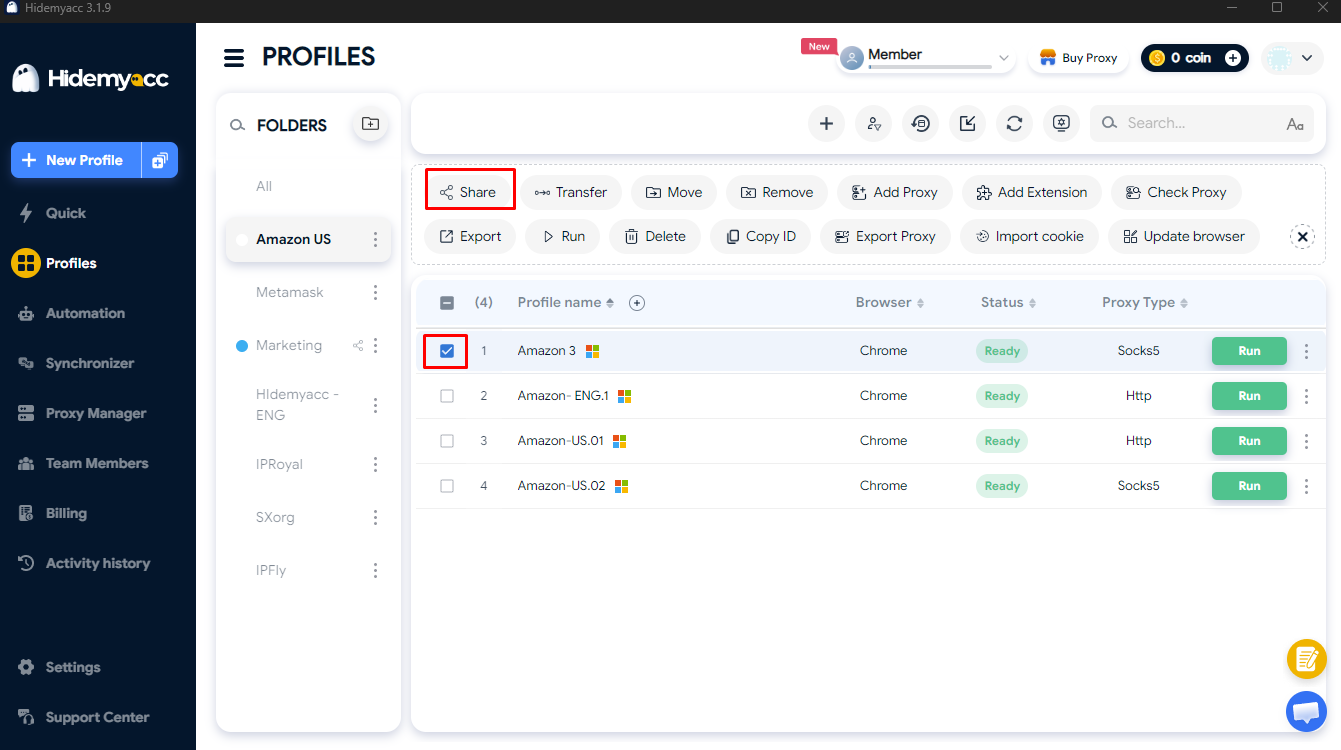
As your profile library grows, use folders and tags to categorize environments by client or project for faster navigation.
For distributed teams, use the Team members feature and access control options available in your plan. Share profiles directly with authorized team members, avoiding the need to send cleartext credentials over unsecured communication channels.
Step 6. Automate repetitive tasks where appropriate
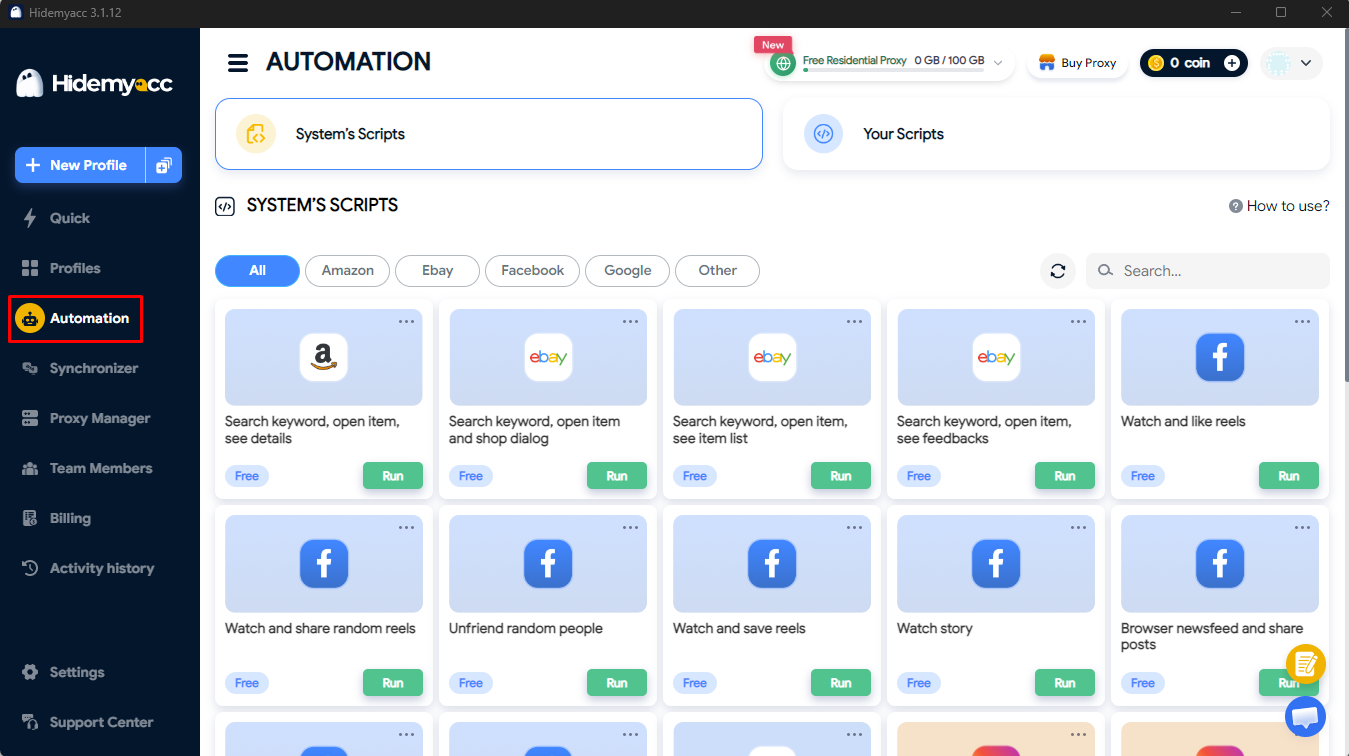
If your workflow involves running identical, routine tasks across multiple profiles, you can use Hidemyacc's built-in automation features to schedule and run pre-configured automation scripts on selected profiles.
This capability suits predictable, repetitive steps. Test new automation scripts on a small scale first, and ensure all automated actions align with the platform's terms of service.
To explore specific configurations and technical workflows in detail, review the official Hidemyacc documentation.
6. Conclusion
The right way to manage multiple online accounts depends on your overall account volume, security requirements, and operational goals. Password managers provide secure credential storage. Built-in account switchers offer convenience on supported platforms. Standard browser profiles help separate cookies for everyday use, while virtual machines and dedicated hardware provide deeper, OS-level isolation.
For teams and agencies managing multiple web accounts at scale, an antidetect browser is a practical option. It organizes profiles and isolates browser environments, though it remains important to manage accounts responsibly and comply with platform policies.
Assess your specific workflow requirements, stay aligned with platform terms, and choose an approach that provides sustainable organization over the long term.
Related reading:
- eBay Multiple Seller Accounts: How to create multiple selling stores
- Can you manage multiple Pinterest accounts in 2026?
- Managing multiple OnlyFans accounts: What you need to know
- How to run multiple TikTok Shop accounts effectively
- How to manage multiple LinkedIn accounts safely
- Can you operate multiple MetaMask wallets? A complete breakdown
- How to manage multiple social media accounts safely
7. FAQ
1. Is using multiple accounts permitted on the same platform?
Policies vary by platform. Some services explicitly allow multiple profiles or provide native multi-user team access, while others restrict them. Review each platform's official terms of service before setting up additional accounts.
2. Can platforms link accounts that share the same Wi-Fi network?
Yes, because devices on the same local network share an external public IP address. However, a shared IP alone is rarely conclusive evidence that accounts belong to the same person; platforms evaluate network data alongside device fingerprints and behavioral patterns.
3. What is the best software for managing multiple email accounts?
For standard inbox management, a dedicated email client with multi-inbox support works best. To organize credentials securely, use a password manager. To keep webmail sessions strictly separated, consider using independent browser profiles.
4. How can I monitor all my accounts from a single place?
It depends on the account type. Email accounts can be centralized within a unified desktop mail client, whereas commercial business profiles are typically monitored through native team dashboards or centralized multi-profile management platforms.