



AI is now involved in over 52% of the video production process on YouTube (Source: wyzowl). However, a paradox is occurring: the more people use AI, the more videos get only a few views. The reason lies not in the tool, but in overly generic prompts that make the content lack direction and easily deviate from the original goal. In this article, let's explore with Hidemyacc how to build AI prompts to create viral YouTube videos, optimize the entire production process, and improve viewer retention.
1. Why use AI Prompts but your YouTube videos still get few views?
Today's audiences are very demanding, and they can easily recognize a mechanical, cliché script. The biggest mistake when prompting is the lack of context, target audience, and specific purpose.
- Consequence: AI will generate content identical to thousands of other videos on the market. The platform's algorithm will flag this as Reused Content and immediately reduce distribution.
- Core solution: Use AI to realize strategic thinking, focusing heavily on click-through rates and viewer retention.
The problem with low-view videos does not lie with AI, but with how the content strategy is built. With the right mindset from the start, AI will act as a tool to accelerate the creative process and amplify the video's effectiveness.

2. Comparing common prompts vs. optimized prompts
Sometimes, the gap between a video with zero views and a million-view video lies not in the budget or tools, but in how you instruct the AI from the beginning.
- Common prompt template: "Write a video script on how to do SEO." The result you get will be bland bullet points, heavily theoretical like a textbook.
- Optimized prompt: "Act as a practical SEO expert with 5 years of experience, write a script solving the pain points of beginners building a website with no traffic. Use a humorous, mildly satirical style...". The returned result will be a script with emotional depth that hits the viewers' psychology.
The key point is not whether the prompt is long or short, but whether you have clearly defined the content goals behind the AI prompt to create viral YouTube videos. When you clearly state who you are talking to, what problems they face, how long the video is, what the pacing is, and what the tone is, AI will no longer generate content based on guesswork, but will start executing exactly according to the strategic direction.
3. Audience retention-first mindset on YouTube in 2026
Entering 2026, AI is no longer a competitive advantage. Almost everyone can use AI to write scripts, edit videos, or optimize titles. The real difference lies in how you direct the input data for it.
- AI is a trend amplifier: Don't force AI to invent topics on its own. Before writing a script, check Google Trends, track the Trending tab on YouTube, or analyze videos with fast view growth in your niche. This is not to follow trends blindly, but to understand what the audience is currently interested in. When your prompt contains the latest trend context, AI will generate topical content instead of generic and safe ones.
- Viewer retention structure: No matter how good the AI's writing style is, if the structure is wrong, the audience will still exit the video. You must command the AI to design the script following a strict psychological journey: Pinpoint the problem the audience is facing -> Provide practical solutions -> Commit to results right in the first 10 seconds.
When viewers see their problems named and hear a clear commitment to results, they have a reason to stay. And as retention increases, the algorithm will automatically push the video to trending, helping you increase YouTube views significantly.
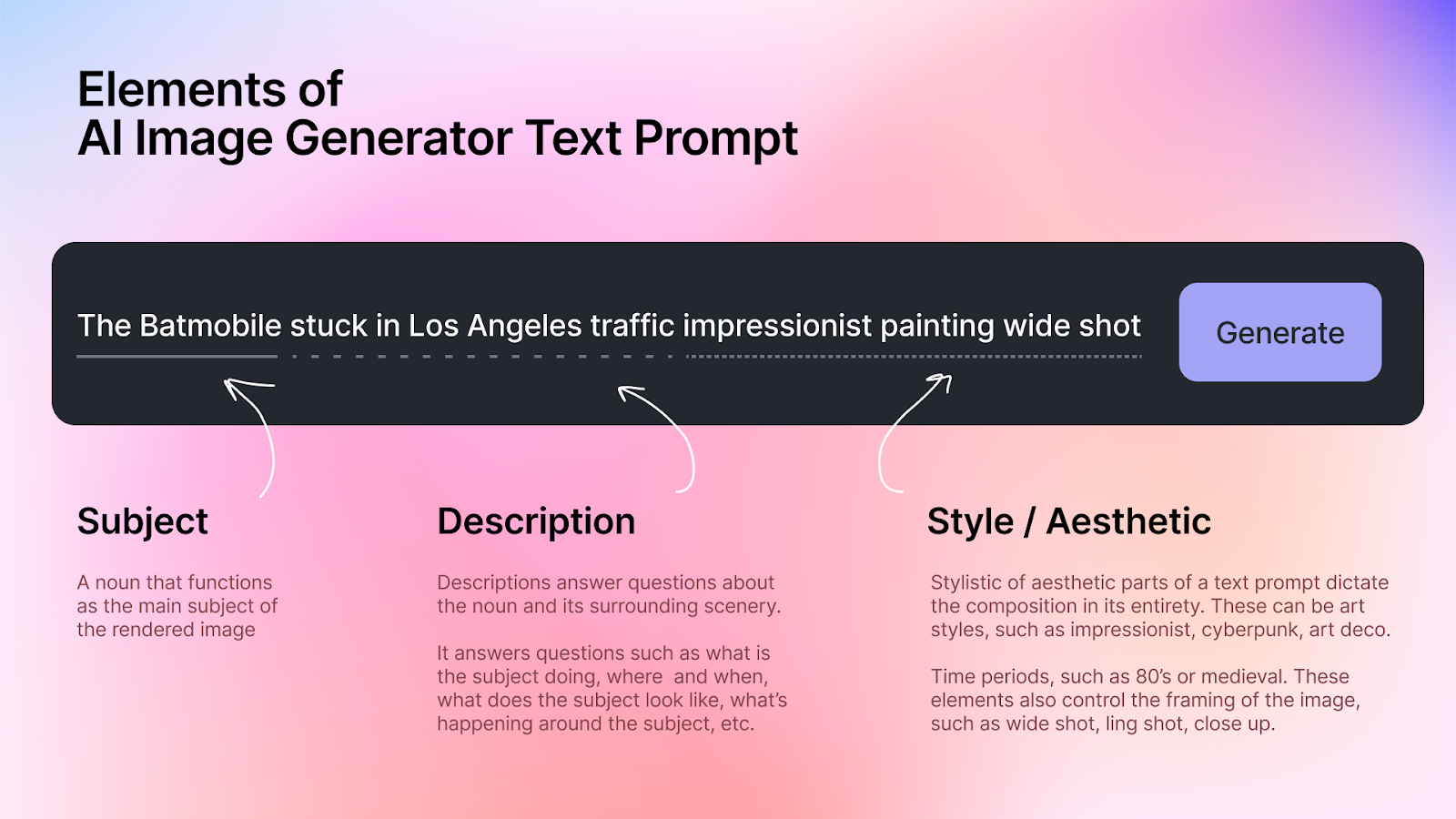
4. SCELA for generating AI images and videos
For AI to create high-quality illustrative footage or thumbnail images, stick to the SCELA formula for the best results:
- Subject: is the most important part. You need to clearly describe the character or object appearing in the frame. Not just "a man", but "a young content creator, wearing a black hoodie, tired eyes, sitting in front of a laptop". The more detailed the appearance, color, and material, the more accurate the image AI creates.
- Context: Gives the shot a story. It could be a studio room at midnight, a crowded cafe in the morning, or a messy workspace. Time and atmosphere determine the overall emotion of the image.
- Effect: Is where you shape the style. You can request cinematic style, 8K resolution, shallow depth of field, film grain, or cool color tones. This is what makes the image look more expensive instead of like a standard stock photo.
- Lighting: Often overlooked but determines 50% of the emotion. Afternoon sunlight creates a nostalgic feeling. Soft studio lighting feels professional. Blue-purple neon creates a modern, tech vibe.
- Action: Gives the image or video movement instead of standing still. You can ask for camera slowly zoom in, handheld shot, slow motion, or the subject typing on the keyboard, sighing, looking at the analysis screen.
Just by adding all 5 SCELA elements, the generated image will have depth, emotion, and clear purpose.
5. 5-step process to optimize AI prompts for creating viral YouTube videos from idea to completion
If you only use AI to write scripts, you are harnessing less than half of its power. A more effective way is to turn AI into a strategic assistant, accompanying you from idea formation until the video is completed and distribution is optimized. Below is a 5-step process to help you systematically optimize AI prompts to create viral YouTube videos.
- Step 1: Discover new topics and ideas: Before writing any script, you need to make sure you are talking about a topic with real demand. Instead of asking generally, "Are there any good ideas?", clearly define the role and goal for AI.
Prompt template: Act as a YouTube consultant, suggest 10 video topics with the most potential to attract viewers in my field today. Focus on the problems that make viewers most anxious or curious.
Setting a role helps AI answer more deeply instead of superficially listing.
- Step 2: Design an engaging 3-second hook: On YouTube, the first 3 seconds decide whether viewers stay or leave. A lengthy intro will cause the retention graph to drop sharply from the start, so clearly state your criteria to AI.
Prompt template: Write 5 short, curiosity-inducing video intro options about this topic without using cumbersome greetings.
You will have multiple options to test instead of just a single one.
- Step 3: Build a fast-paced script: One of the reasons AI videos get early drop-offs is that the script is too monotonous, lacking climax. To retain viewers, the content needs a clear rhythm; every 10–15 seconds there should be a transition, practical example, or thought-provoking question. Add requirements for pacing and emotion.
Prompt template: Write a detailed script based on this outline, using popular, easy-to-understand language, short sentences under 15 words, and creating continuous drama. Add real-world examples to increase persuasiveness.
When you clearly define the pace, AI will proactively divide the content into short segments, avoiding talking endlessly in one breath.
- Step 4: Optimize title and thumbnail: Titles and thumbnails determine CTR. No matter how good the script is, if no one clicks to watch, the video still fails. It's important to ask it to focus on the biggest benefit the viewer receives, rather than just describing the content.
Prompt template: Create 12 short titles under 60 characters, focusing on the biggest benefit the video brings. Prioritize curiosity but do not mislead.
Then, you can track performance in YouTube Studio to choose the version with the best CTR.
- Step 5: Produce illustrations and B-roll footage: A common flaw of AI videos is having a single static frame for too long. This reduces retention because viewers lack visual stimulation.You can use AI to generate images or turn them into dynamic image-to-video content that reinforces each key point and maintains viewer interest from start to finish. Describe clearly following the SCELA formula so the images have depth and emotion rather than looking like generic stock photos. Such illustrations make the video more lively, increase viewer retention, and make the content look more professional even though it is produced by AI.
Once you have a stable channel, the next step is to replicate the model across multiple channels to expand revenue. However, before expanding the system, you should clearly understand how to create and manage multiple YouTube channels from a single account.
6. Measuring Prompt effectiveness with data
You need to closely monitor the metrics in YouTube Studio to know if your prompt is truly effective.
- CTR < 5%: This indicates the content might be fine, but the title or thumbnail is not attractive enough for viewers to click. At this point, you need to ask AI to rewrite the title focusing more strongly on the benefits or increasing the curiosity factor. In addition, you can also apply ways to get 1,000 free YouTube views to create initial momentum for a new video.
- Graph drops at 0–10s: The hook is too weak. When encountering this situation, adjust the prompt for the intro: request shorter, more direct sentences that touch the exact pain point from the very first sentence.
- Graph drops continuously in the middle of the video: The script is too flat, lacking rhythmic breaks or practical examples. The solution is to update the prompt to add a "pattern interrupt," a surprising question, shocking data, or a short story that changes the pace.
- AVD (Average View Duration) < 40%: The cause is a wordy or repetitive script. AI often tends to over-explain if you do not clearly limit the duration and sentence length. Adjust the prompt by requesting sentences under 15 words, removing redundant explanations, and focusing on specific actions.
Note: every time you optimize, you should only change one element. If you edit the hook, title, and script all at once, you won't know which element actually created the improvement.
7. Mistakes that cause AI videos to lose distribution
When a video isn't strongly recommended, the problem usually isn't the algorithm, but how you use AI. Below are common mistakes that easily lead to reduced video distribution:
- Repetitive content: Prompts are too generic, scripts are similar to a bunch of other channels. When the content fails to create differentiation or new value, YouTube's system will assess it as having low retention and restrict recommendations.
- Robotic AI voiceover: Voiceovers with no emphasis, no climax, and a flat pace cause early viewer exits. Even if the content is good, if the delivery lacks emotion, AVD (Average View Duration) will drop sharply.
- Overly clickbait thumbnail: Titles and thumbnails are excessively curious but the content doesn't meet expectations. The result is high CTR but low AVD. When the system notices viewers clicking in and bouncing quickly, the algorithm will reduce recommendations due to a poor user experience.
- Lack of transparency when using AI content: If using images, voices, or videos simulating real people, you need to comply with YouTube's policies and tag "Altered Content" when necessary. Violating this can get your YouTube channel suspended.
When operating multiple channels or platforms simultaneously, you should also learn more about how to safely manage multiple social media accounts without getting banned to limit the risk of being linked.
8. Top AI tools supporting YouTube creators
To optimize the entire process from idea to video publishing, you can combine multiple different AI tools. Below is a list clearly categorized by function:
- ChatGPT and Gemini: Powerful tools for brainstorming ideas, writing scripts, building outlines, and analyzing competitor content. Suitable for the strategic and content creation phases.
- TubeBuddy and CapturesAI: Support keyword research, competition analysis, title optimization, tags, and technical elements that help videos easily appear in searches. To research competitor channels at scale, you can automate with a YouTube channel crawler tool.
- Kling AI and Runway: Mini film studios helping you generate high-quality illustrative video clips.
- Canva and Pixlr: Support quick thumbnail design with clear layouts and strong contrasting colors, helping increase click-through rates (CTR).
- VEED.io and GStory: Automate subtitle creation, basic editing, and fast post-production processing, saving production time.
When coordinating the correct roles of each tool, you will create an AI ecosystem that fully supports the content production process on YouTube, instead of using isolated parts.

9. How to write natural Vietnamese Prompts
An effective prompt not only demands the right content but must also control the tone. Without clear direction, AI easily writes in a safe, formulaic, and emotionless manner. For more natural content, you can apply the following methods:
- Use technical keywords in English: When describing lighting, camera angles, or video quality, use terms like cinematic lighting, slow zoom.... This helps AI understand technical requirements accurately. However, the main script should still be written in Vietnamese to ensure naturalness and the right context for the audience.
- Clearly define pronouns and roles: Instead of letting AI choose its own voice, specify: use pronouns "mình - bạn" (I - you), talk like a friend sharing experiences. When defining the role clearly, the content will have more emotion and depth, avoiding the feeling of reading a machine-generated article.
- "Back-translation" to refresh writing style: After having the Vietnamese version, ask AI to translate it to English and then translate it back, keeping the meaning but expressing it more naturally. This helps change sentence structure and reduce the formulaic feel. However, after back-translating, you should still do a final edit to ensure your personal tone and style are maintained.
When a prompt is built correctly, AI not only understands your request but can also generate more natural and persuasive content.
10. Conclusion
Mastering AI prompts to create viral YouTube videos is not simply knowing how to ask questions, but knowing how to transmit your creative thinking into the machine. In the increasingly competitive context of YouTube in 2026, those who know how to leverage AI to optimize the content production process will have a huge advantage to break through.
However, do not forget that AI is only a support tool. The core value that makes a million-view video still lies in understanding the audience and your unique personality. Start applying these prompt templates, track viewer feedback through actual metrics, and constantly refine them to find your own formula for success. Wishing you soon reach your first million-view milestones on your creative journey.
>>> How does Youtube pay? Simple way to receive YouTube money
11. FAQ
1. Is it better to write Prompts in English or Vietnamese?
You should use bilingual. Use English for technical descriptions (images, lighting, camera angles) so AI understands more accurately. For script content requests, use Vietnamese so AI returns the result in the exact language you need.
2. Does AI help increase click-through rate (CTR)?
Yes, if you know how to leverage it. Ask AI to generate 10-15 different titles based on curiosity or shocking psychology, then use YouTube's Test & Compare feature to choose the template with the highest CTR.
3. Should I immediately publish a script written by AI?
No. You should spend about 20% of your time editing words to make them natural and adding your own personality. This gives the video more "soul" and avoids being judged as mass-produced, mechanical content.
4. Does YouTube ban AI-generated content?
It's not banned, but transparency is needed. You must tag "Altered content" if using AI to generate realistic images or audio of people or real events. If it just supports scriptwriting or simple illustrations, no tag is needed.
5. Is using AI to write scripts considered repetitive content?
Yes, if you use a prompt that is too generic. To avoid this mistake, personalize the Prompt by adding personal perspectives, real experiences, and requesting AI to write in a specific tone.
6. Why does AI often write very wordy scripts?
AI is designed to provide the most complete information. Tip to fix: Clearly request duration limits (e.g., under 3 minutes), use short sentences under 15 words, and command it to ban cliché opening sentences.
7. How to know if a Prompt is effective?
Based on the average view duration metric. If viewers drop off right in the first 30 seconds, the intro is not attractive enough. If the graph drops steadily in the middle, it's because the script lacks pacing breaks or innovations in visuals or audio to retain viewers.






