Earning money on YouTube is increasingly popular, especially with AI tools making content creation faster and easier. Since success rarely comes from just one channel or niche, many creators choose to run multiple channels to test ideas and audiences. However, managing many Gmail accounts is not always practical, which leads to a growing interest in multiple YouTube channels one account. But does YouTube actually allow this, and what risks should creators be aware of? Let’s explore these questions with Hidemyacc in the article below.
1. Does YouTube allow multiple channels on one account?
Yes. YouTube does allow multiple channels under one Google Account.
This is an official feature, not a loophole or workaround. However, the way it works and the limits that come with it are often misunderstood.To understand this clearly, it helps to separate a few key concepts:
- Google Account: This is your main login (usually a Gmail address). It acts as the control center for everything connected to it.
- YouTube Channel: A channel is the public-facing space where videos are uploaded, subscribers follow you, and monetization is reviewed.
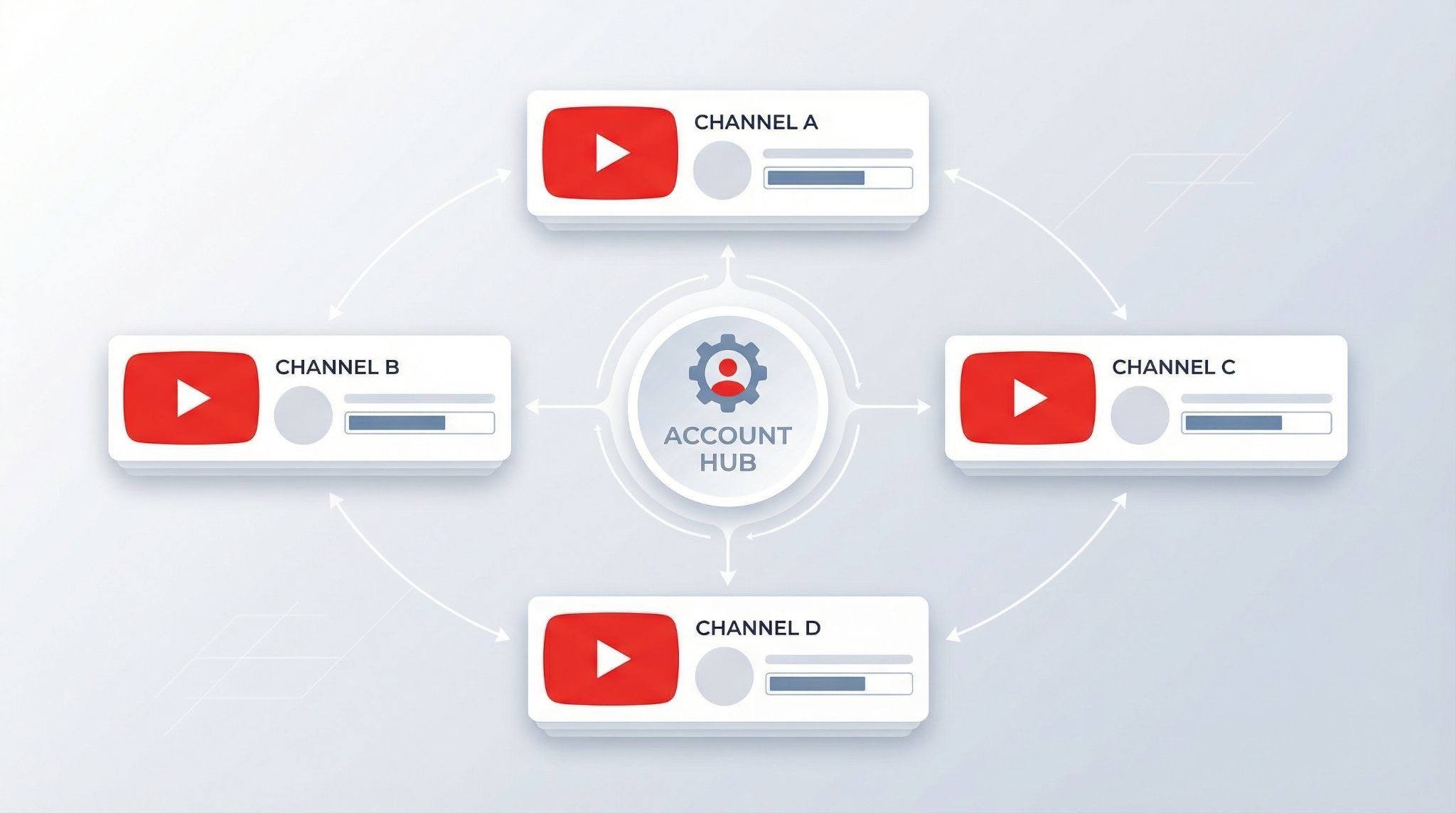
- Brand Account: A Brand Account allows one Google Account to create and manage multiple YouTube channels without needing separate emails.
Using Brand Accounts, one Google Account can legally manage multiple YouTube channels one account, all under the same login.
1.1. What YouTube officially allows
According to YouTube’s documentation and current platform behavior:
- One Google Account can manage up to 100 YouTube channels
- You can switch between channels without logging out
- Each channel has its own: name and branding, nontent library, subscribers and analytics, monetization status
- Multiple people can manage a channel through assigned roles (via Brand Accounts)
From a rules perspective, creating and managing multiple channels under one account is fully permitted.
1.2. What YouTube does not guarantee
While multiple channels are allowed, YouTube does not treat them as completely isolated environments:
- Activity is still evaluated at the account level
- Repeated policy violations across channels can raise red flags
- Monetization reviews look at patterns, not just individual channels
- Rapid channel creation or suspicious behavior may trigger manual checks
In other words, YouTube allows multiple channels on one account by design, but it also expects responsible use. Understanding this distinction is critical before deciding how far you want to scale under a single Google Account.
>>> How does Youtube pay? Simple way to receive YouTube money
1.3. Can you monetize multiple YouTube channels under one Google Account?
Yes. You can monetize multiple YouTube channels managed through the same Google Account. However, each channel must independently meet the applicable YouTube Partner Program (YPP) eligibility requirements and pass its channel review.
For example, reaching the subscriber and watch-hour thresholds on one channel does not automatically qualify your other channels for monetization. YouTube reviews each applying channel to determine whether it complies with the platform's monetization policies.
You also do not need a separate AdSense for YouTube account for every channel. You can link multiple eligible channels to the same approved AdSense for YouTube account, provided you follow YouTube's account and payment requirements.
Before launching multiple channels as a revenue strategy, keep three things in mind:
- Separate eligibility: Each channel must meet the applicable YPP requirements.
- Individual channel reviews: Approval for one channel does not guarantee approval for another.
- Shared payment setup: Multiple monetized channels can use the same approved AdSense for YouTube account.
Check the official YouTube Partner Program eligibility requirements and AdSense for YouTube setup guidance for the latest requirements.
2. Personal Channel vs Brand Account: Which should you use?
If you’re managing multiple YouTube channels, this choice affects how easily you can scale, collaborate, and stay organized. You don’t need to overthink it, what matters is matching the setup to how you actually work.
2.1. Using a Personal Channel
A Personal Channel is designed for simple, solo setups. It works best when everything stays under one person’s control and isn’t expected to change much over time.
A Personal Channel makes sense if:
- You work completely alone
- You manage only one channel
- You don’t need to share access with anyone
- You don’t plan to transfer or sell the channel
In short, a personal channel is fine for individual creators who value simplicity and don’t need flexibility.
2.2. Using a brand account
A Brand Account is built for growth and collaboration. It separates channel management from your Google login and gives you more control as your setup expands.
A Brand Account is the better choice if:
- You manage multiple YouTube channels
- You work with editors, VAs, or a team
- You want to assign roles without sharing passwords
- You expect to scale or restructure later
This option is better suited for creators who treat their channels as long-term projects rather than one-off experiments.
2.3. Team, editor, or agency access
Once another person needs access, even temporarily, the decision becomes clearer. A Brand Account lets you control permissions cleanly and avoids the risks that come with sharing a single Google login.
If collaboration is part of your plan, a Brand Account is the safer default.
2.4 Should you switch later?
It is possible to convert a Personal Channel to a Brand Account, but the process adds extra steps and inconvenience. Switching later is usually done out of necessity, not preference.
If you already know you’ll manage multiple channels or work with others, starting with a Brand Account is often the smoother path.
>>> YouTube shorts monetization: What you must know before starting
3. How to create and manage multiple channels (quick & clean)
Once you’ve decided to use Brand Accounts, setting up and managing multiple channels is straightforward. The key is knowing the correct steps and avoiding common mistakes that slow people down.
3.1. Create a new channel using a Brand Account
Creating an additional channel under the same Google Account does not require a new Gmail. You simply add a new Brand Account. Basic steps:
Step 1: Log in to YouTube
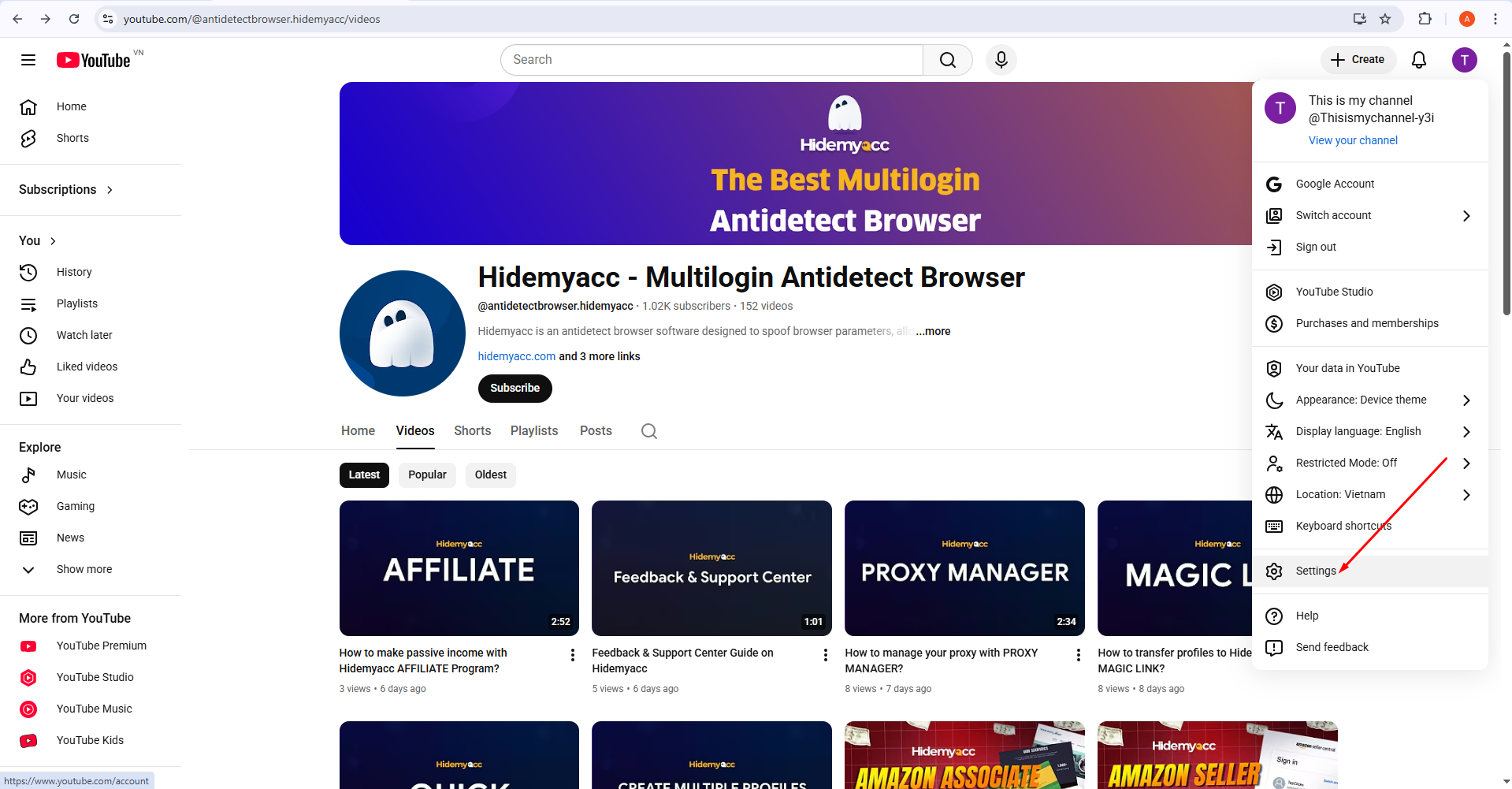
Step 2: Click your profile picture → Settings
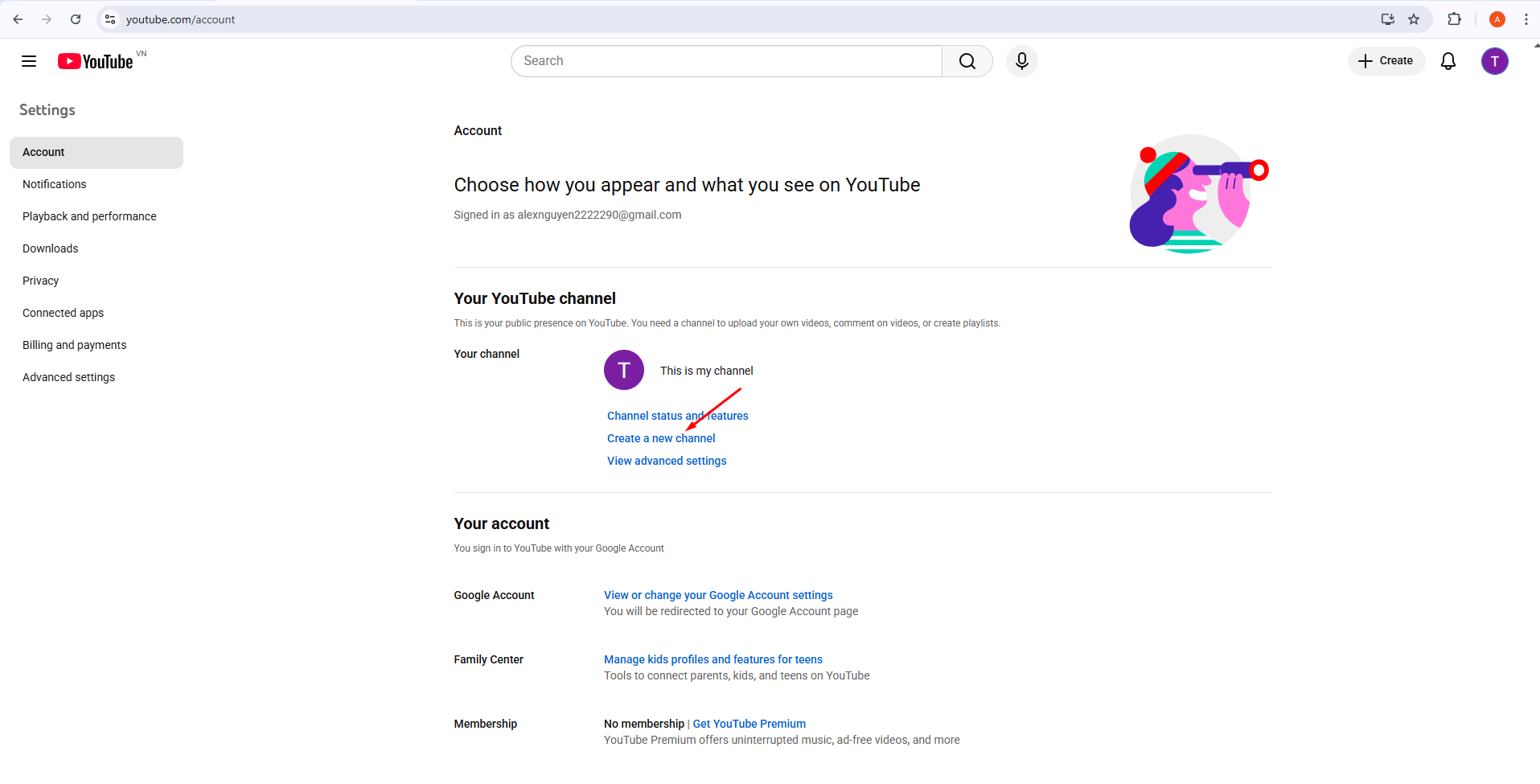
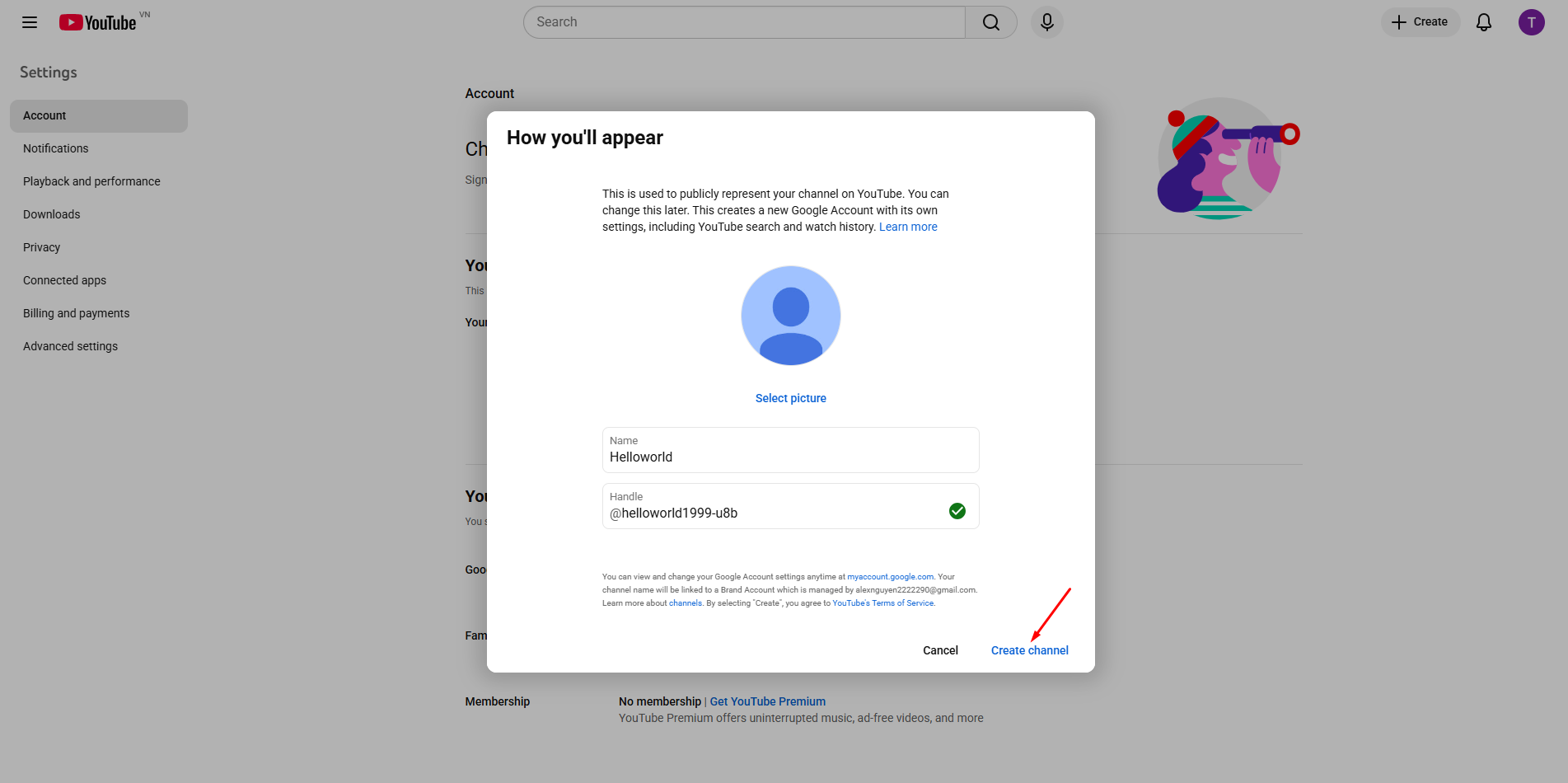
Step 4: Enter a channel name and confirm
3.2. Convert a personal channel to a Brand Account
If you started with a Personal Channel, you can move it to a Brand Account later. This keeps your videos and subscribers but changes how access is managed.
The conversion process is supported by YouTube, but it may require rechecking permissions and reconnecting some tools.
3.3. Common issues and how to fix them
Most problems are simple and avoidable once you know what to look for. Typical issues include:
- Channel not appearing when switching → Check Brand Account permissions
- Unable to add collaborators → Make sure the channel is a Brand Account
- Creation blocked → You may have hit temporary limits; try again later
These issues are usually related to access settings, not account violations.
>>> Top 10 YouTube channel crawler tools to analyze any channel
4. Allowed doesn’t mean safe: Real risks you should consider
YouTube does allow multiple channels under one account, but many creators misunderstand what that permission actually means. “Allowed” simply means you’re not breaking a rule by creating more channels, it does not mean those channels are risk-free or completely independent.
4.1. Account-level evaluation
YouTube evaluates each channel applying for monetization against its channel monetization policies. A channel's compliance history and the content published on it can therefore matter during review. However, creators should not assume that every issue on one channel automatically affects all other channels under the same Google Account. The consequences depend on the specific policy and enforcement action involved.
4.2. The “side channel” misconception
A common mistake is treating secondary channels as safe testing grounds. Many creators assume that experimenting with risky formats or borderline content on a smaller channel won’t matter. In reality, repeated issues across side channels can still raise red flags during policy or monetization reviews.
4.3. Monetization review gets stricter over time
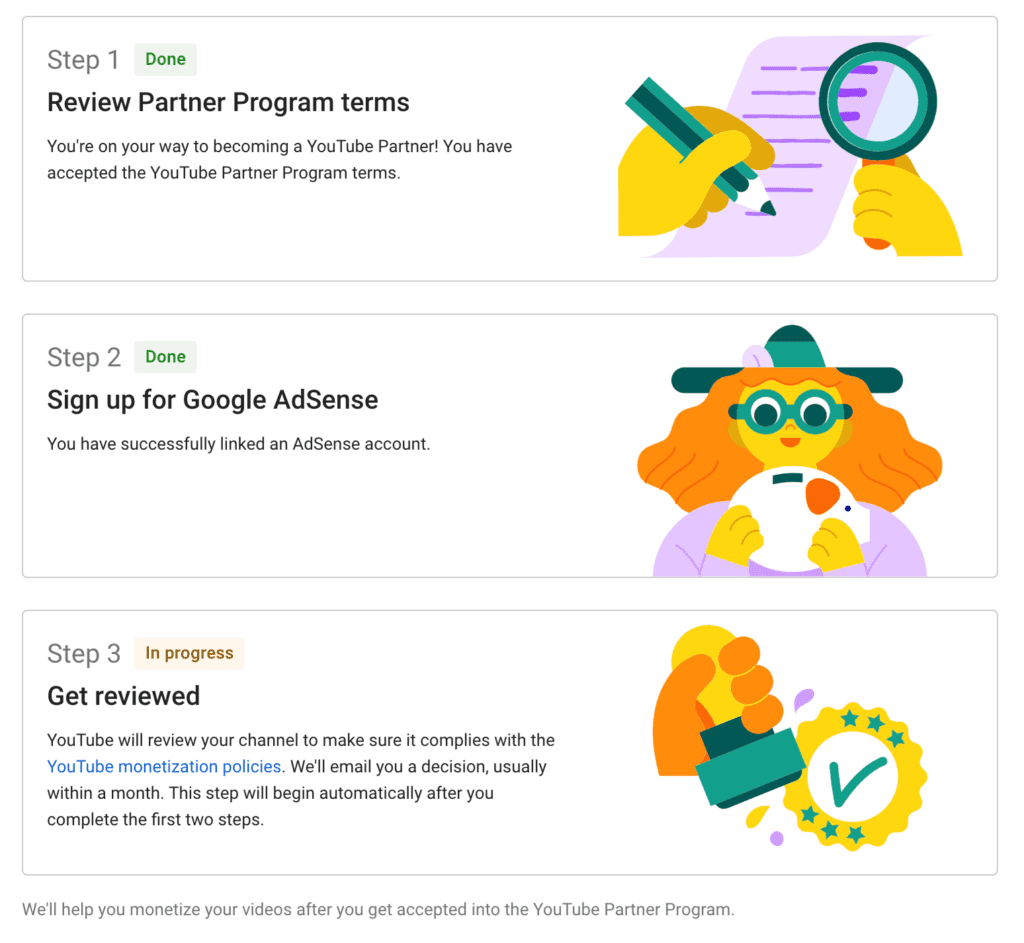
Each channel must qualify for monetization on its own. YouTube reviews the channel as a whole to check whether it follows the platform's monetization policies. Reused content or other policy violations may affect a channel's eligibility, even if it has reached the required subscriber and watch-hour thresholds. Meeting the numerical requirements does not guarantee approval.
4.4. Operational mistakes add up
Managing many channels under one login increases the chance of human error. Uploading to the wrong channel, mixing branding, or managing comments under the wrong identity may seem minor, but repeated mistakes can hurt both audience trust and platform signals.
4.5. One account, one point of failure
All channels are ultimately controlled by a single Google Account. If that account is compromised, suspended, or locked for security reasons, access to every connected channel is affected immediately. For creators who rely on YouTube income, this risk is often underestimated.
>>> Why was my YouTube account suspended? 7 common reasons and how to appeal
5. Best practices for managing multiple YouTube channels safely
Managing multiple YouTube channels under one account is mostly about avoiding small mistakes that cause long-term problems. You don’t need a long checklist, only a few practices that directly affect growth and monetization.
5.1. Verify each channel as early as possible
If you plan to grow a channel seriously, complete the verification steps required to access the features you need. Keep in mind that channel verification and YPP approval are separate processes: verifying a channel does not guarantee monetization eligibility or acceptance into the YouTube Partner Program.
5.2. Keep each channel’s workflow clearly separated
When managing several channels, confusion is one of the biggest risks. Uploading to the wrong channel, applying the wrong thumbnail, or managing comments under the wrong brand can hurt both performance and credibility.
Clear separation, by channel, task, or team member, helps maintain consistency, which is critical once a channel starts generating revenue.
5.3. How Hidemyacc supports multi-channel management
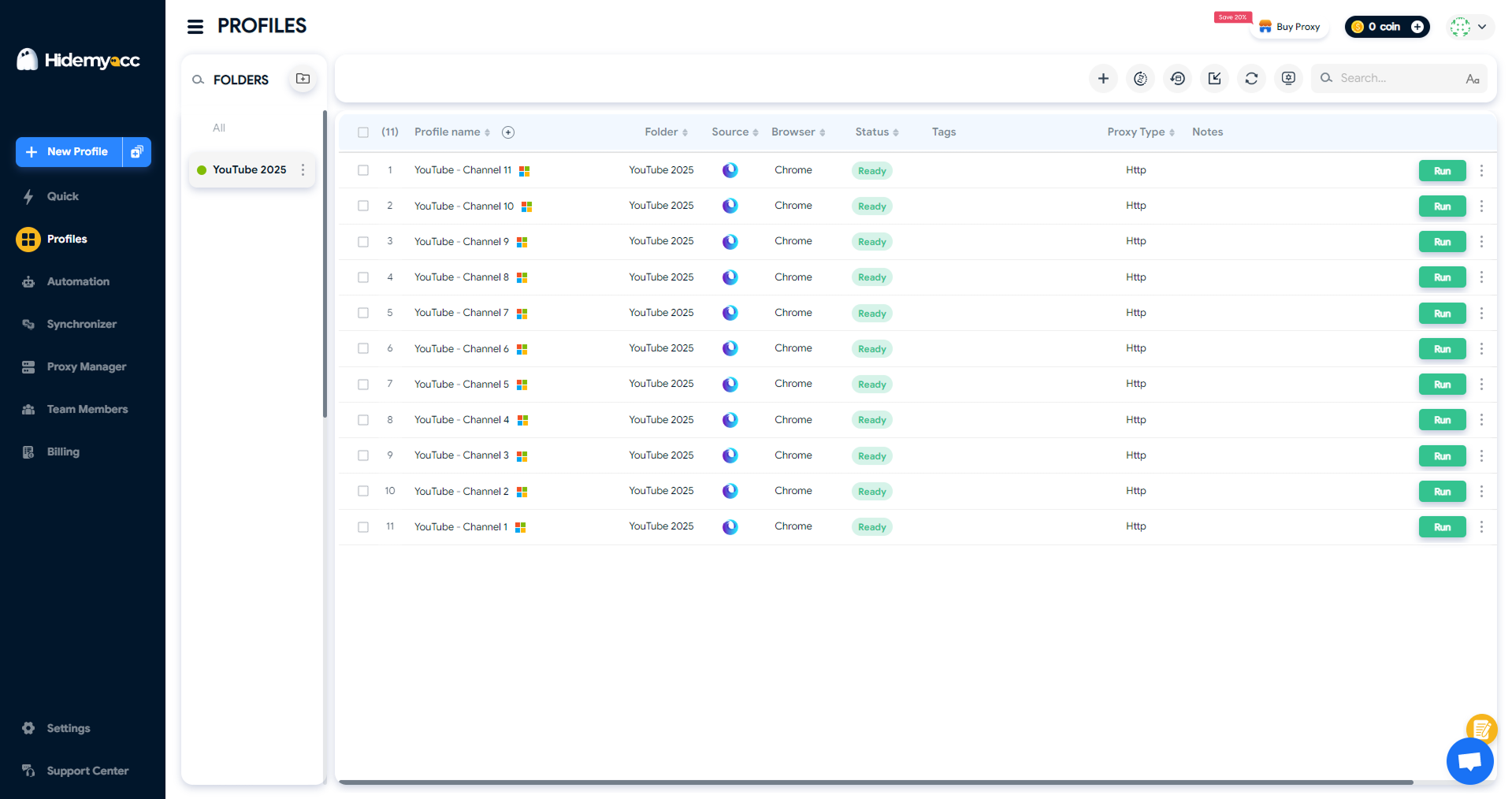
An antidetect browser Hidemyacc helps creators manage multiple YouTube channels by giving each channel its own dedicated browser profile. Each profile keeps its own login session and cookies, so channels don’t overlap during daily work.
This is especially useful when:
- You manage multiple channels at the same time
- You share channel management with editors or assistants
- You want to avoid repeated logins and accidental actions
By assigning one Hidemyacc profile per channel, creators reduce human error and keep workflows clean. This stability supports consistent uploads, clearer testing, and smoother monetization over time.
A Safer Way to Manage Multiple YouTube Channels
Run each YouTube channel in an isolated browser profile using Hidemyacc and avoid session conflicts. Get 10% off your first payment.
Claim 10% Off6. When multiple channels on one account is a bad idea
Using multiple YouTube channels under one account is a bad idea when:
- Content overlaps too much: Reused formats or similar videos across channels make growth and monetization harder.
- Automation is excessive: Mass uploads or overly automated workflows can create unnatural activity patterns.
- You’re testing “gray” niches: Borderline content across multiple channels increases account-level risk.
- Your main channel isn’t stable yet: Splitting focus too early often delays monetization instead of speeding it up.
If you don’t have a clear strategy and stable channel yet, running multiple channels will likely hurt more than help
7. Alternatives to multiple channels under one account
Creating multiple channels under one account is not the only option. In some cases, the alternatives below are simpler and safer.
7.1. Use playlists instead
Playlists work better when:
- Content topics are related
- You want to keep all views and subscribers on one channel
- You’re still testing formats or ideas
Playlists help organize content without splitting traffic or monetization signals.
7.2. Use separate Google Accounts
Separate accounts make sense when:
- Projects are completely unrelated
- You want strong isolation between channels
- You’re testing higher-risk or experimental niches
- Different teams or AdSense setups are involved
This approach reduces account-level dependency but increases management overhead.
8. Conclusion
Running multiple YouTube channels one account is allowed by YouTube and can be effective when done with a clear strategy. The real risk doesn’t come from the setup itself, but from poor management, reused content, or trying to scale too fast without structure.
If you understand when to use Brand Accounts, avoid risky behavior, and choose the right setup for your stage, managing multiple channels can support long-term growth and monetization. Clear workflows and proper separation become increasingly important as the number of channels grows.
For creators or teams handling several channels at once, tools like Hidemyacc can help keep channel environments separate, reduce mistakes, and simplify daily management. Used correctly, this kind of setup allows you to focus more on content and revenue, rather than account confusion.
Running multiple accounts? It’s not just about Youtube accounts, see how others do it across platforms.
- Manage Multiple Social Media Accounts Efficiently - Tips Inside
- How to run multiple Telegram accounts on one device without bans?
- How to use multiple WhatsApp accounts on one device?
- Create Multiple X Accounts Without Getting Banned - Step-by-Step
- How to run multiple Instagram accounts without getting banned
- Multiple TikTok Accounts: Best Practices to Avoid Shadowbans
- Multiple LinkedIn accounts - How to create and manage them effectively?
- Multiple Reddit accounts - How to create and manage them safely (Step-by-step guides)
- How to Safely Run Multiple Discord Accounts Without Bans?
- Can you have multiple Bluesky accounts? Bulk create tips
- Can you have multiple OnlyFans accounts without risk?
- Can you have multiple Snapchat accounts without getting banned?
9. FAQ
1. Can one YouTube account have multiple channels?
Yes. One Google Account can manage multiple YouTube channels using Brand Accounts.
2. How many channels can you make on one account?
You can manage up to 100 YouTube channels through one Google Account. The actual features available to your account may depend on YouTube's current requirements and restrictions.
3. How do I add another channel to my YouTube account?
Go to YouTube Settings → Add or manage channels → Create a new channel
4. Why can't I create a second YouTube channel?
Possible reasons include using the wrong Google Account, lacking the required permissions for a Brand Account, or encountering an account or feature restriction. Check your signed-in account and channel permissions first, then review YouTube's current channel creation guidance if the issue persists.
5. Can people see your other YouTube channels?
Your channels have separate public identities, but that does not guarantee they will remain undiscoverable from one another. Viewers may find them through public videos, search results, mentions, or links. If you want to keep projects separate, review each channel's public information and avoid cross-linking them unnecessarily.
6. How to combine two YouTube channels under one account?
You can’t merge channels, but you can move both under the same Google Account using Brand Accounts.
7. What is the 30 second rule on YouTube?
It refers to how a view is counted on longer videos. It has no impact on how many channels you can run.