Viettel DNS is the key that helps users overcome access barriers such as: Unblocking Facebook, downloading YouTube videos, and increasing network speed. So, how many Viettel DNS server IP addresses are there? How can you change your DNS to access the internet faster? Join Hidemyacc to explore right in the article below!
1. List of Popular Viettel DNS
Viettel DNS is a system of DNS (Domain Name System) servers managed by the Viettel Internet Service Provider in Vietnam. This system helps Viettel network users resolve domain names into IP addresses to access websites and internet services quickly and effectively. Below is the list of Viettel DNS addresses:
Viettel DNS IPv4 Addresses
- 203.113.131.1 (Most popular)
- 203.113.131.2 (Most popular)
- 203.113.181.1
- 203.119.36.106
- 203.190.163.13
- 203.162.57.108
- 208.190.163.10
Viettel DNS IPv6 Addresses
- 2001:1900:2:131::1 (Most popular)
- 2001:1900:2:131::2 (Most popular)
- 2001:1900:2:181::1
- 2001:1900:2:36:106::1
- 2001:1900:2:163:13::1
- 2001:1900:2:57:108::1
- 2001:1900:2:163:10::1
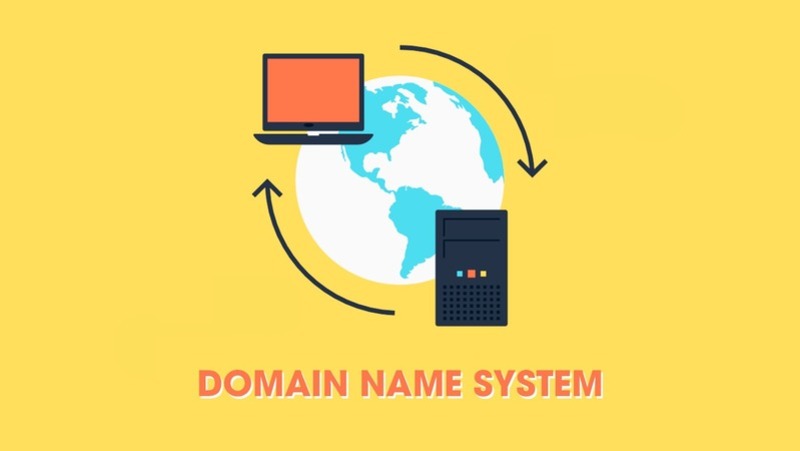
Viettel DNS helps the network connection process take place much faster.
>>>> READ NOW:
- Fixing the This network is blocking encrypted DNS traffic error on iPhone
- What is a DNS Zone? Benefits and effective DNS Zone management
2. Should you choose Viettel DNS or Google DNS?
When choosing a DNS system from any provider, you need to rely on various factors such as access speed, privacy, and security to make the right decision.
Typically, many people tend to choose Google DNS servers because of their stability. However, for users in Vietnam, using Viettel DNS is also an optimal choice. Viettel DNS servers not only help improve network access speed, especially for websites hosted in Vietnam, but also allow you to easily access websites blocked by other Internet Service Providers. Of course, you still cannot access websites that are blocked by the Viettel network itself.
Viettel DNS is the perfect solution if you want to access domestic websites.
3. Instructions for changing Viettel DNS on various devices
Changing to Viettel DNS is a simple and safe measure that helps you easily access blocked websites and improve network connection speeds. With just a few simple steps that Hidemyacc is about to introduce below, you can change your Viettel DNS on all types of devices. Check it out now!
3.1 For Windows 10 Devices
With Windows 10, you need to follow these 7 steps:
- Step 1: Open Control Panel, search for the Network and Internet section, and select Network and Sharing Center.
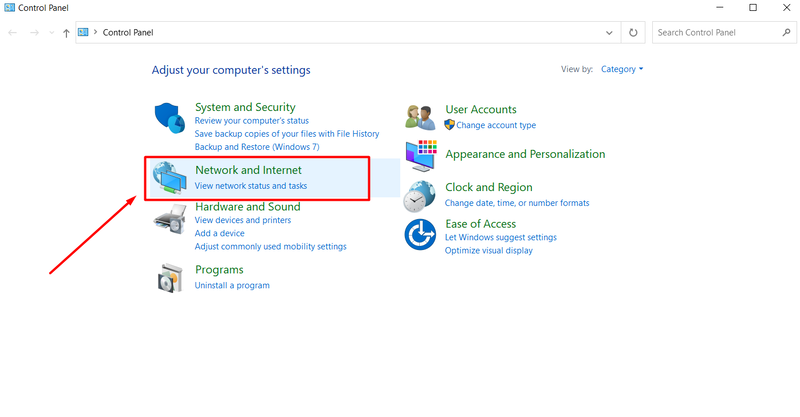
- Step 2: Select Change adapter settings from the menu on the left.
- Step 3: In the Network Connections window, right-click on the network you are currently connected to and select Properties.
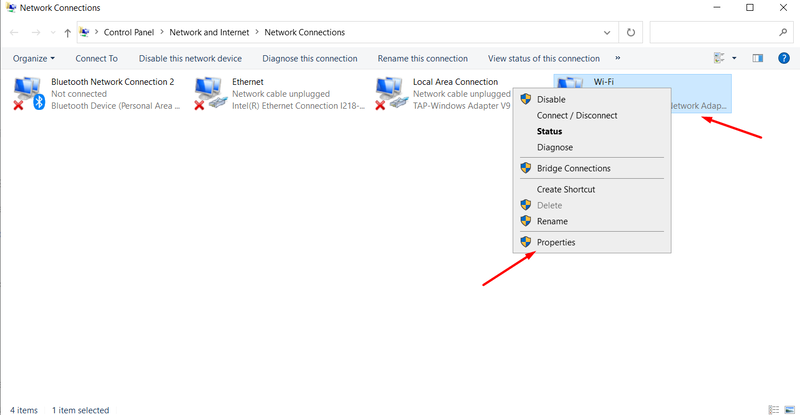
- Step 4: Select Internet Protocol Version 4 (TCP/IPv4) and click on Properties.
- Step 5: Select Use the following DNS server addresses to change the DNS.
- Step 6: Enter the Viettel DNS IP address that you want to use.
- Step 7: Click OK to proceed with saving the changes.
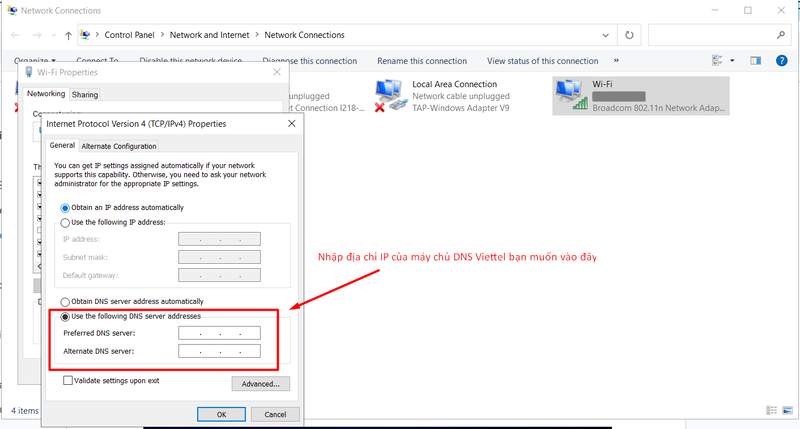
Changing Viettel network DNS on Windows 10
3.2 Android Phones
The method for changing 4G DNS on Android is extremely simple; you just need to follow these steps:
- Step 1: Go to the device Settings, then select Wi-Fi.
- Step 2: Select the name of the Wi-Fi you are connected to, then click Advanced.
- Step 3: Click Modify network, then select Show advanced options.
- Step 4: Select Static under IP Settings.
- Step 5: Enter the Viettel DNS addresses you want to use into the DNS 1 and DNS 2 fields.
- Step 6: Press Save to apply.
>>>> LEARN NOW: How to fix the dns_probe_finished_nxdomain error on phones
3.3 For macOS Devices
Similar to Android, to change Viettel DNS on macOS, you also need to follow similar steps as follows:
- Step 1: Click on System Preferences and select Network.
- Step 2: Select your Network Adapter, then click Advanced.
- Step 3: Select the DNS tab, click +, and enter the Viettel DNS address you want to use.
- Step 4: Click OK and apply.
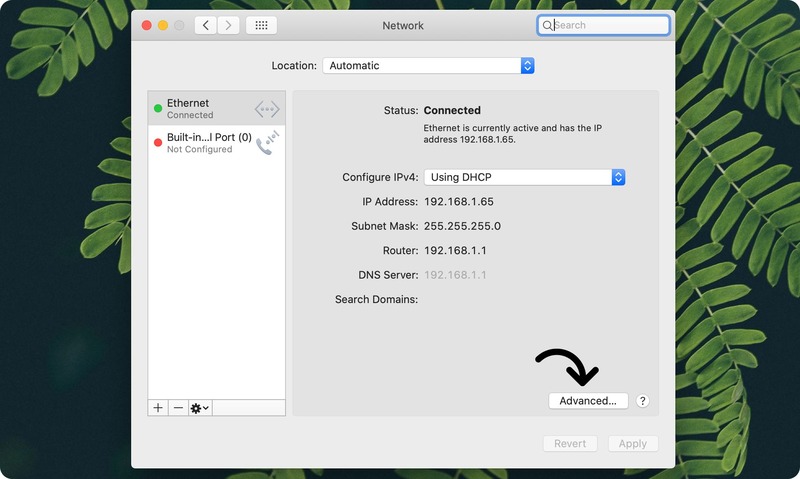
Changing DNS on macOS with just a few simple steps
3.4 For iOS Devices
Below is a detailed guide to help you change Viettel DNS on iOS devices quickly:
- Step 1: Access Settings and select "Wi-Fi".
- Step 2: Click on the connected Wi-Fi network, then tap Configure DNS (or Configure IP depending on version).
- Step 3: Select Manual (or Static) and start entering the Viettel DNS IP addresses you want to use.
4. What benefits does a strong DNS bring to a Website?
Choosing a high-quality DNS server can greatly benefit your website in particular and the operations of businesses and organizations in general. Here are some specific benefits that DNS can provide:
4.1 Increasing Reliability and Supporting Troubleshooting
A strong DNS has the ability to respond quickly when encountering issues. If a DNS server fails, the system will automatically redirect access to other DNS servers, ensuring users can access the website continuously and without interruption.
4.2 Optimizing Efficiency Based on Geographical Location
A strong DNS can support a distributed system with multiple DNS servers worldwide. This allows the website to route users to the nearest DNS server, helping to minimize latency and optimize access speed.
4.3 Enhancing IP Access Speed
A good DNS server will help shorten the time it takes to convert a domain name into an IP address, thereby improving the access speed to the website. When a user enters a name into the browser, the DNS will quickly search and identify the corresponding IP address, then guide the browser to connect to the website's server rapidly.
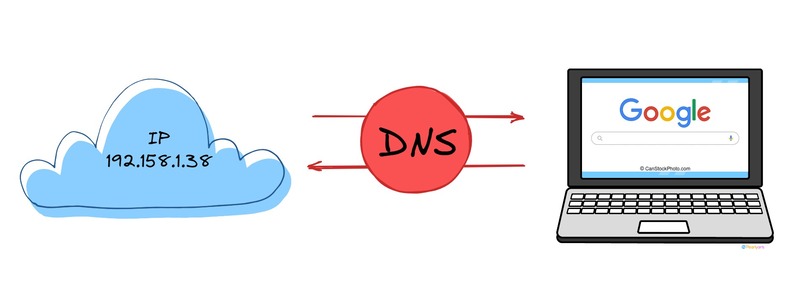
Using a high-quality DNS server helps shorten the time required to resolve a domain name into an IP address.
4.4 Improving Continuous Operation Capabilities
A powerful DNS helps the website achieve higher availability. In other words, users will be able to access the website immediately when they send a request. This helps minimize potential losses and enhances the overall user experience significantly.
4.5 Security and Preventing Cyber Attacks
A strong DNS provides robust security measures, helping to prevent attacks such as DNS cache poisoning, DNS amplification, and DNS spoofing. In this way, it can support security protocols like DNSSEC, ensuring that DNS data is authenticated and maintains its integrity.
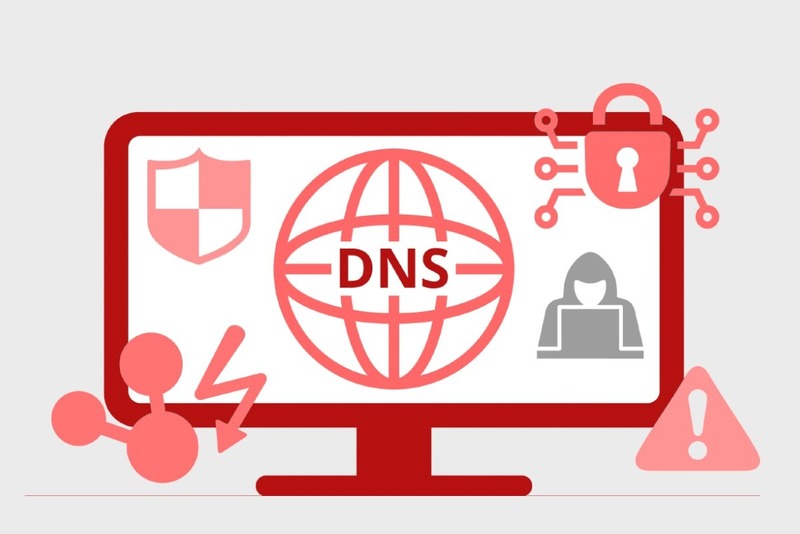
A quality DNS network helps prevent powerful attacks from hackers.
5. Alternatives to changing DNS
Currently, there are several alternatives to changing your DNS if you want to improve access speed, increase security, and access blocked websites without having to change DNS servers. Below are some popular solutions:
- Using a VPN: A VPN solution creates an encrypted tunnel between your device and the VPN server, hiding your IP address and helping you bypass geographical restrictions, content filtering, or enhance security. This is an effective but relatively costly solution.
- Using a Proxy: An intermediary server that helps you access websites through the proxy's IP address instead of your own. Proxies can help you bypass firewalls and access restrictions. However, using free proxies also carries risks regarding personal data security.
- Self-hosting a Local DNS System: This solution involves setting up a DNS cache on your device or network, helping to reduce response times for previously visited websites, thereby increasing browsing speed. This solution requires technical knowledge; if set up incorrectly, you may be vulnerable to cyberattacks.
- Using the Hosts File: Editing the hosts file on your computer to directly map a domain name to an IP address without going through the DNS system, helping control access to specific websites. While it can replace DNS, it is not an optimal solution because updating the hosts file is manual and can be difficult when managing many domains.
The above solutions all have the potential to improve security and privacy similar to the current DNS system; however, they still have certain drawbacks regarding price, data leaks, or even the risk of cyberattacks. The most optimal solution here is using the Hidemyacc Antidetect Browser instead of changing DNS.
With the integrated proxy manager in Hidemyacc, you can easily change and hide your real IP address, supporting efficient multi-account creation and management. Furthermore, the Hidemyacc tool automatically generates unique fingerprints for each profile, helping you browse the web and access the Internet freely without fear of detection. Try Hidemyacc for free now to experience it!

With Hidemyacc's Antidetect Browser, you can easily access the Internet without worrying about data theft.
Above is the list of popular Viettel DNS addresses today and the methods to change DNS that every business should know. Choosing a high-quality DNS is extremely important, as it helps enhance network access speed and prevent attacks from hackers. We hope this information helps you choose the right Domain Name Servers that meet your needs.
>>>> RELATED ARTICLES: