A DNS zone is an important part of the domain name management system, as it stores DNS records associated with a domain. In this article, Antidetect browser Hidemyacc explains what a DNS zone is, its key benefits, and how to manage DNS zones effectively to maintain a stable network environment.
1. What is a DNS Zone?
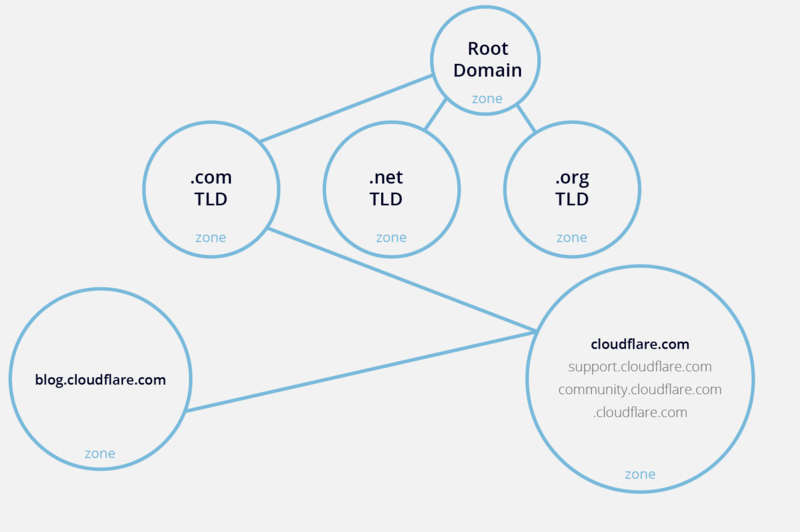
A DNS zone is a portion of the Domain Name System (DNS) that is managed by a specific organization or administrator, used to manage a defined area within the domain namespace. Each zone can include a primary domain and its subdomains. Dividing the DNS system into zones helps organizations or administrators more easily manage and control domain names as well as related information.
2. How a DNS zone works
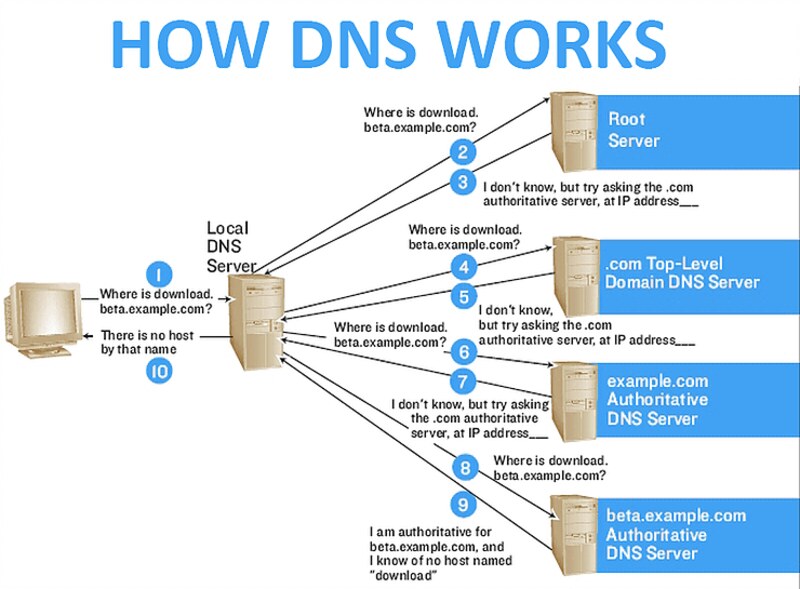
A DNS zone works by storing important DNS records such as A, CNAME, and MX, which define information related to domain names, IP addresses, or email. When a user enters a URL, their computer sends a request to the nearest DNS server. This server checks the DNS zone to find the appropriate record and returns the corresponding IP address, allowing the connection to the correct server.
>>> READ MORE:
- What is AdGuard DNS? How to set up AdGuard DNS on any device
- What is Chrome net internals DNS? Clear DNS cache in Chrome
3. Benefits of a DNS Zone
A DNS zone offers several important benefits for managing and operating the domain name system, specifically:
- Delegated administration: Organizations can split DNS into smaller zones to reduce the workload on servers and administrators, helping the system run more efficiently.
- Administrative autonomy: Organizations can better control DNS record management, allowing flexible changes without going through a central system.
- Load distribution: Redundancy through delegation: Using primary and secondary zones lets you run multiple authoritative name servers, so if one server goes down, others can still answer DNS queries.
- Easier scaling: Splitting large domains into smaller zones reduces the number of records each server has to manage, which keeps lookups fast even as your domain grows.
>>> CHECK IT OUT:
- What is DNS? Functions, how it works, and how to use it effectively
- What is Google DNS? Detailed guide to changing Google DNS on multiple devices
4. Types of DNS Zones
To manage the DNS system effectively, users need to understand the different types of DNS zones. Each type of zone plays a specific role in storing and handling DNS records. Below are the most common DNS zone types:
- Primary DNS Zone: Stores the original zone file with DNS records that can be read and written, and is the place where changes are made directly.
- Secondary DNS Zone: A read-only copy of the primary zone that provides redundancy and helps with load balancing in case the primary server encounters issues.
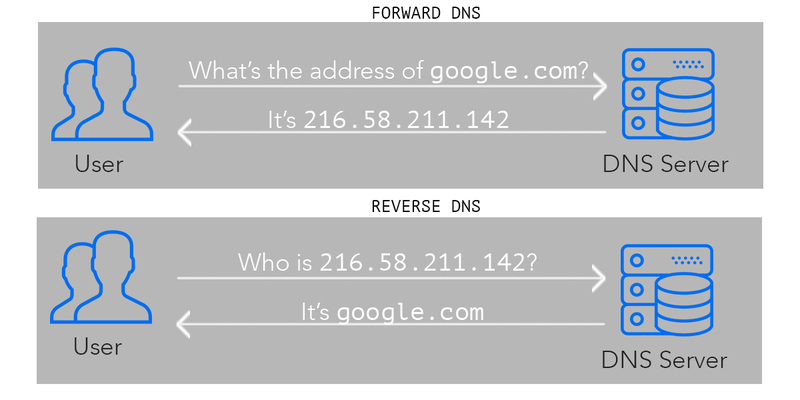
- Forward Lookup Zone: Maps domain names to IP addresses, allowing you to find a server’s IP address from its domain name.
- Reverse Lookup Zone: Maps IP addresses back to domain names, commonly used for verification or logging purposes.
- Stub Zone: Contains only the essential information needed to identify authoritative DNS servers, helping reduce load and optimize DNS queries.
>>> LEARN MORE:
- What is DNS 1.1 1.1? How to quickly set up & change DNS 1.1 1.1
- Change DNS on Windows 10, 11 and Mac easily and quickly
5. Guide to Effective DNS Zone Management
Managing DNS zones is a key factor in ensuring your domain name system operates smoothly and securely. Below are the steps for effective DNS zone management, including choosing the right type of DNS zone, configuring records, and maintaining redundancy.
5.1. Determine the appropriate DNS Zone for your domain
First, you need to identify the suitable type of DNS zone for your domain. A Primary Zone is used when you want to store and edit DNS records, while a Secondary Zone is mainly used for backup and redundancy in case the Primary Zone encounters issues.
5.2. Configuring DNS records
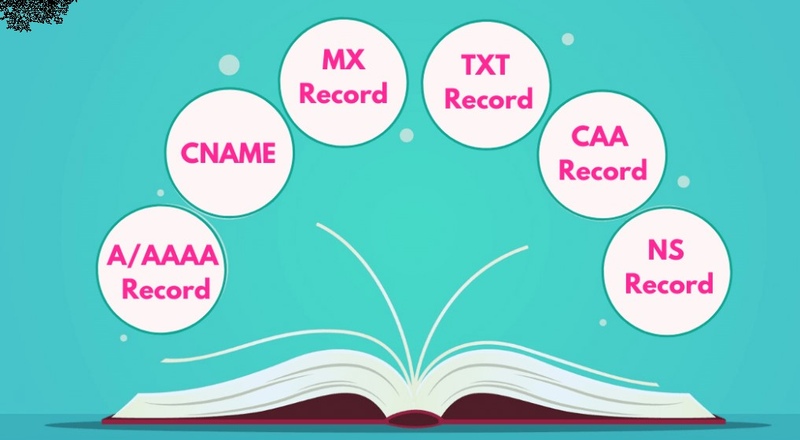
Within a DNS zone, configuring DNS records is very important. You’ll need to set up records such as A, CNAME, MX, TXT, etc. to map domain names to IP addresses, specify mail servers, and verify the domain. Proper record management helps route traffic efficiently.
5.3. Managing lookup zones
To customize how the system maps domain names, you can manage Forward Lookup Zones and Reverse Lookup Zones. The Forward Lookup Zone maps domain names to IP addresses, while the Reverse Lookup Zone does the opposite, helping users manage traffic more flexibly and securely.
5.4. Backup and recovery
You need to keep your DNS data secure by performing regular backups. You can use a Secondary DNS Zone to back up data from the Primary Zone, minimizing the risk of data loss. In case of an incident, the Secondary Zone will help ensure your domain continues to operate without interruption.

We hope this article has provided you with useful information about DNS zones and helped you better understand how to configure and manage them so you can optimize your domain usage and ensure stable, uninterrupted operation. If you have any questions, please contact Antidetect Browser Hidemyacc for support!
>>> RELATED ARTICLES: