Running into proxy authentication error 2606 can instantly block your connection, whether you're browsing, syncing apps, or using a proxy tool. This error usually means your proxy login or configuration isn’t working correctly, but the fix is often simpler than it looks. In this guide, Hidemyacc walks you through quick, practical steps to identify the cause and fix proxy authentication error 2606 fast.
1. Solve proxy authentication error 2606 in 2 minutes (Quick fix)
If you want a fast way to get back online, start with the basic checks below. In most cases, proxy authentication error 2606 is caused by simple misconfigurations rather than complex system issues. Going through these steps carefully can help you identify the problem within minutes.
1.1. Check your proxy credentials carefully
Incorrect or expired login details are the most common cause. Make sure your username and password are still valid, especially if your proxy uses session-based authentication. To avoid small mistakes, copy and paste the credentials instead of typing them manually.
1.2. Temporarily disable the proxy
Turn off the proxy and try connecting again. If your internet works normally, the issue is clearly related to the proxy. If not, the problem may come from your network rather than proxy authentication error 2606.
1.3. Test the proxy in another app or browser
Try using the same proxy in a different environment. If it works elsewhere, your current setup may be misconfigured. If it fails everywhere, the proxy itself could be inactive or blocked.
1.4. Restart your app or device
Cached data can sometimes cause authentication conflicts. Restarting helps clear old sessions and allows the system to reconnect with updated settings.
>>> Learn about: Internet infrastructure - What it is and why it matters
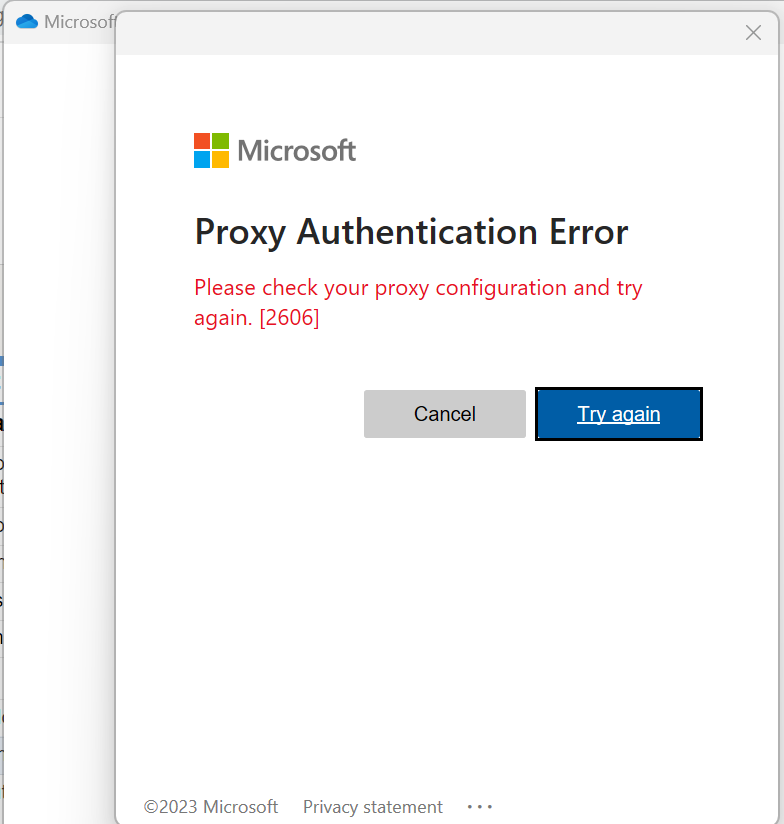
2. What is proxy authentication error 2606?
In simple terms, this error appears when your device tries to connect through a proxy server, but the proxy refuses the connection because it cannot verify your identity. In other words, the authentication step between your system and the proxy fails.
Instead of allowing traffic to pass through, the proxy blocks the request. That’s why you may see apps stop syncing, websites fail to load, or tools suddenly lose connection. This error can show up in different situations:
- When using a browser with a configured proxy
- When running automation or scraping tools
- When working with services like OneDrive or Outlook in a restricted network
Even though the environments may differ, the core issue is the same: the proxy server expects valid authentication, but something in that process is incorrect or missing.
Understanding this makes troubleshooting much easier. Instead of guessing, you can focus on the exact step where authentication breaks and fix proxy authentication error 2606 more effectively in the next sections.
3. Why proxy authentication error 2606 happens
In most cases, proxy authentication error 2606 is not random, it usually comes from a specific misconfiguration or mismatch in the authentication process.
Below are the most common causes, explained in a simple and practical way so you can quickly map them to your situation.
3.1. Incorrect username or password
This is the most frequent reason. If the credentials entered do not match what the proxy server expects, the authentication request will be rejected immediately.
This can happen not only due to typing mistakes, but also when credentials have been changed, expired, or limited by session rules.
3.2. Expired session or authentication token
Some proxies use temporary credentials or session-based authentication. After a certain period, those credentials stop working.
If your setup relies on rotating sessions or short-lived tokens, an expired session can easily trigger proxy authentication error 2606 without any visible warning.
3.3. Proxy IP not whitelisted
In some configurations, authentication is tied to your IP address instead of (or in addition to) a username and password.
If your current IP is not on the allowed list, the proxy will deny access—even if your credentials are correct.
3.4. Misconfigured proxy settings
Incorrect proxy type, port, or protocol can break the authentication process. For example, using an HTTP proxy where a SOCKS proxy is required can cause the connection to fail before authentication even completes.
3.5. Network or firewall restrictions
In corporate environments, firewalls or security policies may block or interfere with proxy authentication requests.
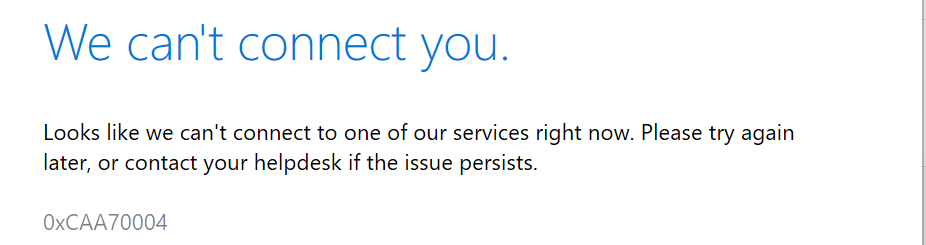
This often happens with tools like OneDrive or Outlook, where system-level policies override manual proxy settings.
4. Step-by-step fixes (When quick fix doesn’t work)
If you’ve already tried the quick fixes but proxy authentication error 2606 still appears, it’s likely the issue is not just a simple typo or temporary glitch. At this point, you need to troubleshoot more precisely.
Instead of repeating basic steps, this section focuses on situations where everything “looks correct” but the error still happens.
4.1. When your credentials seem correct but still fail
Sometimes you are sure the username and password are right, yet authentication still fails. This often happens due to hidden issues rather than obvious mistakes.
For example, some proxies require a specific authentication format, such as including additional parameters in the username. Others may reject requests if the encoding or protocol does not match their system.
In these cases, try regenerating credentials from your provider dashboard and carefully follow their exact format instructions. Even small differences can trigger proxy authentication error 2606.
4.2. When the proxy works elsewhere but not in your setup
If your proxy works in another browser or tool but fails in your current environment, the problem is likely local. This usually points to misconfigured settings such as:
- Wrong proxy type (HTTP vs SOCKS)
- Incorrect port
- Missing authentication method
Instead of re-entering everything blindly, compare your working setup with the failing one. Look for differences in configuration rather than assuming the proxy is broken.
4.3. When system-level settings override your configuration
On some systems, especially in work environments, proxy settings are controlled at the OS or network level.
This means even if you configure the proxy correctly inside an app, those settings can be ignored or overridden. As a result, authentication requests may never reach the proxy correctly.
To fix this, review your system proxy settings and ensure they match your intended configuration. If you're in a corporate network, you may need to check with your IT team, as policies or firewalls can interfere with authentication.
4.4. When cached sessions cause repeated failures
Even after updating credentials, your system might still use old authentication data stored in cache. This can create a loop where every new request is rejected.
Clearing cached credentials, cookies, or saved proxy settings in your browser or application can resolve this issue. Restarting alone may not always be enough if the old session is still stored.
4.5. When the proxy is technically active but blocked
In some cases, your proxy is running, but access is restricted by external factors rather than incorrect credentials. This can cause proxy authentication error 2606 even when your login details are correct. This often happens if:
- Your IP is not whitelisted
- The proxy provider applies access limits
- A firewall or network policy blocks the connection
To confirm this, try using the same proxy on another device, browser, or network.
If the proxy works elsewhere but not in your current setup, the issue is likely related to local restrictions. If it fails everywhere, the problem may come from the proxy provider or access rules.
>>> Learn more: Who are the best proxy providers in 2026? Top 15 services reviewed
5. Fix for different use cases
Not all users encounter proxy authentication error 2606 in the same way. The root cause and solution can vary depending on how the proxy is being used.
Instead of applying generic fixes, it’s more effective to look at your specific use case and adjust accordingly.
5.1. For browser users
If you see the error while browsing, the issue is usually tied to your browser or system proxy settings.
Start by checking whether your browser is using its own proxy configuration or inheriting settings from the operating system. A mismatch between these two can cause authentication failures.
Also, clear saved credentials and cached data. Browsers often store old authentication details, which can conflict with updated proxy settings.
If the problem continues, try switching to another browser. If it works there, your original browser likely has a configuration or extension conflict.
5.2. For scraping tools or automation software
In tools like bots, scripts, or scraping platforms, proxy authentication error 2606 often comes from how credentials are passed into the system.
Some tools require a specific format, such as embedding authentication details directly into the proxy string. Others may not support certain authentication types at all. You should also check:
- Whether the proxy type matches the tool requirements
- Whether your credentials include required parameters (like session or region)
- Whether the proxy is being rotated too frequently, causing session conflicts
Testing with a single static proxy before scaling up can help isolate the issue more effectively.
5.3. For enterprise environments (OneDrive, Outlook, Office 365)
In corporate setups, proxy behavior is often controlled by system policies rather than individual settings.
Even if your credentials are correct, authentication can fail if:
- The network requires integrated authentication
- Group policies override manual proxy configuration
- Security rules block certain types of traffic
In these cases, checking your system network settings is important, but it may not be enough. You might need to coordinate with your IT team to verify proxy policies and firewall rules.
This is why proxy authentication error 2606 can be more persistent in enterprise environments compared to personal setups.
6. How to prevent proxy authentication error 2606
Once you’ve fixed the issue, the next step is making sure it doesn’t happen again. In most cases, proxy authentication error 2606 can be avoided with a few simple habits and better configuration practices.
6.1. Use stable and reliable proxy sources
Not all proxies are equal. Free or low-quality proxies often have unstable authentication systems, which can lead to repeated errors.
Using a trusted provider with clear authentication methods helps reduce unexpected failures and keeps your connection consistent.
6.2. Keep credentials updated and organized
If your proxy setup relies on usernames, passwords, or session-based authentication, it’s important to keep everything up to date.
Avoid reusing old credentials or mixing multiple formats. If possible, store your proxy details in a secure place so you can quickly verify or update them when needed.
6.3. Match proxy configuration with your use case
Different tools and environments require different proxy settings. A configuration that works in a browser may not work in a script or enterprise app.
Before using a proxy, make sure the type, protocol, and authentication method are fully compatible with your setup. This prevents silent mismatches that can trigger proxy authentication error 2606.
6.4. Avoid unnecessary session conflicts
If you are using rotating proxies or session-based credentials, frequent changes can sometimes break authentication.
Try to maintain stable sessions when possible, especially for tasks that require continuous connections. This reduces the chance of authentication being interrupted mid-process.
7. Conclusion
Proxy authentication error 2606 may seem confusing at first, but it’s usually caused by simple issues like incorrect credentials or misconfigured settings.
By following a clear, step-by-step approach, you can quickly identify the cause and fix the problem without unnecessary trial and error. Once resolved, keeping your proxy setup consistent will help prevent proxy authentication error 2606 from happening again.
To learn more about other proxy errors, you can read here: What is a proxy error? Causes and effective solutions
8. FAQ
1. How to fix please check your proxy configuration and try again 2606?
Check your proxy username and password, then verify the proxy address and port. If needed, disable the proxy and set it up again correctly.
2. How do I fix a proxy connection error?
Make sure the proxy server is active and reachable. Test your connection without the proxy and check if your network or firewall is blocking access.
3. How to fix proxy authentication?
Ensure your login credentials are correct and not expired. Confirm that your proxy supports the authentication method you are using.
4. How to fix Microsoft authentication error?
Sign out of your account and log in again. Clear cached credentials and check if system proxy settings or network policies are causing conflicts.
5. How to stop proxy error?
Use a stable proxy service and keep your configuration consistent. Avoid using expired sessions or incorrect settings across different tools.
6. How to reset proxy settings?
Go to your system network settings, remove the current proxy configuration, and set it up again from the beginning.
7. How to unblock a proxy server?
Check firewall and security settings to ensure the proxy is allowed. If needed, contact your network administrator to allow the proxy connection.