



Have you ever heard the term but are still wondering what is a gateway and its vital role in today’s network systems? Nowadays, a gateway has become an indispensable component in complex network architectures, ranging from Local Area Networks (LAN) to the Internet and cloud services. So, what is a gateway? Let’s explore the details with Antidetect Browser Hidemyacc in the article below!
1. What is a Gateway?
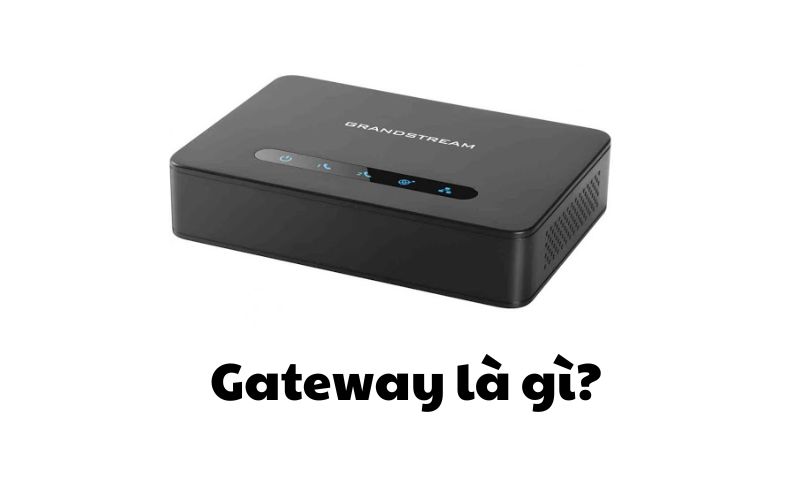
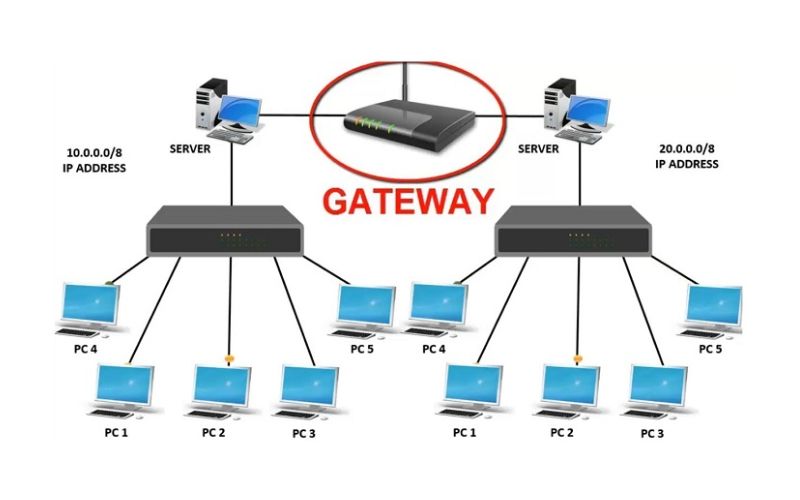
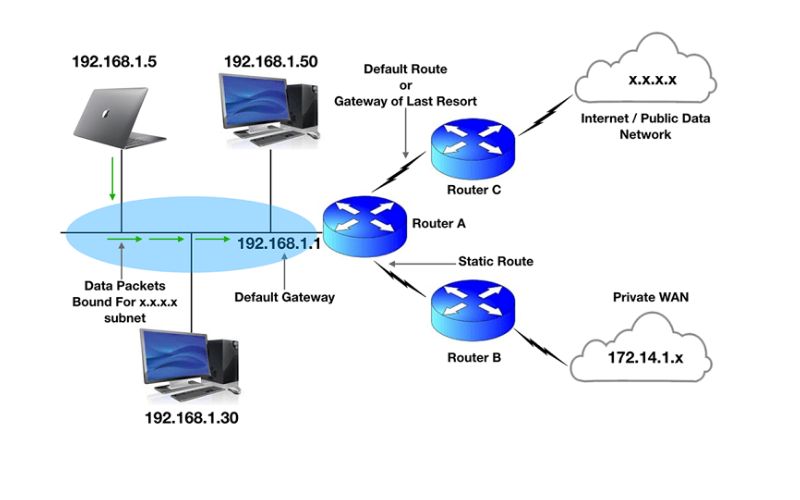
What is a gateway? A gateway is a protocol conversion device that connects two networks using different communication protocols, enabling them to communicate with each other. This device is considered the "gate" of a network, as all data must pass through the gateway before reaching the router. In an IP network, only traffic between nodes within the same Local Area Network (LAN) segment does not require a gateway. Therefore, terms like Gateway Network and Default Gateway were created to distinguish specific functions within network systems.
One of the standout advantages of a gateway is that it makes it easier for network devices to connect to the Internet. As a result, this protocol converter is widely used in both personal and enterprise network systems. Especially in corporate environments, a gateway can also function as a Proxy Server or a Firewall, enhancing security and managing data effectively.
2. How a Gateway Operates
After understanding what is a gateway, its operational mechanism is likely the next aspect you will be interested in. In a network system, boundaries serve as separation points between different networks, defining the communication range of connected devices. When a network needs to communicate with devices in another network or connect externally, this task is handled by the gateway. This device often combines the functions of a router and a modem, acting as a bridge between networks.
A gateway acts as an intermediary point, responsible for directing and managing data flow from the internal network to the external network and vice-versa. When Network A needs to communicate with Network B, the data is sent to the gateway first before being routed along the most optimal path to its destination. Beyond routing tasks, a gateway also stores information about the network's internal paths and the external networks it is connected to.
In essence, a gateway is a protocol converter that enables systems using different protocols to be compatible and communicate with each other. This device can operate at various layers within the OSI (Open Systems Interconnection) model.
In general, a gateway is a crucial element that helps networks cross boundaries and connect seamlessly. Thanks to its routing and data management capabilities, a gateway ensures stable connectivity between different parts of the network system.
3. What are the Roles and Benefits of a Gateway?
In modern network systems, a gateway plays a vital role in connecting networks, managing data flow, and ensuring security between networks with different protocols. So, what are the roles and benefits of a gateway? Let’s find out through the content below:
3.1. Roles
A gateway is crucial in supporting communication between networks using different protocols, helping the system operate more efficiently and securely. Below are the primary functions of a gateway:
- Network Connectivity: A gateway acts as a bridge, linking two or more separate networks, allowing devices in different systems to exchange data easily.
- Packet Routing: With data routing capabilities, gateways use protocols such as RIP (Routing Information Protocol) or OSPF (Open Shortest Path First) to transmit information effectively between networks.
- Network Security: In addition to connectivity, a gateway can function as a firewall, controlling inbound and outbound traffic to prevent external threats.
- Network Monitoring and Management: Gateways support network traffic tracking, helping administrators easily detect and handle issues promptly.
- Performance Optimization: This device can improve transmission speeds, reduce latency, and optimize data traffic between networks.
- Diverse Connectivity: A gateway has the ability to link various types of networks, including LAN, WLAN, MAN, WAN, and the Internet.
- Protocol Conversion: Thanks to its protocol translation capabilities, gateways enable systems using different protocols to communicate without obstacles.
- Load Balancing: This device supports the rational distribution of data between networks, helping to optimize resources and minimize network congestion.
3.2. Benefits
With the following advantages, a gateway has become an indispensable solution for managing and operating modern network systems, ensuring seamless, secure, and efficient connectivity across different devices and platforms.
- Flexible Connectivity: One of the most significant benefits is the ability to connect devices, systems, or networks with different communication protocols. The gateway acts as an intermediary, enabling components to communicate and exchange data smoothly, which enhances operational efficiency in complex network architectures.
- Enhanced Network Security: Security is a vital factor in network management. Gateways protect data from external threats by controlling traffic, implementing security measures, and blocking insecure connections, thereby mitigating cyberattack risks and safeguarding sensitive business information.
- Versatile Protocol Conversion: A standout feature of a gateway is its protocol translation capability. Acting as a "translator," it ensures that data is transmitted accurately and efficiently between platforms that would otherwise be incompatible.
- Data Filtering Capabilities: Gateways optimize network performance by filtering traffic and only allowing necessary, secure data to pass through. This prevents unwanted or malicious data streams, improves processing speeds, and reduces system load.
- Effective Domain Management and Control: Controlling domain access is crucial for maintaining security and performance. Gateways allow administrators to establish access rules and policies, providing tight control over resources and services within the system to ensure network stability.
4. Types of Gateways
After understanding the general concept of what is a gateway, exploring its specific classifications will help you gain a deeper insight into this device. Gateways come in various types, each designed to meet unique connectivity and data transmission needs. Below are some common classifications based on their functions and application fields:
4.1. Web Application Firewalls (WAF)
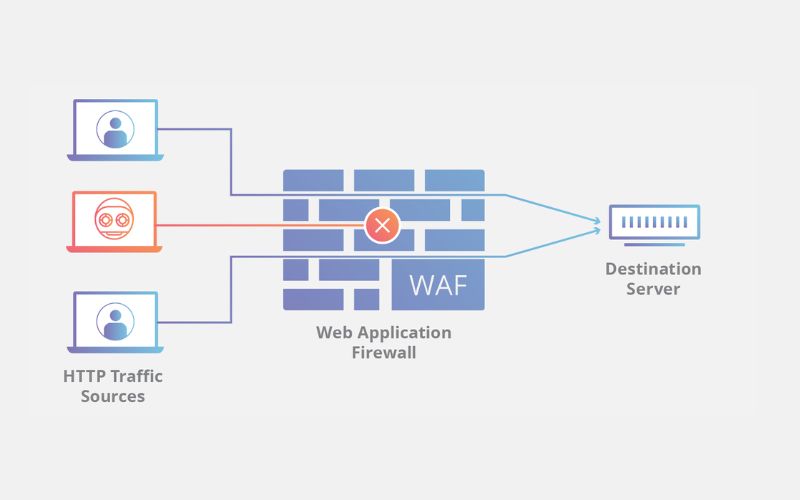
A Web Application Firewall (WAF) is a specialized security solution that protects web applications from cyberattacks, vulnerabilities, and malicious threats. A WAF operates by analyzing incoming traffic to web applications, detecting and blocking malicious behaviors such as SQL Injection, Cross-Site Scripting (XSS), and various other attack methods.
WAF systems can be integrated into the network infrastructure or function as standalone solutions, protecting both the server-side and the client-side. Security methods used by WAFs include policy inspections, signature analysis, encryption, input validation, HTTP request monitoring, access control, and session management.
Benefits of a Web Application Firewall (WAF):
- Prevent Dangerous Attacks: Safeguards web applications from common threats like SQL Injection, XSS, Cross-Site Request Forgery (CSRF), and Remote File Inclusion (RFI).
- Save Time and Costs: Minimizes the effort and budget required compared to developing and deploying custom security solutions in-house.
- Continuous Security: Regularly updated to combat new attack methods and ensure system safety.
- Access Control: Supports monitoring and managing HTTP requests, providing better control over web application activities.
- Improve System Performance: Limits invalid requests and malicious traffic, helping web applications run more stably and quickly.
Web Application Firewalls play a vital role in protecting web applications against increasingly sophisticated threats, helping businesses maintain the security and stability of their online systems.
4.2. Cloud Storage Gateways
A Cloud Storage Gateway is an intermediary technology that connects on-premises storage systems with cloud storage services. This solution allows businesses to seamlessly integrate cloud storage resources into their internal systems, providing flexibility and convenience in data management.
Typically, a Cloud Storage Gateway is deployed as hardware or software on servers within the on-premises system. This technology creates an abstraction layer between local storage and cloud services, enabling data synchronization, cloud backup, and easy retrieval, just like a standard storage system.
4.3. API, SOA, and XML Gateways
In the development of web applications and services, solutions such as API Gateways, SOA Gateways, and XML Gateways play vital roles in management, security, and system performance optimization.
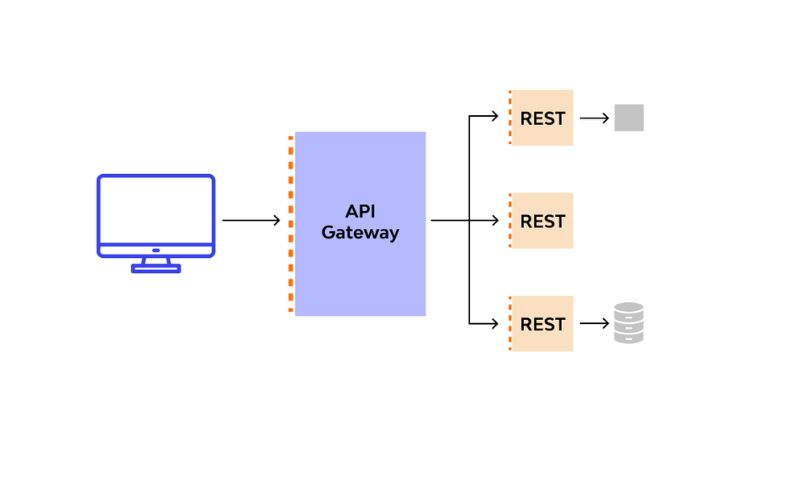
- API Gateway: An API Gateway acts as an intermediary layer between applications and web services, helping to control access, ensure security, and optimize API performance. It also supports monitoring and analyzing API activity, enabling developers to assess performance and ensure system availability.
- SOA Gateway: An SOA Gateway is designed to manage and deploy web services following a Service-Oriented Architecture (SOA). It provides flexibility, compatibility, and service reusability while integrating security features, access control, and service monitoring.
- XML Gateway: An XML Gateway specializes in protecting and managing web services that use the XML data format. This solution helps prevent attacks from users or networks while providing effective mechanisms for security, access control, and data management.
In general, API, SOA, and XML Gateways all contribute significantly to building a secure, efficient, and manageable web service system. Each type has unique characteristics tailored to specific technical requirements and application purposes.
4.4. IoT Gateways
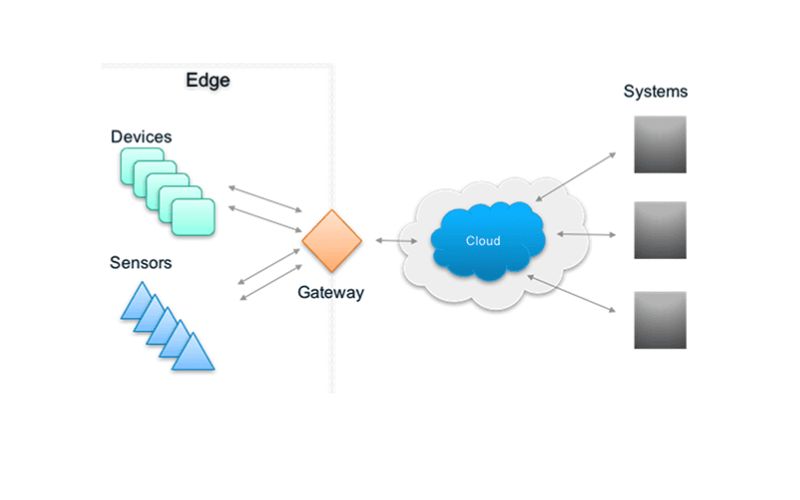
An IoT Gateway is a software or hardware solution that acts as an intermediary between Internet of Things (IoT) devices and data processing or storage systems, such as the cloud or local networks. Its primary function is to connect, manage, and analyze data collected from IoT devices, converting raw data into valuable information. Specifically:
- Data Collection: Receives data from IoT devices and transfers it to processing or storage systems.
- Data Transformation: Reformats data to fit processing workflows, analysis, or predictive models.
- Device Management and Control: Supports firmware updates, status monitoring, and configuration adjustments for IoT devices.
- Security and Encryption: Ensures data safety through authentication and encryption methods to prevent unauthorized access.
- Bandwidth and Cost Optimization: Processes data at the edge before sending it to the cloud, reducing traffic load and transmission costs.
Practical Applications of IoT Gateways: Smart Homes, Healthcare (remote monitoring), Smart Agriculture, Industry 4.0, and Energy Management.
4.5. Email Security Gateways
An Email Security Gateway acts as a protective shield between an internal email system and the Internet. It integrates multiple security layers, including encryption, user authentication, blacklisting/whitelisting, virus scanning, and content analysis to block spam, phishing, and cyberattacks.
Key features include:
- Email Access Control: Manages access and blocks suspicious or spoofed addresses.
- Content Analysis: Scans for spam, phishing, and malicious attachments or links.
- Cyberattack Protection: Prevents data theft and DDoS attacks via email.
- Monitoring and Management: Tracks suspicious activities and generates detailed threat reports.
4.6. VoIP Trunk Gateways
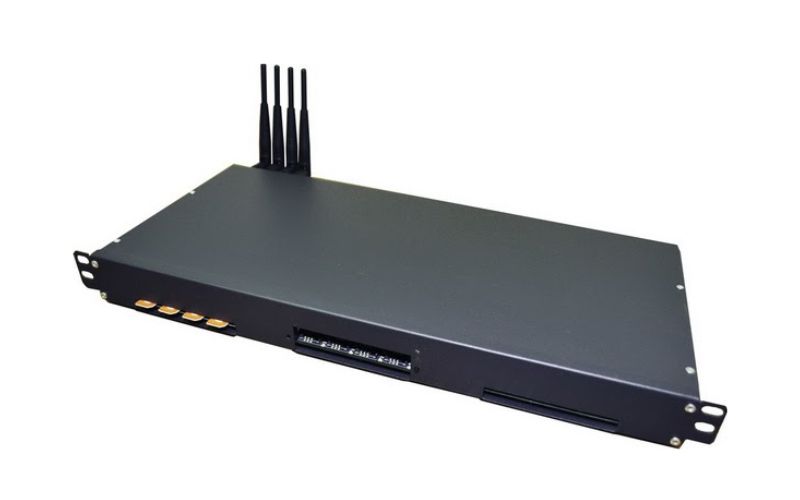
A VoIP Trunk Gateway (also known as an IP-PBX or VoIP Gateway) is a device that connects traditional phone systems or PBX exchanges to a VoIP network. It enables calls to be transmitted over the internet using protocols like SIP, H.323, or MGCP.
By acting as a bridge between the PSTN (Public Switched Telephone Network) and an IP network, it converts analog voice signals into digital data and vice versa. This allows businesses to reduce costs, increase flexibility, and easily scale their communication systems with high reliability.
Outstanding Benefits of VoIP Trunk Gateways:
- Cost Reduction: Supports call transmission over the internet, optimizing costs compared to traditional telephony methods.
- Flexibility and Convenience: Allows for flexible call switching between traditional and VoIP networks, making it easier for businesses to manage their communication systems.
- High Reliability: Connects with multiple VoIP service providers, ensuring the communication system remains stable and always available.
- Scalability: Supports multiple simultaneous calls, helping businesses expand their telephone systems flexibly and efficiently.
>>>> RELATED ARTICLES:
-
What is a Port? Functions and Accurate Classification
-
What is Port 443? Understanding the Functions and Usage of Port 443
5. Distinguishing Between a Gateway and a Router
The differences between a Gateway and a Router are clearly illustrated in the comparison table below:
|
Feature |
Router |
Gateway |
| Basic Features | Hardware device responsible for receiving, analyzing, and forwarding data packets between different networks. | Acts as a bridge between networks that use different communication protocols. |
| Dynamic Routing | Supports dynamic routing. | Does not support dynamic routing. |
| Primary Function | Forwards traffic between different networks. | Converts between different protocols. |
| OSI Layer | Operates at Layer 3 (Network) and Layer 4 (Transport). | Operates at Layer 5 (Session). |
| Operating Principle | Uses routing tables to determine the best path for data based on the destination address. | Defines the boundary between internal and external networks, performing protocol conversion when necessary. |
| Hosting Method | Only supports specialized applications. | Can be deployed on physical servers, virtual applications, or dedicated devices. |
| Additional Features | Supports wireless networking, static routing, DHCP server, NAT, etc. | Supports protocol conversion, network access control, etc. |
| Main Roles | Connects subnets within a larger system, manages IP addresses, and protects the network. | Handles connections between networks with different protocols, security, access control, and domain management. |
| Level | Operates at a low level, focusing on packet routing. | Operates at a high level, providing specialized features for network connectivity. |
| Endpoint | Usually not an endpoint; primarily acts as an intermediary. | Can be a network endpoint, such as a gateway for a LAN. |
| Scale | Suitable for small to medium-sized networks. | Deployed in large and complex network systems. |
6. How to Check Your Default Gateway on a Computer
You can identify the Default Gateway address on your computer using these two simple methods:
- Using the IPconfig Command: First, press the Windows + R key combination to open the Run dialog box, then type cmd and click OK to open the Command Prompt. Next, type the command ipconfig and press Enter. Once the system displays the network information, look for the Default Gateway line to identify the address.
- Checking via Network Settings: Right-click the Wi-Fi or Ethernet icon in the bottom right corner of your screen and select Open Network & Internet settings. Next, click on Ethernet or Wi-Fi, then select Network and Sharing Center. When the Ethernet Status window appears, click Details and find the Default Gateway line to view the connection address.
With these two methods, you can easily check your Default Gateway to manage and troubleshoot network issues whenever necessary.
We hope this article has helped you clearly understand what a gateway is and its vital functions. With its ability to perform protocol conversion, packet routing, network security, and performance optimization, the gateway has become an indispensable solution for both personal and enterprise environments.
Should you encounter any difficulties or need further technical assistance, feel free to contact Hidemyacc today for prompt and effective support!






