



Have you suddenly lost access to websites, games, or familiar apps you use every day? Even with a proxy, are you still unable to bypass system blocks? You are likely facing an IP ban and have landed on a platform's blacklist. An IP ban isn't just a loss of connection; it’s a major risk that can lead to the deletion of multiple valuable accounts. In this article, Hidemyacc will deconstruct the root causes and guide you through fixing IP blocks, from basic to advanced steps. Read on to master the secrets of operating account systems without the fear of being scanned.
1. What is an IP ban? Differentiating between IP bans and account bans
To resolve this thoroughly, you first need to understand the true nature of the problem. The following basic knowledge will help you troubleshoot immediately.
1.1. The concept of IP banning (IP blacklisting)
An IP ban is a form of access restriction implemented by a website server based on the Internet Protocol (IP) address. When a server detects abnormal behavior from an IP, it places that IP onto a blacklist. Once blacklisted, regardless of which account you use, as long as you exit through that IP "door," you will be blocked instantly.
1.2. How to tell if your IP is banned or your account is simply locked
Many users confuse account locks (checkpoint/disable) with IP bans.
- Account lock: You can still log into other accounts normally on the same browser.
- IP ban: You cannot access the website's homepage; the screen displays a system error or forces identity verification before you even log in. Common signs: Access Denied, Error 1006, Forbidden.
To avoid wasting money and to protect your accounts, you must know how to distinguish between a "clean proxy" and a "blacklisted proxy." A clean proxy is simply an IP that is not yet on the blacklists of major detection systems or the specific platform you are using.
1.3. Simple ways to check a dirty IP
- The Google test: Try searching for any keyword. If Google constantly forces you to solve a Captcha, it is the first sign that this IP is considered suspicious.
- The Cloudflare barrier: Access large forums (e.g., blackhatworld.com). If you have verified "I am human" but remain stuck in a secure check loop, that IP range has likely been blocked by Cloudflare.
- Use specialized tools: Check scores on websites like IPFighter or IP-score. These systems gather data from Google and Cloudflare to analyze abnormal behavior and provide the most accurate warnings.
If an IP cannot bypass Google or Cloudflare, in my view, it is a "dead IP." You might use it to test minor projects, but never use it for important accounts or high-value assets.
Read more:
2. "Fatal" reasons why your IP address gets banned
Algorithms from Google, Facebook, or Amazon are becoming increasingly intelligent. Here are the common reasons your IP might end up on a blacklist:
2.1. Abnormal access frequency (rate limiting)
A common mistake for data scrapers or those using automated tools. Sending thousands to millions of requests per minute from a single IP causes the server to mistake you for a DDoS attack, triggering an instant IP block (often shown as a 429 error).
2.2. Spam behavior and policy violations
If you use one IP to manage too many accounts and simultaneously spam messages, comments, or run ads that violate policies, the website will ban both the accounts and the IP range to "pull the problem out by the roots."
2.3. Using "dirty" IPs or blacklisted datacenter ranges
Many cheap proxy providers sell datacenter IPs. These ranges come from data centers and have long been viewed with suspicion by giants like Facebook. If a previous user utilized the range for malicious activity, you will likely be flagged the moment you connect.
2.4. IP conflicts or DNS/proxy configuration errors
Improper proxy setup or using free VPNs often leads to DNS leaks. Consequently, the website sees your real IP in Vietnam while you claim to be in the US, leading to a ban for inconsistent or "fake" behavior.
3. 6 effective ways to fix a banned IP address in 2026
Depending on the severity of the ban, you can apply the following solutions:
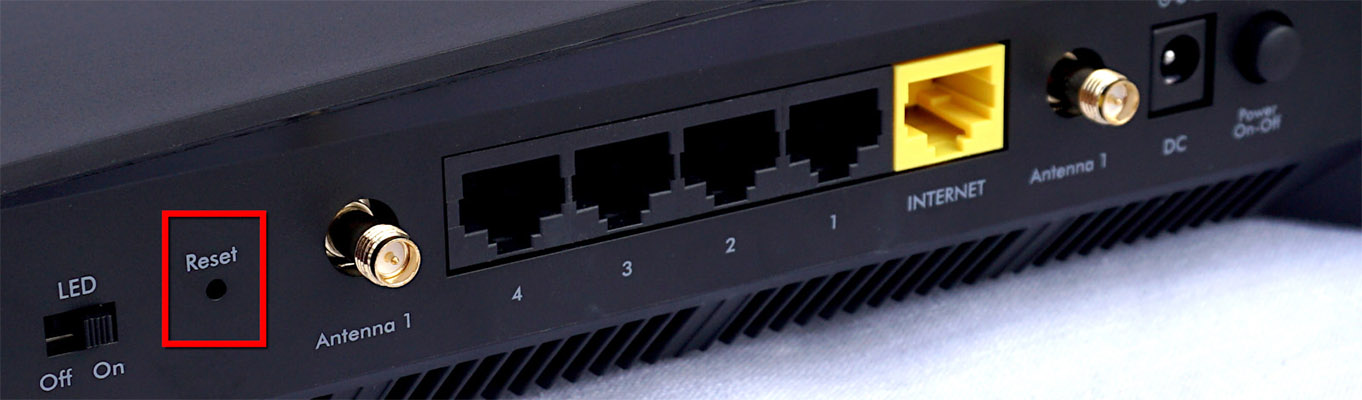
3.1. Reset modem/router to get a new IP
This applies to home internet plans using dynamic IPs. Turn off your modem for 5 - 10 minutes. Upon restarting, your ISP will usually assign a new IP address. However, the success rate is only about 50%, as the new IP might still fall within a blacklisted range.
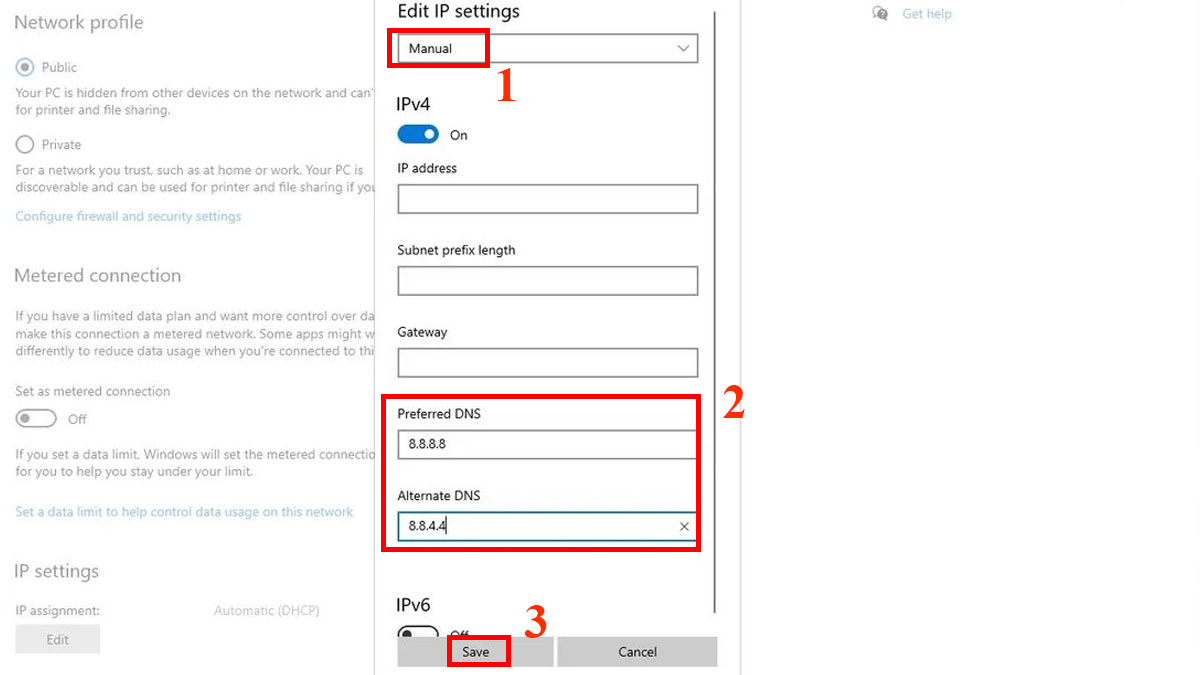
3.2. Change DNS and release/renew IP
You can enter the command prompt (cmd) and type ipconfig /release followed by ipconfig /renew. This command tells your computer to release the old IP and receive a new internal IP from the router, helping to fix some local blocks.
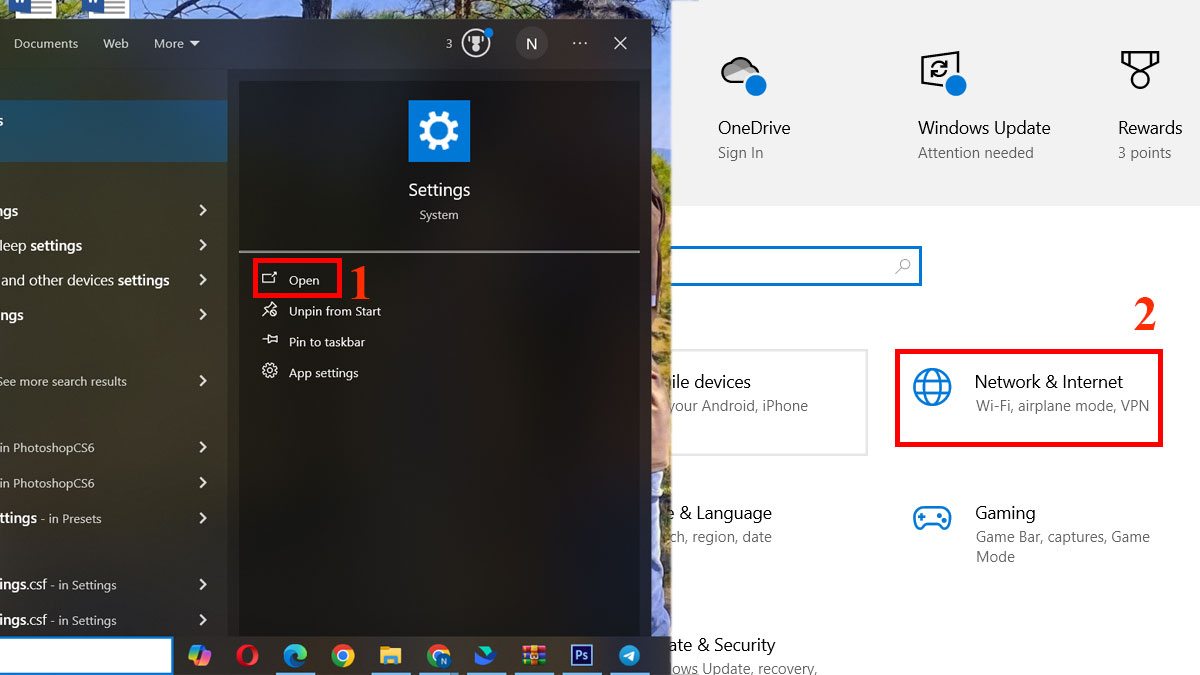
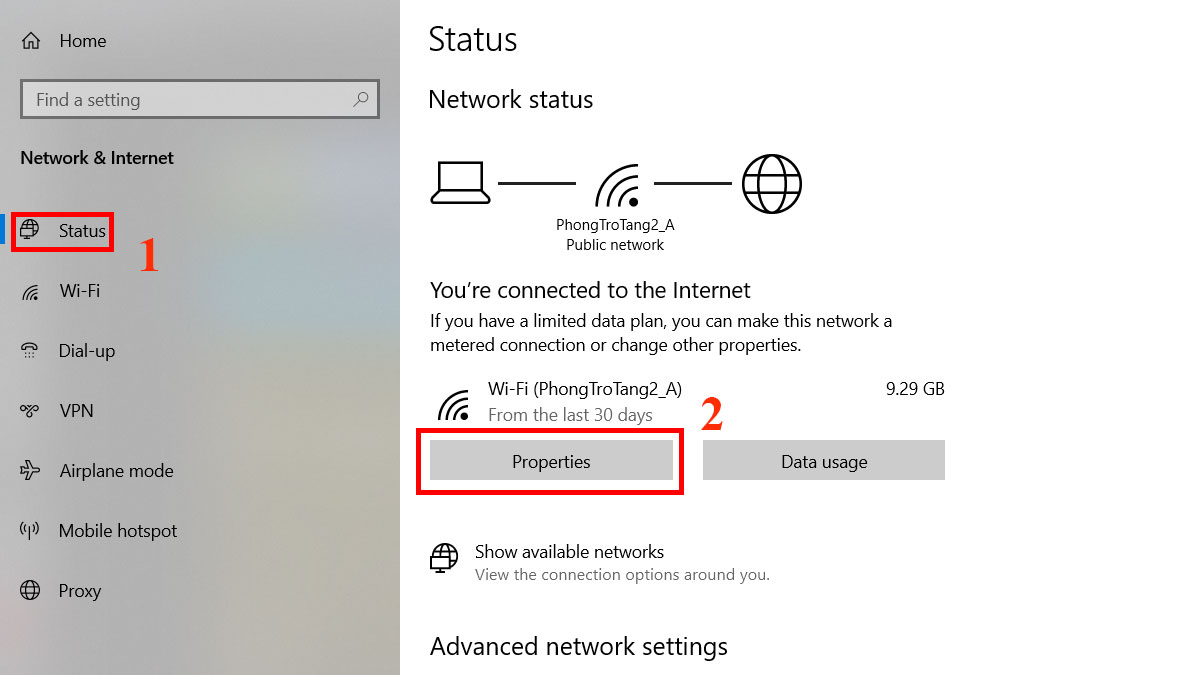
3.3. Use 4G/5G mobile hotspots - the instant "lifesaver"
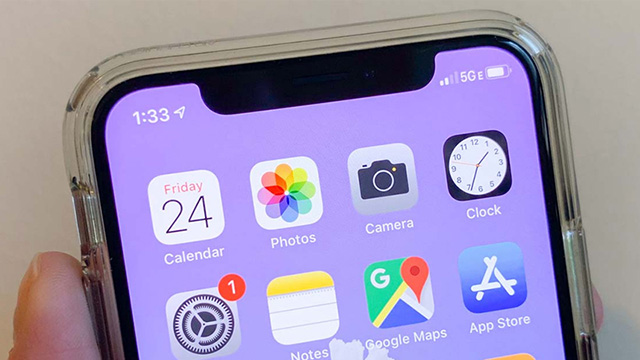
Mobile IP addresses have extremely high trust. Because millions of users share mobile IP ranges, platforms rarely ban these ranges outright. If your Wifi IP is banned, switch to 4G to access your accounts immediately.
3.4. Use high-quality proxies (residential proxies are #1 priority)
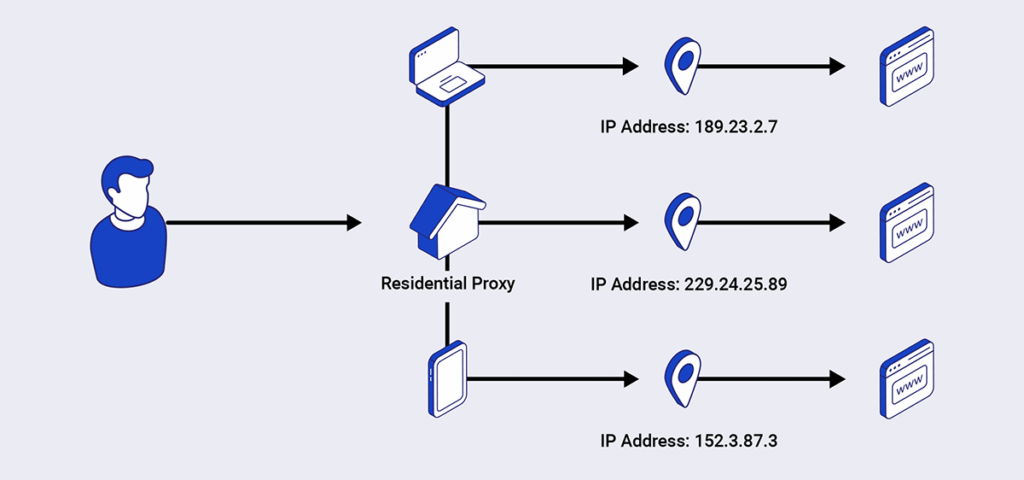
This is the professional solution. Residential proxies use IPs from real users, making them very difficult for websites to detect as spoofing tools. For users handling high-volume scraping, automation, or data collection, rotating residential proxies can provide additional flexibility by distributing requests across a larger pool of IP addresses. OkkProxy offers rotating residential proxies with flexible geographic targeting, including country, state, and city-level locations, making it suitable for workflows that require different IP locations and scalable data collection.
- Important note: Always test proxy quality on IPFighter before adding them to your accounts. Never buy in bulk without checking the "cleanliness" of the range first.
3.5. Use paid VPNs with dedicated IPs
Paid VPNs help encrypt all access data. However, you should choose a dedicated IP plan rather than a Shared IP to prevent others from "dirtying" the IP and causing you to get banned by association.
Related articles:
4. Why is your account still banned after changing your IP?
After changing your IP and verifying it isn't blacklisted, you might find that while you can access the website, your account is still locked. New accounts are also immediately flagged. Why?
4.1. The login device is banned along with the IP
Every time you visit a site, your browser parameters, operating system, device specs, and IP are collected. Therefore, when suspicious actions occur, both your IP and your device can be blacklisted. This is the main reason accounts stay locked even after switching to a clean IP.
4.2. The golden rule for account survival
To ensure safe logins and survive platform scans, you must follow: 1 clean device + 1 clean IP = 1 secure account access.
However, owning many physical devices is expensive. Use this solution instead:
1 antidetect browser profile + 1 quality proxy = 1 secure account access.
4.3. The link between antidetect browsers, proxies and WebRTC
WebRTC is a vulnerability that allows websites to query your real IP even when using a proxy. If you don't handle WebRTC IP leaks, your real identity is exposed.
5. Combining Hidemyacc antidetect browser and residential proxies for anonymity
Hidemyacc does not change your IP, but it creates the perfect environment for your proxy to work effectively.
5.1. How does Hidemyacc change browser parameters?
Hidemyacc allows you to create countless separate browser profiles. Each profile has a unique browser fingerprint: OS, browser, CPU, RAM, Canvas, WebGL, user agent, etc. Websites will see each profile as a completely distinct physical device.
5.2. Noise mechanism and total WebRTC leak protection
Hidemyacc integrates features to automatically "noise" sensitive parameters. It can fake or block WebRTC entirely, ensuring your real IP is never leaked past the proxy layer.
5.3. Adding proxies directly and integrating IPFighter
You can add proxies directly to each profile in Hidemyacc for easy management. When opening a profile, Hidemyacc can automatically open a tab to IPFighter to check your IP's quality score. This ensures you never log into an important account with a blacklisted IP.
You can find more information about Avoid IP Blocking with Hidemyacc in this article.
6. Conclusion
In summary, a banned IP address is a technical problem that can be solved. However, remember that the IP is only a necessary condition. To truly succeed in today's harsh environment, a clean and independent browsing environment is the sufficient condition. Combining quality residential proxies with the Hidemyacc browser is the ultimate "armor" to protect your digital assets.
7. FAQ
How can I check if an IP is banned or blacklisted?
You can check via 3 ways: See if Google shows constant Captchas; Check if you can bypass Cloudflare on forums like Blackhatworld; or check scores on IPFighter or IP-score.
Does a banned IP on a phone affect a computer sharing the same Wifi?
Yes. Because you are using the same local network, both devices share the same public IP. If the IP is banned, any device on that network will face the same issue.
How do I remove an IP address from a blacklist?
Depending on the violation, some sites auto-unban after 24 - 48 hours. However, with major security systems, your IP may remain blacklisted permanently until a manual change is made by an administrator.
Why am I blocked if I didn't violate any policies?
This usually happens because you are sharing an IP range with a "bad actor" (common on public networks or dynamic ISP IPs), causing the system to mistakenly ban the entire range.






