
Ever searched for shoes on Amazon and seen an ad for those exact shoes on Facebook minutes later? That is cross-site tracking in action.
Simply put, cross-site tracking is a process where third-party entities monitor your behavior as you move between different websites. Knowing how to prevent cross-site tracking is vital, not just to stop targeted advertising, but to reclaim your online privacy and speed up your browsing experience.
This guide will explain how these trackers work and provide simple, actionable steps to stop browser tracking on all your devices.
1. How cross-site tracking works
Understanding the "invisible" methods used to follow you is the first step toward choosing to prevent cross-site tracking. Most trackers rely on a few common techniques to monitor your movements:

- Third-party Cookies: Think of these as tiny "tracking stickers" placed on your browser by an ad company. As you move from a news site to a shopping site, the company sees the sticker and knows exactly where you have been.
- Tracking Pixels: These are invisible, microscopic images hidden on websites or inside emails. When you load the page, the pixel "pings" a server to report exactly what you are looking at in real-time.
- Browser Fingerprinting: Even without cookies, trackers can identify you by your device’s unique setup, like your screen size, battery level, and installed fonts. This creates a digital fingerprint that is almost impossible to hide.
- Social Buttons: Those "Like" or "Share" buttons do more than just connect you with friends. Even if you don't click them, they can report your visit back to social media platforms, linking your browsing history to your personal profile.
By combining these methods, companies can build a surprisingly accurate map of your online life without you ever knowing they are there.
2. Why you should prevent cross-site tracking
While many people think of blocking trackers as just a way to avoid annoying ads, the benefits of choosing to prevent cross-site tracking go much deeper:
- Protect your personal privacy: Advertisers can build a very personal profile of your life, including your health searches, financial habits, and political views.
- Stop ad manipulation: When companies know your every move, they can show you specific ads designed to trick you into spending more money.
- Faster browsing speeds: Trackers are extra scripts that run in the background. Blocking them means websites load faster and your device uses less battery.
- Better data security: The less data you share with unknown third parties, the lower the risk that your personal information will be leaked or sold.
Ultimately, stopping these trackers gives you back control over your digital life, making your internet experience both faster and more secure.
3. Step-by-Step guide to prevent cross-site tracking
Each browser handles privacy differently, so choosing the right settings is essential to prevent cross-site tracking effectively. You can adjust your preferences on the most popular platforms following these steps:
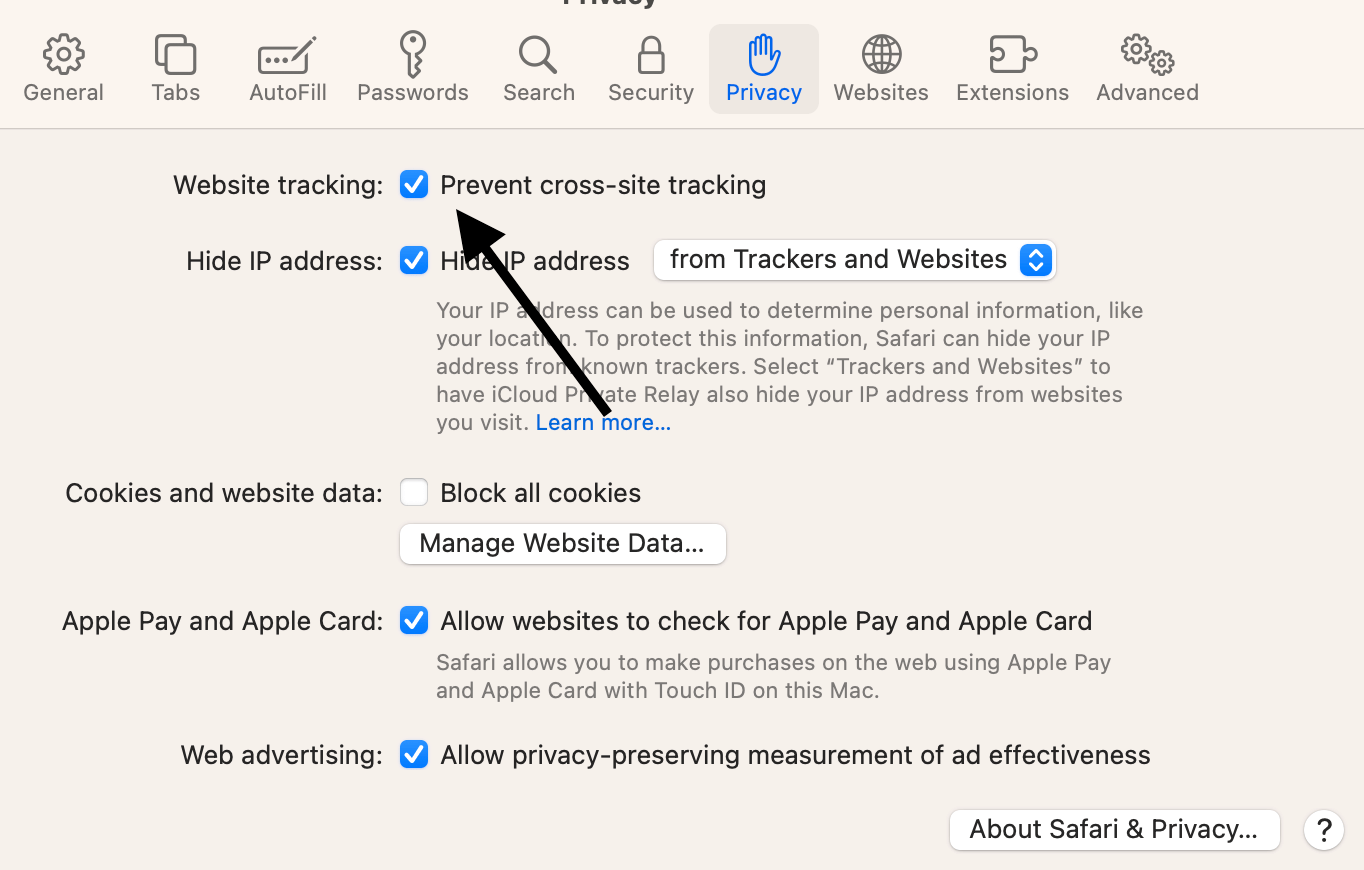
3.1. Safari (The privacy leader)
Apple's Safari is a pioneer in user privacy, thanks to its Intelligent Tracking Prevention (ITP) technology. This built-in feature uses machine learning to identify and block trackers that attempt to follow you across the web.
- On Mac: Open Safari, click on Settings (or Preferences) > Privacy, and ensure "Prevent cross-site tracking" is checked.
- On iPhone/iPad: Go to Settings > Safari, scroll down to the Privacy & Security section, and toggle on "Prevent cross-site tracking."
3.2. Google Chrome (Most popular)
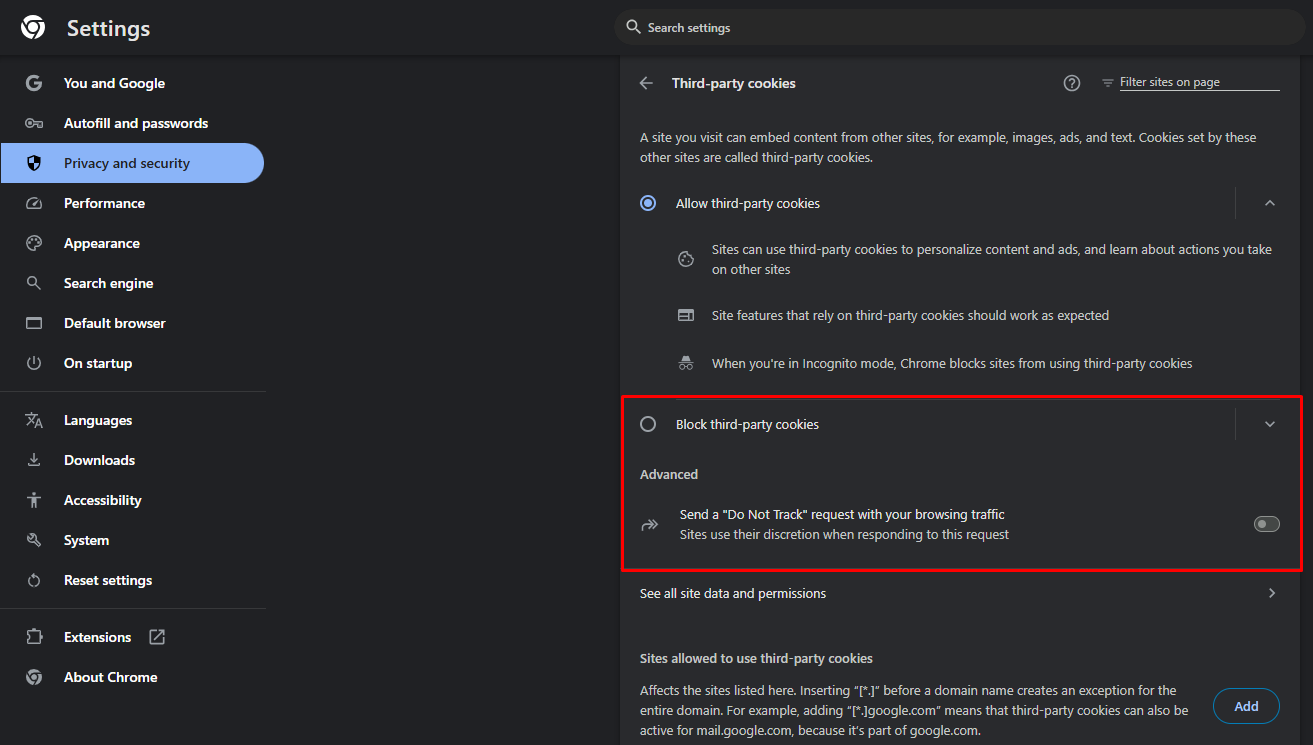
While Chrome is widely used, it requires more manual adjustment to stop browser tracking because it is deeply integrated with Google’s advertising ecosystem.
- Block Third-party cookies: Go to Settings > Privacy and security > Third-party cookies and select "Block third-party cookies."
- Send "Do not track": In the same Privacy and security section, you can toggle on "Send a 'Do not track' request." Keep in mind that many websites may choose to ignore this request.
3.3. Mozilla Firefox
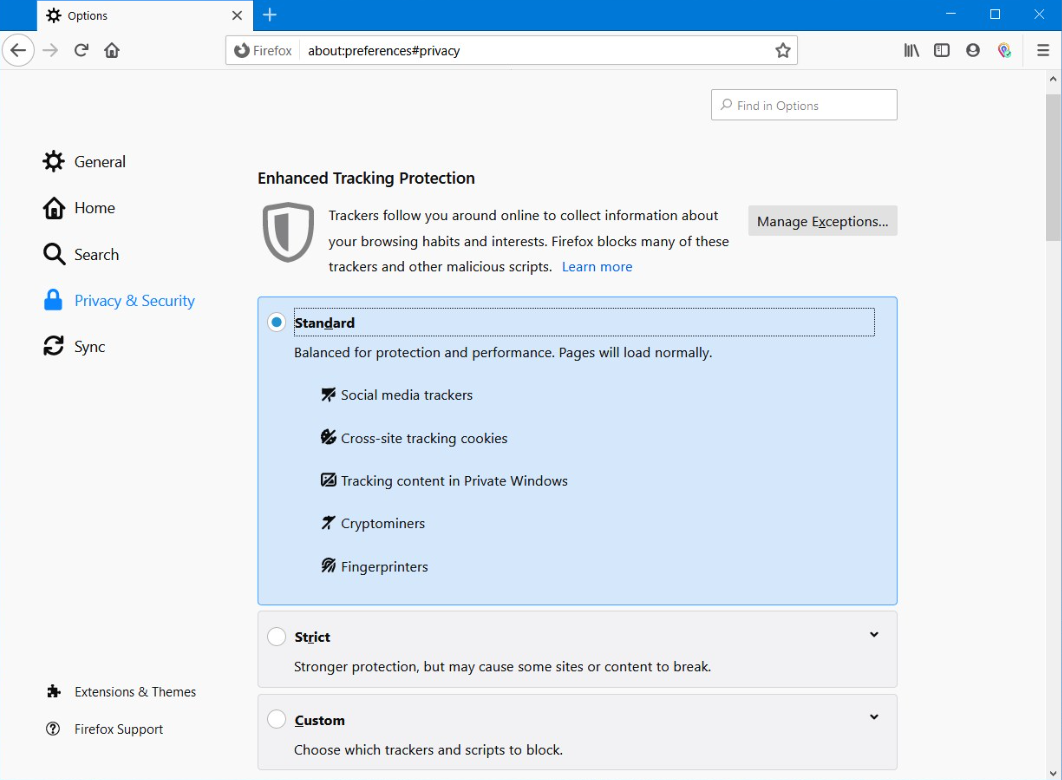
Firefox provides a powerful system called Enhanced Tracking Protection (ETP), which blocks most trackers by default.
Strict Mode: To maximize your privacy, go to Settings > Privacy & Security. Under Enhanced Tracking Protection, switch from "Standard" to "Strict." This blocks even more hidden trackers, though it may occasionally cause some websites to load incorrectly.
3.4. Microsoft Edge
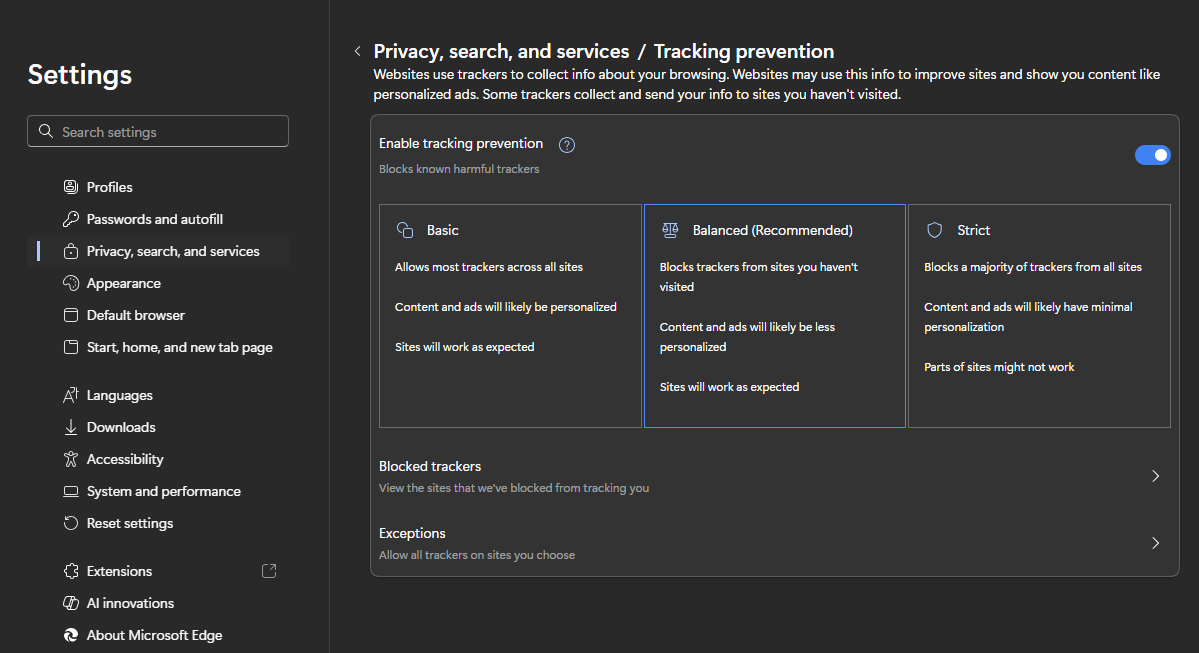
Edge uses a tiered system to manage your online privacy, allowing you to choose how much protection you need.
Tracking Prevention: Navigate to Settings > Privacy, search, and services. Under the Tracking Prevention section, ensure the feature is turned on and choose between "Balanced" or "Strict" to block a higher number of trackers.
Adjusting these settings across all your devices creates a much stronger defense against invisible data collection and intrusive profiling.
4. Advanced tools for enhanced privacy
While browser settings provide a solid foundation, using specialized tools can offer an even stronger defense to prevent cross-site tracking across all your online activities:
- Use a secure VPN: Premium VPN services like NordVPN or ExpressVPN do more than just hide your IP address. These services can block known trackers and malicious websites at the network level before they even reach your browser.
- Install privacy extensions: For an extra layer of security, you can add reputable extensions like uBlock Origin, Privacy Badger, or Ghostery. These tools automatically identify and block tracking scripts that your browser might otherwise miss.
- Switch to privacy-focused browsers: If you want privacy by default, consider switching to browsers like Brave or the DuckDuckGo Browser. These are built from the ground up to block ads and stop browser tracking without requiring any manual setup.
Integrating these advanced tools into your daily routine ensures that your digital footprint remains as small as possible, regardless of which website you visit.
5. Taking privacy to the next level: Antidetect browser
For users who require a higher level of anonymity, such as digital marketers or privacy researchers, standard browser settings may not be enough. Antidetect browser Hidemyacc provides a professional solution to prevent cross-site tracking by mimicking entirely different devices.
- Digital Spoofing vs. Blocking: Instead of just blocking trackers, these browsers feed them false information. You can create multiple profiles, each with a unique "digital fingerprint" including different screen resolutions, fonts, and hardware IDs.
- Complete Identity Isolation: Every profile operates in its own sandbox. This means cookies and cache from one session can never interact with another, making it impossible for tracking networks to link your different accounts or activities.
- Hardware-Level Masking: These browsers can alter how websites see your graphics card (WebGL) or audio signals. This ensures that even the most advanced fingerprinting techniques cannot identify your actual machine.
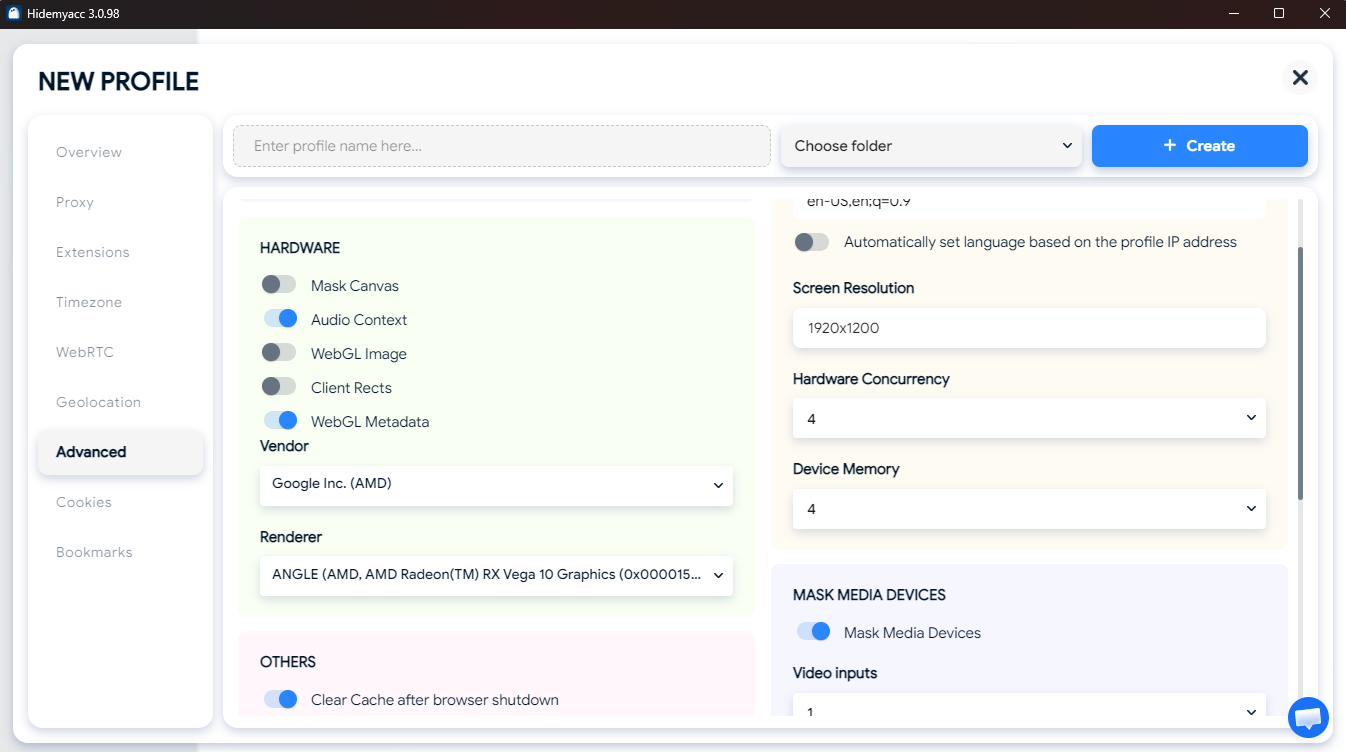
In short, while a standard browser acts as a protective shield, an antidetect browser allows you to appear as a completely new and unique user every time you visit a site.
6. Potential downsides of blocking trackers
While the privacy benefits are clear, choosing to prevent cross-site tracking can occasionally impact your browsing experience in a few ways:
- Website functionality issues: Some websites rely on tracking scripts to function. If these are blocked, you might experience "broken" pages, such as an inability to log in using social accounts like Facebook or Google.
- Less relevant advertising: Blocking trackers does not mean you will stop seeing ads entirely; it simply means the ads will be generic. Instead of seeing products you are interested in, you will see random advertisements that may have no connection to your needs.
- Re-entering information: Since your browser is no longer "remembering" you across different domains, you might find yourself having to re-adjust settings or close the same pop-up notices more frequently.
Understanding these trade-offs allows you to find the right balance between a highly convenient internet experience and a highly private one.
7. Conclusion
Choosing to prevent cross-site tracking is a vital step in reclaiming your online privacy. By combining standard browser settings with advanced tools like VPNs or Antidetect browsers, you can effectively minimize your digital footprint and stop intrusive data collection.
While these measures may occasionally lead to less relevant ads or minor website display issues, the trade-off for a faster and more secure internet experience is well worth the effort. Maintaining your privacy is an ongoing practice of staying informed and keeping control over your personal data.
8. FAQ
Does "Incognito Mode" prevent cross-site tracking?
While it deletes your history after the session, it does not stop websites from using active fingerprinting or IP tracking while you are browsing.
Will blocking trackers break the websites I visit?
Occasionally, some sites may fail to load features like social media logins or embedded maps if their required tracking scripts are blocked.
Is "Prevent cross-site tracking" the same as using a VPN?
No, because a VPN encrypts your connection and hides your IP, while cross-site tracking prevention specifically targets cookies and browser scripts.
Does Google Chrome's "Do not track" actually work?
It is only a polite request sent to websites, and many advertising companies choose to ignore it entirely.
Why do I still see ads after blocking trackers?
You will still see advertisements, but they will be generic and based on the current page content rather than your personal search history.
Can mobile apps track me across other apps?
Yes, both iOS and Android now include settings to limit "App Tracking Transparency" to prevent apps from following your activity outside of their own platform.
Is it possible to be 100% invisible to trackers?
Achieving total invisibility is nearly impossible, but combining a privacy browser with a VPN and an Antidetect tool can block the vast majority of tracking attempts.






