



Using multiple WhatsApp accounts on one device has become a common need for many users today. Whether you want to separate personal and business conversations or manage different WhatsApp numbers for different purposes, relying on just one account is often not enough.
By default, WhatsApp links each account to a single phone number, which makes many users believe that using more than one account on the same device is impossible. However, with the right setup and supported methods, it is completely possible to use multiple WhatsApp accounts on one device safely and efficiently.
In this guide, we will explain how WhatsApp handles multiple accounts, what you need before setting them up, and the most reliable methods to use more than one WhatsApp account on a single phone. This article covers both Android and iPhone users and focuses on official and commonly used solutions.
1. Can you use multiple WhatsApp accounts on one device?
Yes, you can use multiple WhatsApp accounts on one device, but there are certain rules and limitations you need to understand first.
WhatsApp operates on a simple principle:one phone number = one WhatsApp account. This means you cannot create two WhatsApp accounts using the same phone number at the same time. However, WhatsApp does allow users to register and manage multiple accounts as long as each account is linked to a different phone number.
In recent updates, WhatsApp has also started supporting multi-account functionality on some devices, making it easier to switch between accounts without relying on third-party apps. Additionally, Android devices often provide built-in features such as app cloning, which further simplifies using multiple accounts.
That said, not all methods are officially supported by WhatsApp. Using unsafe cloning apps or violating WhatsApp’s usage policies may increase the risk of account suspension. Choosing the right method is essential if you want to use multiple WhatsApp accounts without issues.
2. What do you need to use multiple WhatsApp accounts?
Before setting up multiple WhatsApp accounts on one device, there are a few basic requirements you need to prepare. Meeting these conditions will help ensure that all accounts work smoothly and reduce the risk of login or verification issues.
2.1. Do you need multiple phone numbers?
Yes. Each WhatsApp account must be linked to a unique phone number. WhatsApp does not allow two accounts to share the same number at the same time.
You can use:
- Physical SIM cards
- eSI M
- Virtual phone numbers that can receive SMS or voice calls
Without multiple phone numbers, it is not possible to create or maintain multiple WhatsApp accounts on the same device.
2.2. Does your device support multiple WhatsApp accounts?
Your device type directly affects how many WhatsApp accounts you can use and which methods are available.
- Android devices usually offer more flexibility, thanks to built-in features like Dual Apps or App Clone.
- iPhones have more limitations, but still support multiple accounts through official apps or WhatsApp’s built-in multi-account feature.
Checking your device’s capabilities beforehand will help you choose the most suitable method for using multiple WhatsApp accounts.
2.3. Is a stable internet connection required?
Yes. All WhatsApp accounts rely on an internet connection to send and receive messages. When using multiple accounts on one device, an unstable connection may cause:
- Message delays
- Sync issues
- Login problems
A stable Wi-Fi or mobile data connection is strongly recommended.
2.4. Do you have enough storage space?
Each WhatsApp account stores its own chat history, media files, and backups. Running multiple WhatsApp accounts means your device will consume more storage over time.
Make sure your phone has enough available space to avoid performance slowdowns or backup failures.
3. What are the common ways to use multiple WhatsApp accounts on one device?
If you’ve actually tried running multiple WhatsApp accounts on one device, you’ll quickly realize that there’s no single “perfect” method. Each option works well in certain situations and feels inconvenient in others.
Over time, I’ve tested several common setups, some officially supported, some relying on phone features. What matters most is how stable they are in daily use, not just whether they work once during setup.
Below are the methods that realistically make sense when you want to manage more than one WhatsApp account on the same device.
3.1. Using WhatsApp and WhatsApp business together
This is usually the first method people try and for good reason. Installing WhatsApp Messenger alongside WhatsApp Business is simple, and everything works as expected from the start.

Each app runs independently, so messages, media, and notifications never mix. In everyday use, this setup feels stable and predictable. You don’t have to worry about missed messages or random logouts, which is why many people stick with this option long-term.
The main limitation becomes obvious once you need more than two accounts. For basic personal–work separation, though, this method is hard to beat and is one of the safest ways to use multiple WhatsApp accounts on one device.
3.2. Using App cloning on Android devices
On Android, app cloning is where things start to feel more flexible and slightly less predictable. Most mid-range and flagship Android phones support some form of Dual Apps or App Clone, allowing you to run a second copy of WhatsApp with another number.
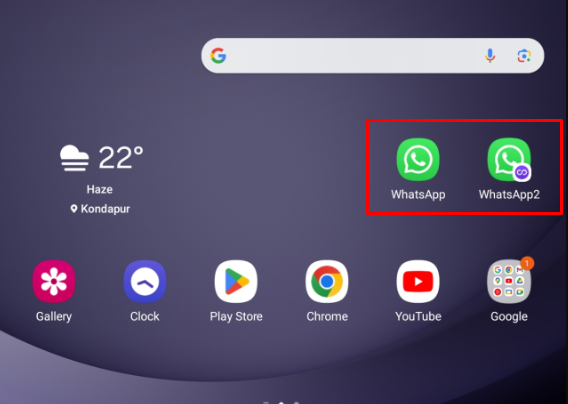
In practice, this works well for daily messaging. However, long-term use can reveal small issues, such as delayed notifications or background restrictions after system updates. These aren’t deal-breakers, but they do require occasional tweaking in system settings.
If you’re comfortable adjusting phone permissions and don’t mind minor maintenance, app cloning is a practical way to manage multiple WhatsApp accounts on Android without carrying another device.
3.3. Using WhatsApp’s built-in multi-account feature
When WhatsApp introduced its native multi-account feature, it immediately felt cleaner than most workarounds. Everything happens inside one app, and switching between accounts is quick and intuitive.
In real-world use, this feature is convenient, especially for people who don’t want duplicate apps cluttering their home screen. That said, availability is still inconsistent, and not everyone has access to it yet.
If your device supports it, this is one of the most straightforward ways to manage multiple WhatsApp accounts with minimal friction.
3.4. Using WhatsApp Web as a secondary option
WhatsApp Web offers a different approach compared to mobile apps. It doesn’t create new accounts, but instead allows you to access existing WhatsApp accounts that have already been registered on a phone.
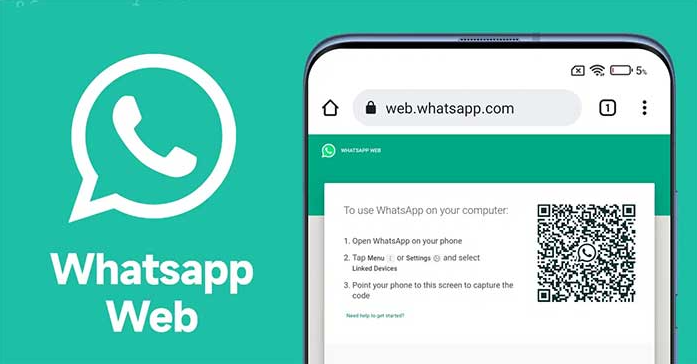
The key condition here is simple: every WhatsApp Web session must be linked to a WhatsApp account that already exists on a mobile device. In other words, WhatsApp Web is not a replacement for the mobile app, it’s an extension of it.
By using separate browser profiles, each profile can stay logged in to a different WhatsApp Web account. One profile equals one WhatsApp account. As long as the session remains active, you can switch between accounts simply by switching browser profiles, without logging in and out repeatedly.
This setup is particularly useful for work-related tasks. Even though WhatsApp Web is not designed to run continuously in the background, it works well for scenarios such as:
- Replying to customer inquiries during fixed working hours
- Managing sales or support conversations from a desktop
- Handling multiple business-related WhatsApp accounts without using multiple phones
Since work communication often happens in batches rather than 24/7, the “non-continuous” nature of WhatsApp Web is less of a drawback in practice. You open the browser when needed, handle messages, and close it once the task is done.
However, once you start managing many accounts, keeping sessions organized becomes important. Logging multiple WhatsApp accounts in the same browser environment can quickly lead to conflicts, accidental logouts, or mixed sessions.
This is where using isolated browser profiles becomes essential.
Tools like Hidemyacc allow you to create and manage separate browser profiles, each with its own cookies, session data, and environment. This makes it easier to keep each WhatsApp Web account fully separated, reducing the risk of cross-login issues and saving time during daily work.
If you regularly work with multiple WhatsApp accounts on the web, using a dedicated browser profile solution like Hidemyacc can help you manage sessions more efficiently and keep your workflows organized. Get your Hidemyacc and work with multiple Whatsapp accounts.
Simplify multi-account WhatsApp management
Each WhatsApp account in its own secure browser profile with Hidemyacc.
Go Multi-AccountsHidemyacc is a powerful browser profile management tool designed to help you handle multiple accounts across social media, messaging apps, and other platforms safely and efficiently. With Hidemyacc, each account runs in its own isolated environment, preventing session conflicts, protecting your data, and streamlining your daily workflow. Whether you’re managing WhatsApp, Facebook, Instagram, or other accounts, Hidemyacc makes it easy to stay organized and productive.
4. What’s the difference between the ways to use multiple WhatsApp accounts?
After actually using different setups over a period of time, the differences between these methods become very clear. Some are suitable for constant communication, while others work better for task-based or work-hour usage.
Instead of looking at features alone, it makes more sense to compare these methods based on how they behave in real daily workflows.
|
Method |
Best For |
Number of Accounts |
Stability in Daily Use |
Practical Limitations |
|
WhatsApp + WhatsApp Business |
Personal & work separation |
2 |
Very high |
Limited to two accounts |
|
Android App Cloning |
Power users on Android |
2–3 |
Medium |
Requires system tuning |
|
Built-in Multi-Account Feature |
Clean, official setup |
2 |
High |
Not widely available yet |
|
WhatsApp Web (Browser Profiles) |
Work-focused usage |
Many (web sessions) |
Medium |
Not always online |
In practice, most people combine more than one method. For example, mobile apps are used for constant communication, while WhatsApp Web is reserved for handling work-related conversations during specific time blocks.
5. Which multiple WhatsApp method works best for each use case?
For daily communication
If you need WhatsApp to stay active all day with reliable notifications, mobile-based solutions are still the most dependable. Native apps are designed to run in the background, sync messages instantly, and handle calls without interruption.
This is why setups like WhatsApp + WhatsApp Business or built-in multi-account support feel more “natural” for daily chatting. They don’t require extra steps, and once configured, you rarely have to think about them again.
For users who rely on multiple WhatsApp accounts for personal and ongoing communication, mobile apps remain the core solution.
For work and task-based use
Work communication usually follows a different pattern. Messages are handled during working hours, often from a desktop, and do not require constant real-time availability.
This is where WhatsApp Web becomes more practical than it initially appears. By logging each WhatsApp account into a separate browser profile, you can manage multiple accounts in parallel without switching phones or apps.
For tasks such as:
- Customer support replies
- Sales follow-ups
- Managing multiple client accounts
WhatsApp Web offers enough functionality without the overhead of running multiple mobile apps all day.
When paired with isolated browser profiles, this approach scales better than most mobile-only solutions for managing multiple WhatsApp accounts in a work environment
6. What are the trade-offs when using WhatsApp Web for multiple accounts?
The biggest trade-off is continuity. WhatsApp Web does not function as an always-on communication channel. Sessions may disconnect, browsers may be closed, and notifications are not as persistent as on mobile.
However, for many work scenarios, this limitation is acceptable. The goal is not instant replies at all times, but organized, efficient handling of conversations during specific periods.
As long as each web session is kept separate and tied to its own WhatsApp account, this method remains stable and predictable for professional use.
7. Final thoughts on choosing the right setup
There is no single best way to manage multiple WhatsApp accounts on one device. The right setup depends on how those accounts are actually used.
Mobile-based methods are better for constant communication, while web-based solutions are more efficient for structured, work-focused tasks. Many users end up combining both to balance availability and control.
If your workflow involves managing several WhatsApp accounts from a desktop, organizing them through separate browser profiles can significantly reduce friction and mistakes.
Manage Multiple WhatsApp Accounts with Confidence
Stop switching devices or logging in and out. Hidemyacc keeps each WhatsApp Web session isolated in separate browser profiles. Get 10% off your first payment.
Get Discount Now
Many marketers and Make money online users don’t stop at WhatsApp. In fact, managing multiple accounts on other platforms is often necessary to scale campaigns and workflows efficiently.
- How to run multiple Telegram accounts on one device without bans?
- Manage Multiple Social Media Accounts Efficiently - Tips Inside
- Create Multiple X Accounts Without Getting Banned - Step-by-Step
- How to run multiple Instagram accounts without getting banned
- Multiple TikTok Accounts: Best Practices to Avoid Shadowbans
- Multiple LinkedIn accounts - How to create and manage them effectively?
- Multiple Reddit accounts - How to create and manage them safely (Step-by-step guides)
- How to Safely Run Multiple Discord Accounts Without Bans?
8. FAQ
Can you use multiple WhatsApp accounts on one device?
Yes, you can use multiple WhatsApp accounts on one device, as long as each account is registered with a different phone number. Depending on your device and setup, this can be done using official apps, built-in system features, or WhatsApp Web.
How many WhatsApp accounts can one phone have?
In most cases, one phone can comfortably handle two WhatsApp accounts using official methods like WhatsApp Messenger and WhatsApp Business. On Android devices, app cloning or system-level dual app features may allow more accounts, while web-based setups can scale further for work-related use.
Is it allowed to have multiple WhatsApp accounts?
Yes. Having multiple WhatsApp accounts is not against WhatsApp’s terms of service. Issues usually arise only when users rely on unofficial apps, automation tools, or engage in spam-like behavior.
Do I need multiple phone numbers for multiple WhatsApp accounts?
Yes. Every WhatsApp account must be linked to a unique phone number. WhatsApp does not support using the same number for more than one account at the same time.
Can iPhone users use multiple WhatsApp accounts?
iPhone users have fewer options than Android users, but it is still possible. The most reliable methods are using WhatsApp alongside WhatsApp Business or WhatsApp’s built-in multi-account feature if it’s available on your device.
Can I use multiple WhatsApp accounts on WhatsApp Web?
Yes, but only if those accounts already exist on mobile devices. Each WhatsApp Web session must be linked to an active WhatsApp account on a phone. By using separate browser profiles, you can manage multiple WhatsApp Web accounts in parallel, especially for work-related tasks.
Is WhatsApp Web reliable for managing multiple accounts?
WhatsApp Web works well for task-based and work-hour communication but is not designed for always-on usage. Notifications may be inconsistent, and sessions can disconnect, so it’s best used as a supporting option rather than a full replacement for mobile apps.
Is it safe to use app cloning for multiple WhatsApp accounts?
Built-in app cloning features on Android devices are generally safe. However, third-party cloning apps may introduce security risks or stability issues. For long-term use, official apps or system-level solutions are usually more reliable.
Will I get banned for using multiple WhatsApp accounts?
Simply using multiple WhatsApp accounts does not lead to bans. Accounts are more likely to be restricted due to spam activity, automation, or using modified or unofficial WhatsApp versions.
What is the best way to manage multiple WhatsApp accounts for work?
For continuous communication, mobile-based solutions are the most stable. For work-focused tasks such as customer support or sales, WhatsApp Web combined with separate browser profiles offers better organization and scalability.






