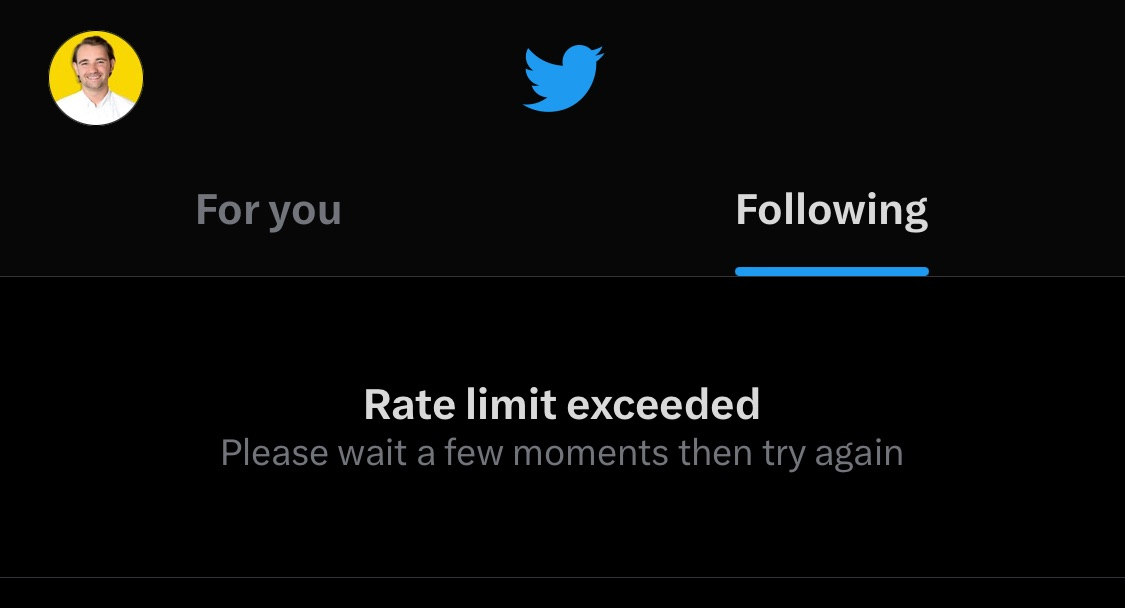
The rate limit exceeded on Twitter notification often appears quite suddenly, leaving many users confused when their feed browsing and interactions are interrupted. In essence, this is a platform mechanism designed to temporarily limit accounts that are overly active or exhibit bot-like behavior in order to protect the system.
So how can your account quickly return to normal without getting locked? Let Hidemyacc walk you through the details below.
1. What does the "Rate limit exceeded" error on Twitter mean?
Rate limit exceeded on Twitter is an alert informing you that you have surpassed the temporary usage limit set by Twitter. To manage network traffic, the platform establishes a specific quota for certain actions such as posting, liking, following, or refreshing the timeline within a given timeframe. When you exceed this threshold, the system displays the rate limit exceeded message.
Why does Twitter enforce this limit?
This regulation is primarily implemented to control bots, automated tools, and unauthorized data scraping activities. Enforcing these caps helps reduce server loads while maintaining a more stable and secure user experience.
Access limits between verified and unverified accounts:
According to an official announcement from Twitter on July 1, 2023, the platform tightened its rate limit policies to curtail extreme levels of data scraping and system manipulation. The specific tier limits apply as follows:
- Verified accounts (Blue checkmark - X Premium): allowed to read roughly 10,000 posts per day
- Unverified accounts (existing accounts): limited to reading a maximum of 1,000 posts per day
- New unverified accounts: strictly controlled at 500 posts per day
When users exceed these quotas in a short period, the system triggers the rate limit exceeded notice and temporarily restricts access to tweets or feed updates.
2. Why do you see the "Rate limit exceeded" error on Twitter?
If you suddenly encounter the rate limit exceeded error on Twitter, the trigger might stem from routine browsing habits or third-party tools connected to your profile. Here are the common reasons your account may hit the cap prematurely:
- Refreshing the page (F5) too frequently: Constantly refreshing your timeline within minutes depletes read quotas rapidly, particularly on unverified accounts.
- High-frequency engagement bursts: Executing actions like posting, following/unfollowing, liking, or retweeting in rapid succession makes the algorithm suspect spam-like behavior.
- Excessive use of third-party applications: Auto-posting schedulers, background tools sending continuous requests, or abusing API endpoints burn through quotas swiftly. If your workflow requires software assistance, examine reliable Twitter automation tools to set up safe workflows that prevent account flagging.
- New or unverified accounts: X applies very restrictive caps to this segment to curb spam bot proliferation.
- Technical issues on Twitter servers: Sometimes the issue does not originate on the user end; server outages or maintenance can cause rate limit warnings to pop up across widespread accounts.
Overall, this error generally stems from behavioral habits or technical factors. Pinpointing the exact cause allows you to avoid hitting these thresholds moving forward.
3. How to fix the "Rate limit exceeded" error on Twitter easily
In most scenarios, a rate limit error is temporary and straightforward to resolve. Try the following approaches to get your account back to normal operation.
3.1. Wait for the limit to reset
Typically, the platform resets usage counters after 15–30 minutes. During this window, halt all actions on Twitter—such as refreshing feeds, reposting, or liking—so the system registers your profile activity as standard again.
3.2. Revoke access for third-party apps
Certain connected third-party tools send background requests without your direct oversight. If background apps are draining your allowance, disconnect them immediately:
-
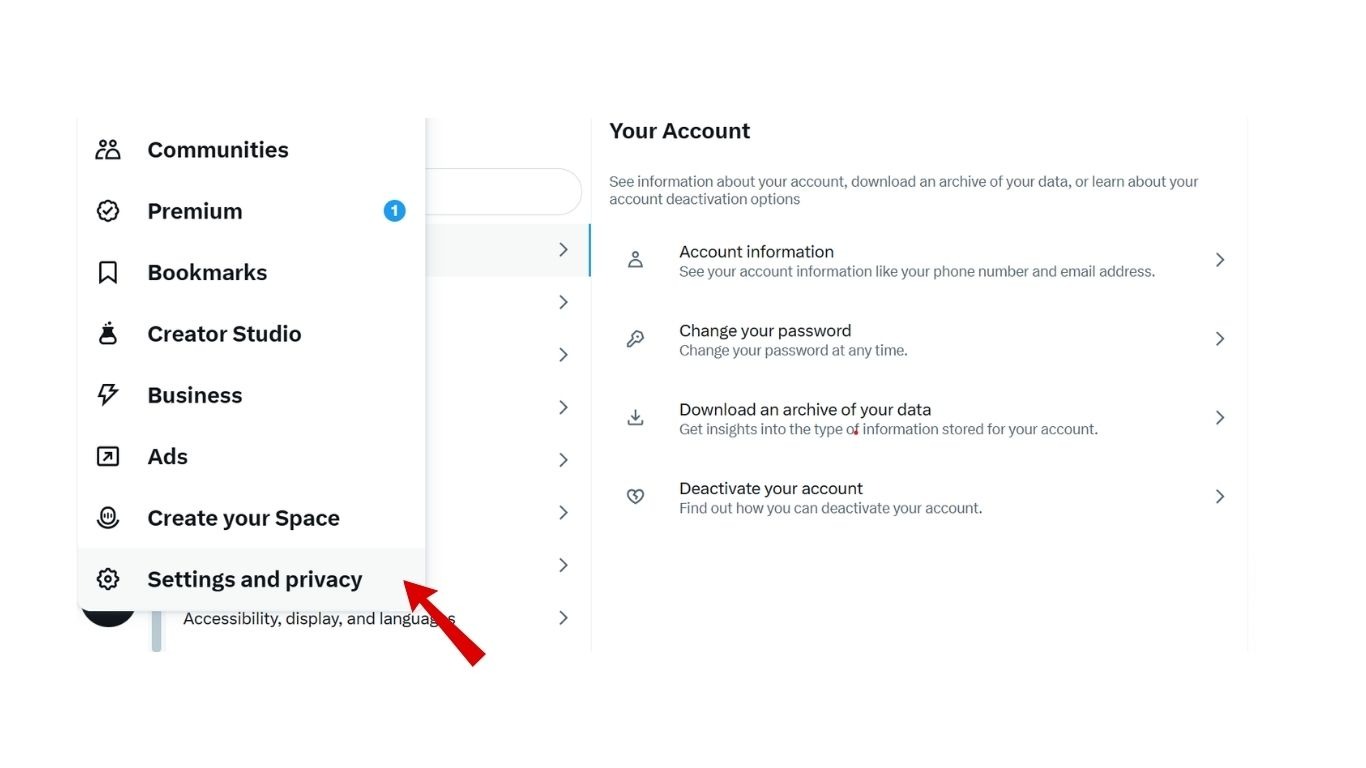
Step 1: Go to Settings on Twitter.
-
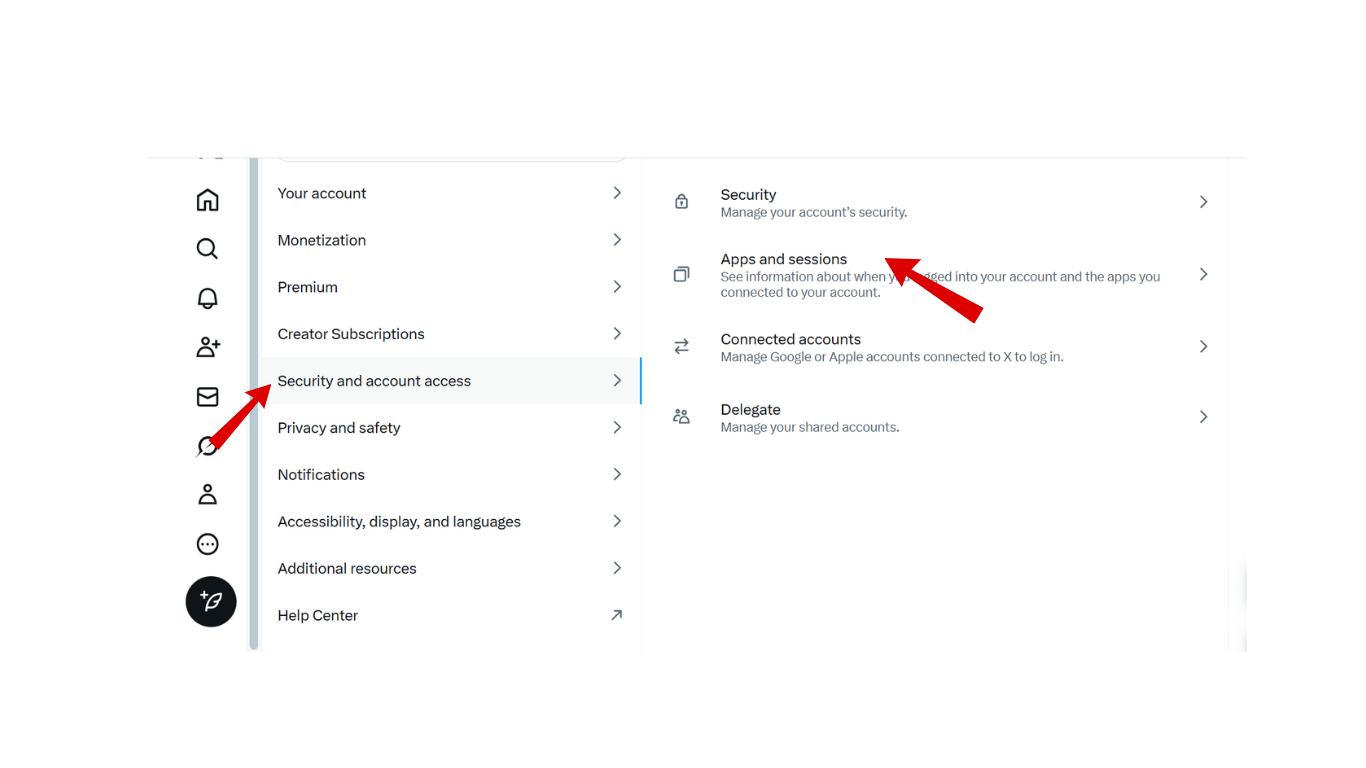
Step 2: Select Security and account access > Apps and sessions.
-
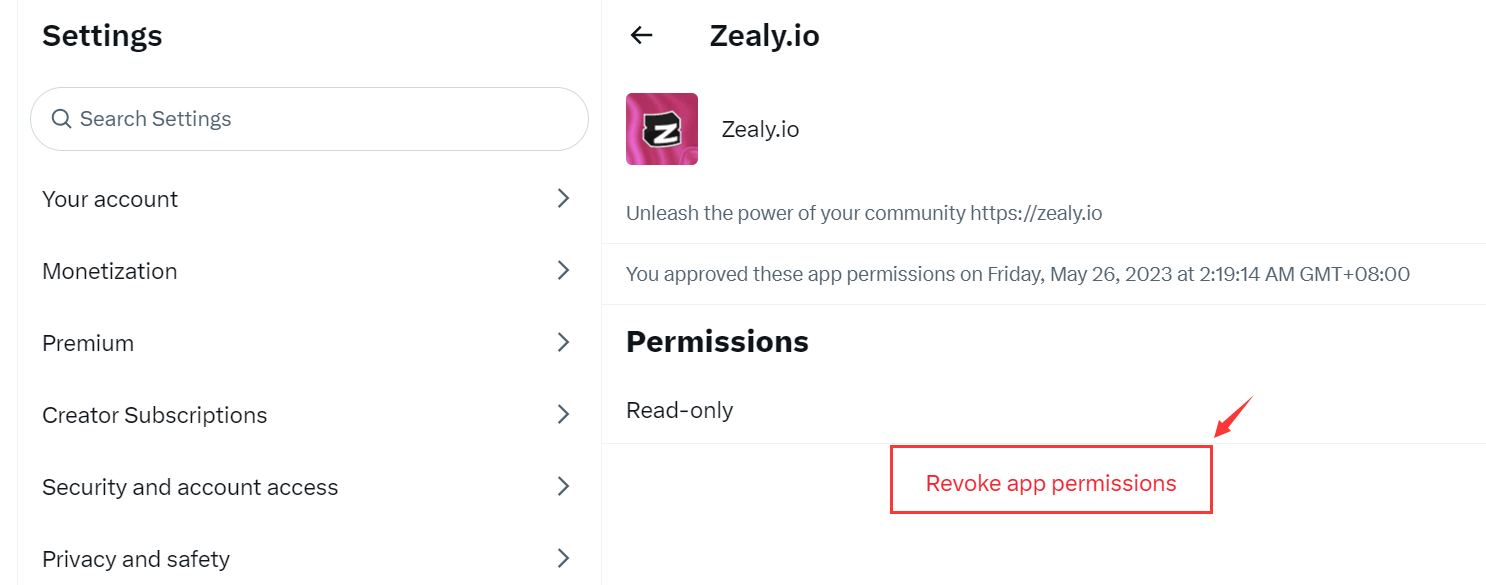
Step 3: Click Revoke app permissions on applications that are unnecessary or questionable.
3.3. Log out and log back in
A classic yet consistently effective troubleshooting step is logging out of your account on the active device. Next, clear your browser cache or app storage, and log back in.
3.4. Switch devices or browsers
If the issue is occurring on the mobile app, try signing in through a desktop web browser, or vice versa. Additionally, connect through a different Wi-Fi network or switch to cellular data to confirm whether your network routing is triggering the block.
3.5. Use a VPN or proxy
In certain instances, Twitter algorithms enforce localized limits based on network IP addresses. Changing your IP address using a VPN or proxy can help bypass regional or shared-network rate caps.
4. How to prevent the Rate limit exceeded error on Twitter
To minimize workflow interruptions caused by rate caps, adhere to these operational principles when managing your account:
- Upgrade to X Premium: A paid subscription provides significantly higher daily thresholds compared to standard accounts, particularly once you verify your Twitter account according to platform standards. However, note that X Premium does not bypass anti-spam protections. If your activity pattern matches automated spam behavior, rate limit flags will still occur.
- Moderate automated tool usage: Mass-following, mass-unfollowing, or mass-engagement bots get flagged rapidly. If your business model requires handling multiple profiles, learn how to create multiple accounts on X safely to prevent detection and account throttling.
- Pace your interactions: Avoid firing off likes, retweets, or follows in tight bursts. Spacing actions out keeps your operational footprint looking organic and prevents automated tripwires.
Maintaining steady, natural pacing rather than clustering hundreds of operations into brief windows ensures long-term account health.
5. When does a Rate Limit error lead to account penalties?
If an account consistently breaches usage boundaries within short intervals, Twitter algorithms classify the activity as bot-driven behavior. At that point, the issue moves beyond a momentary cooldown into tiered punitive actions.
Here are the escalating penalties the platform enforces:
- Search and visibility de-indexing: Your posts publish successfully, yet do not populate in search queries, hashtag streams, or the feeds of others. This acts as a silent penalty that many miss initially. If you observe an unexpected drop in reach, examine the signs of a shadowbanned Twitter account to take timely corrective steps.
- 3-day read-only mode: All interaction capabilities—including tweeting, liking, retweeting, and following—are locked for 72 hours. You are limited strictly to passive viewing.
- Permanent suspension: This represents the most severe sanction, usually triggered by platform manipulation policy breaches or persistent API/automation abuse. If your Twitter account is suspended, the likelihood of irreversible access loss is substantial.
Should your account end up locked or suspended, remain calm and submit an appeal to the platform support team. Lay out the circumstances objectively and concisely to improve the odds of reinstatement.
6. Conclusion
The "Rate limit exceeded" message on Twitter serves primarily as a temporary throttling system to regulate frequency and safeguard server infrastructure. In most situations, it causes no lasting harm to your profile and resolves as soon as usage stabilizes. Nevertheless, letting your account breach limits repeatedly can flag your behavior as irregular, opening the door to harsher administrative penalties.
For teams that operate multiple profiles concurrently, establishing an isolated and secure management environment from the start dramatically lowers the chance of encountering rate limits or suspensions.
For further reading, check out: How to manage multiple social media accounts without getting banned.
7. FAQ
1. Why does Twitter say "Rate limit exceeded" when I barely used it?
This can occur because connected third-party tools are making automated background calls, your current IP address is being shared with someone spamming requests, or Twitter servers are experiencing widespread outages.
2. Why is my Twitter account restricted to read-only mode for 3 days?
This penalty triggers when security systems identify repetitive spam-like activities or determine that community guidelines have been breached.
3. How long does the rate limit exceeded error usually last on Twitter?
In standard scenarios, the limit lifts automatically within 15 to 30 minutes. Depending on the nature and frequency of the trigger, functional cooldowns can stretch up to 24 hours.
4. Does a VPN actually resolve the Rate Limit issue?
A VPN can help if the limit was applied against your specific IP address or local network. However, it will not work if the restriction is tied directly to your Twitter user ID.
5. Is "Rate Limit Exceeded" the same as a Shadowban?
No. A rate limit is an explicit, temporary operational cap. A shadowban is an unannounced penalty where your account remains operational, but your content is silently suppressed from visibility to other users.
6. Does using X Pro prevent hitting rate limits?
Yes, X Pro uses a dedicated, more stable data pipeline. However, access currently requires an active paid X Premium subscription.