



Bluesky, a social network similar to X, has been gaining attention thanks to its fresh approach to user experience.
Because of that, it’s not surprising if you start thinking about having more than one Bluesky account. But the real question is: can you have multiple Bluesky accounts? If so, are there any risks involved, and what’s the safest way to do it?
In this article, Hidemyacc will walk you through Bluesky’s rules, answer common questions, and show you how to create and manage multiple Bluesky accounts efficiently and safely over time.
1. Can you really have multiple Bluesky accounts?
Yes. You can have multiple Bluesky accounts.
Bluesky does not limit users to a single account, and there is no publicly stated maximum number of accounts per person. Many users already operate more than one account for personal, work, or project-related reasons.
In practice, as long as you use a different email address for each signup, you can continue creating new Bluesky accounts with unique usernames.
However, Bluesky still applies moderation rules. While having multiple accounts is allowed, accounts must be used responsibly and not for spam, abuse, or coordinated manipulation. As long as each account behaves like a normal, independent user, managing multiple Bluesky accounts is generally acceptable.
Therefore, if you plan to manage multiple Bluesky accounts safely and in compliance with platform rules, using a dedicated account management solution becomes essential. The right tool helps keep each account isolated, reduces the risk of being flagged for suspicious behavior, and makes multi-account management far more efficient.
Simplify Multi-Account Bluesky Management
Hidemyacc helps you organize multiple Bluesky accounts in separate browser environments, reducing conflicts and saving time.
Go Multi-AccountsFor those curious about how Bluesky stacks up against other social media platforms, you can read our comparisons on Bluesky vs Twitter, Bluesky vs Threads to see the differences in features, usability, and account management.

2. How many Bluesky accounts can one person have?
There is no fixed number that defines how many Bluesky accounts one person can realistically manage.
While the platform doesn’t publish a hard limit, the practical threshold is usually shaped by setup quality and workflow, not official rules. For most users, managing one or two accounts is straightforward. Beyond that, complexity increases quickly.
The number of accounts you can handle depends on factors such as:
- Email availability and organization: Each account typically requires its own email, which already limits how far most users can scale.
- Consistency in account environments: As the number grows, keeping logins, sessions, and devices separated becomes more difficult without a structured system.
- Time and management effort: Five accounts require a very different level of attention compared to twenty, especially if you want them to remain active and healthy.
Because of this, many users find that problems don’t start at a specific number, but at the point where manual management stops being practical. That’s usually when questions about bulk creation and automated management begin to matter.
So instead of asking “How many Bluesky accounts can I have?”, a more useful question is “How many accounts can I manage properly with my current setup?” and that answer will be different for every user.
3. Can you create multiple Bluesky accounts with one email?
In practice, it is possible to create multiple Bluesky accounts using the same email, and quite a few people have done this before.
The most common method is using email aliases. With some email providers, you can create multiple variations from a single address, for example, by adding dots or “+tags”. During signup, these addresses look different, but all confirmation emails are still delivered to the same inbox.
At certain times, this method can work on Bluesky. You can receive the verification emails, complete the registration process, and successfully create multiple accounts from one base email without running into immediate issues.
However, the problem appears when you look at this approach in the long term.
Using email aliases for multiple accounts is usually not a good idea if you plan to manage them seriously, for several reasons:
- Account recovery becomes harder: When all security alerts, notifications, and recovery emails go to one inbox, it’s easy to lose track of which message belongs to which account.
- Higher chance of accounts being linked: Even if aliases look different, they are still tied to the same underlying email, creating an unnecessary shared signal between accounts.
- Doesn’t scale well: This approach may work for one or two extra accounts, but it quickly becomes messy and difficult to manage as the number grows.
- Depends on Bluesky’s email handling at a given time: A method that works today may stop working in the future without notice.
So while creating multiple Bluesky accounts with one email can be possible in some cases, it’s generally only suitable for short-term testing. If your goal is long-term stability and clean account management, using one email per account is still the safer and more reliable approach.

Can you create multiple Bluesky accounts with one email?
4. Bulk creating Bluesky accounts (step-by-step)
In practice, creating multiple accounts on Bluesky is fairly straightforward. The signup process is simple and can be repeated multiple times, as long as each account uses a valid email address and a unique username.
The basic steps to create a Bluesky account are:
- Step 1: Prepare an email address that can receive verification emails
- Step 2: Visit the Bluesky website or open the Bluesky app
- Step 3: Enter your email, password, and date of birth
- Step 4: Choose a username (it must be unique)
- Step 5: Complete the captcha verification
After logging into the account, you can go to Settings to verify your email. Verifying your email helps ensure the account works properly and unlocks more features on the platform.
Once that’s done, you can log out and repeat the same process to register another Bluesky account.
5. Common ways to manage multiple Bluesky accounts (and their limitations)
As the number of accounts grows, the challenge is no longer account creation, but how to manage them efficiently without confusion. Below are the most common approaches users typically use:
- Different browsers or browser profiles (Desktop): Each account is logged in using a separate browser or a different profile within the same browser.
- Use app cloning (Android): Clone the Bluesky app to log into multiple accounts simultaneously on one device.
- Mixing web and mobile apps: Some accounts are used on the web, while others are managed through the mobile app to keep sessions separate.
- Manual login and logout: Logging out and back in when switching accounts (only practical for a very small number of accounts).
These methods can work well in the early stages, especially if you’re managing only a few accounts and don’t need to switch between them frequently.
However, these approaches start to show clear limitations as the number of accounts increases:
- It’s easy to log into the wrong account by mistake
- Switching between browsers or apps becomes time-consuming
- Managing or viewing many accounts at the same time is difficult
- Repetitive actions across accounts are inefficient
Because of these limitations, once the number of Bluesky accounts goes beyond a basic level, many users begin looking for more structured and safer ways to manage them.
6. How to manage multiple Bluesky accounts safely with Hidemyacc
When you manage only a few Bluesky accounts, manual methods are usually fine. But once the number grows into dozens or even hundreds, things quickly become confusing. It’s easy to forget which account is which, make mistakes, or accidentally affect the wrong account.
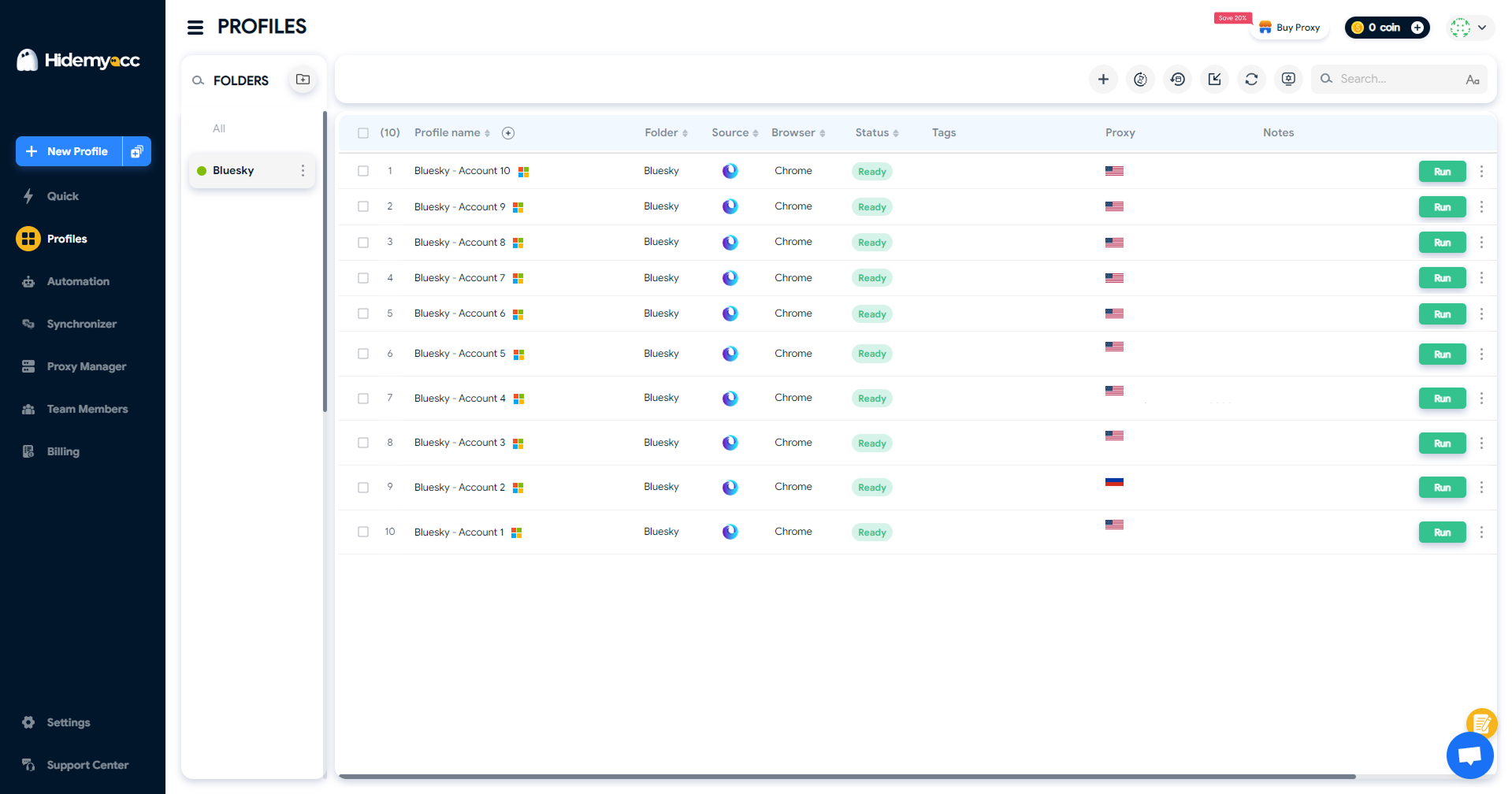
Antidetect browser Hidemyacc helps by turning each Bluesky account into its own browser profile, with separate settings and sessions. This way, you always know exactly which account you’re opening and using.
For users targeting multiple regions, Hidemyacc lets you assign a dedicated proxy to each profile, making it easier to manage accounts linked to different countries.
When working with many accounts at once, you can:
- Open multiple accounts simultaneously
- Clearly see which profile belongs to which account
- Perform the same action across multiple accounts using synchronized control
For repetitive tasks, Hidemyacc also supports script-based automation, allowing you to automate routine actions like logging in or browsing feeds, while keeping full control over how accounts are used.
Scale Your Bluesky Accounts More Efficiently
Organize multiple Bluesky accounts in independent browser environments using Hidemyacc. Save 10% on your first payment.
Claim Your 10% Off7. Can people see or link your other Bluesky accounts?
No. Bluesky does not publicly show or link your other accounts.
Each Bluesky account exists independently. Other users cannot see whether you own multiple accounts unless you choose to reveal that information yourself.
That said, accounts can still become linked indirectly in certain situations. This usually happens through user behavior rather than platform features. For example:
- Reposting or interacting mainly between your own accounts
- Using the same bio, links, or identifying details across profiles
- Publicly mentioning or cross-promoting your other accounts
As long as each account is used normally and maintained as a separate profile, there is no built-in way for people to view or discover your other Bluesky accounts.
8. Conclusion
So, can you have multiple Bluesky accounts? Yes. Bluesky allows users to create more than one account, but the platform itself isn’t designed for managing many profiles at the same time.
As the number of accounts increases, manual switching quickly becomes inefficient and harder to control. Using the antidetect browser Hidemyacc allows you to manage multiple Bluesky accounts in separate browser profiles, keeping each account organized and clearly separated.
With a structured setup and responsible use, managing multiple Bluesky accounts can remain efficient and scalable over time.
If you’re managing multiple accounts across different platforms, it’s important to keep them organized and avoid conflicts. Check out our guides on:
- Manage Multiple Social Media Accounts Efficiently – Tips Inside
- How to run multiple Telegram accounts on one device without bans?
- How to use multiple WhatsApp accounts on one device?
- Create Multiple X Accounts Without Getting Banned - Step-by-Step
- How to run multiple Instagram accounts without getting banned
- Multiple TikTok Accounts: Best Practices to Avoid Shadowbans
- Multiple LinkedIn accounts - How to create and manage them effectively?
- Multiple Reddit accounts - How to create and manage them safely (Step-by-step guides)
- How to Safely Run Multiple Discord Accounts Without Bans?
9. FAQ
1. Can you have multiple Bluesky accounts?
Yes. Bluesky allows users to create more than one account. There is no publicly stated limit, as long as each account follows platform rules and is used responsibly.
2. Can you have multiple accounts on Bluesky?
Yes. Many users operate multiple accounts for different purposes, such as personal use, work, or managing separate projects. Each account should have its own email and unique username.
3. Can you have multiple Bluesky accounts on one email?
In some cases, it may work using email aliases, but it’s not recommended long term. Managing multiple accounts with one base email can cause confusion and make account recovery harder. Using one email per account is the safer option.
4. How many Bluesky accounts can I have?
Bluesky does not publish a fixed number. In practice, the limit depends on how well you can manage and organize your accounts without violating platform rules.
5. Are alts allowed on Bluesky?
Yes. Alternate accounts are allowed, as long as they are not used for spam, abuse, or coordinated manipulation. Each account should behave like a normal, independent user.
6. How to switch between accounts on Bluesky?
Bluesky provides a built-in Switch account feature. You can add multiple accounts and switch between them directly from the Settings menu without logging out.
This works well if you manage a small number of accounts. However, the feature is mainly designed for switching, not for opening or operating multiple accounts at the same time, so it becomes less practical as the number of accounts grows.
7. Can people see your other Bluesky accounts?
No. Bluesky does not publicly link accounts together. Other users can only connect your accounts if you reveal the connection yourself through behavior or public information.






