1. What is Dolphin Anty?
Dolphin Anty is an antidetect browser developed in Russia, tailored primarily for users managing multiple social media accounts, executing Facebook ad campaigns, or working in affiliate marketing and traffic arbitrage. The software creates hundreds or even thousands of separate browser profiles, each equipped with an isolated digital fingerprint, cookie jar, and browsing environment to prevent cross-account linking and mass bans on target platforms.
Dolphin Anty concentrates on two primary feature groups: browser profile management and automation tools. It is engineered for teams and individuals running multi-account operations across isolated browser contexts.
2. Key Features of Dolphin Anty
Before diving into hands-on testing, here is a quick overview of Dolphin Anty's core specifications and features that were evaluated during our review.
|
Criteria |
Feature Details |
|
Profile Types |
Local profiles running on host device & Cloud profiles |
|
Fingerprint Engine |
Real-device hardware spoofing with customizable WebGL, Canvas, User Agent, Screen Resolution, CPU, and RAM parameters |
|
Free Profile Limit |
5 profiles, no time limit |
|
Supported OS |
Windows, macOS, Linux |
|
Automation Capabilities |
Cookie Robot, drag-and-drop Scenarios, action recorder, integration with Selenium, Puppeteer, Playwright, Local & Remote API |
|
Proxy Management |
Bulk proxy assignment, blacklist checker, built-in partner proxy integration |
|
Proxy Protocols |
HTTP/HTTPS, SOCKS5 |
|
Team Collaboration |
Available from Base tier; role-based access controls, internal profile, proxy, and scenario sharing |
|
Bulk Creation |
Yes, via Mass Import using templates or raw data pasting |
|
Security & Auth |
Email/Password, supports 2FA via authenticator apps |
|
Pricing Overview |
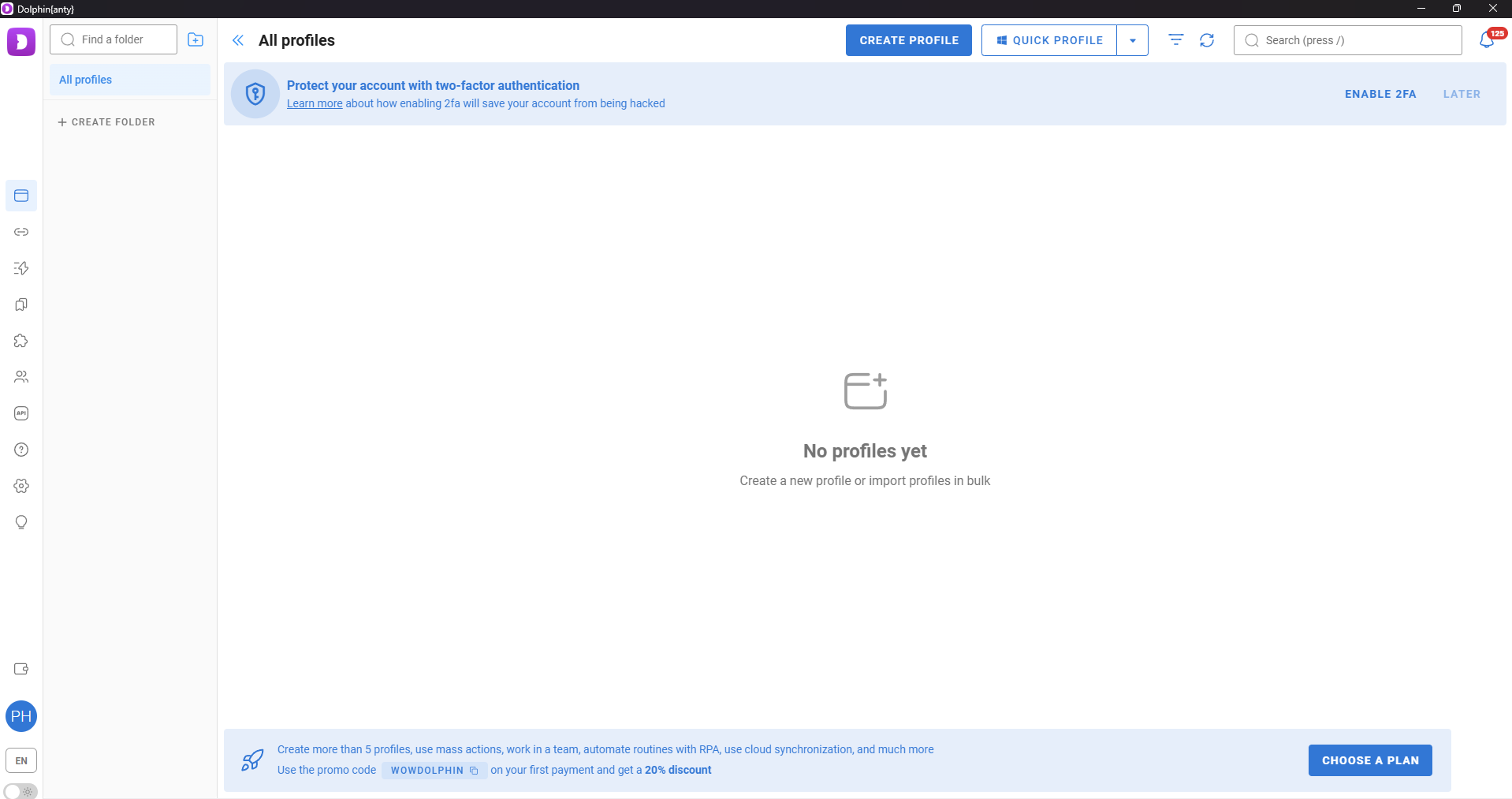
Free: $0 (5 profiles) · Starter: from $10/mo (20 profiles) · Base: from $89/mo (100 profiles) · Team: from $159/mo (300 profiles) · Enterprise: from $299/mo (1,000+ profiles) |
|
Billing Structure |
Based on active profile quota and additional team member seats |
|
Payment Methods |
Bank Cards, Cryptocurrency |
|
Free Trial |
Yes, perpetual Free tier with 5 profiles |
|
Customer Support |
Live chat, Email, Telegram |
3. Dolphin Anty Pricing Tiers
Dolphin Anty structures its pricing around operational scale, catering to solo beginners up to agencies running thousands of profiles. Core features remain relatively consistent across paid tiers, with primary differences lying in profile limits, user seats, and team collaboration controls.
- Free Plan: Allows up to 5 profiles with no time restrictions and no credit card required. Ideal for getting familiar with the interface before upgrading, though insufficient for scaling multiple concurrent accounts.
- Starter Plan (formerly Free+): Starts at $10/month for solo users (1 user seat), supporting up to 20 active profiles with options to purchase additional slots up to 60 profiles. Unlocks core features including cloud sync, Cookie Robot, Scenarios, API integrations, and bulk proxy management.
- Base Plan: Starts at $89/month with 100 profiles included, tailored for small teams. Additional team seats cost $10/month each.
- Team Plan: Starts at $159/month with up to 300 profiles for growing operations. Additional user seats cost $20/month each; profile capacity is fixed for this tier.
- Enterprise Plan: Starts at $299/month, offering 1,000 profiles with custom scaling up to 50,000 profiles. Additional team seats cost $25/month each.
Plans from Base upwards include role-based permissions, profile creation limits per team member, internal resource sharing, and profile recovery within a 48-hour window. Annual billing grants approximately a 40% discount, while semi-annual billing offers a 20% discount compared to monthly rates.
4. Hands-on Experience: Testing Dolphin Anty from A to Z
Testing Context: All testing was conducted on a Windows host using the current build of Dolphin Anty (as of August 2026) under a Free plan account. Two proxy setups were evaluated: a paid proxy connected via the in-app partner integration (Milwaukee, USA) and a standalone Private SOCKS5 proxy (Singapore, Cellular node). Because the Free tier limits concurrent launches to 3 active profiles, testing focused on 1–2 primary profiles rather than massive parallel workloads.
4.1. Creating and Setting Up Browser Profiles
Profile Creation Process
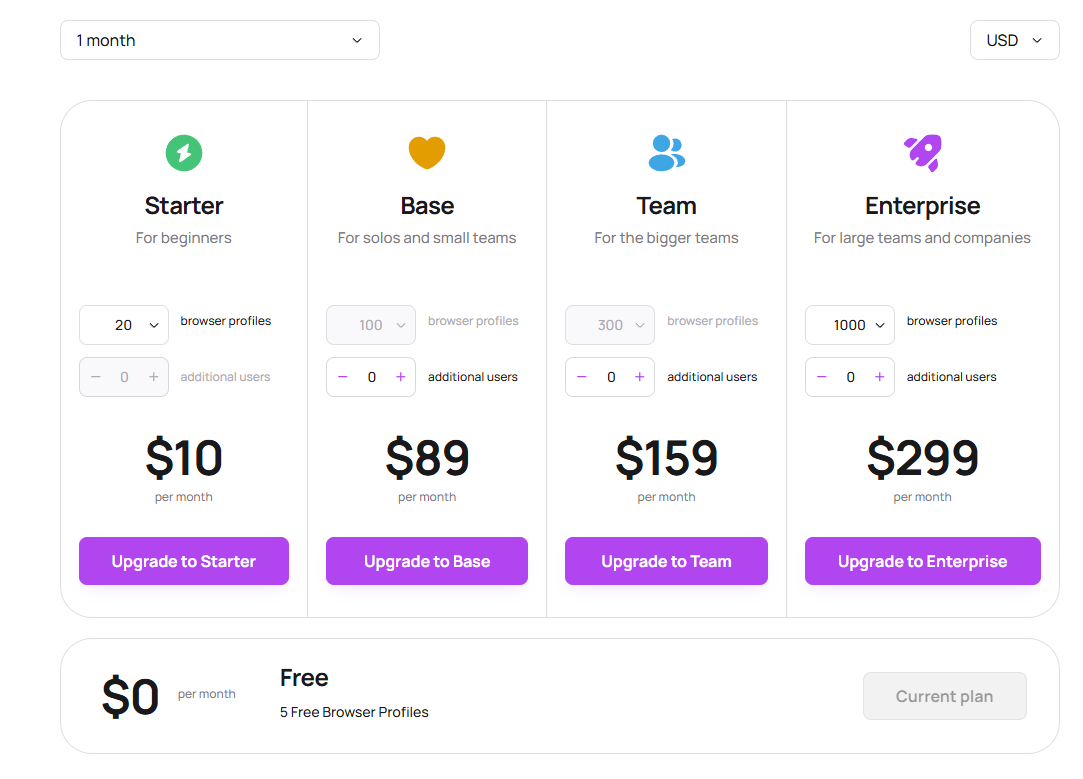
Upon opening Dolphin Anty for the first time, the main dashboard appeared clean, displaying "No profiles yet" in the central panel. A security banner at the top prompted enabling Two-Factor Authentication (2FA) with "Enable 2FA" and "Later" options, demonstrating a proactive approach to account security right from setup.
Users can specify profile names, browser versions, operating systems, landing pages, proxies, and cookies. Fingerprint parameters are auto-generated during profile creation, though manual overrides can be applied for custom workflow requirements.
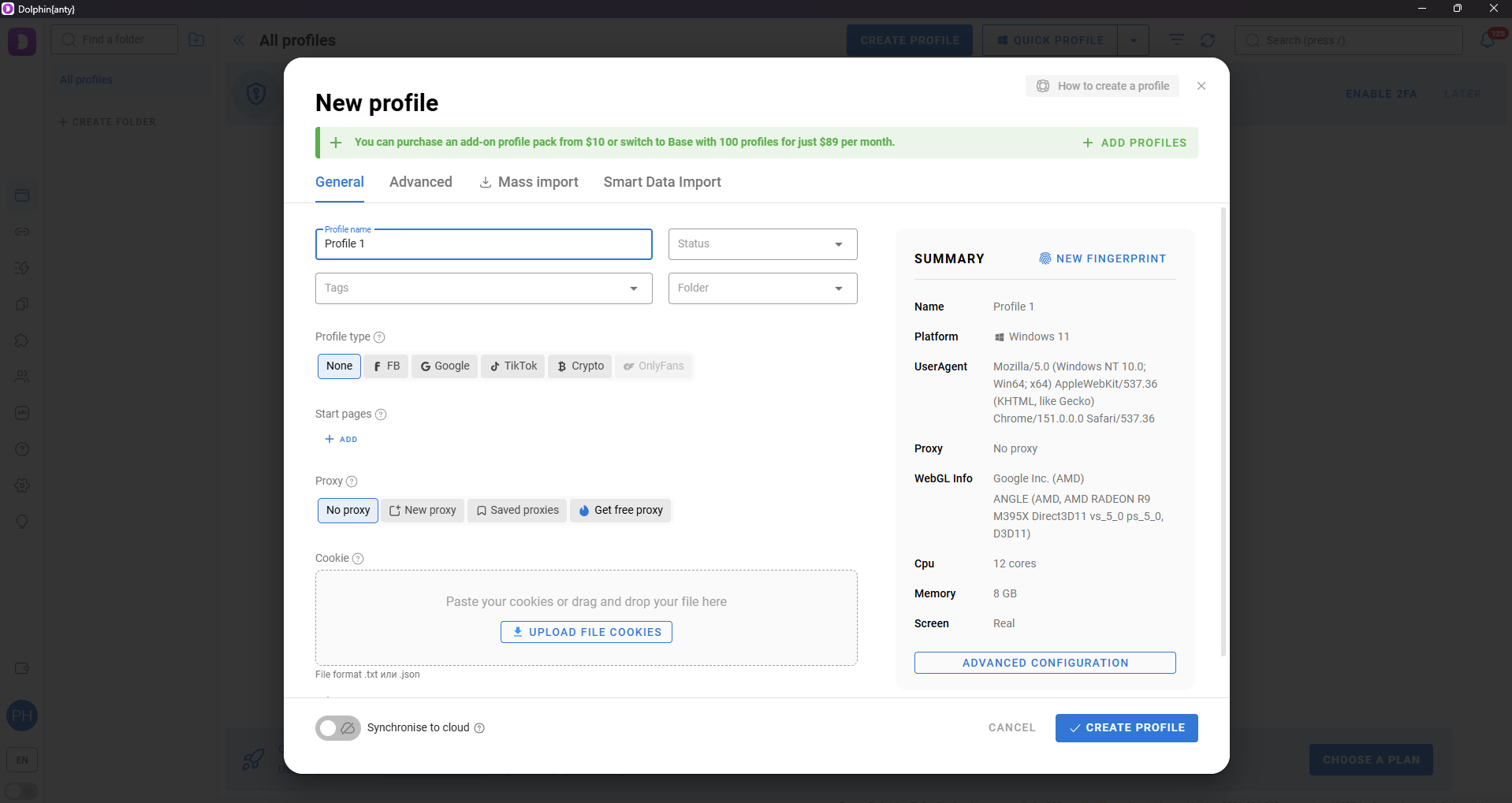
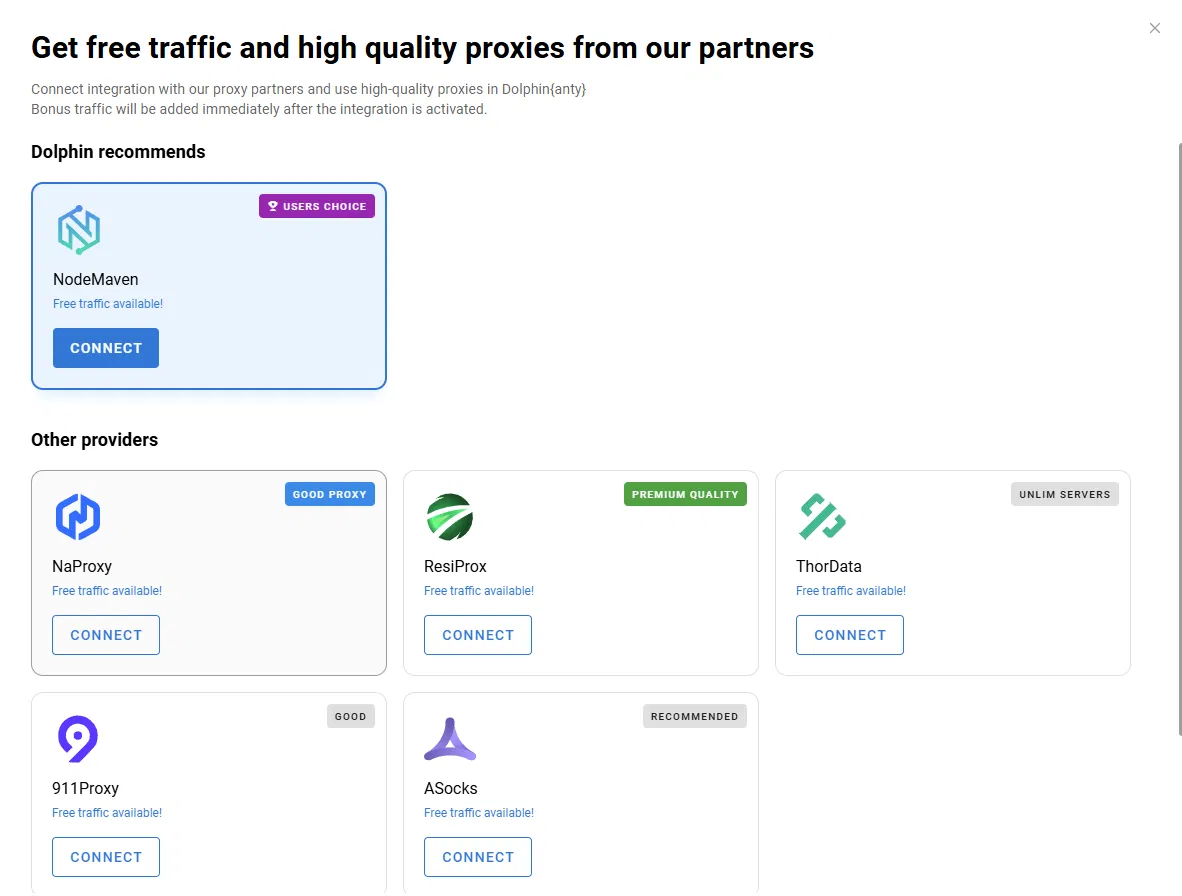
A notable feature is the built-in free proxy selection during profile creation. Clicking "Get free proxy" opens an integrated list of partner providers: NodeMaven is highlighted as "Users choice," alongside options like NaProxy, ResiProx, ThorData, 911Proxy, and ASocks, each featuring a "Connect" button and "Free traffic available" tags. This is convenient for beginners, removing the need to source external proxies immediately.
4.2. Fingerprint & Anti-Detection Audit
Each proxy setup was assigned to a separate profile and evaluated against identical audit platforms: Pixelscan, Browserleaks, Iphey, AmiUnique, IPFighter, and CreepJS, along with consistency, WebRTC leak, and timezone/geolocation alignment checks.
Audit Platform Results
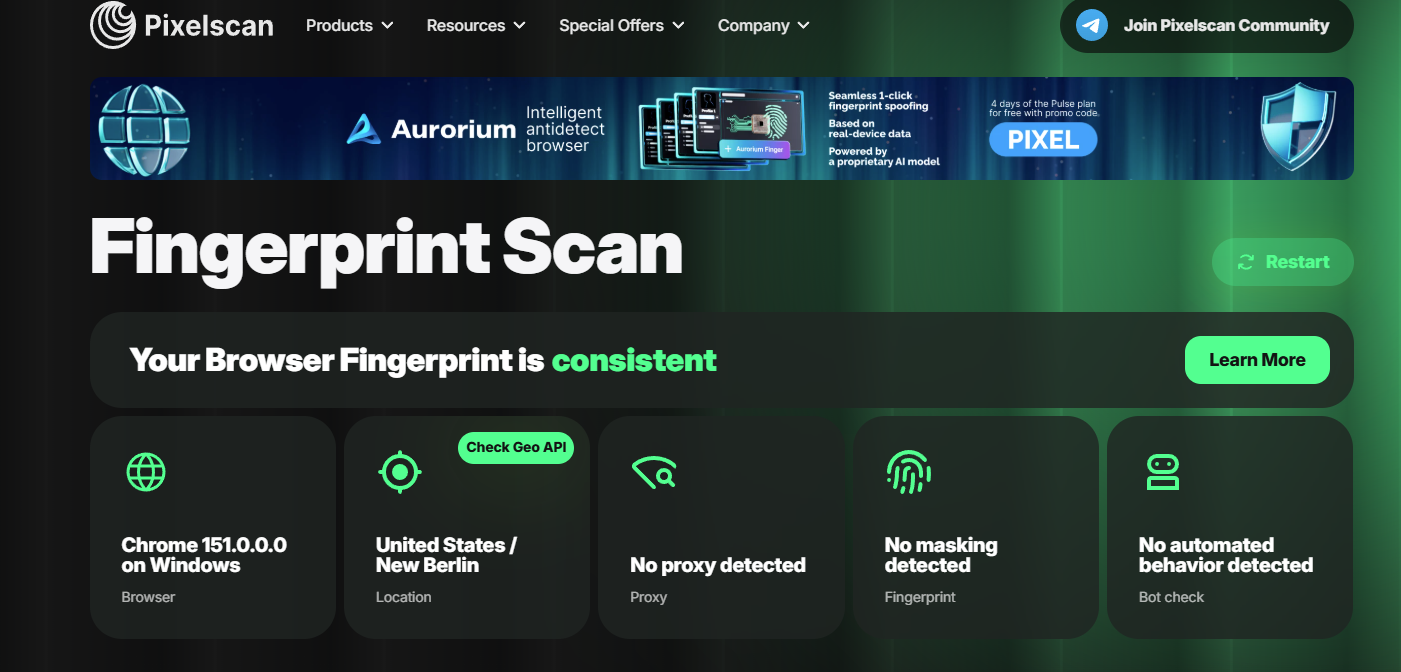
When switching to the US proxy, IPFighter scored 100% (Good) with zero blacklist warnings. Pixelscan returned "Your Browser Fingerprint is consistent." CreepJS recorded 100% fingerprint coverage with an IP risk rating of "perfect."
Consistency Checks
Across both US and Singapore proxy tests, Pixelscan confirmed consistent fingerprints, detecting no proxy headers, fingerprint masking, or browser automation flags. CreepJS likewise yielded clean scores on the US proxy test.
WebRTC Leak Testing
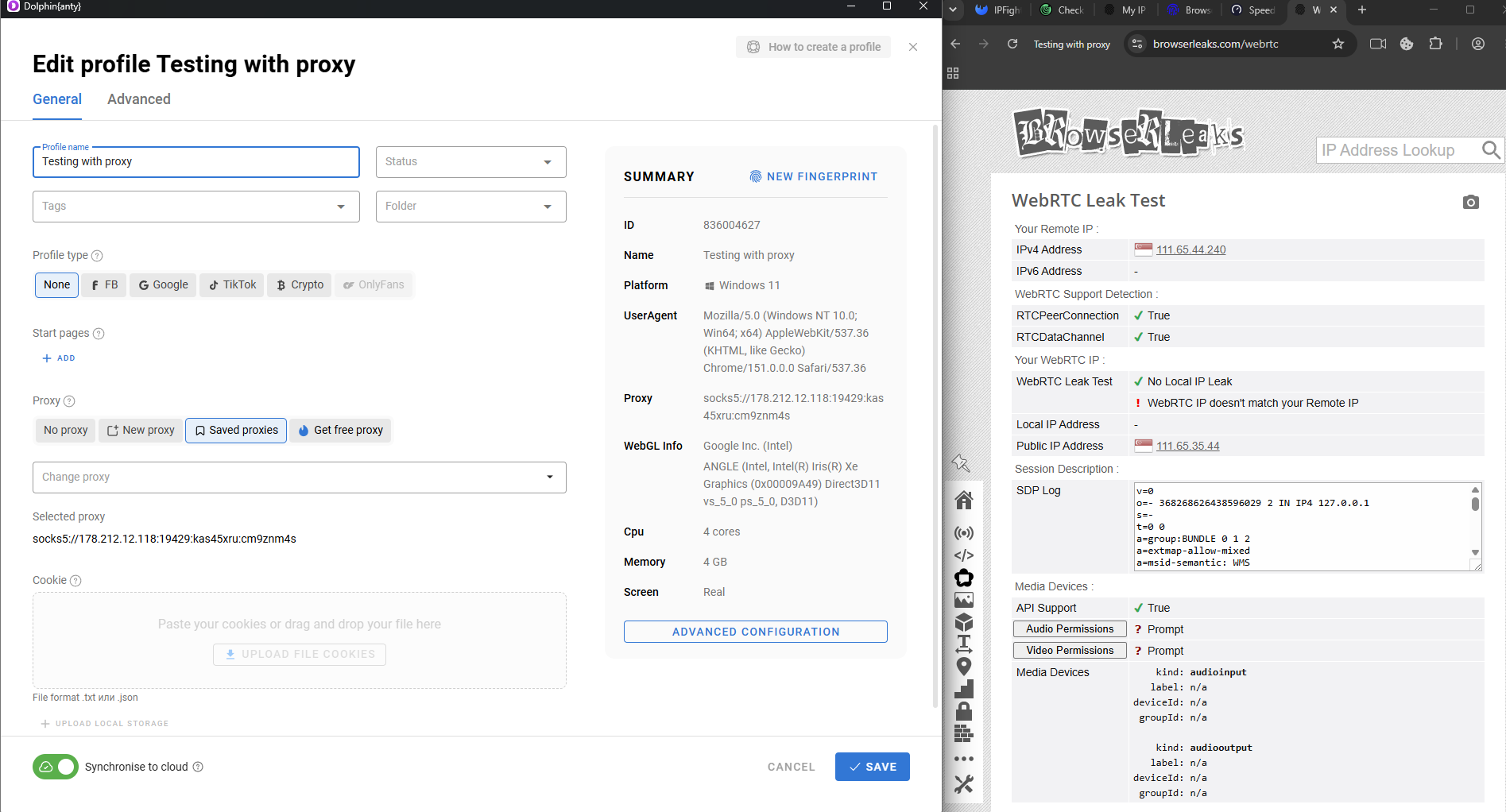
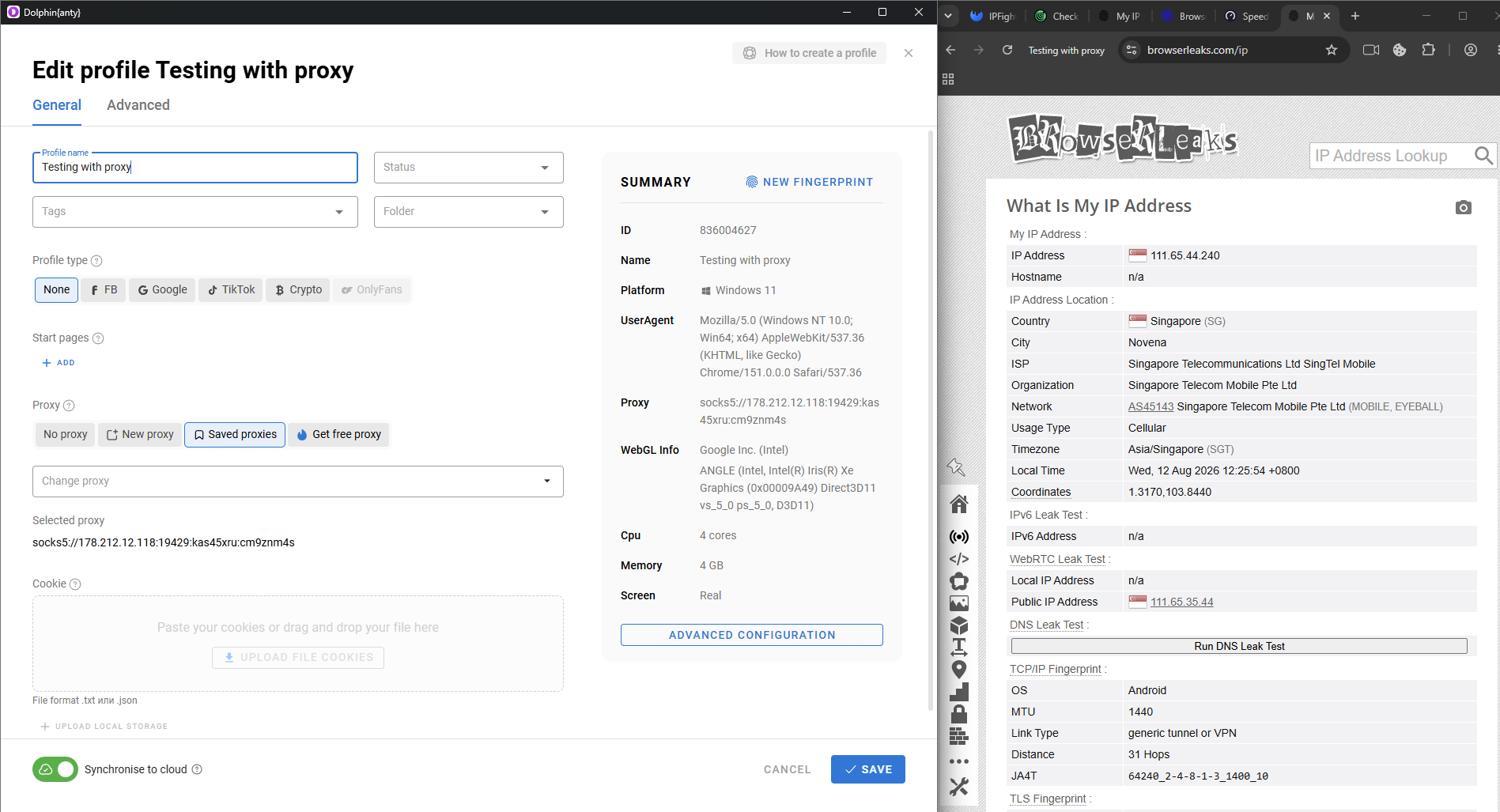
With the Singapore proxy, Browserleaks confirmed "No Local IP Leak," though a minor warning appeared: "WebRTC IP doesn't match your Remote IP." The IP detected via HTTP (111.65.44.240) and the IP detected via WebRTC (111.65.35.44) showed a slight subnet discrepancy, despite belonging to the same provider network.
Timezone & Geolocation Alignment
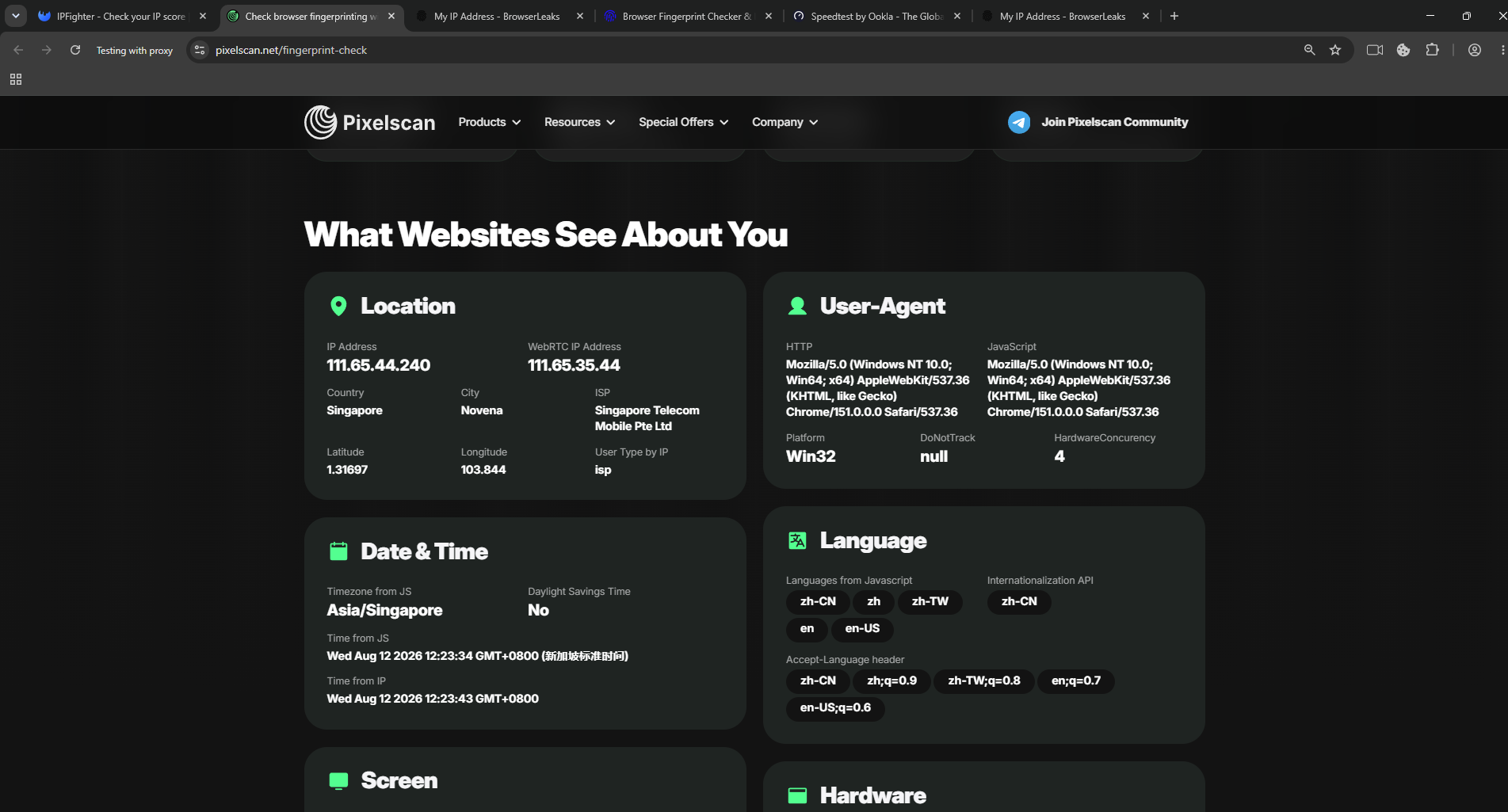
On the Singapore proxy, Pixelscan reported Timezone from JS as Asia/Singapore, with JS time and IP time aligning at GMT+0800 without mismatches. Minor language header observations showed Accept-Language and JS Languages prioritizing Chinese (zh-CN) before English:
Additionally, Browserleaks exposed a TCP/IP layer anomaly: while the profile claimed Windows 11, the TCP/IP Fingerprint identified the OS as Android with a "generic tunnel/VPN" link type—a characteristic artifact of the budget cellular proxy used:
Fingerprint Test Summary Table
|
Audit Metric |
US Partner Proxy |
Singapore SOCKS5 Proxy |
|
IPFighter Score |
100% (Good) |
Not tested separately |
|
Blacklist Warnings |
None |
Not tested separately |
|
Pixelscan Consistency |
Consistent |
Consistent |
|
CreepJS Coverage |
100%, risk "perfect" |
Not tested separately |
|
WebRTC Leak |
Not tested separately |
No Local IP Leak; minor IP mismatch |
|
Timezone/Geo Matching |
Matched |
Matched (Asia/Singapore, GMT+0800) |
|
TCP/IP Signature |
Matched |
Anomaly (Detected Android OS / Tunnel) |
Audit Verdict: Dolphin Anty delivers consistent, reliable browser spoofing across independent verification tools. Minor secondary anomalies (such as WebRTC subnet variance or TCP/IP OS mismatches) were tied directly to low-cost proxy infrastructure rather than flaws in the browser core itself.
4.3. Proxy Compatibility & Website Accessibility
Two distinct proxy types were evaluated: a paid partner proxy integrated directly inside Dolphin Anty (US) and a standalone Cellular SOCKS5 proxy purchased externally (Singapore). Both proxy profiles connected quickly without errors.
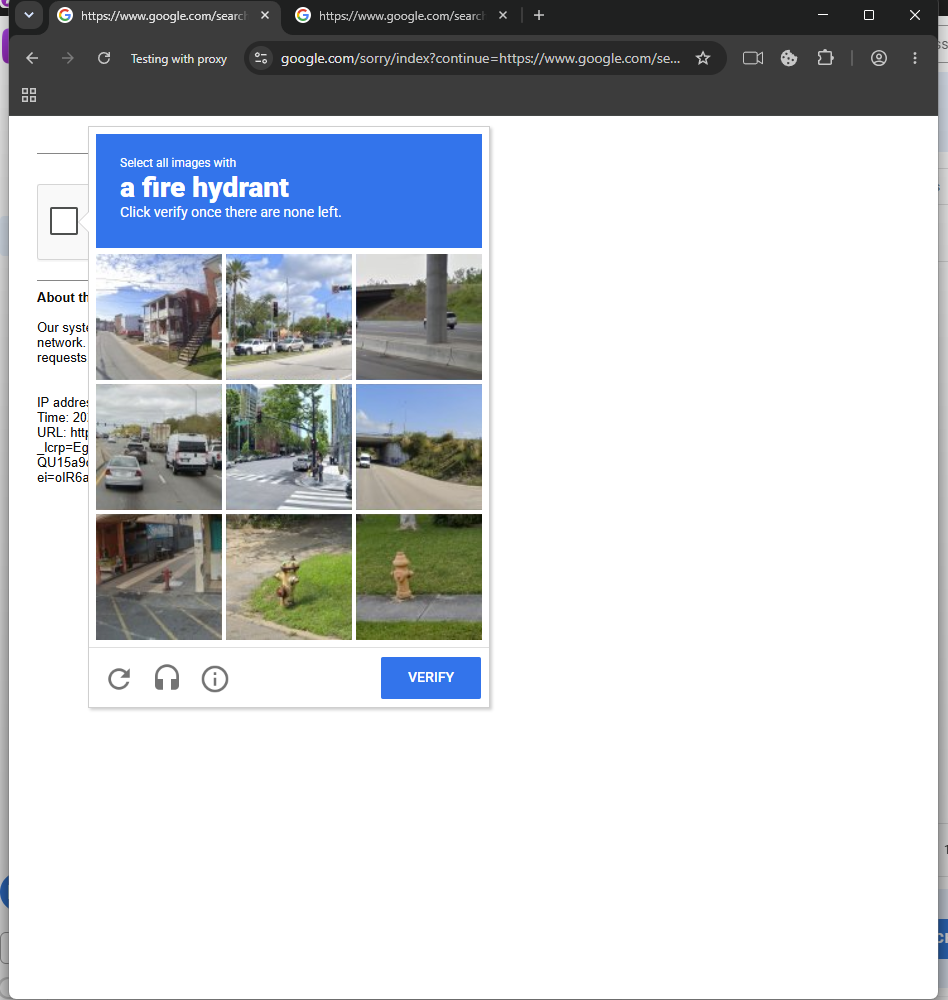
When performing initial Google searches, the first three search attempts triggered image CAPTCHAs, which resolved immediately upon manual completion. Subsequent search tabs loaded cleanly without further CAPTCHA challenges.
Testing top target websites: Etsy and TikTok loaded smoothly without connection delays or CAPTCHAs. Sephora displayed standard regional shipping prompts based on the detected IP location.
Verdict: Proxy integration functions properly for location and IP switching, exhibiting broad compatibility across proxy sources. However, initial CAPTCHA prompts can still occur depending on proxy IP reputation.
4.4. Automation / RPA Features
Dolphin Anty advertises built-in automation suites including a Cookie Robot, visual Scenarios builder, and API support for Selenium, Puppeteer, and Playwright. However, because our test account operated on the Free plan, advanced automation could not be verified directly; clicking Scenarios opened a upgrade prompt indicating the feature requires a Base plan or higher.
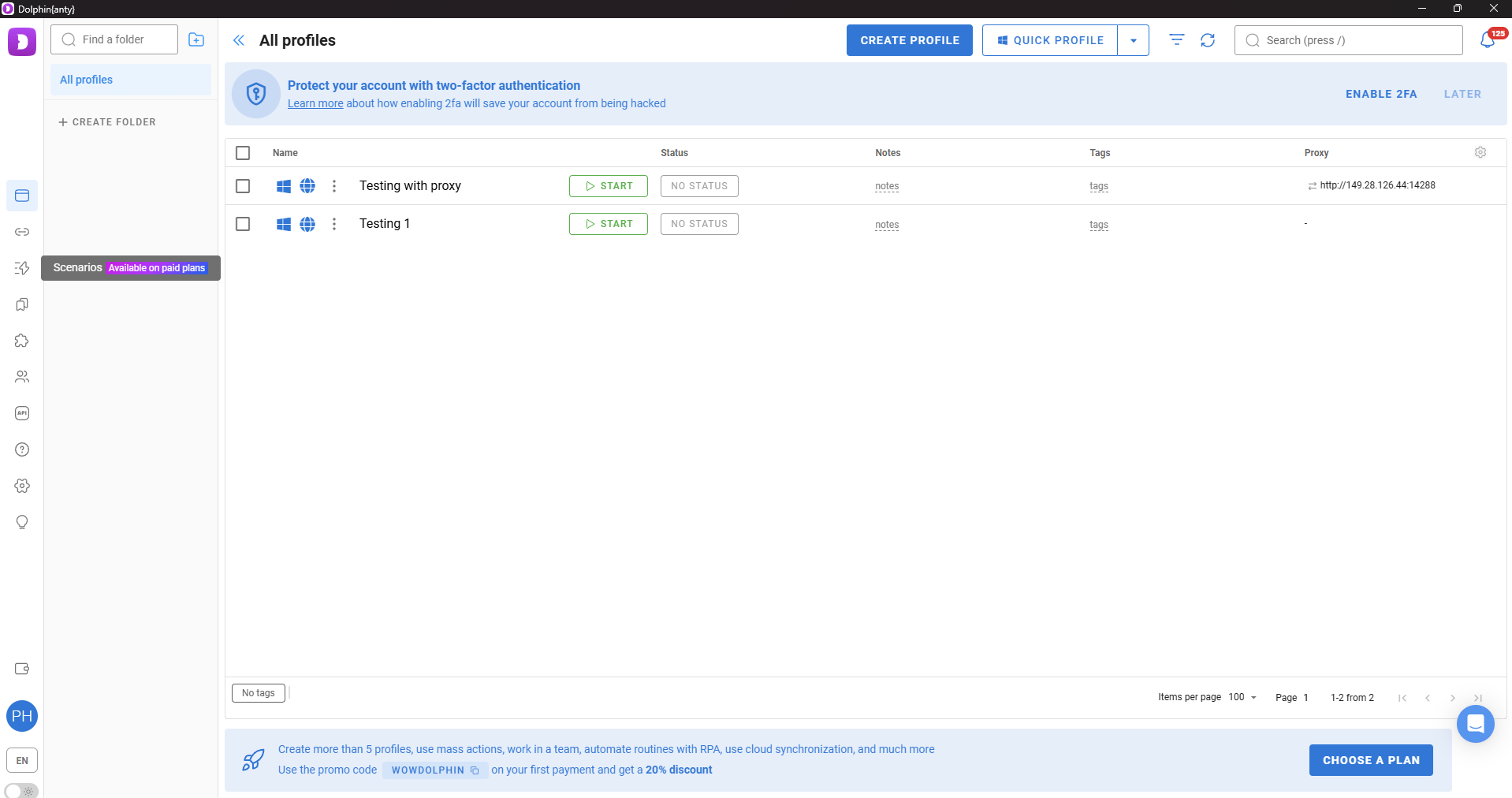
Verdict: Automation evaluation is limited to advertised specifications, as real-world script execution requires upgrading to paid tiers.
4.5. Team Collaboration
According to official documentation, team management is available from the Base plan upwards, featuring role-based permissions and internal resource sharing (profiles, proxies, scenarios). These features could not be tested on our Free tier account.
Verdict: Team collaboration features remain unverified in this review due to subscription tier limits.
4.6. Performance & Resource Consumption
Profile Launch Speed: Timed across multiple launches, clicking "Start" until the browser window fully rendered averaged 2 to 3 seconds.
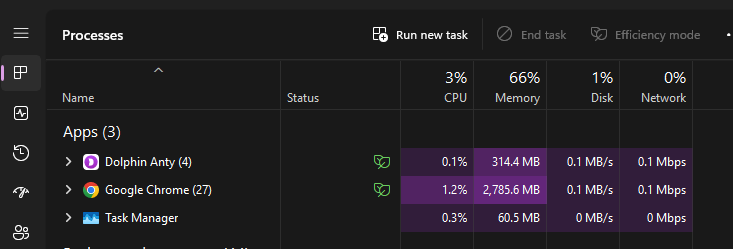
RAM and CPU consumption were monitored via Windows Task Manager across three operational states (measuring Dolphin Anty background processes and active browser instances):
|
Active Profile Count |
RAM Usage (Dolphin Processes) |
CPU Usage (Dolphin Processes) |
|
0 profiles (Dashboard only) |
314.4 MB |
0.1% |
|
1 active profile |
~662 MB |
~11.2% |
|
2 active profiles |
~1,806 MB (~1.8 GB) |
~19.6% |
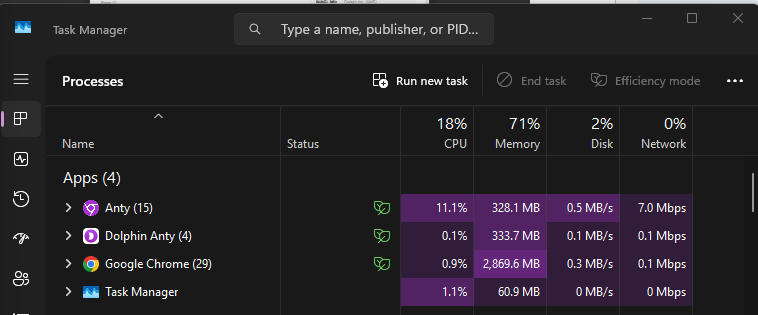
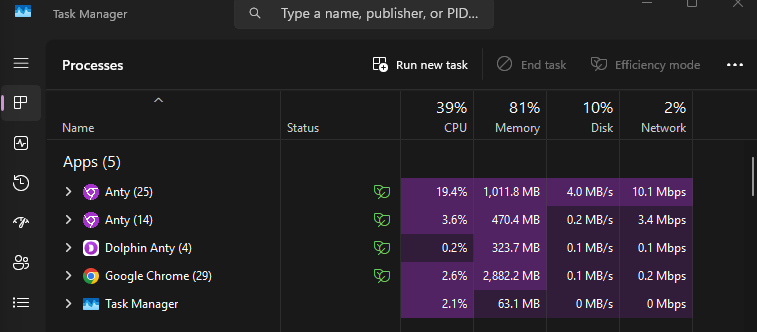
Because the Free tier limits concurrent launches to 3 active profiles, performance benchmarking stopped at 2 active profiles.
Verdict: Individual profile launch speeds are fast. However, memory consumption scales rapidly with additional open profiles, adding roughly 700 to 750 MB of RAM per active browser instance and reaching nearly 1.8 GB with just 2 profiles running.
4.7. Mass Import Capability
Mass Import allows batch-creating profiles instead of configuring instances individually. Dolphin Anty provides a CSV/txt template with fields including:
- Profile name
- Cookie data
- Proxy type
- Proxy details
- User Agent string
- Notes
In practice, Mass Import requires pre-formatted data matching Dolphin Anty's exact schema. If you do not have pre-formatted cookies, proxies, and User Agents ready, Mass Import does not save significant setup time for initial configuration.
This makes the process slightly less beginner-friendly. Conversely, for experienced operations with large CSV databases of accounts, cookies, and proxies, Mass Import efficiently generates dozens of profiles in a single step.
Free Plan Profile Limits
During testing, the Free plan allowed creating up to 5 profiles total, but restricted active concurrent launches to 3 profiles.
If 3 profiles are currently running, launching a 4th or 5th profile requires closing an active window first. For beginners evaluating the software or managing small-scale accounts, this limit is manageable, but it presents an immediate bottleneck for scaling concurrent operations.
5. Overall Evaluation of Dolphin Anty
Following hands-on testing, Dolphin Anty demonstrated solid stability in creating and maintaining browser profiles. Fingerprint masking proved consistent across multiple audit tools, and proxy integration worked seamlessly. However, CAPTCHAs can still occur depending on proxy reputation, and core automation features are locked behind paid tiers. Overall user experience depends heavily on the quality of external proxies used.
|
Pros |
Cons |
|
Consistent fingerprint audit scores |
CAPTCHAs can still trigger depending on proxy IP quality |
|
Intuitive, straightforward profile creation UI |
Advanced automation features require paid plan upgrades |
|
Broad proxy protocol support and in-app partner integration |
Free plan limits concurrent running profiles to 3 |
|
Comprehensive automation suite (Scenarios, API, Cookie Robot) |
Heavy RAM usage per open profile (~700-750MB) |
|
Supports Mass Import for batch profile management |
No mobile OS fingerprint support (Android/iOS) |
6. Hidemyacc: A Cost-Effective Alternative to Dolphin Anty
If Dolphin Anty does not fit your operational workflow or budget, the antidetect browser Hidemyacc serves as a compelling alternative—especially if you require native mobile fingerprints, no-code automation, or seamless profile migration from other browsers.
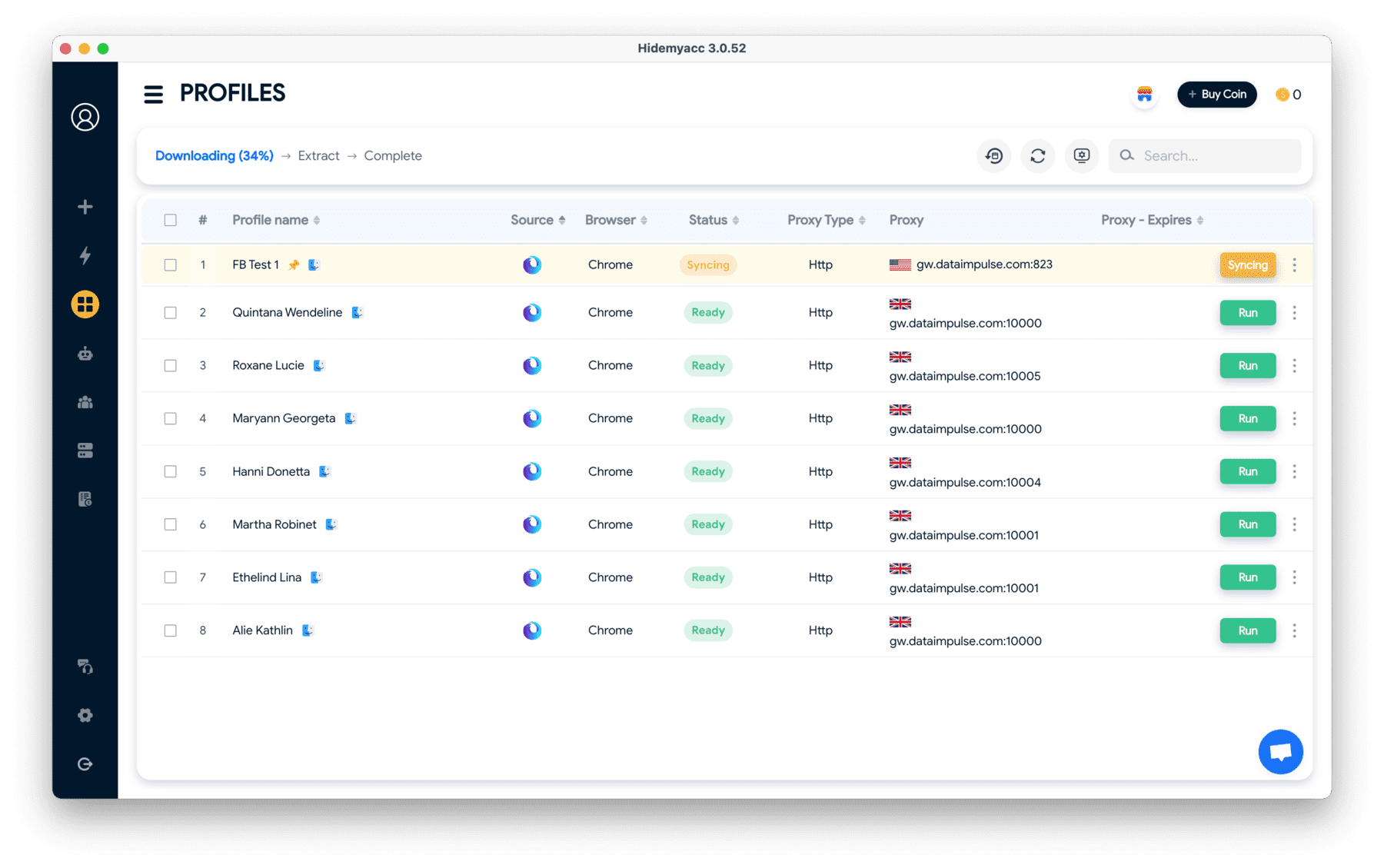
Hidemyacc is built on its proprietary Marco browser engine (Chromium-based) and delivers granular fingerprint customization for each profile. Key features include:
- Flexible Fingerprint Customization: Manually configure individual profile parameters or let the system generate randomized real-device fingerprints.
- Sub-Account Management: Create sub-accounts with role-based access permissions. Starting from the Base plan, free sub-account seats are included with each tier.
- Free Built-in Proxies: Base plans and above include access to a shared pool of 10,000+ free datacenter proxies across 40+ countries.
- Magic Link Migration: Easily import profiles from Dolphin Anty and other antidetect browsers without setting up parameters from scratch.
- No-Code Automation: Build automation workflows using visual drag-and-drop actions, web recorders, or custom code scripts. Hidemyacc also provides a pre-built script library for major platforms.
- Synchronizer: Mirror real-time actions from a master profile window to multiple slave profile windows simultaneously.
- Mobile Fingerprints: Base plans and above support native Android and iOS fingerprints for workflows requiring mobile environment emulation.
Feature Comparison: Dolphin Anty vs. Hidemyacc
|
Feature |
Dolphin Anty |
Hidemyacc |
|
Starting Price |
Free (5 profiles) or from $10/month |
From $5/month (promotional rate) |
|
Free Trial |
Perpetual Free plan (no credit card) |
7-day free trial (no credit card) |
|
Browser Engine |
Chromium-based |
Marco Engine (Chromium-based) |
|
Fingerprint Parameters |
WebGL, Canvas, User Agent, Resolution... |
OS, Browser, Canvas, WebGL, Fonts, Hardware... |
|
No-Code Automation |
Cookie Robot, Scenarios |
Drag-and-drop builder, Action Recorder, Script Library |
|
Coded Automation |
API, Selenium, Puppeteer, Playwright |
Selenium, Puppeteer, Playwright via REST API |
|
Team Seats |
Paid add-on per seat from Base plan |
Free sub-account seats included from Base plan |
|
Profile Sharing / Transfer |
Yes, within internal team |
Yes, via Magic Link, Profile Sharing, and Transfer |
|
Free Built-in Proxies |
Third-party partner integrations |
Included from Base plan (10,000+ IPs) |
|
Mobile Fingerprints (Android/iOS) |
Not supported |
Supported from Base plan |
|
External Profile Import |
Manual Mass Import template |
One-click import via Magic Link |
|
Supported OS |
Windows, macOS, Linux |
Windows, macOS, Linux |
|
Customer Support |
Live chat, Email, Telegram |
Live chat, Email, Community group |
Dolphin Anty holds an advantage if you need to scale to tens of thousands of profiles or are accustomed to its specific automation ecosystem. Conversely, if you require mobile fingerprints, no-code automation, or easy profile migration from Dolphin Anty, Hidemyacc represents a versatile alternative.
Struggling to keep multiple accounts safe?
Move to Hidemyacc and manage multiple accounts using a reliable antidetect browser built for long-term operations.
7. Final Verdict
Dolphin Anty is a solid choice if your primary requirement is managing multiple desktop browser profiles with robust fingerprint masking and flexible proxy integrations. The perpetual Free plan lets beginners test the platform before committing, while paid tiers scale up automation and team features.
However, Dolphin Anty may not suit every operational setup. If your workflow depends heavily on automation on a budget, feature locks on lower plans can be restrictive. Similarly, if your tasks require Android or iOS mobile environment emulation, Dolphin Anty currently lacks mobile fingerprint options.
Dolphin Anty is right for you if:
-
You manage multiple desktop profiles on Windows, macOS, or Linux.
-
You want a perpetual Free plan to test features before paying.
-
You need customizable hardware fingerprints and built-in proxy integrations.
-
You utilize advanced automation tools like Scenarios, Cookie Robot, or API scripts.
-
You are already familiar with the Dolphin ecosystem and want to scale profile capacity.
Consider Hidemyacc if:
- You need native Android and iOS mobile fingerprints.
- You want visual, no-code drag-and-drop automation without tier locks.
- You want to migrate existing profiles seamlessly from Dolphin Anty via Magic Link.
- You need built-in free proxies and included sub-account team seats.
- You prefer testing with a full-featured 7-day free trial.
Evaluating software on your actual operational workflow via a free trial provides far more value than relying strictly on feature marketing sheets.
Recommended Reading:
- What is a Browser Fingerprint? How it Works
- BitBrowser Review: Pros and Cons
- Kameleo Antidetect Browser Review: Is it Worth It?
- Incogniton Browser Review: An Honest Assessment
- VMLogin Review: Is it an Effective Antidetect Browser?
- Linken Sphere Review: Is it the Right Antidetect Browser?
- SessionBox Review: Features and Limitations
- Ghost Browser Review: Multi-Session Browsing Explored
- Nstbrowser Review: Affordable But Capable?
- Lalicat Review: Complete Overview and Testing
- Octo Browser Review: Detailed Multi-Account Management
- Undetectable Browser Review: Fits Your Needs?
- ixBrowser Review: How it Works for Multi-Accounting
- DICloak Review: Pros and Cons Analysis
8. FAQ
1. What is Dolphin Anty used for?
Dolphin Anty is an antidetect browser designed to manage multiple online accounts safely. It isolates each browser profile, equipping it with a distinct digital fingerprint, cookie jar, and browsing environment.
2. What are the key features of Dolphin Anty?
Key features include Chromium browser management, in-app proxy integrations, and automated workflows. Users can customize User Agents, timezones, screen resolutions, Canvas, WebGL, and other hardware signals per profile.
3. How does Dolphin Anty spoof browser fingerprints?
It generates unique browser parameters based on real-device hardware data, reducing account linkage and ban risks across major social and advertising platforms.
4. Does Dolphin Anty support proxies?
Yes. Separate proxies can be assigned to individual profiles. It supports HTTP, SOCKS5, and mobile/residential proxy protocols to enhance privacy.
5. What are the main strengths of Dolphin Anty?
It offers a user-friendly interface, a perpetual free plan, and reliable fingerprint spoofing. Automation tools like Cookie Robot and Scenarios make multi-account management straightforward for small teams.
6. What are the main weaknesses of Dolphin Anty?
System RAM usage escalates significantly when running multiple active profiles simultaneously (~700-750MB per profile). Advanced features like API access and visual Scenarios require upgrading to higher-tier paid plans.
7. Can Dolphin Anty be used for automation?
Yes. Dolphin Anty supports API integrations, Selenium, Puppeteer, Playwright, and built-in Scenarios for automating tasks across profiles, making it useful for affiliate marketing and social media management.
8. How does Dolphin Anty compare to other antidetect browsers?
Dolphin Anty is more affordable and accessible than traditional options like Multilogin. However, it lacks native mobile OS fingerprints (Android/iOS) and requires paid upgrades to unlock full automation features compared to tools like Hidemyacc.
9. What is the best alternative to Dolphin Anty?
Hidemyacc provides a comprehensive, cost-effective antidetect browser solution featuring mobile fingerprints, no-code automation, free built-in proxies, and Magic Link profile migration, making it an excellent alternative for multi-account management.