
According to official 2026 regulations, you need to reach a minimum of 1,000 followers to unlock the Livestream feature on TikTok.
However, you can absolutely go Live sooner if you know how to leverage platform exceptions. This article will answer in detail how many followers are needed to Live on TikTok, update age conditions, and guide you to thoroughly fix technical errors that cause the Live button to be hidden.
1. Official Regulations on TikTok LIVE feature
Instead of trusting unverified information, you need to understand the platform's original rules. TikTok establishes technical barriers to ensure users are ready and understand how the app operates before starting a live broadcast.
1.1. Minimum number of followers
According to current global policy, 1,000 followers is the prerequisite condition for the LIVE feature to be unlocked. This rule applies uniformly to both the mobile app and the TikTok LIVE Studio software on computers.
TikTok considers this number as a "Trust Threshold" aiming to:
- Quality Control: TikTok wants to ensure the streamer has a certain audience base and understands content creation on the platform.
- Limit Spam: The 1,000 follower mark helps limit fake accounts and spam accounts created solely to broadcast bad content or scams via livestream.
1.2. Mandatory age regulations
Many users have reached the required follower count but the Live feature still doesn't appear. The main reason often lies in the age declared on the profile:
- 16 years or older: Eligible to use the live broadcast feature (Go LIVE).
- 18 years or older: Eligible to receive Virtual Gifts and withdraw earnings.
Important Note: TikTok censors age very strictly. If you lied about your age when creating the account, TikTok's AI may request ID Verification at any time. If it doesn't match, the Live feature will be permanently locked.
Age regulations and identity verification are usually set up from the very first step. Check out: Detailed guide to create a TikTok account for beginners
2. Why can some accounts with under 1,000 Followers still open Live?
Seeing accounts with low follower counts livestreaming usually stems from the following technical factors and policies:
2.1. Feature testing program (TikTok testing)
TikTok frequently conducts random testing phases (A/B Testing) in certain markets. The system will unlock the Live feature for a small group of accounts to test interaction effectiveness.
Note: This is not an official feature and is unstable. TikTok can turn off this feature on your account at any time when the testing process ends.
2.2. Account trust signals
TikTok's algorithm may prioritize opening Live early for accounts that haven't reached 1,000 followers but meet high-quality indicators:
- Long-term account activity (Account Age).
- Original Content, creative, not copied.
- Stable engagement rate (High views and average watch time).
Note: There is no certain formula for this. This is a "favor" from the algorithm and not a default right.
3. How to check if your account is eligible for Live
Instead of waiting for a notification, you can check your account status directly via the following steps:
Step 1: Open the TikTok app, tap the plus (+) icon in the middle of the navigation bar (where you create new videos).
Step 2: At the bottom toolbar (where you select Camera mode, Story...), swipe right to find the LIVE section.
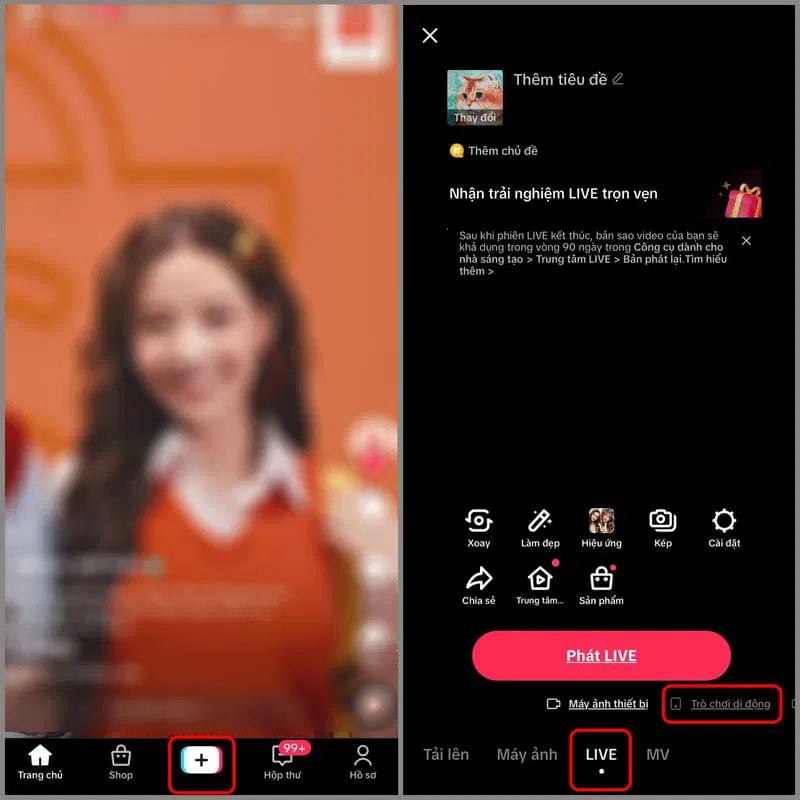
Result display:
- If the LIVE tab exists: Your account has been granted permission.
- If there is no LIVE tab: Your account is not eligible yet or you need to update to the latest app version.
4. Guide to starting a professional livestream process
Activating the Live button is just the beginning. For the broadcast to be effective and retain viewers, you need to follow this standard 4-step process:
Step 1: Technical preparation (Pre-Live)
- Network Connection: Ensure you use stable Wifi or high-speed 4G. Spotty internet is the leading cause of viewers leaving.
- Equipment: Clean your phone camera. Blurry images will significantly reduce viewer experience.
Step 2: Optimize title and cover image
- Title: Needs to be concise and contain keywords that stimulate curiosity or hit viewer needs. (Example: "Live Q&A...", "Confession Corner...").
- Cover Image: Use an image with a clear face or main product, avoid using images that are too dark or blurry.
Step 3: Privacy settings and moderation
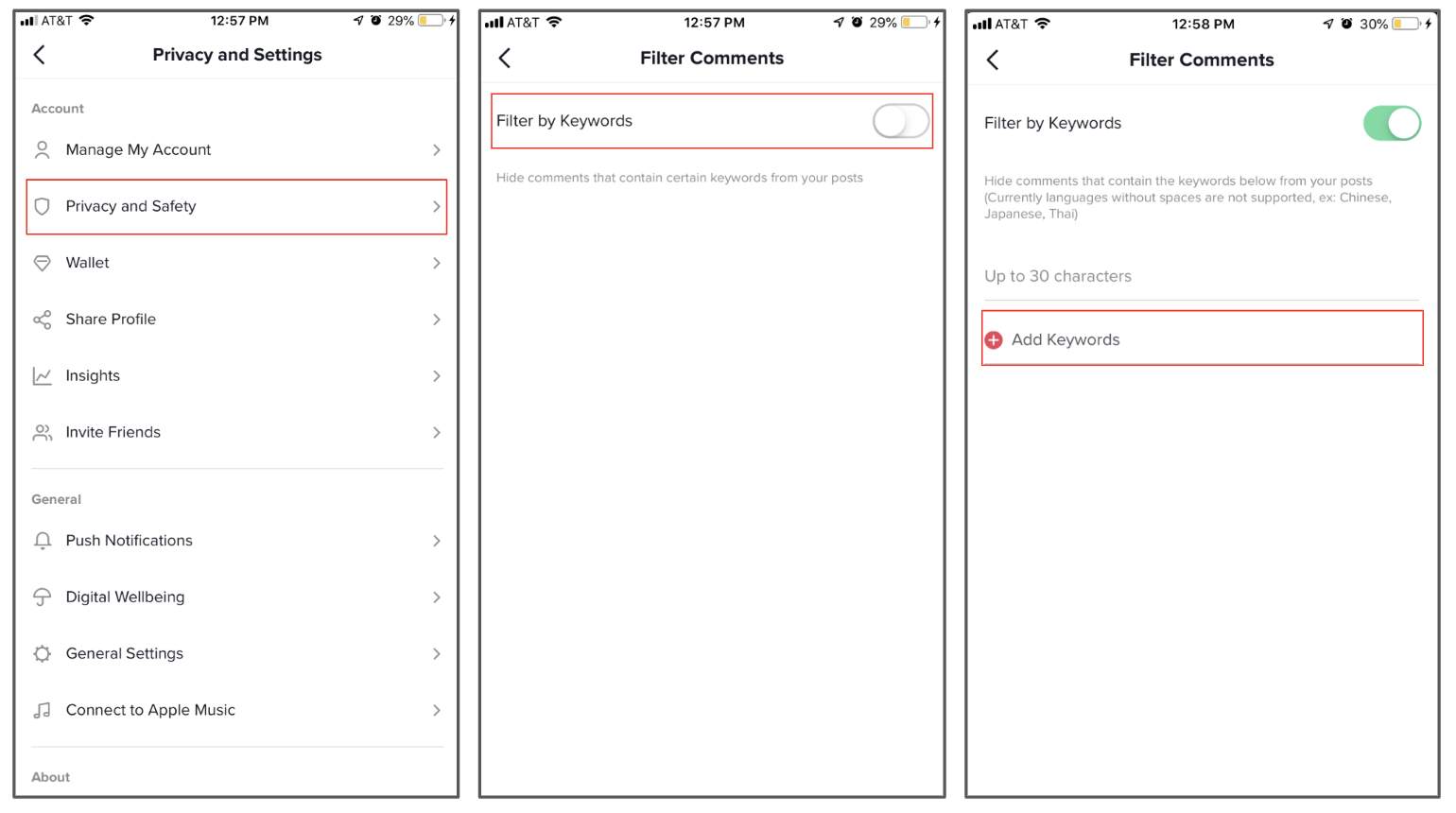
- Go to Settings in the Live preparation interface.
- Turn on Comment Filters to automatically block rude keywords, helping maintain a civilized environment for the broadcast.
Step 4: Viewer retention strategy (first 3 minutes)
- As soon as you press "Go LIVE", start talking immediately.
- Absolutely avoid "dead air" while waiting for viewers to join.
- Interact and greet the first viewers by name to create a personal connection.
- When ending, don't turn off abruptly. Say goodbye and schedule the next live.
>>> To keep viewers longer and optimize broadcast efficiency, don't miss: How to increase engagement on TikTok: How to increase followers effectively on TikTok?
5. Common reasons why you can't Live (even with 1,000 followers)
Many users meet all standards but the Live button is still hidden. Below are technical causes and solutions:
5.1. Community guidelines violations (account violations)
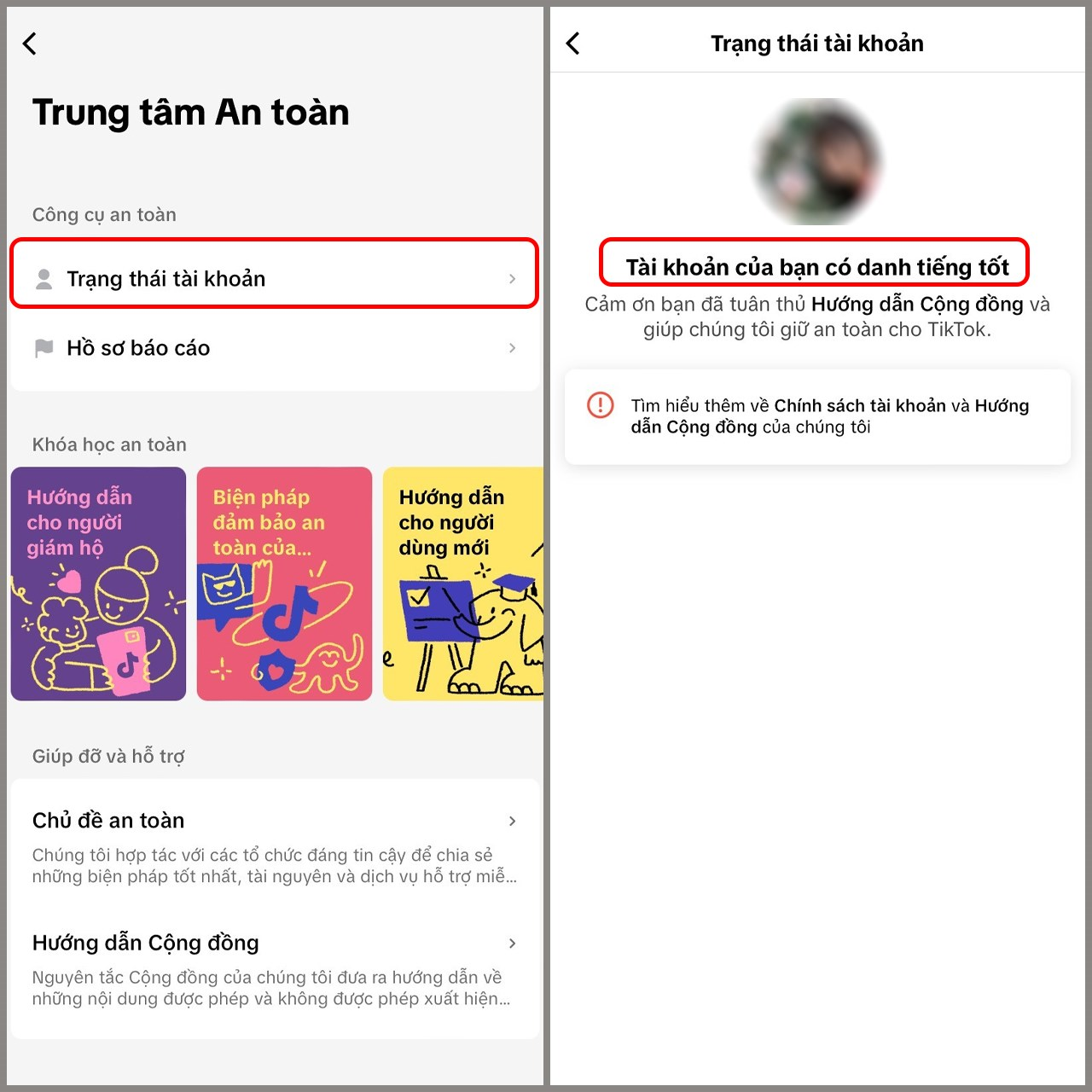
Check "Account Status". If you have had videos removed or reported for violations, TikTok may apply penalties restricting the Live feature (Livestream suspended) from 7 to 30 days.
>> Learn more: TikTok shadowban: Signs and how to fix it
5.2. Age or account activity issues
Besides clear policy violations, TikTok's algorithm continuously reviews the user profile's 'credibility score'. Below are technical barriers causing Live features to be disabled even with enough followers:
- Age: As mentioned, if the system suspects you are underage (even if the profile says 18+), they may request identity verification.
- New Accounts: Accounts newly created but with little actual interaction are often limited in features.
- Duplicate Content: Re-uploading others' videos too much causes the account to be rated as Low Quality.
- Abnormal Account Signs: New accounts with sudden follower spikes in a short time (due to using tools) are often marked as risky by the algorithm. The system will block the Live feature until it records actual interaction behavior from users.
>>> Using automation tools incorrectly can get your account flagged. Learn carefully to avoid risks:
- TikTok Automation: Top 10 most effective Account Management Automation tools
- How to manage multiple TikTok accounts without shadowban
5.3. System errors or regional restrictions
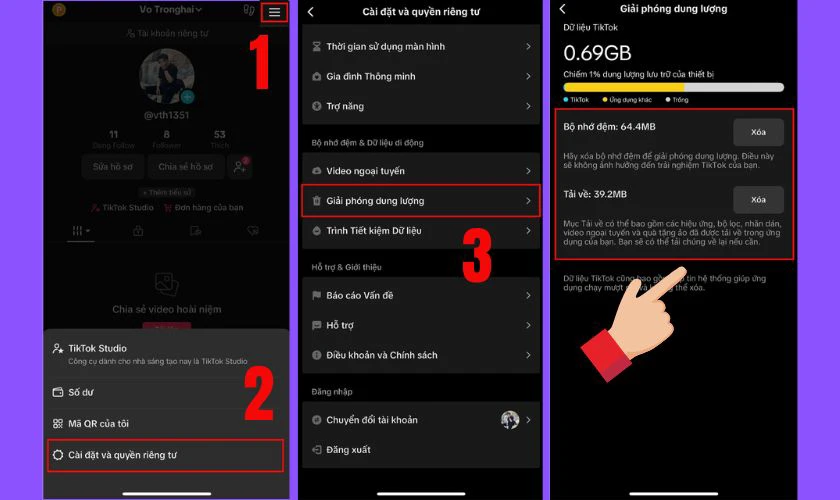
Sometimes the issue lies with your device. App Cache overload can cause software conflicts.
Solution: Go to Settings & Privacy > Free up space > Clear cache.
6. How to reach 1,000 Followers quickly and safely
Instead of looking for risky "hack" follow tools, focus on a sustainable content strategy. Then, the question of how many followers to Live on TikTok will be solved thoroughly and safely.
6.1. Optimal content strategy to unlock LIVE quickly
Focus on producing Short videos with a duration of 15-30 seconds. The most important factor is the first 3 seconds (Hook) must be very attractive to retain viewers. This is the fastest way to reach new viewers and grow followers organically.
>>> See more:
- 10 ways to increase TikTok followers free, fast and effectively
- Best times to post on TikTok to trend? You shouldn't miss this guide!
6.2. Behaviors to absolutely avoid
TikTok's algorithm is increasingly smart in detecting cheating tricks. To protect the Trust Score for your account, you must say 'no' to the following actions:
- Don't buy Follows: Fake accounts won't interact, lowering Engagement Rate and making it hard for your videos to trend.
- No Cross-follow Spam: Following too many people in a short time will make TikTok suspect your account is a Bot/Spam.
Many people make mistakes trying to take shortcuts. Read this article to protect your channel:
7. TikTok Live requirements by country - Any differences?
Basically, the 1,000 followers rule is a general standard applied globally. However, there are still some small differences depending on the geographical area:
- Censorship Policy: In markets like Europe (EU) or the US, regulations on child protection and commercial content on Livestream will be stricter.
- Experimental Features: Some new features (like Live Studio, Gaming Live) may be prioritized for update in some countries before global rollout.
8. Conclusion
In summary, the core answer to the question "how many followers to Live" lies in 3 main technical barriers: you must reach the 1,000 followers mark, be of adult age (16+ to broadcast, 18+ to receive gifts), and possess a clean activity history. These are necessary filters TikTok establishes to ensure the safest and highest quality broadcasting environment for the community.
Sincere advice is don't try to "bend the rules". Focus on creating valuable content. Then, the Live button will appear as a powerful tool supporting you to interact and develop your personal brand.
After unlocking the Live feature, check out these articles to optimize your income:
- How to monetize on TikTok: Full guide for beginners
- [Answered] How many followers to monetize on TikTok?
9. FAQ
1. Can I Live with 100 followers?
Officially, no. TikTok requires a minimum of 1,000 followers. However, some accounts are lucky to get Live opened early thanks to random algorithm tests by TikTok or by linking TikTok Shop Seller Center.
2. How to Live without reaching 1,000 followers in 2026?
The most effective and official solution is to register a TikTok Shop Seller account. When linking an official sales account, the LIVE button is usually activated immediately for commercial purposes.
3. Why don't I see the Live button even though I'm eligible?
If the LIVE button is hidden, you may not have updated to the latest app version, are in a restricted area, or your account recently violated Community Guidelines leading to a temporary Live ban.
4. How old do you have to be to Live on TikTok?
You must be at least 18 years old to receive Virtual Gifts. Although previously 16-year-olds could Live, 2026 policies are tightening the 18+ age regulation for all key Live features to ensure safety.
5. Does TikTok Live Studio on PC require 1,000 followers?
Yes. TikTok Live Studio on computers also requires 1,000 followers and a "clean" account history similar to the mobile version.
6. Will I lose the Live button if followers drop below 1,000?
Highly likely. If the follower count drops deep below the 1,000 mark and remains there for a long time, TikTok may revoke your Livestream rights until you reach the required threshold again.






