Yes, you can have multiple Pinterest accounts in 2026, and Pinterest does not strictly forbid it. However, behavior matters more than the number of accounts, and this is where many users get confused. Many accounts are suspended without clear explanations, leaving users unsure what they did wrong. In this article, Hidemyacc will explain what Pinterest allows and what can cause risks. And also shows how to manage multiple accounts safely to avoid bans.
1. Can you have multiple Pinterest accounts?
The short answer is yes, but with conditions. Pinterest allows users to create and own multiple accounts as long as their behavior follows platform rules.
1.1. Technical permission vs behavioral acceptance
Pinterest separates two things very clearly.
First, what is technically allowed. You can register multiple accounts using different emails.
Second, what is behaviorally accepted. Pinterest evaluates how those accounts behave, interact, and overlap over time.
This means:
- Having multiple Pinterest accounts is not a violation by itself
- Running those accounts with spam-like behavior creates real risk
Pinterest does not count accounts. Pinterest analyzes patterns. If multiple accounts show duplicated content, identical links, abnormal switching, or aggressive automation, they may be limited or restricted. Even if each account is technically valid. As long as each account has a clear purpose, unique content direction, and natural activity, managing more than one Pinterest account is acceptable and commonly done.
1.2.Why do people want multiple Pinterest accounts?
Most users create multiple Pinterest accounts for separation of purpose, not for spamming.
Pinterest is used for very different goals, ranging from personal inspiration to brand growth and sales.
A common reason is separating personal and business activities. Personal accounts are usually exploratory, while business accounts require consistent, commercially focused content built around how to earn money on Pinterest.
Creators and affiliate marketers often need multiple accounts to separate different niches. Mixing unrelated topics in one account can hurt content relevance and overall performance.
>>> Pinterest Affiliate Marketing: How to start to earn money online?
For agencies and freelancers, multiple accounts are necessary to manage client brands. Each account represents a different business with its own audience and content strategy.
Some users also create extra accounts to test content or pinning strategies without risking their main account. Pinterest generally allows these use cases as long as user behavior remains natural and value-driven.
2. How many Pinterest accounts can you have?
This is the most common question users ask on Google before creating more Pinterest accounts. The short truth is simple. Pinterest does not publish a fixed number. What matters more is how you use each account, not how many you own. The platform focuses on behavior patterns. Accounts that look natural usually stay safe. Accounts that look automated or duplicated are often flagged.
2.1. Does Pinterest have an official limit?
Pinterest has no public or official limit on how many accounts one person can create. Instead, Pinterest applies a behavior-based review system. Accounts are evaluated individually and collectively. If multiple accounts appear connected and risky, action may be taken.
2.2. What Pinterest looks at when you run multiple accounts
Pinterest tracks signals that often relate to spam or automation. One signal alone may not cause issues. Several combined signals increase risk.
Common risk signals include:
- Same IP address or device fingerprint across accounts
- Repeated or duplicated content between profiles
- Pinning too fast, especially right after account creation
- Abnormal login behavior, such as frequent switching or constant logins and logouts
- Linking the same domain repeatedly across multiple accounts
These behaviors often appear in spam networks.That is why Pinterest treats them seriously. The more similar your accounts look, the higher the risk.
2.3. What is a safe number of accounts in real life?
In real usage, the most common safe setup is:
- 1 personal account
- 1 business account
This setup fits most users and aligns with Pinterest’s intended use. If you need more accounts, each one must have a clear and separate purpose, such as:
- Different brands
- Different clients
- Different niches
Each account should feel independent in content, activity, and strategy.
Warning: Creating many accounts with the same structure, same links, and same behavior is dangerous. Pinterest often treats these as coordinated spam activity. A smaller number of well-managed accounts is always safer than many identical ones.
3. Personal vs business Pinterest accounts: what’s the difference?
Before creating multiple Pinterest accounts, users need to understand which account type fits their goal. Many problems start from choosing the wrong type or mixing purposes in one account. Pinterest offers two main account types. Each one is designed for a different use case. Using them correctly helps reduce risk and improves long-term performance.
3.1. Personal vs business account comparison
A personal account is built for individual browsing and casual content sharing. While a business one is designed for brands, creators, and monetization.
Key features differences:
|
Criteria |
Personal account |
Business account |
|
Purpose |
Personal inspiration |
Marketing and monetization |
|
Analytics |
Basic or none |
Advanced analytics |
|
Ads access |
❌ |
✅ |
|
Brand credibility |
Low |
High |
|
Domain verification |
❌ |
✅ |
This comparison makes one thing clear. Business accounts are the correct choice for any commercial activity.
3.2. Can you own both personal and business accounts?
Yes. Pinterest allows users to own both account types.
This setup is common and safe when used correctly:
- Personal account for saving ideas and inspiration
- Business account for publishing content and driving traffic
Keeping purposes separate helps Pinterest understand your intent and reduces account risk.
3.3. When separate accounts make sense
Using different accounts is recommended in these cases:
- Creator: One business account focused on content and audience growth
- Affiliate: A niche-specific business account for affiliate links
- Brand: Dedicated business account with verified domain and ads
Each account should serve one clear goal only.
3.4. When you do not need multiple accounts
You usually do not need more than one account if:
- You run a single brand or niche
- Your content targets one audience
- All links point to the same domain
In these cases, one well-optimized business account is enough.
3.5. Common mistakes to avoid
Many Pinterest account issues come from basic mistakes:
- Using a personal account for business activities
- Creating a business account but not verifying the domain
- Mixing affiliate, brand, and personal content in one profile
These mistakes confuse Pinterest’s system and can limit reach or cause restrictions. Choosing the right account type is the foundation. Once this decision is correct, creating and managing multiple Pinterest accounts becomes much safer and more predictable.
4. Can you have two separate Pinterest accounts?
Yes. Pinterest allows you to have two separate accounts as long as each account has a clear, distinct purpose and does not show overlapping or spam-like behavior.
4.1. Most common and practical use cases
The following scenarios are the most reasonable and widely used ways to run two Pinterest accounts.
- Personal + Business: This is the safest and most common setup. One account is used for inspiration and saving ideas. The other is used for publishing content, driving traffic, and analytics.
- Two different brands: If you own or manage two unrelated brands, separating accounts helps keep branding, audience, and content signals clean and focused.
- Agency or client management: Agencies often manage Pinterest accounts for clients. Each client account represents a separate business and should remain fully independent.
- Two separate niches: If your content targets very different topics, such as food and travel, one account can confuse Pinterest’s understanding of your audience. Separation improves relevance.
4.2. Key rule to remember
Two accounts are a smart choice when you want to:
- Publish different content types
- Target different audiences
- Serve different goals or domains
However, you must avoid behaviors that make accounts look connected. Repeated content, identical links, and synchronized activity can cause Pinterest to treat both accounts as spam. Two separate Pinterest accounts work best when the separation is real, consistent, and intentional.
5. How to create multiple Pinterest accounts safely in 2026
Creating multiple Pinterest accounts is still possible in 2026. The difference is how carefully you set them up and warm them up. Pinterest has improved its spam detection. Accounts created without structure or patience are restricted very quickly. This section focuses on safe, realistic, and long-term methods, aligned with Helpful Content principles.
5.1. Email requirements: can you use the same email?
Pinterest follows a strict rule: 1 email = 1 Pinterest account
You cannot use the same email address to register multiple accounts.
Some users try shortcuts, such as:
- Email aliases
- Adding dots to Gmail addresses
- Using the “+” sign (email alias trick)
These methods may work technically, but they are not recommended. Pinterest sometimes scans email patterns very deeply. Accounts created from aliases can be linked together internally, increasing the risk of bulk restrictions. The safest option in 2026 is to use separate, real email addresses for each account.
5.2. How to set up each account properly (profile and boards)
Each Pinterest account must look independent and purposeful.
Key setup rules:
- Different avatar and bio for each account
- Clear account name and niche, no generic naming
- Unique board structure based on the account goal
- Avoid copying board names or descriptions across accounts
For business accounts:
- Verify your website domain if you own one
- Fill out business information completely
- Match content topics with the verified domain
Pinterest values clarity. Accounts with a clear theme are easier to trust.
5.3. First-week safety checklist (avoid instant restrictions)
The first 7 days are critical. Most new-account restrictions happen here.
Follow this checklist carefully:
- Verify email and phone number immediately
- Complete the profile before posting any pins
- Pin slowly during the first 3–7 days
- Follow a few relevant boards to create natural signals
- Avoid running ads too early
- Avoid aggressive outbound links if the account is brand new
Slow activity equals trust. Fast growth on a new account often looks automated. Pinterest prefers accounts that behave like real users, not marketing machines. If you treat each account as a separate project, build it patiently, and respect these rules, managing multiple Pinterest accounts in 2026 remains safe and scalable.
>>>More like this:
- How to create and manage Multiple Reddit accounts
- Create Multiple X Accounts Without Getting Banned
- How to create infinite Google accounts in 2026?
- How to create multiple Facebook accounts
6. Why people get “Pinterest jail” when using multiple accounts
Pinterest jail is not random. It is usually triggered by repeated risky behavior across one or more accounts.
6.1. What “Pinterest jail” actually means
“Pinterest jail” is not an official Pinterest term. It is a user-created phrase describing temporary or semi-permanent restrictions applied to an account and its more commonly known as a shadowban. These restrictions usually affect reach or features, not full bans.
Common signals that an account is limited:
- Sudden drop in impressions, often overnight
- Pins fail to publish or stay stuck in draft
- Verification requests appear unexpectedly
- Search visibility drops, even for old pins
The account still exists. It just cannot perform normally.
6.2. Common reasons Pinterest restricts accounts
Pinterest restrictions are behavior-based. When multiple risk signals appear together, the system reacts.
The most common reasons include:
- Abnormal account switching, especially frequent or fast switching
- Spam pinning, such as too many pins in a short time
- Suspicious logins, including unusual locations or devices
- Duplicate content or repeated links across accounts
- Violating Community Guidelines, even unintentionally
These patterns often appear in spam networks. That is why Pinterest treats them seriously. Multiple accounts with identical behavior are especially high risk.
6.3. How to recover from Pinterest jail
Recovery is possible in many cases. The key is to slow down and clean up signals.
Recommended recovery steps:
- Stop aggressive activity for several days
- Reduce pin frequency to a natural level
- Remove duplicated pins or links
- Appeal the restriction if a notice is shown
After cleanup, resume activity slowly. Pinterest often restores reach gradually once risky patterns disappear. Pinterest jail is usually a warning, not the end. Users who adjust behavior and focus on quality often see accounts recover over time.
7. Why is Pinterest not letting me switch accounts?
Before troubleshooting, it's worth knowing that Pinterest actually offers a built-in way to switch between accounts: you can link accounts to your primary login and switch between them within the same browser session, without logging out each time. This works for a small number of linked accounts and is designed for convenience, such as switching between one personal and one business account you own.
However, this native switching feature is not built for running separate, unrelated accounts at scale. Linked accounts share the same login session by design, which is the opposite of the isolation needed when managing accounts for different brands, clients, or niches. If your accounts appear connected through Pinterest's own linking feature, they are already treated as related, not independent, which defeats the purpose if your goal is separation rather than convenience.
This is why most "why can't I switch accounts" problems people search for are actually about accounts that were never linked in the first place, and are instead being accessed manually across the same browser or device. The fixes below apply to that second, more common situation.
7.1. Technical causes (app, cache, session issues)
Some switching problems are purely technical. They usually happen without any policy violation.
The most common technical causes include:
- Corrupted cache, causing login data to conflict
- Outdated Pinterest app, especially on mobile
- Browser session conflicts, when multiple accounts share the same session
When session data overlaps, Pinterest may fail to load the correct account or block switching entirely. These issues often appear after long login sessions or frequent account changes.
7.2. Security triggers (too many logins, suspicious activity)
Pinterest also blocks switching for security reasons. This happens when the system suspects automation or account abuse.
Common security triggers include:
- Too many logins or switches in a short time
- Bot-like behavior, such as instant account hopping
- Logins from multiple devices or locations that look abnormal
In these cases, Pinterest temporarily limits switching to protect accounts from takeover or spam networks. This is especially common when managing multiple accounts without clear separation.
7.3. Quick fixes to try first (step-by-step)
Start with simple fixes before assuming your account is restricted.
Follow these steps in order:
- Log out of all Pinterest accounts on all devices
- Clear cache and cookies in your browser or app
- Use a different browser to log in again
- Wait 24–48 hours before switching accounts again
- Change your password if you suspect a security check
In most cases, switching access is restored automatically after a short cooldown. If the problem persists after these steps, reduce switching frequency going forward. Slower, more natural behavior significantly lowers the chance of future blocks.
8. How to manage multiple Pinterest accounts safely
Managing multiple social media accounts is not only about creation. Long-term safety depends on how you operate each account daily. Most restrictions happen during management, not registration. This section explains practical habits that help accounts stay separated, natural, and trusted.
8.1. Keep every account in a separate login environment
Each Pinterest account should have its own login environment.
A safe environment includes:
- Browser profile with separate cookies and sessions
- Distinct device fingerprint per account
- Stable and consistent IP for each account
Pinterest often becomes suspicious when:
- One account logs in from many IPs within a short time
- Multiple accounts share the same IP and identical behavior
These patterns commonly appear in spam networks.
The goal is simple. Each account should look like it belongs to one real user, in one stable environment. Consistency is more important than complexity.
8.2. Safe daily habits when managing multiple Pinterest accounts
Daily behavior determines account trust.
Follow these habits to reduce risk:
- Avoid frequent switching between accounts in a short period
- Give each account its own pinning schedule, not the same posting time
- Do not copy and paste identical captions or descriptions
- Avoid pinning one domain aggressively across many accounts
- Keep clear branding and positioning for every account
If you use a scheduling tool:
- Set natural posting intervals, not fixed robotic timing
- Avoid scheduling the same content simultaneously on multiple accounts
Pinterest rewards accounts that feel human, focused, and consistent. Managing multiple Pinterest accounts safely is about discipline. Slower actions, clearer separation, and intentional branding protect accounts far better than any shortcut.
8.3. Using Hidemyacc to manage multiple Pinterest accounts safely
After understanding why separate login environments matter, the next logical step is choosing the right tool to manage them efficiently. Hidemyacc is an antidetect browser designed for users who need to handle multiple accounts on the same machine without overlap.
Hidemyacc allows you to create multiple browser profiles, where each Pinterest account runs inside its own isolated environment. Every profile behaves like a separate physical device, not just a new tab or browser window.
Each Hidemyacc profile includes:
- A unique browser fingerprint, reducing device-level linking
- Proxy integration, allowing each account to use a stable, dedicated IP
This setup aligns well with how Pinterest evaluates behavior. When accounts remain consistent in device signals and IP usage, switching errors and security flags are significantly reduced.
Key benefits for managing multiple Pinterest accounts with Hidemyacc:
- Lower switching errors and lockouts: Each account stays logged into its own browser profile. This avoids session conflicts, forced logouts, and temporary switching blocks caused by shared cookies or cache.
- Reduced risk of account limits: Separate fingerprints and IPs help prevent Pinterest from linking accounts through device or network signals, which commonly trigger reach drops or feature restrictions.
- Cleaner behavioral signals per account: Each profile maintains its own history, login pattern, cookies and activity timeline. This makes behavior appear consistent and natural instead of synchronized or automated.
- Better operational control at scale: Accounts can be labeled and grouped by brand, niche, or client. This reduces human error, such as posting the wrong content on the wrong account.
- Practical for marketers, affiliates, and agencies: Teams managing many Pinterest accounts can centralize workflows on one machine while keeping each account isolated and compliant.
With Hidemyacc, growing and managing a large-scale Pinterest network becomes simple, safe, and much more efficient.
How to use Hidemyacc:
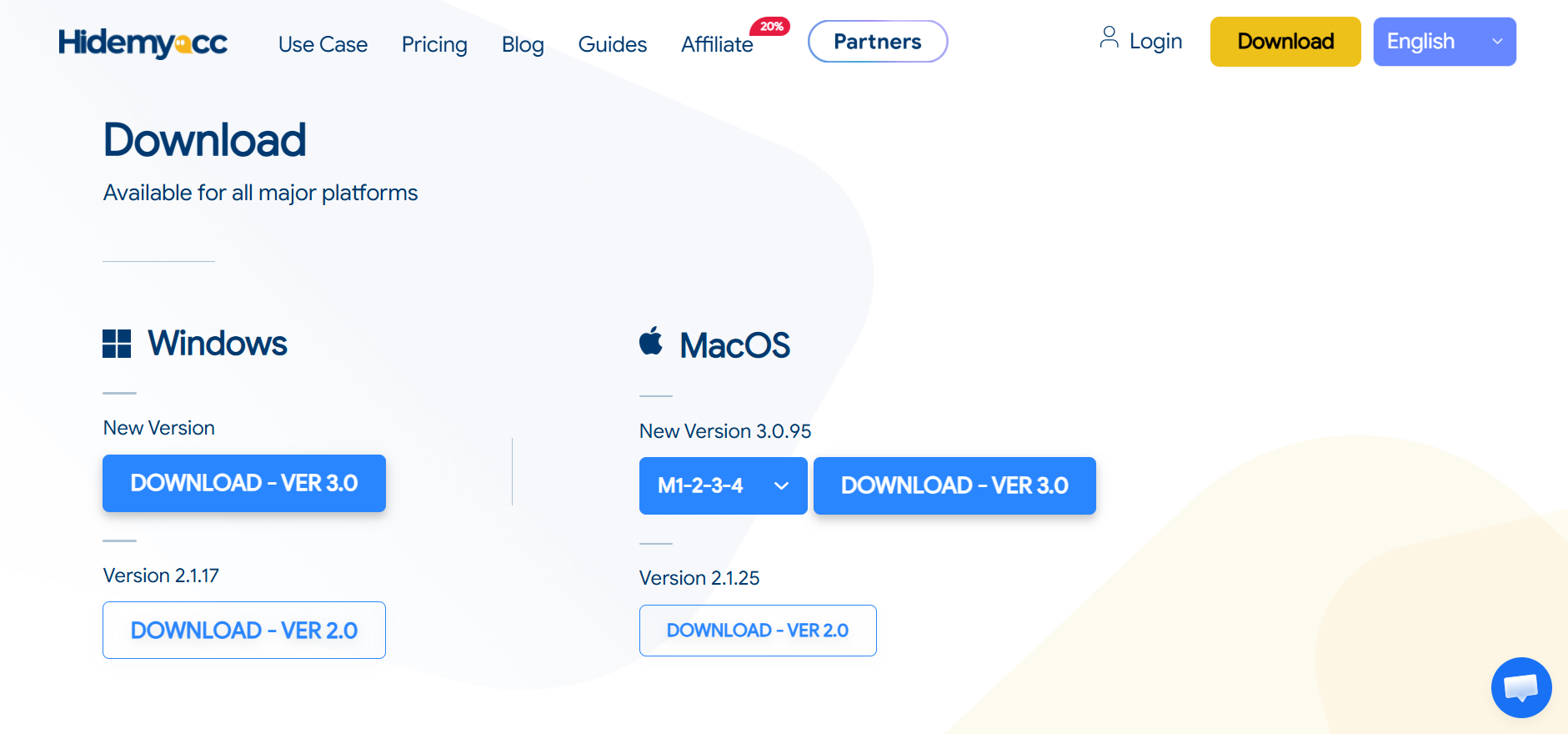
Step 1: Download Hidemyacc on your device
Step 2: Create your account and activate 7 day-trial
You can freely use Hidemyacc for 7 days without entering any credit card information. After the trial you can choose which plan that suits you the most.
Step 3: Create new profiles
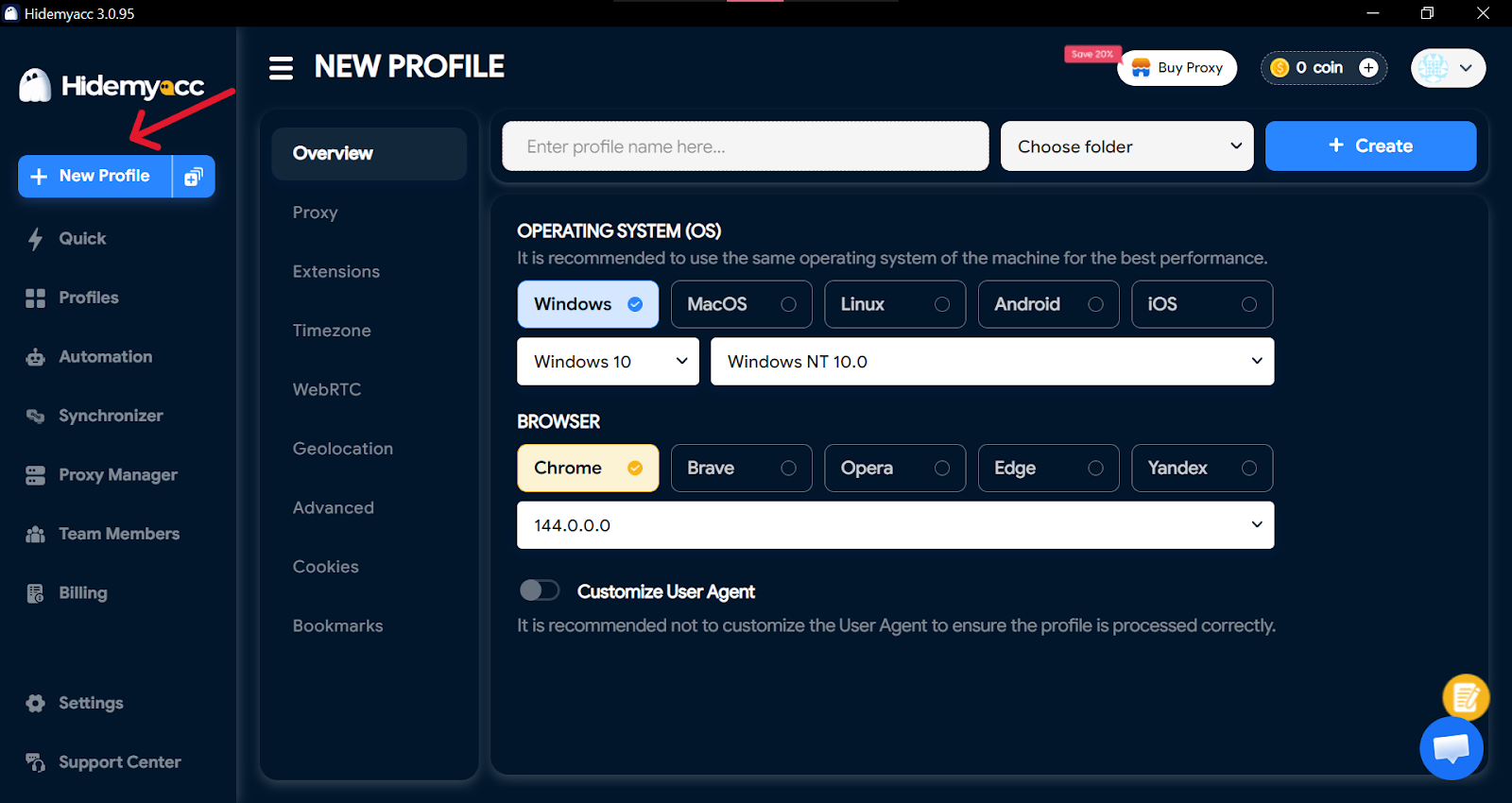
Step 4: Log into your Pinterest accounts with each profile
You can manage your Pinterest accounts on this device and won't have to worry about Pinterest locking you out.
>>>See more:
- How to run multiple Instagram accounts without getting banned
- How to safely manage multiple TikTok accounts and avoid shadowbans
- How to manage multiple LinkedIn accounts without getting banned
9. Should you use one Pinterest account or multiple?
After understanding limits, risks, and management rules, the final question is practical. Do you actually need multiple Pinterest accounts?
There is no universal answer. The right choice depends on goals, scale, and resources.9.1. Decision checklist before creating multiple accounts
Before adding another account, review this checklist honestly:
- Goal: Are you serving one purpose or multiple distinct purposes?
- Scale: Is one account already reaching its limit in content or audience focus?
- Resources: Can you manage content, schedules, and branding separately?
If one answer is unclear, multiple accounts may create more risk than benefit.
9.2. When one Pinterest account is enough
Using a single account is the better option when:
- You run one brand, one website, or one niche
- All content targets the same audience
- You link to one primary domain
- You have limited time or team resources
In these cases, one optimized business account is easier to grow, safer to manage, and more sustainable.
9.3. When multiple Pinterest accounts make sense
Separating accounts becomes reasonable when:
- You manage different brands or clients
- Each account targets a different niche or audience
- Content strategies and domains do not overlap
- You can maintain separate environments and schedules
Each account must have its own identity, purpose, and workflow. Multiple accounts only work when separation is real, not cosmetic.
9.4. Final decision rule
If your goals can be achieved with one account, stay with one. If different goals would confuse one account, then separation is justified. Pinterest rewards focus and consistency. Whether you choose one or many, structure always matters more than quantity.
10. Conclusion.
Pinterest does not punish users for owning multiple accounts. What Pinterest truly cares about is value, user experience, and authentic behavior.
The core takeaway is clear:
- Multiple Pinterest accounts is not a bad thing
- Bad behavior poses a real risk
Accounts that deliver useful content, stay consistent in branding, and behave naturally usually remain safe. In contrast, aggressive switching, duplicated content, and automated patterns often lead to limits or reach loss.
If you decide to manage multiple Pinterest accounts seriously, structure matters. Each account should operate in a separate login environment, with stable IP usage, isolated sessions, and independent daily activity.
This is where tools like Hidemyacc become relevant. Hidemyacc helps create isolated browser profiles, manage device fingerprints, and maintain IP consistency. These factors are critical when scaling multiple Pinterest accounts while minimizing detection risk.
In short, Pinterest rewards focus, patience, and clarity. When multiple accounts are managed responsibly and supported by the right setup, they can grow safely and sustainably without harming performance or trust.
11. FAQ
1. How many accounts can I have on Pinterest?
Pinterest does not publish a limit, but behavior matters more than numbers.
2. How to avoid Pinterest jail?
Avoid repetitive actions, automation abuse, and rapid account switching.
3. Why is Pinterest not letting me switch accounts?
This usually happens due to session, cache, or security-related restrictions.
4. Can I have a personal and business Pinterest account?
Yes, Pinterest allows owning both account types.
5. Can I have two separate Pinterest accounts?
Yes, if each account has a clear and different purpose.
6. Can I see who stalks my Pinterest?
No, Pinterest does not provide this feature.
7. Should I have a separate Pinterest account for my business?
Yes, a business account offers analytics and advertising tools.
8. How to make a new Pinterest account with the same email?
You cannot, as each account requires a unique email address.
9. Is it better to have a business or personal account?
A business account is better for marketing and growth goals.