Kiwi VPN is a free mobile VPN app available on iOS and Android. It lets you hide your IP address, bypass geo-restricted content, and protect your connection on public Wi-Fi — all with a single tap.
But is it actually good? This article covers what Kiwi VPN offers, how to set it up, and whether it's worth using compared to other free VPN options.
1. What is Kiwi VPN?
Kiwi VPN is a free VPN app that allows users to anonymize their online identity, access blocked websites, and protect personal data when connecting to public networks.
With a simple, easy-to-use interface, Kiwi VPN is suitable for both new and experienced VPN users. With just a few taps, you can connect to servers around the world and enjoy unlimited access.
Note: There are several apps using the "Kiwi VPN" name across different stores. This article covers the Kiwi VPN Proxy app for mobile (iOS and Android), developed for personal use with free and paid tiers.
>>>> SEE MORE:
- What is Site to Site VPN ? Compare Site to Site VPN and Client to Site
- What is Radmin VPN ? Download the latest free Radmin 2025
2. Outstanding benefits of Kiwi VPN
Using Kiwi VPN has many benefits, especially for those who frequently work online, access public Wi-Fi networks, or want to watch region-restricted content.
- Free to use — no time limit or traffic cap on the free plan
- 2,000+ global servers — connect to servers in multiple countries with one tap
- Ad blocker built-in — browse without intrusive ads
- Kill Switch — automatically cuts internet if the VPN drops, preventing IP leaks
- Auto-connect on public WiFi — activates VPN automatically when joining unsecured networks
- Multi-platform — available on both iOS and Android
3. How to download and set up Kiwi VPN
Kiwi VPN supports both iOS and Android, below are detailed instructions on how to install Kiwi VPN for each platform.
3.1 Download and install Kiwi VPN for iOS
Step 1: Open App Store on iPhone/iPad.
Step 2: Search for "Kiwi VPN" in the search bar.
Step 3: Click Download and wait for the installation to complete.
Step 4: Open the app, select the desired VPN server and tap connect .
Step 5: Allow VPN configuration when prompted — tap Allow on the system popup. This is required for the app to function.
3.2 Download and install Kiwi VPN for Android
Step 1: Open Google Play Store on your Android phone.
Step 2: Type "Kiwi VPN" in the search box.
Step 3: Click Install and wait for the app to download.
Step 4: After installation is complete, open the application and select the country you want to connect to VPN.
Step 5: Tap OK when the system asks to set up a VPN connection. The app needs this permission to route your traffic securely.
>>>> LEARN MORE:
- What is Shadowrocket ? Simple installation and usage
- What is iTop VPN? How to install and use iTop VPN
- Rent VPN Server: 7 Tips to choose the best cheap VPN
4. Is Kiwi VPN safe?
Kiwi VPN uses encryption to protect your data in transit and states it does not track browsing history or store real IP addresses. For casual use — such as bypassing geo-restrictions or securing a public WiFi connection — it's generally fine.
However, there are a few things to keep in mind:
- Free version includes ads, which can interrupt the experience
- No independent security audit has been published for this app
- Free VPNs in general may have limitations in encryption strength compared to paid services like NordVPN or ExpressVPN
If you need a VPN for sensitive activities like banking or handling confidential data, consider a verified paid VPN. For general browsing and content unblocking, Kiwi VPN is a reasonable free option.
5. How to use Kiwi VPN
After downloading Kiwi VPN to your phone, open the app and start testing it through the following steps:
Step 1: Access the Best Location feature from the main interface
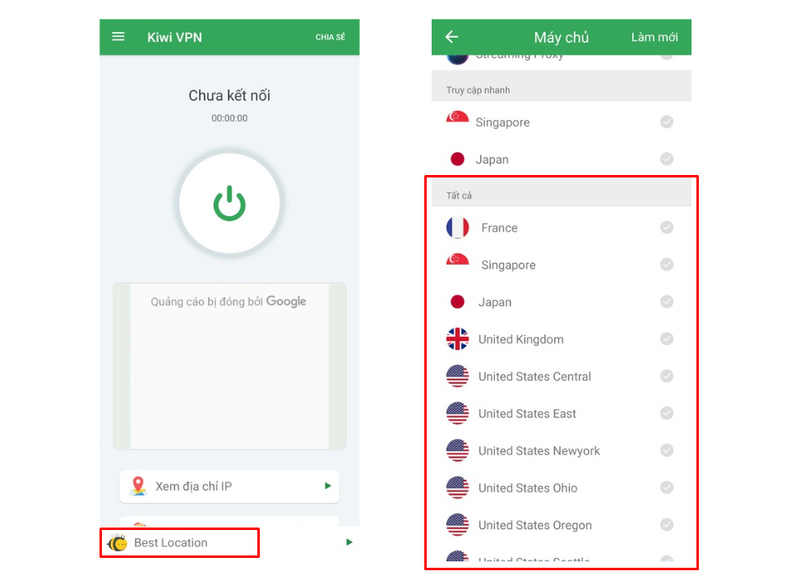
Step 2: When the country list appears, you can select the country for which you want to change the IP address.
Step 3: Select the connection section then press OK to confirm
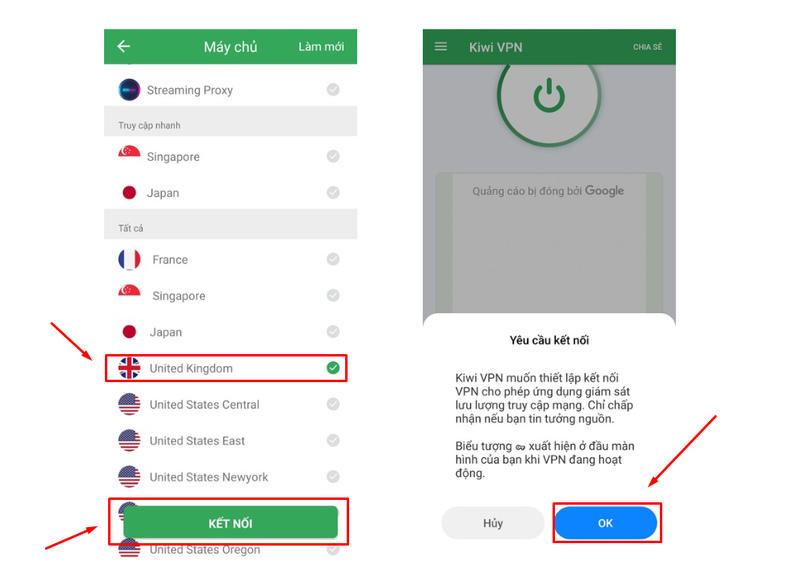
Step 4: Wait a few seconds for the process to complete until VNP displays successfully.
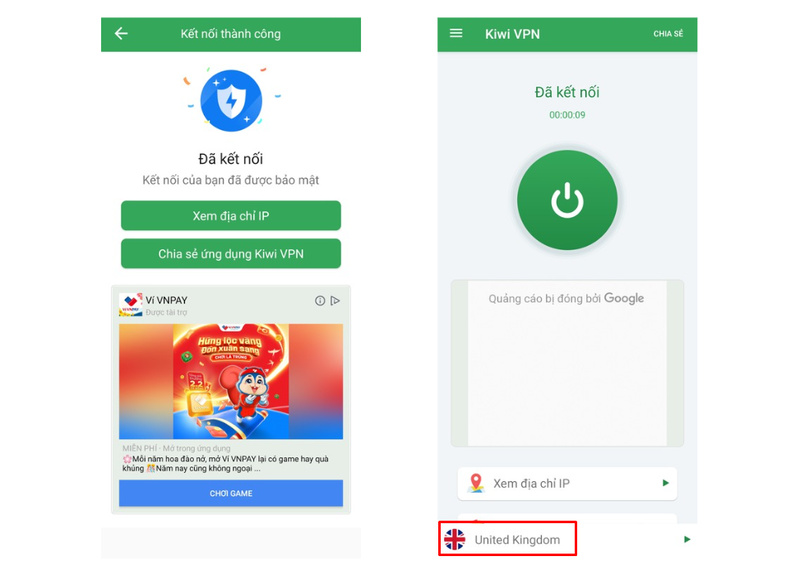
Tip: For best speed, choose a server geographically close to your location. If the connection is slow, tap the server list and switch to a different country.
6. Kiwi VPN alternatives to consider
If Kiwi VPN doesn't meet your needs, here are stronger alternatives:
- NordVPN — Audited no-logs policy, 6,000+ servers, best for privacy-focused users
- ExpressVPN — Fast speeds across 100+ countries, good for streaming
- ProtonVPN — Free tier with no data cap, based in Switzerland with strict privacy laws
- Windscribe — 10GB free data/month, built-in ad blocker
Read more:
- Proxy Server: What is it and how does it work?
- Datacenter Proxy 101: All You Need To Know About Datacenter Proxy
- What is rotating IP address proxy? Top providers for rotating proxy
- Mobile Proxy: Why you need them and where to buy
- What is a VPN? How it can protect you from online threats
Kiwi VPN is a solid free option for basic privacy needs — hiding your IP, unblocking content, and staying safe on public WiFi. It's easy to set up and works on both iOS and Android with no time limits on the free plan.
If you need stronger security or no ads, upgrading to a paid plan or switching to an audited VPN like ProtonVPN or NordVPN is worth considering.
7. FAQ
Is Kiwi VPN completely free?
Yes, Kiwi VPN has a permanently free plan with no time limit or traffic cap. The free version includes ads. A paid version is available if you want an ad-free experience and access to additional server locations.
Does Kiwi VPN work on both iPhone and Android?
Yes. Kiwi VPN is available on both the App Store (iOS) and Google Play Store (Android). The setup process is the same on both platforms — download, select a server, and tap connect.
Will Kiwi VPN slow down my internet?
Like any VPN, Kiwi VPN adds a small amount of latency because your traffic is routed through a VPN server. To minimize speed loss, connect to a server close to your physical location. The paid version typically offers better speeds due to less congested servers.
Does Kiwi VPN keep logs of my activity?
Kiwi VPN states it does not track browsing history or store your real IP address. However, no independent audit has verified this claim. If privacy is your top priority, consider a VPN with a publicly audited no-logs policy such as ProtonVPN or NordVPN.
Can I use Kiwi VPN to access Netflix or other streaming platforms?
Kiwi VPN can unblock some geo-restricted content, but results vary by server and region. It is not specifically optimized for streaming, so access to platforms like Netflix may be inconsistent depending on which server you connect to.
What should I do if Kiwi VPN is not connecting?
Try the following steps: switch to a different server location, toggle airplane mode on and off to reset your network connection, or reinstall the app. If the issue persists, contact Kiwi VPN support via their in-app help center or email.
How is Kiwi VPN different from an antidetect browser?
A VPN like Kiwi VPN hides your IP address but does not change your browser fingerprint. Websites can still detect and link multiple accounts through fingerprint tracking. An antidetect browser like Hidemyacc creates isolated browser profiles with unique fingerprints for each account, making it a stronger solution for multi-account management.