IPcook has gained significant attention among users looking for proxies for web scraping and multi-account management. This review provides an in-depth evaluation of the provider, covering core features, pricing plans, configuration on Hidemyacc, and live testing results for Residential and ISP proxies to help you make an informed decision.
1. What Is IPcook?
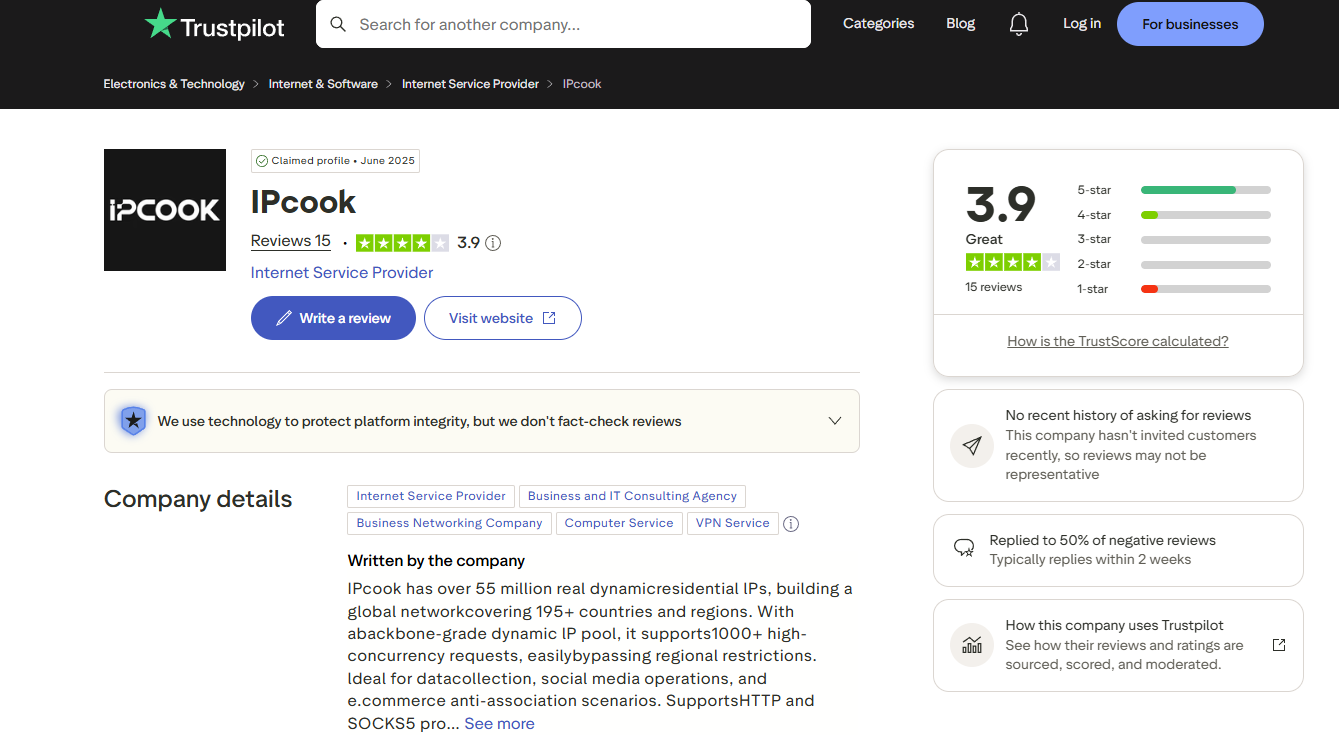
IPcook is a proxy service provider with a network of tens of millions of residential IPs across multiple countries. The platform offers three main proxy types: Residential, ISP, and Datacenter, serving use cases such as web scraping, multi-account management, ad verification, and market research.
Unlike standard datacenter proxies, IPcook Residential proxies route connections through genuine residential devices. Its ISP proxies are static IPs registered under commercial telecom providers, combining the high trust score of residential IPs with the speed and stability of datacenter servers. IPcook supports both individual users and enterprises, with packages scaling from a few gigabytes to custom high-volume enterprise tiers.
2. Community Feedback and User Reviews
Community feedback regarding IPcook is largely positive, particularly among users who require rotating residential proxies for web scraping or running multiple browser profiles. Key advantages frequently noted include non-expiring traffic balances, an intuitive dashboard, and the ability to create up to 10 free sub-accounts for easy project segmentation. Its ability to bypass detection mechanisms on major e-commerce and social platforms is also well-regarded.
However, real-world user experiences show some variance. Connection speeds can drop and slight latency spikes may occur during peak hours under rapid IP rotation. Additionally, the documentation on the official website is relatively basic, which may require newer users to spend extra time configuring their settings.
3. Key Features of IPcook
| Feature | Details |
|---|---|
| IP Types | Residential Proxy, ISP Proxy, Datacenter Proxy |
| Locations | US, France, Canada, Germany, UK, Netherlands, Japan, Vietnam, and more |
| Geo-Targeting | Country / State / City |
| Protocols | HTTP, SOCKS5 |
| Rotation Modes | Automatic rotation (Randomize) or Sticky session |
| Starting Prices | Residential from $0.3/GB, ISP from $1.39/IP, Datacenter from $1.1/IP |
| Pricing Model | By traffic (GB) for Residential; per-IP for ISP and Datacenter |
| Sub-accounts | 10 free sub-accounts per Residential package |
| API Access | Supports proxy generation via API |
| Authentication | Username & Password, IP Whitelist |
4. IPcook Pricing & Payment
IPcook uses different pricing structures depending on the proxy type, data volume or IP quantity, and rental duration.
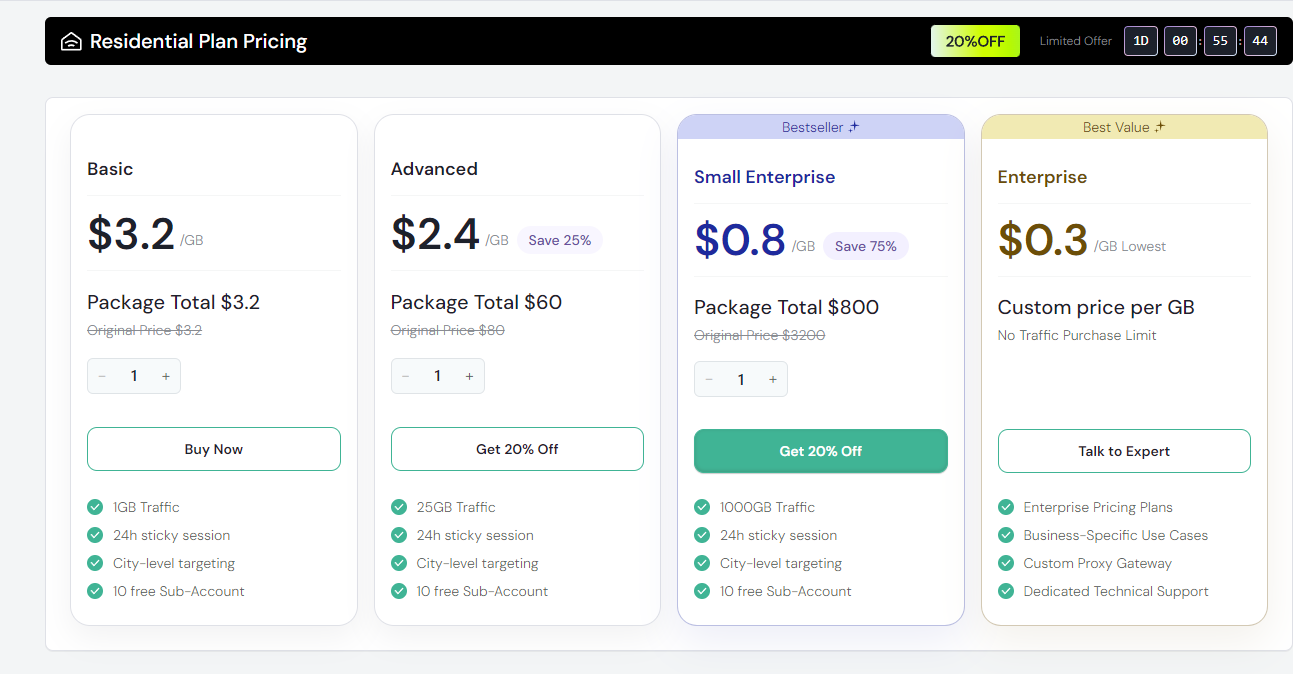
Residential proxy are charged based on data consumption rather than IP counts. The price per gigabyte decreases significantly with larger packages.
- Basic: $3.2/GB (minimum 1GB)
- Advanced: $2.4/GB (25% discount, 25GB package)
- Small Enterprise: $0.8/GB (75% discount, 1,000GB package; most popular)
- Enterprise: From $0.3/GB (custome volume, requires direct consultation)
All Residential packages include sticky sessions, city-level targeting, and up to 10 free sub-accounts.
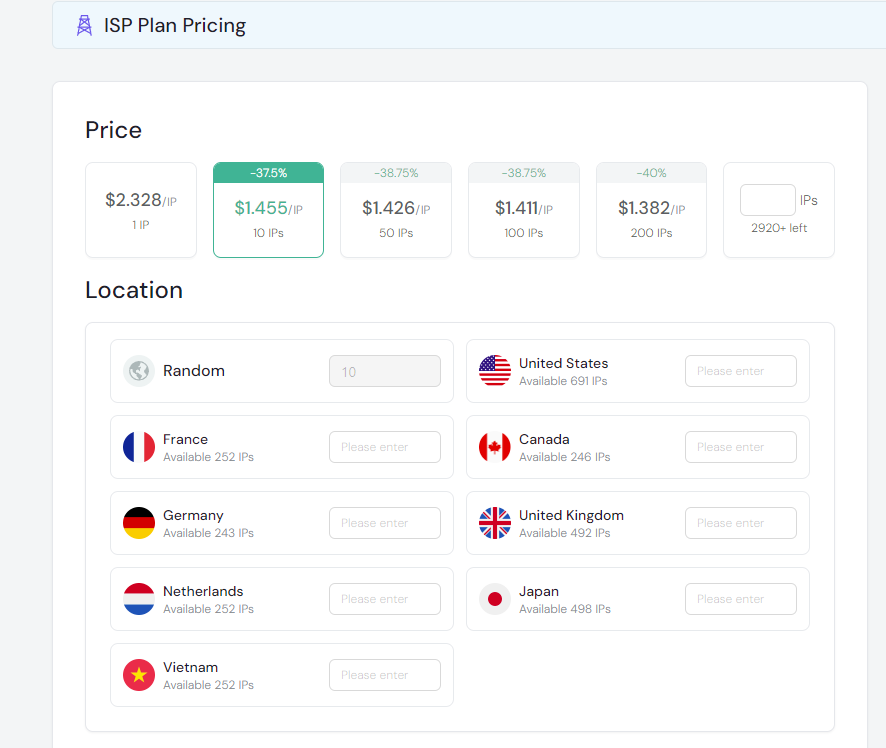
ISP proxies are sold based on a fixed number of IP addresses with non-expiring traffic. The unit price per IP decreases with larger order volumes:
- 1 IP: $2.4/IP
- 10 IPs: $1.455/IP
- 50 IPs: $1.426/IP
- 100 IPs: $1.411/IP
- 200 IPs: $1.382/IP
The ISP lineup supports multiple countries and is suitable for tasks that require maintaining a stable, consistent IP address over an extended period.
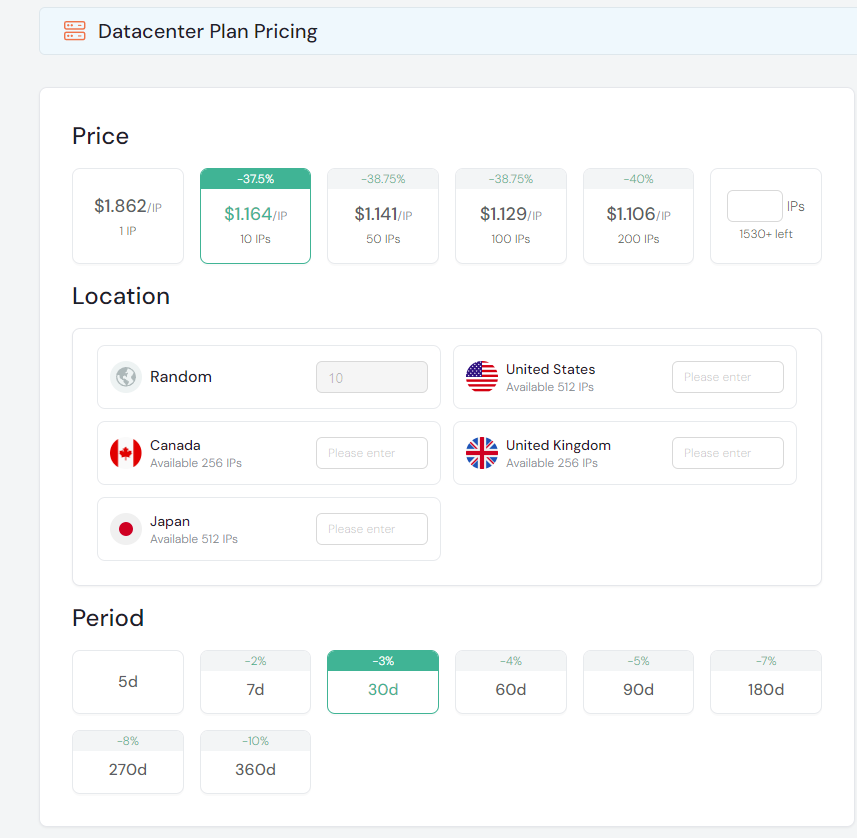
Datacenter proxy are also billed per IP but offer flexible rental duration options to optimize costs based on actual usage:
- 1 IP: $1.92/IP
- 10 IPs: $1.164/IP (37.5% discount)
- 50 IPs: $1.141/IP (38.75% discount)
- 100 IPs: $1.129/IP (38.75% discount)
- 200 IPs: $1.106/IP (40% discount)
Supported locations include the US, Canada, the UK, and Japan. Rental periods range from 5 to 360 days, with longer terms offering greater savings—up to a 10% discount on the 360-day plan.
To test the service, two US-based proxy plans were purchased with the following specifications:
| No. | Proxy Type | Country & City | Actual Paid Price |
|---|---|---|---|
| 1 | Residential, HTTP | US, Allen | $3.20 |
| 2 | ISP, HTTP/SOCKS5 | US, Dallas | $2.33 |
Pricing for the US proxy plans differs significantly between the two pricing models. The Residential plan cost $3.20 for 1 GB of test data, while the ISP plan cost $2.33 for a single static IP address.
During the purchase of these two test proxies, the prices displayed on the platform matched the actual amount charged. IPcook operates on a prepaid balance model where funds are deducted based on usage, with no expiration date on balance credits for Residential and ISP plans.
The difference between Residential and ISP proxies extends beyond pricing. Residential proxies, billed by traffic, are well-suited for tasks with fluctuating data demands that require continuous IP rotation. In contrast, the per-IP pricing model of ISP and Datacenter proxies is better suited for maintaining a fixed number of accounts or sessions over extended periods without worrying about traffic costs for uploads and downloads.
Read more: Residential Proxy vs. Datacenter Proxy: Key Differences and How to Choose the Right One
5. How to Set Up IPcook on Hidemyacc
After purchasing proxies, the next step is to import the connection credentials into the antidetect browser Hidemyacc to establish isolated working environments for each account. The configuration process is straightforward thanks to Hidemyacc's auto-format detection. This guide illustrates the setup using a Residential Proxy package.
5.1 Access the Proxy Generator on the IPcook Dashboard
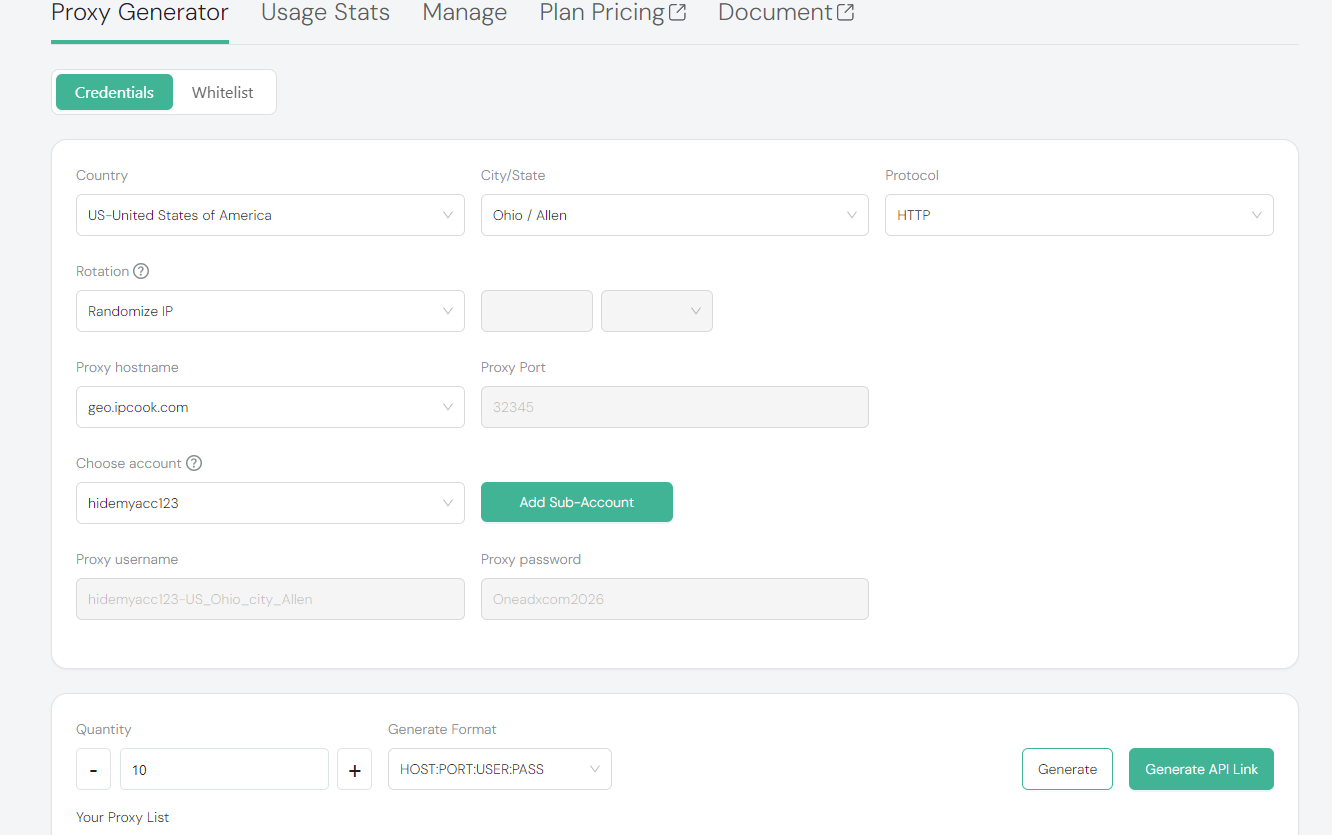
To begin, register an account on IPcook and purchase a suitable proxy plan (Residential, ISP, or Datacenter depending on your requirements). This walkthrough uses the Residential proxy configuration as an example. Once in the Proxy Generator, configure the following key parameters before generating your proxies:
- Country and City/State: Select your desired country and target city.
- Protocol: Choose HTTP or SOCKS5.
- Rotation: Select Randomize IP for automatic rotation, or choose Sticky mode to maintain a static IP session.
- Quantity and Generate Format: Set the number of proxies needed; setting the format to HOST:PORT:USER:PASS is recommended.
After completing the configuration, click Generate to generate the proxy list. The returned output strings in host:port:username:password format are fully compatible with Hidemyacc, allowing you to paste them directly without filling in individual fields manually.
5.2 Configure a Browser Profile in Hidemyacc
You can integrate IPcook proxies with the Hidemyacc antidetect browser to create isolated, secure browser environments for each account.
Follow these steps:
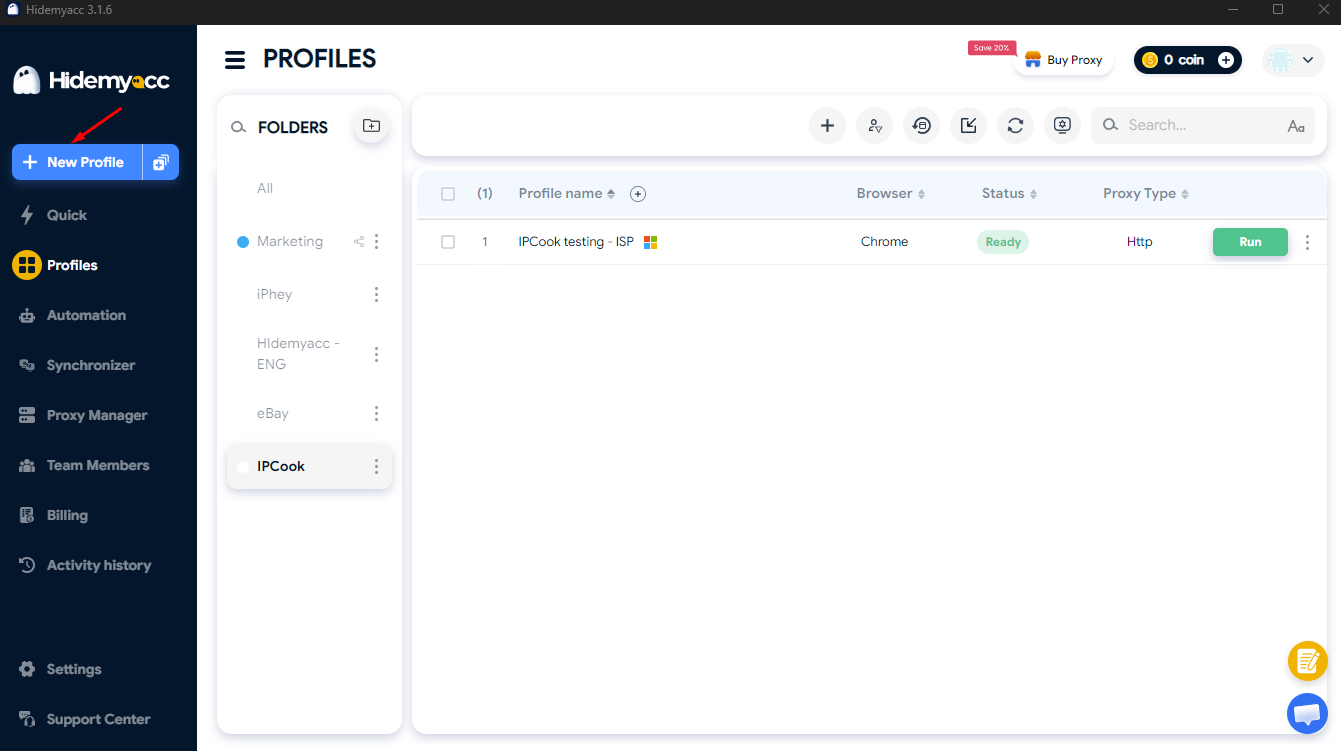
- Step 1: Download and install the Hidemyacc software on your computer, then create a new profile (New Profile).
- Step 2: Open the Proxy section in the profile settings and select Your Proxy. Select the correct Connection type (HTTP or SOCKS5) matching the protocol generated in step 5.1. Copy the credentials string from IPcook and paste it directly into the Quick add box; the system will automatically parse and fill in the Host, Port, Username, and Password fields accurately.
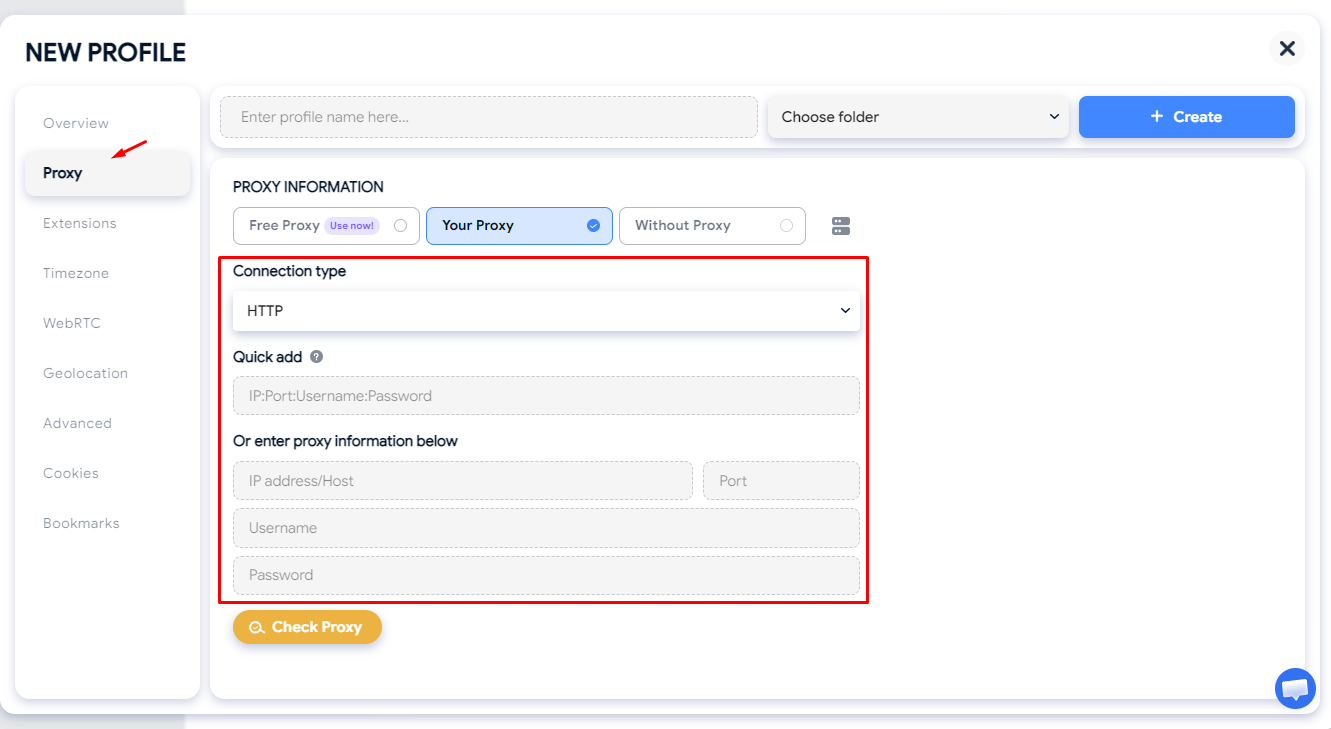
- Step 3: Click the Check Proxy button to verify the connection. If the proxy is functioning properly, the system will display the IP address and its actual geographic location. Verify the detected location against your initial selection, as city-level discrepancies may occur depending on the proxy type. Once the connection status is successful, click Create to complete setup and launch the profile.
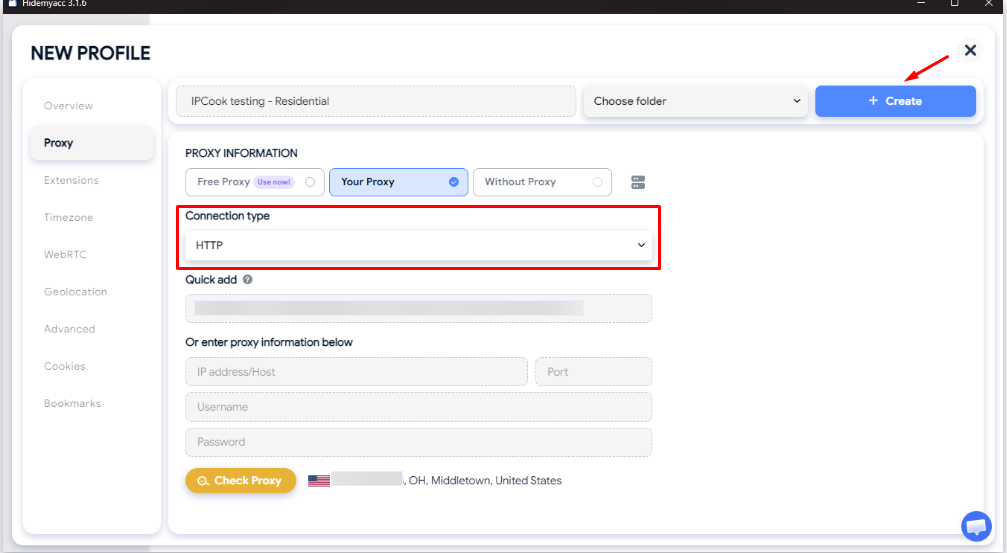
A common mistake during setup is selecting the wrong Connection type. If the proxy credentials generated on IPcook use HTTP, you must select the HTTP protocol in Hidemyacc; similarly, if generated as SOCKS5, select Socks 5. When encountering an error stating that the proxy server cannot be reached, prioritize rechecking the connection protocol before concluding that the proxy is faulty.
Read more:
6. Real-World Performance: Testing Methodology and Results
To objectively evaluate actual quality rather than relying solely on marketing claims, two US-based proxy types—Residential Proxy and ISP Proxy—were purchased and subjected to comprehensive testing covering anonymity, data leak risks, connection speed, CAPTCHA trigger rates, and page load performance across major e-commerce platforms.
6.1 Anonymity and Identity Leak Tests
| Measurement Metric | Residential Proxy (HTTP) | ISP Proxy (HTTP/SOCKS5) |
|---|---|---|
| IP Score (IPFighter) | 70% | 75% |
| Blacklist Status | 2/10: zen.spamhaus.org, cbl.abuseat.org | 2/10: zen.spamhaus.org, cbl.abuseat.org |
| WebRTC Leak | Leak detected (WebRTC IP does not match Public IP) | No leak (WebRTC IP matches Public IP) |
| Timezone Check | Exact match | -15 points due to mismatched browser timezone config |
| IP Type Identification | Residential IP | Residential / ISP IP |
| Location Accuracy | Configured Allen (Ohio), detected Middletown (Ohio) | Assigned directly to a static IP in Dallas (Texas) |
| IP Stability | Automatically changed IP to Maryland on second check | Maintained a single, fixed IP (173.232.253.159) |
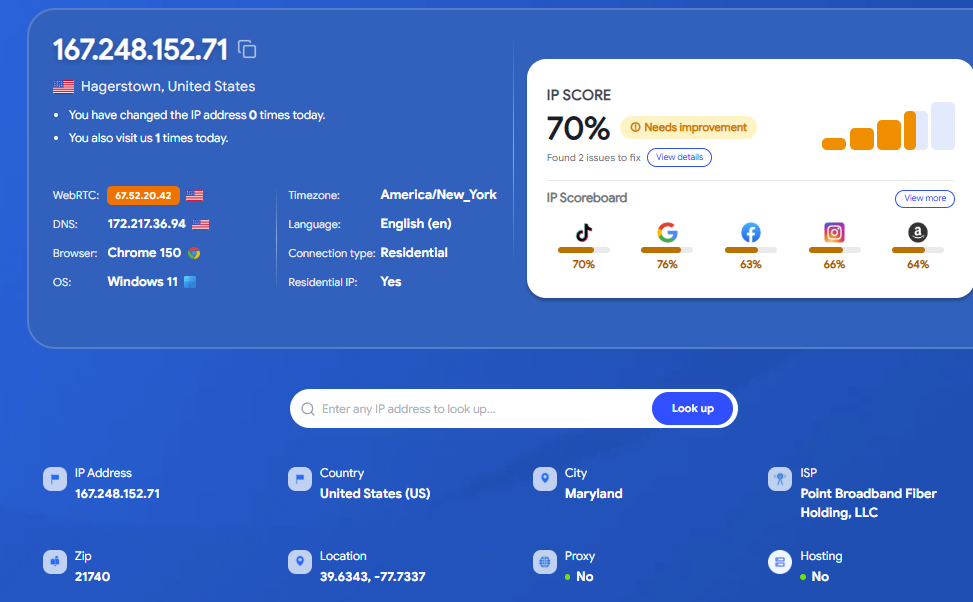
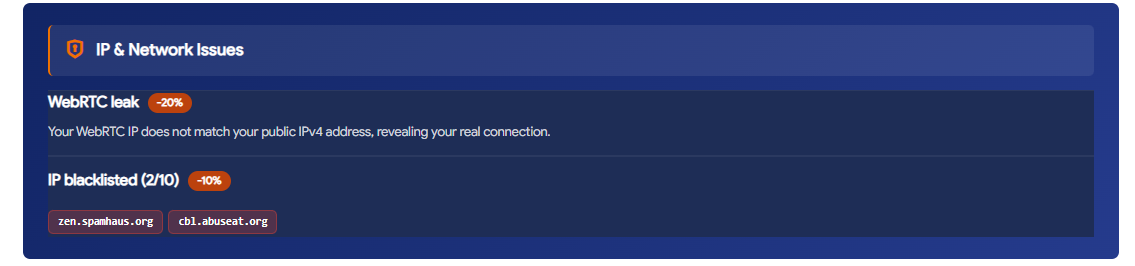
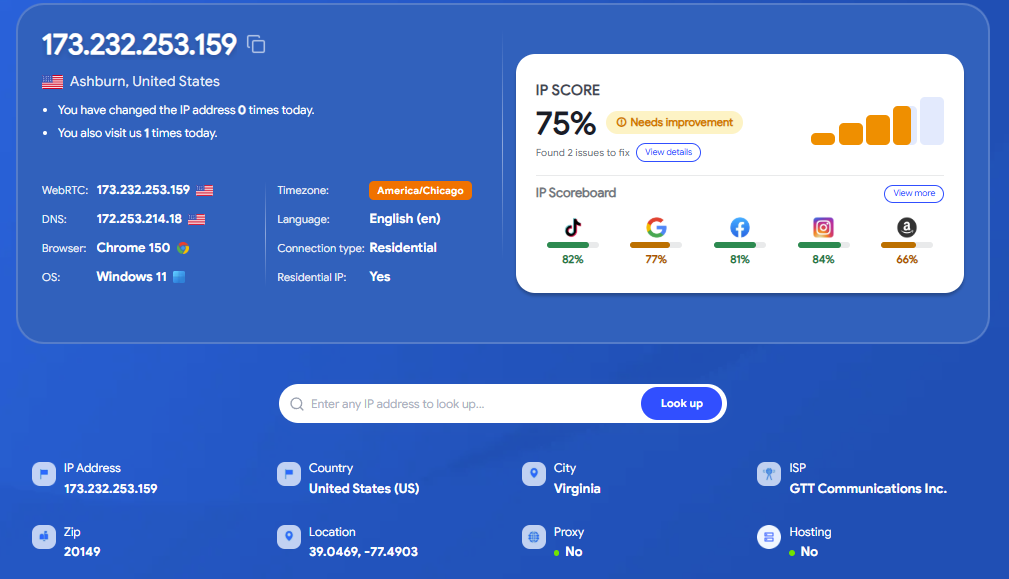
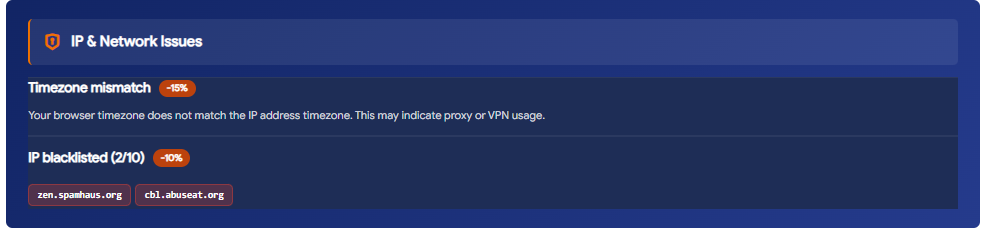
The test results show that ISP Proxy delivers higher stability and technical security, as it did not encounter WebRTC leaks. In contrast, Residential Proxy was found to have a WebRTC leak, where the WebRTC IP address did not match the displayed Public IP. A WebRTC leak is a critical issue to watch out for because it can expose the device's original local network IP, increasing the risk of platforms detecting and linking multiple accounts back to the same source.
Additionally, the actual location of the Residential Proxy showed a discrepancy at the city level, resolving to Middletown instead of the selected Allen. While this level of variance does not impact general tasks targeted at the country or state level, it can cause data inaccuracies if used for local SEO or granular city-level ad verification.
Notably, both test proxy samples appeared on two blacklist databases: zen.spamhaus.org and cbl.abuseat.org. Since these lists primarily serve email spam filters, they have minimal impact on standard web browsing; however, they remain an important factor to consider if your workflow requires pristine IP cleanliness.
6.2. Speed and Latency Testing
Following the anonymity checks, both proxies were benchmarked for real-world connection speeds via Speedtest.
| Network Metric | Residential Proxy | ISP Proxy |
|---|---|---|
| Download Speed | 14.22 Mbps | 31.94 Mbps |
| Upload Speed | 16.88 Mbps | 40.18 Mbps |
| Latency (Ping) | 400 – 500 ms | 277 ms |
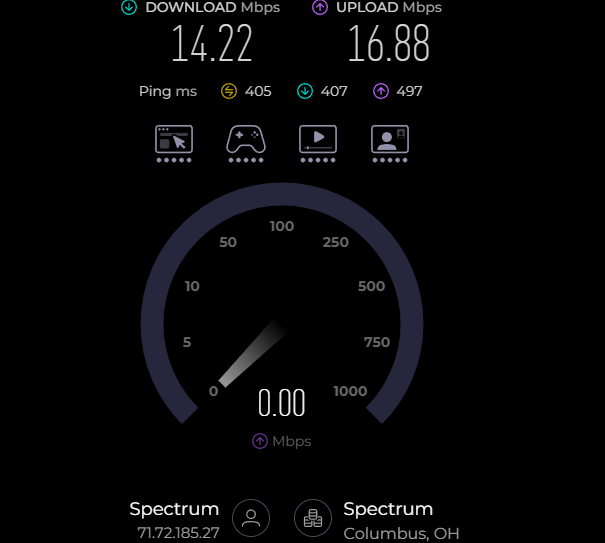
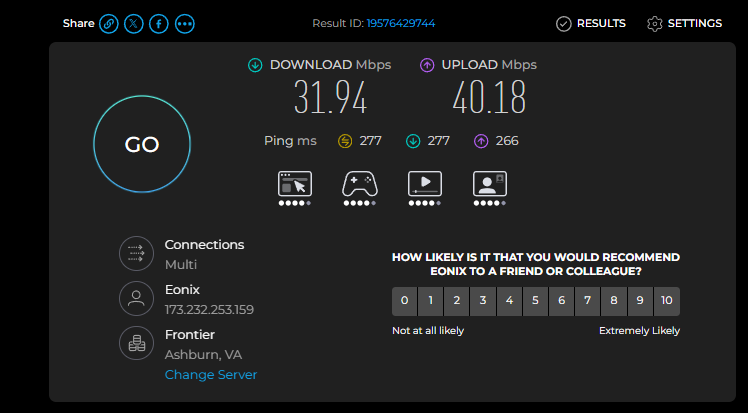
Connection speeds show a clear discrepancy between the two product lines. Compared to Residential, the ISP Proxy delivers roughly 2.2 times faster download speeds, 2.4 times faster upload speeds, and significantly lower ping (277 ms compared to 400 to 500 ms).
The ping of 400 to 500 ms on the Residential Proxy is substantially higher than standard internet connections, which typically range from 20 to 80 ms. For tasks that do not require instant responses, such as basic web browsing or static data scraping, this level of latency poses no major issue. However, for tasks requiring live interaction, such as dynamic UI testing, chatbot evaluations, or any operation demanding rapid server feedback, this high latency can lead to lag or timeouts, making the Residential Proxy less suitable for these specific use cases.
6.3. Google Search CAPTCHA Trigger Rate Testing
CAPTCHA is an essential metric when using proxies for automation tasks or running multiple consecutive queries. Therefore, both proxy types were tested for performance when searching commercial keywords on Google Search.
| Proxy Type | Queries Executed | CAPTCHA Status | Distinct IPs Detected in Session |
|---|---|---|---|
| Residential Proxy | 4 consecutive searches | Triggered CAPTCHA with unusual traffic warning | 2 distinct IPs |
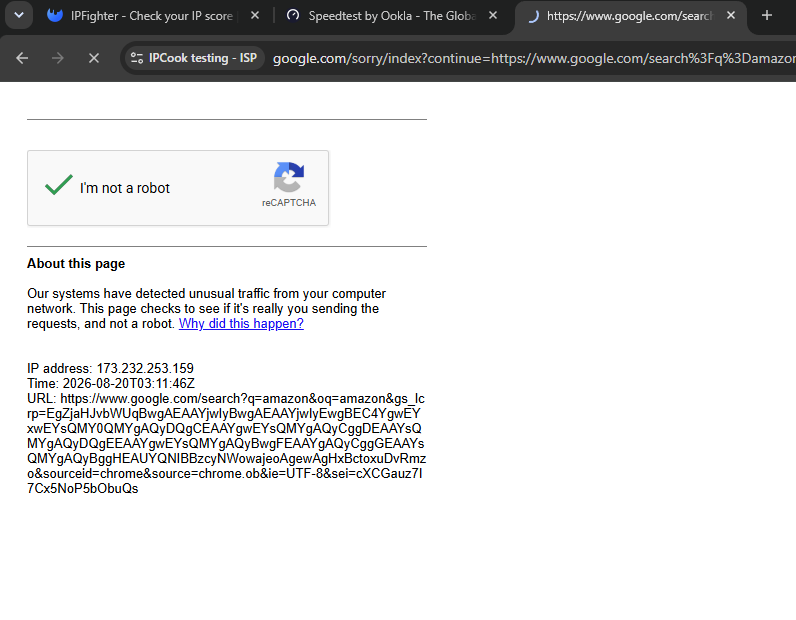
| ISP Proxy | 2 consecutive searches | Triggered verification CAPTCHA | 1 static IP |
Encountering a CAPTCHA challenge after only 4 queries indicates that when using Residential Proxies for high frequency scraping on Google, such as bulk SERP extraction or tracking multiple keyword rankings simultaneously, you need a proper request delay strategy or IP rotation schedule. Without these measures, block rates remain high and can disrupt automated workflows. The presence of two different IP addresses within a single session also highlights the root cause of the block: IP inconsistency during request handling, which Google anti-bot systems monitor closely.
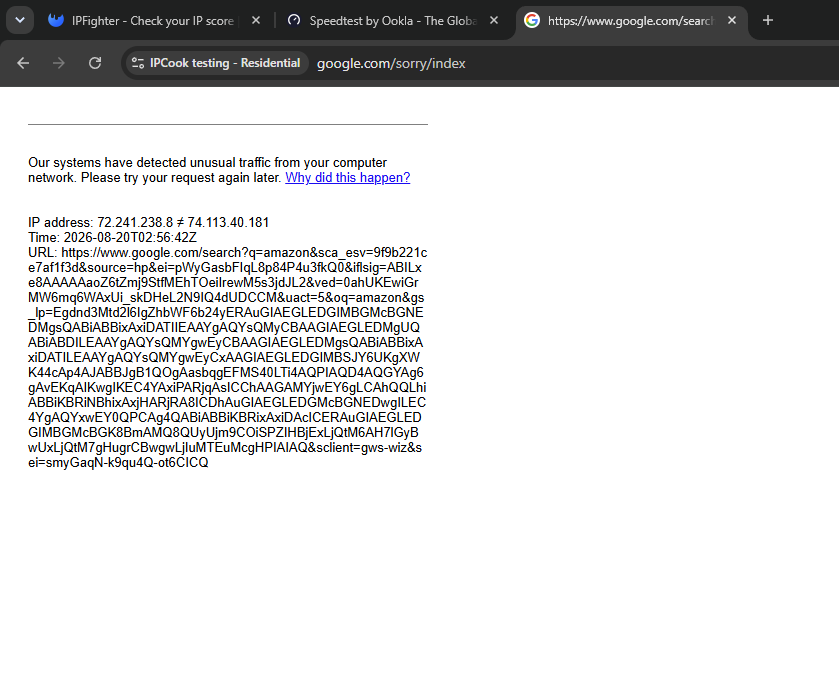
Regarding ISP Proxies, even though the IP address offered higher consistency with only one single IP appearing throughout the session, it triggered the CAPTCHA verification prompt earlier, right after two searches. This indicates that Google anti-bot systems do not evaluate traffic solely on IP consistency. They also factor in the subnet fingerprints of commercial ISP registrations, which are more easily flagged as automated traffic compared to genuine residential IP pools tied to physical households. Consequently, for tasks requiring frequent Google queries, both proxy types demand a proper request delay strategy rather than relying merely on proxy selection to bypass CAPTCHA challenges completely.
6.4. E-Commerce Platform Access and Load Time Testing
To evaluate protection bypass capabilities and real-world loading speeds, the proxies were used to directly access major e-commerce and social media platforms including Amazon, Etsy, and TikTok. Rather than searching through Google, direct URLs were entered into the address bar to accurately measure the response time of each site.
| Platform | Residential Proxy | ISP Proxy | Operational Notes |
|---|---|---|---|
| Amazon.com | 11 seconds | 8 seconds | Both succeeded without CAPTCHA challenges |
| Etsy.com | Incomplete (traffic depleted) | 8 seconds | Smooth loading without CAPTCHAs or IP blocks |
| TikTok.com | Incomplete (traffic depleted) | 10 seconds | Normal access, stable media loading, no CAPTCHA |
With the ISP Proxy plan, all three platforms showed positive results without encountering any CAPTCHA verification prompts or connection blocks. Page loading times remained fast and stable, ranging from 8 to 10 seconds on resource-heavy platforms like Etsy and TikTok.
7. IPcook Advantages and Limitations
Below is a breakdown of the key strengths and drawbacks observed through the features and live test results of IPcook.
Advantages
IPcook performs well with its diverse proxy portfolio, straightforward setup, and solid performance on the ISP lineup:
- Diverse proxy types and locations, supporting city-level targeting in selected regions.
- ISP proxies offer superior speeds and showed zero WebRTC leaks during testing.
- Both proxy types successfully access major e-commerce platforms via direct URL entry.
- Generated proxy formats match Hidemyacc requirements directly without manual reformatting.
Limitations
Several limitations should be considered when using IPcook for workflows requiring high anonymity or stability:
- Residential proxies showed a WebRTC leak, requiring caution for high-anonymity tasks.
- Both proxy types appeared on two blacklists, indicating that not all IP ranges maintain high cleanliness scores.
- High-frequency direct searches on Google are prone to being flagged as unusual traffic, triggering CAPTCHAs.
- Actual residential IP locations can deviate from the initially selected city.
These factors should be verified before deploying proxies into production, especially for operations requiring stable IPs and minimal risk of platform flagging.
8. Conclusion
Through direct testing, IPcook Residential proxies are suitable for tasks requiring diverse geographic locations without demanding high connection speeds. Meanwhile, ISP proxies deliver noticeably faster performance, stable IPs, and better leak resistance, making them well-suited for tasks that require a fixed IP over extended periods. Both types have minor limitations regarding IP cleanliness, so evaluate your specific project requirements before choosing a plan.
When deploying IPcook proxies for multi-account management, ensure the browser timezone and language settings match the proxy geolocation to prevent detection tools from flagging inconsistencies. For this reason, pairing proxies with the Hidemyacc antidetect browser is recommended, as it allows isolated profile management with matching timezone, language, and fingerprint configurations to make IPcook usage safer and more effective.
9. FAQ
1. What tasks is IPcook best suited for?
IPcook is well-suited for data scraping, multi-account social media management, localized ad verification, and market research.
2. Should I choose Residential or ISP proxies?
If you require high speed and long-term IP stability, ISP proxies are the better choice. If you need wide geographic IP variety and do not prioritize raw speed, Residential proxies serve the purpose better.
3. Does IPcook get blocked on Google or Amazon?
Both proxy types can trigger CAPTCHA challenges during high-frequency Google searches. However, direct access to commercial platforms like Amazon via URL showed no blocking issues.
4. Is IPcook IP location accurate down to the city level?
In our tests, IPs resolved accurately at the state level but showed slight city-level variances from the initial selection. Users should verify the actual location after generating proxies if high precision is required.
5. Are additional tools required when using IPcook proxies?
Using an antidetect browser is recommended to manage timezone, language, and browser fingerprint configurations to match the proxy location, reducing the risk of detection when running multiple accounts simultaneously.