IPFly is one of the more prominent proxy providers on the market, boasting a network of over 90 million residential IPs alongside budget-friendly pricing. However, a massive IP pool and low rates alone don't guarantee a truly reliable service.
This IPFly review evaluates both its Residential and ISP Proxies through rigorous hands-on testing—covering key features, Hidemyacc integration, anonymity, connection speed, CAPTCHA trigger rates, and accessibility on major e-commerce platforms.
1. What is IPFly?
IPFly is a proxy provider with a network of 90+ million residential IP addresses spanning more than 190 countries and regions. Its product lineup includes three primary proxy types:
- Residential Proxy
- ISP Proxy
- Datacenter Proxy
The ISP Proxy category is further broken down into three options: Static ISP, Static Native, and Carrier Native, each tailored to specific use cases. Beyond proxy solutions, IPFly also offers its own antidetect browser, TriBull, built for multi-account management and social media automation.
IPFly uses two different pricing models depending on the product:
- Residential Proxy: billed by bandwidth (GB)
- ISP Proxy: billed per IP on weekly, monthly, or quarterly plans
While Datacenter Proxies are advertised with per-IP pricing on the homepage, the exact rental duration couldn't be verified during this review. Users should confirm billing terms directly inside the dashboard prior to purchase.
Overall, IPFly targets users involved in web scraping, ad verification, social media management, market research, SEO, and e-commerce operations.
2. Community reviews & user feedback
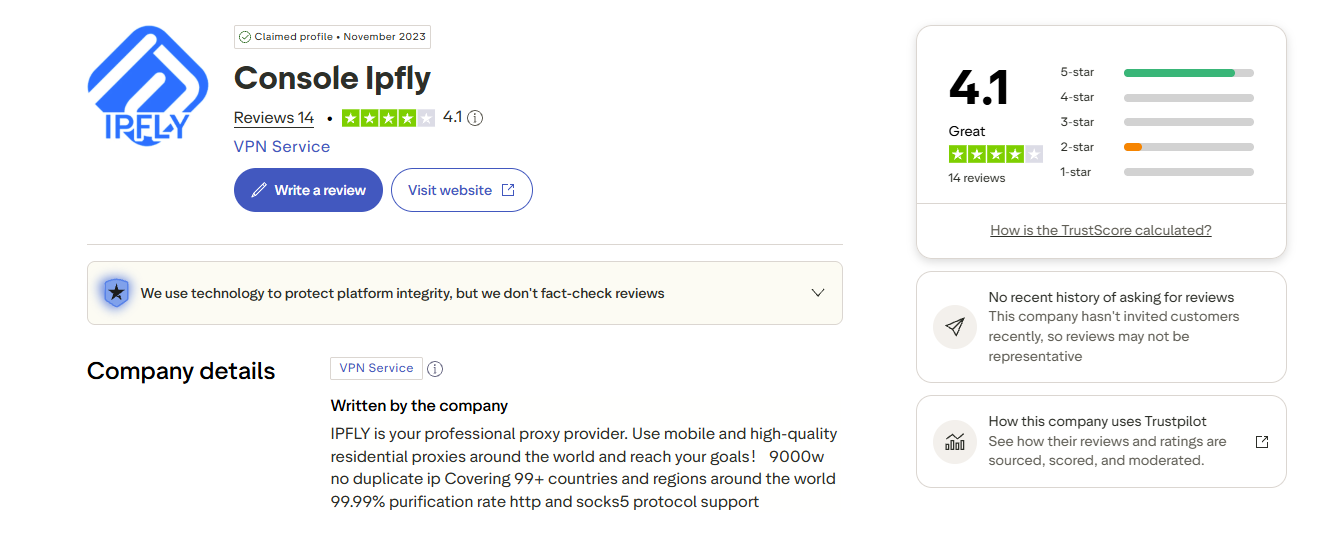
At the time of writing, IPFly holds a 4.1/5 rating ("Great") on Trustpilot based on 14 reviews. While the overall score is solid, the relatively small sample size means it should serve as a helpful reference rather than a definitive grade.
Most positive reviews highlight:
- Stable connection speeds
- Competitive pricing
- Responsive customer support
On the flip side, several users note that performance varies depending on the specific IP assigned. Interestingly, this aligns closely with our hands-on testing, where different IP types showed noticeably different behavior across websites and CAPTCHA checks.
3. Key features of IPFly
| Specification | Details |
|---|---|
| IP Types | Residential (Rotating), ISP (Static ISP, Static Native, Carrier Native), Datacenter |
| IP Pool | Over 90 million residential IPs |
| Coverage | 190+ countries and regions |
| IP Geolocation | Country, region (Residential); country, city (ISP) |
| Protocols | HTTP(S), SOCKS5 |
| IP Rotation | Rotating (Residential), Static (ISP) |
| Pricing Model | Per GB (Residential); per IP (ISP & Datacenter) |
| Rental Period | Weekly, monthly, or quarterly (ISP) |
| Additional Product | TriBull Antidetect Browser |
| Proxy Retrieval | Create a Sub Account to receive Host, Port, Username, and Password |
One key detail to note is that the proxy string format isn't standardized across product lines. Residential Proxies use the USERNAME:PASSWORD:HOST:PORT format, whereas ISP Proxies follow HOST:PORT:USERNAME:PASSWORD. Pay close attention to this structure when importing proxies into an antidetect browser so credentials don't end up in the wrong fields.
4. Pricing
IPFly publicly displays its starting prices on the homepage, along with promotional discounts that may vary over time. The table below summarizes the entry-level pricing for its three main proxy products at the time of this review.
| Product | Starting Price |
|---|---|
| Residential Proxy | From $0.8/GB |
| ISP Proxy | From $2.5/IP |
| Datacenter Proxy | From $4.5/IP |
Residential Proxy is billed based on bandwidth usage (GB), while ISP and Datacenter Proxies are priced per IP. Inside the dashboard, ISP pricing also varies by country, city, and rental duration (weekly, monthly, or quarterly), so the advertised $2.5/IP should be considered the starting price rather than a fixed rate.
For this review, both the Residential Proxy (1 GB allocation) and ISP Proxy (1 US IP) were provided directly by IPFly as review units rather than purchased via the standard checkout. As a result, this evaluation focuses strictly on connection quality and real-world performance, excluding the checkout experience, payment options, and total cost incurred.
5. How to set up IPFly in Hidemyacc
Once you've generated your proxy, the next step is importing the connection details into the Antidetect Browser Hidemyacc to build an isolated browsing environment for each account.
5.1 Get proxy credentials from the IPFly dashboard
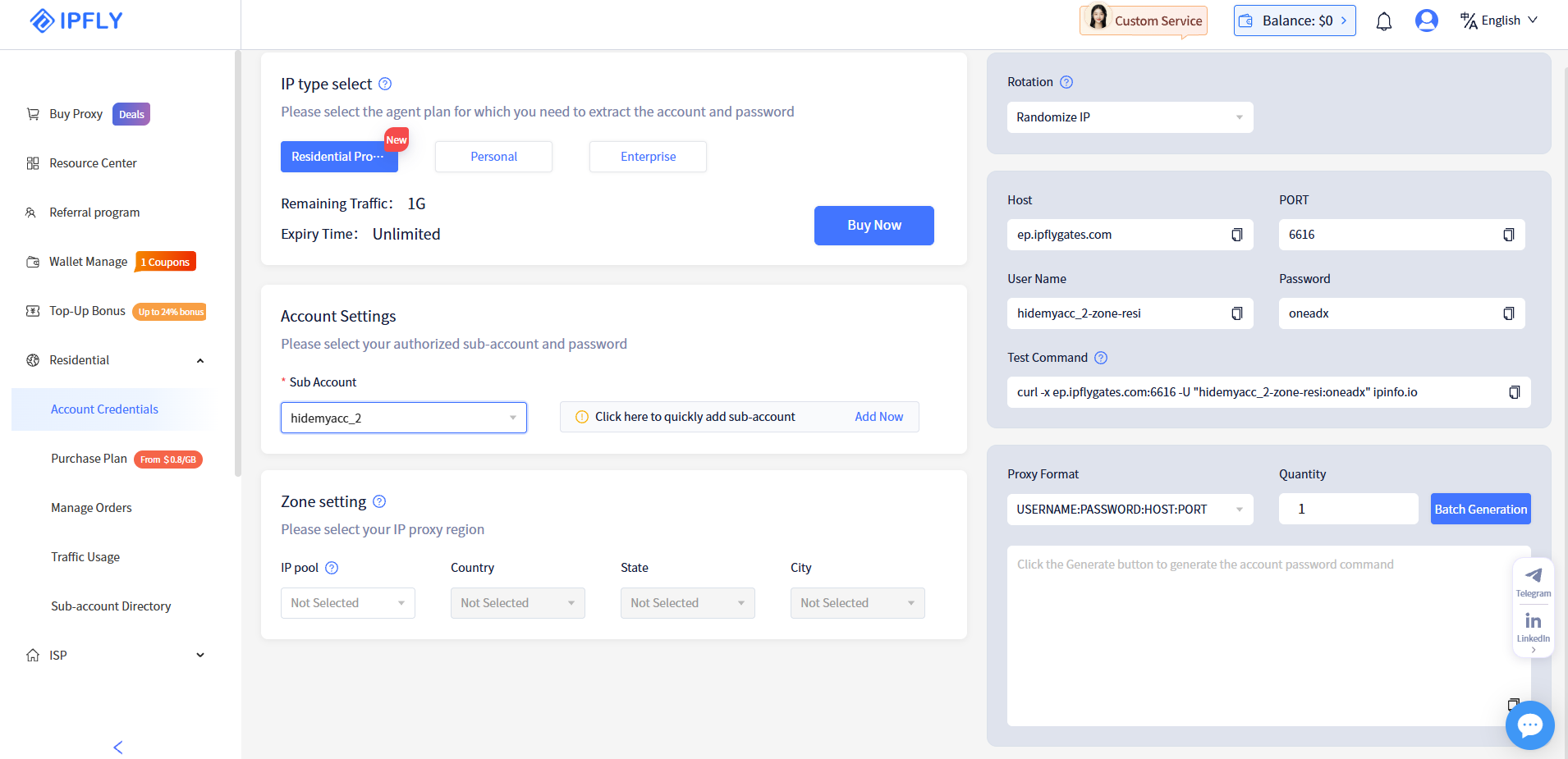
For Residential Proxies, go to Residential → Account Credentials. The dashboard will prompt you to choose a package type (Residential Pro, Personal, or Enterprise) and set up a Sub Account before issuing credentials. Once completed, the Host, Port, Username, and Password will appear in the right-hand panel.
In the Residential Pro package tested, Zone Settings (Country, State, City) could not be customized. This means IP locations are assigned randomly from the available residential pool rather than selected manually—a slight departure from some competing providers.
After confirming the credentials, select the following Proxy Format:
USERNAME:PASSWORD:HOST:PORT
Keep Quantity \= 1, then click Batch Generation to generate the complete proxy string.
Get proxy credentials from the IPFly dashboard
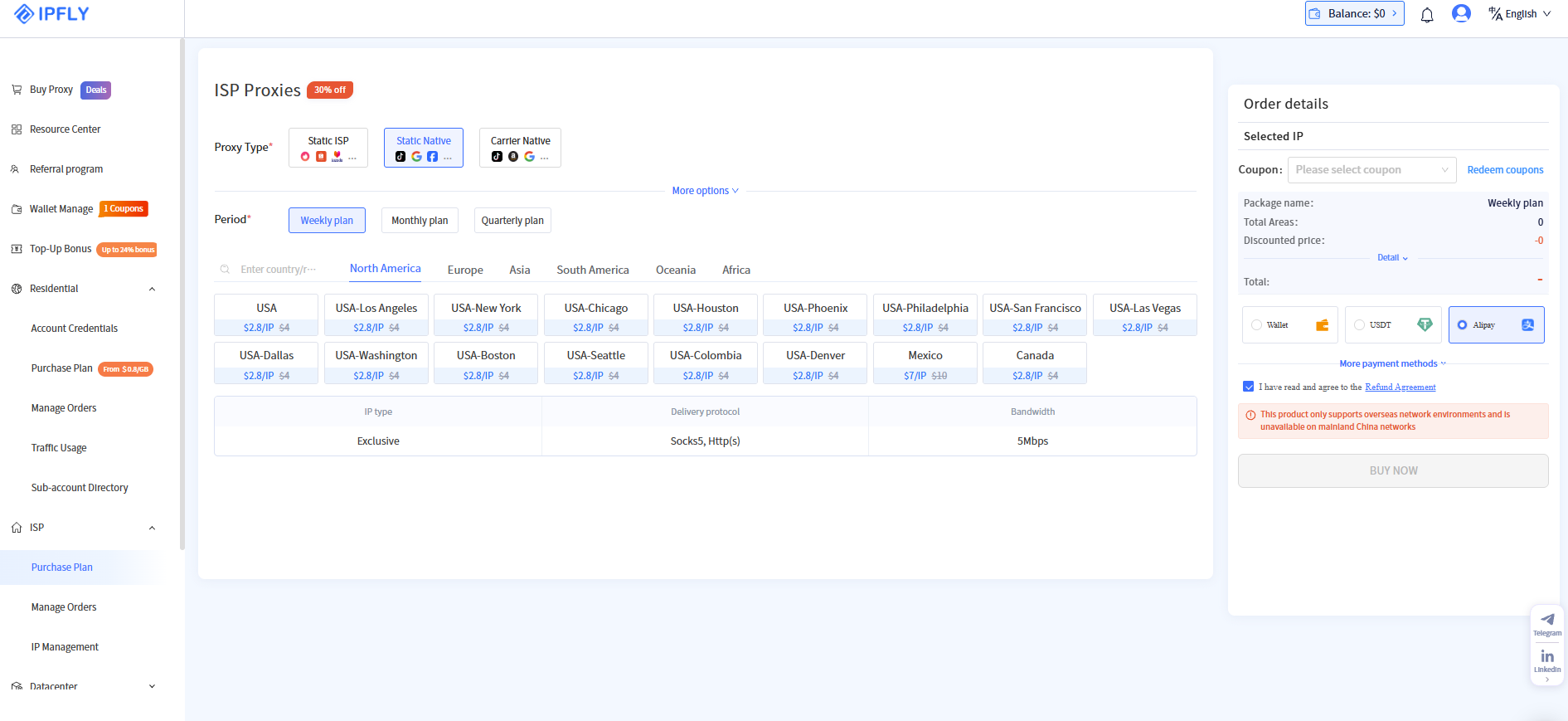
For ISP Proxy, go to ISP → Purchase Plan. Here, you can select:
- Proxy Type (Static ISP, Static Native, or Carrier Native)
- Period (weekly, monthly, or quarterly)
- Country and City for the proxy location
After the purchase is completed, the proxy credentials will appear under IP Management, including Proxy Host, Port, Username, Password, IP Address, and Region.
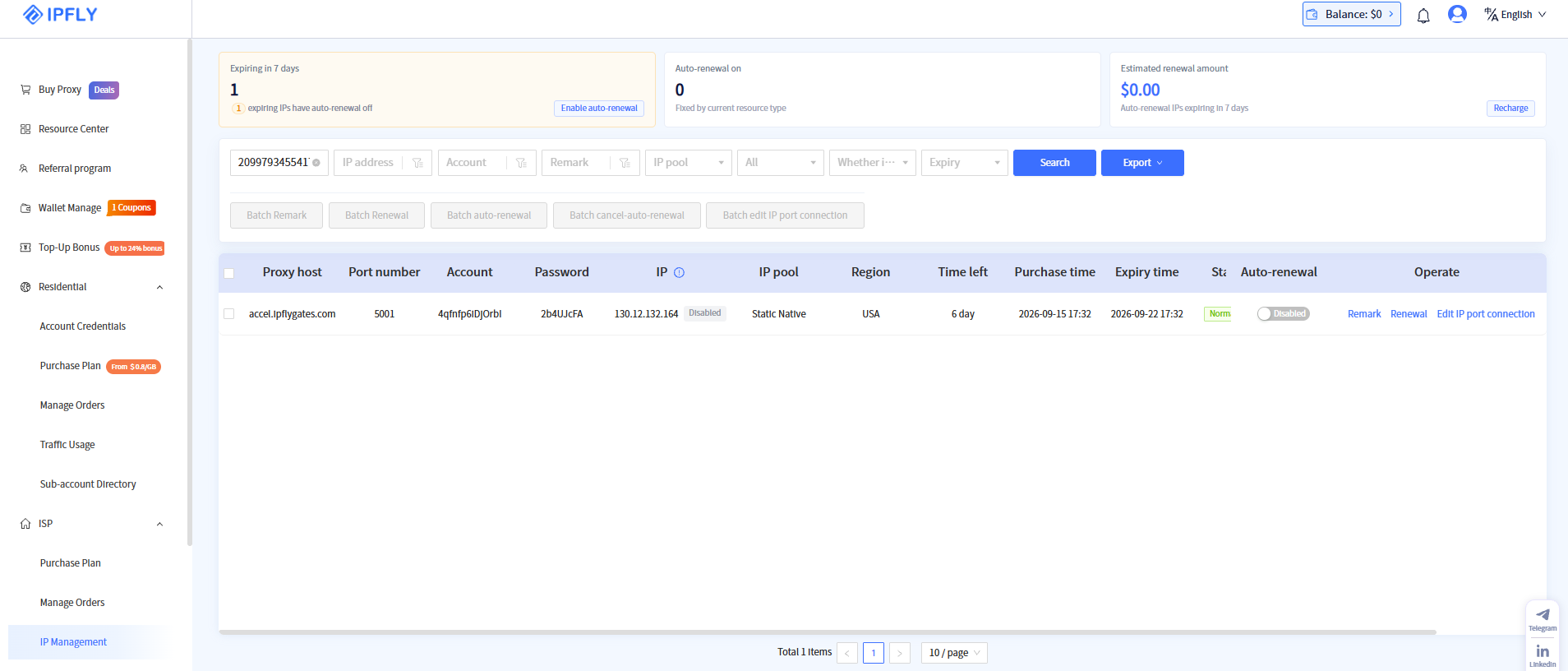
5.2 Configure browser profile on Hidemyacc
After obtaining your proxy credentials, follow these steps to set up the browser profile on Hidemyacc.
Step 1: Download and install the Hidemyacc software on your computer, then create a new profile (New Profile).
Step 2: Under the Proxy section, select Your Proxy. Choose the appropriate Connection type matching the protocol configured on IPFly. Because IPFly's proxy string format differs between its product lines, double-check before pasting into Quick Add. If Hidemyacc parses the fields incorrectly, enter the Host, Port, Username, and Password manually into their respective fields.
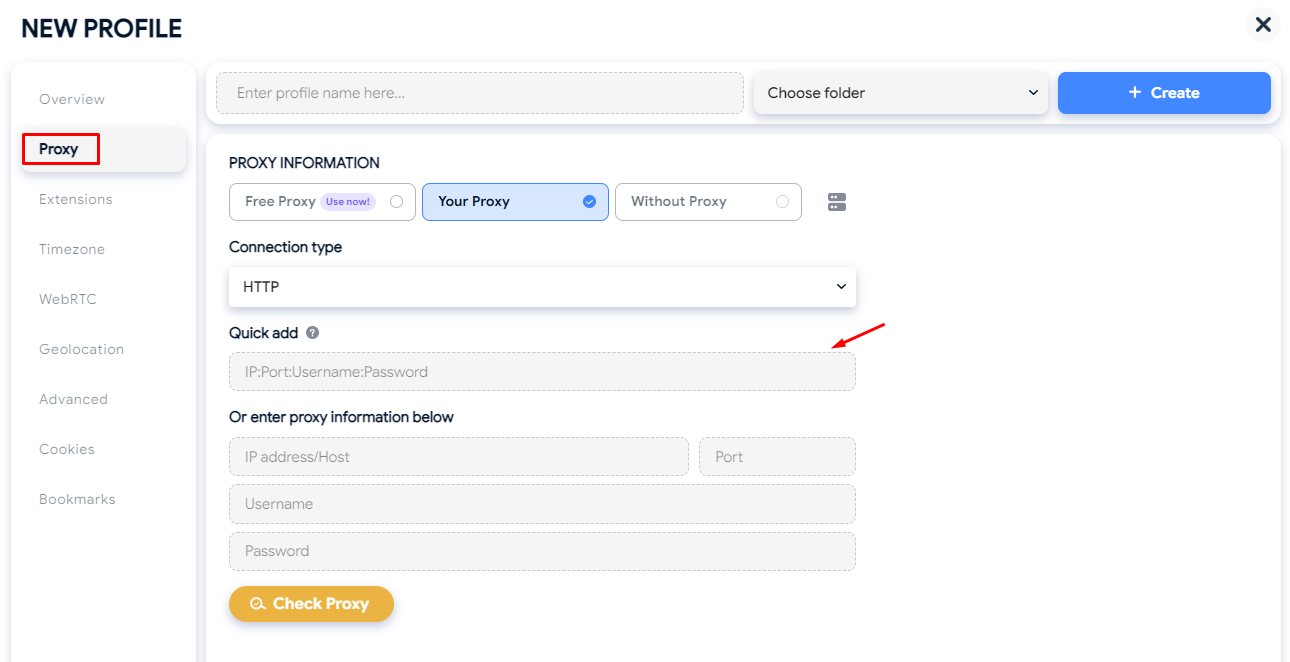
Step 3: Click Check Proxy to test the connection. If configured properly, Hidemyacc will display the IP address along with its detected location. Once verified, click Create to finish setting up and launch the profile.
Read more: How to use a proxy in Hidemyacc: 2026 step-by-step guide
6. Real-world performance: Testing process and results
To assess real-world performance, both the Residential Proxy (Pro plan, 1 GB traffic, Randomize IP enabled without Sticky Sessions) and the ISP Proxy (1 static US IP, Static Native) were put through four benchmark tests: anonymity, connection speed, Google CAPTCHA trigger rates, and accessibility on major e-commerce platforms.
6.1 Anonymity and identity leak test
Anonymity was tested using IPFighter and cross-checked against Scamalytics. Each tool uses a different evaluation model: IPFighter looks at browser fingerprinting, geolocation, WebRTC leaks, and platform compatibility, while Scamalytics evaluates overall fraud risk (Fraud Score) and historical IP reputation.
The table below summarizes all test results for both proxy types.
| Criteria | Residential | ISP |
|---|---|---|
| IP Score (IPFighter) | 55% (Needs improvement) | 75% (Needs improvement) |
| IPFighter location | Cairo, Egypt | Los Angeles, United States |
| Timezone | Mismatch, America/Sao_Paulo (-15%) | Mismatch, America/Toronto (-15%) |
| WebRTC leak | Yes, exposed real IP from a different country | No leak |
| Blacklist | 2/10, zen.spamhaus.org and cbl.abuseat.org | 2/10, same two sites |
| Connection type | Residential | Residential |
| Fraud Score (Scamalytics) | 1/100 (Low Risk) | 0/100 (Low Risk) |
| Scamalytics notes | IP owner is Vodafone Data | Note indicates running anonymising VPN, potentially proxying traffic from another location |
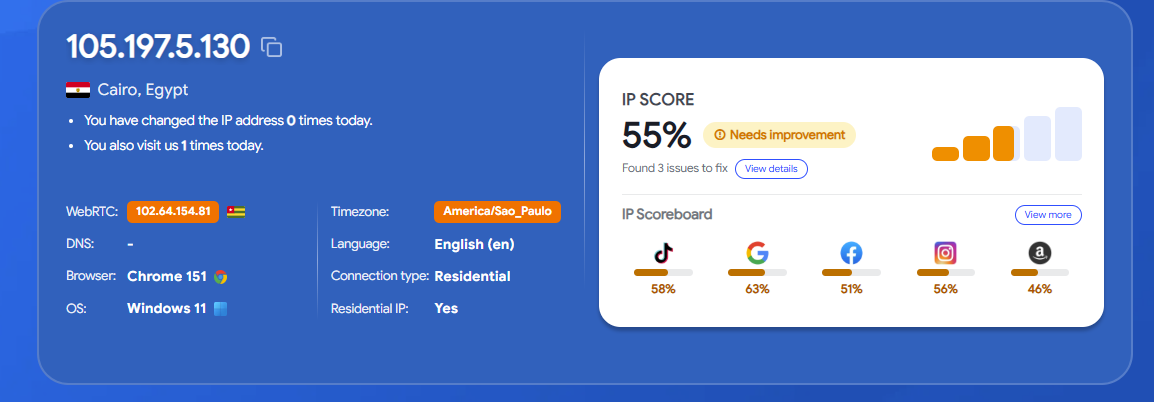
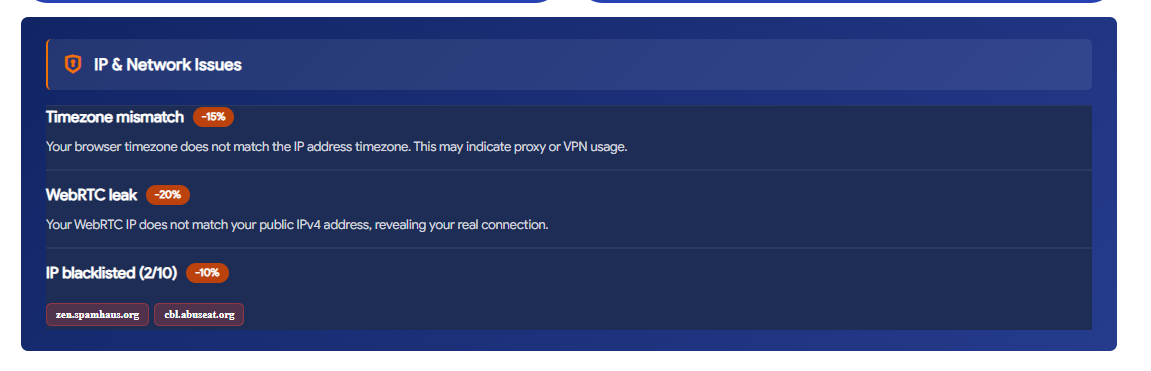
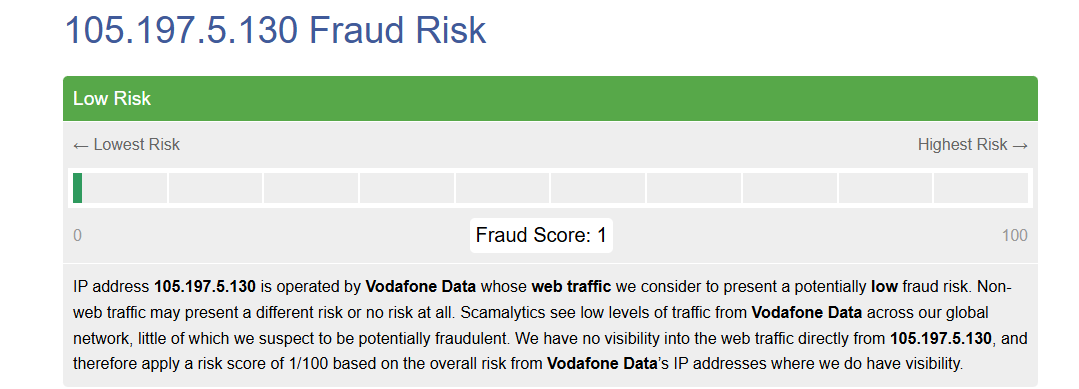
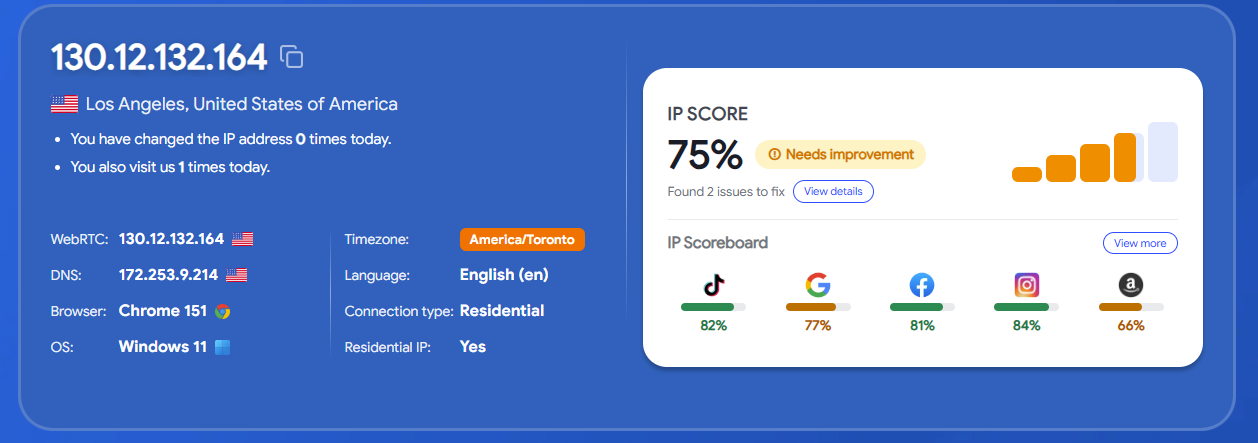
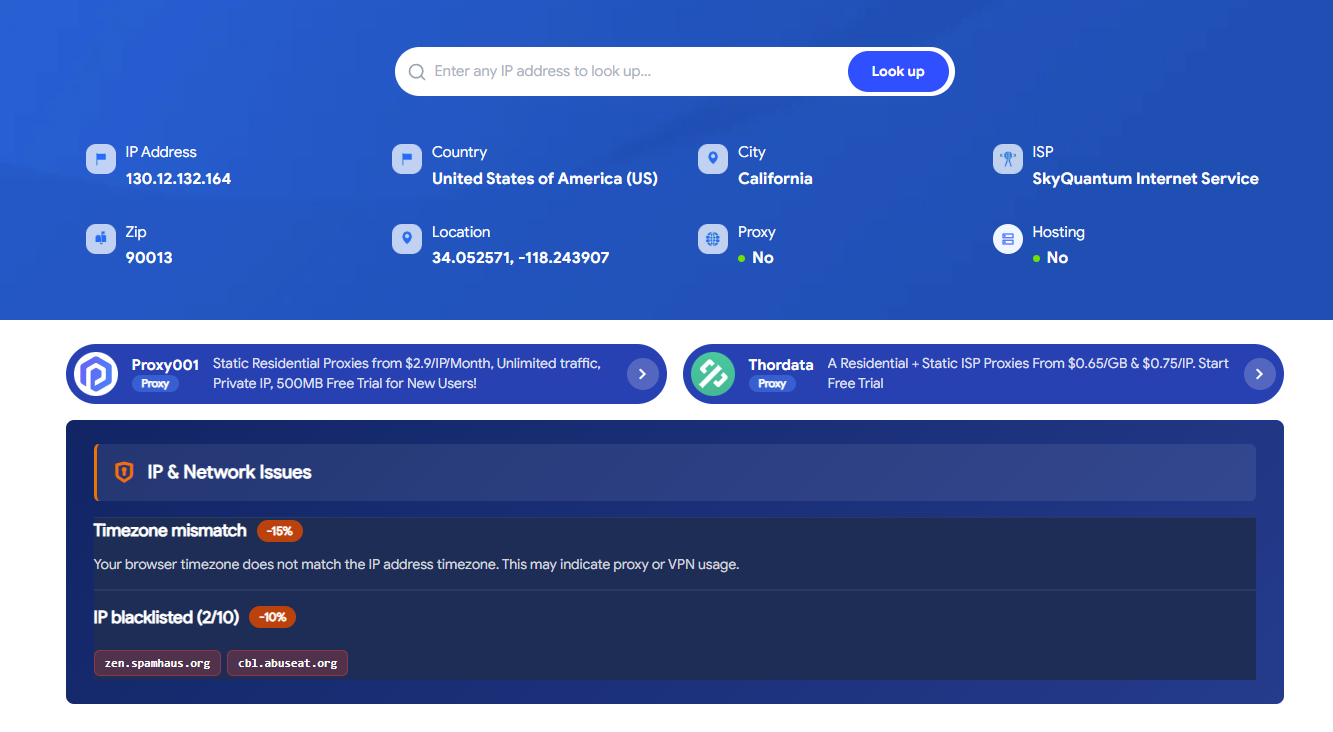
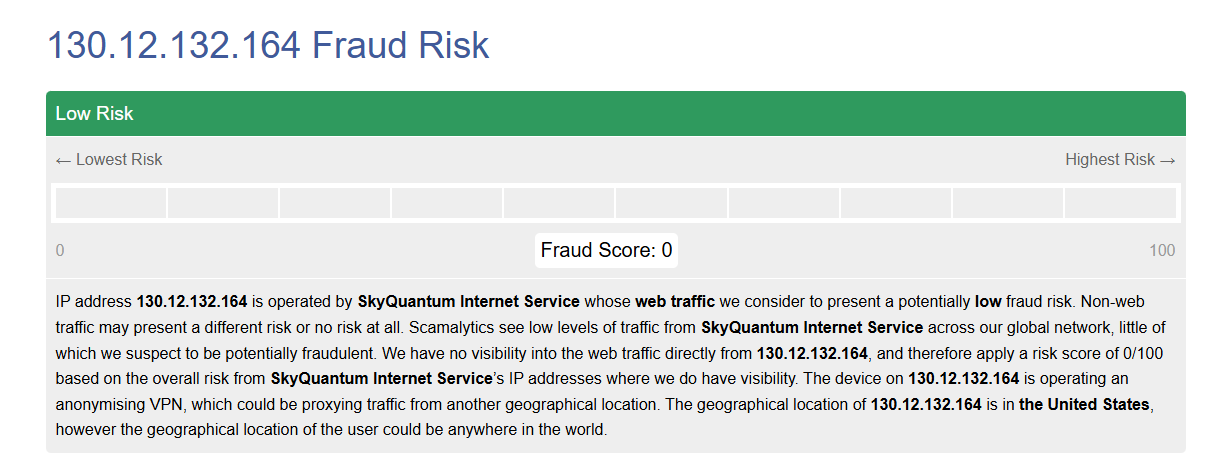
The results revealed an interesting contrast: while both proxy types flagged a "Needs improvement" status on IPFighter due to timezone mismatches or WebRTC exposures, both scored near-zero Fraud Scores on Scamalytics—indicating exceptionally clean reputation records. This underscores how different lookup tools can yield contrasting conclusions depending on the telemetry metrics they prioritize.
For the Residential Proxy, because the default Pro tier relies strictly on Randomize IP, the IP location shifted constantly between steps—ranging from Venezuela during initial proxy verification to Cairo, Egypt during the IPFighter scan. This reflects an unmanaged rotating mechanism, unlike services that provide Sticky Session options to lock an IP for a fixed duration.
As for the ISP Proxy, despite being a static IP, location readouts varied across tools. IPFly labelled the IP as US-based, IPFighter's location lookup detected Los Angeles, US, while its Timezone check pointed to America/Toronto. Paired with Scamalytics' note regarding anonymizing VPN usage, this suggests the IP routes through multiple network relays, causing different lookup databases to report different geographical locations.
Both proxy types turned up on two blacklists: zen.spamhaus.org and cbl.abuseat.org. Since these databases primarily target email spam filtering, they rarely impact standard web browsing, search queries, or platform access. However, if your workflow involves bulk email distribution, this is worth keeping in mind.
Beyond overall scores, IPFighter also rates IP suitability across popular online platforms.
| Platform | Residential | ISP |
|---|---|---|
| TikTok | 58% | 82% |
| 63% | 77% | |
| 51% | 81% | |
| 56% | 84% | |
| Amazon | 46% | 66% |
Overall, ISP Proxy scored higher than Residential Proxy across all five platforms. The gap was widest on Facebook and Instagram, where ISP Proxy scored 25–30 points higher, indicating it is better suited for logging in or managing social media accounts.
6.2 Speed and latency test
Speed was measured using speed.cloudflare.com to evaluate performance across practical tasks such as web browsing, data downloading, and video streaming. The table below summarizes the results.
| Metric | Residential | ISP |
|---|---|---|
| Download | 4.08 Mbps | 52.6 Mbps |
| Upload | 25.4 Mbps | 110 Mbps |
| Latency | 454 to 516 ms | 225 to 234 ms |
| Jitter | 191 ms | 7.1 ms |
| Network Quality Score | Bad across streaming, gaming, and video chatting | Streaming Average, Gaming Poor, Video Chatting Average |
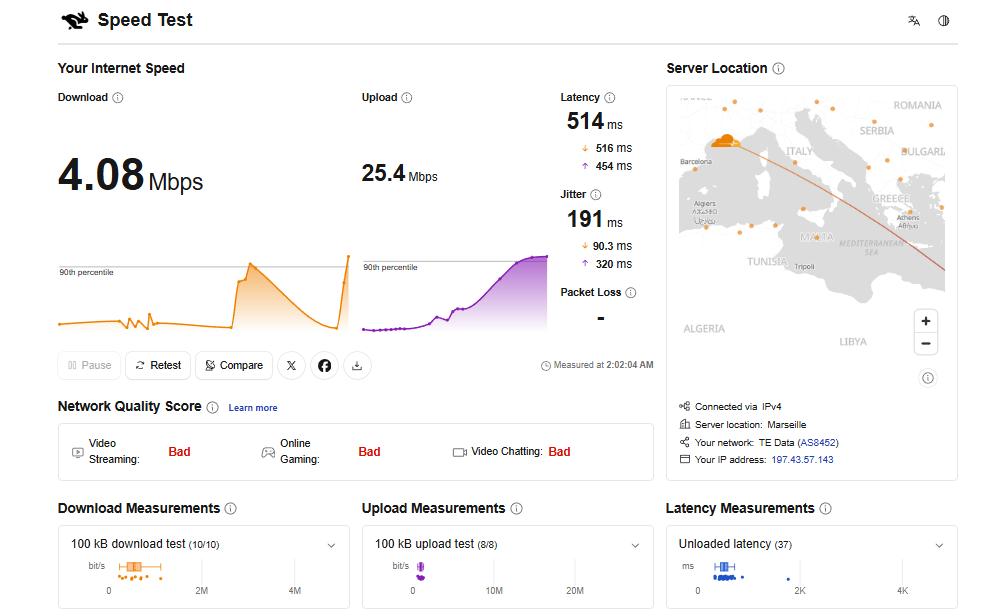
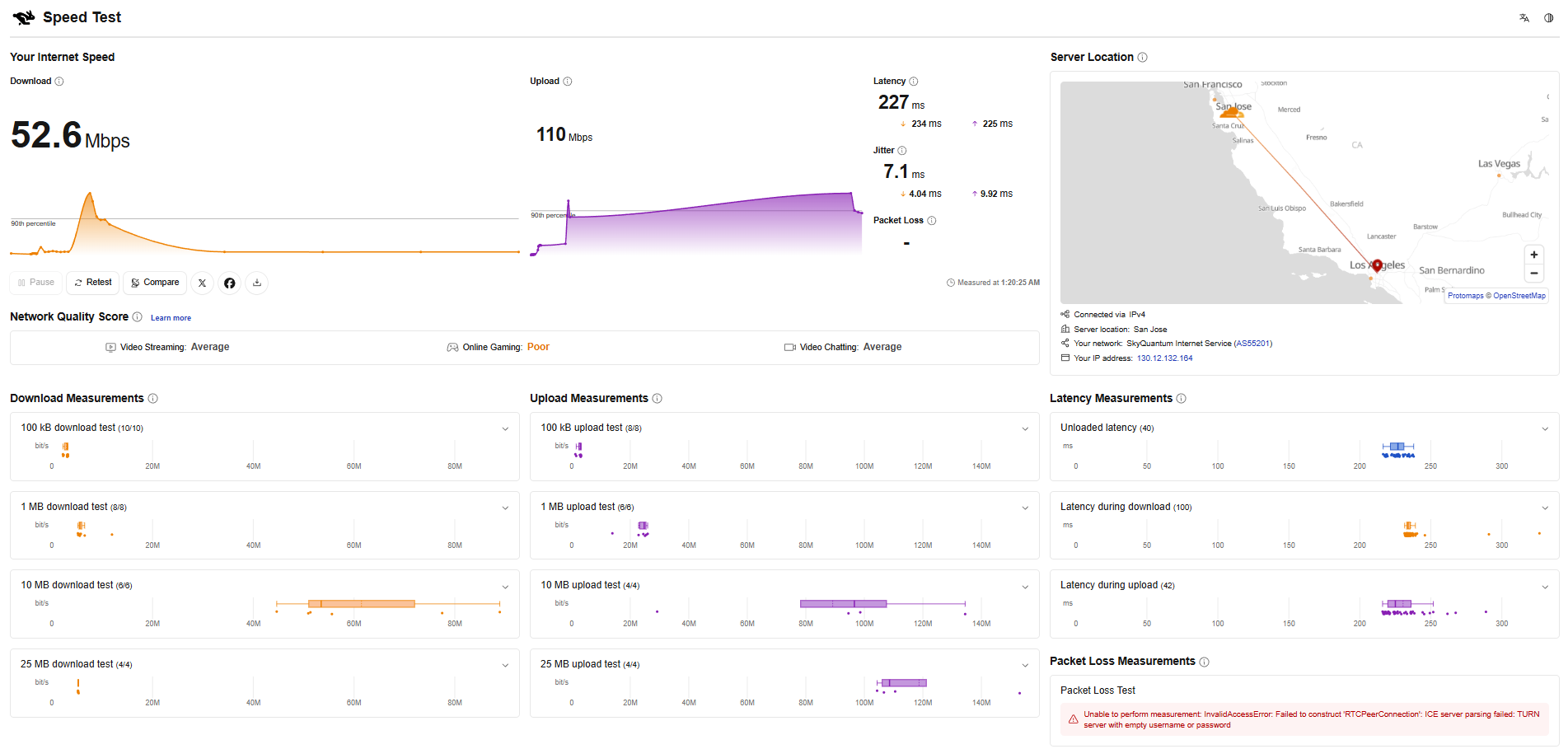
The metrics clearly demonstrate that ISP Proxy outperforms Residential Proxy in both raw throughput and connection stability. Download speeds hit 52.6 Mbps—nearly 13x faster than Residential—while upload speeds were over 4x higher. In practice, this translates to faster page loads, smoother image rendering, and speedier file transfers during active sessions.
The contrast in latency and jitter is even more pronounced. Latency measures round-trip delay between client and server, while jitter reflects line consistency. Residential Proxy logged latency around 500 ms with jitter reaching 191 ms, leading to sluggish page loads and erratic request behavior. In comparison, ISP Proxy maintained a tight jitter of just 7.1 ms, making it far more dependable for automated or sequential web tasks.
Ultimately, ISP Proxy was the only option in this test that avoided a "Bad" Network Quality score across all Cloudflare criteria. While not designed for competitive online gaming, these scores confirm that ISP Proxy is well-suited for high-throughput, stability-focused operations like multi-account operations or web scraping.
6.3 CAPTCHA trigger rate when searching on Google
To test real-world usability on Google, we ran two standard commercial search queries: "best wireless headphones 2026" and "iphone 17 pro review". Key metrics recorded were CAPTCHA prompt frequency and verification completion rates.
| Keyword | Residential | ISP |
|---|---|---|
| best wireless headphones 2026 | Triggered CAPTCHA, failed verification twice, completely blocked with "unusual traffic" notice | Triggered CAPTCHA, passed after 2 verification attempts |
| iphone 17 pro review | Triggered CAPTCHA, blocked completely after 1 verification attempt | No CAPTCHA triggered |
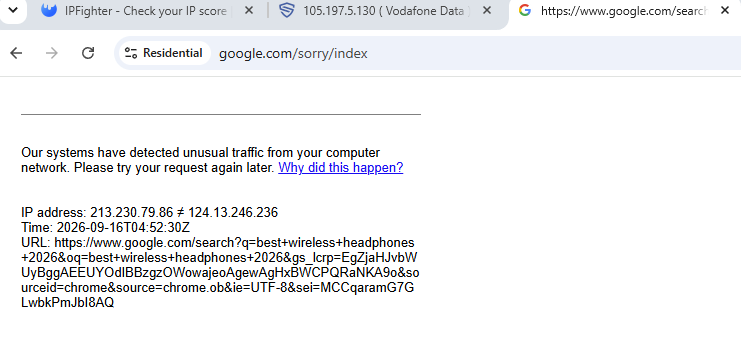
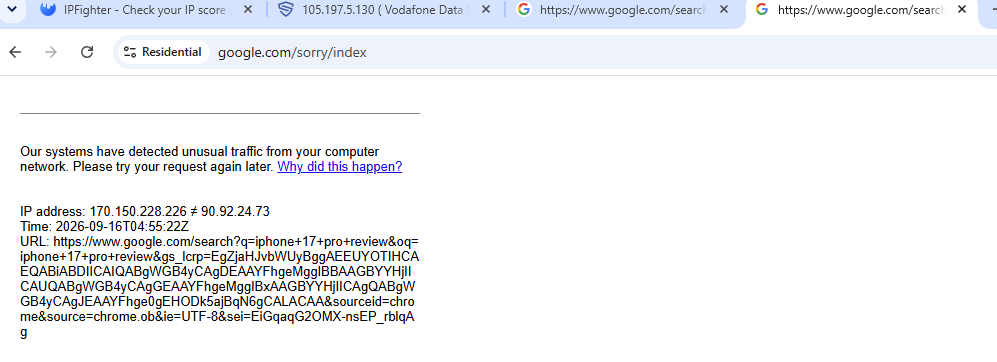
The results highlight that the key difference between the two proxy types lies in IP address stability. Residential Proxy was blocked by Google across both search queries, whereas ISP Proxy encountered CAPTCHA only once and successfully verified.
Notably, Google's "Unusual traffic" page for the Residential Proxy listed two distinct IP addresses within a single request sequence (e.g., 213.230.79.86 ≠ 124.13.246.236). This confirms that the IP rotated mid-session due to the default Randomize IP rule, triggering Google's anti-bot safeguards and terminating the session.
Conversely, ISP Proxies utilize static IPs and remain unaffected by mid-session rotation. As a result, even when occasional CAPTCHAs appeared, solving them allowed the search session to proceed smoothly without being blocked.
6.4 Accessibility and load times on e-commerce platforms
Beyond Google search, both proxy lines were tested across three major target destinations: Amazon, TikTok, and Etsy. Each site was loaded multiple times to measure average page render times and overall pass rates.
| Platform | Residential | ISP |
|---|---|---|
| Amazon.com | 14 seconds, not blocked | 8 seconds, not blocked |
| TikTok.com | 23 seconds, not blocked, videos loaded | 10 seconds, not blocked, all videos loaded |
| Etsy.com | Completely blocked, retries failed | 5 seconds, not blocked on first attempt |
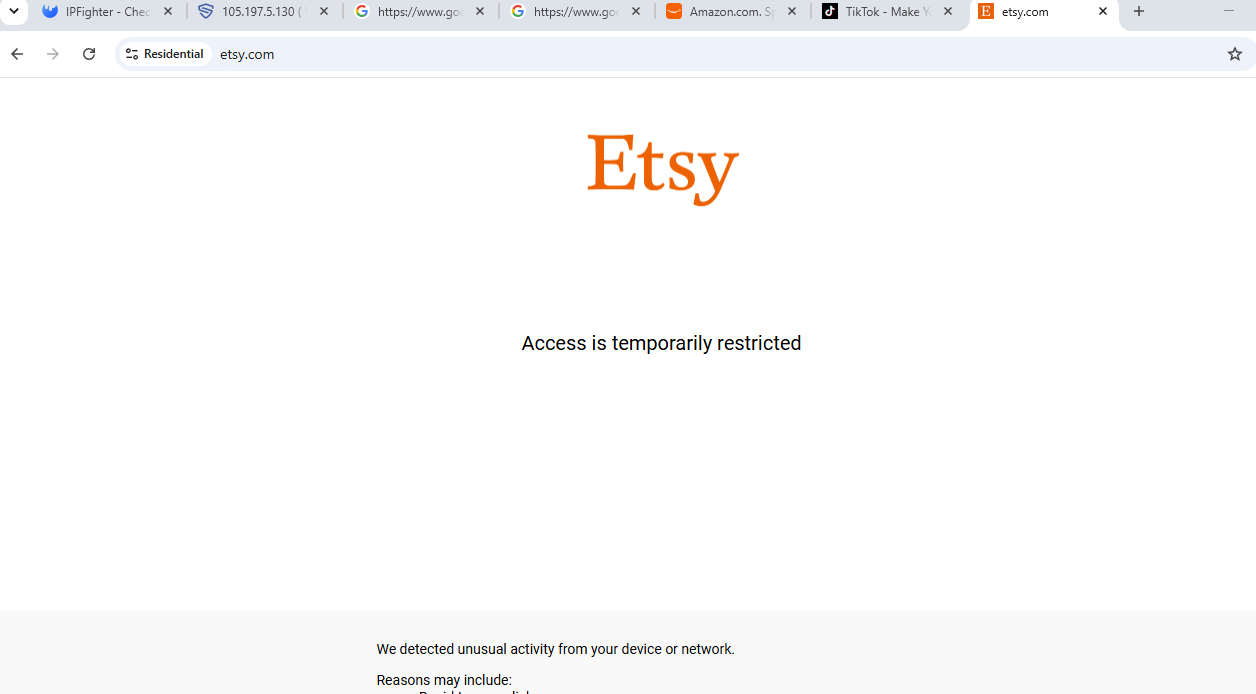
The results align closely with the speed test conclusions. ISP Proxy successfully accessed all three platforms on the first attempt, loading pages 2 to 3 times faster than Residential Proxy.
Residential Proxy managed to load Amazon and TikTok, though page loads were noticeably slower. However, Etsy blocked the Residential Proxy entirely throughout testing, even across page refreshes. This indicates that IP stability is just as critical as raw bandwidth when bypassing strict anti-bot systems.
Across both Google queries and e-commerce platforms, ISP Proxy proved significantly more dependable in both access rates and load times. Residential Proxy's main pain point remains its forced mid-session IP rotation.
7. Pros and cons of IPFly
Following thorough testing of both offerings, clear performance gaps emerge between IPFly's Residential and ISP Proxies. ISP Proxy excels in speed and connection stability, whereas Residential Proxy struggles due to random rotation and CAPTCHA flags.
Pros
- Extensive pool of over 90 million residential IPs across 190+ countries and regions, ideal for diverse geo-location requirements.
- Competitive entry-level pricing, starting from $0.8/GB for Residential Proxies and $2.5/IP for ISP Proxies.
- Solid ISP Proxy performance, delivering 52.6 Mbps download, 110 Mbps upload, and consistent stability.
- Extremely low Fraud Scores on Scamalytics, demonstrating clean IP reputation histories.
- Full support for HTTP(S) and SOCKS5 protocols, with seamless integration into antidetect browsers like Hidemyacc.
Cons
- The tested Residential Pro tier only supported Randomize IP without Sticky Session options, triggering mid-session IP shifts.
- Inability to manually select country or city locations under the default Residential Pro setup.
- Geolocation inconsistencies between the IPFly dashboard, Hidemyacc, and testing tools like IPFighter or Scamalytics.
- Inconsistent proxy string formats across product lines increase the likelihood of configuration mistakes for new users.
- Minor dashboard UX friction, such as floating live chat widgets overlapping copy buttons.
In short, IPFly's main drawbacks stem from user experience and IP assignment options rather than the underlying network performance of its ISP Proxies.
8. Conclusion
Based on hands-on benchmarks, IPFly shows a distinct performance gap between its Residential and ISP Proxy products. ISP Proxy emerges as the standout solution, delivering high connection speeds, strong stability, low CAPTCHA trigger rates, and reliable access to major e-commerce platforms. Slight geolocation discrepancies across testing databases do not noticeably impact real-world use.
Conversely, Residential Proxy is hindered by its unmanaged default rotation mechanism. Mid-session IP changes trigger Google security blocks and reduce success rates on anti-bot-protected sites like Etsy.
For workflows that demand high speeds and uninterrupted sessions, ISP Proxy is clearly the better option. If you opt for Residential Proxies, make sure to choose a plan that supports Sticky Sessions to maintain IP continuity throughout your sessions.
Read more:
- Reviewing Byteful (Ping Proxies): Do they deliver?
- NaProxy Review: Should You Make It Your Go-To Proxy Provider?
- PrivateProxy Review: Explore performance, and features
- MarsProxies Review - Main Features, Pros and Cons
- TabProxy Review: Does It Provide High-Quality Residential Proxies?
- GoProxy Review 2026: Is It Worth Using for Residential Proxies?
- Proxyma Review: Features, Pricing, and Performance Test
9. FAQ
1. What use cases is IPFly best suited for?
IPFly is suitable for web scraping, ad verification, multi-account social media management, market research, SEO tracking, and e-commerce operations. Users can select Residential or ISP Proxies depending on their specific project requirements.
2. Should I choose IPFly Residential Proxy or ISP Proxy?
Testing shows ISP Proxy provides superior speed, latency, and CAPTCHA bypass capabilities. Residential Proxy is ideal when extensive location diversity is needed, but you should choose plans supporting Sticky Sessions if session persistence is required.
3. Why did Google block Residential Proxy while allowing ISP Proxy?
The primary reason is the Randomize IP mechanism. During testing, Residential Proxy changed IP addresses during active search sessions, causing Google to detect suspicious traffic patterns and trigger "Unusual traffic" blocks. ISP Proxy utilizes static IPs, avoiding mid-session rotation and yielding much higher verification success rates.
4. Why do different tools show different locations for the same IP?
This is common across proxy testing. Platforms like IPFly, Hidemyacc, IPFighter, and Scamalytics each query independent IP geolocation databases, which can lead to location variations. This discrepancy does not necessarily indicate a proxy error, though it should be verified if city-level targeting is critical.
5. Should I use IPFly with an antidetect browser?
Yes. Pairing IPFly with an antidetect browser like Hidemyacc aligns browser timezones, languages, and fingerprints with the proxy IP, reducing detection risks such as timezone mismatches and ensuring isolated environments for each account.