



Running more than one Facebook account is no longer a rare case, especially for people working in marketing, e-commerce, or social media management. While Facebook officially allows only one personal account per user, real-world needs often push users to look for more flexible ways to operate. This is why topics like How to create multiple Facebook accounts continue to attract attention. In this guide, we break down the reality behind Facebook’s rules, how account detection works, and how tools like antidetect browser Hidemyacc are used to organize separate browsing environments, helping users manage multiple accounts more effectively and with greater control.
1. What Facebook says about multiple accounts
Before discussing How to create multiple Facebook accounts, it is essential to understand Facebook’s official position. The platform’s rules define what is allowed, what is restricted, and where risks begin.
1.1. One person = one personal account
Facebook’s core policy is clear: each person is allowed only one personal Facebook account. A personal account represents a real individual and is the foundation for accessing all other Facebook and Meta services. Creating multiple personal accounts to represent the same person is considered a violation of this policy.
1.2. Clarifying commonly confused concepts
Confusion around How to create multiple Facebook accounts often comes from mixing different Meta assets and roles:
- Account (Personal Account): A Facebook login tied to one real person. This is limited to one per individual.
- Profile: Facebook now allows users to add additional profiles within the same Meta ecosystem, but these are not separate Facebook accounts. These profiles are managed under one main account and are connected across Meta services such as Instagram and WhatsApp. You cannot add independent Facebook accounts as profiles.
- Page: Pages represent businesses, brands, or communities. One personal account can manage multiple Pages without violating policy.
- Business Manager / Ad Account: These are business-level tools designed to manage assets, advertising, and permissions. They allow scale without creating additional personal accounts.
Understanding these distinctions is critical, as Facebook encourages asset and role separation not account duplication.
>>> Protect Multiple Facebook Ad Accounts: Prevent Ban & Restriction
1.3. Common penalties for violations
When Facebook detects policy breaches related to multiple personal accounts, typical consequences include:
- Security checkpoints
- Temporary feature restrictions
- Permanent account disablement
In some cases, linked assets such as Pages or ad accounts may also be affected.
1.4. Why Facebook enforces this strictly
Facebook tightly controls personal accounts to:
- Prevent spam and fake identities
- Protect advertising integrity
- Maintain trust across its social graph
From Facebook’s perspective, identity consistency is fundamental. This is why any discussion about How to create multiple Facebook accounts must start with policy awareness, not tactics.
2. Why people still want multiple Facebook accounts
Despite Facebook’s clear policies, interest in How to create multiple Facebook accounts continues to grow. This demand is driven not by curiosity, but by practical operating needs across different use cases.
Separating personal and professional activities
Many users want a clear boundary between private life and work. Using a single personal account for both can feel limiting, especially when professional activities require different behavior, content, or connections.
Marketing, affiliate, and dropshipping operations
In performance-driven industries such as affiliate marketing and dropshipping, operators often manage multiple brands, funnels, or offers at the same time. This naturally leads to interest in separating activities, testing approaches, or isolating risk, factors that fuel searches around How to create multiple Facebook accounts.
Advertising and testing environments
Advertisers frequently run experiments with creatives, audiences, and strategies. While Facebook provides business tools for this, some users still look for account-level separation to reduce overlap or dependency between campaigns.
Managing multiple communities
Community managers and agencies may oversee several groups or Pages across different niches. Handling all interactions from a single personal identity can become inefficient or difficult to scale.
Research, automation, and social media management
Researchers and social media professionals often need controlled environments for observation, automation, or platform testing. These scenarios also contribute to ongoing interest in multiple Facebook accounts.
Scale your Facebook marketing without limits
Manage multiple Facebook accounts in isolated, secure environments using Hidemyacc.
Go Multi-Account3. Can you have multiple Facebook accounts?
From a practical standpoint, the answer is yes, it is possible to have multiple Facebook accounts as long as each account operates independently and is not linked to the others. This perspective reflects how the platform behaves in reality, not how it is framed in official policy.
3.1. What “independent accounts” means in practice
When people discuss having multiple Facebook accounts, they are usually referring to accounts that:
- Appear as separate individuals within Facebook’s system
- Do not share obvious technical or behavioral links
- Operate in isolated environments rather than as extensions of one identity
In this context, the idea behind How to create multiple Facebook accounts is not about quantity, but about separation.
3.2. Why independence matters
Facebook does not evaluate accounts in isolation. Instead, it looks for connections and patterns. When multiple accounts show strong overlap, they are more likely to be reviewed, restricted, or disabled together. This is why users focus on keeping accounts independent rather than simply creating more of them.
3.3. Common factors users try to keep separate (conceptual level)
Without going into tactics, independence is usually discussed around:
- Identity signals
- Login and usage behavior
- Device and environment consistency
- Network-level associations
- Shared activity patterns
These elements form the basis of how Facebook determines whether accounts are related.
This distinction explains why the real question is not simply “Can you have multiple Facebook accounts?”, but rather:
How does Facebook determine whether multiple accounts belong to the same entity?
4. How Facebook detects multiple accounts
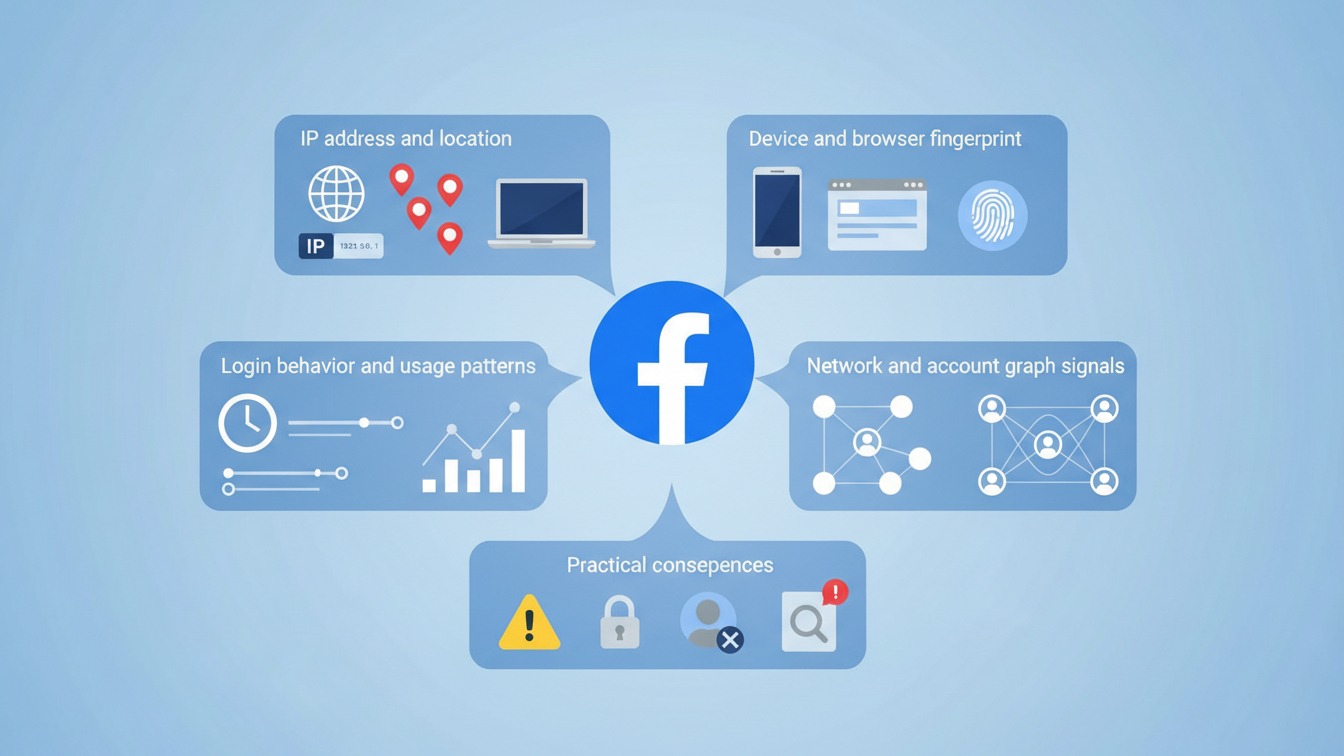
To understand discussions around How to create multiple Facebook accounts, it is important to know how Facebook evaluates whether accounts are truly independent. Facebook does not rely on a single signal. Instead, it combines multiple technical and behavioral indicators to assess account relationships.
4.1. IP address and location
One of the most basic signals is IP and geographic location. When multiple accounts are consistently accessed from the same IP address or a very limited set of locations, Facebook may interpret this as a shared control point rather than separate individuals.
4.2. Device and browser fingerprint
Facebook also analyzes device and browser fingerprints. Hardware characteristics, browser configuration, installed fonts, system settings, and environmental signals help determine whether multiple accounts are being accessed from the same technical setup. Even when login credentials differ, identical environments can create strong linking signals.
4.4. Login behavior and usage patterns
Behavior plays a critical role. Login timing, frequency, session length, and interaction patterns can indicate whether accounts are operated by one entity. Repeated similarities in how accounts are used often strengthen Facebook’s confidence that they are related.
4.5. Network and account graph signals
Facebook evaluates connections between accounts as well. Shared friends, Pages, groups, coordinated actions, or repeated overlaps in interactions contribute to what is known as the account graph. These relationships can reinforce other technical signals.
4.6. Signal combination, not single triggers
Individually, none of these signals is always decisive. However, when combined, they form a technical and behavioral profile that Facebook uses to judge whether accounts are independent or linked.
4.7. Practical consequences
When accounts are determined to be connected, the outcomes can include:
- Accounts being checkpointed or disabled
- Loss of data, Pages, or ad accounts
- Damage to business assets linked to the accounts
In practice, logging into multiple accounts from the same device or environment increases the chance that accounts become “linked.” If one account is restricted or disabled, others associated with it may be affected as well.
This detection logic explains why independence, not just account creation is central to any serious discussion of how to create multiple Facebook accounts.
>>> Avoid account banned on platforms like Facebook Business
5. How to create multiple Facebook accounts with antidetect browser Hidemyacc
In discussions around How to create multiple Facebook accounts, antidetect browsers are often mentioned as an infrastructure-level solution rather than a simple tool for account creation. Their role is tied to environment separation, not to bypassing policy through shortcuts.
5.1. The role of an antidetect browser
An antidetect browser, specially Hidemyacc, is designed to create multiple isolated browser environments. Each environment functions as a separate setup, helping accounts operate independently instead of appearing as if they are accessed from the same device or system.
From a conceptual perspective, the value of an antidetect browser lies in:
- Environment isolation rather than shared access
- Consistency within each account’s operating context
- Reducing unintended technical overlap between accounts
This is why antidetect browsers are commonly referenced in conversations about How to create multiple Facebook accounts, the focus is on separation, not speed.
5.2. Step by step to create multiple Facebook accounts using Hidemyacc
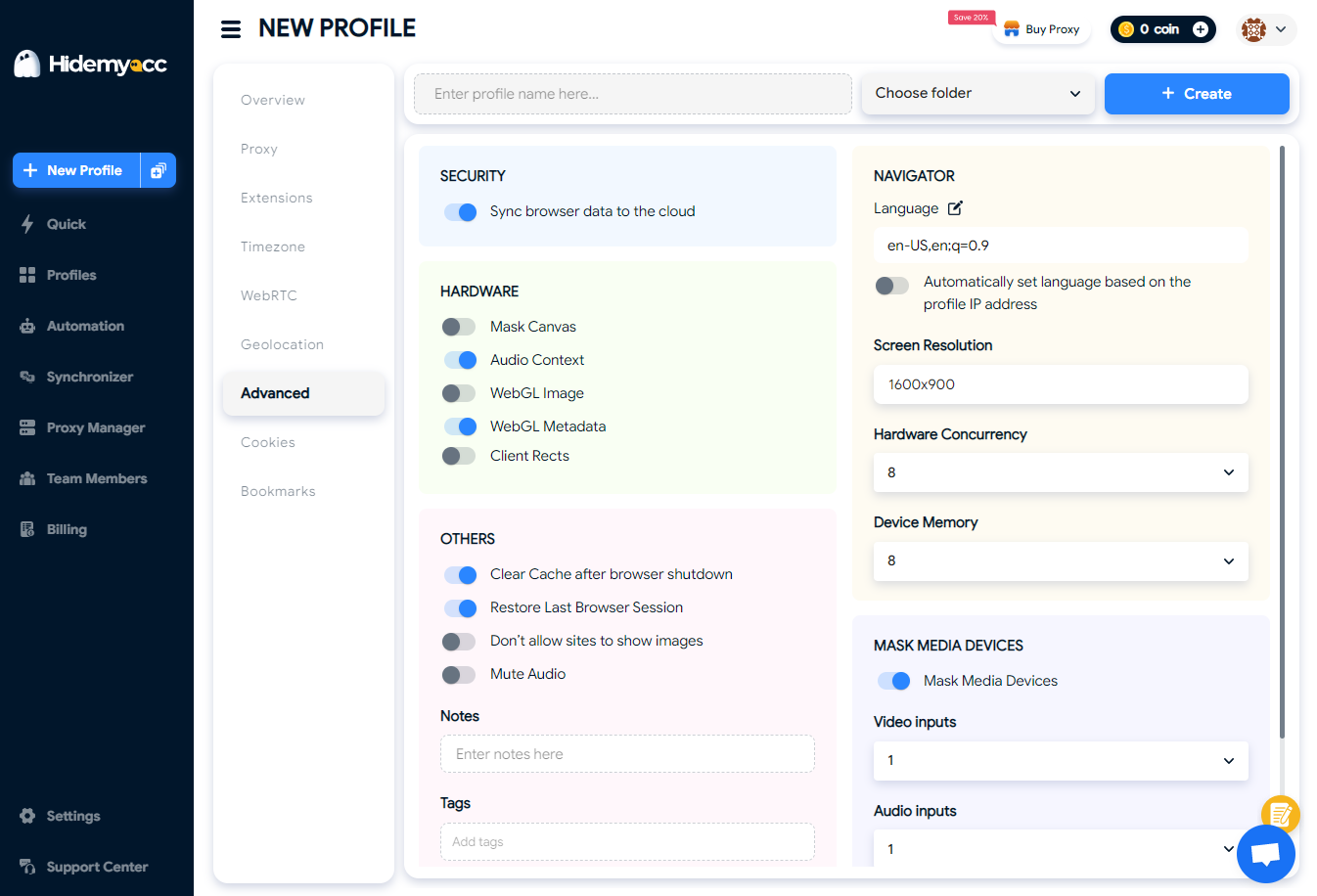
Step 1: Create a new browser profile in Hidemyacc
The process starts by creating a new, empty browser profile in Hidemyacc. This profile represents a standalone browsing environment that will later be permanently associated with one Facebook account.
At this stage, the profile is treated as a blank workspace, no prior logins, no browsing history, and no shared sessions with other profiles.
- Select "Create profile" on the main interface, then set up the browser parameters.
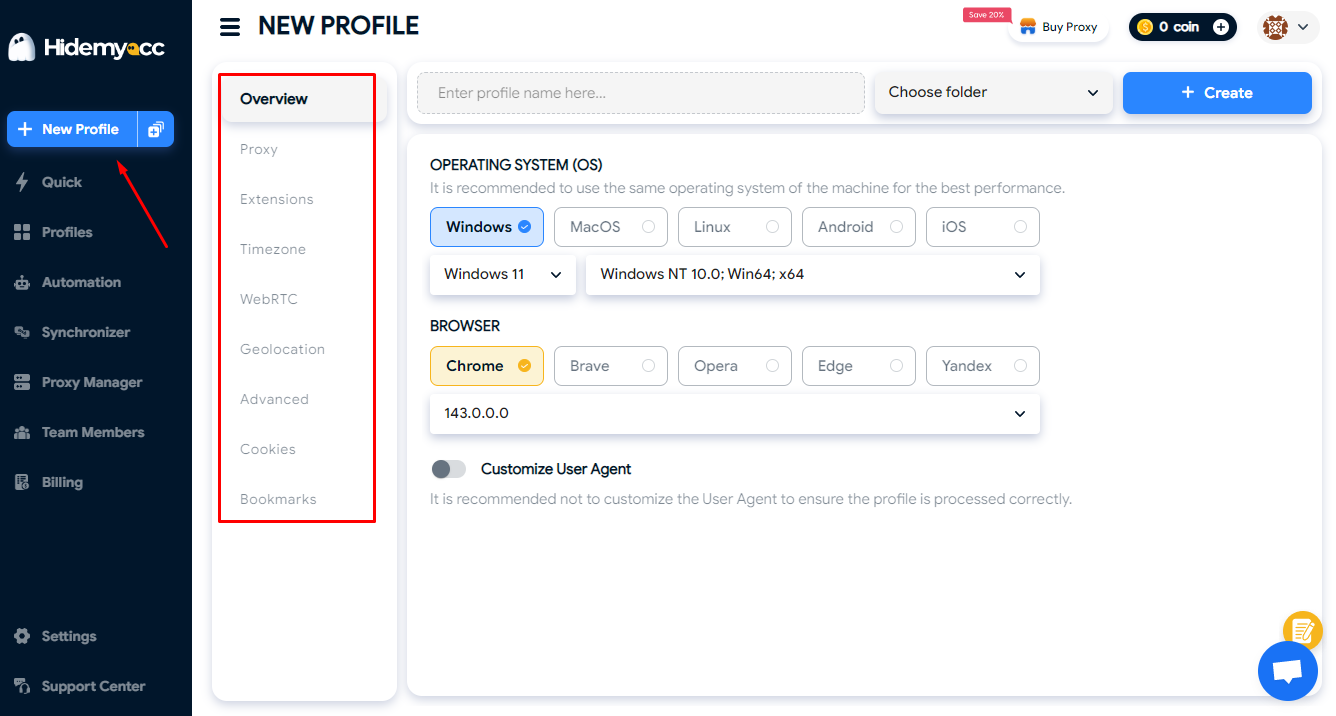
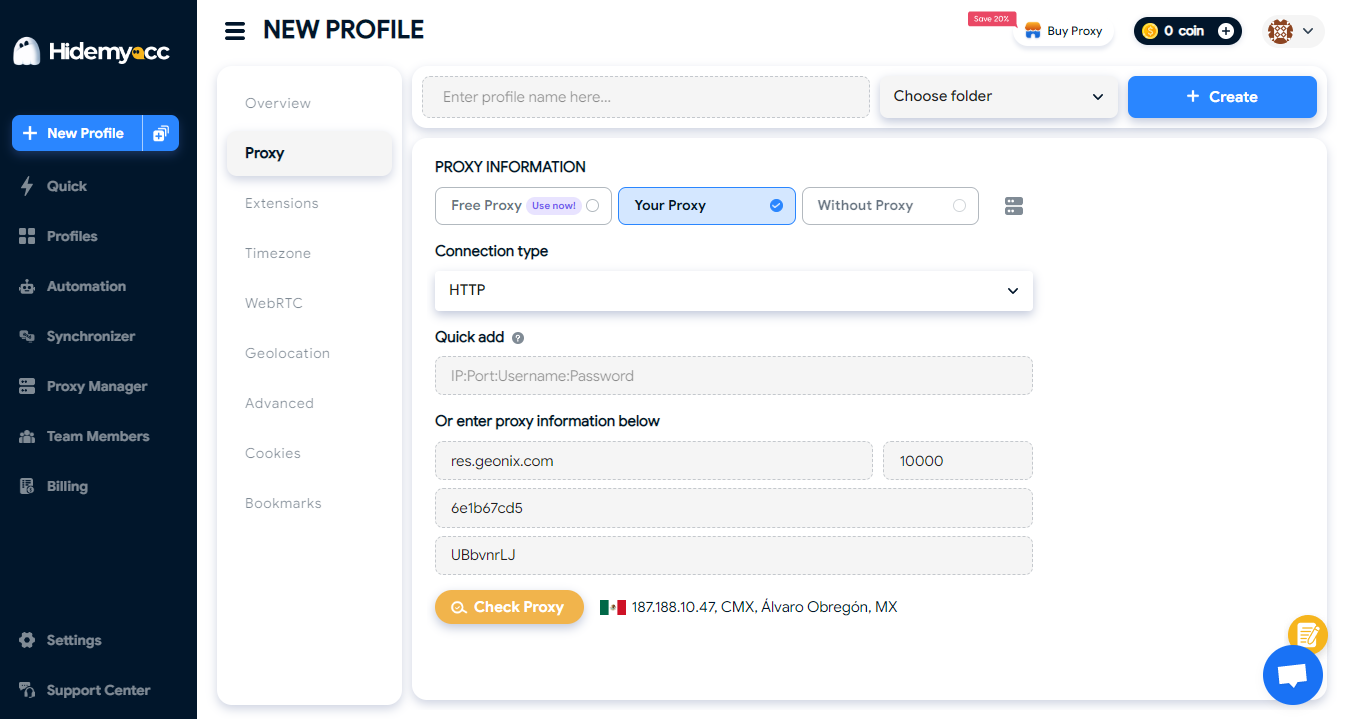
- In the proxy section, each account has a different IP address. You can use a static proxy for each profile or a rotating proxy for 4 to 6 accounts. You can use either a datacenter proxy or a residential proxy. Make sure you enter the correct proxy format in each field.
- Advanced setup options can be customized or based on the system's default settings.
Step 2: Assign one profile to one Facebook account
Before any Facebook activity takes place, a simple rule is established: one Hidemyacc profile equals one Facebook account.
This rule is critical for maintaining separation over time. Profiles are not reused, and Facebook accounts are not accessed outside their assigned environment.
Step 3: Open the profile and access Facebook
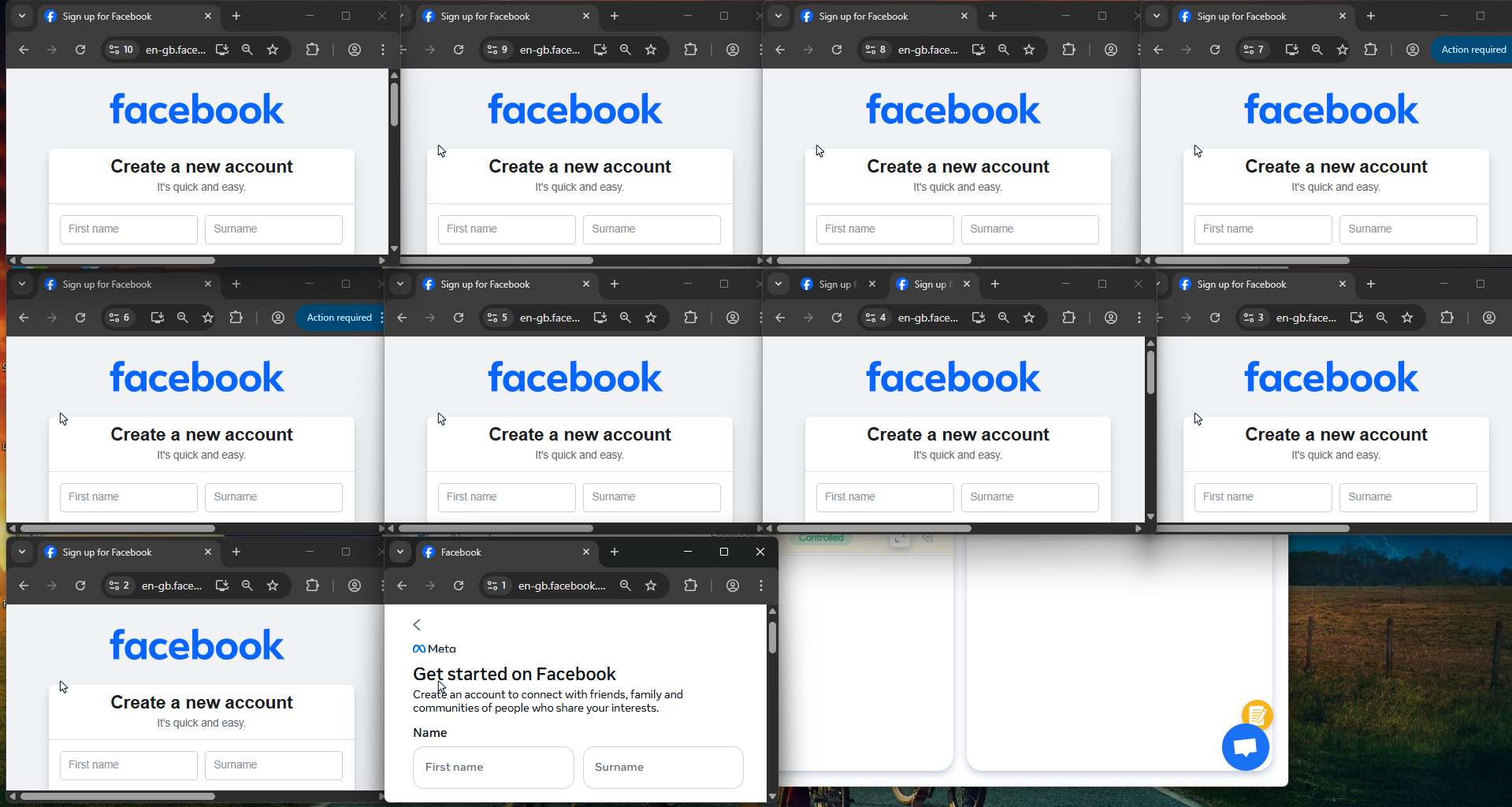
Once the profile is ready, it is opened as a normal browser session. From Facebook’s perspective, this looks like a new user accessing the platform from a distinct environment.
At this point, the profile becomes the only location from which the Facebook account will be created and later accessed.
Step 4: Create the Facebook account inside the profile
The Facebook account is then created entirely within that Hidemyacc profile. From creation onward, all interactions with this account login, browsing, posting remain confined to the same environment.
Step 5: Maintain long-term consistency
After creation, the focus shifts from setup to consistency. Each Facebook account continues to operate only inside its original Hidemyacc profile, without cross-login or shared usage.
5.3. Warming up multiple Facebook accounts
The real challenge with How to create multiple Facebook accounts begins after the account exists during the warm-up phase.
New Facebook accounts are naturally sensitive. If activity looks rushed or unnatural, restrictions tend to appear quickly. That’s why I treat warm-up as a process of building normality, not performance.
Start slow and behave like a real user
In the early days, I avoid doing anything that feels goal-driven. The account is used the way a normal person would:
- Browsing the feed
- Watching a few videos
- Clicking on posts without interacting too much
The idea is to let the account “exist” before expecting it to do anything useful.
Gradual interaction over time
Instead of jumping into posting or managing assets, interactions increase slowly. Likes, follows, and basic profile actions happen naturally, spaced out over time. Consistency matters more than volume.
This is where many people misunderstand How to create multiple Facebook accounts: stability is built through patterns, not speed.
Why automation helps during warm-up
Managing multiple new accounts manually can become time-consuming. This is where Hidemyacc’s Facebook automation features are helpful, not to accelerate actions, but to maintain regular, lightweight activity without constant manual effort.
Automation, when used carefully, helps:
- Keep activity consistent
- Reduce repetitive manual work
- Save time during the warm-up period
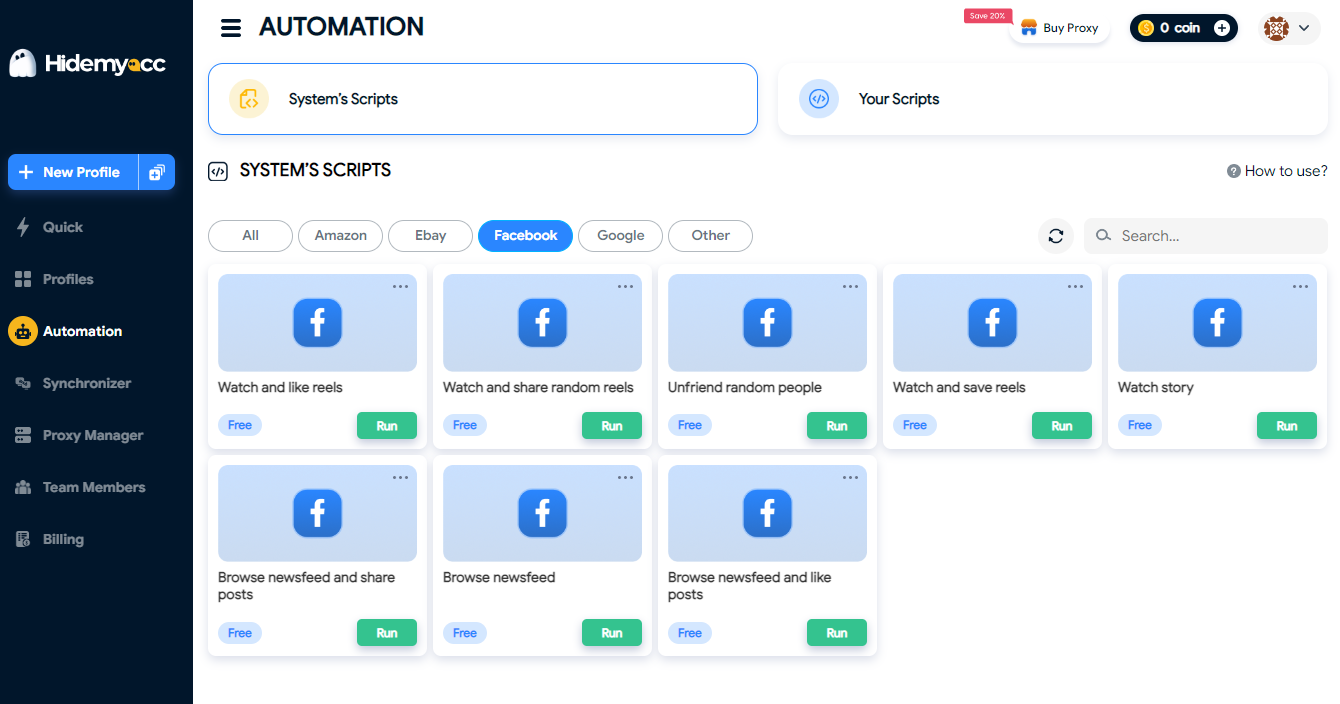
The goal is not to push accounts faster, but to avoid gaps or unnatural bursts caused by human inconsistency.
Think long-term, not short-term
From a user’s point of view, warm-up is about patience. Accounts that are treated as long-term assets tend to be more stable than those created for immediate use.
A smarter way to manage multiple Facebook accounts
Manage multiple Facebook accounts in isolated browser profiles while keeping operations stable and organized. Get 10% off your first payment today.
Claim Your 10% Off6. Best practices for managing multiple Facebook accounts
When working with multiple accounts, long-term stability matters more than short-term efficiency. In the context of How to create multiple Facebook accounts, best practices are less about speed and more about discipline, consistency, and risk control.
Treat accounts as long-term assets
Each Facebook account should be managed as if it is meant to last. Sudden changes in behavior, frequent switching, or aggressive activity often lead to problems. Accounts that follow predictable, steady usage patterns tend to remain stable longer.
Maintain strict separation
One of the most important principles is clear separation:
- One account per environment
- One environment per account
- No cross-login or shared usage
Blurring these boundaries increases the chance that accounts become linked, which can cause chain reactions if one account is restricted.
Be consistent with behavior
Facebook pays close attention to patterns. Logging in sporadically, changing usage styles frequently, or acting inconsistently can raise flags. Regular, moderate activity is safer than bursts of intense action followed by inactivity.
Scale operations, not identities
Instead of creating more personal accounts, scale through:
- Pages
- Business Manager
- Ad accounts and role-based access
This aligns better with Facebook’s ecosystem and reduces dependency on personal accounts. Many issues around How to create multiple Facebook accounts come from using accounts as operational tools rather than access points.
Monitor risk and adjust early
When managing multiple accounts, early signals matter. Temporary restrictions, feature limits, or unusual prompts often indicate increased scrutiny. Adjusting behavior early can prevent larger losses later.
Ultimately, best practices focus on control and sustainability. Managing multiple accounts is not just about having more access, it’s about protecting the assets connected to that access over time.
Facebook is just the beginning. Learn how people manage multiple accounts on different platforms without running into bans.
- Manage Multiple Social Media Accounts Efficiently - Tips Inside
- How to run multiple Telegram accounts on one device without bans?
- How to use multiple WhatsApp accounts on one device?
- Create Multiple X Accounts Without Getting Banned - Step-by-Step
- How to run multiple Instagram accounts without getting banned
- Multiple TikTok Accounts: Best Practices to Avoid Shadowbans
- Multiple LinkedIn accounts - How to create and manage them effectively?
- Multiple Reddit accounts - How to create and manage them safely (Step-by-step guides)
- How to Safely Run Multiple Discord Accounts Without Bans?
- Can you have multiple Bluesky accounts? Bulk create tips
- Can you have multiple OnlyFans accounts without risk?
- Can you have multiple Snapchat accounts without getting banned?
7. Conclusion
The topic How to create multiple Facebook accounts goes far beyond simply registering additional accounts. Facebook is built around identity consistency, and the platform evaluates accounts based on technical signals, behavior, and long-term patterns, not just login credentials.
Tools like Hidemyacc play a supporting role in this process by helping users establish isolated, consistent browser environments. Used correctly, an antidetect browser does not replace strategy or patience, but it provides the infrastructure needed to keep accounts separated and manageable over time.
Still, no tool can compensate for poor habits. Accounts that are rushed, mismanaged, or treated as disposable tend to fail regardless of setup. Warm-up processes, consistent behavior, and careful asset management remain essential.
Ultimately, success with How to create multiple Facebook accounts comes from combining the right operational framework with patience and discipline. The focus should always be on sustainability, not shortcuts.
8. FAQ
Can you have multiple Facebook accounts?
Yes, in practice it is possible if each account operates independently and is not linked, though it is restricted by Facebook policy.
Is it legal to create multiple Facebook accounts?
Creating multiple personal Facebook accounts is not illegal, but it violates Facebook’s Terms of Service.
Why does Facebook ban multiple accounts?
Facebook bans multiple accounts to prevent fake identities, spam, abuse, and manipulation of its platform.
How does Facebook detect multiple accounts?
Facebook combines IP, device and browser fingerprints, login behavior, and network connections to link accounts.
Can Facebook detect multiple accounts on the same device?
Yes, logging into multiple accounts on the same device increases the chance they will be linked.
Is it safe to manage multiple Facebook accounts?
Managing multiple accounts carries risk, and safety depends on separation, consistency, and long-term behavior.
What happens if Facebook links multiple accounts?
If accounts are linked, Facebook may restrict or disable them together, including related assets.
How many Facebook accounts can one person have?
Officially, one person is allowed only one personal Facebook account.
What is the difference between Facebook account, profile, and page?
A personal account represents a person, profiles are sub-identities within Meta, and Pages represent businesses or communities.
Do I need multiple Facebook accounts for marketing?
In most cases, marketing can be done using Pages and Business Manager without multiple personal accounts.
Can I use one IP for multiple Facebook accounts?
Using one IP for multiple accounts increases the likelihood that Facebook will link them.
What is the safest way to manage multiple Facebook accounts?
The safest approach is strict environment separation, consistent behavior, and using official tools where possible.
Do antidetect browsers help with multiple Facebook accounts?
Antidetect browsers help by isolating browser environments and reducing technical overlap between accounts.
How to warm up a new Facebook account?
New accounts should start with slow, natural activity and gradually increase interactions over time.
Can multiple Facebook accounts be linked and banned together?
Yes, once accounts are linked, restrictions or bans often apply to all connected accounts.






