
"Port" is a familiar term in the field of computer networks, appearing in both hardware and software. Port plays an important role in connecting and transmitting data between devices or in network communication. So what is a Port ? What is its function and how is it classified? Let's find out the details with Antidetect Browser Hidemyacc in the article below!
1. What is Port?
In the field of information technology, "Port" is a term for a connection port that helps devices or software communicate with each other. Ports can exist as physical ports on devices or software ports to transfer data over a network.
Below are some applications of Port in technology:
- Physical port: A connection port on a device, such as USB, HDMI, Ethernet, that helps transfer data or connect to other devices.
- Software Port: Used in networking to identify services, such as port 80 for web (HTTP), port 25 for email (SMTP).
- Software Porting: Refers to the process of converting software from one operating system or platform to another environment.
For example, when you connect a portable hard drive via USB, the port acts as a physical port, allowing data to be transferred between the computer and the hard drive. Similarly, when you visit a website, the browser uses port 80 or 443 to connect to the web server.
2. Basic functions of Port
Each type of port has its own functions, helping to optimize performance and ensure security when transmitting information. Below are the basic functions of ports that you need to know.
2.1. Information selection and transmission
Although not directly performing news filtering, Port plays an important role in the process of transmitting data between devices and networks, helping to connect information faster and more conveniently.
News curation often relies on specialized tools and software such as filters, search engines, or content management systems. Once processed, this data needs to be delivered to users – this is where Ports come into play.
Ports help control the flow of data into a device, ensuring that only appropriate files are allowed to be transmitted. If the data does not match the specified port, the device will deny access, helping to protect the system from unsafe sources. Thanks to that, Ports not only support transmission but also play an important role in information security.
2.2. Identify files and data
When registering a port on the device, the system will automatically identify and route the file or data to the correct port, ensuring an exact match with the file's bits, making the transmission process smooth and efficient.
2.3. Prevent harmful intrusions
Although Ports do not have the ability to directly prevent intrusions, Port management plays an important role in system security. Opening uncontrolled Ports can create vulnerabilities, making it easy for hackers or malware to penetrate.
To minimize risks, users need to regularly check and update security configurations, and use solutions such as firewalls, anti-virus software, intrusion detection systems (IDS) and network security defense systems (IPS).
In addition, Port acts as a data filter, helping to check, detect and remove malicious files before they enter the system. This is considered the first layer of control, helping to protect the device from cyber security threats.
2.4. Some other functions
Port not only plays the role of connecting devices but also supports many important functions in the process of transmitting data and signals. Below are some other functions of Port:
- Physical connection: Helps link devices together, such as a USB port that connects to a mouse, keyboard, printer, or external hard drive.
- Data transfer: Allows data exchange between devices, typically an Ethernet port in a LAN or a USB port between a computer and a peripheral device.
- Charging and power supply: Some ports, such as USB or phone charging ports, are used to power devices.
- Network Connectivity: Ethernet port supports internet connection and access to network resources.
- Audio & Video Interface: HDMI port, audio port helps transmit signals from computer to monitor, speaker or other entertainment device.
>>>> SEE MORE: What is Gateway? Functions and operation
3. Popular Port types today
Nowadays, there are many different types of Ports, serving purposes such as connecting devices, transferring data, charging batteries and connecting to the network. Below are the most common types of Ports that you often encounter in technology devices.
3.1. Classification according to specific functions
Ports are classified according to specific functions, helping devices communicate effectively with each other. Below are some common types of Ports classified by function:
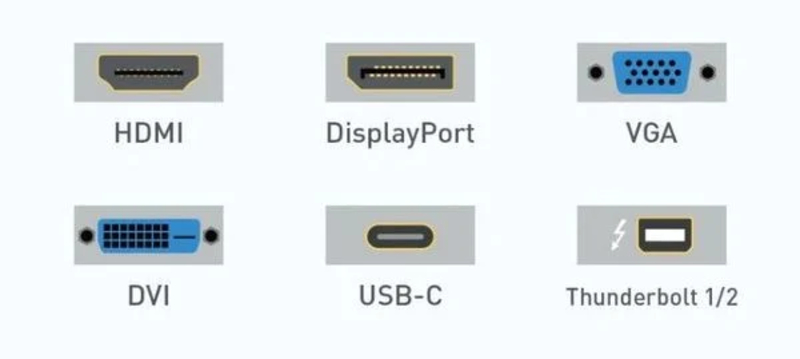
- USB (Universal Serial Bus): Multi-purpose port used to connect peripheral devices such as mouse, keyboard, portable drive, printer...
- Ethernet: Connect your computer to a LAN or the Internet via a network cable, ensuring stable transmission speeds.
- HDMI (High-Definition Multimedia Interface): Transmits high-quality audio and video between a device and a display, speakers, or entertainment system.
- Thunderbolt: High-speed data port, supports connecting displays, external hard drives and many other devices.
- DisplayPort: Specialized in outputting images and sound, popular on computer monitors and specialized devices.
- Audio Jack: Connect headphones, speakers, microphones and other audio devices.
3.2. Classification by version
Each Port plays a certain role in data transmission and connection between devices. Below are some common Ports classified by version:
- Port 20 (TCP) : FTP data transmission, supports file upload and download.
- Port 21 (TCP) : Controls FTP connections, helps manage the transmission process.
- Port 22 (TCP/UDP) : Supports SSH connection, ensuring secure remote server access.
- Port 23 (TCP) : Used for Telnet, supports remote connections but has little security.
- Port 25 (TCP) : Send email via SMTP protocol.
- Port 80 (TCP) : Access website via HTTP protocol.
- Port 119 (TCP/UDP) : Connect to online news service via NNTP.
- Port 143 (TCP/UDP) : Supports remote email access via IMAP.
- Port 161 (TCP/UDP) : Monitor and manage network devices with SNMP.
4. Factors affecting Port registration
Port registration is not simply a matter of choosing a number, but is influenced by many important factors. Below are some important factors to consider when registering a Port.
4.1. Hard drive specifications
Hard drive specifications directly affect the choice of Port. The type and number of ports required will depend on the hard drive configuration of the machine. Therefore, research carefully or seek advice to ensure proper connection.
4.2. Storage and file capacity
Each Port is designed to accommodate different data types, file sizes, and formats. So, when registering a Port, you need to consider two main factors:
- File types that the computer supports.
- System storage capacity
>>>> LEARN MORE: What is Port 443? Learn about the functions and how to use Port 443
5. How to check Port number on Windows
Checking port numbers on Windows helps you manage network connections and troubleshoot problems easily. Here's how to do a quick Port number check:
- Open the Run dialog box with Windows + R or search on the Search bar.
- Type cmd then press Enter to open the Command Prompt window.
- Type ipconfig and press Enter to view network information.
- Continue typing netstat to display a list of active ports.
6. FAQ
6.1. What is Port 8080?
Port 8080 is a network port commonly used for the HTTP protocol, acting as an alternative to port 80. Port 8080 is popular in the following cases: Run the web service instead. Website development and testing. Deploy internal services.
6.2. What is IP port?
IP Port is a combination of IP address and port number, which helps to identify a connection point on the network. If the IP address is like the home address of the device, then the port number is like the room number, specifying the specific application or service that is running. Thanks to IP Port, data is transmitted to the right place, the right destination in the network system.
6.3. What is a network port?
A network port is a logical connection point on a network device that allows data to be transferred between devices. Each port is identified by a unique number from 0 to 65,535, which helps route information correctly within the network system.
6.4. What is Port 80?
Port 80 is the default network port for the HTTP protocol, which allows browsers and web servers to transfer data such as text, images, and HTML code. This is an important port that helps display the websites you visit every day.
Read more:
- Internet infrastructure: What it is and why it matters
- VPS Hosting Explained: What it is and how it works
- What is WebRTC? How browsers handle real-time communication
- Understanding DNS: Types, Security, and How to Prevent DNS Leaks






