



WebRTC leak is a browser vulnerability that causes your real IP to be exposed even when you are using a VPN or Proxy. Many people believe that simply turning on a VPN is enough to remain anonymous, but the WebRTC mechanism can bypass that layer of protection. This is particularly risky when conducting crypto transactions, managing multiple accounts, or accessing region-restricted content. This article analyzes the leakage mechanism and guides you on how to check and block WebRTC leak effectively.
1. What is WebRTC and Why does it leak?

There is some confusion between WebRTC and DNS; WebRTC is a technology built into browsers that allows for video calls, audio transmission, and real-time data sharing, while DNS is a domain name management and resolution system that helps identify the IP addresses corresponding to websites or resources. Both belong to general internet infrastructure.
The problem lies in how WebRTC establishes a direct connection between two devices. To create a stable connection, the browser must collect available IP addresses on the system.
1.1. Direct peer-to-peer connection
WebRTC is designed to establish peer-to-peer connections between two devices. Data does not pass through an intermediate server but is transmitted directly from one point to another.
To establish a connection, the browser must collect and publicize the available IP addresses on the device, including local IPs within the LAN and public IPs from the service provider. This collection process happens automatically as soon as a website activates WebRTC functionality.
If there is no proper blocking mechanism, real IP information can be revealed, creating a WebRTC leak even when a VPN or Proxy is on.
1.2. The role of the ICE protocol
WebRTC uses ICE (Interactive Connectivity Establishment) to find the optimal connection path between two devices. When activated, ICE scans all network interfaces on the system, including WiFi, Ethernet, and even physical connections from the modem.
During this process, the browser records many different types of IP addresses, including internal IPs and public IPs. If not properly restricted, these addresses can be accessed by websites through JavaScript. This is the core cause leading to a WebRTC leak even when you are using a VPN or Proxy.
2. WebRTC leaks when using VPN or proxy: What you need to know

Many people believe that simply turning on a VPN or configuring a Proxy is enough to hide their IP. In reality, a WebRTC leak can still occur due to differences in how network traffic is handled.
VPNs and Proxies operate at two different layers of the system. WebRTC, however, interacts directly with the browser's network stack. This overlap creates a vulnerability if not configured correctly.
2.1. When using a VPN
A VPN works by creating an encrypted tunnel between the device and the VPN server. All internet traffic is routed through this server's IP instead of the real IP.
In theory, this tunneling mechanism helps hide the public IP address from websites and online services. However, WebRTC does not always follow the encrypted route. When the browser activates the ICE mechanism, it can directly query physical network cards to find available IP addresses.
If this request goes outside the VPN tunnel, the real IP from the service provider is still exposed. In that case, a WebRTC leak occurs even though the VPN still shows a connected status.
2.2. When using a Proxy
A Proxy operates at the application level and usually only handles TCP (Transmission Control Protocol) traffic such as HTTP or HTTPS. It does not control the entire network stack of the operating system. Meanwhile, WebRTC prioritizes UDP (User Datagram Protocol) to transmit real-time data with low latency. These UDP packets can go directly out through the real network connection without going through the Proxy.
This is a protocol asymmetry. The Proxy protects TCP, while WebRTC uses UDP. Additionally, the Proxy does not interfere with the browser's ICE process. When ICE collects available IP addresses, the real IP can still be returned to the website. Therefore, if you only configure a Proxy without addressing WebRTC, the risk of a WebRTC leak is almost certain to occur.
3. The risks of WebRTC leak
WebRTC leak is not just a small technical error. It directly breaks the anonymity layer that a VPN or Proxy is trying to create.
When the real IP is exposed, all online activities can be linked to your actual identity or location. This is particularly dangerous in environments involving multi-account management or sensitive transactions.
3.1. Loss of anonymity
When a WebRTC leak occurs, a website can collect the real IP address alongside the IP from the VPN or Proxy. This allows the system to cross-reference and determine that you are hiding your identity.
The real IP can be stored along with cookies, browser fingerprints, and access history. When this data is combined, the ability to trace you increases significantly.
In multi-account management environments, just a single WebRTC leak is enough to break the entire previously established anonymity structure.
3.2. Geographic location exposure
WebRTC leak can reveal the actual public IP provided by the network operator. From this IP, a website can easily deduce the country, city, and internet service provider. Even if you have changed your IP to the US or Europe using a VPN, WebRTC can still return an address in Vietnam.
This discrepancy creates an abnormal signal in anti-fraud systems. Platforms can detect that you are using IP-hiding tools. In marketing, affiliate activities, or accessing region-restricted content, a WebRTC leak causes a loss of geographical consistency and reduces account trust.
3.3. Restricted or banned accounts
Many platforms use IP addresses as a key signal in their anti-fraud systems. IPs help them detect links between accounts and assess risk levels. When a WebRTC leak reveals the real IP, the system may recognize that multiple accounts are accessing from the same network source.
And it is especially dangerous for those managing a large number of accounts, doing affiliate work, or running advertisements. Consequences can include feature limitations, security checkpoints, temporary suspensions, or permanent bans. A single WebRTC leak is enough to trigger automated control mechanisms.
3.4. Becoming a target for attacks
A public IP is a direct identifier of a device on the internet. When a WebRTC leak exposes the real IP, you lose the protective layer provided by the VPN or Proxy. Malicious actors can use this IP to perform port scans, identify open services, or exploit network configuration vulnerabilities.
In some cases, the real IP can even become a target for DDoS attacks aimed at disrupting the connection. For professional work environments or internal system management, a WebRTC leak significantly increases the attack surface and overall security risks.
4. How to test for WebRTC leaks
Before fixing it, you need to determine whether a WebRTC leak is currently occurring. The testing process is very simple and only takes a few minutes. You should perform this check every time you switch browsers, change your VPN, or reconfigure your Proxy.
Step 1: Identify your real IP
Turn off the VPN or Proxy.
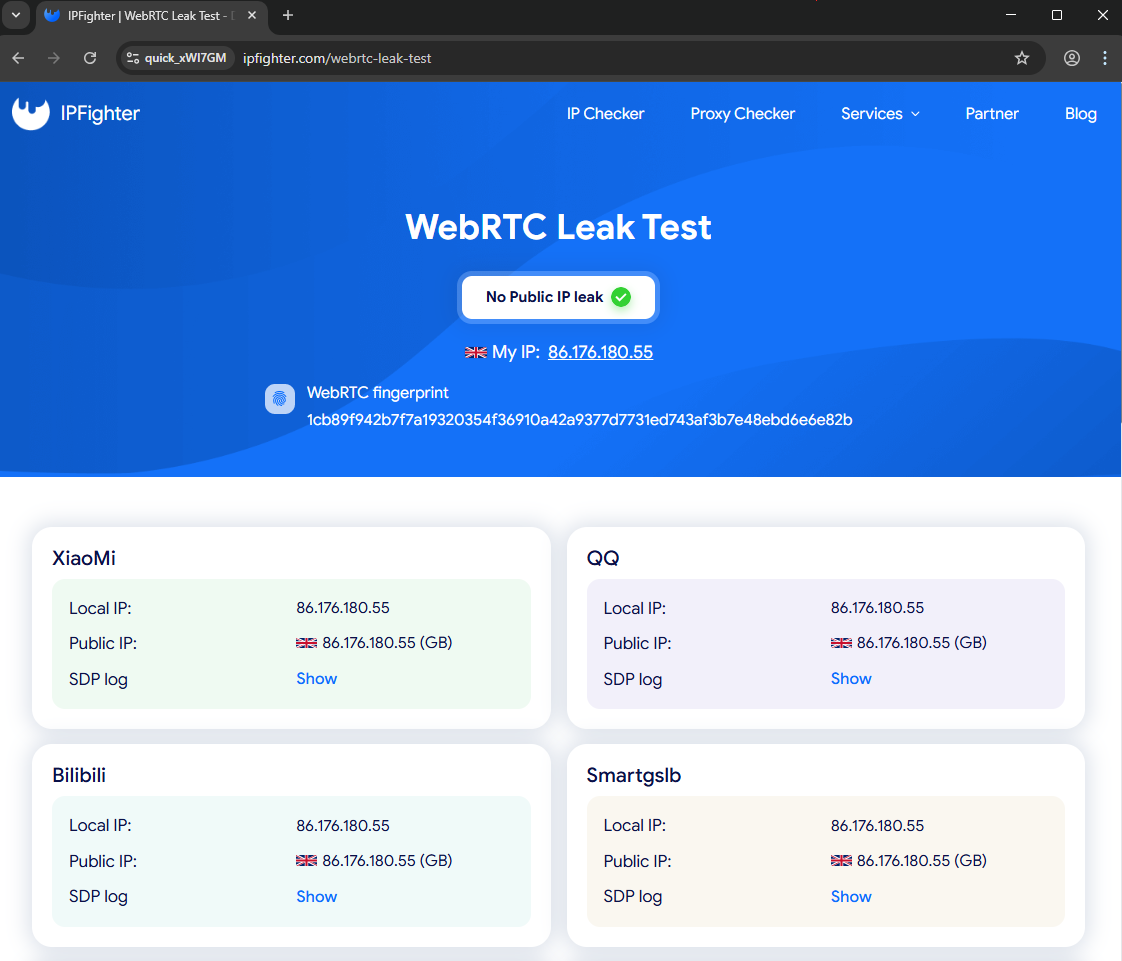
Access testing sites such as IPLeak.net, BrowserLeaks, or IPFighter.
Record the public IP address provided by your network operator. This is your real IP.
Step 2: Check with VPN/Proxy enabled
Turn on the VPN or reconfigure the Proxy as usual.
Access the same testing site again. Observe the Public IP Address section or the section related to WebRTC.
Step 3: Compare results
If the displayed IP still matches the real IP from step 1, you have a WebRTC leak.
If the displayed IP is the VPN/Proxy IP and there is no "Potential Leak" warning, your current configuration is secure. Check back periodically to ensure no WebRTC leak arises when updating your browser or changing networks.
5. How to stop WebRTC leaks?
After identifying a WebRTC leak, you need to choose a handling method suitable for your usage purpose. If you are just doing basic web browsing, disabling WebRTC may be enough. If you work professionally or manage multiple accounts, higher-level configuration is required.
5.1: Manually disable WebRTC
This method is suitable when you do not need video calling or real-time data transmission.
On Mozilla Firefox:
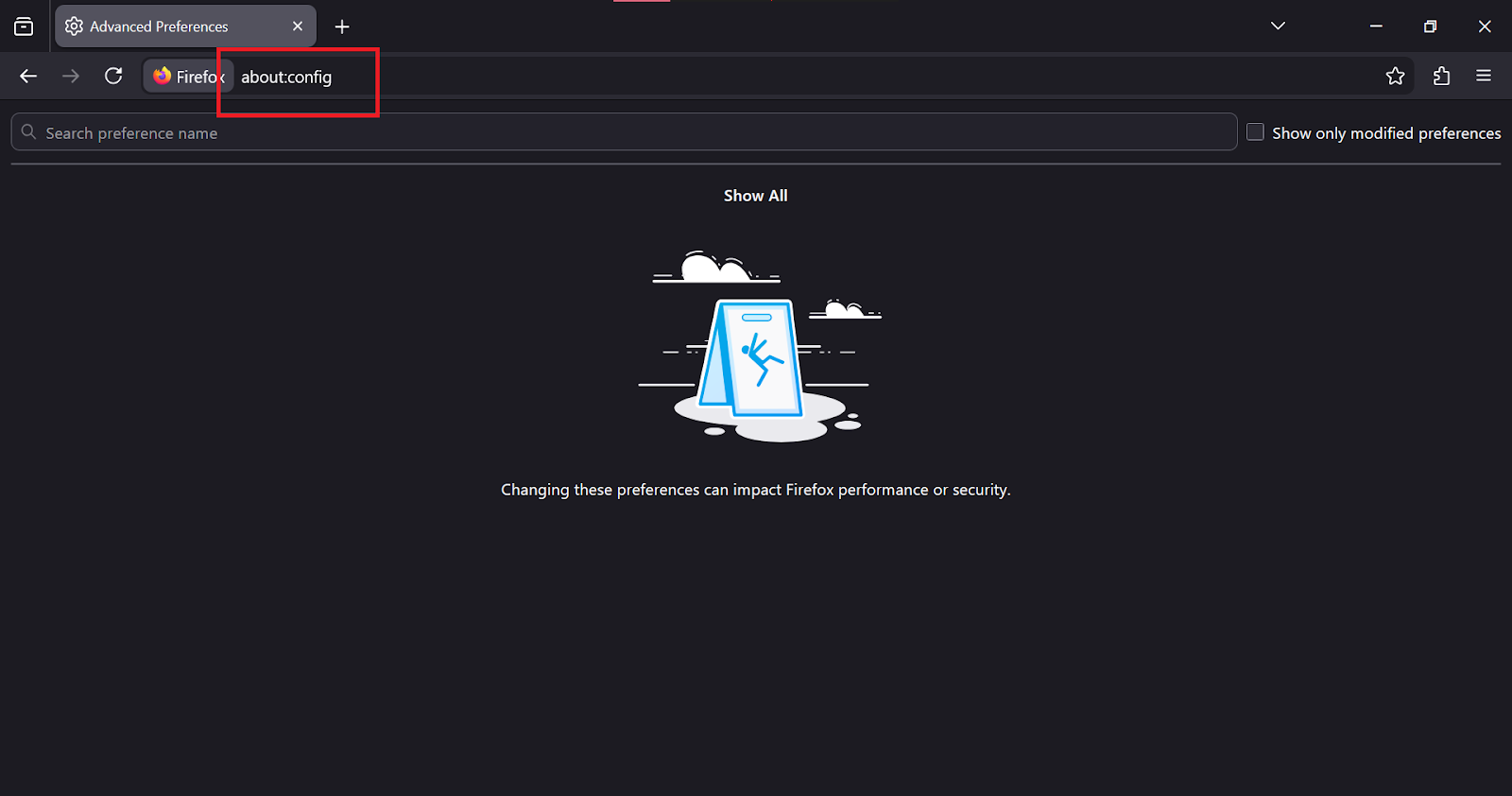
Step 1: Type about:config into the address bar
Step 2: Search for the keyword media.peerconnection.enabled
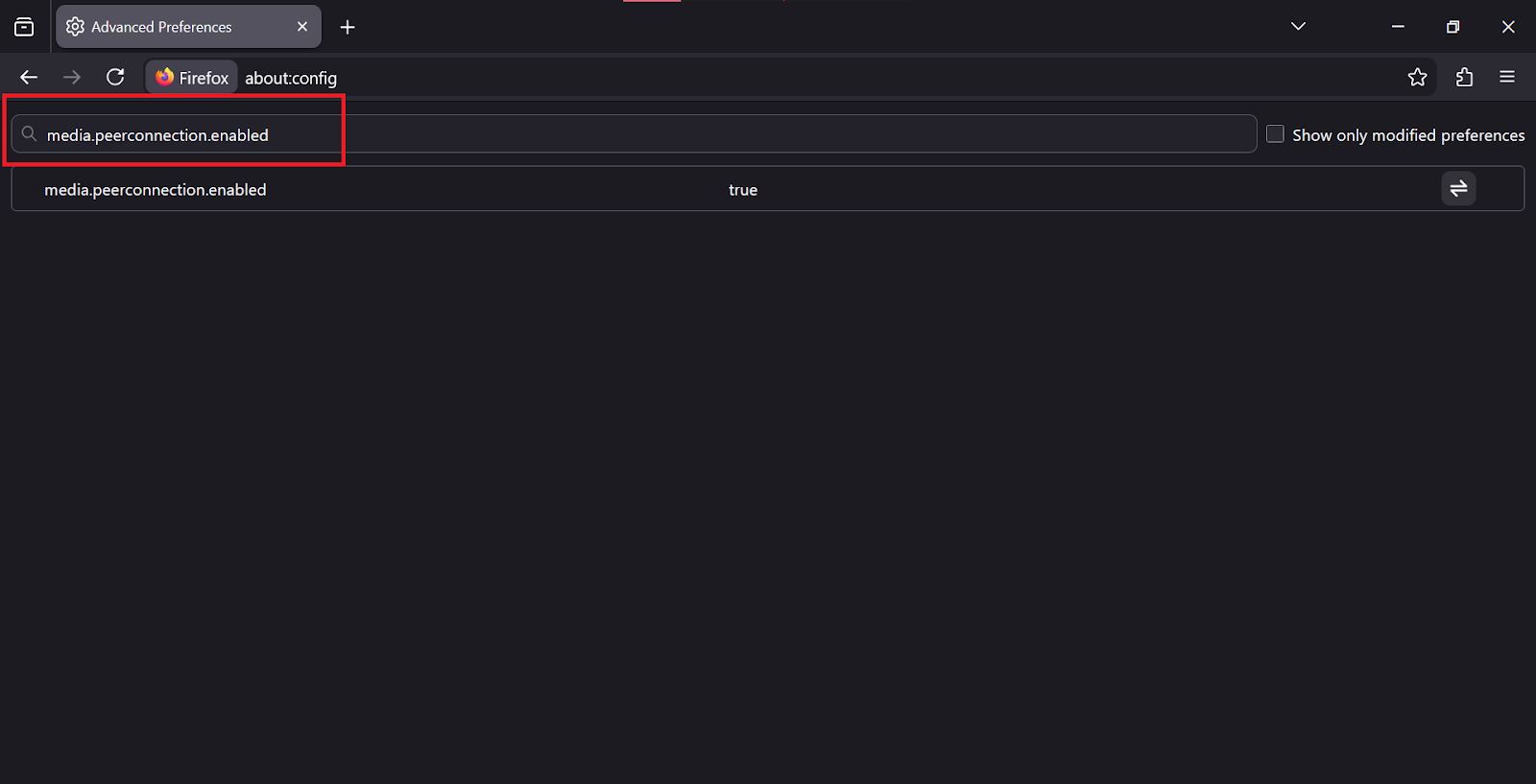
Step 3: Change the value from true to false
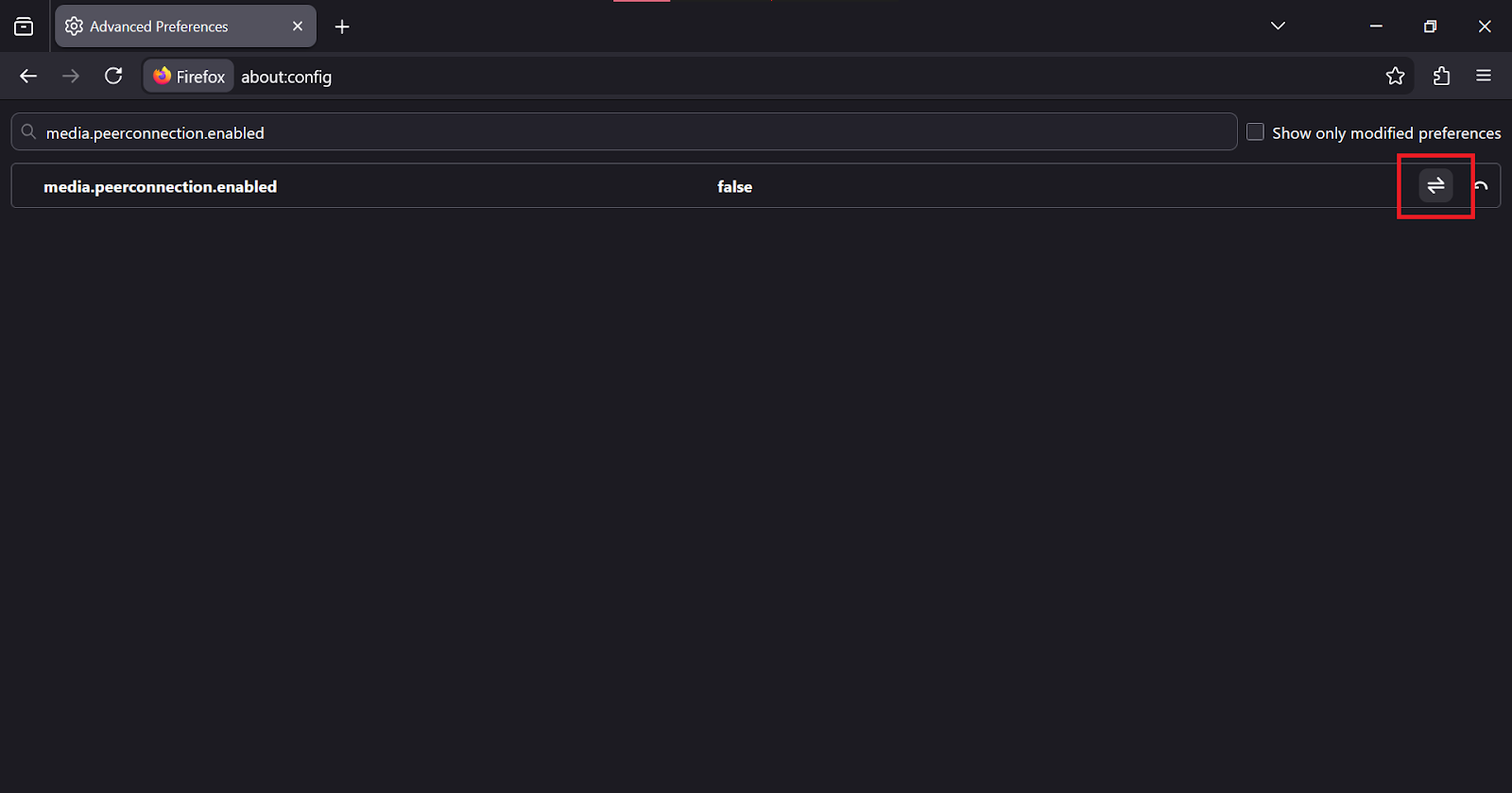
This action will completely disable WebRTC and prevent a WebRTC leak at the browser level.
On Safari:
Step 1: Enable the Develop menu
Step 2: Select Experimental Features
Step 3: Activate WebRTC mDNS ICE candidates
This method limits the exposure of the public IP during the ICE process.
5.2: Use extensions
Some browsers do not allow disabling WebRTC directly in settings. Browsers like Google Chrome, Microsoft Edge, and Brave require the use of extensions.
You can install extensions specifically for blocking WebRTC or use official utilities from VPN providers like NordVPN or ExpressVPN. The extension will interfere with the ICE collection process and mitigate WebRTC leak.
5.3: Choose the right tools
If high security is required, you should use a paid VPN with integrated WebRTC Protection at the system level.
In cases where you use a Proxy to manage multiple accounts, you need to combine it with an antidetect browser like Hidemyacc. This tool allows for WebRTC configuration matching the Proxy IP, preventing the system from returning the real IP.
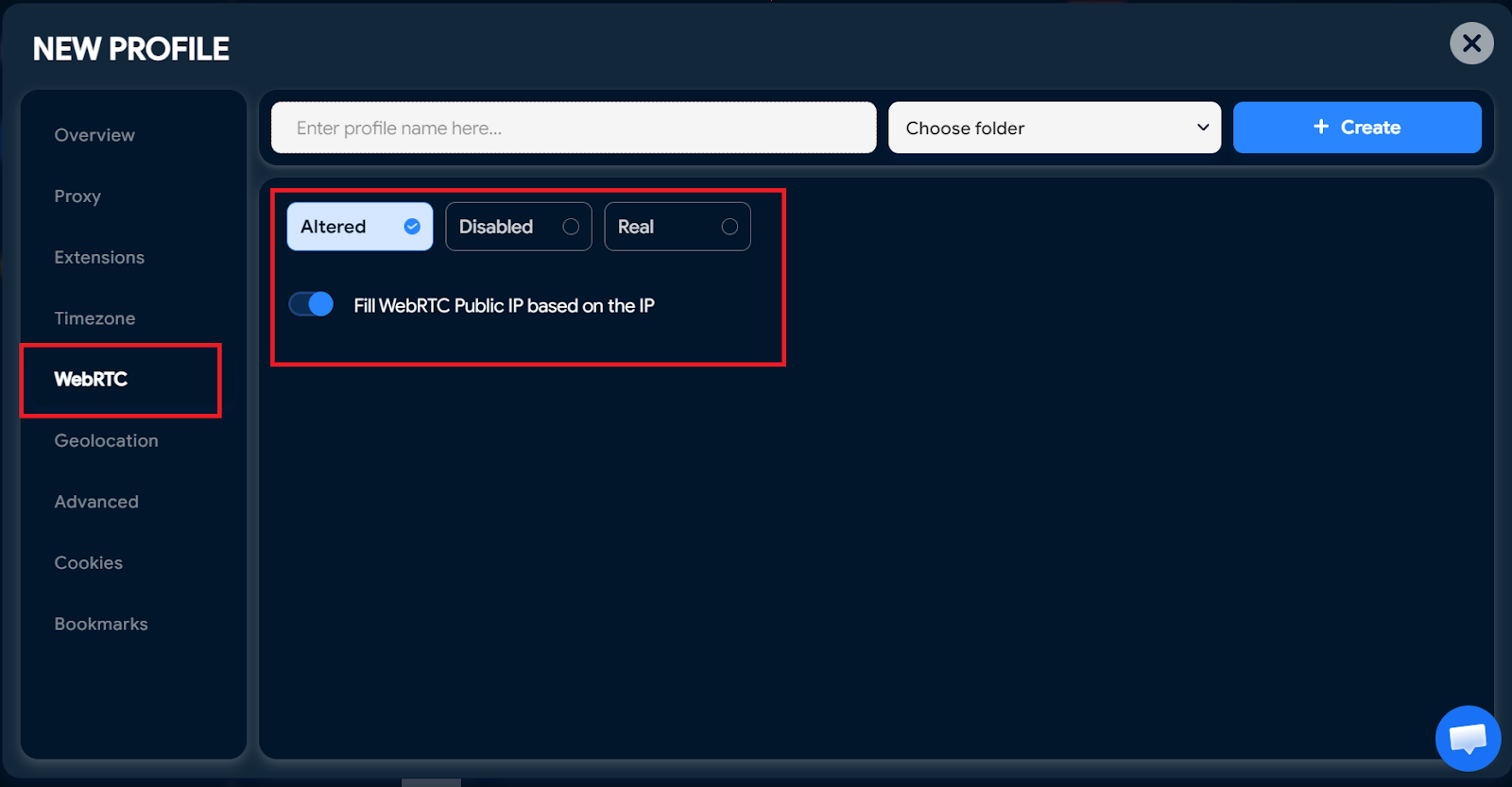
For professional environments, this is a sustainable solution to control WebRTC leak.
6. Conclusion
WebRTC leak is a common but often overlooked vulnerability when using a VPN or Proxy. With just one incorrect configuration, your real IP can be exposed without you even realizing it.
If you are only browsing the web normally, you can disable WebRTC or use an extension to reduce risk. If you work with crypto, affiliate marketing, or manage multiple accounts, a higher-level protection solution is necessary.
Most importantly, perform periodic checks every time you switch browsers, change your VPN, or configure a Proxy. Proactively detecting and handling WebRTC leak is a mandatory step to maintain long-term anonymity and security.
7. FAQ
1. Does incognito mode prevent WebRTC leak?
No. Incognito mode only prevents the browser from saving history, cookies, and form data. It does not change how WebRTC communicates with websites. If the browser still has WebRTC enabled, your real IP can still be exposed through a WebRTC leak even in Incognito.
2. Does disabling WebRTC break the browser?
It does not break core functions like reading news or watching videos. However, features requiring real-time communication will not work. Examples include video calls on Google Meet, Discord, or the web version of Zoom. If your work depends on these services, you should consider this before completely disabling WebRTC.
3. Why doesn't a VPN block WebRTC leak?
Most VPNs create an encrypted tunnel for network traffic. However, WebRTC is a feature at the browser level. If the VPN does not have a specific mechanism to handle WebRTC or if the browser configuration conflicts, ICE requests can bypass the encrypted tunnel. In that case, the real IP is still exposed even though the VPN shows a connected status.
4. Is WebRTC leak dangerous?
The level of danger depends on your usage purpose. For general users, the consequence might only be more accurate ad tracking. But for journalists, crypto traders, or those bypassing censorship, WebRTC leak is a serious risk because it reveals your actual location and identity.
5. How is WebRTC leak different from DNS leak?
There is a clear difference in mechanism. A DNS leak occurs when domain name queries are sent to the ISP's DNS servers instead of the VPN's private DNS. A WebRTC leak occurs when the browser directly provides the IP address to the website to establish a P2P connection. Both weaken privacy, but through two different technical mechanisms.
6. Does WebRTC leak occur on phones?
Yes. Mobile browsers like Google Chrome and Safari both support WebRTC. If the VPN on your iPhone or Android does not have an integrated leak-blocking feature, your real IP can still be exposed just like on a computer. Therefore, WebRTC leak is not just a desktop issue but also affects the mobile environment.






