
Modern websites always need to save data to remember user settings such as language, interface, or shopping carts. In fact, besides Cookies, browsers also use two other storage locations that few people notice: local storage and session storage. Without a clear understanding of the difference between these two, users can easily leave data traces on the browser. This is also one of the factors that many platforms can use to identify access environments or link accounts together.
In the following comparison of local storage and session storage, Hidemyacc will help you understand the differences between these two storage mechanisms and choose the appropriate data storage method.
1. Local storage
1.1. Definition
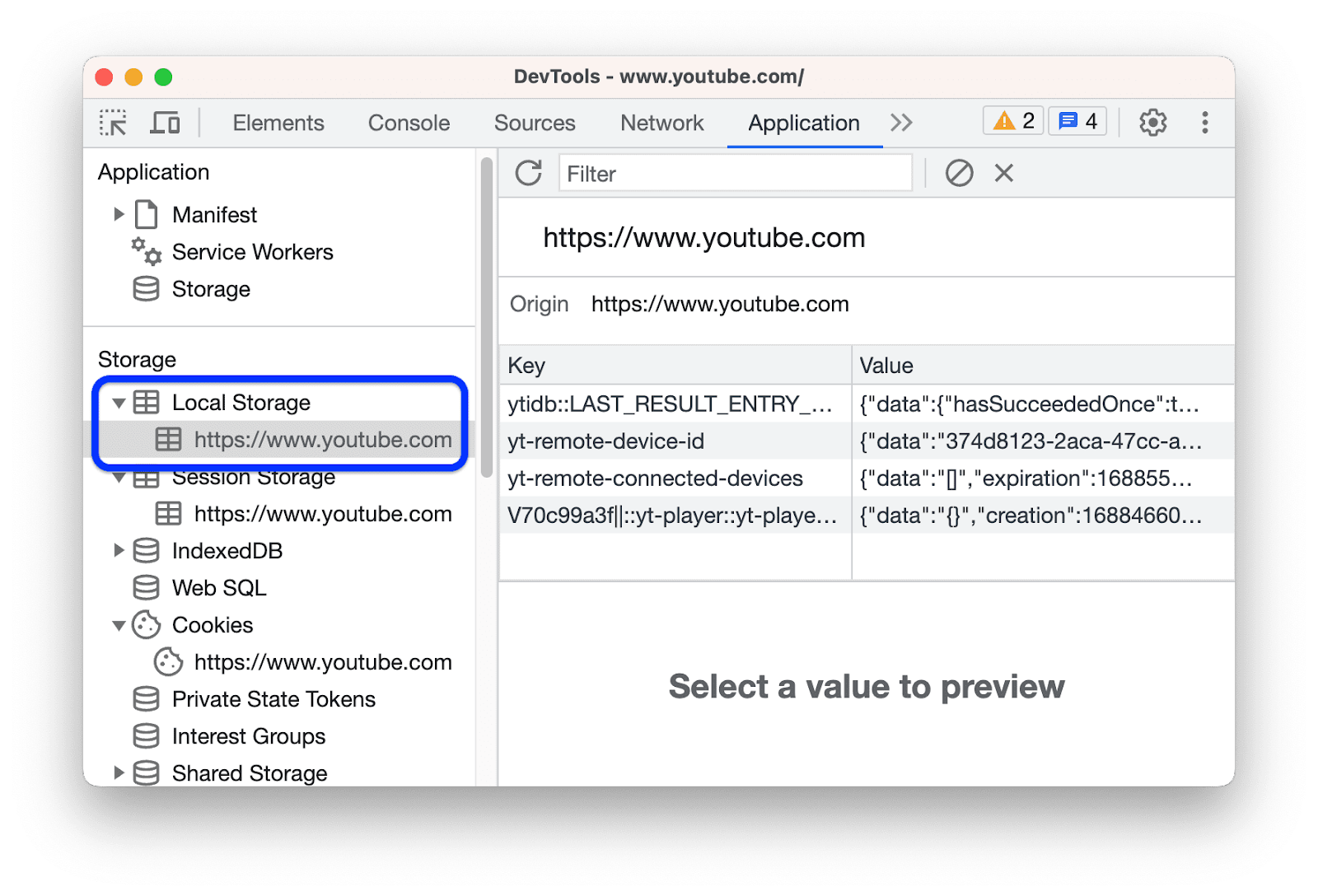
Local storage is a data storage mechanism on the browser that allows information to be saved directly on the user's device as string values. In essence, local storage allows websites to store data almost permanently on the browser; the information is retained even when the user reloads the page or returns after a period of time. Data is only deleted when the user actively clears browser data (cache, site data) or performs actions such as reinstalling the browser.
The most common applications of local storage are saving dark mode interface settings, remembering the display language, or other personalized configurations, helping to maintain a seamless experience for subsequent visits.
In addition to storage mechanisms like local storage or session storage, many websites use browser fingerprinting to identify the access device. You can learn more details in the article What is Browser Fingerprint and how websites identify your device.
1.2. Advantages
The biggest advantage of this mechanism is that the data persists long-term, so when users return to the website, they will still see their old settings preserved. Furthermore, data in Local Storage is very easy to share and synchronize across different tabs, providing great convenience for features like shopping carts, dashboards, or interface changes. Additionally, data remains intact when users reload the page and can still be accessed in future website sessions.
1.3. Disadvantages
However, local storage also comes with some disadvantages. Due to its long-term storage nature, users often forget to clean it up, leading to an accumulation of junk data on the browser over time. More seriously, because the data persists after the user logs out, it can pose significant security risks if the website unintentionally stores sensitive information.
2. Session storage
2.1. Definition
Session storage is a data storage mechanism with a structure similar to local storage, but the key difference is that data only exists during a browser tab session. Specifically, session storage only stores data within the scope of a single browser tab. When the user closes that tab or browser window, all data is automatically deleted. Nonetheless, if the user only reloads the page, the internal data will remain intact.
This mechanism is often used by developers to handle temporary data flows while the user is actively interacting with the website. Typical examples include preserving the input state of a multi-step form, storing temporary data during the checkout process, or retaining information that is only truly necessary for a short-term access session.

2.2. Advantages
The advantage of session storage is the automatic cleanup mechanism upon closing the tab, which keeps the browser environment clean and much safer than long-term storage. Moreover, each tab has a completely independent data store, helping to avoid information conflicts when users open multiple tabs of the same website simultaneously.
This is a perfect solution for temporary data flows, long information forms, or purchasing checkout processes.
2.3. Disadvantages
In return, its disadvantage is that data disappears immediately when the tab is closed. This means users will have to re-enter information from the beginning if they accidentally close the tab before finishing their task. Additionally, session storage cannot share data between tabs and cannot be used to store long-term user settings.
3. Comparing local storage vs session storage
To better understand the differences between these two storage mechanisms, we need to compare local storage and session storage based on how they operate, the scope of storage, and data persistence.
Although both belong to the browser storage group and share many similarities, each is designed to serve different purposes in web applications.
3.1. Similarities
Since both belong to the Web Storage API, a comparison of local storage and session storage shows they have many similarities in data storage and access methods.
- Browser-side storage: Both store data directly on the user's browser (client-side), helping the website retrieve information quickly without sending requests to the server.
- Data structure: Both use the key–value model, where data is stored in string format.
- Capacity: Both mechanisms provide a relatively large storage space compared to Cookies, usually ranging from 5 to 10MB depending on the browser.
- Domain-based management: Data is always isolated and strictly managed by each individual domain. One website cannot access, read, or edit the data of another, thereby ensuring basic security.
- Access tools: Both use the same Web Storage API with similar commands to add, edit, or delete data.
- No effect on page reload: Data in both storage locations is not lost when you press F5 or reload the webpage.
Overall, local storage and session storage share many similarities as they both belong to the Web Storage API and use similar data storage mechanisms in the browser. This allows developers to retrieve and manage data quickly without relying entirely on the server.
3.2. Differences
Despite belonging to the Web Storage API, a comparison of local storage and session storage reveals that these two mechanisms are designed for different use cases. The difference lies primarily in the scope of data activity and how data is maintained in the browser.
The table below helps you easily compare these two types of browser storage.
|
Criteria |
Local Storage |
Session Storage |
|
Storage Duration |
Data is stored long-term and has no default expiration date. Only lost when the user clears the cache or reinstalls the browser. |
Data only exists during a tab session. |
|
Sharing Scope |
Shared between multiple tabs or windows of the same website in the same browser. |
Only exists in the open tab, not shared with other tabs (even of the same website). |
|
Storage Capacity |
Approximately 5–10MB per domain (depending on browser). |
Similar to Local Storage, approximately 5–10MB per domain. |
|
Access Method |
Uses Web Storage API (key–value), only supports string data types. |
Uses Web Storage API (key–value), only supports string data types. |
|
On Page Reload |
Data remains intact. |
Data remains intact when reloading the page. |
|
When Closing Tab or Window |
Data is retained and can be accessed when opening the website next time. |
Data is deleted immediately when the tab or browser window is closed. |
|
Common Purpose |
Saving long-term settings: interface (dark mode), language, login info (if needed). |
Saving temporary data: multi-step form status, temporary shopping cart, session data. |
From the comparison table above, it can be seen that local storage and session storage are designed to serve two different data storage needs in the browser.
- Storage duration: data in local storage is kept long-term on the browser, while session storage only exists during the tab session.
- Operating scope: local storage can share data between multiple tabs of the same website, whereas session storage is limited to the current tab.
Therefore, understanding these two characteristics will help you choose the appropriate type of browser storage for each storage need.
4. Quick guide to choosing between local storage and session storage
After comparing local storage and session storage, the decision on which to use depends largely on how long the data needs to be stored and how that data is used. To make the correct choice, you can answer the following questions:
- Does the data need to be kept after closing the browser or returning to the website?
If the answer is yes, local storage is the right choice. If not, use session storage.
- Does the data need to be shared between multiple tabs of the same website? (e.g., shopping cart, theme, interface settings)
If yes, choose local storage. If not necessary, session storage will be much safer as it helps avoid data leakage between different workflows.
- Is the data only temporary or related to a short process?
Session Storage is usually more suitable because the data will be automatically deleted when the tab is closed. It helps maintain a smooth state throughout the operation and will automatically clean up as soon as the session ends.
- Does the application have multi-step forms or a temporary checkout process?
Session Storage is the optimal choice to save state throughout the process.
In summary: Local Storage is suitable for long-term data storage such as: interface settings (dark mode), website language, personal filters, or some cached data. Meanwhile, session storage is suitable for temporary data, for example: multi-step form status, checkout progress, or information only used in a single session.
Advice: Always prioritize starting with session storage to ensure the browser memory stays light, and only switch to local storage when there is a real need to store information across sessions.
5. Why browser storage matters when using multiple accounts
When using multiple accounts on the same computer, data saved on the browser such as local storage, cookies, or browser fingerprints can be collected by online platforms to identify the access environment.
If you run multiple accounts in a standard browser, a large amount of identifying data can be unintentionally shared across sessions. This can lead platforms to recognize that multiple accounts are being accessed from the same device or browser environment.
Because of this risk, people whose work requires managing a large number of accounts often use antidetect browser tools like Hidemyacc. Specifically, Hidemyacc allows assigning proxies and configuring fingerprints for each profile. System will then identify them as logging in from completely separate devices and IP addresses. Thus, accounts are isolated in their operating environments, minimizing the risk of related bans or mass access blocks when managing multiple accounts on online platforms.
6. Security notes when using Web Storage
The greatest security risk related to Web Storage usually occurs when a website encounters a security vulnerability. If hackers can inject and run malicious JavaScript snippets on the page, they are fully capable of reading and stealing all data stored in these containers. Additionally, various forms of data leakage still exist in the browser environment. For example, vulnerabilities like WebRTC leak can cause the user's real IP address to be exposed even when using a VPN.
Therefore, a key principle is absolutely not to store sensitive data such as login tokens, passwords, or important personal information in local storage or session storage. Protecting this information with more secure methods will help avoid unfortunate data leaks.
Besides, many users also choose private browsers to limit being tracked when accessing the internet. You can find more about Private browsers and how to protect your online privacy.
7. Conclusion
Through a comparison of local storage and session storage, it is clear that both serve as essential data storage mechanisms, helping modern websites operate more smoothly on the browser. While local storage stands out for its ability to maintain personalized information long-term, session storage excels in handling lightweight temporary data. Understanding the difference between these two mechanisms will help you choose the right storage method, optimize website performance, and ensure safety for user data.
8. FAQ
1. How do Local Storage and Session Storage differ?
Local storage saves data long-term on the browser, while session storage only exists within a tab session.
2. Is Session Storage lost when refreshing the page?
Explain that data remains when reloading the page but will be deleted when the tab is closed.
3. What is the capacity of Local Storage?
Most browsers allow storing about 5–10MB of data per domain.
4. Is Local Storage safe for storing login information?
No. Local Storage can be accessed by JavaScript if the website has an XSS vulnerability. Therefore, login tokens or sensitive data should not be stored in Local Storage.
5. Does Session Storage share data between tabs?
No. Session Storage only works in a specific browser tab. If a user opens the same website in another tab, that tab will have a completely separate Session Storage session. This prevents temporary data from being shared across multiple tabs.
6. Can Local Storage and Session Storage data be deleted?
Yes. Users can clear this data by clearing website data in the browser or using Developer Tools. Additionally, the website can also actively delete data using JavaScript via the Web Storage API.






