



When accessing the internet, platforms not only collect IP addresses but also collect data through browser fingerprints with detailed parameters such as screen resolution, fonts, graphics cards, or audio drivers. Being tracked so deeply into the hardware by platforms makes many users feel unsafe. Grasping that concern, the Brave fingerprinting mechanism was created as a protective shield. So what exactly is Brave fingerprinting? How does this mechanism work to prevent tracking? Let's find out in detail with Hidemyacc in the article below!
1. What is Brave fingerprinting?
Essentially, Brave fingerprinting is the mechanism that the Brave browser uses to restrict advanced device identification techniques. Instead of creating a unique browser fingerprint to track users, Brave applies a security mechanism that scrambles device information (also known as Farbling) before returning data to the website.
When tracking systems attempt to collect information from the browser, this mechanism intervenes and provides controlled, adjusted values. As a result, the collected data becomes less accurate and difficult to use for building behavioral profiles, thereby enhancing privacy during web browsing.

If you want to better understand how modern browsers protect personal data, refer to the article: Private browser - How to protect your online privacy?
2. How does Brave fingerprinting work?
To better understand Brave fingerprinting, we need to look at how Brave processes data at the technical level when a website tries to collect information from the browser. This mechanism doesn't just stop at blocking tracking, but actively adjusts data across multiple layers to reduce user identification capabilities.
2.1. The concept of data farbling
The core of Brave's protection mechanism is farbling (scrambling) device information before providing it to the website. When a website requests access to APIs like Canvas, WebGL, or audio processing tools to analyze the machine's configuration, Brave will not return perfectly accurate parameters. Instead, the browser adjusts the results with a small, controlled deviation. The special point is that this level of noise is small enough not to break the web interface, but large enough so the system cannot accurately identify your hardware.
For example, if a website tries to check the audio driver or how the device processes signals, Brave might return a value that is slightly tweaked from reality. This deviation reduces the accuracy of the browser fingerprint but does not affect the experience of listening to music, watching videos, or using normal features.
If you want to understand more about fingerprint changing methods, see the article: How to change browser fingerprint
2.2. Information standardization mechanism
Besides adding noise, Brave fingerprinting also aims to standardize browser information. Instead of letting each device display a distinct and easily distinguishable configuration, Brave tries to make users' configurations look as similar to each other as possible.
When millions of people use Brave with similar protection mechanisms, the differences between configurations are significantly narrowed. As a result, your device no longer stands out from the crowd, making it harder to distinguish a specific individual. This is a way to increase group anonymity, rather than just hiding individual parameters.
2.3. Changes per browsing session
Another layer of protection in Brave fingerprinting is the mechanism of changing data per session or per website. This helps limit continuous tracking across multiple platforms.
Specifically, the adjusted values can vary depending on the domain and are refreshed after each browsing session. Thus, even if a website manages to build a fingerprint during one visit, that data is hard to use for tracking users over a long period or linking behaviors across different sites.
The combination of data farbling, configuration standardization, and per-session changes creates a multi-layered protection mechanism. This is the foundation that makes Brave fingerprinting a notable solution in the context of increasingly sophisticated browser identification techniques.
3. Main protection layers in Brave fingerprinting
In the Brave fingerprinting mechanism, the browser deploys multiple layers of protection to limit the collection of device information for fingerprinting. Each layer focuses on a group of data commonly exploited in modern identification techniques.
-
Canvas fingerprinting: This is one of the most popular techniques. A website will ask the browser to draw a hidden image, then analyze tiny differences in the rendering process to create a fingerprint. Brave intervenes by adding noise to the image rendering results, making the collected data no longer accurately reflect the hardware and software characteristics of the device.
Related article: Detailed information about Canvas fingerprint
- Audio fingerprinting: This technique exploits how a device processes sound to create a distinct audio signature, usually related to drivers and signal processing systems. Brave adjusts the data returned from the audio system, making this characteristic unstable and difficult to use for long-term identification.
- WebGL fingerprinting: WebGL allows websites to access information related to the graphics card and 3D image processing capabilities. This is a crucial data source to determine hardware configuration. Brave fingerprinting limits the accuracy of WebGL parameters, thereby preventing the exact identification of the user's graphics card and display environment.
To proactively control this data layer, users should check and enable WebGL Fingerprint properly.
-
Font and screen enumeration: Some websites will list available fonts and collect information about screen resolution to create identification markers. The combination of fonts and display size can create a quite distinctive profile. Brave reduces the level of detail of this information, helping the user's device become harder to distinguish among millions of other configurations.
By simultaneously protecting multiple data access points like this, Brave fingerprinting forms a multi-layered defense system, significantly reducing the effectiveness of current browser identification techniques.
4. Comparison of Brave with other browsers
When weighed against popular browsers, Brave's anti-identification mechanism clearly shows a difference in its core approach:
|
Browser |
Core protection mechanism |
Performance & Stability |
Privacy security level |
|
Chrome |
Mainly blocks third-party cookies, restricts some APIs according to new privacy policies. Does not integrate hardware tracking blocking features. |
Very high |
Low (Allows diverse data collection) |
|
Firefox |
Has enhanced protection mode, option to block fingerprinting when strict mode is enabled, blocks known tracking scripts but requires manual setup. |
High |
Medium - High |
|
Safari |
Integrates Intelligent Tracking Prevention (ITP) limiting cross-site data. |
High |
Medium - High |
|
Brave |
Adds noise using the Brave fingerprinting mechanism, standardizes configurations and randomizes per session or per website. |
High |
Very high |
Looking at the comparison table, it can be seen that Chrome prioritizes compatibility and performance over in-depth fingerprinting protection. Safari focuses on limiting tracking between websites but does not intervene deeply in all identification techniques. Firefox provides fairly good protection when users activate strict mode, however, it still requires additional customization.
Meanwhile, Brave stands out thanks to its anti-fingerprinting mechanism enabled by default, proactively reducing the accuracy of the browser fingerprint while maintaining stability when accessing the web. This makes Brave a choice worth considering for those who prioritize privacy but still want to ensure a stable web browsing experience.
5. How to configure Brave fingerprinting
Users can customize the protection level of Brave fingerprinting directly in Brave's settings. This configuration is quite simple and does not require in-depth technical knowledge.
• Step 1: Go to Settings → select Brave Shields. This is the area to manage Brave's tracking blocking and privacy protection features.
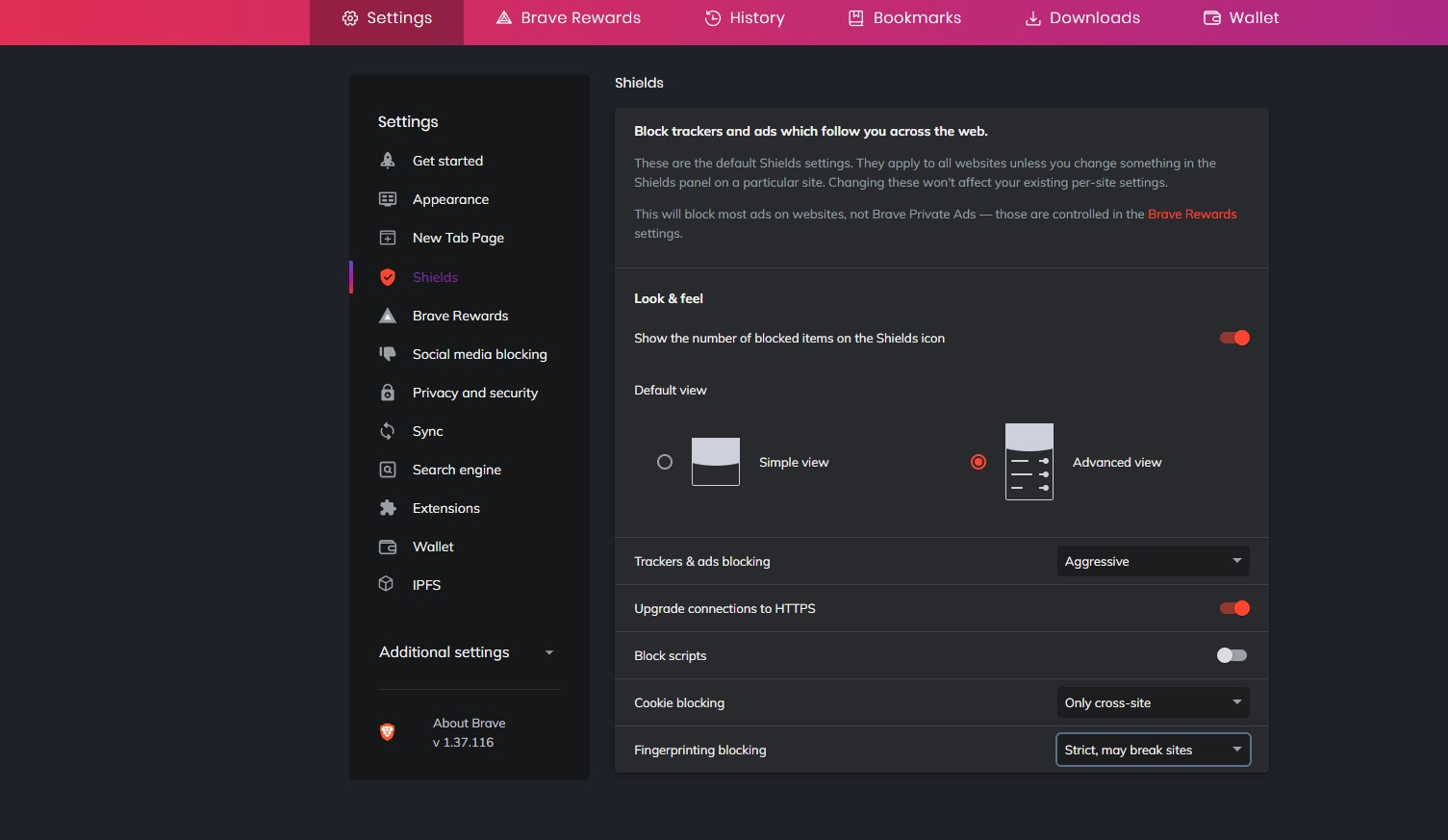
• Step 2: In the Brave Shields section, select Fingerprinting blocking. Here, you can control how Brave fingerprinting handles browser identification techniques.
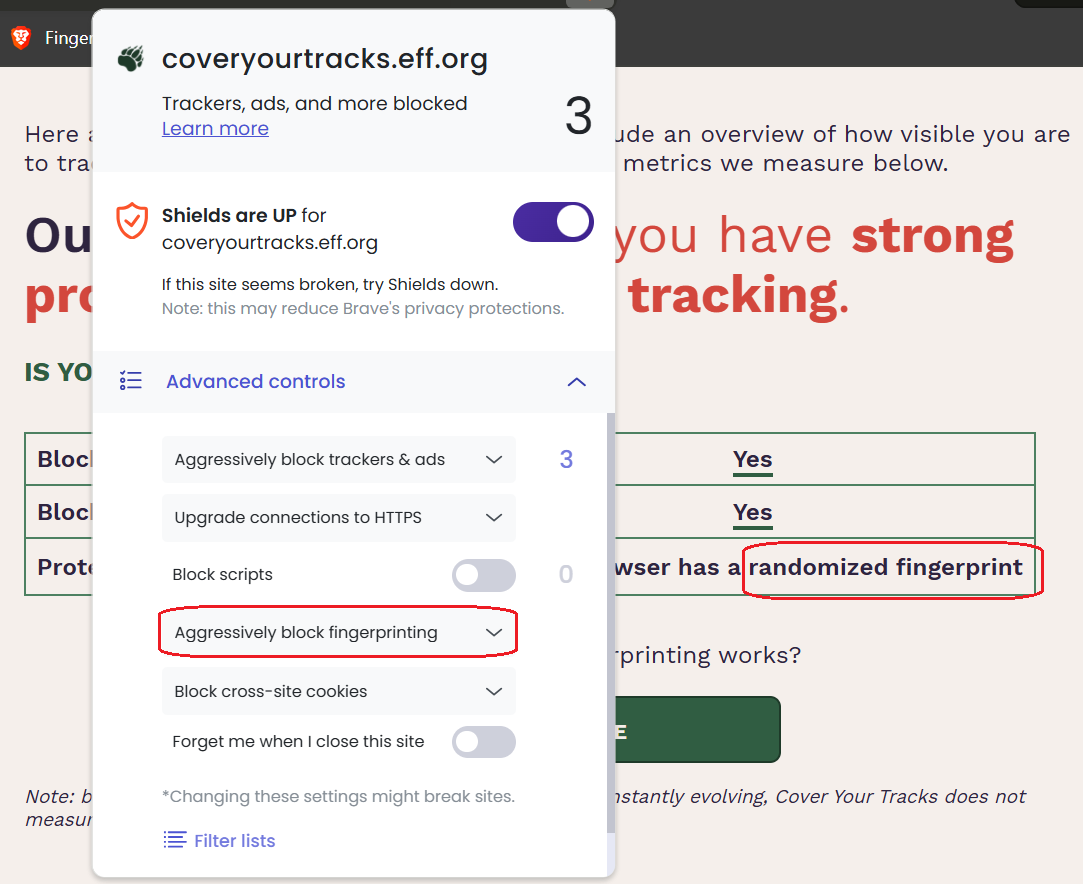
• Step 3: Select the protection level in the Fingerprinting blocking section. You will see two main options:
- Standard (Default): Balances between privacy and website stability. Suitable for most users.
- Strict: Enhances fingerprinting blocking to a higher level. Reduces the ability to be identified more strongly but sometimes can cause some websites to operate not entirely stably.
Switching to Strict mode will help Brave fingerprinting intervene more strongly in browser fingerprint collection techniques. However, if you prioritize a smooth web experience, Standard mode is usually enough for normal browsing needs.
You can check your fingerprint level using: 9 best free browser fingerprint testing tools
6. Does Brave really make you completely anonymous?
Although Brave fingerprinting is evaluated as an outstanding privacy protection layer, this browser cannot bring absolute anonymity. The nature of the farbling mechanism is to adjust and distort data at a controlled level rather than completely changing the device environment or core parameters like User Agent, operating system, or underlying hardware. Therefore, some technical signs can still exist and be exploited by advanced tracking systems.
Currently, many major platforms like Google, Facebook, or Amazon use machine learning algorithms to cross-analyze many different data layers. Even if some information has been farbled, they can still combine elements like IP address, user behavior, network configuration, or interaction history, including connection-level signals such as a JA3 fingerprint that operates independently of anything the browser farbles, to determine the connection between devices and accounts.
Especially, if you manage multiple accounts within the same Brave environment, the risk of accounts being linked still exists. Brave fingerprinting helps reduce the accuracy of identification data, but does not completely erase all signs that can be analyzed.
7. Antidetect browser Hidemyacc: A comprehensive solution far beyond Brave
For professional users (such as MMO, running ads, e-commerce) requiring the management of massive, completely independent accounts, relying on the farbling mechanism of Brave fingerprinting is not safe enough. To solve this problem, using antidetect browser Hidemyacc will be a more suitable choice.
-
Changing instead of farbling: While Brave focuses on adjusting data to reduce the accuracy of the identification process, Hidemyacc allows the creation of many distinct fingerprint configurations for each profile. Components like Canvas, WebGL, Audio, Font, WebRTC… are set independently, helping each profile possess a different identity.
-
Completely isolated environments: Each profile in Hidemyacc acts as an independent browser device. This helps reduce the risk of platforms linking multiple accounts based on device configuration duplication.
-
In-depth proxy management: Unlike regular browsers, Hidemyacc allows assigning and managing separate proxies for each profile strictly. This is a crucial factor in isolating the network environment for each account, which regular browsers like Brave do not support at an in-depth isolation level. It also means each profile can spoof its timezone correctly to match its assigned proxy location, a mismatch that Brave's farbling mechanism does not address.
In summary, for operational models that need to manage multiple independent accounts and minimize the risk of being linked, using an antidetect browser like Hidemyacc provides a much more comprehensive level of fingerprint control and operating environment compared to browsers focused on anti-tracking like Brave.
8. Conclusion
In general, Brave fingerprinting applies an extremely smart farbling mechanism, creating a solid barrier protecting common users from the tracking of online trackers. However, if your goal is to build and manage a safe, undetected, and unlinked multi-account system, using specialized software like antidetect browser Hidemyacc is the solution that brings long-term sustainability.
9. FAQ
1. Does Brave block fingerprinting?
Yes. Brave minimizes fingerprinting by randomizing browser data (farbling mechanism) instead of just simply blocking tracking scripts.
2. Does Brave protect privacy better than Chrome?
Yes. Brave provides the Brave fingerprinting protection layer and blocks third-party trackers by default right from the start, security features that Chrome does not have pre-configured.
3. Can fingerprinting track you without cookies?
Yes. Systems can identify your device based on a unique combination of browser and hardware characteristics without needing to store any cookies on your computer.
4. Does using a VPN prevent browser fingerprinting?
No. A VPN only has the effect of hiding your IP address and encrypting network traffic. It absolutely does not intervene or change the hardware fingerprint of the browser.
5. Is Brave completely anonymous?
Not completely. Brave fingerprinting protects common users very well, but large AI systems still have the ability to extract noisy data to identify you. To manage multiple accounts with absolute safety, you need to use a dedicated antidetect browser.
6. Can websites bypass Brave's fingerprint protection layer?
Yes, they can. Sophisticated Machine Learning algorithms from major platforms have the ability to analyze anomalies in the noisy data layer. Instead of extracting the original parameters, AI will identify unchanging behavioral patterns to predict probabilities and link your real identity.






