
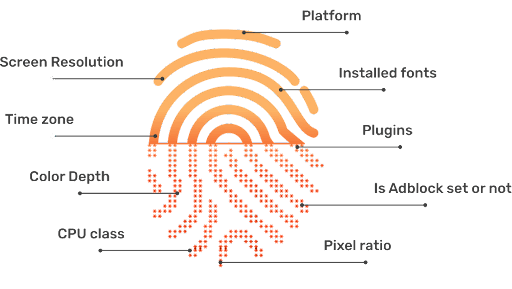
Have you ever wondered how websites track your online activity even when you've deleted all cookies or used incognito mode? The truth is, while you browse the web, your information is still being silently collected through your browser browser fingerprint .
So what information about you can websites collect? This article will help you find out what that information is and suggest solutions for safer and more secure web browsing.
1. What does the website collect information for?
Collecting data through browser fingerprints isn't entirely bad. In fact, websites use this information for the following three main purposes:
1.1 Optimizing the user experience
Each device has a different configuration. Websites collect information about screen resolution, operating system, and browser to ensure the interface is displayed optimally on your device. For example, by knowing whether you are using a phone or a computer, the website will automatically adjust the font size, images, and layout for optimal viewing and usability.
1.2 Behavioral analysis and targeted advertising
This is the most common goal for marketers. By understanding your preferences, habits, and browsing history through your browser fingerprint, businesses can deliver more targeted advertising. Instead of showing spam, you'll see products or services that match your actual needs, thereby improving conversion rates for brands.
1.3 Enhancing security and fraud prevention
In the banking and e-commerce sectors, browser fingerprinting is a powerful tool for preventing cybercrime. If an account is suddenly logged in from a device with a completely unfamiliar "fingerprint" or unusual parameters (such as constantly changing time zones or IP addresses), the system will immediately trigger additional verification steps to protect users' assets and information, preventing phishing attacks or payment fraud.
See more:
- Can blocking and faking browser fingerprints help avoid account suspension?
- How to change your browser's fingerprint? (3 effective ways)
- Detailed information about browser automation.
- Virtual machine vs multi-login app: What are the differences?
2. What information about you can the website collect?
Whenever you visit a website, it can collect a significant amount of information about you. We've divided this information into five main categories as follows:
2.1 Network and Location Information
2.1.1 IP Address
Every device connected to the internet uses an IP address, a unique set of numbers that identifies the device and allows it to communicate with other devices on the network. An IP address is a unique identifier for a device on the internet or local network. The acronym "IP" stands for "Internet Protocol," which is a set of rules governing the format of data sent over the internet or local network. These IP addresses can be static or dynamic, with static addresses remaining constant and dynamic addresses changing periodically.
Additionally, IP addresses can be public or private, with public addresses used for communication with devices outside the private network and private addresses used for communication within the private network.
2.1.2 Geographical location
Geolocation uses a visitor's IP address to determine their approximate location at the city level. This allows websites and other online services to provide location-specific content and services to their visitors.
For example, a travel booking website might use geographic location to display personalized recommendations for local attractions or restaurants in the city where the visitor lives. While geographic location can provide accurate information in many cases, it's not always 100% accurate and can be affected by factors such as the use of virtual private networks (VPNs) or proxy servers.
2.1.3 Timezones
Similar to geolocation, websites can use your browser's fingerprint to identify and compare your browser's system and time zone. Your browser's time zone is determined by the difference in hours between your current local time and Coordinated Universal Time (UTC), which is the global time standard.
Time zone information can be collected by websites through your browser's Date object, which returns the current date and time in your local time zone. This information can be used to determine your geographic location or to track your activity across different time zones. Additionally, it can be used to detect unusual or suspicious activity, such as when your browser suddenly switches to a different time zone, which might indicate the use of a VPN or proxy server.
2.1.4 Timestamp
The timestamp displays the date and time you accessed the website. This information can be obtained through the browser's Date object, which provides details about the current date and time.
Timestamp information can be used by websites to track user activity and behavior over time, as well as to identify patterns or trends in user behavior.
2.2 Browser Information
2.2.1 Navigation Objects
The Navigation object is a built-in object in the JavaScript programming language that provides information about your browser and device. It provides many properties and methods that can be used to collect your browser's fingerprint, including user agent, language, cookies, platform, and plugins.
-
User Agent (UA) Chain
A User-Agent (UA) string is a text string sent by your browser to the web server with every request, identifying the browser and operating system the user is using to access the website. The User-Agent string typically includes information such as the browser name and version, the operating system name and version, and the device type. It may also include additional information such as installed plugins and extensions. Websites can use User-Agent strings to tailor their content or user experience to a specific browser or operating system. For example, a website might offer a download link or a different video format to a user accessing the site from a particular browser.
-
Language settings
Language settings refer to the language you've set as the default in your browser, which may indicate your location or preferred language. This information may be collected by websites through your browser's navigation object, which provides details about your device, including language settings.
Language settings can be used by websites to tailor their content or user experience to a specific language or location. For example, a website might offer a localized version of the site to users accessing it from a particular language.
-
Cookie
Cookies are small text files that a website stores on your device. When you visit a website, that website may store information in cookies on your device and then retrieve that information when you visit that website again in the future.
Cookies are commonly used to track your behavior and preferences. Websites may use cookies to remember your login information, shopping cart contents, and browsing history. Cookies can also be used to track your activity across multiple websites.
Although cookies are widely used for legitimate purposes, such as remembering user preferences or personalizing their experience on a website, they can also be used for tracking and advertising purposes. Therefore, many web browsers offer options to limit or block cookies to protect user privacy.
-
Plugins
Plugins are software components that can be added to a web browser to enable additional functionality, such as displaying multimedia content, running Java applications, or providing security features. This information can be obtained through your browser's navigation object, which provides details about the user's device, including installed plugins.
Information about plugins can be used by websites to determine a user's software configuration and tailor their content or user experience to suit the specific plugins installed. For example, a website might provide download links or alternative video formats to users who visit the site and have a particular plugin installed.
2.2.2 Extensions
Extensions refer to small software programs that can be added to your web browser to modify its functionality or behavior. This information can be collected through your browser's Extensions API, which provides details about installed extensions.
Extension information can be used by websites to determine a user's software configuration and tailor their content or user experience to specific installed extensions. For example, a website might provide a download link or alternative video format to a user who visits the site with a specific extension installed.

2.3 Device and Operating System Information
2.3.1 Device Model
The device type indicates the specific device you are using to access the website, such as a desktop computer, laptop, tablet, or mobile phone, along with the brand and model of the device.
This information can be obtained through the navigation object in your browser, which provides details about the user's device, including the operating system, browser version, screen resolution, and other attributes.
Websites can use device model information to determine your hardware and software configuration, which can help them tailor their content or user experience to specific devices. For example, a website might offer a mobile-friendly layout for users accessing the site from smartphones or tablets.
2.3.2 Operating System (OS)
An operating system (OS) is software that manages a computer's hardware resources and provides common services to computer programs.
This information can also be obtained through the browser's navigation object, which provides details about the user's device, including the operating system, browser version, screen resolution, and other attributes.
Operating system information can be used to determine a user's hardware and software configuration, which can help websites tailor their content or user experience to that specific operating system. For example, a website might provide a Windows-specific download link for users accessing the site from a Windows computer.
2.3.3 Platform
Platform refers to the combination of your operating system, device type, and browser version. This platform is a crucial component of browser fingerprinting because different operating systems, devices, and browser versions have unique characteristics that can be used to identify them. For example, the fonts installed on your device, screen resolution, and the type of browser plugins installed can all provide clues about your platform.
By combining information about a user's platform with other browser-based fingerprinting techniques, such as tracking your IP address or using canvas fingerprinting, websites can create detailed profiles of your activity and preferences. This information can be used for a variety of purposes, such as targeted advertising or fraud detection.
Like other forms of browser fingerprinting, using platform information for tracking purposes can raise privacy concerns, especially if you are unaware of the tracking or unable to opt out.
2.3.4 CPU Layer
The CPU layer is a data point that reveals your device's CPU. Specifically, it provides information about the number of cores in your device's CPU, its speed, and its architecture. By analyzing the CPU information gathered through JavaScript, websites can identify your device and browser, as well as track your activity across various websites.
You can limit CPU-class fingerprinting by using browser extensions or settings to block CPU information discovery, or by running your browser in a virtual machine with a different CPU configuration.
2.3.5 Sensors
Sensors refer to the various sensors available on modern devices such as smartphones, tablets, and laptops. These sensors include accelerometers, gyroscopes, magnetometers, and ambient light sensors, among many others.
Websites can collect information about the sensors on your device by measuring the data output by those sensors. For example, an accelerometer can be used to measure the device's orientation and movement, while an ambient light sensor can be used to measure the device's light levels.
You can stop the sensor from taking fingerprints by using a browser extension or settings to block access to certain sensors, or by running your browser in a virtual machine with limited sensor capabilities. However, it's important to note that not all devices have the same set of sensors, so the availability of sensor information may vary by device.
2.3.6 Touch support
Touch-enabled fingerprinting can be used to detect whether your device has a touchscreen and, if so, what types of touch events are supported. Touch-enabled fingerprinting typically involves detecting touch events on your device and their associated attributes, such as touchstart, touchend, touchmove, and touchcancel. By analyzing the touch events supported by your device, websites can identify your device and browser and track your activity across various websites.
You can take steps to restrict touch-enabled fingerprinting by using browser extensions or settings to block access to touch event information, or by running your browser in a virtual machine with restricted touch event capabilities.
2.3.7 Keyboard Layout
Keyboard layout analysis can be used to discover your device's keyboard layout. It involves detecting keypress events on your device and analyzing the key codes associated with those events. Different keyboard layouts have different key codes associated with the same physical key; therefore, by analyzing the key codes, websites can determine the keyboard layout on your device.
You can prevent fingerprinting of your keyboard layout by using browser extensions or settings to block access to keypress event information, or by running your browser in a virtual machine with a different keyboard layout.

2.4 Display and Hardware Information
2.4.1 Screen Resolution
Screen resolution refers to the number of pixels displayed on a computer screen, usually expressed as the number of horizontal pixels multiplied by the number of vertical pixels. This information can be collected by websites through the browser's window object, which provides details about your viewport size and screen resolution.
It can be used to determine your hardware configuration, which can help websites tailor their content or user experience to suit specific screen sizes. For example, a website might offer larger font sizes or a different layout for users accessing the site from smaller screens.
2.4.2 System Fonts
System fonts are fonts installed on your device and may be used by websites to display text on web pages. Because different operating systems and devices have different default fonts, the combination of fonts installed on your device can be used to identify your device and browser. Websites can detect which fonts are available on your device and create a fingerprint based on the unique combination of installed fonts.
System font fingerprinting is often used in conjunction with other browser fingerprinting techniques, such as canvas fingerprinting and plugin detection, to create a more comprehensive profile of a user's device and browser.
You can take steps to limit system font fingerprinting by using browser extensions or settings to block font detection, or by installing a font randomizer that periodically changes the available fonts on your device.
2.5 Data Storage and Browser Identification
2.5.1 Canvas
Canvas fingerprinting is a technique used by websites to collect information about a user's web browser and device by exploiting the HTML5 canvas element. The canvas element is used to create graphics and animations on a website, and its unique display attributes can be used to generate a unique identifier for the user's browser.
When a user accesses a website using Canvas fingerprinting, the website creates a small image with unique display attributes specific to the user's browser and device. The website then sends this image to the user's browser, which creates a bitmap of the image based on the user's device's display attributes. This bitmap is then compared to a database of other bitmaps to generate a unique identifier for the user's browser.
Canvas fingerprinting is a form of browser fingerprinting used by websites to track users online, even when they delete cookies or use private browsing mode. It is considered a privacy concern because it can be used to track users without their knowledge or consent.
2.5.2 File Format Identifier
File format identifiers are data points that can be used to uniquely identify your browser. These identifiers are based on the type of file your browser can handle, such as image formats (JPEG, PNG, GIF, etc.), audio formats (MP3, WAV, etc.), video formats (AVI, MP4, etc.), and document formats (PDF, DOC, etc.).
Your browser's ability to handle these file formats is determined by the presence or absence of specific plugins, extensions, or codecs that the web server can detect through requests to your browser.
By analyzing the presence or absence of these file format identifiers in your browser, along with other browser characteristics such as user agent strings, screen resolution, installed fonts, and other attributes, websites can create a unique browser fingerprint that can be used to track you across multiple websites and sessions, even if cookies are deleted or blocked.
2.5.3 Browser's Local Database
A browser's local database, also known as web storage, is a type of data storage that allows websites to store information on your device, such as login credentials, user preferences, and other types of data.
Local databases can be accessed by websites using JavaScript, and many modern browsers offer different types of local databases, such as cookies, local storage, and indexed database APIs. These databases can be used for legitimate purposes, such as improving the user experience by remembering user preferences, or for less user-friendly purposes, such as tracking users for advertising purposes.

3. Safe ways to protect personal information when browsing websites
To protect your privacy and personal data, you can consider the following solutions:
3.1 Use a secure browser and tracking-blocking extensions.
Instead of popular browsers, you might consider switching to privacy-focused browsers like Brave or Tor Browser. These browsers have built-in capabilities to block tracking scripts and obfuscate fingerprint information. Additionally, installing extensions like uBlockOrigin or Privacy Badger is also an effective way to prevent hidden data-collecting code from websites.
3.2 Controlling access and restricting information sharing
Always exercise caution when accessing unfamiliar websites. You should limit granting access to location, camera, or microphone permissions unless absolutely necessary. Strictly controlling these permissions not only helps protect your personal information but also minimizes the amount of "specific" data that websites can use to identify your device.
3.3 Using the Hidemyacc antidetect browser software
For professional users who need to manage multiple accounts, conventional methods are insufficient. You should use the anitdetect Hidemyacc software to create separate browser profiles, each with a unique and completely new browser fingerprint. Instead of just blocking tracking scripts, Hidemyacc allows you to change entire technical parameters, helping you protect your privacy and optimize work performance in an online environment.
See more related articles here:
- 9 Best Free Browser Fingerprint Checkers
- What is a User Agent? How to change your User Agent on 4 popular browsers.
- 7 Effective Ways to Bypass Captcha in 2026 - Detailed Guide
- Defining Cookies on the Internet: How Do They Work ?
4. Conclusion
In short, websites can collect a vast amount of information about your identity and behavior through browser fingerprinting. From device configuration and geographical location to detailed hardware specifications, all of this is exploited by websites and advertisers to track and identify users.
While it's difficult to completely prevent this data collection, you can still minimize the risk by using secure browsers, installing tracking-blocking extensions, or tightening your privacy settings.
And of course, to help you optimize the management of multiple accounts and ensure the security of your personal information online, using Hidemyacc antidetect is absolutely essential.
If you have any further questions, comments, or suggestions, please contact us via Telegram, Skype, or Facebook Messenger support.
5. FAQ
1. Why does this website collect my IP address?
Your IP address helps websites identify your device and approximate location, enabling personalized content and traffic analysis.
2. Is the geographical location accurate?
Location based on IP address is usually accurate at the city level, but it can be inaccurate if you use a VPN or proxy.
3. What are cookies and are they dangerous?
Cookies are small files stored on your device that help remember logins, preferences, and browsing history. Most cookies serve a specific user experience, but they can also be used for tracking advertising.
4. What is browser fingerprinting?
This is a technique for collecting device, browser, font, and plugin characteristics to identify users without the need for cookies.
5. Are sensor and touch sensor data being collected?
The website can measure data from accelerometers, gyroscopes, ambient light, and touch events to identify the device.
6. Does Tor Browser help protect privacy?
Tor helps to hide IP addresses and reduce fingerprinting, but it doesn't completely prevent all advanced identification techniques like canvas fingerprinting.






