DataImpulse offers several proxy types and a range of features for users who need reliable IP connections for different online tasks. But how well does the service perform in practice, and is it worth considering? In this DataImpulse review, we examine its proxy types, pricing, features, refund policy, and user feedback on G2. We also test the service firsthand using the Intro plan across the US, UK, and Germany, evaluating IP location accuracy, access to websites such as Google, Amazon, and eBay, connection speed, and traffic consumption.
1. What Is DataImpulse?
DataImpulse is a proxy provider offering residential proxies, premium residential proxies, mobile proxies, and datacenter proxies. Its services target individuals, businesses, and developers who need to access websites through multiple IP addresses or geographic locations.
According to its official website, DataImpulse focuses on use cases such as web scraping, SERP tracking, price comparison, market research, and ad verification. These activities all involve collecting or checking data based on access locations.
Instead of sending all requests through a single IP address, users can route their connections through proxy IPs in the countries or regions they want to research. This approach helps them collect web data, check website content across different markets, and access region-specific information.
1.1. Types of Proxies Offered by DataImpulse
DataImpulse offers four main types of proxies:
- Residential Proxy: Uses IP addresses associated with residential internet connections. This type is suitable for activities that require accessing websites from the perspective of users in a specific location, such as checking search results, tracking product prices, or collecting publicly available web data.
- Premium Residential Proxy: According to DataImpulse, Premium Residential uses a selected pool of residential IPs that the provider describes as having stronger reputation, speed, and stability. The service is designed for sensitive tasks and websites with stricter protection. All targeting options are included in the plan price.
- Mobile Proxy: Uses IP addresses from mobile networks. This option is intended for tasks that involve checking website content or user experiences through mobile connections.
- Datacenter Proxy: Uses IP addresses from data centers. This type is generally suitable for tasks that prioritize speed and the ability to handle large numbers of requests, although its IP characteristics differ from those of residential and mobile proxies.
Each proxy type serves different requirements. Residential and Premium Residential proxies may be more suitable for accessing websites that apply stricter traffic controls, while datacenter proxies can be considered for workflows where speed and traffic costs are priorities. Mobile proxies are useful when a project specifically requires mobile network IPs.
1.2. What Use Cases Does DataImpulse Support?
On its official website, DataImpulse introduces proxies for various data collection and market research activities. Some notable use cases include:
- Web Scraping: Collecting data from multiple websites and information sources. Proxies help route requests through IP addresses in the regions being researched.
- SERP Tracking: Monitoring keyword rankings, researching competitors, and checking search results based on geographic locations.
- Price Comparison: Tracking and comparing product prices across multiple websites, marketplaces, and regions.
- Market Research: Collecting information about prices, advertisements, search results, and product reviews from the perspective of customers in different countries.
- Ad Verification: Checking whether advertisements display the correct content and reach the intended target audience in different regions.
- AI data collection and training: Teams developing AI agents or training AI models may use proxies to collect publicly available web data from different locations. Residential and mobile proxies can provide access through IPs associated with different regions, helping teams gather location-specific information for their data collection workflows.
In addition, DataImpulse also mentions applications such as review monitoring, travel fare aggregation, website availability testing, and multi-region accessibility.
For this review, Price Comparison and Market Research are the two most directly relevant use cases. The test will use residential proxies to access e-commerce websites in the US, UK, and Germany, allowing us to observe differences in product information and regional accessibility.
1.3. DataImpulse Overview
| Criteria | Information |
|---|---|
| Provider | DataImpulse |
| Products | Residential, Premium Residential, Mobile, and Datacenter Proxies |
| Residential IP pool | 90M+ IPs |
| Mobile IP pool | 16M+ IPs |
| Datacenter IP pool | 20M+ IPs |
| Payment model | Pay-as-you-go based on data usage |
| Protocols | HTTP(S), SOCKS5 |
| Session types | Rotating and Sticky |
| IP targeting | Country, state, city, ZIP code, and ASN, depending on proxy type and configuration |
| Geographic coverage | 195 countries |
| Success rate | 99.9% (according to DataImpulse) |
| Customer support | 24/7 human support |
| Website | https\://dataimpulse.com/ |
According to DataImpulse, the company operates its own first-party residential IP pool rather than reselling residential networks from other proxy providers. The provider also states that its operations are ISO-certified and that it is an accredited member of the Ethical Web Data Collection Initiative (EWDCI).
One notable aspect of DataImpulse's pricing model is its traffic-based billing. Users purchase proxy traffic and pay according to the amount of data consumed, rather than maintaining a fixed monthly subscription. According to the provider, purchased traffic does not expire.
This model may suit projects with varying traffic requirements across different stages. However, you still need to monitor traffic consumption to keep your budget under control.
2. DataImpulse User Reviews on G2
In addition to information provided by the vendor, reviews from actual users offer further insight into the DataImpulse experience.
On G2, DataImpulse currently has a rating of 4.7/5 stars from 28 reviews. Most positive feedback focuses on pricing, proxy performance, and customer support response times. However, some users also mention limitations related to setup, IP pool size, and management tools.
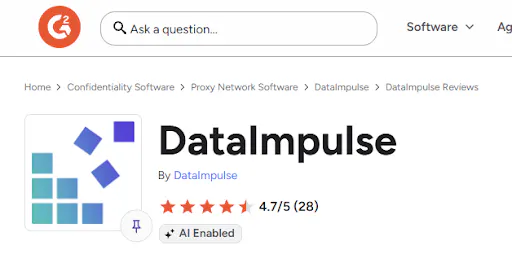
DataImpulse reviews on G2
2.1. What Users Like About DataImpulse
Based on reviews posted on G2, several advantages are frequently mentioned by users:
- Competitive pricing: Some customers consider DataImpulse reasonably priced for their needs. Users can purchase traffic based on their requirements instead of maintaining recurring payments. One user who uses proxies for scraping also commented positively on the service's speed and pricing.
- Responsive customer support: This is one of the points mentioned in multiple positive reviews. Users report that they can communicate directly with support staff and receive guidance when problems arise. One customer particularly appreciated receiving assistance from a real support representative instead of having to interact with a chatbot.
- Relatively easy-to-use interface and setup: Some users say getting started with DataImpulse is fairly straightforward, the dashboard is easy to navigate, and the documentation helps them configure proxies quickly.
- Performance and integration capabilities: Some customers using DataImpulse for scraping, data collection, and online reputation management report positive experiences with its speed, stability, and ability to integrate with existing systems. One user mentioned that connecting the service to their current tools required only minor configuration changes.
2.2. Limitations Mentioned by Users
Alongside the positive feedback, G2 also features several issues that users have encountered:
- Setup process does not suit every use case: One 1.5/5-star review describes a poor experience when the user was looking for a proxy solution for LinkedIn automation. According to the review, the initially recommended solution did not meet the user's requirements, disrupting their workflow and resulting in additional costs.
- IP pool size: One user who uses DataImpulse for scraping believes the provider should expand its IP pool to better support large-scale requirements.
- Traffic statistics on the dashboard: Some reviews suggest adding more detailed usage statistics and filters to make traffic monitoring easier.
- Guidance for beginners: One user notes that advanced features may take time for beginners to learn. They would like to see more visual guidance or a more detailed onboarding process.
These reviews show that the DataImpulse experience depends considerably on the intended use case and proxy selection. The service receives positive feedback for its pricing, support response times, and integration capabilities. However, you should still identify your technical requirements before purchasing proxies, especially for automation workflows that need to maintain stable IP addresses.
3. Key Features of DataImpulse
DataImpulse provides essential features for managing proxies and adjusting connections to different use cases. Notable aspects include session management, location-based targeting, a management dashboard, and integration with third-party tools.
3.1. Rotating and Sticky Sessions
DataImpulse supports two types of connection sessions:
- Rotating Session: IP addresses change according to a rotation mechanism. Depending on the configuration, users may receive a new IP address when establishing a connection or sending the next request. This option is suitable for tasks that need to distribute requests across multiple IPs.
- Sticky Session: Maintains the same IP address for a specified period. This is useful when you need to preserve a login state or perform multiple consecutive actions on the same website.
DataImpulse allows users to configure sticky sessions for durations ranging from 1 to 120 minutes. According to the provider, a 30-minute session is a recommended option because residential IPs come from real users' devices, which may go offline unexpectedly. Shorter sessions can help reduce the risk of disruptions caused by an unavailable IP.
Choosing between these modes depends on the requirements of each task. For example, when collecting data from multiple product pages, rotating sessions can help distribute requests across different IP addresses. Meanwhile, sticky sessions are more suitable for workflows that require a consistent browsing session.
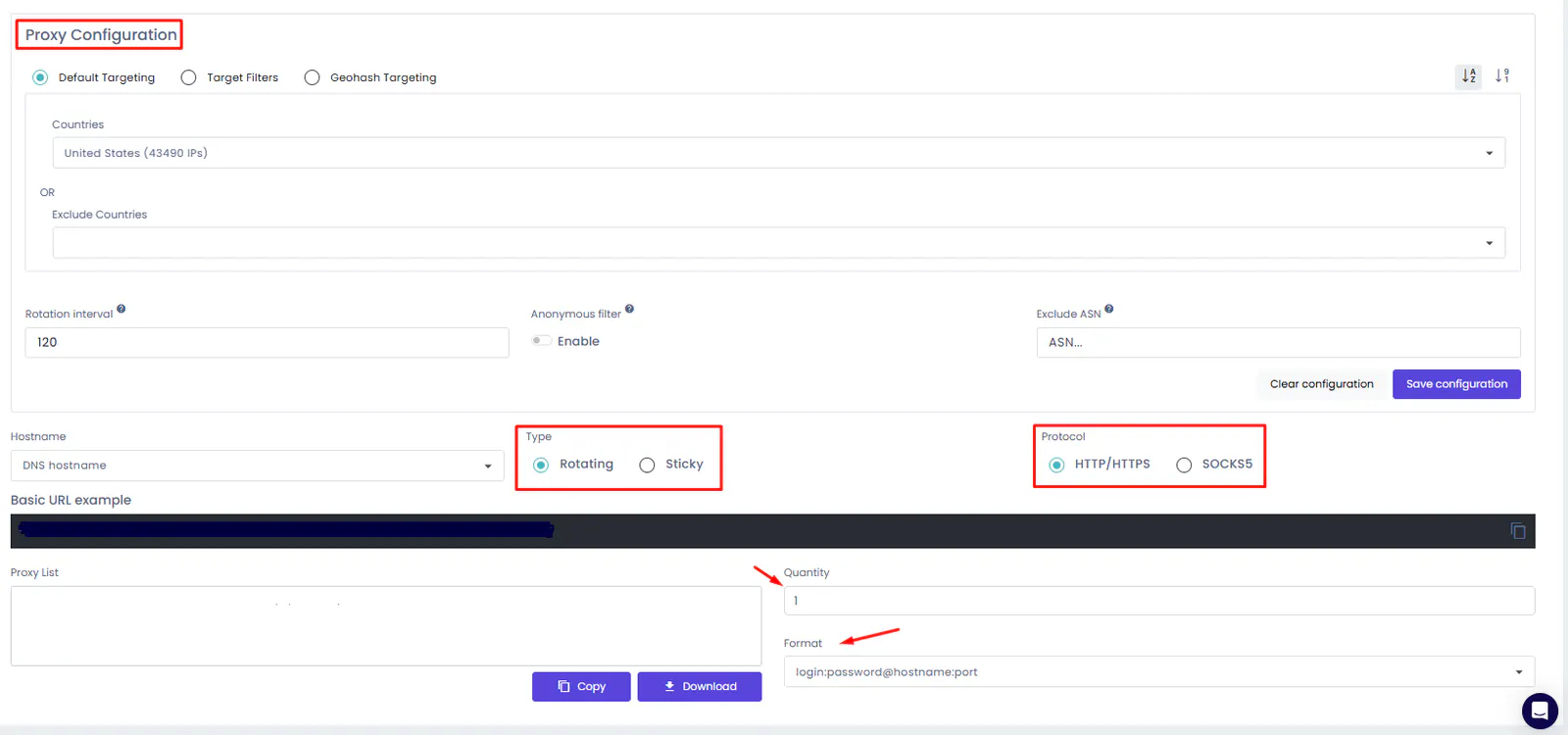
Rotating and Sticky Sessions on DataImpulse
Read more: What Is a Rotating Proxy? Top 7 Best Rotating Proxy Providers Today
3.2. Proxy Management Dashboard
DataImpulse provides a dashboard where users can manage account information and proxy configurations. From here, you can access connection details, select proxy types, configure the necessary settings, and monitor data usage.
Beyond proxy configuration, the dashboard also provides several account management tools. Users can exclude specific ASNs, monitor traffic consumption in detail, contact customer support, access documentation, top up their balance, and enable automatic balance recharges.
Wholesale customers also receive a dedicated account manager, according to the provider.
A centralized management interface reduces the time spent looking for configuration details when setting up proxies in browsers or external software.
For projects that use multiple proxies or require frequent traffic monitoring, the dashboard is also where you should check consumption to control costs. According to the provider, purchased traffic does not expire, so you can use the remaining data for future data collection sessions.
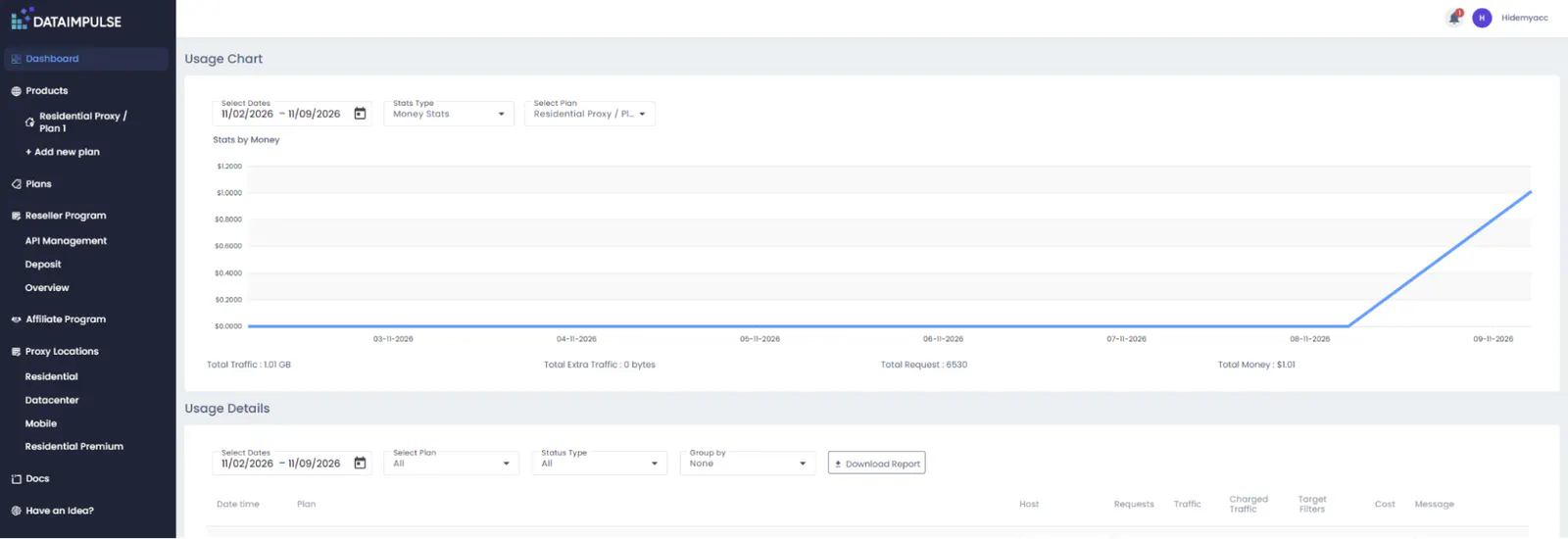
DataImpulse proxy management dashboard
3.3. Connection Protocols and API
DataImpulse supports common protocols such as HTTP(S) and SOCKS5.
- HTTP(S): Suitable for accessing websites through browsers or applications that support HTTP proxies.
- SOCKS5: Can be used with various applications and tools, depending on the software's compatibility.
In addition to connection protocols, DataImpulse also provides an API that allows users to manage proxy usage, control sessions, and integrate with other tools. This is useful for projects that need to automate data collection workflows or manage multiple connections.
Support for multiple protocols and an API allows DataImpulse to connect with various working environments. Before configuring your proxy, check which protocols your software supports so you can select the appropriate connection details.
Read more: HTTP/HTTPS Proxy vs. SOCKS Proxy: Which One Should You Use?
3.4. Location-Based Targeting
DataImpulse supports IP selection by country and provides more detailed location options, such as city, state, ZIP code, and ASN, depending on the service configuration.
This feature is particularly useful for Price Comparison and Market Research. For example, a business operating in multiple countries may need to check the price of the same product on Amazon or other marketplaces from the perspective of local customers.
Instead of accessing a website through a single IP address, users can select IPs in the regions they want to research and collect data for each market. According to DataImpulse, country targeting is free. However, more specific targeting options, including state, city, ZIP code, and ASN, consume twice the traffic used by the request.
For Premium Residential proxies, all targeting options are included in the plan price.
When choosing a proxy, check the available location options in the dashboard and compare them with your project's requirements. Not all proxy types offer the same targeting coverage.

Selecting a proxy location on DataImpulse
3.5. Integration with Data Collection Tools
In addition to direct browser configuration, DataImpulse provides integration guides for third-party applications and tools. The provider states that it offers setup tutorials for more than 90 tools, including Scrapy, Puppeteer, Selenium, Playwright, Octoparse, ParseHub, and several proxy management tools.
This allows users to incorporate proxies into existing scraping workflows instead of configuring them manually in each browser profile.
For example, users can configure DataImpulse in Scrapy or Selenium to send website requests through a proxy. For projects that require data collection from multiple locations, combining scraping tools with targeting options makes it easier to organize data sources by market.
You can find the available setup guides in the DataImpulse Tutorials section.
4. DataImpulse Pricing
DataImpulse uses a pricing model based on data consumption. Prices vary depending on the type of proxy and the amount of traffic purchased. According to the pricing information published on its website at the time of reference, the basic rates are as follows:
| Proxy Type | Standard Price | Intro Plan for New Users |
|---|---|---|
| Residential Proxy | \$1/GB | \$5/5GB |
| Premium Residential Proxy | \$5/GB | \$5/1GB |
| Mobile Proxy | \$2/GB | \$5/2.5GB |
| Datacenter Proxy | \$0.50/GB | \$5/10GB |
In addition to the Intro plans, DataImpulse also offers larger traffic packages with different per-GB rates. Therefore, you should check the price displayed at checkout before purchasing to confirm the exact amount you will pay.
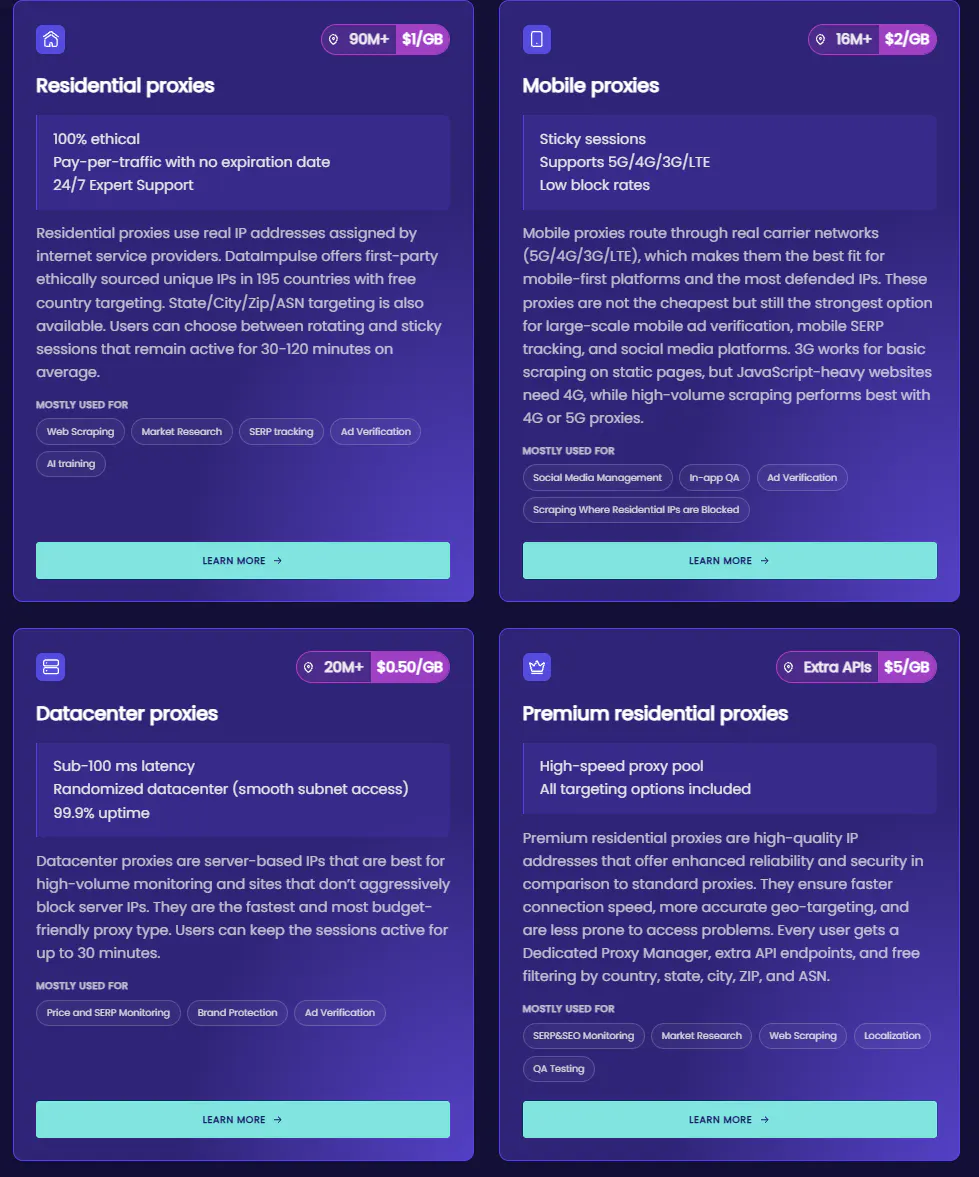
DataImpulse pricing for different proxy types
4.1. Costs by Proxy Type
Residential Proxy
Residential Proxy has a standard price of \$1/GB. The Intro plan for new users costs \$5 for 5GB. This option is suitable for tasks that require accessing websites based on geographic locations, tracking product prices, or collecting data from sources with access control mechanisms.
Premium Residential Proxy
Premium Residential Proxy has a standard price of \$5/GB. The Intro plan costs \$5 for 1GB. Its price is higher than that of standard residential proxies, so you should consider this option based on your project requirements and actual test results.
Mobile Proxy
Mobile Proxy has a standard price of \$2/GB. The Intro plan for new users costs \$5 for 2.5GB. This proxy type is suitable for tasks that require checking content through mobile network IPs.
Datacenter Proxy
Datacenter Proxy has a standard price of \$0.50/GB, making it the cheapest of the four proxy types listed. The Intro plan costs \$5 for 10GB. This may be worth considering when cost and processing speed are priorities, but keep in mind that datacenter IPs have different characteristics from residential or mobile IPs.
4.2. Factors Affecting Costs
For users with higher traffic requirements, DataImpulse offers volume-based pricing starting at 1,000GB. The rates provided by DataImpulse are:
| Proxy Type | Volume Price |
|---|---|
| Residential | \$0.80/GB |
| Mobile | \$1.60/GB |
| Datacenter | \$0.45/GB |
| Premium Residential | \$4.00/GB |
After purchasing the Intro plan, the minimum top-up amount is \$50, according to DataImpulse. This is worth considering if you only need a small amount of traffic for occasional tasks.
Besides proxy type, the total cost of using DataImpulse also depends on several factors:
- Traffic consumption: The more traffic you use, the higher your costs will be.
- Proxy type: Each proxy type has a different price.
- Purchase package and promotions: Prices may vary depending on promotional offers or the amount of traffic purchased.
- Targeting options: Country targeting is free, while state, city, ZIP code, and ASN targeting consume twice the traffic used by a request. Premium Residential plans include all targeting options in the price.
One notable advantage is that purchased traffic does not expire. This gives users more flexibility when conducting data collection in separate sessions. You can purchase traffic in advance and use it gradually for future checks instead of having to consume it within a fixed billing cycle.
4.3. Payment and Refunds
DataImpulse displays several payment methods, including Visa, Mastercard, Google Pay, Apple Pay, Alipay, cryptocurrency, and bank transfers.
DataImpulse offers a 7-day refund policy for a user's first Intro plan purchase, provided that less than 80% of the allocated traffic has been used. Payments made with cryptocurrency are non-refundable. You should carefully review the applicable conditions and confirm the details with customer support before purchasing, especially if your project has specific proxy requirements.
With a traffic-based pricing model, monitoring usage after you start using the service is also important. You should check actual consumption rather than estimating usage time based solely on the amount of traffic purchased.
5. How to Set Up DataImpulse on Hidemyacc
After purchasing a proxy, you can use your DataImpulse connection details to configure it in an antidetect browser. In this test, antidetect browser Hidemyacc is used to create profiles that access websites from different countries.
5.1. Get Proxy Details from DataImpulse
First, log in to your DataImpulse account and access the proxy management section.
Select the proxy type you want to use, then configure the location and session settings according to your requirements. Once completed, retrieve the connection details needed for configuration, including:
- Proxy host.
- Port.
- Username.
- Password.
- Connection protocol.
You will use these details in the next step.
DataImpulse proxy configuration details
5.2. Create a Profile on Hidemyacc
Open Hidemyacc and select New Profile to create a new browser environment.
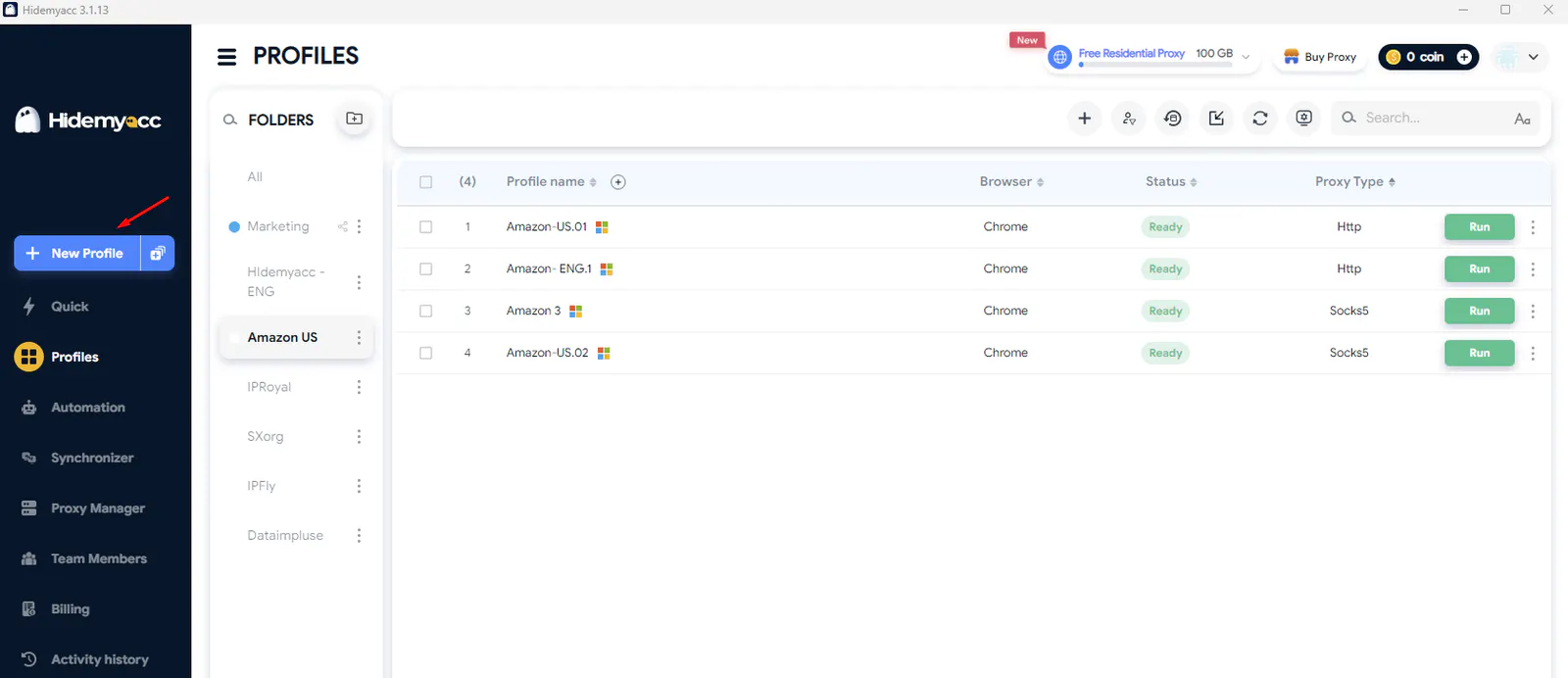
Configuring a DataImpulse proxy on Hidemyacc
Name the profile according to its purpose or proxy location. In the proxy settings, select Your Proxy and enter the connection details retrieved from DataImpulse. Next, select the correct protocol and enter the host, port, username, and password. Once everything is configured, click Check Proxy to test the connection.
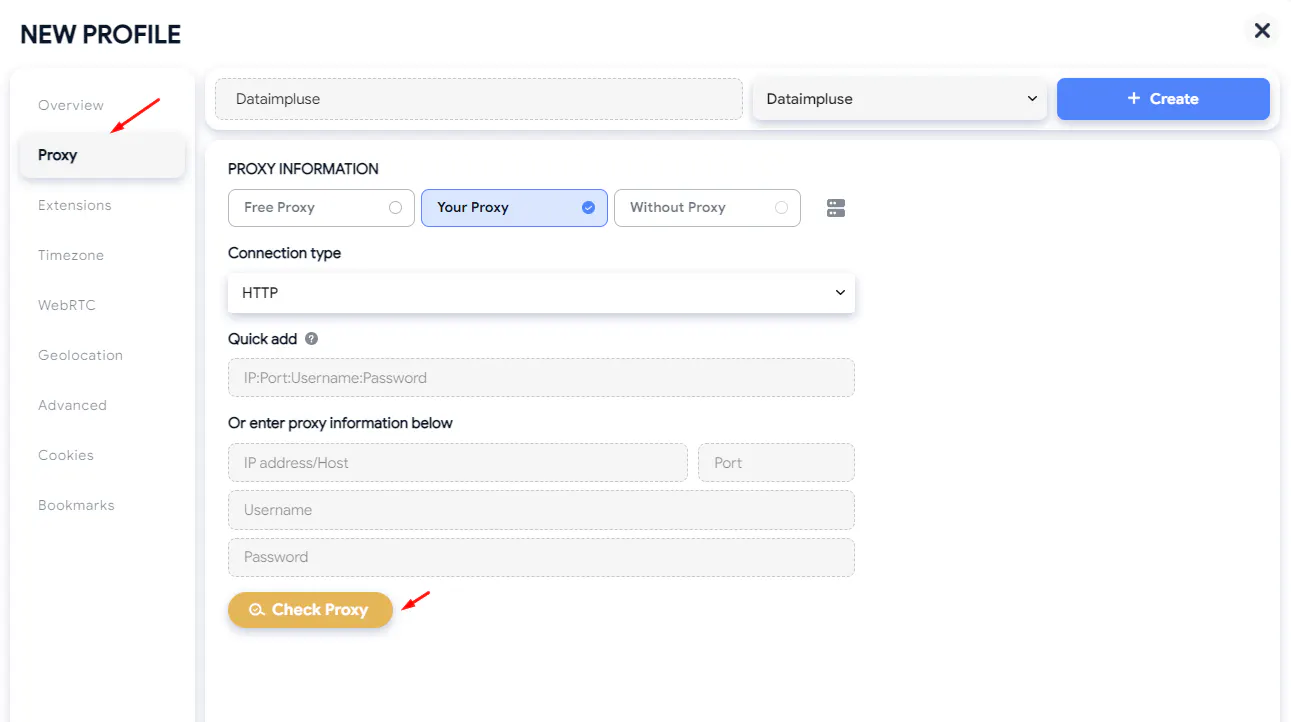
Configuring a DataImpulse proxy on Hidemyacc
You may also be interested in: How to Use a Proxy on Hidemyacc
5.3. Check and Launch the Profile
After entering your proxy details, click Check Proxy to verify the connection and IP information. If the connection is working, you can proceed by selecting Check Profile to check the browser environment configuration.
Finally, click Create to save the profile and select Run to launch it.
Each profile can be configured with its own proxy, allowing you to manage separate browsing environments for different countries or purposes.
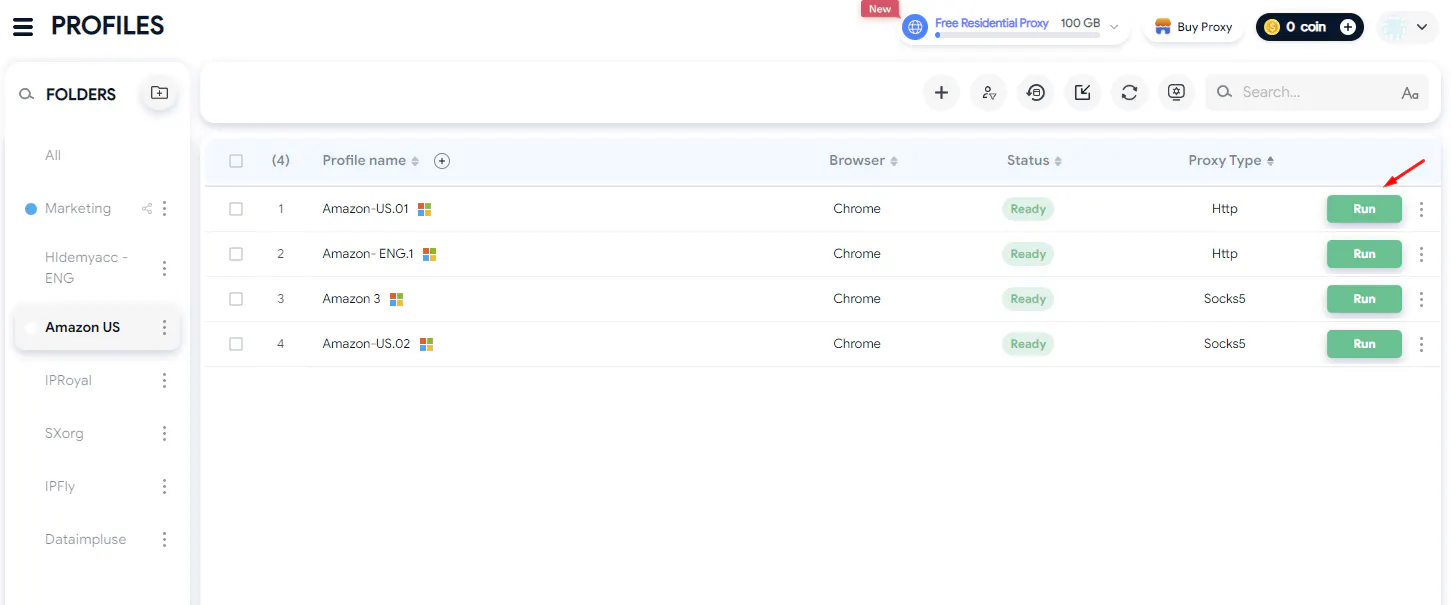
Testing a DataImpulse proxy on Hidemyacc
6. Testing DataImpulse Residential Proxy Performance in Real-World Conditions
This test focuses on the Price Comparison use case, one of the applications introduced on DataImpulse's official website. In practice, businesses may need to track the price of the same product across multiple marketplaces and markets to research competitive pricing, check differences in promotions, or prepare business expansion plans.
To simulate this scenario, the Kindle Paperwhite is used as the reference product. Amazon and eBay are accessed through IP addresses in the US, UK, and Germany. The test also examines access to Google to check search results by region.
This is a limited-scope practical test, not a large-scale automated scraping process. Its goal is not only to check whether the proxy can access websites but also to evaluate three factors: whether the IP location reflects the target market, whether websites can be accessed reliably, and whether page loading speeds are sufficient for looking up product information.
6.1. Test Setup
The test was conducted using three profiles on Hidemyacc, each configured with a Residential Proxy corresponding to one market. The configurations were kept consistent to minimize unnecessary differences between test sessions.
| Item | Initial Test | Follow-up Test |
|---|---|---|
| Tracked product | Kindle Paperwhite | Kindle Paperwhite |
| Use case | Price Comparison and Market Research | Google Search accessibility |
| Websites tested | Google, Amazon, and eBay | Google and IPFighter |
| Countries | US, UK, and Germany | US, UK, and Germany |
| Antidetect browser | Hidemyacc 3.1.13 | Hidemyacc 3.1.13 |
| Browser | Chrome 155 | Chrome version reported by IPFighter: 155 for US, 156 for UK and Germany |
| Number of profiles | 3 | 3 |
| Proxy type | Residential | Residential |
| Protocol | HTTP | HTTP |
| Session mode | Sticky | Rotating |
| Session duration | 120 minutes | Not applicable |
| Traffic package | Intro \$5/5GB | Same Residential package |
Each profile was configured with a separate proxy. The IP information was then checked before accessing Google, Amazon, and eBay. Sticky mode was used to maintain the same IP address throughout the configured session instead of changing IPs continuously after each request.
Using Sticky Sessions is suitable for this test because price tracking often involves opening multiple product pages within the same browsing session. Maintaining the same IP helps prevent location changes between visits, making the comparison process more consistent.
A separate follow-up test was conducted using Rotating sessions to check IP changes and Google accessibility. The same three countries and the keyword Kindle Paperwhite were used. IP addresses were checked five times in each profile, followed by one Google search per country.
6.2. Checking IP Location and Connection Information
The first factor examined was the ability to route IP addresses by country. For Price Comparison activities, this is important because e-commerce websites may display different prices, currencies, product categories, and shipping conditions depending on the market.
During the test, all three IP addresses were identified as belonging to their respective configured countries. When accessing the target websites, the tester could view content associated with the US, UK, and German markets.
| Country | Geolocation Result | Recorded Information |
|---|---|---|
| US | Correctly identified as the selected country | City and ISP information recorded according to the test results |
| UK | Correctly identified as the selected country | City and ISP information recorded according to the test results |
| Germany | Correctly identified as the selected country | City and ISP information recorded according to the test results |
These results show that DataImpulse met the basic requirement for country-level IP targeting within the scope of the initial test. This is an advantage when researching multiple markets without having to access the internet directly from each country. Users can create separate profiles to observe how websites display product information in different regions.
However, it is important to distinguish between an IP's location and the actual location information that a website uses to personalize content. An IP address being correctly identified as belonging to a country does not guarantee that all displayed information accurately reflects the experience of a local shopper.
For example, when checking Kindle Paperwhite prices on Amazon, the results may also depend on the shipping address, logged-in account, cookies, browsing session, and selected product version. If users rely solely on the IP address to determine product prices in a country, they may overlook other factors that affect prices or purchasing conditions.
Therefore, when conducting Price Comparison research, you should check the IP country, website version, currency, and shipping address together. If your goal is to compare prices across markets, keep the testing conditions consistent to minimize data discrepancies.
Additional IP Rotation Check
A follow-up check was conducted using Rotating mode to observe how IP addresses changed during repeated requests. The IP lookup page was refreshed five times in each profile, and the returned addresses were recorded.
| Country | IP addresses observed | Unique IPs |
|---|---|---|
| US | 24.46.254.134, 9.142.40.148, 9.142.40.148, 71.190.145.38, 188.221.160.43 | 4 |
| UK | 86.26.152.244, 80.5.124.55, 51.9.168.155, 109.153.71.81, 82.45.78.139 | 5 |
| Germany | 95.90.210.134, 89.244.88.164, 185.202.156.43, 92.208.3.120, 2.241.99.20 | 5 |
The UK and Germany profiles returned different IP addresses in all five checks. The US profile returned four unique IPs, with the same address appearing in the second and third checks, approximately two minutes apart.
These observations confirm that the Rotating setup assigned multiple IP addresses during the test. However, the results also show that an IP did not necessarily change with every manual page refresh.
IP Quality and Fingerprint Checks
IPFighter was also used to examine the IP addresses and browser-related signals in the three Rotating profiles.
| Country | IP Score | Issues detected | DNS location | WebRTC location |
|---|---|---|---|---|
| US | 60% | 3 | Germany | US |
| UK | 70% | 2 | UK | UK |
| Germany | 60% | 3 | India | Germany |
IPFighter reported scores of 60% for the US, 70% for the UK, and 60% for Germany, with 2–3 issues detected per profile. WebRTC locations matched the selected countries, while DNS locations differed in the US and Germany.
These results confirm that multiple IPs were assigned during the test, but a new IP was not returned after every manual refresh. IPFighter findings are also diagnostic indicators, not proof that a website will block a connection.
6.3. Checking Access to Amazon and eBay
After confirming the IP locations, the test continued by accessing Amazon and eBay to evaluate the proxy's usability for product research.
Amazon
Amazon was accessible from all three markets: the US, UK, and Germany. Product pages displayed region-specific content, allowing the tester to observe product information and prices in each market.
This is a positive result for the Price Comparison use case. When researching product prices across multiple countries, users can create profiles with separate proxies to access the regional versions of Amazon. This is more convenient than relying on a single browsing session, especially when checking differences in prices, product availability, or product options.
One important point is that being able to access a website does not mean all product data can be collected easily. Amazon may display CAPTCHA , require users to log in, or restrict certain activities when it detects unusual traffic. The current test confirmed that the website was accessible, but it did not involve enough requests to evaluate whether access could be maintained during continuous data collection.
eBay
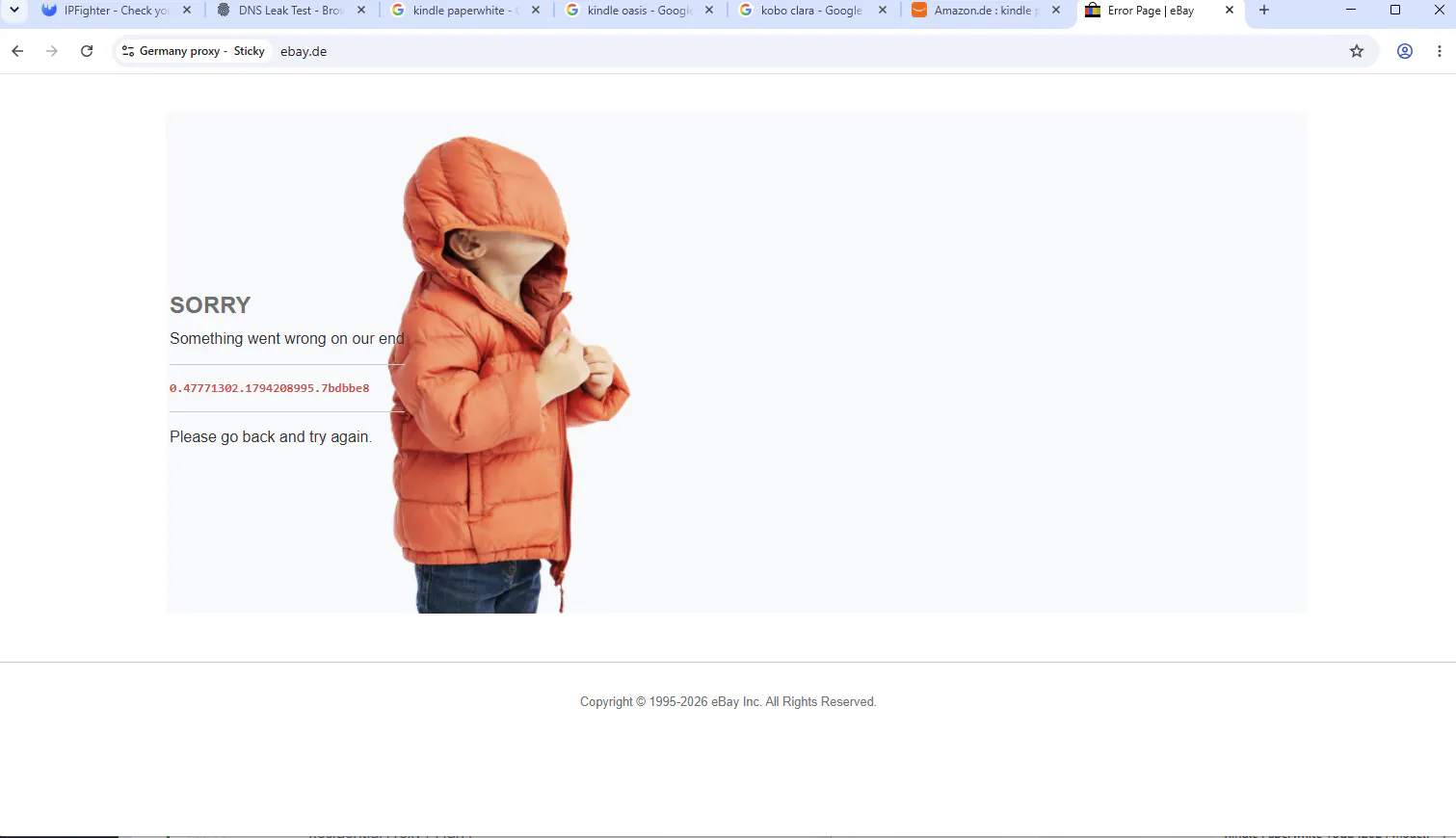
eBay was also tested in the corresponding markets. However, one access error occurred during the process, while the remaining attempts were successful.
This indicates that access to eBay was not entirely consistent within the scope of the test. A single failed attempt is not enough to conclude that the proxy is incompatible with the platform, but it is still worth considering if you plan to use DataImpulse for regular data collection.
In addition, eBay product data differs from Amazon's. The same product may be listed by multiple sellers, with different conditions, such as new or used, shipping terms, and prices. Users need to filter the correct product version and condition before adding the data to a comparison table.
Assessment: Amazon delivered better access results in this test, as it could be opened in all three markets. On eBay, one failed access attempt indicates that further stability testing is needed before using it as a regular data source. DataImpulse can support access to e-commerce platforms, but the results from one website should not be generalized to all other websites.
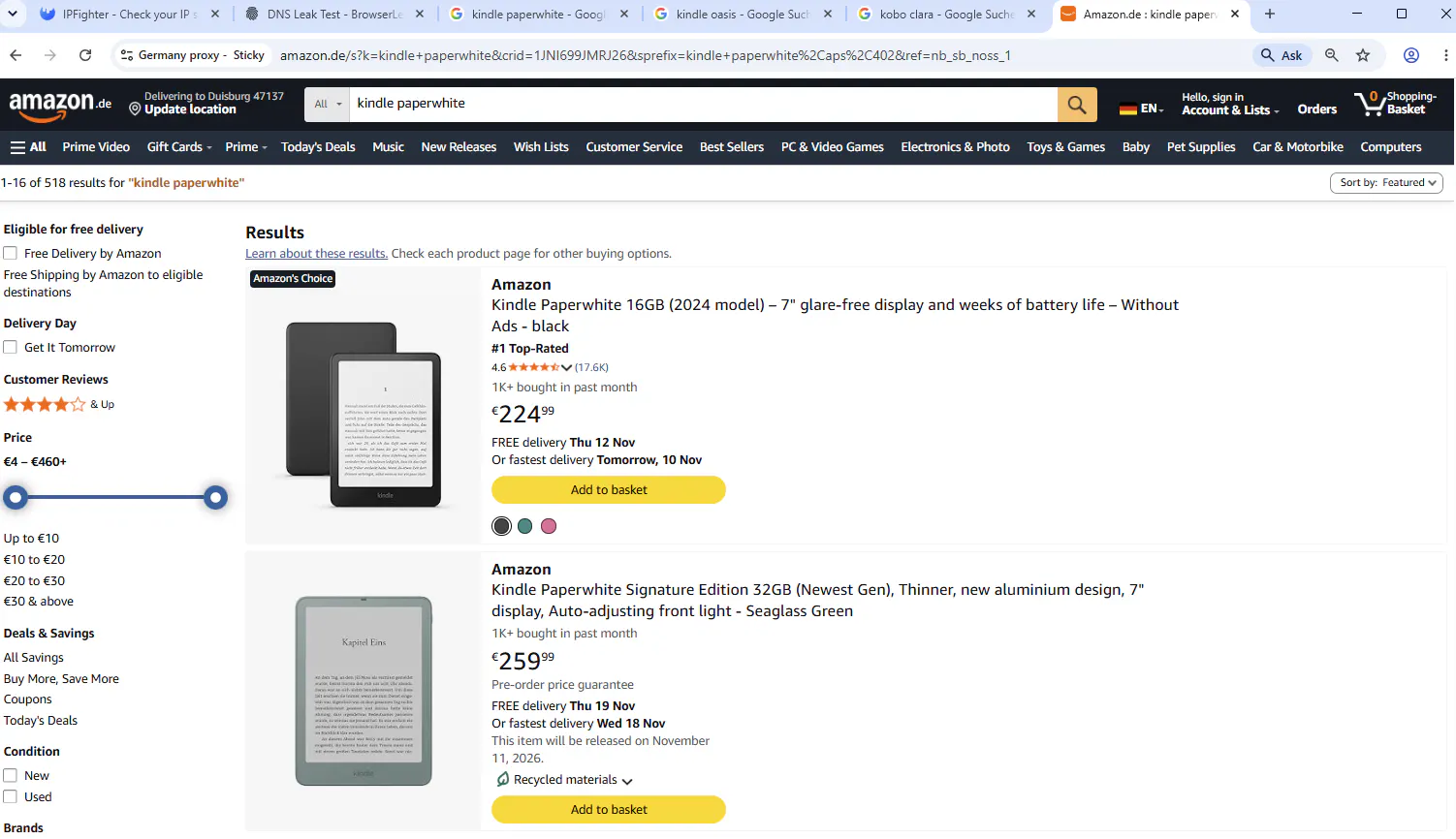
Accessing Kindle Paperwhite product pages on Amazon
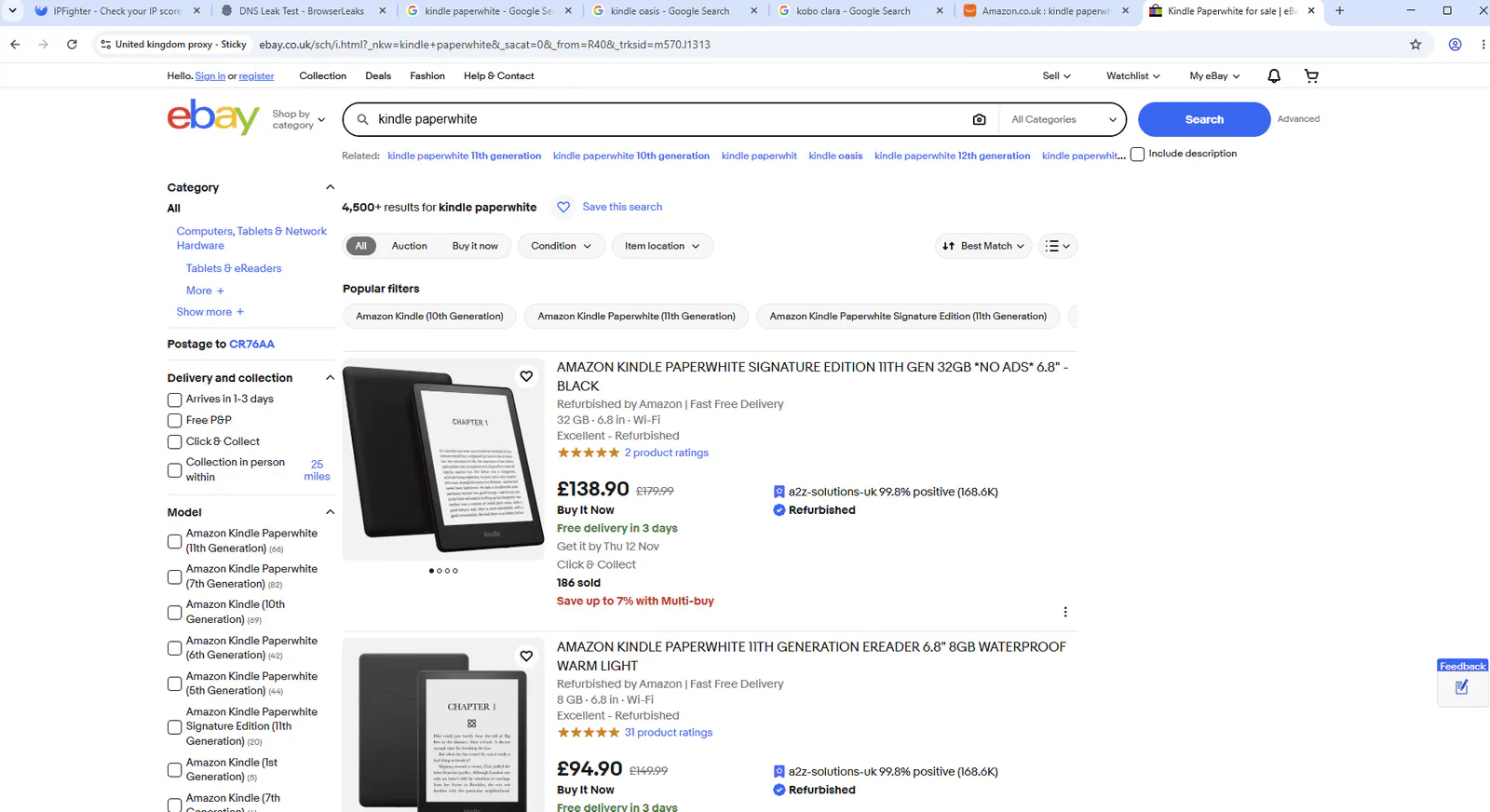
Accessing Kindle Paperwhite product pages on eBay.
6.4. Checking Google Access and Website Responses
Google access results differed between Sticky and Rotating sessions. During the initial Sticky test, the US IP returned a 403 error, while the German IP displayed a CAPTCHA.
In the follow-up Rotating test, the same keyword, Kindle Paperwhite, was searched once in each country.The Rotating test produced more favorable initial results in the US and Germany, while the UK profile still required verification. However, only one Google search was conducted per country during this follow-up test, so the results are not sufficient to establish a consistent success rate or prove that Rotating is always more reliable than Sticky Sessions.
Google and other protected websites evaluate multiple signals, including IP reputation, browser fingerprints, HTTP headers, request frequency, and user behavior. A proxy only changes the IP-related part of the connection, so CAPTCHA challenges or access denials do not necessarily indicate that the proxy IP itself has failed.
The 403 error in the initial US test prevented access to Google at that time. The CAPTCHA in Germany required additional verification before access could continue. In the follow-up test, the US and Germany profiles loaded search results immediately, while the UK profile required one verification step.
403 and CAPTCHA responses when accessing Google through a proxy.
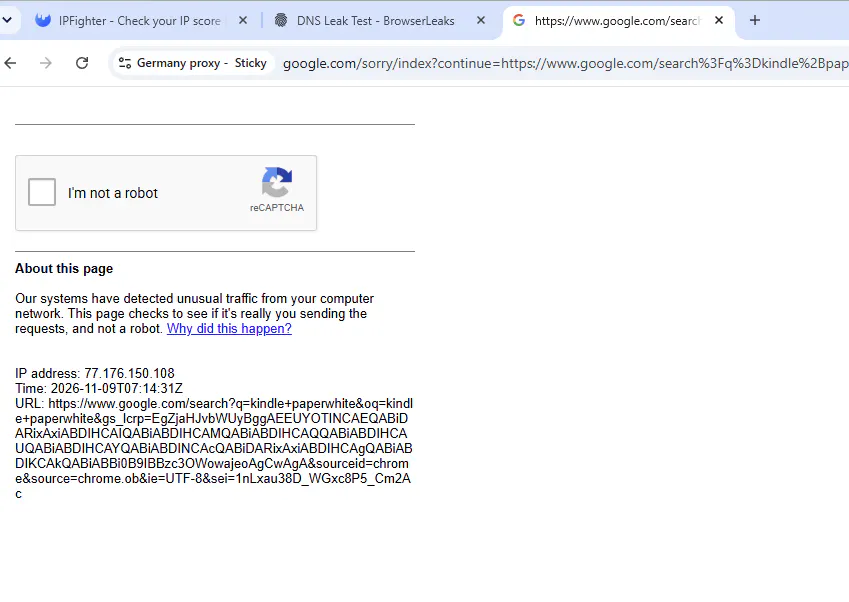
403 and CAPTCHA responses when accessing Google through a proxy.
For users who track search results, these interruptions can affect workflow efficiency. When checking only a few keywords manually, users may be able to complete a CAPTCHA or retry after encountering an error. However, repeated verification requests and access denials can become more disruptive when collecting larger amounts of search data.
Google access varied by country and session mode. Rotating returned results immediately in the US and Germany during the follow-up test, but the UK still required one CAPTCHA verification. Further testing with repeated searches and more IPs is needed to assess long-term reliability.
6.5. Comparing Product Information and Page Loading Speeds
During access to Amazon and eBay, the recorded page loading time was approximately 2–4 seconds. For manual product searches and information checks, this response time was relatively convenient.
Page loading speed directly affects the proxy user experience. When opening multiple product pages or switching between markets, slow response times can increase the overall research duration. Within the scope of this test, the 2–4-second loading time indicates that accessing e-commerce pages did not involve significant speed-related issues.
However, this should not be considered DataImpulse's fixed loading speed. Page loading time also depends on the website's server, content size, number of images, network connection quality, and testing time. The test also did not involve simultaneous scraping tasks or large numbers of requests, so these results cannot be used to evaluate performance in large-scale automation workflows.
Regarding traffic, total consumption after the test was approximately 1.01GB. At the Residential Proxy rate of \$1/GB, the corresponding cost was approximately \$1.01.
This is important information when evaluating DataImpulse's cost-effectiveness. The \$1/GB rate makes expenses relatively easy to estimate for low-traffic tasks, but total costs may increase as the number of products, markets, and websites being monitored grows.
For example, a workflow that opens only a few product pages will consume a different amount of traffic from one that continuously loads multiple pages containing images and dynamic content. If you collect data regularly, monitor traffic after each testing session to determine the average consumption per product or market.
One important distinction is that traffic consumption does not come only from the content users directly view. Website components, images, and other resources loaded when opening a page can also increase data transfer. Therefore, you should not estimate costs based solely on the number of pages visited.
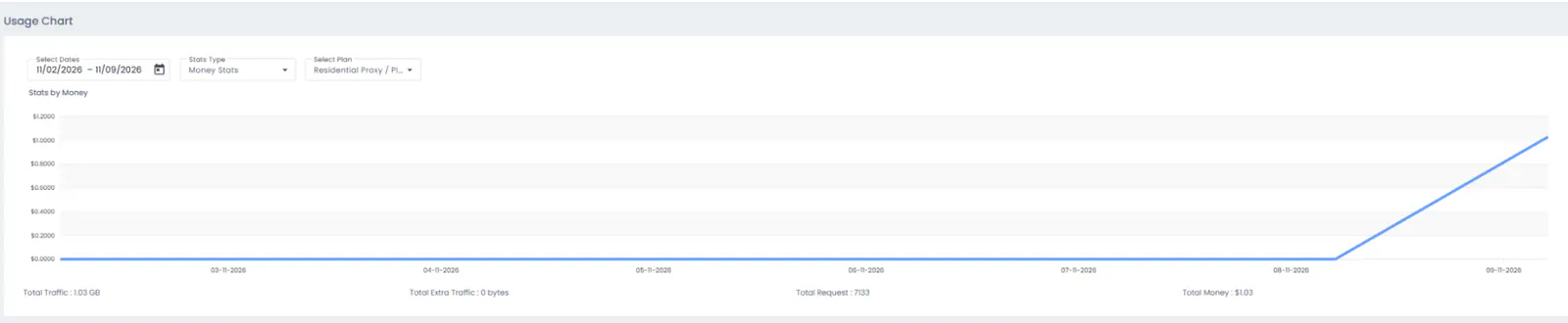
Traffic usage statistics after the DataImpulse test.
6.6. DataImpulse Evaluation Through the Price Comparison Test
The initial test showed that DataImpulse could provide access to Amazon across all three markets, with page loading times of approximately 2–4 seconds. However, Google access varied by country, and eBay recorded one failed access attempt.
The follow-up Rotating test returned more favorable Google results in the US and Germany, while the UK profile required one CAPTCHA verification. IP checks also confirmed that multiple addresses were assigned, although the same IP could appear in consecutive checks.
| Criteria | Recorded Result | Assessment |
|---|---|---|
| IP geolocation | All three IPs were identified as belonging to the correct countries | Meets the requirement for market-based routing |
| Amazon access | Accessible in all three markets | Suitable for checking products by region |
| eBay access | One access error occurred | Stability requires further evaluation |
| Page loading speed | Approximately 2–4 seconds on Amazon and eBay | Sufficient for ordinary browsing and product searches within the test |
| Traffic consumption | Approximately 1.01GB | Budget planning is necessary when scaling up |
For the specific use case of tracking Kindle Paperwhite prices, DataImpulse can support access to Amazon across multiple markets and help users collect region-specific product information. The Rotating follow-up also suggests that session mode may affect Google accessibility, although more testing is needed to confirm whether these results are consistent.
The product data from the US, UK, and Germany has not been confirmed to represent the exact same Kindle Paperwhite model. Therefore, the test is useful for evaluating accessibility and observing different markets, but it is not sufficient to establish precise price differences for the same product across countries.
Overall assessment: DataImpulse performed well in terms of country-level IP targeting and Amazon access in the initial test. The follow-up Rotating test returned more favorable Google results in the US and Germany, although the UK profile still required CAPTCHA verification. The service is worth considering for market research and checking region-specific product information, but further testing is necessary before deploying large-scale data collection.
7. Who Is DataImpulse Suitable For?
Based on the use cases introduced by DataImpulse, its proxy types, pricing model, and test results, the service may be suitable for the following user groups:
| User Group | Suitability | Reason |
|---|---|---|
| Web scraping professionals | Suitable | Offers residential, mobile, and datacenter proxies for different data collection requirements |
| Businesses tracking prices | Suitable | Allows users to check product prices across multiple marketplaces and regions |
| Market researchers | Suitable | Supports the collection of prices, advertisements, search results, and reviews across markets |
| SEO specialists | Worth considering | Allows users to check search results and monitor SERPs by geographic location |
| Advertising professionals | Worth considering | Helps verify how ads appear across different regions and devices |
| Website testing teams | Worth considering | Allows users to check website accessibility and content from multiple markets |
| AI developers and data teams | Worth considering | Can support the collection of publicly available web data for AI agents and model training |
DataImpulse may be worth considering if you need proxies for data collection tasks or region-specific website testing. AI developers and data teams may also use its proxy connections to collect publicly available web data from different locations for their workflows.
However, for tasks that require maintaining a fixed IP for extended periods or involve complex automation workflows, you should carefully evaluate the proxy type and its capabilities before deploying it at scale.
8. Pros and Cons of DataImpulse
8.1. Pros
DataImpulse offers multiple proxy types with traffic-based pricing, allowing users to choose a service according to their actual needs. Residential proxies start at \$1/GB, while datacenter proxies are cheaper, making them suitable for projects that need to balance performance and budget.
The service supports rotating and sticky sessions, multiple connection protocols, an API, and IP location targeting options. DataImpulse also provides integration guides for tools such as Scrapy, Selenium, Puppeteer, Playwright, and Octoparse, allowing users to incorporate proxies into existing data collection workflows.
Another advantage is that purchased traffic does not expire and country targeting is included in the package. This gives users more flexibility when conducting market research or scraping projects that do not run continuously.
In the initial test, the profiles could access Amazon in all three markets. In the follow-up test, Rotating sessions also returned more favorable Google access results in the US and Germany, although the UK profile still required CAPTCHA verification. These capabilities are useful for market research and monitoring region-specific content.
G2 reviews also indicate that users are generally satisfied with the service's pricing, customer support response times, and integration capabilities.
8.2. Cons
Website access results are not always consistent. During the test, Google returned a 403 error in the US session and displayed a CAPTCHA in the German session. eBay also recorded one failed access attempt. These results show that proxies may still encounter limitations depending on the IP, website, browsing environment, and time of use.
In addition, traffic-based pricing requires users to monitor consumption regularly, especially for scraping tasks that involve loading large numbers of pages. Some G2 users have also expressed a desire for a larger IP pool, more detailed dashboard statistics, and better setup guidance for beginners.
9. Conclusion
DataImpulse is worth considering if you need residential, mobile, or datacenter proxies for tasks such as web scraping, market research, product price tracking, or checking search results by region.
The service offers multiple proxy types, supports rotating and sticky sessions, provides an API and targeting options, and uses a traffic-based payment model. Purchased traffic does not expire, which is also convenient for projects with irregular data collection schedules. G2 reviews indicate positive user feedback regarding pricing, customer support, and integration capabilities.
However, real-world test results show that accessibility still depends on the IP, browsing environment, and target website. CAPTCHAs may appear, some websites may fail to load during individual attempts, and traffic consumption needs to be monitored to control costs. The test also had a limited scope and does not establish how the service performs in large-scale scraping workflows.
Therefore, before using DataImpulse for a long-term project, you should test it with the exact websites, countries, and workflows you intend to use.
If you need to manage multiple accounts or separate browser environments, you can combine proxies with antidetect browser Hidemyacc to manage individual profiles and configure independent connections.
Related articles:
- Who Are the Best Proxy Providers in 2026? Top 15 Services Reviewed
- ProxyLink Review - Key Features, Pros, and Cons
- Storm Proxies Residential Proxy Review
- Soax Proxy Review: Testing Soax Proxy Quality
- MyPrivateProxy Pros and Cons: Is It Worth Buying?
10. FAQ
1. What types of proxies does DataImpulse offer?
DataImpulse offers residential proxies, premium residential proxies, mobile proxies, and datacenter proxies. Each type has different characteristics and pricing, making them suitable for different use cases.
2. Does DataImpulse support SOCKS5?
Yes. DataImpulse supports HTTP(S) and SOCKS5. You should choose the protocol that is compatible with your browser or software.
3. How does DataImpulse charge for its services?
DataImpulse uses a traffic-based pricing model. The price depends on the proxy type and package purchased. Residential proxies start at a standard rate of \\$1/GB.
4. Does DataImpulse traffic expire?
According to the provider, purchased traffic does not expire. You can use the remaining data for future data collection sessions.
5. Does DataImpulse support rotating and sticky sessions?
Yes. Rotating sessions allow IP addresses to change according to a rotation mechanism, while sticky sessions maintain the same IP for a specified period based on the configuration.
6. Can DataImpulse be used for web scraping?
Yes. DataImpulse lists web scraping as one of its main use cases and provides integration guides for tools such as Scrapy, Puppeteer, Selenium, Playwright, and Octoparse.
7. Can DataImpulse be used with Hidemyacc?
Yes. You can retrieve the host, port, username, and password from DataImpulse, then enter them in the proxy settings of a Hidemyacc profile. After checking the connection, you can launch the profile and start using it.