SSL VPN has become an important solution for establishing secure connections and protecting user information during data transmission. This technology offers flexibility and convenience, allowing users to access network resources from virtually anywhere. In this article, Antidetect browser Hidemyacc explores what SSL VPN is and the key benefits it offers in the digital era of Industry 4.0.
QUICK SUMMARY:
What: Secure encrypted connection through browser
How: Uses SSL/TLS protocol to encrypt data
Best For: Remote workers, secure company access
Setup: No software needed, just username + password
1. What is SSL VPN?
SSL VPN (Secure Sockets Layer Virtual Private Network) is a networking technology that enables users to establish a secure, encrypted connection between a public network (such as the Internet) and an organization's internal network. It uses the SSL or TLS protocols to ensure data security during transmission.

SSL VPN technology enables access to applications, folders, and internal network resources without requiring specialized software installations. It ensures maximum security by automatically adopting the latest encryption protocols whenever the browser or operating system is updated. This offers users both convenience and robust protection when accessing resources remotely.
>>>Read More:
2. Classification of SSL VPN
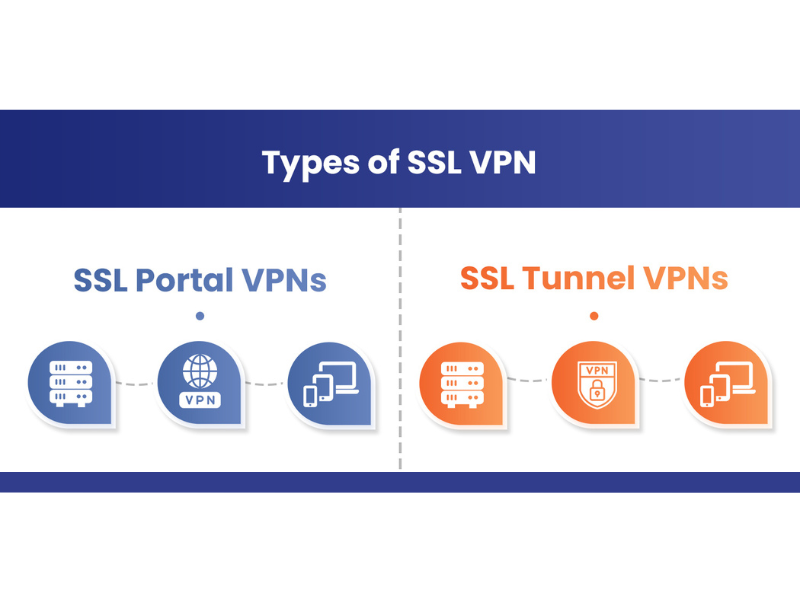
SSL VPN can be categorized into two primary types: SSL Portal VPN and SSL Tunnel VPN, each offering distinct levels of security and access capabilities.
2.1. SSL Portal VPN
SSL Portal VPN enables users to access a secure portal through a web browser. By logging in with their credentials, users can connect securely to a range of authorized intranet applications and services. Typically, SSL VPN portals only require a username and password, ensuring security without needing additional software installations.
2.2. SSL Tunnel VPN
SSL Tunnel VPN provides a more comprehensive, secure connection, granting access to a broader range of network services beyond web applications. This type of SSL VPN supports access to an organization’s proprietary services and applications through a secure SSL tunnel connection. In some cases, SSL Tunnel VPN may require the browser to install additional components, like JavaScript or Flash, to function effectively.
3. How SSL VPN works
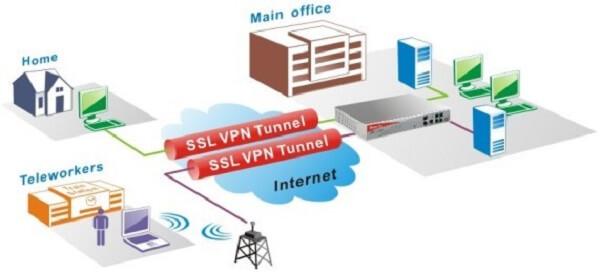
SSL VPN operates directly through a web browser, eliminating the need for additional applications or complex configurations. When a user logs into the VPN portal, an encrypted and secure connection is established between the browser and the SSL VPN server.
All data exchanged over this connection is encrypted to ensure security, allowing only the user's browser to decrypt information received from the server. SSL VPN remains active only while the browser is open; if the browser is closed or switched, the secure connection is terminated.
>>>Explore More: How to set VPN on Android: A Step-by-Step guide for easy setup
4. Benefits of using SSL VPN
SSL VPN is a flexible security solution widely used for remote access to internal networks. Here are the benefits this technology brings:
-
High security: SSL VPN uses the SSL/TLS protocol to encrypt data transmitted over the network. This helps protect information from interference by third parties without access rights, ensuring the safety of important information.
-
Flexible remote access: Users can easily connect to the local network from anywhere, just need an Internet connection. This is very useful for employees working remotely, or students studying online.
-
Easy to install and use: One of the strengths of SSL VPN is the simplicity of the setup process. Users do not need to install software or complicated configuration, just need a web browser to access.
-
Cross-platform support: SSL VPN works on many different types of devices and operating systems, from computers and laptops to mobile phones and tablets. This brings maximum convenience to users.
-
Flexible access management: SSL VPN helps manage access to specific company resources. This allows businesses to have better control, limit access rights for each employee, and minimize the risk of data leaks.
5. Disadvantages of SSL VPN
In spite of SSL VPN brings many benefits, but it also has some disadvantages that you need to keep in mind:
-
Security limits on other applications: SSL VPN only encrypts data transmitted through the browser, meaning other applications are not protected by this connection. This could create a security vulnerability if users need to access applications outside of the browser.
-
Vulnerable if the browser has vulnerabilities: SSL VPN depends on the web browser to establish a secure connection. If a hacker discovers a security flaw in the browser's code, the VPN connection can be compromised and data stolen.
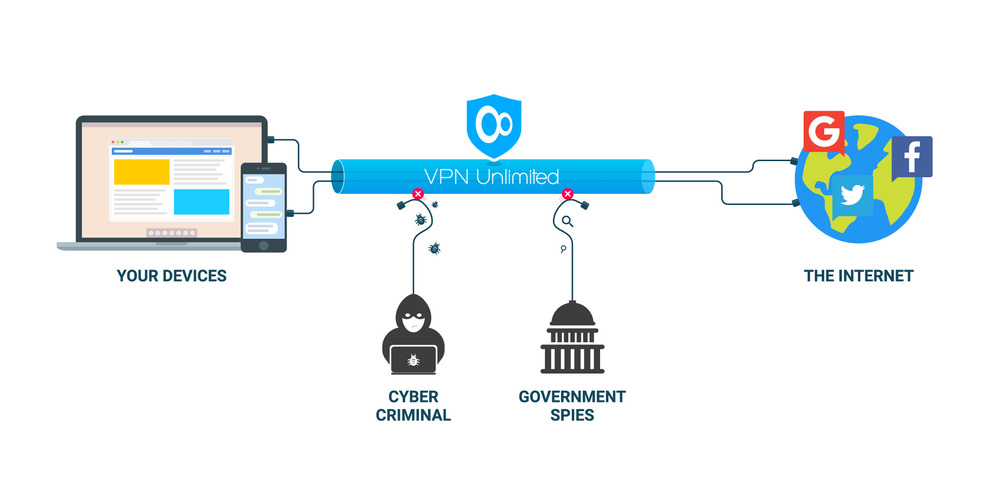
While SSL VPN offers secure connections, it does have a key limitation: it can only be used with a single browser after connecting to the VPN application. This means you cannot run multiple profiles with different IP addresses simultaneously on the same device. Switching between various IP profiles requires disconnecting and reconnecting, which can be time-consuming.
A more flexible solution is to use a proxy, because the proxy can be specific to each application or browser. This helps you change individual IPs for each profile and run each profile simultaneously with a different IP. However, just changing the IP is not enough, because many websites can detect browser fingerprints, helping them identify your device through its technical specifications.
For users managing numerous accounts, combining a proxy with an Antidetect Browser, such as Hidemyacc, provides an optimal solution. This setup allows users to alter both IP addresses and browser fingerprint elements, including browser, operating system, and IP details, thereby enhancing anonymity and avoiding detection.
- Change browser fingerprint: Combined with a proxy for better anonymity, avoiding detection by websites through Browser Fingerprint.
- Manage multiple accounts: Allows you to easily switch between accounts with each separate IP without worrying about being locked.
- High security: Protect personal data and prevent third-party tracking.

Hidemyacc provides the optimal solution for those who need to manage a large number of accounts
Read more:
- Proxy Server: What is it and how does it work?
- Datacenter Proxy 101: All You Need To Know About Datacenter Proxy
- What is rotating IP address proxy? Top providers for rotating proxy
- Mobile Proxy: Why you need them and where to buy
- What is a VPN? How it can protect you from online threats
6. Some frequently asked questions
To help you better understand the usage SSL VPN, you can refer to the questions that many users often ask below:
6.1. Does SSL VPN work on phones?
SSL VPN Completely usable on mobile phones. One of the big benefits of SSL VPN is cross-platform support, allowing users to access from phones, laptops, PCs, and tablets without needing to install complicated software.
6.2. Does SSL VPN affect laptop performance?
SSL VPN may affect laptop performance, because SSL VPN uses network bandwidth to connect and encrypt data. Factors such as internet connection quality, number of running applications, and machine configuration can also affect performance when using SSL VPN.
In conclusion, SSL VPN has become an essential component of many organizations' security strategies, offering high security, flexible remote access, and ease of use across various platforms. We hope this article has provided valuable insights into SSL VPN. Hidemyacc offers solutions to streamline multi-account management efficiently. Contact Hidemyacc today for support and consultation!