LinkedIn's security algorithms are becoming increasingly strict, making automation or account farming riskier than ever. In that context, LinkedIn proxy acts as a digital "shield", helping you remain anonymous and change IP addresses safely. This is a mandatory infrastructure solution so you can manage multiple independent LinkedIn accounts on the same device without being detected by the system. However, choosing the wrong type of proxy is as dangerous as not using one; this article will help you clearly distinguish between Residential Proxy, Mobile 4G and guide the most standard setup process in 2026.
1. Why do you need to use proxy for LinkedIn?
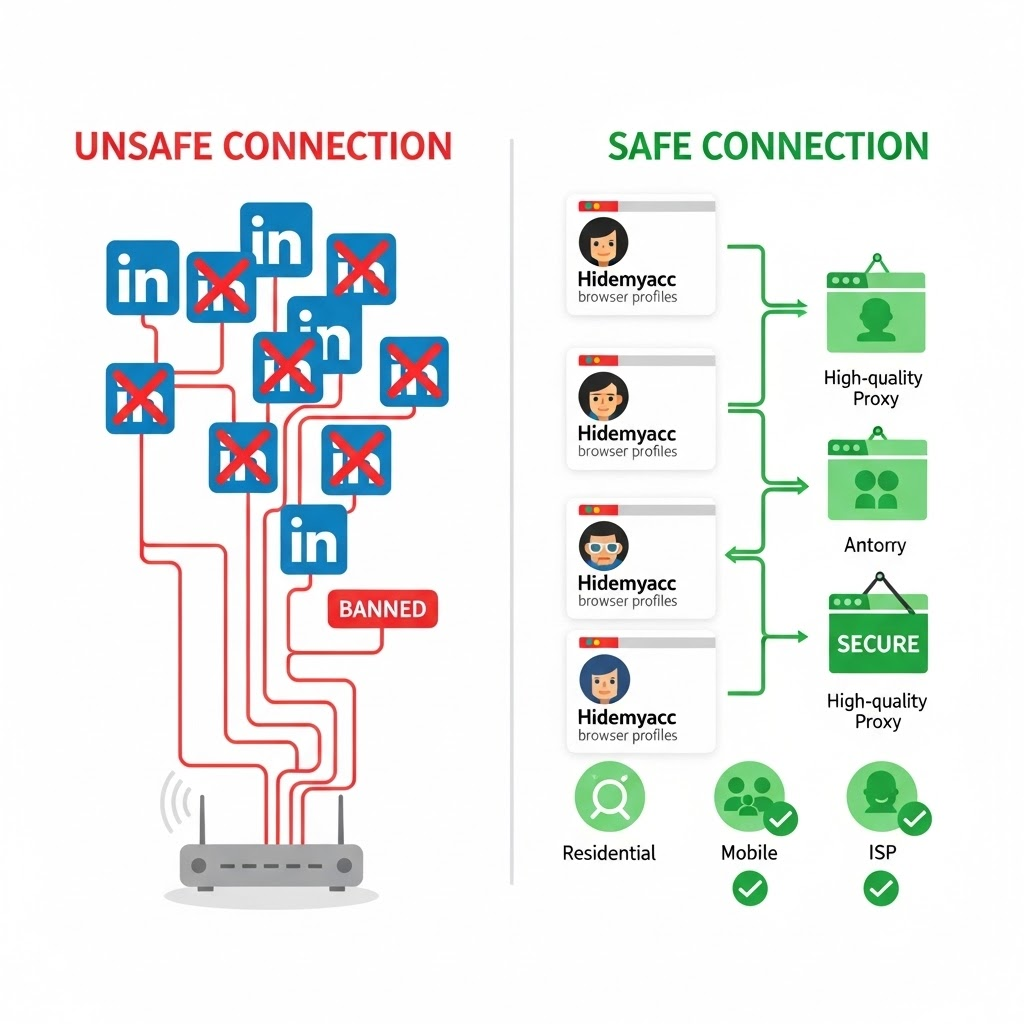
LinkedIn is known as the social media platform with the strictest firewall and security systems today. Unlike Facebook or Twitter, LinkedIn is very aggressive in scanning suspicious behavior from IP addresses. There are 4 core reasons why Proxy becomes an indispensable technical infrastructure:
1.1. Managing a multi-account system
LinkedIn operates on the principle of "one real person - one account". If you log in to many different accounts on the same IP address (for example: office Wifi or at home), the algorithm will immediately flag this as abnormal behavior. The consequence is that if one account is locked, other accounts on the same IP will be "linked-ban" and die in series.
Why should you use proxy?
The use of proxy helps you assign a unique IP address to each profile, ensuring the following technical factors:
- Establish a clean environment: Instead of using a shared IP address that risks being blacklisted, proxy provides a unique and separate network identity for each user profile, not overlapping with other accounts.
- Avoid data conflict: When combining proxy with antidetect browser, the data of each account (such as cookies, history) is completely separated. This ensures that if one account encounters a problem, the remaining accounts are still safe.
- Maintain stability: Fixing a proxy to an account helps avoid the phenomenon of continuous "IP jumping" (e.g., IP changing location unusually in a short time) - one of the fraud signals that LinkedIn's algorithm scans very strictly.
This is a step in the way to manage multiple LinkedIn accounts safely, avoiding being locked, helping you build and manage the system sustainably.
1.2. Safe automation
Support tools like Linked Helper, Expandi or Phantombuster save significant time, but they often create a much higher frequency of requests than manual human operations.
LinkedIn detection mechanism:
The system not only evaluates behavior but also looks very closely at the IP address. If in one day, LinkedIn detects many different accounts originating from a single IP address (e.g., company network or home wifi) but simultaneously sending out hundreds of connection invitations or messages, the algorithm will immediately flag this as abnormal behavior and proceed to lock them in series.
The role of Proxy:
At this time, Proxy acts as an essential "identity mask":
- Distribute traffic: Instead of crowding all activities through one internet connection, Proxy provides each account with a separate IP address.
- Hide the origin: Help the system record these as real users operating independently from different locations, instead of a farm running centralized tools.
By this way, you minimize the risk of being detected as a bot by the system and limit the situation of accounts being flagged or locked in series.
1.3. Large-scale data collection
LinkedIn strictly limits the number of profiles that an account can view each day. If you try to exceed this limit to collect candidate information or potential customers, your IP will be blocked or constantly have to solve CAPTCHA.
To perform effective LinkedIn data scraping campaigns, you need a rotating proxy system. They allow changing the IP address after each request, helping you collect data continuously without interruption.
>>> See now:
- Explore LinkedIn Scraping: The right way and things to avoid
- What to do when your LinkedIn Account is Restricted?
1.4. Overcoming geographical barriers
Content, advertisements and job listings on LinkedIn are often displayed differently depending on the geographical area. If you are in Vietnam but want to exploit the US or European market, a Vietnamese IP will be a major obstacle. Proxy allows you to simulate location in any country, helping you accurately access Jobs, Leads or check ad display in that target market.
2. Not all Proxies are the same: Classifying LinkedIn proxies
Choosing the wrong type of proxy is the leading cause of account restrictions right after logging in. Below is a detailed analysis to help you make the correct choice:
2.1. Residential proxies (residential proxies)
Residential proxies are IP addresses provided by actual internet service providers (ISP) (such as Viettel, VNPT, FPT in Vietnam or Verizon, AT&T in the US) provided to households.
- Characteristics: When you use this type, your traffic looks exactly like a real user browsing the web at home.
- Usage purpose: Most optimal for Scraping (Data crawling) and large-scale Automation. Due to the Rotating nature of many residential packages, you can change identity continuously to avoid being blocked.
This is a good balance between cost and efficiency, especially suitable for campaigns that need to change identity continuously to collect data.
2.2. Static residential proxies (static ISP proxies)
Many people often confuse this type with datacenter proxy. In fact, Static ISP is a combination: it has the high speed of a server but the reliability of a residential IP.
- Characteristics: Most importantly, this IP address does not change (Static). It is attached to your account forever (unless you cancel the package).
- Why needed for LinkedIn: LinkedIn is very suspicious if an account logs in from different IPs continuously. Static ISP helps maintain a stable login session, extremely suitable for farming main Sales/HR accounts and long-term profile development.
If your goal is to build a personal brand or manage official accounts, this is the top choice to ensure absolute stability.
2.3. Mobile proxies (mobile proxies 4G/5G)
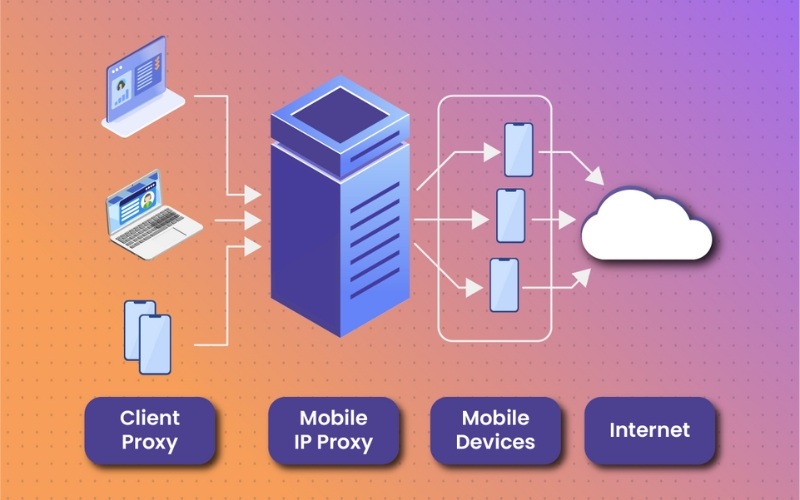
These are IPs routed through mobile devices using actual 3G/4G/5G networks.
- Characteristics: Due to the network infrastructure structure (CGNAT), a mobile IP address is often shared by thousands of real users at the same time. Therefore, LinkedIn almost cannot block these IPs, because if blocked, it will affect real users.
- Usage purpose: Dedicated to important accounts, newly created accounts needing high safety or when your account has a history of checkpoints. However, the price of this type is usually the highest.
Although it has the highest price, the superior safety helps this type of proxy become a solid shield for high-value accounts.
2.4. Datacenter proxies (datacenter proxies)
These are IPs created in bulk from cloud servers (Cloud Server) such as AWS, Google Cloud, Azure...
Warning: should not be used for LinkedIn. The IP ranges of these data centers have often been blacklisted by LinkedIn or are very closely monitored (Flagged). The rate of being detected and permanently locked is very high.
3. Review top 10 best LinkedIn proxies 2026
After identifying the suitable type of proxy, the remaining problem is choosing a reliable proxy purchase point. The following summary table will evaluate 10 best providers in detail.
3.1. Quick comparison table
|
Provider |
Best for |
Proxy type |
Geo-Targeting |
Pricing starts from |
Success rate |
|
Bright Data |
Enterprise Scraping |
Resi, Mobile, ISP |
City, Zip, ISP |
$0.9/IP |
99.95% |
|
IPRoyal |
Budget & Beginners |
Residential, ISP |
Country, City |
$1.75/GB |
99.7% |
|
SOAX |
Precise Targeting |
Mobile, ISP, Resi |
City, Carrier |
$0.32/GB |
99.55% |
|
Decodo |
Value for Money |
Resi, Mobile, DC |
City, State |
$0.2/IP |
99.47% |
|
Proxy-Seller |
Individual Accounts |
Dedicated ISP/IPv4 |
Country, City |
$0.75/IP |
99% |
|
Oxylabs |
Large Scale Business |
Resi, Mobile, DC |
ASN, Zip, City |
$0.5/1K results |
99.95% |
|
NetNut |
High Speed |
Static ISP, Resi |
Country, City |
$0.45 |
99.99% |
|
HydraProxy |
Mobile Automation |
Mobile 4G, Resi |
US locations |
$2.5/GB |
98% |
|
ProxyEmpire |
Rollover Data |
Resi, Mobile |
Country, Region |
$0.35/GB |
99.56% |
|
Infatica |
Corporate Ethics |
Resi, Mobile, DC |
Country, City |
$0.3/GB |
98.5% |
3.2. List of 10 providers
Bright Data
Bright Data (formerly Luminati) is widely recognized as the world's No. 1 web data platform. They position themselves as a premium solution for large enterprises.
- Key features: Powerful open-source Proxy Manager management system, "Unblocker" feature helps automatically bypass LinkedIn firewall.
- IP Pool: Over 72 million IPs (largest in the market).
- Supported countries: Global (195 countries), covering down to each city.
- Proxy types: Full range of Residential Proxy (Static & Rotating), ISP, Datacenter and Mobile Proxy.
- Protocol: HTTP/HTTPS and SOCKS5.
- Trial: None
- Price: from $0.9/IP or monthly plan.
- Support: 24/7 via Ticket and private Account Manager.
IPRoyal
IPRoyal emerges as a transparent provider with a commitment to 100% ethically sourced IPs. They are the top choice for individuals and small businesses.
- Key features: Data traffic policy never expires - buy once use all year.
- IP Pool: About 8 million+ IPs.
- Supported countries: 195 countries.
- Proxy types: Focus on Residential Proxy and Static Residential.
- Protocol: HTTP/HTTPS and SOCKS5.
- Trial: No free trial, but has cheap test packages.
- Price: only from $1.75/GB.
- Support: Live chat 24/7 and Discord community.
SOAX
SOAX is a clean proxy provider with a very strict input IP verification mechanism.
- Key features: Ability to target super-detailed down to the specific Carrier and City.
- IP Pool: Over 8.5 million IPs.
- Supported countries: Global.
- Proxy types: Residential, Mobile and ISP Proxy (rotating).
- Protocol: HTTP/HTTPS and SOCKS5.
- Trial: Has $1.99 trial package.
- Price: $0.32/GB
- Support: Highly rated for Live Chat response speed.
Decodo
Decodo is a direct competitor with Bright Data in terms of quality but with "softer" prices, suitable for Solopreneurs and Agencies.
- Key features: Built-in X-Browser to manage multiple profiles, compatible well with Automation tools.
- IP Pool: Over 40 million residential IPs.
- Supported countries: 195+ locations.
- Proxy types: Residential, Mobile, Datacenter and ISP Proxy.
- Protocol: HTTP/HTTPS and SOCKS5.
- Trial: Yes
- Price: Flexible, about $0.2/IP.
- Support: Chat support 24/7 response under 5 minutes.
Proxy-Seller
Proxy-Seller focuses on selling Proxy per individual IP (Dedicated). This is the most economical choice to farm a small number of accounts (1-5 accounts).
- Key features: Allows flexible rental duration (1 week, 1 month...). Easy buying interface.
- IP Pool: Not publicly announced total number, but available in 50+ countries.
- Supported countries: Most popular are US, UK, Canada, Vietnam...
- Proxy types: IPv4/IPv6 Dedicated (ISP & Datacenter) and Mobile Proxy.
- Protocol: HTTP/HTTPS and SOCKS5.
- Trial: No.
- Price: From only $0.75/IP.
- Support: Live Chat and TeamViewer 24/7.
Oxylabs
Oxylabs is a "giant" serving the Enterprise customer segment.
- Key features: "Next-Gen Residentials" technology uses AI to simulate user behavior, optimizing for large-scale Scraping.
- IP Pool: Over 100 million IPs.
- Supported countries: Global coverage.
- Proxy types: Residential, Mobile, Datacenter (Rotating & Static).
- Protocol: HTTP/HTTPS and SOCKS5.
- Trial: Yes (for businesses).
- Price: from $0.5/1K results
- Support: Dedicated Account Manager.
NetNut
NetNut connects directly with ISPs (DiViNetworks) instead of relying on P2P networks, bringing superior speed.
- Key features: Connection speed (Speed & Latency) fastest in the market, extremely stable static IPs.
- IP Pool: Over 52 million IPs.
- Supported countries: Global.
- Proxy types: Specializes in Static ISP and Rotating Residential.
- Protocol: HTTP/HTTPS and SOCKS5.
- Trial: 7 days free trial.
- Price: From $0.45.
- Support: Skype, Telegram and Email.
HydraProxy
HydraProxy is a cost-optimized solution for Mobile Proxy in the US market.
- Key features: Rare unlimited bandwidth policy for rotating ports.
- IP Pool: Over 5 million IPs (mainly US Mobile).
- Supported countries: US and Europe.
- Proxy types: Mobile 4G/5G and Residential.
- Protocol: HTTP/HTTPS and SOCKS5.
- Trial: Refund within 24h.
- Price: From $2.5/GB.
- Support: Email and Chat.
ProxyEmpire
ProxyEmpire stands out with the "Rollover Data" policy (data accumulation).
- Key features: Unused data will be reserved for the next month, not lost.
- IP Pool: Over 9 million IPs.
- Supported countries: 170+ countries.
- Proxy types: Residential and Mobile Proxy.
- Protocol: HTTP/HTTPS and SOCKS5.
- Trial: Has $1.97 trial package.
- Price: From $0.35/GB
- Support: Fast Live chat.
Infatica
Infatica focuses on "Ethical Proxy" (Official proxy, with clear origin), targeting corporate customers needing legal safety.
- Key features: Feature to exclude bad IPs (Scam/Fraud IPs) from the default pool.
- IP Pool: Over 10 million IPs.
- Supported countries: 100+ locations.
- Proxy types: Residential, Datacenter and Mobile.
- Protocol: HTTP/HTTPS and SOCKS5.
- Trial: Has cheap test packages.
- Price: From $0.3/GB.
- Support: Professional ticket system.
3.3. Advice: Which LinkedIn proxy should you choose?
If you are still confused between too many options, here is specific advice based on each usage purpose to help you make a decision quickly:
For large-scale data crawling needs (Scraping): Bright Data.
Reason: They possess a strong infrastructure and 99.99% success rate, helping process millions of requests without interruption. This is the optimal LinkedIn data scraping Proxy choice when doing LinkedIn for business.
For managing multiple accounts (Account farming): Proxy-Seller (Static ISP) or SOAX.
Reason: When farming accounts long-term, the vital factor is the stability of the static IP. These parties provide unchanged IPs, helping maintain login sessions and avoiding LinkedIn starting continuous identity verification. Don't forget to refer to the article on how to manage multiple LinkedIn accounts.
For high-frequency automation (Running Tools): ProxyEmpire or HydraProxy (Mobile Proxies).
Reason: You should take advantage of the mobile IP (4G/5G). LinkedIn is usually not too strict with mobile IPs, this is a safe Proxy running tool LinkedIn solution.
4. Core factors to consider when buying LinkedIn proxy
After consulting the list of providers, making the final decision is still a difficult problem. To not waste budget on services incompatible with LinkedIn's algorithm, you need to carefully evaluate 4 technical parameters before spending money:
4.1. Scale of IP address pool
The larger the IP pool, the lower the probability of being assigned a "dirty" IP address (IP previously used by others for spam and already blocked by LinkedIn).
- Why a large IP pool is needed: Providers owning millions of IPs (like Bright Data or Smartproxy) bring greater peace of mind. With a giant pool, the possibility of receiving a clean IP never abused is very high.
- Risks from small providers: If you choose parties with high-quality IP pool for LinkedIn but too small in quantity, you easily encounter IP overlapping. This is extremely dangerous when running large campaigns, as many of your accounts might accidentally use the same bad IP.
Tip: Ask the support department directly about the actual number of active IPs in the country you are targeting, instead of just looking at the total global number.
4.2. Location accuracy & Geographic targeting
LinkedIn has a mechanism to monitor geographic consistency very strictly. If your Profile says you are working in London but the login IP displays in Manchester, the security system will trigger and request identity verification immediately.
- Detail level : A good proxy service must allow you to filter IP down to the City) or even the Carrier.
- Consistency : You need to ensure geographic targeting for LinkedIn account operations stably, no Proxy jumping position randomly to another country while in use.
- Advice: Always choose Proxy with location 100% matching the location information written on your LinkedIn Profile.
Therefore, always choose proxy with position 100% matching the information on LinkedIn Profile and ensure stable IP, not jumping to other areas during use.
4.3. Rotating options & Session control
Depending on the usage purpose being data crawling or farming accounts for messaging, you need different IP change mechanisms.
- Fixed session: This is the ability to maintain Proxy session persistence for a long time (10-30 minutes or more). This is a mandatory condition when you perform real user operations like Sales messaging, browsing Newfeed to avoid being considered by LinkedIn as logging in from many places at once.
- Rotating on request: IP address will change immediately after each request sent. This mechanism is only suitable for mass data crawling to avoid being blocked.
Warning: Absolutely avoid rotating proxies that rotate too fast (under 1 minute) when you are logged in and working on a specific account.
4.4. Success rate & IP reputation
This is an indicator measuring the Proxy's ability to "jump" the firewall.
- IP reputation: LinkedIn proxy requirements are increasingly strict. Residential or Mobile IPs always have much higher trust than Datacenter IPs.
- 95%+ Index: You should only choose providers with a commitment to success rate over 95% specifically for the LinkedIn platform. If lower, your work will be constantly interrupted.
How to check: Before using, check if the IP is in the blacklist or not using free tools like IPLeak or Whoer.
5. Safe setup guide: How experts use LinkedIn proxy
Owning a good proxy is actually only 50% of the journey. The remaining 50% deciding the survival of the account lies in how you configure it. If you simply install proxy into ordinary Chrome or Firefox browser, you will still be "caught" by LinkedIn immediately for leaving digital traces.
Below is the 4-step professional setup process to ensure absolute safety:
5.1. Step 1: Combine with Antidetect browser Hidemyacc
The fatal problem is that LinkedIn not only checks IP address. Their AI system scans the entire browser fingerprint (Browser Fingerprint) including: operating system, fonts, screen resolution, WebGL and Canvas.
The mandatory solution to overcome this barrier is using Hidemyacc. This is the most effective tool today helping you create a clean login environment that ordinary browsers cannot do:
- Absolute independence: Each profile created will operate as a separate physical computer. Cookies and Cache are never cross-contaminated between accounts, radically preventing "link-ban" situation.
- Fingerprint customization: Hidemyacc automatically simulates hardware parameters (User-agent, Audio context...) looking completely natural. This makes LinkedIn's AI recognize you as a real user on a new device, instead of detecting you are using simulation software.
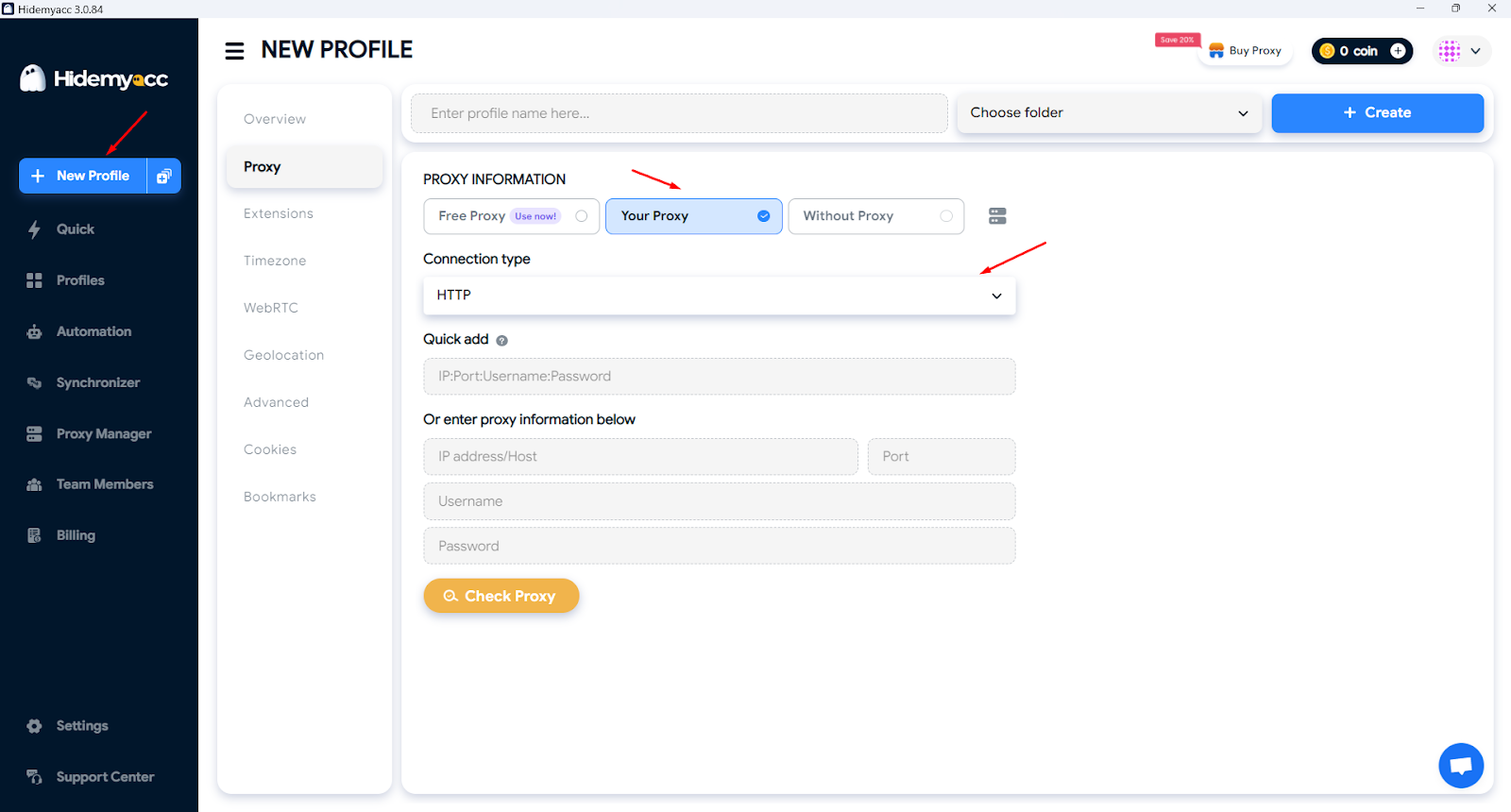
- Smart proxy integration: Assigning proxy manually on browser is very easy to cause confusion. With Hidemyacc, you can hard assign each IP to a specific profile, ensuring 100% consistency throughout use.
Combining Hidemyacc helps create an independent login environment, simulate natural fingerprint and assign fixed IP for each profile, thereby minimizing the risk of link-ban.
5.2. Step 2: Synchronize browser fingerprint
The golden rule in LinkedIn proxy setup is "Consistency". Browser parameters must match 100% with the characteristics of the Proxy you are using.
- Timezone: This is the most elementary error. If your IP is in New York (US) but the system timezone is UTC+7 (Vietnam), the account will be flagged immediately. You need to set browser timezone matching IP location.
- WebRTC Leak: WebRTC can reveal your real IP despite Proxy turned on. Ensure configuration to block or simulate IP for this protocol.
- Language: Browser should prioritize the language of the Proxy location country. Example: If using French IP, let browser language priority be French or English, avoid Vietnamese.
- Geographic location: Turn on GPS simulation feature so browser coordinates match perfectly with IP Proxy coordinates.
Ensure every browser parameter must match absolutely with IP position in use. Just one detail off-standard, LinkedIn can fully detect abnormality and flag account.
>>> If you setup these parameters wrong, LinkedIn will request identity verification. Then, see the guide: Unable to verify LinkedIn account? Detailed how-to-fix guide
5.3. Step 3: Account warm-up process
Note: Don't act like a robot right after changing IP. You need a methodical LinkedIn account warm-up guide to build trust.
7-day golden process for new IP:
- Day 1-2: Only login, browse Newsfeed for about 5-10 minutes to create cookies. Absolutely no connecting, no messaging.
- Day 3-5: Light interaction by Liking a few posts, Follow 1-2 large companies, lightly update personal information.
- Day 6-7: Start sending 1-3 manual connection invitations per day to the most relevant people.
The goal of this process is to create a "clean activity history" on the new IP range, making LinkedIn's monitoring system lower alert level with your account.
5.4. Step 4: Mastering safe limits
A true expert is one who knows when to stop. To prevent LinkedIn account being locked, you need to comply with the following numbers (based on 2026 algorithm):
- Connection invitations: Should not send more than 20-30 invitations/day for free accounts.
- Direct messages: Limit the number of messages sent to strangers. If sent too aggressively, you will be reported as Spam.
- Using Tool Automation: If using tools, always set "Random Delay" between actions. Example: Wait 30-60 seconds between each message sent to simulate human behavior.
In summary, whether using proxy or support tools, you still must comply with safety limits and act like a real user to reduce risk of being flagged spam or locked by LinkedIn.
>>> To increase invitations and message limits safely, account upgrade is necessary. Refer to detailed price table at: How much is LinkedIn Premium account? Analysis of price, features and benefits
6. Common mistakes that cause account locking
Even when you own the best Proxy system and the best browser, account can still "fly away" if you make elementary mistakes about usage behavior. Below are 5 most common mistakes you need to keep in mind:
6.1. Using free Proxy
Many people often fall into a harmful 'trap' when trying to optimize the cost of operating LinkedIn accounts
- Mistake: Many people try to save costs by searching for free Proxy lists floating on the internet to fake IP.
- Consequence: 99% of these IP addresses have been in LinkedIn's blacklist for a long time due to too much abuse. The fact that you share an IP range with thousands of other spammers is one of the reasons LinkedIn locks accounts fastest, usually within 5 minutes after logging in.
- Advice: Always use paid Proxy with clear origin to ensure IP cleanliness.
Don't trade off the whole account for saving - choose paid proxy, clear origin to ensure clean IP and long-term safety.
>>> If you accidentally used "trash" proxy and got locked, see now: LinkedIn account restricted: Causes and how to fix
6.2. Changing IP continuously in a short time
LinkedIn always closely follows every login trace to ensure user authenticity, especially regarding geographic distance.
- Mistake: You log in to account on phone (using Vietnam Wifi/4G) but at the same time running Tool on computer (using US Proxy).
- Consequence: LinkedIn will detect "Impossible Travel" behavior. The system understands that no real human can be in Vietnam at 9:00 and appear in US at 9:05. This is the clearest sign of fraud.
- Advice: To avoid LinkedIn account restriction, follow consistency principle. If already using Proxy for that account, maintain IP of that country on every device, or best log out completely from phone when running tool.
Caution in maintaining a single IP will help your account avoid unnecessary bans.
6.3. Abusing automation
A perfect IP setup also cannot save account if operations on the platform lack necessary naturalness.
- Mistake: Setting Tool to send 100 connection invitations in just 1 hour or sending bulk messages with identical content to strangers.
- Consequence: LinkedIn's AI system is very smart in "Pattern Recognition". Even if your IP is clean, but behavior manipulating too fast and stereotypical like a machine, you will still be locked.
- Advice: Apply safe LinkedIn automation tips: Always use "Random Delay" feature and personalize recipient's name in message content.
The secret to successful automation lies in making the tool operate smoothly and randomly as human-like as possible.
6.4. Not handling WebRTC leak
Besides IP address, technical loopholes hidden deep in browser are often indirect causes of account locking.
- Mistake: You only install Proxy into browser but forget to check if that browser is accidentally revealing real IP via WebRTC protocol.
- Consequence: IP leaking on LinkedIn situation is extremely dangerous. It allows LinkedIn to see through Proxy mask and see clearly your home or office real IP address, making using Proxy meaningless.
- Advice: Use specialized browsers like Hidemyacc, because this software has been programmed to default block or simulate WebRTC parameters matching Proxy, giving you absolute peace of mind.
Radical control of data transmission parameters will help you build a solid shield for your account system.

6.5. Poor content & low acceptance rate
LinkedIn not only scans automatically via machines but also relies on feedback from real users to evaluate the reputation level of an account.
- Mistake: Sending connection invitations indiscriminately to unrelated people or leaving personal profile looking like virtual account (no avatar, sketchy information).
- Consequence: When you send invitation and too many people click "I don't know this person" or report Spam, LinkedIn will start scrutinizing closely again entire IP history and browser fingerprint.
- Advice: Optimize profile professionally before starting using Proxy to interact.
Investing in a professional appearance is an important stepping stone helping optimize efficiency when using support tools.
>>> To increase reputation for new account, you can see article: Increase LinkedIn follow: 5 most effective free ways
7. Conclusion
To build a sustainable LinkedIn account system in 2026, winning formula lies in 3 core pillars: a quality Proxy source, comprehensive protection of Antidetect Browser Hidemyacc and maintaining natural interaction behavior. Lacking any of these factors, your account will always be in risk zone of algorithm purge.
Are you ready to scale your LinkedIn? Choose a most suitable provider from Top 10 list above and start setting up safe system today!
8. FAQ
1. Can LinkedIn detect that I am using proxy?
LinkedIn can fully detect poor quality proxy types (like Datacenter Proxy). However, if you use Residential or Mobile Proxy combined with an anti-detect browser (Antidetect browser), your behavior will look exactly like a real user and extremely difficult to be detected by the system.
2. Which proxy type is best for running automation tools on LinkedIn?
Static Residential Proxy is the most optimal choice for managing accounts and sending messages because they provide a fixed IP address and have high reputation. Conversely, if your purpose is mass data collection, choose Rotating Residential Proxy
3. Is using free proxy for LinkedIn safe?
Absolutely not. Free proxy types usually have been in LinkedIn blacklist for long and have no security. Using them will make your account face risk of being permanently locked almost immediately.
4. How many LinkedIn accounts can I run on one proxy?
Safest ratio is 1:1 (One proxy dedicated to one account). Stuffing, sharing one IP address for many accounts is clearest sign making LinkedIn perform bulk scans and lock your entire account system at once.
5. Why is my account still restricted despite using proxy?
Proxy only helps hide your IP address. Account can still be locked due to other reasons like: browser fingerprint leakage, excessive spam behavior, or because that proxy IP itself was "dirty" before. Combine proxy with Antidetect Browser Hidemyacc to ensure maximum safety.
6. Can I use VPN instead of Proxy for LinkedIn account farming?
VPN usually uses public IP ranges shared by thousands of people at once, making LinkedIn very easy to identify and flag violations. Meanwhile, Proxy (especially Private Residential) brings absolute privacy and higher reliability for professional tasks.
7. Does using proxy slow down LinkedIn tool speed?
If you use reputable providers (like Bright Data or NetNut), connection speed will not be significantly affected. However, mobile proxy types sometimes have slightly higher latency but in return they bring superior safety.