1. How do websites use your cookies?
Cookies are small pieces of information that a web server stores within a web browser to track people across the internet. Cookies are how the Internet remembers you and saves you the hassle of having to log into websites every two minutes. They are a vital part of how the web works, yet they are easily targeted because they are often used to store personal information of website visitors. Understanding first party vs third party cookies can help you see which cookies are set directly by the website you visit and which ones are set by external domains for tracking purposes.

1.1. How do websites use your cookies?
Let’s take a look at how cookies work.
Imagine we have a website that requires people to log in to see the contents of the site. When you log in, your browser sends your user name and password to the server, which verifies them.
If everything is checked out, it sends you the requested content. However, there is a small caveat. The HTTP protocol (which we use to browse the Internet) is stateless. That means that when you make another request to that same server, it has forgotten who you are and will ask you to log in again. This is where cookies, whether first party or third party cookies, play a crucial role in maintaining session information.
1.2. Who is affected by cookies?
As you can see, cookies are very useful, and they make our lives a lot easier. Everybody is impacted by cookies in a positive way.
Cookies are important to information seekers, bloggers, and publishers because it’s how information is found and how publishers get credit for the traffic they drive to affiliate sites. Knowing the difference between first party vs third party cookies can help publishers and users understand which data is directly linked to their own website and which comes from external sources.
Advertising platform cookies are important for shoppers and e-commerce stores because they eliminate friction from transactions. They do this by remembering your personal information through cookies, making transactions easier and more secure than the old way of doing things.
Cookies are also important to mobile device users and app developers because they allow for an easy handoff between devices, whether the cookies involved are first party or third party cookies.
1.3. The advantages and disadvantages of cookies
1.3.1. Advantages of cookies
Time-saving
Can you imagine how time-consuming it would be to browse around a site like Facebook and have to log in again every time you click on something?
With the help of cookies, you can still log in to the website, and the server still validates your credentials. If everything checks out, however, the server not only responds with the content but also sends a cookie to your browser. Understanding first party vs third party cookies helps clarify which cookies are essential for login and which may be used for tracking purposes.
The cookie is then stored on your computer and submitted to the server with every request you make to that web. The cookie contains a unique identifier that allows the server to remember who you are and keep you logged in.
Login persistence
But it doesn’t stop there. Besides keeping you logged in, cookies can also be used to store your settings. Let’s say you change the number of results your favorite search engine should return. Chances are high that they save these preferences on a cookie and not on their servers. This is generally handled through first party cookies, while third party cookies might still track your preferences across other sites.
1.3.2. Disadvantages of cookies
Data constraints
But there are also some restrictions on the use of cookies. Most browsers only allow websites to store a maximum of 300 cookies and they cannot contain a lot of data (just 4096 bytes maximum).
The biggest limitation, however, is that cookies set by one website cannot be read by another. And that restriction raises the question: How can companies use cookies to track us around the internet? This is where the distinction between first party vs third party cookies becomes essential, first-party cookies are generally safe and site-specific, while third-party cookies are the main tools for cross-site tracking.
>>> Ways to Manage Cookie Settings in Browsers: Chrome, Firefox & Edge
2. First party vs third party cookies: Two types of common cookies
Everyone is affected by cookies, yet not all cookies are created equal. Let’s talk about the two types of cookies that are used to personalize our online experiences and why understanding first party vs third party cookies is crucial for both users and marketers.
2.1. First party cookies
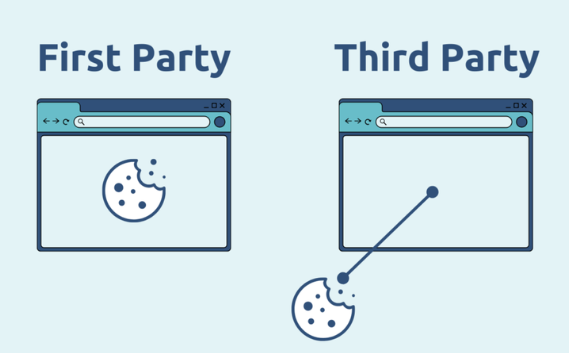
First-party cookies are created directly by the website or mobile app that you are visiting. They are only accessible on that website or app.
These first party cookies allow websites to collect customer analytics data, remember language settings, and carry out other useful functions that help provide a good user experience. They are supported by all major browsers and are safe to use for all users.
They are also called session cookies or temporary cookies because they activate when a user starts a browsing session on a site and expire the moment the user exits the site.
For example, you enter a site and it remembers your language, location, login details, and whatever filters you set there. These first-party cookies are necessary and useful for a smoother and quicker browsing experience. Understanding first party vs third party cookies helps users know which cookies stay on a single site and which ones might track them across the internet.
2.2. Third party cookies
Third-party cookies are used by advertising agencies who have clients that pay for displaying ads for products and services but don’t want to waste money displaying them to people who are unlikely to convert.
So they need to track the types of sites you visit and make an educated guess if you are the kind of person who would be interested in what they offer.
Third-party cookies are like first-party cookies’ evil twin. That’s how they are portrayed by privacy advocates, governments, and web users.
Third-party cookies can be set up by any third-party domain and share your data with any other third party. For example, pixels from Facebook Ads on your site can share data about your users with other advertisers on their platform. This information is generally shared anonymously, but once a third-party cookie is set, there is little a website owner or visitor can do to limit where this information goes. It can be sold, shared, or used to follow you across the internet.
Zombie cookies are from a third-party and permanently installed on users' computers, even when they opt not to install cookies. They also reappear after they've been deleted. When zombie cookies first appeared, they were created from data stored in the Adobe Flash storage bin. They are sometimes called “flash cookies” and are extremely difficult to remove.
Like other third-party cookies, zombie cookies can be used by web analytics companies to track unique individuals' browsing histories. Websites may also use zombies to ban specific users. Understanding first party vs third party cookies helps illustrate why third-party cookies, especially zombie cookies, raise privacy concerns.
>>> Cookie Bot: Automatically Collect Cookie History for Your Browser
3. Differences between first party cookies vs third cookies party
To give you a better idea of the differences between first-party and third-party cookies, Hidemyacc provides you with a detailed comparison table.
| Feature | First-Party Cookies | Third-Party Cookies |
| Origin | Created by the website you are currently visiting. | Created by a domain other than the one you are visiting (e.g., an advertising network). |
| Purpose | Primarily used to improve user experience on the specific website, such as remembering login credentials, items in a shopping cart, or site preferences. | Often used for tracking user behavior across multiple websites for targeted advertising, analytics, and other purposes. |
| Data Collected | Typically collects data related to your interactions with the specific website. | Can collect a wider range of data, including your browsing history across different websites. |
| Storage | Stored on your device and associated with the domain of the website you are visiting. | Also stored on your device but associated with a different domain. |
| Control | You have more control over first-party cookies through your browser settings. | Controlling third-party cookies can be more complex due to the involvement of multiple domains. |
| Privacy Concerns | Generally considered less intrusive to privacy as they are primarily used to enhance your experience on a specific site. | Can raise more privacy concerns due to the potential for data tracking across multiple websites. |
| Examples | Remembering your login information on a social media site, items in your shopping cart on an e-commerce platform. | Ads that follow you across different websites based on your browsing history. |
4. How do browsers handle first party and third party cookies?
4.1. First party cookies
First-party cookies are directly set by the website a user is visiting. Most browsers automatically accept these cookies because they are primarily designed to enhance user experience and enable site personalization. Understanding first party vs third party cookies helps users distinguish between cookies that improve the site experience and those used for tracking.
For instance, visiting websites like techcrunch.com or getshogun.com will result in each site creating and storing a cookie on your device. These are first-party cookies, scoped only to the website you visit.

4.2. Third party cookies
Websites often employ third-party trackers (or cookies) to gather user data. This may include details about user behavior on the site, location, and the type of device being used, all of which are shared by the website. Knowing the difference between first party vs third party cookies helps users see how these external trackers operate.
These trackers can monitor actions like the content users engage with or items they click on, such as products and advertisements. They generate third-party cookies to use this information for showing targeted ads when users browse other websites.
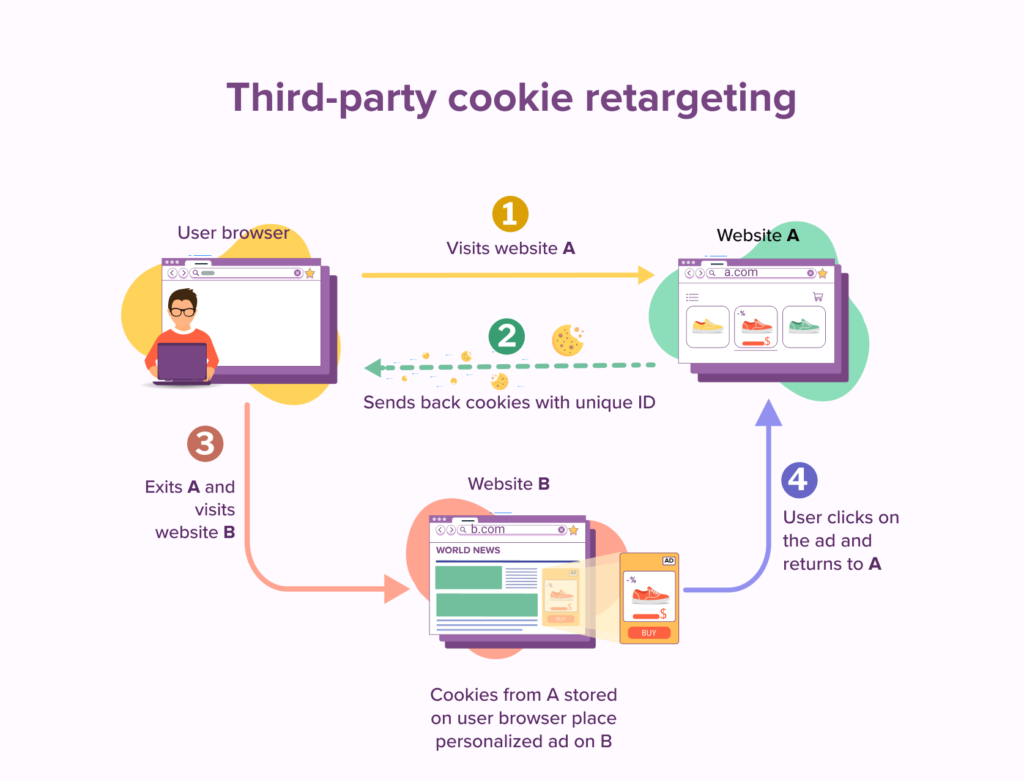
In the given example, Facebook uses first-party cookies when:
- It stores cookies on your computer to remember that you are logged in. (These cookies are scoped to Facebook's domain name, meaning that no one besides Facebook.com can read what's on the cookie.)
Facebook uses third-party cookies when:
- The blog owner places a Facebook like button on their website. To show this like button, your browser has to download some code from Facebook servers, and when it communicates with Facebook.com, it sends along the cookies that Facebook set earlier. Facebook now knows who you are and that you visited this blog.
In essence, Facebook uses first-party cookies for its own functionalities on its platform, while it uses third-party cookies to track users across other websites that have embedded Facebook buttons or functionalities. Understanding first party vs third party cookies makes this distinction clear for users who are concerned about privacy and tracking.
>>> Discover:
5. How to prevent third party cookies from tracking you
5.1. Are there ways to stop third-party cookies?
Third-party cookies can be blocked when a user takes any of these actions:
- Browses in private or incognito mode.
- Uses browsers like Firefox or Safari, which block third-party cookies by default.
- Adjusts cookie and tracking settings in their browser (as explained below).
- Uses Tor.
- Installs ad blockers or similar extensions like Ghostery or Privacy Badger.
Knowing the difference between first party vs third party cookies helps users focus on controlling only those cookies that track them across multiple sites.
5.2. Stop third party cookies from tracking you with Hidemyacc
As a user, you can protect yourself from trackers by installing browser extensions or applications that block them. These applications are especially beneficial to customers doing MMO, e-commerce business, or social media marketing because they need to run multiple accounts efficiently.
With Hidemyacc, you can control your fingerprints and manage your profiles while remaining anonymous. Each profile behaves as if it is running on a separate computer and isolated environment. As a result, each profile will contain different cookies, including first-party cookies set by sites you visit, while preventing unwanted third-party cookies from tracking you.
Cookies can be uploaded to the cloud or stored locally based on your preferences. This setup allows you to freely conduct online work (MMO) without being tracked or detected by web servers like Google, Facebook, Amazon, Etsy, or eBay. Using Hidemyacc highlights the practical importance of understanding first party vs third party cookies in managing multiple accounts securely.
Hidemyacc software will help you hide original computer parameters and create multiple new computer parameters for each profile, supporting users to access the internet with multiple accounts without being detected. Download Hidemyacc and start your 7-day trial now!
DOWNLOAD
If you have any further questions, comments, or suggestions, feel free to contact us via Telegram, Skype, or Facebook Messenger support.
Discover similar insights here: