Finding how to pay on Temu is a matter of interest for many users today. Having just entered the Vietnamese market, Temu has quickly attracted consumer attention with attractive purchasing policies. In this article, Antidetect Browser Hidemyacc will share the payment methods as well as simple payment instructions via Temu, helping you have the best shopping experience. Watch now.
1. Payment Methods on Temu
Temu is known as a shopping app that is easy to use, has good prices, and is convenient for users. However, currently, Temu does not yet support Cash on Delivery (COD).
Specifically, this app only accepts payment on Temu via methods such as: Credit/Debit cards, Apple Pay, Google Pay, PayPal, Cash App, Temu credit, or buy now pay later services like Klarna and Afterpay. This can cause many inconveniences and risks for users, such as having paid but receiving products that are not of guaranteed quality, counterfeit goods, or goods not as described.

>>>> YOU MAY BE INTERESTED IN:
-
How to register to sell on Temu to make money extremely easily
-
Does Temu ship to Vietnam? Temu Shipping Policy
2. Simple Guide on How to Pay on Temu
When shopping on Temu, you can choose a payment method suitable for your conditions and usage needs. Here is a simple guide on how to pay on Temu in just 6 steps:
2.1 Step 1: Log in to Temu Account
The first step is that you need to download, register, and log in to your Temu account.
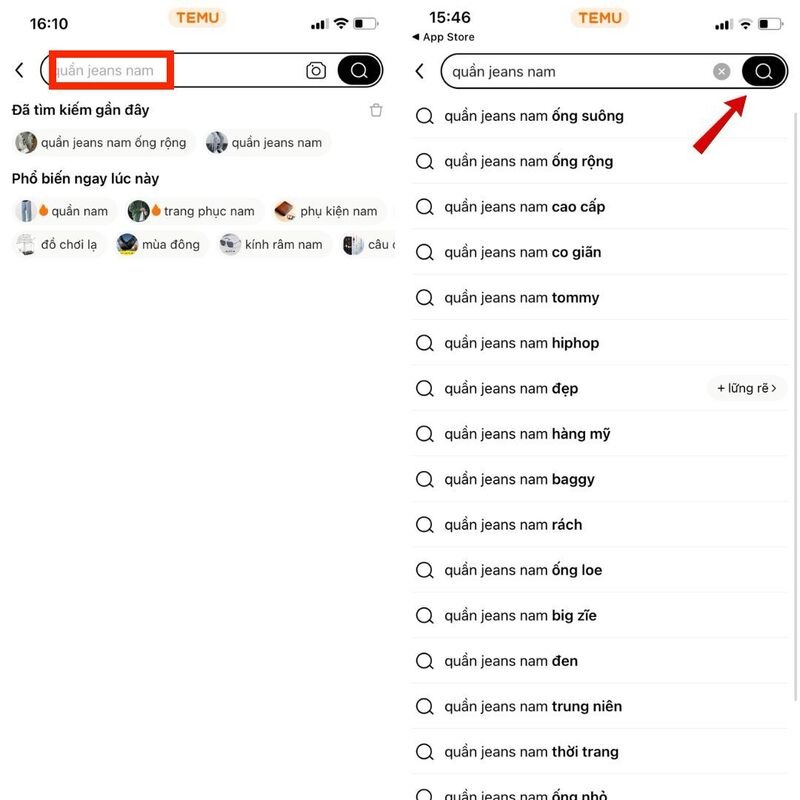
2.2 Step 2: Find the Desired Product
After logging into your Temu account, select the product you need to buy by clicking on the search bar and entering the product keyword. Just after a few seconds, related products will be displayed on the screen.
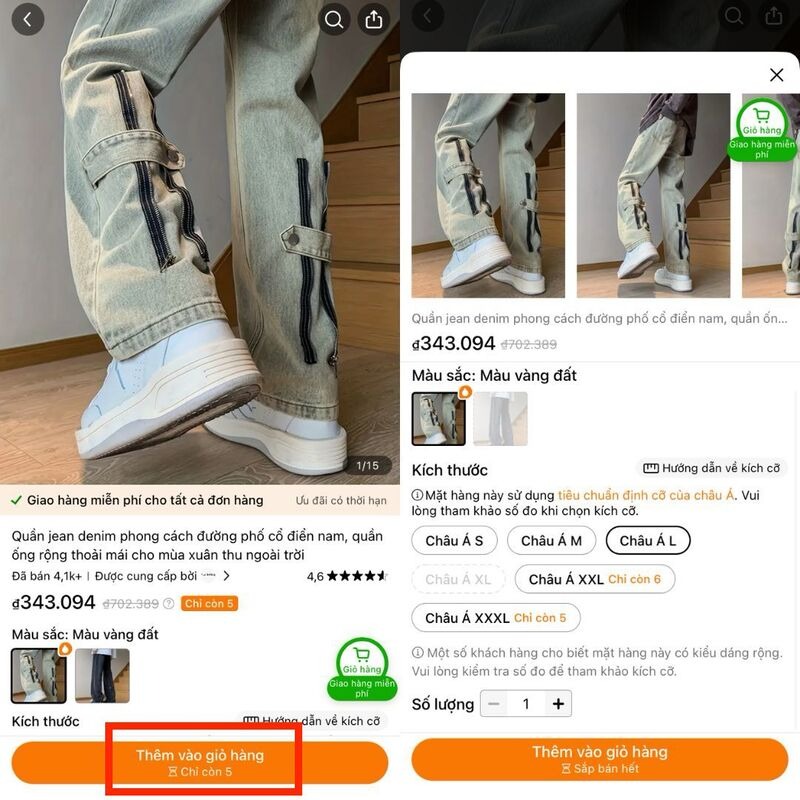
2.3 Step 3: Add Product to Cart
Once you have selected the desired product, you need to select the product parameters (if any) and press the "Add to Cart" button.
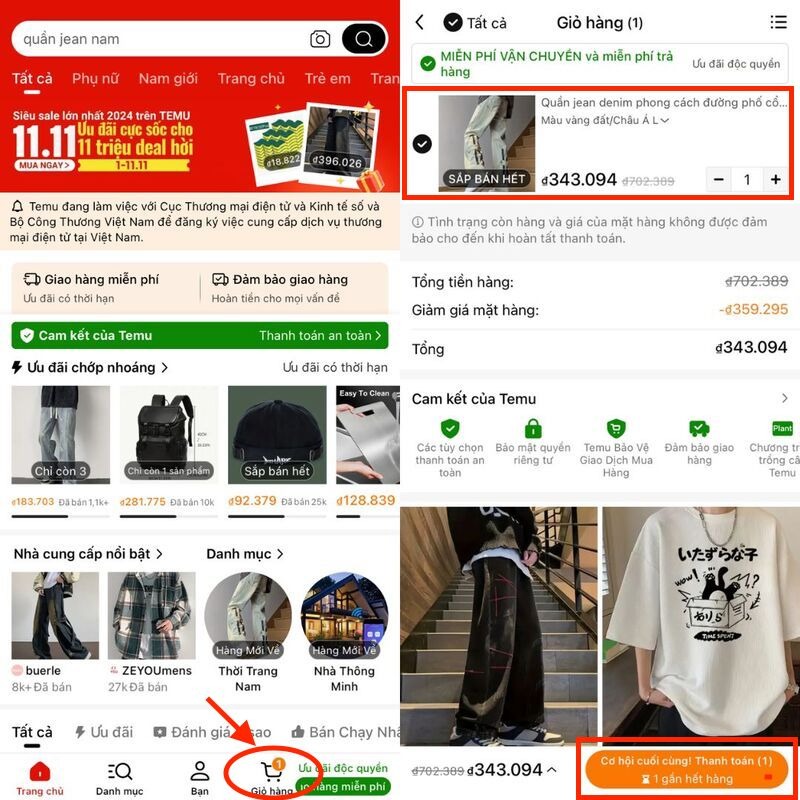
2.4 Step 4: Access Cart and Checkout
Next, access the shopping cart and select the products to buy, then click the "Checkout" button at the bottom right corner of the screen.
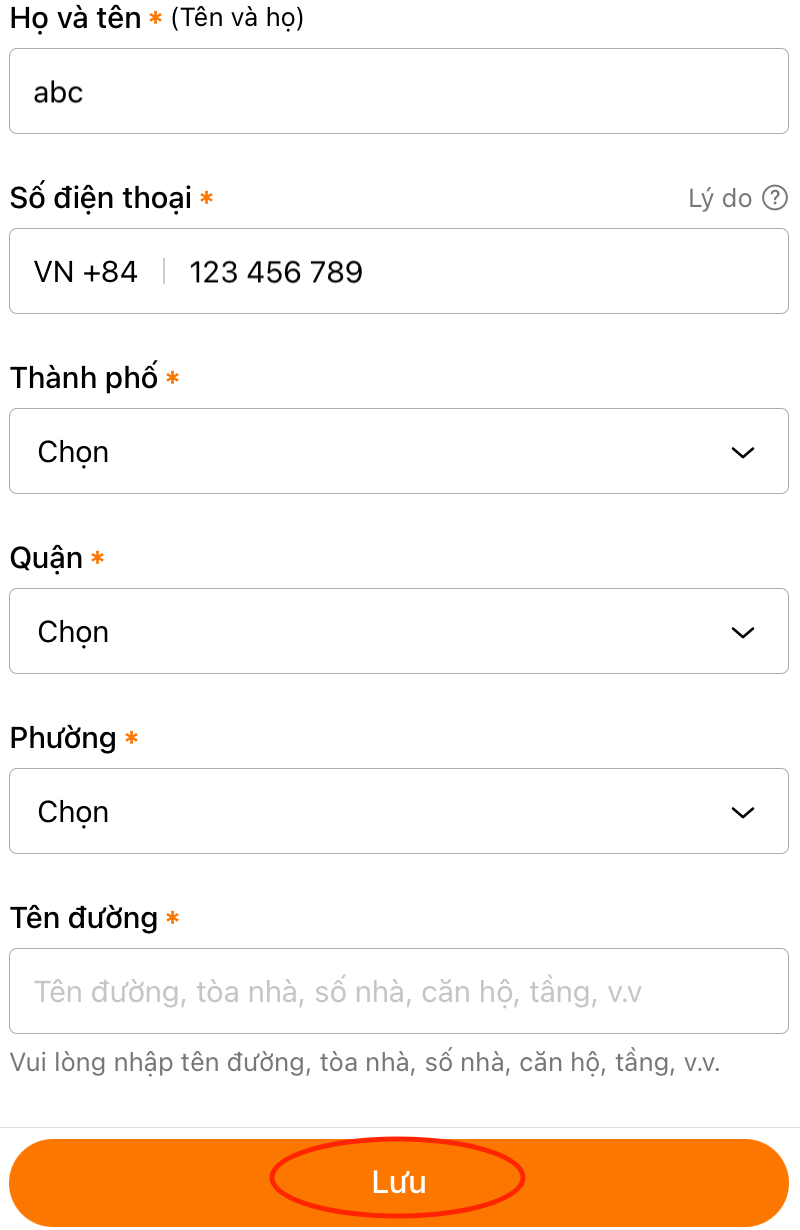
2.5 Step 5: Enter Shipping Address
After selecting checkout, you need to enter the delivery address. This operation only needs to be done once; the system will automatically select this address for subsequent times.
The information to enter includes: Country/Region, full name, phone number, city, district, ward, street name. After filling in, click the "Save" button and proceed to the next step.
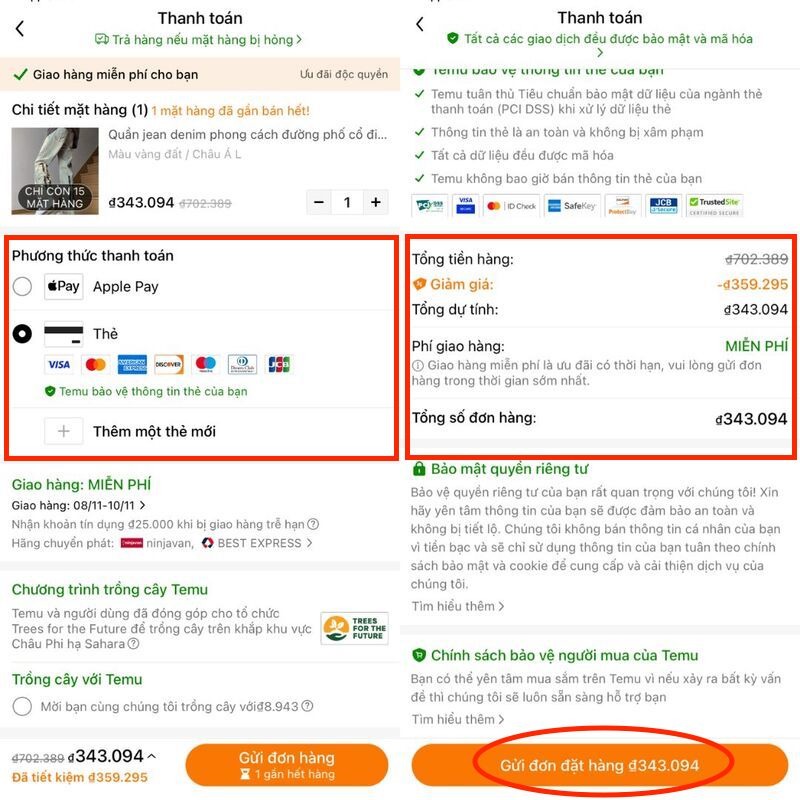
2.6 Step 6: Apply Discount Code and Make Payment
When switching to the Payment page, in the "Payment Method" section, you need to choose a payment method suitable for the ordered items. If there is a discount code, the system will automatically apply it to the order. Next, you need to check the order information again and press the "Submit Order" button to complete the transaction.
>>>> CHECK OUT NOW:
-
What is Temu? How to create a shopping account on Temu
-
Detailed, simple guide on how to get free Temu products
3. How to Add or Remove Payment Cards on Temu
Adding a payment card on Temu is extremely simple; you just need to follow these steps:
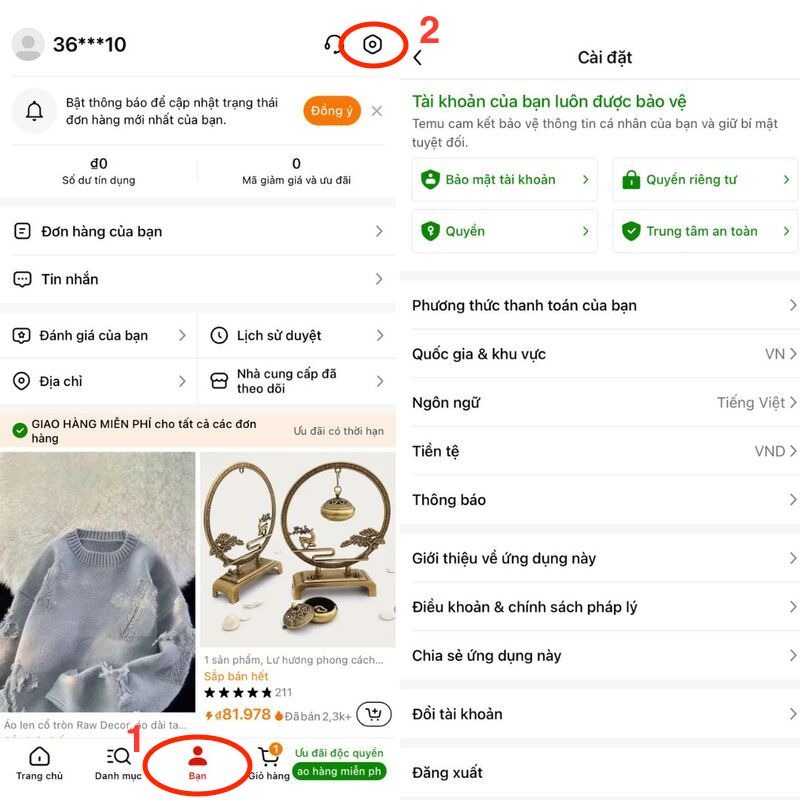
Step 1: Access the Temu app on your phone, then click on the "You" tab at the bottom of the screen.
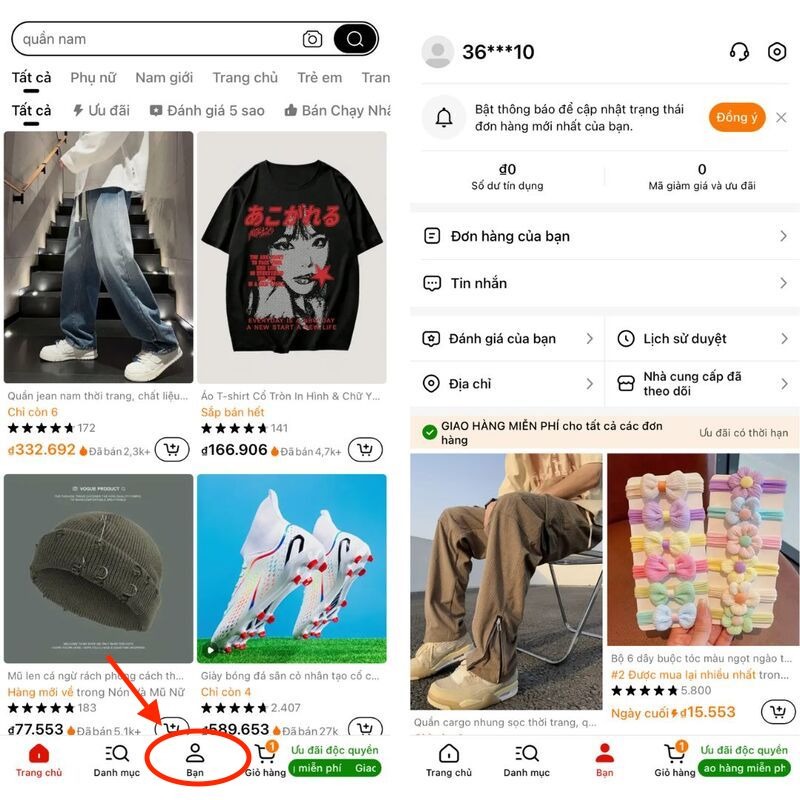
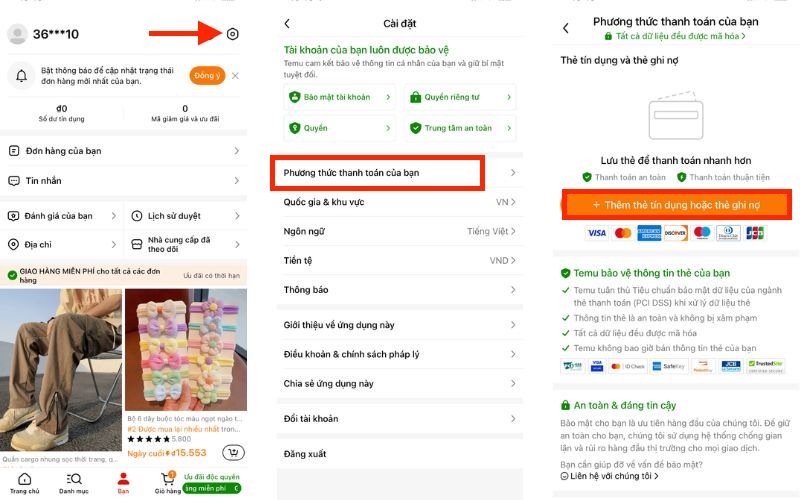
Step 2: Tap on "Settings" in the top right corner of the screen. Then select "Your payment methods" and choose "Add a credit or debit card". Payment on Temu can apply payment methods such as: International payment (Visa, Mastercard) or payment via Google Pay.
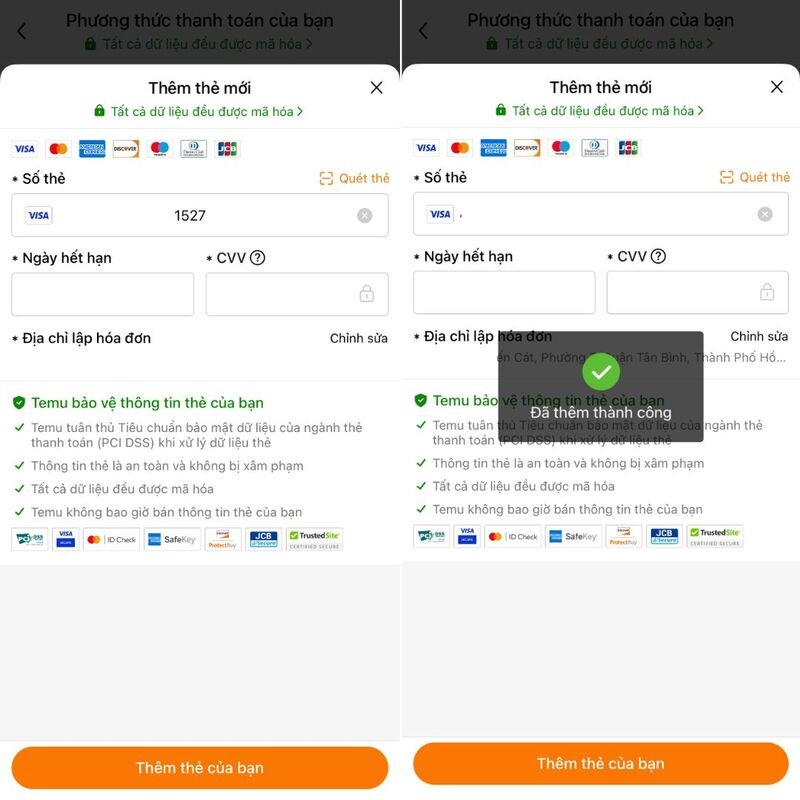
Step 3: You need to fill in the necessary information in the payment section, including: Card number, expiration date, CVV. Then select "Add your card" and receive a notification that the card has been added successfully.
In case you want to delete a card on the Temu app, you do the same by:
Step 1: Go to Temu, tap "You" then go to "Settings" in the top right corner of the screen. Select "Your payment methods", select "Edit", then press "Delete card".
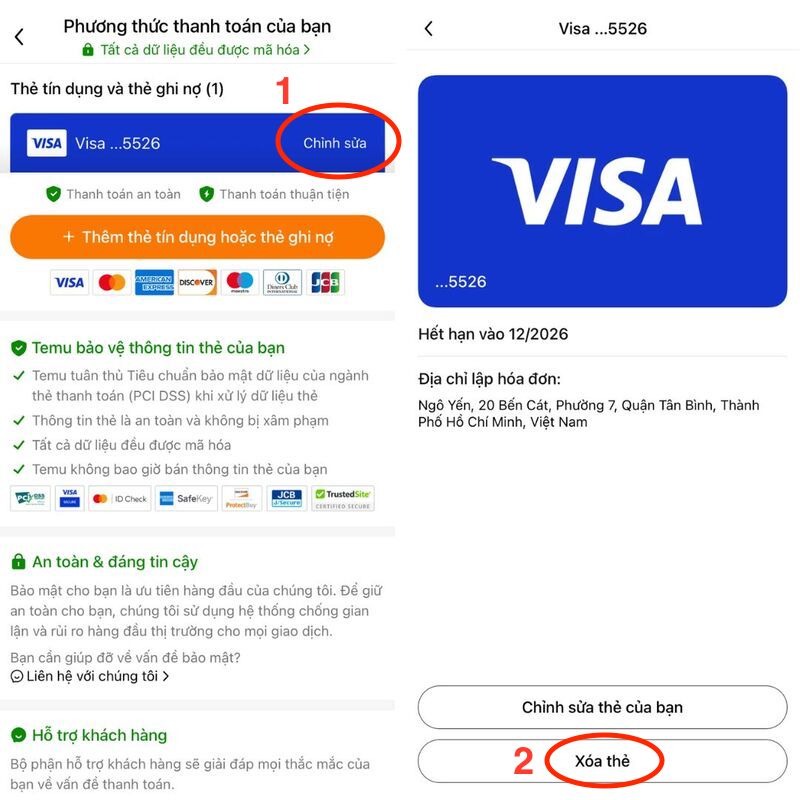
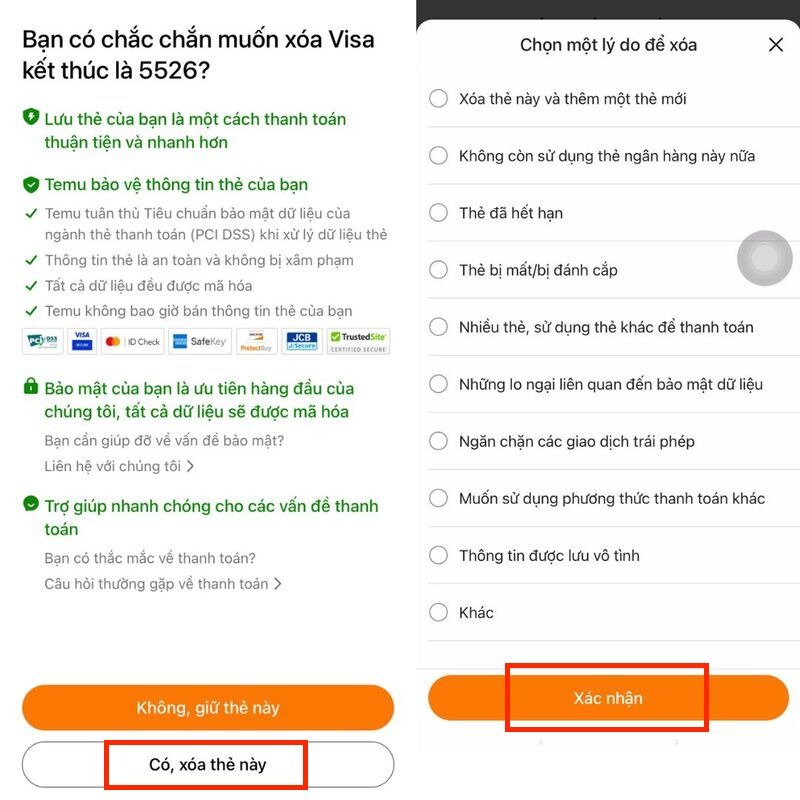
Step 2: The screen will display the prompt "Are you sure you want to delete the visa ending in…?" and some accompanying terms. If you are sure you want to delete, tap "Yes, delete". Next, you need to choose a suitable reason for deleting the card, then select "Confirm". Thus, your payment card on Temu has been deleted successfully.
>>>> DON'T MISS:
-
Comparison of Temu and Shopee: 5+ must-know differences
-
Is Temu a scam? Guide to using Temu safely
4. Reasons You Cannot Pay for Temu Orders
The inability to pay for Temu orders stems from many different reasons. Here are some common reasons:
-
Incorrect card information: In this case, you need to check the card number, expiration date, billing address, and security code for the transaction to be processed.
-
Card issuing bank declined payment: If the bank card has a payment error, you need to contact the bank staff for timely support.
If your financial information is confirmed and you suspect the payment was declined due to a technical error, please access another browser or use other available payment methods to complete the order.
5. Notes When Buying and Paying on Temu
It is difficult to confirm whether Temu is safe or not. Therefore, when shopping and finding how to pay on Temu, please save the following experiences to have the best experience on this e-commerce platform:
-
Read product information carefully: Before paying, you need to carefully read the product description and reviews from customers who have purchased to ensure the quality received.
-
Check the delivery address again: Ensure to enter the correct address information, including street name, district, city, and phone number.
-
Use discounts: If there is a discount code on Temu, check the application conditions and enter the code correctly to receive the offer.
-
Choose payment method: Temu currently supports payment via credit cards and e-wallets. You need to be sure that you have registered and know how to use one of these payment methods.
-
Track orders: After payment, regularly monitor the delivery status to know the receipt time.
-
Contact customer service: If you encounter any difficulties related to purchasing and payment, quickly contact Temu's customer service department for resolution.
Temu is considered a "paradise" for shopaholics, not only because of its easy-to-use interface but also because the prices are relatively affordable. Although how to pay on Temu is quite simple, it still needs to be done correctly to ensure successful transactions and avoid unnecessary risks. Hopefully, the article will help you have safe and effective shopping experiences on this platform. Don't forget to visit Hidemyacc for more useful information on this topic!
>>>> ARTICLES ON THE SAME TOPIC:
-
11 Ways to get Temu discount codes quickly, easy to implement
-
8 ways to make money from Temu Affiliate simple and latest 2024