Do you want to use an additional Venmo account but are unsure what types of accounts the platform permits? Registering with a different email does not guarantee a completely independent account, as Venmo evaluates various account details and access environments. This article helps you understand Venmo account limits, how accounts can be linked, and how using separate browser profiles makes managing authorized accounts more convenient.
1. Can you have a second Venmo account?
The answer depends on your account type and intended use.
According to Venmo's policy, each individual is permitted only one personal account. Therefore, if you are trying to create an additional personal account, using a different email address or phone number does not make it a valid second personal account. Venmo explicitly advises against creating new accounts to resolve issues with existing ones.
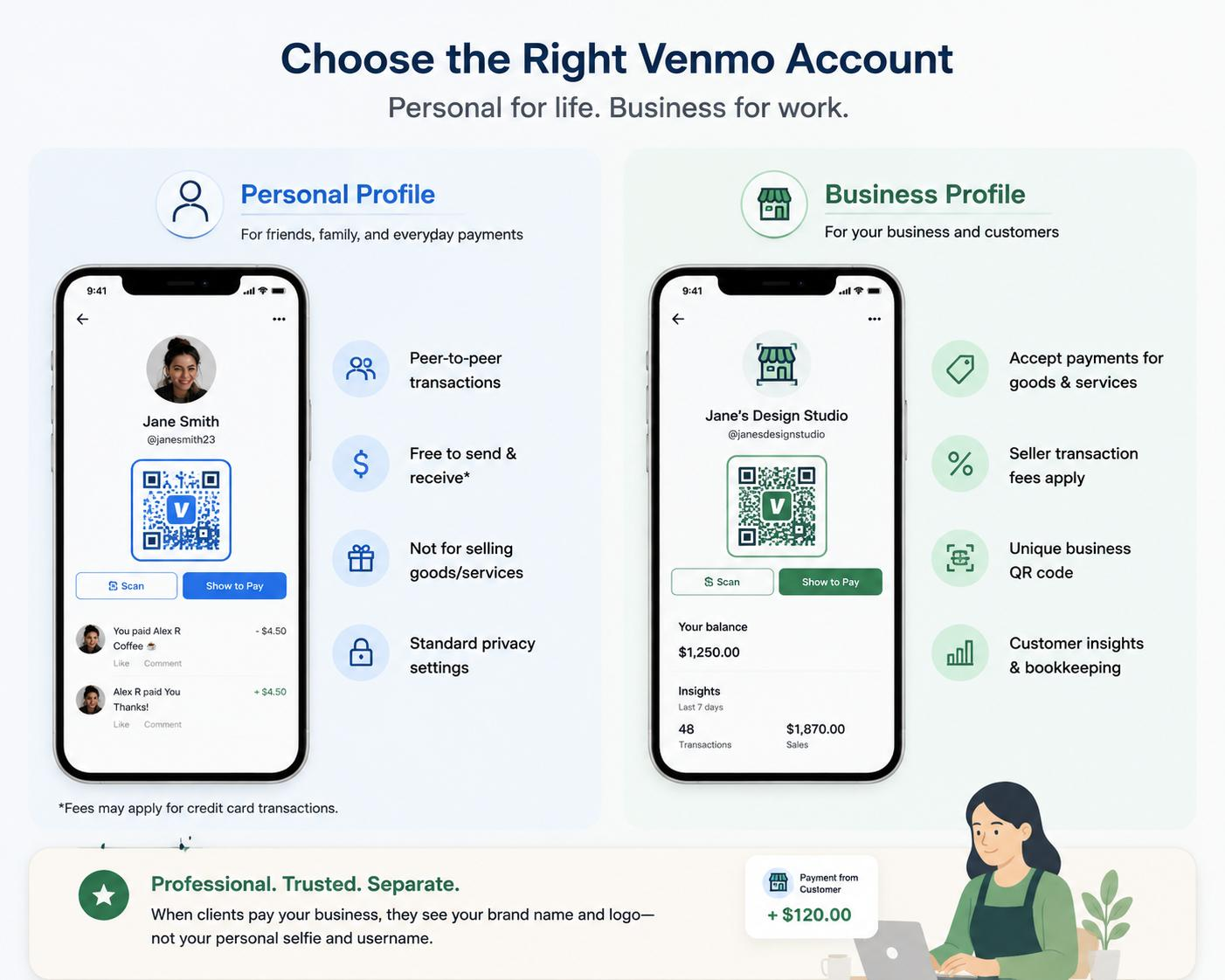
However, Venmo supports a business profile designed for commercial activities. A business profile links directly to your existing personal account and does not operate as an independent second personal account. Users can seamlessly switch between both profiles using the same login credentials.
If your goal is to manage multiple accounts or profiles permitted by Venmo, isolating your digital environment becomes critical. Sharing a single browser profile can mix cookies, session tokens, and browsing data across different sessions.
Therefore, before setting up additional accounts or profiles, you should understand which account structures Venmo allows and what data points can link your sessions. This forms the foundation for choosing an effective browser profile management strategy.
How do personal accounts and business profiles differ?
A personal account is intended for personal transactions on Venmo. In contrast, a business profile is designed for individuals, sole proprietors, casual sellers, or businesses receiving payments for goods and services. Business profiles are subject to specific fees, tax reporting, and verification requirements.
Notably, a business profile does not have separate login credentials. Users log in using their primary personal account credentials and toggle between personal and business profiles within the Venmo application.
2. Why do Venmo accounts get linked?
When managing multiple authorized accounts or profiles, understanding the signals connecting your access environments helps minimize data cross-contamination across sessions.
2.1. Email and phone number
Email addresses and phone numbers are primary identifiers during Venmo registration and login. Venmo allows users to log in using an email, phone number, or username alongside a password. If an email address or phone number is already registered, the system prompts the user to log in to the existing account rather than creating a new one.
Thus, using a different email address does not create a valid new personal account. The email is simply one component of the broader account dataset.
2.2. Device and browser environment
A web browser stores various session-related data types, such as cookies, local storage, and session storage. When accessing multiple accounts within the same browser profile, these data points are shared across sessions.
Example: You log into Account A in Chrome, log out, and then log into Account B within the same Chrome profile. Although the accounts use different login credentials, they are accessed from an identical browser environment.
Similarly, opening two separate Chrome windows does not establish two isolated environments. If both windows share the same browser profile, local data and system configurations remain identical.
This is why dedicated browser profiles are valuable for managing separated access environments. Each profile maintains isolated cookies, local storage, and session tokens, preventing cross-session data leaks.
2.3. Login behavior and activity patterns
Beyond login credentials, account management requires operational consistency. Constantly logging in and out of multiple accounts or swapping environments complicates management and increases user error.
Crucially, if an account faces restrictions or login issues, creating a new account as a workaround is inappropriate. Venmo explicitly advises users against opening new accounts when experiencing access problems.
Managing multiple accounts within a shared environment generates overlapping data points. Key considerations when operating Venmo accounts include:
| Factor / Indicator | Category | Key Consideration |
|---|---|---|
| Email, Phone Number | Account Data | Using details linked to another account triggers identity verification prompts or account consolidation flags. |
| Cookies, Session Data | Browser Data | Storing tokens in a shared browser profile causes data leakage and cross-account linkage scans. |
| Device, Browser | Access Environment | Accessing multiple accounts on a single hardware environment reveals matching behavior chains. |
| Browser Fingerprint | Browser Config | Hardware fingerprints (Canvas, WebGL, User-Agent) allow systems to identify specific devices precisely. |
| Login Patterns | Account Activity | Frequent swapping between accounts increases anomaly alerts and management complexity. |
When you need separated environments, isolated browser profiles preserve distinct cookies, storage, and session environments. However, profile isolation strictly serves environment management and does not alter Venmo's account ownership policies.
3. Browser fingerprints and why changing emails or IPs is not enough
Before exploring browser profile setups, it is essential to understand browser fingerprints and why simple changes—like switching emails, changing IPs, clearing cookies, or using incognito mode—do not create an isolated environment.
3.1. What is a browser fingerprint?
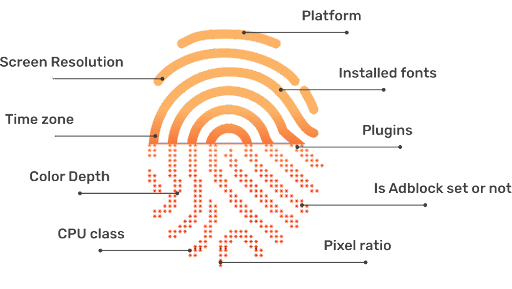
A browser fingerprint is a collection of browser and hardware parameters combined to describe and identify a unique access environment.
Common browser fingerprint components include:
- User-Agent string.
- Operating system parameters.
- Screen resolution & color depth.
- Canvas rendering output.
- WebGL hardware parameters.
- Installed system fonts.
- System timezone & language.
- WebRTC network data.
These components combine to create a distinct signature for a specific browser and hardware configuration.
Note that these parameters represent standard digital fingerprinting techniques in general. You should not assume Venmo publicly discloses all tracking parameters or relies on a single signal to link accounts.
Further reading:
What is a Browser Fingerprint? How to manage browser fingerprints
What information can websites see about you? Understanding browser fingerprinting
3.2. Why changing emails or IPs is insufficient
Changing an email address alters only an account credential; it does not generate a fresh browser environment. Similarly, an IP address reflects network location, not the underlying browser fingerprint.
Common basic workarounds and their limitations include:
- Using Incognito Mode: Incognito mode limits saving browsing history and cookies locally. It does not spoof hardware parameters. Opening two incognito windows on the same machine exposes identical hardware signatures.
- Clearing Cookies: Clearing cookies removes session tokens but leaves hardware fingerprints (Canvas, WebGL, system fonts) unchanged.
- Changing IP Addresses: Switching IPs alters network routing but leaves User-Agent, Canvas, WebGL, timezone, and device specifications intact.
The core issue is that these workarounds modify only single data points, whereas modern access environments are evaluated holistically.
Example: If you use a US proxy IP while your timezone, language, and hardware parameters reflect your physical device in Vietnam, the resulting parameter mismatch signals an artificial environment. Thus, changing an IP address is not equivalent to changing a browser fingerprint.
3.3. Why dedicated browser profiles are necessary
A dedicated browser profile isolates local storage, cookies, and environment settings per account. Rather than sharing a single browser and repeatedly logging in and out, each authorized account or profile operates within a dedicated browser profile.
Isolated components include:
- Cookies & local storage.
- Session tokens.
- Browser configurations & cache.
- Login credentials & state.
For multi-environment workflows, an antidetect browser creates and maintains independent profiles while spoofing environment parameters per profile. This enables users to manage accounts in isolated environments instead of toggling within a shared browser instance.
This approach differs fundamentally from opening multiple windows or incognito tabs, as dedicated profiles preserve isolated data and settings permanently.
However, antidetect browsers function strictly as environment management tools. Using an antidetect browser does not bypass Venmo terms of service and should never be used to circumvent platform restrictions or account limits.
Learn more: What is an Antidetect Browser? Why it surpasses VPNs & proxies
4. Managing Venmo environments using Hidemyacc
Once you understand how dedicated browser profiles isolate access environments, you can set up clean profiles to maintain separate environments for permitted accounts.
4.1. What is Hidemyacc?
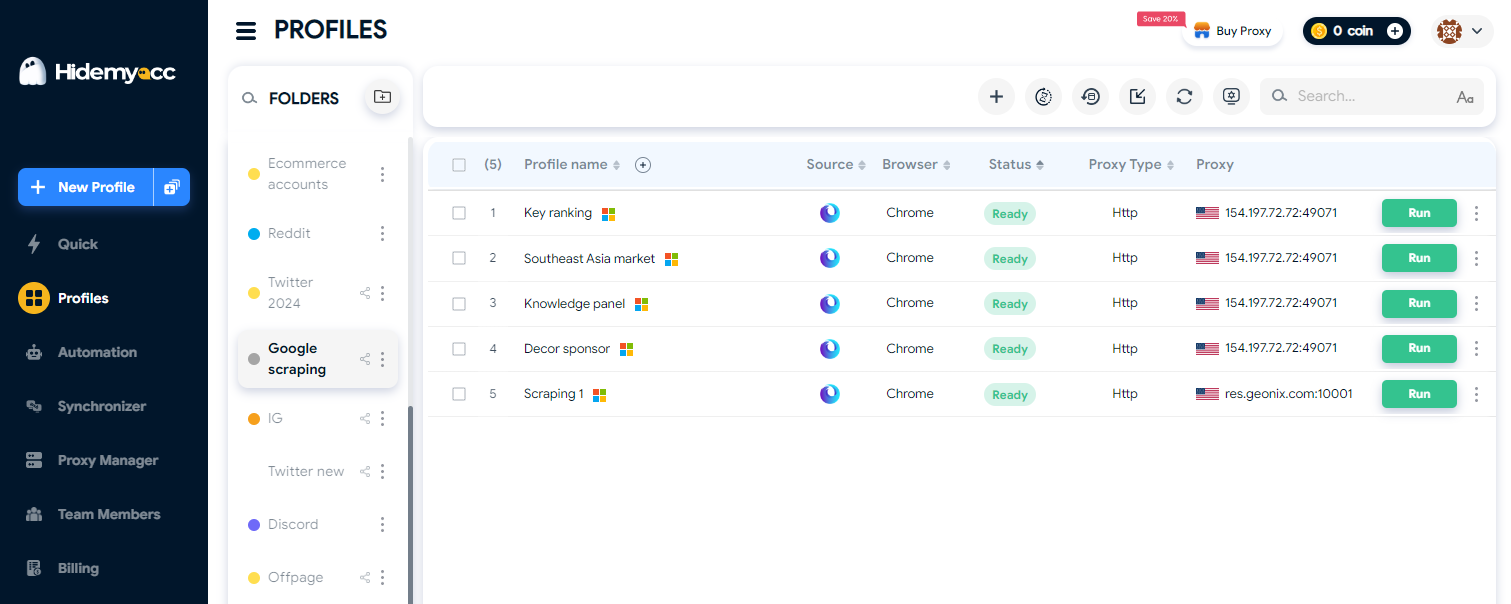
The antidetect browser Hidemyacc enables creating and managing multiple isolated browser profiles within a single application.
Each profile preserves an independent browsing environment, including cookies, local storage, session data, and browser configurations. This eliminates the need to constantly log out and log in across accounts on a single browser instance.
For users managing a personal account alongside a business profile, profile isolation provides cleaner, organized browser data management.
4.2. Creating a new profile in Hidemyacc
To establish a clean access environment for an account, create a new browser profile inside Hidemyacc. Each profile maintains isolated data independent of other profiles.
Step 1: Launch Hidemyacc
Log in to your Hidemyacc software and open the profile management dashboard.
Step 2: Create a new profile
Click "New profile" and assign a clear name, such as "Venmo Business," to distinguish it from other profiles.
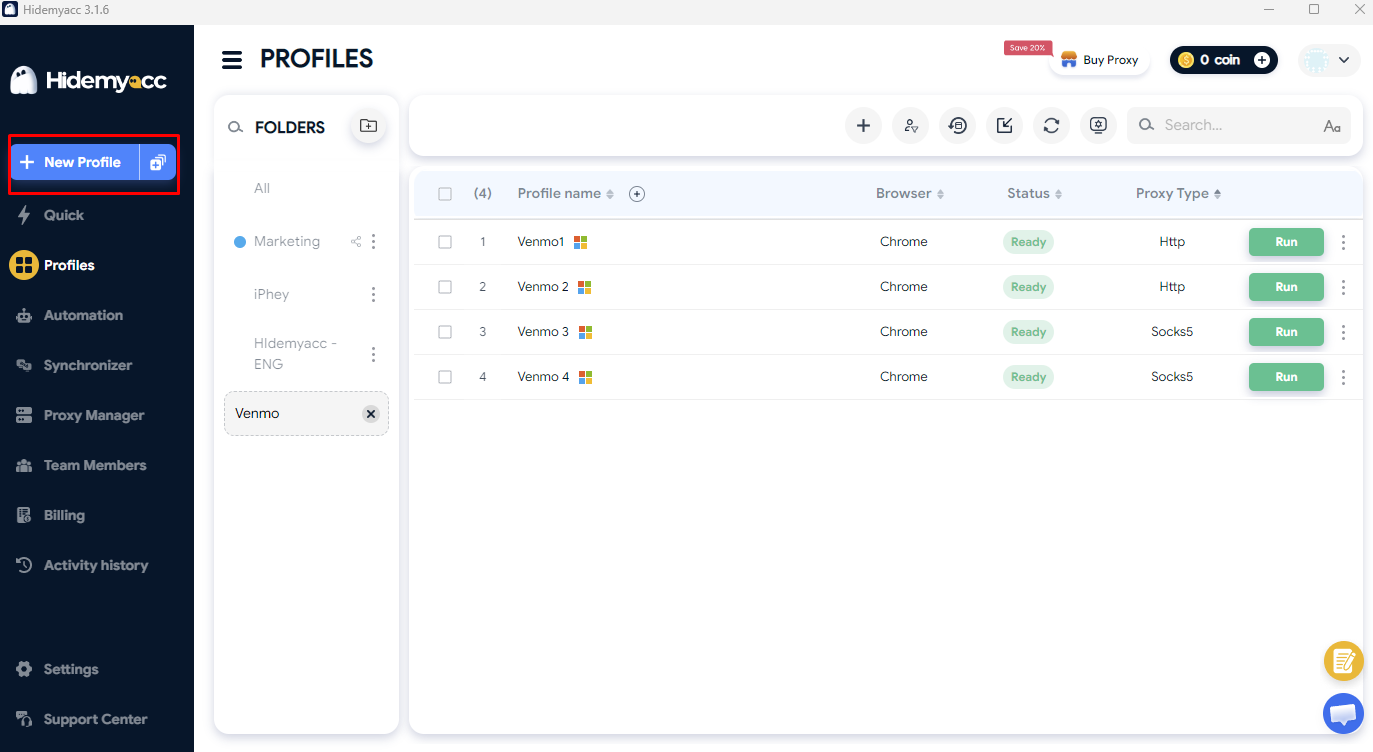
Step 3: Configure and save the profile
Configure parameters for the browser profile, including OS, User-Agent, timezone, and language settings. Once configured, click Create. The profile operates with a dedicated browser environment isolated from other profiles.
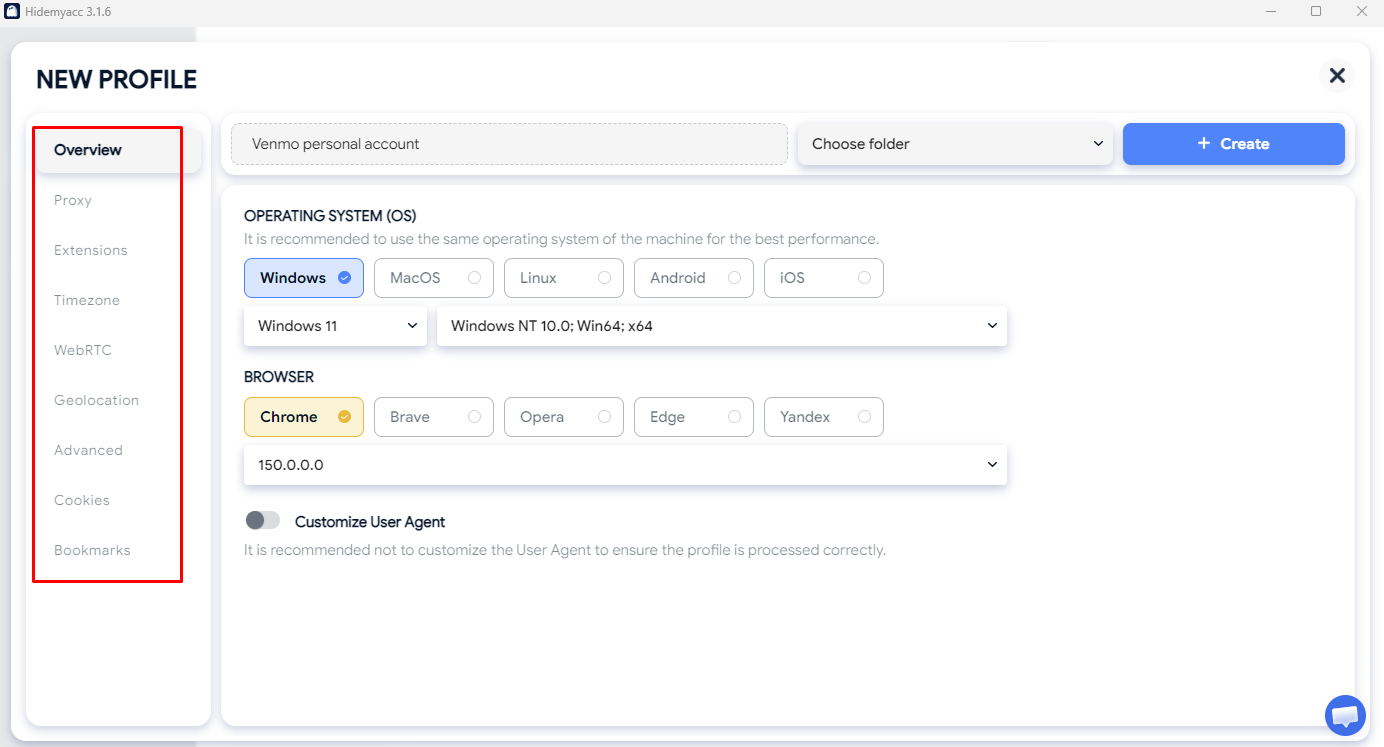
4.3. Accessing Venmo within the new profile
Launch the newly created profile, navigate to Venmo, and log in with your authorized account credentials.
If accessing your primary personal account, sign in with your established credentials. If setting up a business profile, follow Venmo's official registration prompts within the application.
Because a business profile connects directly to a personal account and lacks separate credentials, creating a new browser profile does not create a new Venmo user identity.
If Venmo prompts for identity verification during sign-in or profile creation, provide accurate personal documentation as requested by the platform.
4.4. Maintaining environment consistency
After creating profiles, maintain environment stability and adhere to standard usage guidelines:
- Assign each browser profile strictly to its designated account.
- Avoid repeatedly logging into multiple accounts within the same profile.
- Avoid frequent modifications to profile fingerprint settings.
- Keep cookies, session storage, and cache isolated per profile.
- Ensure account information is accurate and verified.
- Do not use isolated profiles to bypass Venmo verification or restrictions.
Crucially, Hidemyacc provides browser environment isolation; it does not grant authorization to create unauthorized Venmo accounts. If your goal is managing a legitimate business profile alongside a personal account, profile separation ensures clean, organized operations.
Read more: What Is a Multi-Account Browser? A Complete Guide with Hidemyacc
5. What happens if Venmo restricts an account?
Account restrictions on Venmo limit access to specific features or transaction capabilities. Depending on the situation, Venmo may request additional documentation or identity verification before restoring full functionality.
Common restriction outcomes include:
- Additional Identity Verification Prompts: Venmo may request official ID or documentation.
- Feature Limitations: Specific features, such as instant transfers or sending funds, may be temporarily disabled.
- Delayed Transactions: Payments or bank transfers may undergo security reviews.
- Account Review Status: The account may undergo administrative review before resolution.
- Balance Hold: Funds in the account balance may be temporarily held during security reviews.
The impact depends on the underlying reason for the restriction. If you encounter an account restriction, review Venmo's official notification rather than attempting to open a new account.
What should you do when restricted?
Opening a new personal account to evade an existing restriction violates Venmo policy. Check your email or app notifications for instructions from Venmo.
If you require assistance, contact official Venmo support channels to resolve account status issues. Completing required verification steps is the proper path to resolving restrictions.
6. Best practices when managing Venmo environments
Isolating browser profiles is one component of environment management. More importantly, accounts must be operated legitimately, using accurate personal information while adhering to Venmo rules.
Comply with account limits
Personal account holders should not assume they can open additional personal accounts using alternate emails or phone numbers. Always review current Venmo user agreements before registering additional profiles.
Separating personal and commercial transactions is properly handled through a Venmo business profile, which links to your verified personal account.
Provide accurate information
Account details must remain accurate and consistent, especially when identity verification is required. Submit official documentation directly through Venmo's secure verification prompts.
Altering personal information to mimic a separate individual does not pass verification checks and risks permanent account suspension.
Maintain stable browser environments
Keep each browser profile dedicated to its assigned account. This maintains organized cookies and session states while eliminating repetitive login actions.
Follow these simple rules:
- Dedicate each profile to a single account or purpose.
- Avoid logging into multiple accounts inside one profile.
- Avoid unnecessary adjustments to profile hardware settings.
- Do not cross-share cookies or cache across profiles.
Do not use profiles to evade restrictions
Antidetect browsers serve strictly as environment management tools, not mechanisms to bypass account restrictions or identity checks.
Restricted accounts must be resolved directly with Venmo support. Creating new accounts or altering browser fingerprints to evade active restrictions violates platform terms.
7. Conclusion
Setting up a second Venmo environment involves more than registering a new email address. First, verify which account structures you are permitted to operate under Venmo policies. If you manage a linked business profile alongside a personal account, separating browser profiles, cookies, and session data ensures organized management.
Crucially, browser profile management addresses local environment isolation—it does not alter Venmo's account terms. When facing account restrictions, resolve them through official support rather than opening new accounts.
You may also be interested in:
Can You Have Multiple PayPal Accounts?
What Is a Stripe Account? How to Create and Verify One
Top 6 Payoneer Alternatives Worth Using Today
How to Manage Multiple eBay Accounts Effectively
How to Create a Second eBay Account: How to Avoid Suspension and Account Linking
Can You Have Multiple Etsy Shops? A Complete Guide
How to Manage Multiple Etsy Accounts Without Getting Your Shops Suspended
Can Using Multiple Walmart Accounts Help You Scale Faster?
How to Effectively Manage Multiple WooCommerce Stores
How to Effectively Manage Multiple TikTok Shop Accounts
How to Create Multiple Shopify Stores Without Getting Banned
How to Open Multiple Amazon Seller Accounts
8. FAQ
1. Can you have two Venmo accounts?
Venmo permits one personal account per individual. Eligible users can also open a linked business profile. Operating a "second account" depends on whether it is an authorized business profile linked to your personal account.
2. Can you have both a personal account and a business profile?
Yes. Eligible users can create a business profile linked to their primary personal account. Review Venmo's official business profile requirements before setting one up.
3. What should you do if your Venmo account is restricted?
Review official Venmo notifications, submit requested verification documentation, and contact Venmo support. Do not attempt to open a new account to bypass restrictions.
4. Can you use Venmo across multiple devices?
Yes, you can access your account on supported devices. However, logging in on multiple devices does not create additional accounts. Maintain consistent credentials and login habits across devices.
5. How do you manage permitted Venmo profiles cleanly?
If you operate permitted profiles (such as a personal account and a linked business profile), using separate browser profiles isolates cookies, session storage, and local data, preventing data overlap.