Do you need to manage multiple Shopee accounts without constantly logging out, signing back in, or accidentally mixing up account information? Isolating your login environments and establishing a proper management workflow makes switching, tracking, and operating multiple accounts much more convenient. This article provides a step-by-step guide to each method along with essential operational tips.
1. Is using multiple Shopee accounts allowed?
If you want to create additional Shopee accounts, the first rule to note is that each phone number can only be linked to or registered with a single account. Shopee allows creating a new account using a different phone number or via supported third-party linkage options, followed by phone number verification.
This means the core restriction applies to the registration information used, rather than strictly forbidding an individual from operating more than one account under any circumstance. However, owning multiple accounts and using them to violate platform policies are two completely different matters.
Another common misconception is that buyer and seller accounts are entirely separate account types. In reality, a user can use their standard Shopee account to access the Seller Centre and complete the necessary setup steps to start selling.
If your goal is to manage multiple storefronts, Shopee provides the Multi-Store Management Portal. This platform allows sellers to link multiple seller accounts to manage storefronts, centralized inventory, and order fulfillment in one place.
Therefore, before creating additional accounts, clarify your main objective:
- Need extra login credentials: Register a new account following Shopee's guidelines.
- Want to start selling: Use your existing account and access the Seller Centre.
- Want to manage multiple shops: Explore the Multi-Store Management Portal and linked shop features.
- Want to assign employee permissions: Use the Sub-account System within the Multi-Store Management Portal instead of sharing master account credentials.
The boundary lies in how the accounts are used. Creating multiple accounts to abuse vouchers, exploit promotions, or evade platform enforcement will lead to account restrictions.

2. Why do Shopee accounts get linked?
When multiple accounts are used within the same environment, they leave overlapping digital footprints. Key technical signals analyzed by online platforms include IP addresses, cookies, session tokens, device information, and browser fingerprints.
An IP address represents the device's network location. Cookies are data stored by websites on your browser to remember user state and information, while sessions maintain active logins.
In addition, a browser fingerprint is a collection of browser and hardware parameters, such as User-Agent, Canvas fingerprint, WebGL, screen resolution, timezone, and hardware specs. Combined, these parameters form a distinct identification signature for your access environment.
For example, if you use a proxy to change your IP address before logging into a second account, but launch it on the same computer and browser profile, most other environmental parameters remain identical.
This means changing your IP address alone does not mean the two accounts are fully isolated. Account linkage is triggered by a combination of matching signals rather than a single factor.
Read more:
What is a Browser Fingerprint? How to block browser fingerprinting
What is a Device Fingerprint and how to change it?
How to check and enable WebGL fingerprinting
3. What methods can you use to manage multiple Shopee accounts?
Depending on the number of accounts and the required level of isolation, you can choose from five primary methods.
3.1. Dedicated physical devices
The most straightforward method is using a separate phone or computer for each account. Each account operates on an independent hardware environment without needing software configuration.
The advantage is easy deployment and high environment isolation. However, hardware costs scale rapidly with the number of accounts, and managing multiple physical devices becomes cumbersome.
Thus, dedicated physical devices work best if you only need to manage 2–3 accounts.
3.2. Incognito mode or manual cookie clearing
You can use Incognito windows or clear cookies after logging out to prevent previous account session data from remaining in the browser.
This approach is free and easy to execute. However, Incognito mode and cookie clearing do not modify hardware fingerprints, IP addresses, or device parameters. Therefore, this method is better suited for temporary logins rather than long-term multi-account management.
3.3. Virtual Machines (VMs)
Virtual Machines allow you to run isolated virtual operating systems on your current computer. Each VM functions as a separate workstation, providing higher isolation than standard browser profiles.
The downside is that VMs consume significant RAM and CPU resources. Running multiple VMs simultaneously requires a powerful computer setup, and configuration can be complex.
This approach suits users needing OS-level isolation for a small number of accounts (typically under 5).
3.4. Separate built-in browser profiles
Browsers like Chrome and Edge allow creating multiple built-in profiles to separate cookies, history, saved logins, and settings across accounts.
This method is free, user-friendly, and allows fast switching. However, all profiles share the same host machine hardware and OS parameters, meaning they should not be treated as completely independent devices.
This method works well for beginners or those who simply want to prevent login credential mix-ups.
3.5. Antidetect browsers
What is an antidetect browser? These are specialized browsers designed to create and manage multiple profiles with customizable environment parameters. Compared to built-in profiles, antidetect browsers offer granular control over browser fingerprints, cookies, and system parameters per profile.
The biggest advantage is centralized management. When account numbers grow into the dozens, you can organize each account into a dedicated profile instead of juggling physical devices or virtual machines.
However, antidetect browsers are environment management tools. They do not guarantee that accounts will never face Shopee restrictions if platform policies are violated.
Each method offers different levels of environment isolation and scalability. The table below compares the options to help you choose the best fit for your operational scale.
| Method | Cost | Isolation Level | Scalability | Setup Complexity |
|---|---|---|---|---|
| Dedicated physical devices | High | Very High | Low | Low |
| Incognito / Clear cookies | Free | Low | Low | Low |
| Virtual Machines (VM) | Medium – High | High | Medium | High |
| Separate browser profiles | Free | Medium | Medium | Low |
| Antidetect browser | Low – Medium | High | High | Medium |
If you only manage a few accounts, dedicated tools are not strictly necessary. As your operations expand, choosing a method with strong organizational capabilities and scalability will significantly reduce management overhead.
4. Common mistakes when running multiple Shopee accounts
Managing multiple accounts goes beyond signing in. If your environment and operational workflows are unorganized, you may face both technical errors and shop management issues.
4.1. Common technical mistakes (buyers and sellers)
A widespread error is logging into multiple accounts within the same browser profile. This causes cookies and session data to overlap, leading to account mix-ups, misplaced items in carts, or incorrect order processing.
Some users focus solely on changing IP addresses via proxies or VPNs while ignoring the browser environment. However, an IP address is just one of many parameters used to evaluate session linkage.
Reusing identical passwords or keeping disorderly login records creates unnecessary security risks. As account numbers scale, use unique passwords and maintain organized record systems.
Finally, avoid suspicious activity, such as mass logging into accounts in rapid succession, executing repetitive actions at high speeds, or abusing vouchers across accounts. These behaviors trigger automated risk flags.
4.2. Specific mistakes when managing multiple seller shops
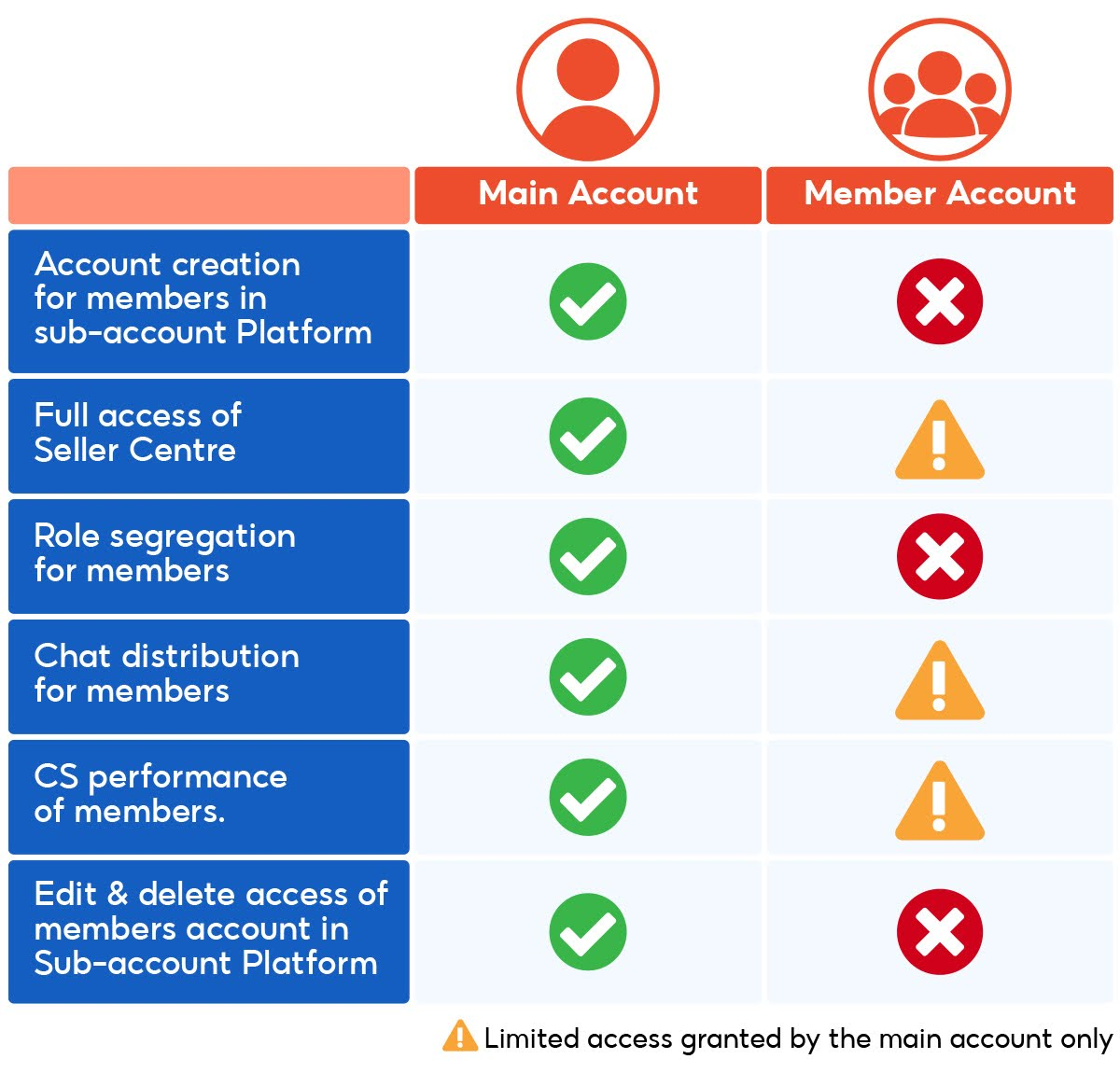
For merchants, creating extra individual accounts solely to delegate tasks is inefficient. If your goal is to let staff manage shop operations, Shopee's Sub-account System is the proper solution.
Additionally, running multiple shops does not permit duplicating policy-violating listings or evading platform enforcement measures. Products and store content must be carefully reviewed prior to listing.
Depending on violation severity, Shopee may restrict shop features, temporarily limit account access, or permanently suspend accounts.
5. How to safely manage multiple Shopee accounts using Hidemyacc
As account numbers grow, relying on multiple devices or manual configurations becomes hard to control. An antidetect browser consolidates all profiles into a single dashboard and simplifies management.
5.1. Why choose the antidetect browser Hidemyacc?
The antidetect browser Hidemyacc allows you to create and manage multiple browser profiles independently. Cookies, session tokens, and fingerprint settings are stored separately per profile, preventing cross-account data leaks.
Instead of managing physical hardware or virtual machines, you can create a dedicated profile for each account and manage them from a unified interface—ideal for scaling operations.
This directly addresses the environmental linkage risks discussed earlier. Rather than altering IP addresses alone, you isolate each account's browser environment and control the corresponding technical parameters.
However, understand the tool's scope. Hidemyacc manages browser environments; it does not guarantee account immunity if platform policies are breached. Operating in compliance with Shopee's rules remains essential.
Read more: What is a multi-accounting browser? Comprehensive guide to Hidemyacc
5.2. Setup steps
Follow these steps to set up isolated browser environments and organize your profiles effectively:
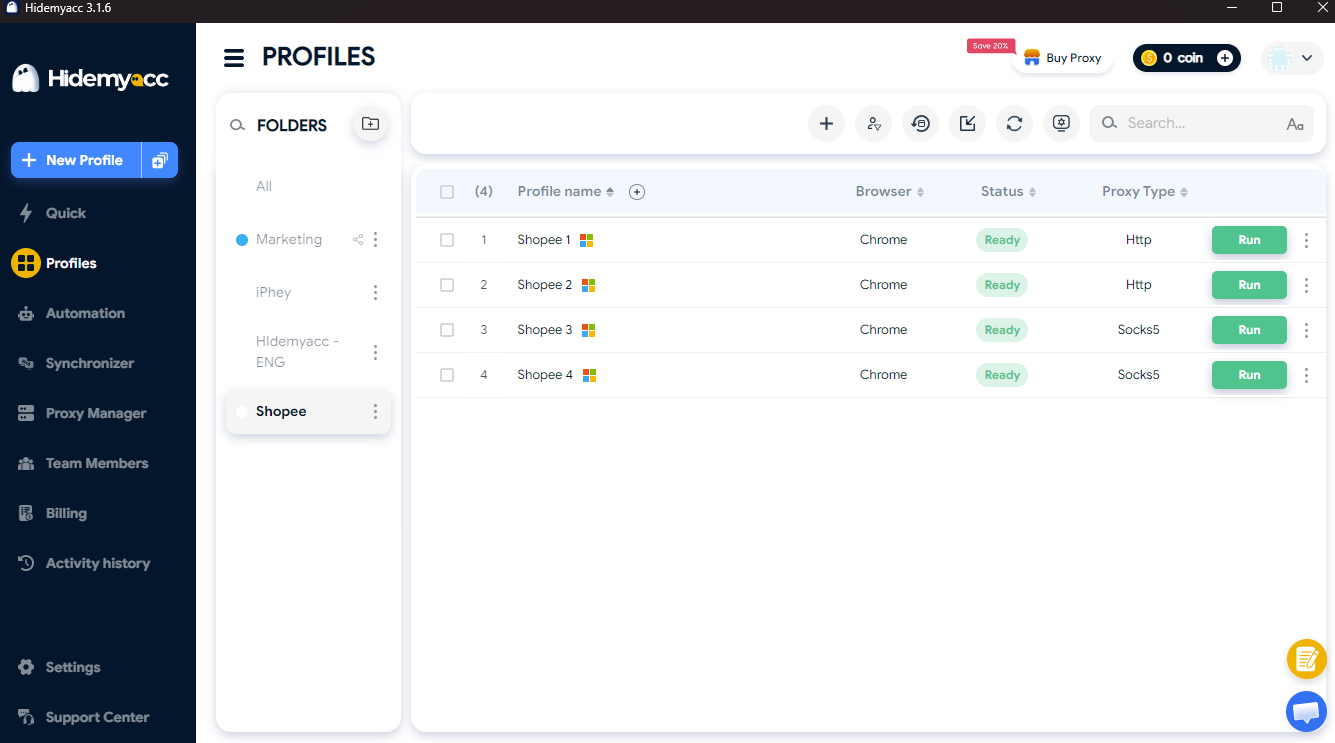
- Step 1: Create a dedicated profile for each account
Create a separate Hidemyacc profile for each Shopee account. Avoid logging into multiple accounts within the same profile to keep session data isolated.
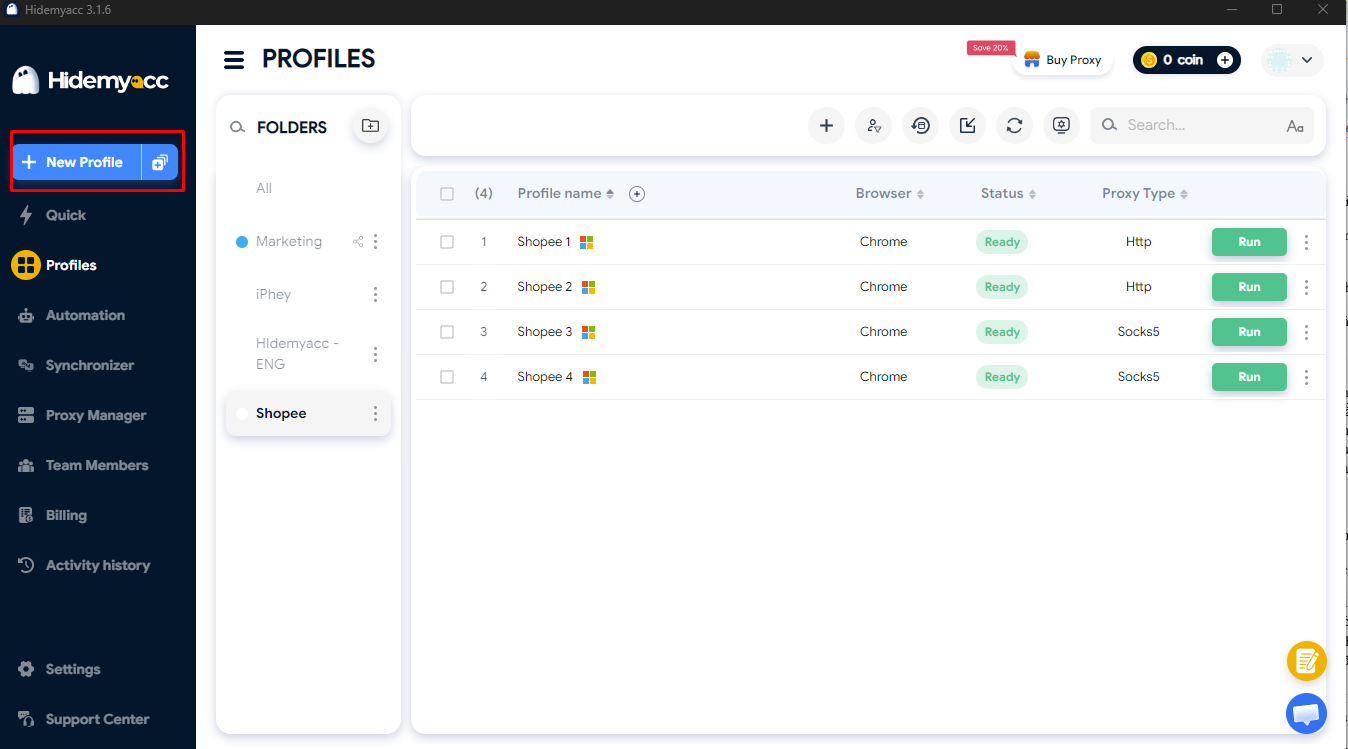
- Step 2: Configure browser environment settings
Set required parameters such as operating system, language, timezone, and fingerprint settings. Once configured, keep parameters stable rather than changing them continuously.
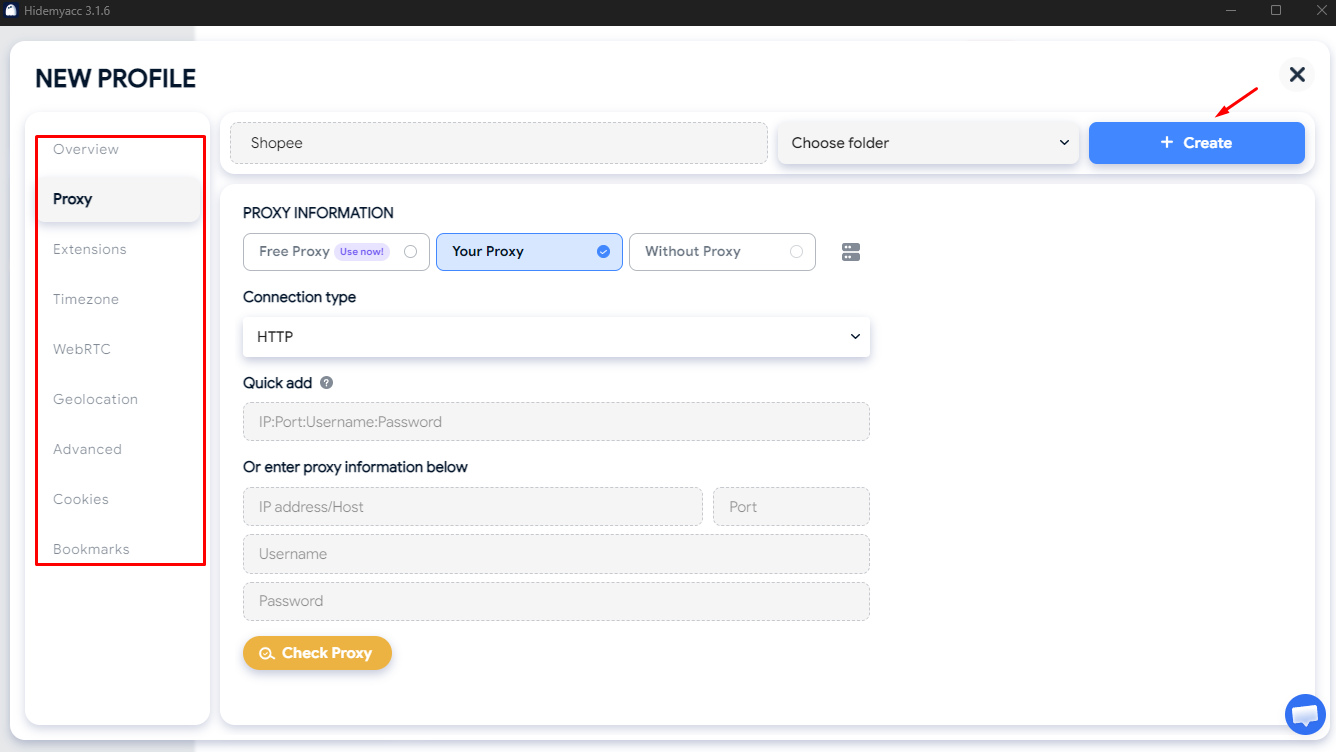
- Step 3: Assign proxies if needed
If your setup requires unique IP addresses per environment, assign a dedicated proxy to each profile. Remember that proxies handle network routing but do not replace browser profile isolation.
- Step 4: Log into the corresponding account
Launch the designated profile before logging into its matching Shopee account. For seller accounts, complete required identity verifications before initiating store operations.
- Step 5: Organize your profile dashboard
Name profiles systematically using store names or operational roles. For team setups, assign specific profiles to team members to prevent login overlaps.
This workflow provides a dedicated workstation for each account while streamlining profile management and switching. Maintaining structured naming conventions keeps operations organized as account volume grows.
6. Important considerations when operating multiple Shopee accounts
Managing multiple accounts involves more than isolating browser profiles. Maintaining stable operational habits and complying with Shopee policies are vital for long-term account health.
6.1. General guidelines (buyers and sellers)
Whether using accounts for purchasing or business tasks, follow these fundamental practices:
- Comply with Shopee policies: Do not use multiple accounts to engage in fraudulent activities, evade penalties, or gain unfair advantages.
- Avoid promotion abuse: Do not use multiple accounts to repeatedly claim welcome vouchers, discounts, or new-user promotions.
- Manage credentials separately: Use unique passwords and keep organized records for each account to avoid mix-ups.
- Maintain environment stability: Avoid rapid account switching or modifying environment configurations frequently within short windows.
- Allocate proxies properly: If using proxies, assign dedicated proxies per profile instead of sharing a single proxy across multiple accounts.
- Monitor notifications: Check Shopee alerts regularly to detect early signs of account restrictions and follow platform instructions promptly.
- Do not trade accounts: Third-party accounts carry hidden risks regarding control, verification details, and past activity logs.
These practices help reduce common operational errors. However, if you manage multiple seller shops, additional guidelines apply.
6.2. Specific guidelines for managing multiple seller shops
In addition to managing login environments, merchants must ensure each shop meets Shopee's verification and operational standards:
- Complete verifications: Provide accurate information and complete required verification steps before launching shop operations.
- Delegate permissions correctly: Use the Sub-account System to assign staff access instead of sharing primary master account logins.
- Review product listings: Do not duplicate product listings and descriptions across shops without customization.
- Do not use extra shops to bypass rules: Operating multiple shops does not allow repeating policy-violating behaviors or avoiding Shopee enforcement actions.
In short, environment isolation addresses technical environment management, but policy compliance ultimately determines long-term account stability.
7. Conclusion
Managing multiple Shopee accounts is far smoother when each account operates in an isolated environment with a clear workflow. For a small number of accounts, built-in browser profiles or separate physical devices are sufficient; as your scale expands, antidetect browsers offer a centralized and scalable solution.
Regardless of the method chosen, environment isolation is only part of the process. Operating accounts legitimately, maintaining steady activity patterns, and adhering to Shopee policies remain the cornerstone of long-term account health.
8. FAQ
1. Does Shopee allow users to have multiple accounts?
Yes. Shopee permits users to operate multiple accounts, provided each account is linked to a unique phone number. Risks primarily arise when accounts are used to abuse vouchers, exploit promotions, or breach platform policies.
2. Is it safe to use multiple Shopee accounts on the same device?
It can be, but sharing a device creates overlapping access environments. Isolating browser profiles helps manage cookies, session data, and login credentials cleanly for each account.
3. Can I have multiple Shopee seller accounts?
Buyer and seller functions share the same Shopee account—simply activate the Seller Centre and complete the required verifications. If managing multiple shops, the Sub-account System is the proper feature for delegating team permissions.
4. How can I switch between multiple Shopee accounts quickly?
You can create dedicated browser profiles for each account and label them clearly. When managing multiple profiles, an antidetect browser simplifies profile switching and organization.
5. Is using an antidetect browser safe for Shopee?
Antidetect browsers isolate and manage browser environments, but they do not guarantee immunity if platform rules are breached. Users must operate accounts legitimately and comply with Shopee terms of service.