When doing dropshipping, you often need multiple AliExpress accounts to test suppliers, hunt for new user deals, or separate orders by region and store. However, AliExpress limits one account per person and can link accounts sharing the same device, IP address, payment method, or shipping address. This article helps you understand why accounts get linked, compares management methods, shows how to use separate browser profiles to create distinct AliExpress accounts, and explains how to warm up new accounts to minimize the risk of suspension.
1. Can you have multiple AliExpress accounts?
According to AliExpress terms, each user is only allowed to register one account. Therefore, if you want to create additional AliExpress accounts, keep in mind that doing so may violate platform rules.
However, in practice, many dropshippers and buyers still use multiple accounts for different purposes. This can come with risks if AliExpress detects accounts linked to the same individual.
AliExpress
2. Why do dropshippers need multiple AliExpress accounts?
There are several reasons why dropshippers want to use multiple AliExpress accounts. With each account, you can separate a store, a product line, or a market for easier management.
Test multiple suppliers and products
When doing dropshipping, you often need to test various products and suppliers before finding suitable options. Using separate accounts helps keep your purchase history distinct and makes tracking each product group easier.
Separate stores and markets
If you manage multiple dropshipping stores, using separate accounts for each store helps prevent confusion when sourcing products, placing orders, and tracking shipments.
You can also divide accounts by market if you have different workflows regarding products, shipping, or suppliers.
Take advantage of new user deals
Another reason people look for ways to create multiple AliExpress accounts is new user promotion programs. New accounts may be eligible for specific coupons or discounts depending on campaign terms.
However, you should not create multiple accounts solely to claim the same deal repeatedly. Abusing coupons or promotional offers can lead to account restrictions.
Participate in referral programs
AliExpress may run referral programs offering vouchers or rewards depending on the timing and market. If participating, review the program terms carefully to avoid using multiple accounts in unauthorized ways.
Easier workflow management
When managing multiple stores or workflows, separating accounts helps you identify which account is dedicated to which purpose. This is particularly useful when multiple team members are involved in order fulfillment and product sourcing.
3. Why do AliExpress accounts get linked?
Creating accounts using different emails does not guarantee complete independence. When you use multiple accounts, AliExpress examines various signals to determine if the accounts belong to the same person.
These signals can be categorized into three main groups: identity and payment information, device and browser, and usage behavior.
3.1. Identity, payment, and shipping information
Different email addresses do not mean accounts are completely isolated. Beyond email, several other pieces of information can be used to identify accounts. For instance, multiple accounts sharing the same payment method, shipping address, or phone number create obvious connections between them.
This is especially notable in dropshipping because you frequently pay for orders and enter customer delivery addresses. If accounts share this information, it creates matching data points across them.
For example, if two accounts use the same payment card or shipping address, these matching credentials can be cross-referenced by the platform. Therefore, simply registering each account with a different email is insufficient if you want to manage accounts independently.
3.2. Device and browser
Operating multiple accounts within the same environment also creates clear connections.
When you log into your first account on a browser, the browser stores cookies, session data, and activity logs. If you log out and log into a second account on the same browser, you are still utilizing the exact same device and browser environment. In other words, logging out of an old account does not turn your device into a new environment.
For example, logging into Account A on Chrome and then logging out to log into Account B on that same Chrome instance leaves many overlapping device and browser traces. This is why browser fingerprints, cookies, and active sessions must be carefully considered when managing multiple accounts.
3.3. Usage behavior
AliExpress also monitors how accounts are operated. Creating or logging into multiple accounts in a short period from the same location can flag an unusual activity pattern.
Accounts can also exhibit similar patterns in browsing, order placement, or sourcing behavior. If multiple accounts consistently perform identical actions, they are easily recognized as related.
For example, creating 5 accounts from the same network within 3 days and operating them identically presents an abnormal behavior pattern to detection systems.
3.4. Summary table of signals AliExpress uses to link accounts
The table below summarizes the primary signals and situations you should pay attention to when managing multiple AliExpress accounts.
| Signal | Group | Risk Level | When to be cautious |
|---|---|---|---|
| Matching payment methods | Identity | High | When paying for orders across multiple accounts |
| Matching shipping addresses | Identity | High | When fulfilling dropshipping orders |
| Shared IP address | Network | High | When opening multiple accounts on one network |
| Same device, same browser | Device | High | When environments are not separated |
| Browser fingerprint | Browser | High | When environments are not separated |
| Rapid account creation | Behavior | Medium | When opening many accounts in a short time |
These signals do not work in isolation. An account may share a few parameters with another without encountering issues. However, when multiple signals overlap, accounts are much more likely to be identified as linked.
Therefore, if you need to manage multiple AliExpress accounts, pay attention to the entire operational environment rather than just changing your email or a single isolated parameter.
4. Browser fingerprinting and why changing email or IP is still not enough
As mentioned above, device and browser signals play a major role in linking accounts. However, changing your email or IP address alone still fails to completely isolate your digital environment.
To understand why, it is essential to first understand what a browser fingerprint is and what data forms it.
4.1. What is a browser fingerprint?
A browser fingerprint is a collection of characteristics gathered from your browser and device that creates a relatively unique identity for your access environment.
Information commonly used to generate a fingerprint includes:
- User-Agent
- Operating System
- Canvas fingerprint
- WebGL
- Fonts
- WebRTC
- Various hardware parameters...
Importantly, a fingerprint is not a single piece of data; it is an aggregation of many distinct characteristics. Thus, changing one parameter does not mean your entire environment has changed.

Learn more: What is Browser Fingerprinting? How to block browser fingerprinting
4.2. Why changing email, IP, or using incognito mode is insufficient
Here is how common methods used to isolate accounts perform in reality:
| Method | Reality |
|---|---|
| Changing Email | Only changes registration/login credentials, while device and browser environments remain identical. |
| Changing IP | Changes network connection details but leaves the overall browser and hardware environment unchanged. |
| Using Incognito Mode | Prevents local history and session caching, but does not turn your computer into a new physical device. Two incognito windows on one PC share the exact same hardware fingerprint. |
| Clearing Cookies | Deletes session data but does not alter the underlying hardware and browser parameters. |
As shown, these methods only alter partial data points. If other device and browser signals match, the accounts remain linked.
4.3. Why does every account need its own browser profile?
Managing multiple accounts on a single browser risks mixing cookies, sessions, and stored data.
A dedicated browser profile isolates this data completely. Think of it as:
Account A → Profile A → Browser Data A
Account B → Profile B → Browser Data B
This eliminates the need to constantly log in and out of different accounts on the same profile.
For multi-environment needs, antidetect browsers allow you to create multiple independent profiles and customize browser parameters for each. This streamlines managing multiple accounts on a single computer.
However, separating browser environments does not override AliExpress policies. You should not use separate profiles to bypass bans, dodge verification requests, or operate accounts in violation of platform terms.
5. Methods to manage multiple AliExpress accounts
There are several ways to manage multiple AliExpress accounts. Depending on account volume, available hardware, and your workflow, you can use multiple real devices, virtual machines/VPS, cloud phones, or antidetect browsers.
Each method offers different levels of environment isolation, costs, and convenience.
5.1. Multiple real devices
The simplest approach is dedicating a physical device to each account. Each account operates on its own computer or mobile phone, avoiding shared browser environments entirely.
The advantage is easy setup without technical complexity. You simply use the designated device whenever accessing a specific account.
However, this becomes impractical as account volume grows. Purchasing, maintaining, and managing numerous physical devices is expensive and switching between them is time-consuming.
Therefore, using multiple real devices is best suited for managing a small number of accounts.
5.2. Virtual Machines or VPS
Virtual machines or a VPS allow you to create isolated working environments without purchasing additional physical computers. Each environment can be dedicated to a specific account or workflow.
Compared to buying real devices, this approach scales better and allows access to multiple environments from a single desktop. However, setting up and managing VMs or VPS instances is technically complex, requiring knowledge of operating systems, server resources, and network configurations. Running many instances simultaneously also increases resource costs.
This method fits users already experienced with virtual machines who need strict environment control.
Read more: VPS vs Antidetect Browser: The optimal solution for multiple dropshipping accounts
5.3. Cloud phone
Cloud phones provide virtual mobile devices hosted on cloud infrastructure. You can access these virtual devices remotely from your PC without buying physical smartphones.
Each account runs on its own virtual mobile device, making cloud phones well-suited for mobile app-centric workflows.
The main advantage is easier scalability than buying physical phones. However, the user experience can be clunky if your work is primarily conducted on desktop browsers.
5.4. Antidetect browser
Antidetect browsers enable you to create multiple browser profiles on a single computer. Each profile stores its own cookies, session data, and web storage while customizing distinct browser parameters.
Instead of using multiple physical computers, you simply open the designated profile for a specific account. For instance, Profile A corresponds to Account A and Profile B to Account B. Data between profiles remains strictly isolated, preventing accidental cross-contamination.
Many antidetect browsers also support proxy management and fingerprint configuration per profile, making multi-account management seamless on a single machine.
This is the ideal choice for desktop-focused dropshippers managing multiple accounts or workflows simultaneously. Compared to maintaining physical devices, it is far more compact and scalable.
Which method should you choose?
Each approach has distinct pros and cons. Choose based on your account volume, current hardware, and operational workflow.
| Method | Environment Isolation | Cost & Complexity | Best For |
|---|---|---|---|
| Multiple real devices | One device per environment | High cost, hard to scale | Small number of accounts |
| VMs / VPS | Separate virtual machines | Medium to High | Tech-savvy users |
| Cloud phone | Cloud-based virtual devices | Medium | Mobile app workflows |
| Antidetect browser | Separate browser profiles | Low to Medium | Desktop-based dropshippers |
If you only manage a few accounts, dedicated physical devices offer a straightforward path. As account volume grows, VMs, VPS, or cloud phones help expand your setup.
If your work is desktop-focused and you want to manage multiple profiles efficiently from one PC, an antidetect browser is a highly effective choice. Mapping each account to a dedicated profile ensures seamless switching and organized management.
6. How to create and manage multiple AliExpress accounts with Hidemyacc
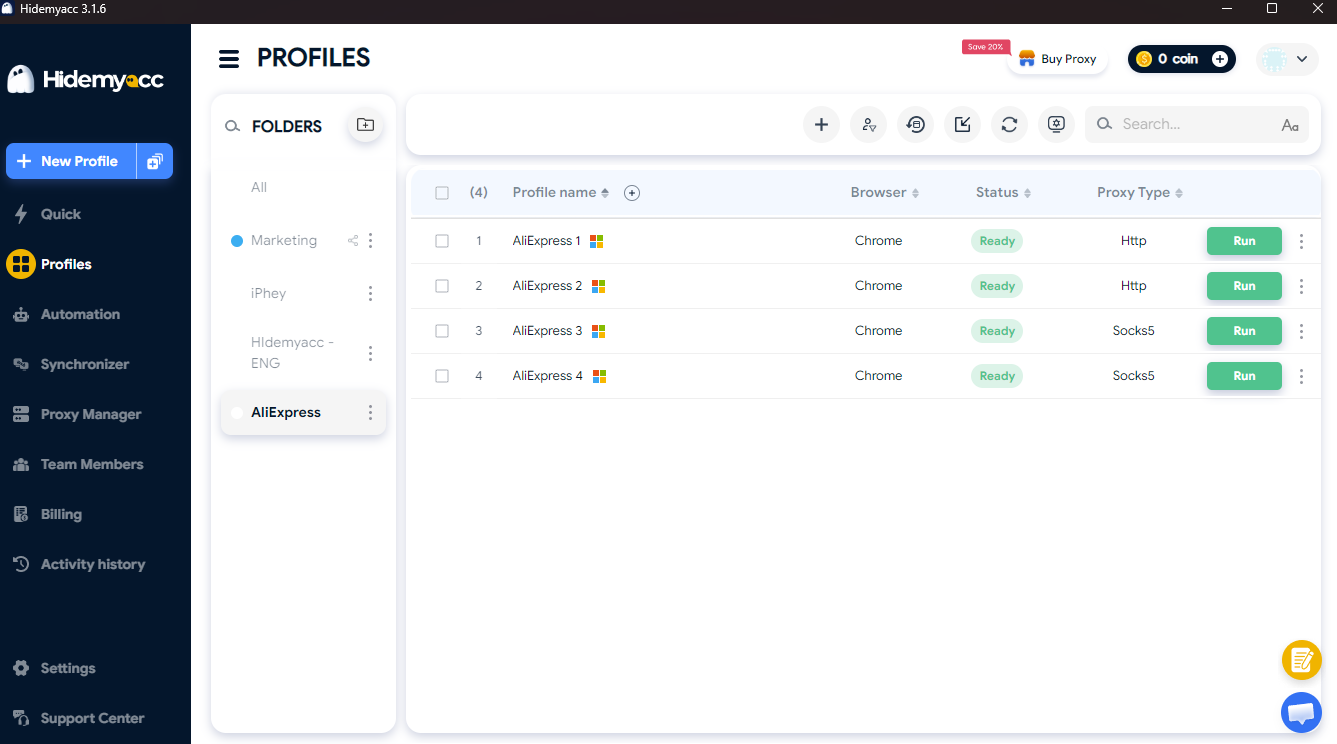
Hidemyacc antidetect browser is a solid solution for running multiple browser profiles on one computer. Instead of sharing a single Chrome profile and repeatedly logging in and out, you can set up isolated profiles assigned to specific accounts or workflows. This separates browser data and structures your account management cleanly.
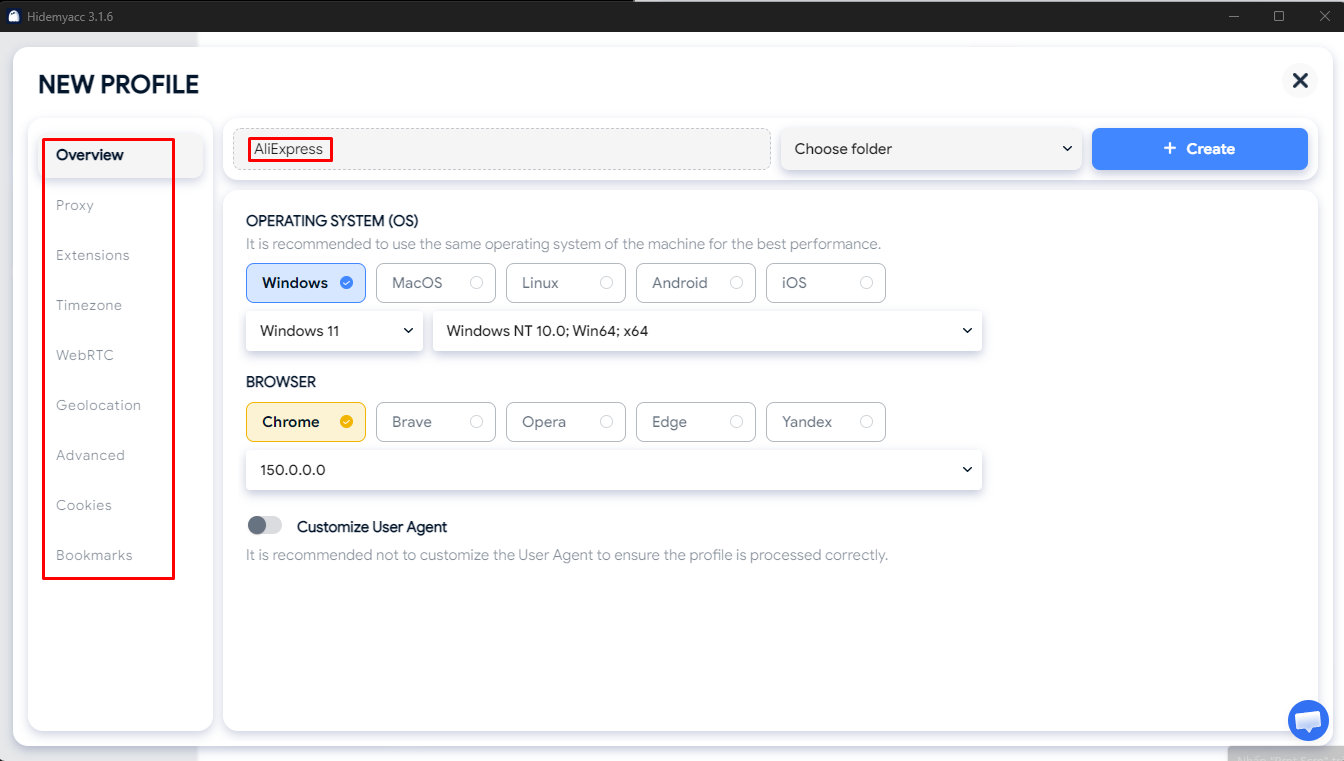
Step 1: Create a dedicated profile for each account
- Create an individual profile for every AliExpress account.
- Name profiles after accounts, stores, or intended uses for clear identification.
- Configure appropriate browser parameters and maintain stable configurations over time.
Step 2: Assign proxies to profiles if required
- Assign a dedicated proxy to each profile if your workflow requires network isolation.
- Select high-quality proxies with locations suited to your target market.
- Avoid frequent changes to IP addresses or network parameters during operations.
Step 3: Access AliExpress from dedicated profiles
- Launch the profile and access AliExpress within that isolated environment.
- Register or log in according to AliExpress guidelines and policies.
- Do not log into multiple accounts within the same profile to prevent cookie and session mixing.
Step 4: Manage account details separately
- Track login credentials, payment methods, and order histories for each account independently.
- Keep organized notes mapping profiles to specific legitimate business uses.
- Maintain an account management spreadsheet to track status, profiles, and associated workflows.
Note: Hidemyacc isolates and manages browser environments, but it does not make multi-account creation permissible if that activity violates AliExpress policies.
Read more: What Is a Multi-Account Browser? A Complete Guide with Hidemyacc
7. Aged accounts and how to safely warm up new AliExpress accounts
On AliExpress, accounts with history and tenure generally carry higher trust than brand-new registrations.
7.1. What is an aged account and why does it matter?
An aged account is a pre-existing account with a history of past activity. An account with established usage history behaves differently in detection systems compared to a newly registered account that immediately attempts high-value transactions.
However, age alone does not guarantee absolute safety. Account history, natural behavior, and policy compliance remain vital factors.
7.2. Risks of purchasing aged accounts
Buying existing accounts saves registration time but introduces significant risks. You often lack full visibility into an account's history, including:
- Prior policy violations or hidden flags that you are unaware of.
- Registration details that do not match your actual identity.
- Abrupt changes in device fingerprints, IP locations, or usage patterns after transfer, triggering security flags.
- Difficulty verifying ownership or appealing suspensions if the account gets restricted.
- Potential policy violations regarding account buying and selling.
Given these issues, creating and legitimately warming up your own accounts offers far better control than buying pre-made accounts.
7.3. How to safely warm up a new account
Instead of purchasing accounts, start with fresh accounts and build authentic usage history gradually.
- Log in and browse regularly rather than carrying out heavy transaction volumes right after registration.
- Begin by viewing items, searching for products, and adding items to cart before placing large orders.
- Keep account information and browser environments consistent throughout operations.
- Avoid placing abnormal order quantities in short timeframes.
- Do not abuse discount codes or new user promotion campaigns.
- If requested to verify, follow AliExpress instructions directly rather than opening a replacement account.
The goal of warming up an account is not to deceive detection systems, but to build normal usage patterns and avoid triggering unnecessary security reviews.
8. What happens if AliExpress links or suspends your accounts?
When AliExpress detects linked accounts or policy violations, it may require identity verification or restrict account functions. Enforcement severity depends on the specific violation and account history.
Potential consequences include:
- Verification requests: AliExpress may demand identity verification or extra verification steps before restoring access.
- Account reviews: Specific operations may be suspended pending manual compliance review.
- Order cancellations: Pending orders may be canceled automatically if account issues arise.
- Cross-account restrictions: If accounts are linked, enforcement on one account can trigger restrictions across related accounts.
- Seller impacts: For sellers, restrictions can disrupt storefront operations, order processing, and feature access.
Behaviors that trigger account flags
Operating multiple accounts does not guarantee a ban, but certain actions dramatically increase risk levels, such as:
- Creating accounts exclusively to exploit new user coupons or deals repeatedly.
- Opening multiple accounts rapidly without legitimate operational needs.
- Executing transaction patterns inconsistent with natural account history.
- Creating new accounts to circumvent existing restrictions or bans.
- Providing false information or breaching AliExpress terms of service.
If an account is restricted, do not attempt to create new accounts to bypass the restriction. Review official AliExpress notifications, identify the cause, and follow official appeal channels.
9. Key considerations when managing multiple AliExpress accounts
Managing multiple accounts requires more than changing IP addresses or setting up profiles. Maintaining accurate account data, stable environments, and policy compliance is essential to long-term operations.
Core best practices include:
- Comply with AliExpress policies: Do not use multiple accounts to exploit promotions or bypass platform bans.
- Use accurate information: Avoid false identities or fake documentation during registration.
- Maintain stable environments: Use dedicated browser profiles and avoid constant IP or fingerprint changes.
- Avoid rapid creation: Register accounts only as actual business needs arise.
- Handle restrictions properly: Follow official verification procedures rather than creating replacement accounts when issues occur.
Effective account management relies on proper organization and tracking. Keeping clean records and dedicated environments per account minimizes operational mistakes.
10. Conclusion
Managing multiple AliExpress accounts allows dropshippers to separate purchasing channels, supplier testing, and distinct store workflows. However, operating multiple accounts creates linking risks if environments, device parameters, or personal details overlap.
To manage accounts effectively, define clear operational roles for each account, utilize isolated browser profiles, and maintain environment stability. For desktop workflows requiring multiple profiles, antidetect browsers offer a structured, efficient management system.
Above all, maintain accurate information, avoid promotion abuse, and rely on official AliExpress resolution processes whenever account issues arise.
You may also be interested in:
- AliExpress Dropshipping: A complete beginner's guide
- Can you have multiple PayPal accounts?
- What is a Stripe account? How to create and verify your account
- Top 6 Payoneer alternatives worth using today
- How to effectively manage multiple eBay accounts
- Creating a second eBay account: How to avoid suspension and account linking
- Can you open multiple shops on Etsy? A detailed guide
- Managing multiple Etsy accounts without shop suspensions
- Does using multiple Walmart accounts help you scale faster?
- How to systematically manage multiple WooCommerce stores
- Managing multiple TikTok Shop accounts effectively
- Guide to creating multiple Shopify stores without bans
- How to open multiple seller accounts on Amazon
11. FAQ
1. Does AliExpress allow multiple accounts?
According to terms, each user is restricted to one account. While dropshippers often use additional accounts, doing so carries risks of account linking and suspension if detected.
2. How does AliExpress detect multiple accounts on the same device?
AliExpress relies on device fingerprinting, IP addresses, payment credentials, and shipping addresses to identify related accounts operating in shared environments.
3. Are new AliExpress accounts more prone to suspension than aged ones?
Brand-new accounts face stricter automated screening, especially when placing high-value initial orders. Warming up new accounts gradually establishes natural usage history.
4. Should you buy aged AliExpress accounts?
Purchasing accounts carries high risks, including hidden violation histories and instant flags when device/IP parameters shift abruptly upon transfer. Exercise extreme caution.
5. Which proxy type is best for multiple AliExpress accounts?
Residential or mobile proxies are far more reliable than datacenter proxies because they mimic real user traffic. Each profile should be assigned its own dedicated proxy.
6. Is it safe to share payment methods or shipping addresses across accounts?
No. Shared payment or shipping details are primary identity signals that instantly link accounts, even if browser environments are isolated.
7. Should you use cloud phones or an antidetect browser?
It depends on your workflow: cloud phones suit mobile app actions, while antidetect browser profiles are lightweight, cost-effective, and easier to scale for desktop operations.