



OnlyFans has grown far beyond entertainment, becoming a place where thousands of creators make serious money.
So if you also want to earn from OnlyFans, or separate different content styles, sticking to just one account may feel limiting.
But can you have multiple OnlyFans accounts without problems?
In this guide, Hidemyacc breaks down the real rules, risks, and practical considerations creators need to know before running multiple OnlyFans accounts in 2026.
1. Can you have multiple OnlyFans accounts? (Official rules explained)
The answer is that OnlyFans does not publicly state a fixed number of accounts a creator is allowed to have.
What the platform clearly requires is that each account must be verified separately. Every new account goes through identity checks and manual review, which means approval depends on verification rather than a published account limit.
In practice, many creators operate two accounts, commonly one free and one paid, without issues when both are fully verified and used for different purposes. When additional accounts are created, the review process becomes stricter and the risk of rejection increases.
This is why most concerns around multiple accounts begin after the second one.
2. What happens if you create a third OnlyFans account?
Most creators who run multiple OnlyFans accounts begin with a familiar setup: one free account to test content or attract followers, and one paid account for subscriptions. For many people, this works without immediate issues.
Things often change when a creator tries to open a third account. At this stage, creators commonly report the following outcomes:
- Longer approval times during verification
- Account rejection without a clear explanation
- Accounts being linked together under the same identity
- Additional reviews on existing accounts after the third one is created
The key reason is that every account must pass identity verification. When more than two accounts are created under the same person, scrutiny increases, even though a third account is not publicly stated as forbidden by OnlyFans.
This is why many creators describe the experience as stable with two accounts, but uncertain once they move beyond that point.
3. How OnlyFans detects multiple accounts
When creators run more than one account, detection is usually not about a single action. OnlyFans reviews accounts based on a combination of signals rather than one specific factor.
Here are the main elements that commonly trigger closer review when multiple accounts are involved:
- Identity verification: Every account requires ID submission and facial verification. When the same identity appears across several accounts, those accounts are more likely to be reviewed together.
- Payment and payout information: Using the same bank details or payout methods across multiple accounts can make them easier to link, especially when more than two accounts are involved.
- Login environment: Repeated logins from the same browser setup or device environment can signal that accounts belong to the same person.
- Account timing and behavior: Creating several accounts within a short period, or managing them in similar ways, can increase scrutiny during manual review.
Individually, these signals may not cause problems. However, when several of them overlap, especially after a third account is created, reviews become more likely.
Protect your accounts from bans
Manage multiple OnlyFans accounts safely with Hidemyacc!
Protect & ScaleUnderstanding what triggers attention is important before trying to scale beyond two accounts. In the next section, we’ll look at what creators typically need to prepare if they still want to run multiple OnlyFans accounts, and where most risks come from.
4. What you need to create multiple OnlyFans accounts
Before trying to run more than one account, it’s important to understand that success depends less on “how many” accounts you open and more on how well each account is prepared and separated. Most problems happen because creators skip this step.
Below are the key areas creators need to think about when managing multiple accounts.
4.1. Identity and verification readiness
Every account must pass identity checks on its own. This includes valid identification and facial verification. Even when using the same real identity, inconsistencies or repeated submissions can slow approval or trigger additional review. This is the hardest part to scale and the main reason why creating a third account carries higher risk.
4.2. Payment and payout setup
Payout details matter more as the number of accounts increases. Reusing the same banking or payout information across several accounts can make them easier to link. Creators often run into issues when they scale accounts faster than their financial setup can reasonably support.
4.3. Email and account data separation
Each account needs its own email address and clean account details. Reusing emails, recovery options, or similar profile information makes accounts look connected during review. Small overlaps here are easy to overlook but often contribute to problems later.
4.4. Device and login environment
Managing multiple accounts from the same browser and device environment increases the chance that accounts are reviewed together. As account count grows, keeping login environments separate becomes more important to avoid unnecessary scrutiny.
None of these factors alone guarantee approval or rejection. However, when several of them overlap, especially after a third account is created, the risk increases significantly. This is why preparation matters more than the number of accounts itself.
5. How to create multiple OnlyFans accounts safely with Hidemyacc
When creating more than one OnlyFans account, the main risk is accounts being linked and reviewed together, which can lead to suspensions or bans. This often happens when multiple accounts are managed in the same browser. Antidetect browser Hidemyacc helps reduce that risk by keeping each account inside a separate browser profile, so login data and sessions don’t mix.
With Hidemyacc, each OnlyFans account is handled in its own environment. This makes it easier to control logins, avoid cross-account activity, and reduce the chance that one account issue affects the others.
Here’s a simple way creators set up separate profiles before registering new OnlyFans accounts.
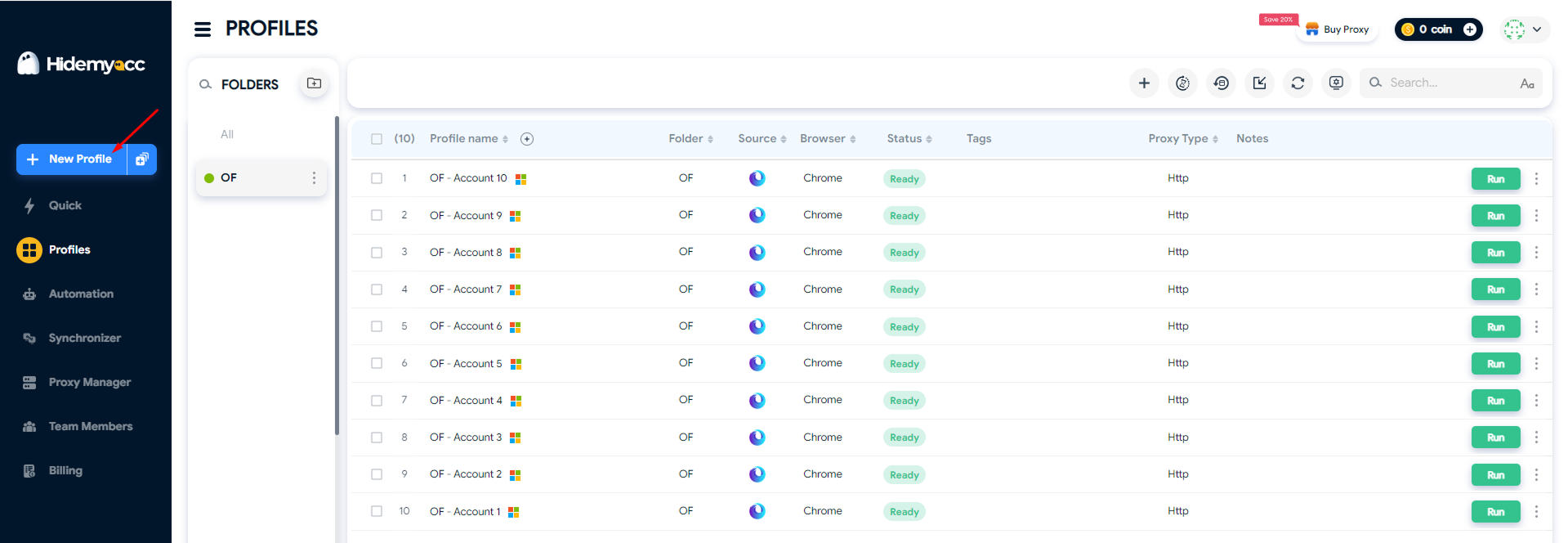
Step 1: Click New Profile to create a new browser profile.
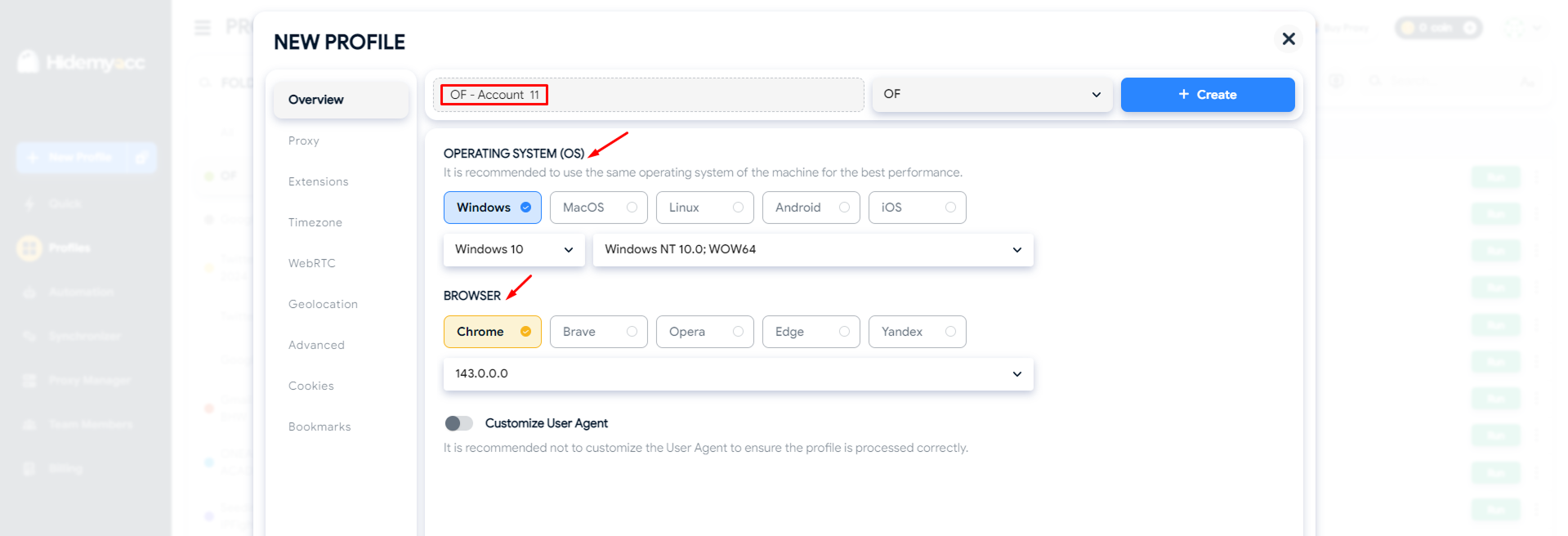
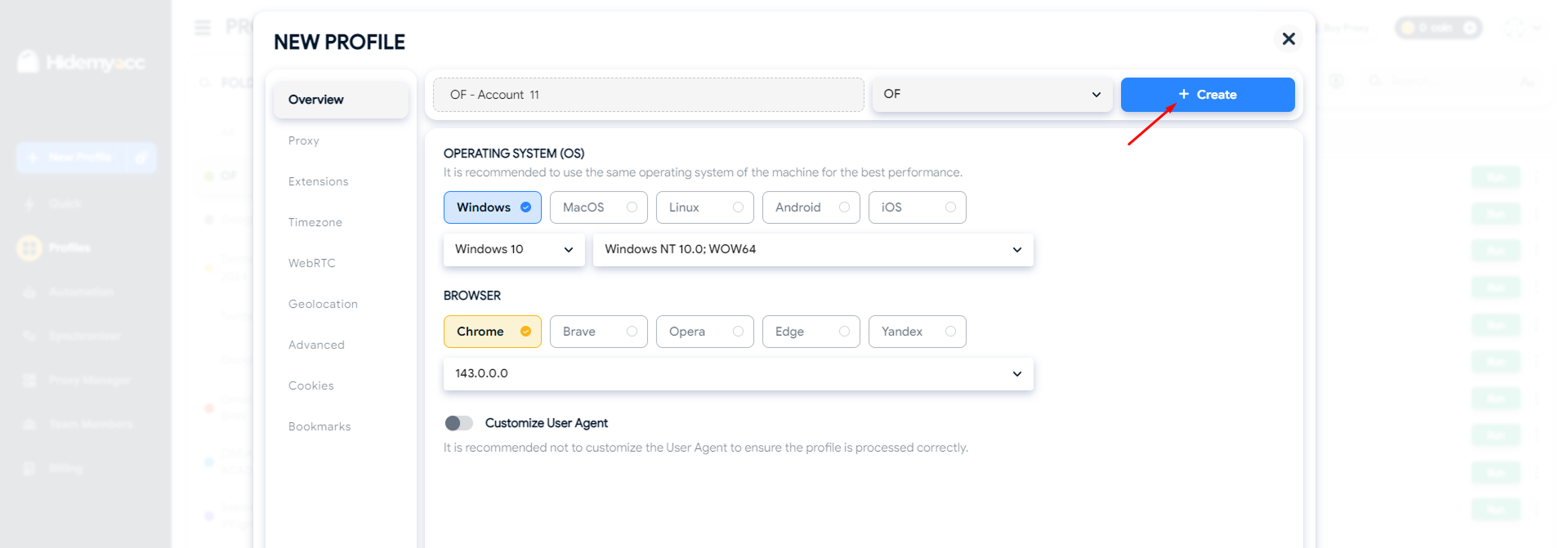
Step 2: Enter a profile name if needed, then select the Operating System (OS) and browser.
Step 3: Attach a proxy if you use one, or skip this step if not.
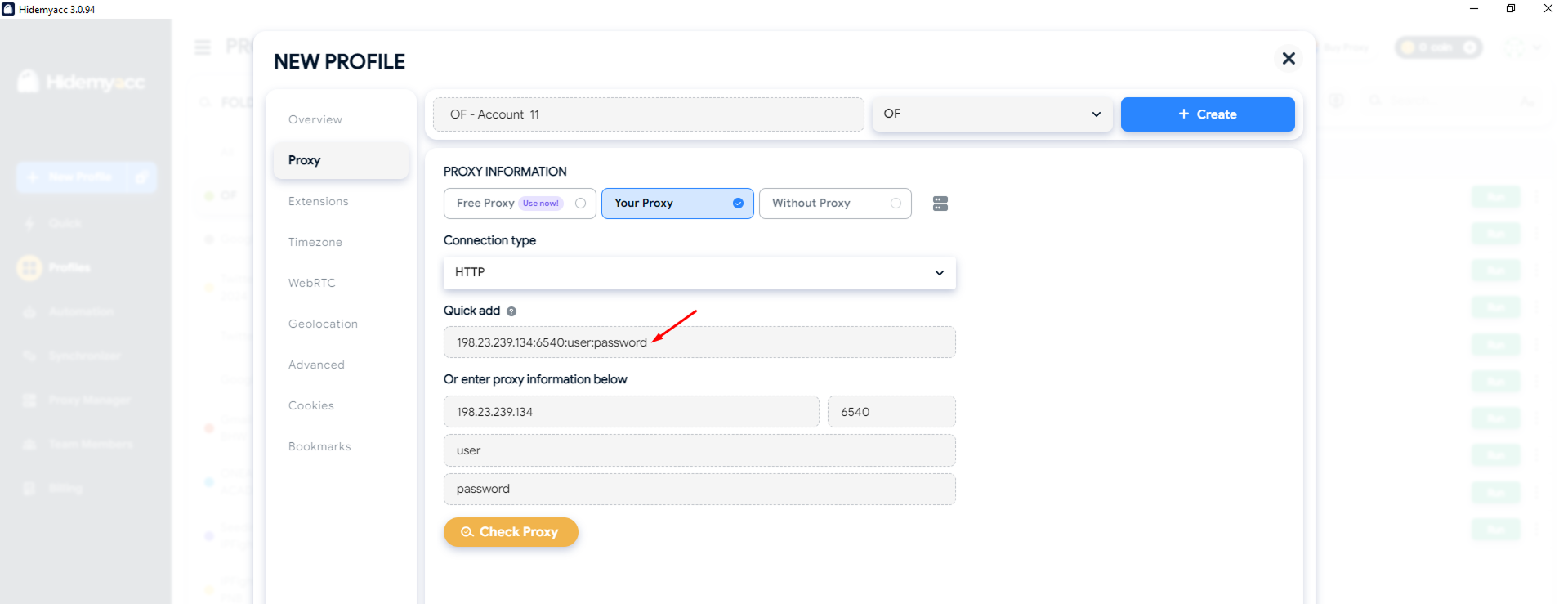
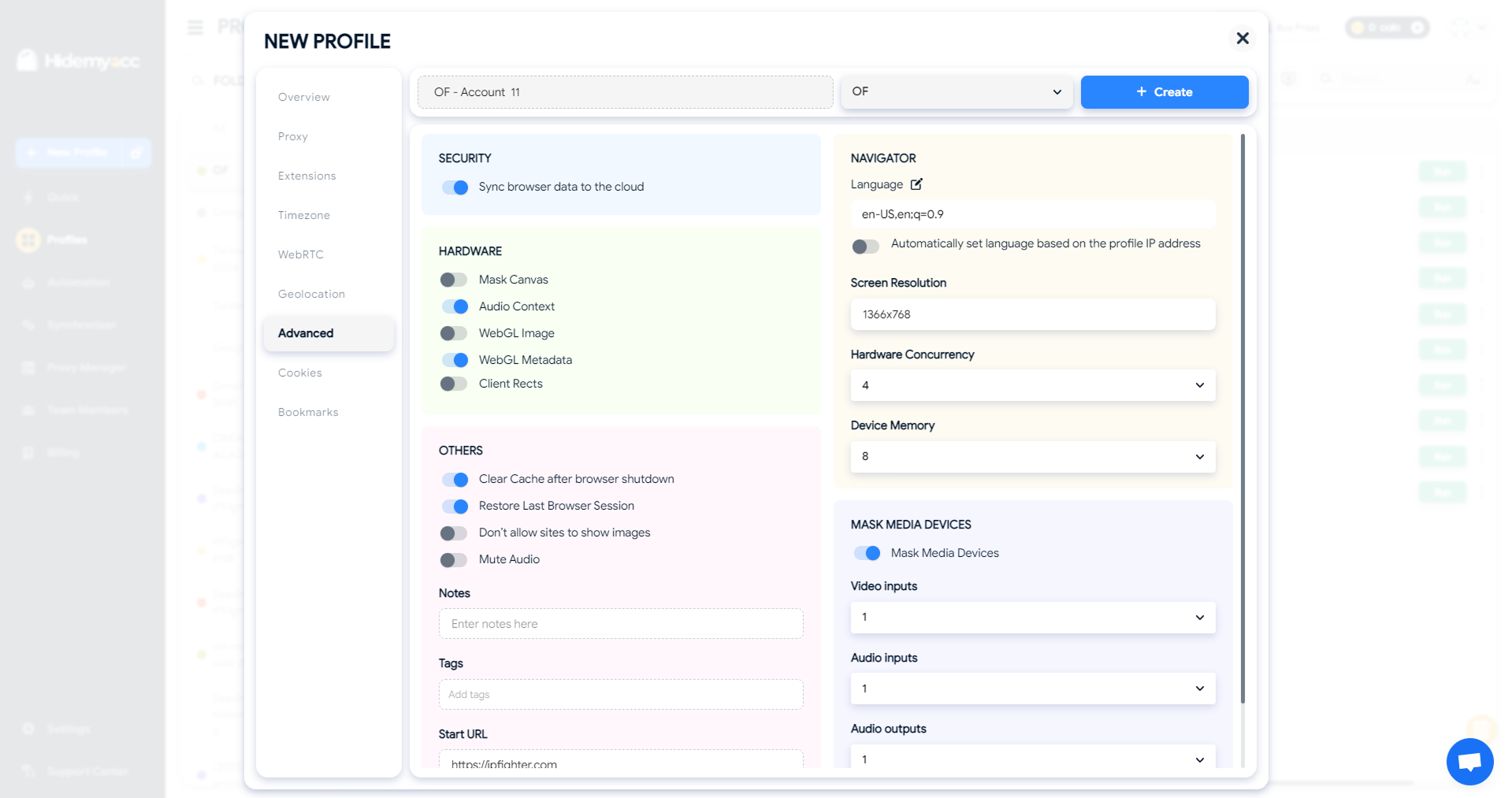
Step 4: Review advanced settings such as extensions, timezone, WebRTC, and hardware, or leave them as default.
Step 5: Click Create to finish setting up the profile.
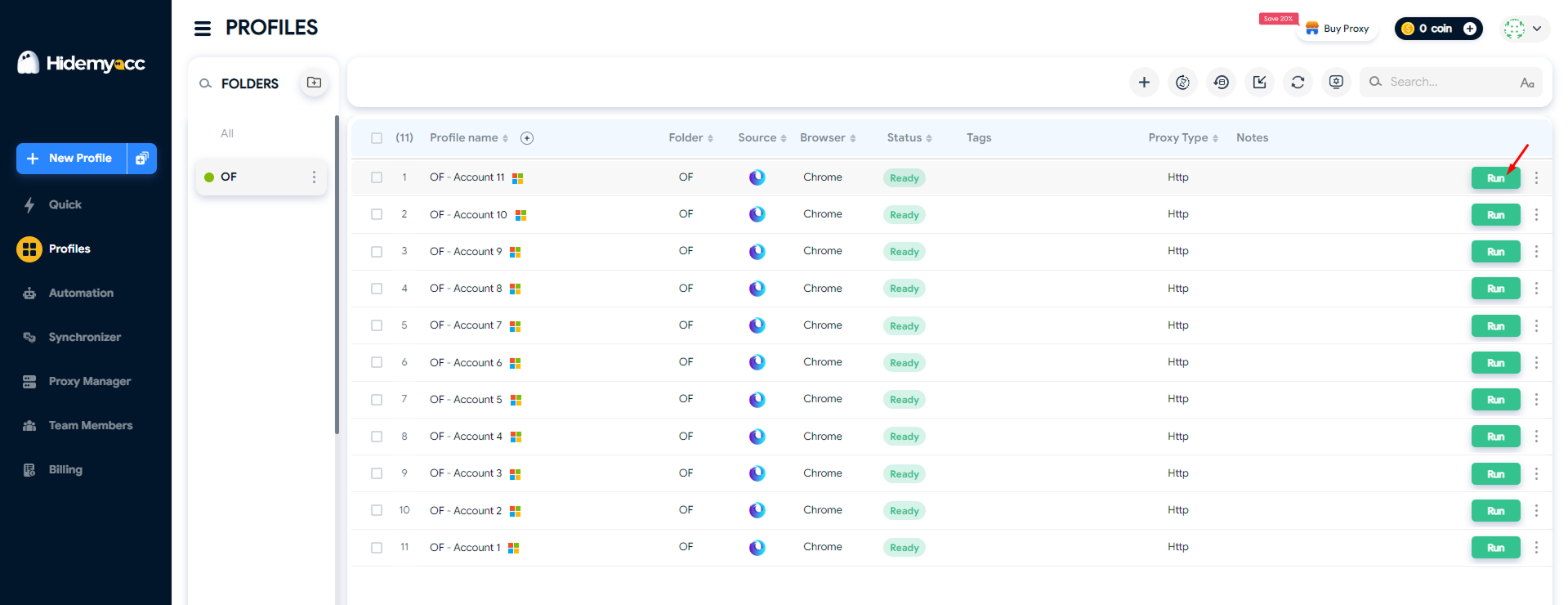
Step 6: Click Run, open the profile, and visit the OnlyFans website to register the account.
Each browser profile should be used for one OnlyFans account only. Reusing the same profile for multiple accounts increases risk and defeats the purpose of separation.
However, it’s important to understand that Hidemyacc only provides a clean and separated browser environment, it is not the sole factor in preventing suspensions. To truly reduce risk when running multiple accounts on OnlyFans, creators also need to ensure proper identity verification, clear and compliant payout setup, unique email addresses, and a distinct purpose for each account. If the browser environment is clean but these core elements are not handled correctly, accounts can still be reviewed or suspended.
6. Safer alternatives if you need more than two accounts
Before creating a third OnlyFans account, consider these lower-risk alternatives:
- One free account + one paid account: Use the free page for discovery and testing, and the paid page for monetization.
- Content separation inside one account: Use PPV messages, bundles, or categories instead of opening new accounts.
- Pricing and promotion changes: Adjust subscription prices or run limited offers rather than creating another account.
- Use another platform for a different niche: Keep separate content styles on different platforms to avoid linking risk.
If you’re concerned about the risks of creating additional accounts, or simply don’t want to manage too many OnlyFans accounts, these options can still help you meet your goals without opening another one.
Safely manage more than two OnlyFans accounts
Skip the risk of bans or account reviews. Hidemyacc isolates each account in its own browser session for secure, seamless management.
Get Hidemyacc Now7. Conclusion
So, can you have multiple OnlyFans accounts? You can, but the risk increases as you add more accounts.
Two accounts, usually one free and one paid, are often manageable when handled correctly. Issues tend to appear with a third account, where reviews become stricter and mistakes can affect more than one account.
Using antidetect browser Hidemyacc helps create a clean, separated browser environment for each account, which is an important part of keeping accounts stable. When combined with proper identity verification, clear payout setup, and a clear purpose for each account, this approach gives creators the best chance to run multiple OnlyFans accounts as safely as possible.
If you’re managing multiple accounts across different platforms, it’s important to keep them organized and avoid conflicts. Check out our guides on:
- Manage Multiple Social Media Accounts Efficiently – Tips Inside
- How to run multiple Telegram accounts on one device without bans?
- How to use multiple WhatsApp accounts on one device?
- Create Multiple X Accounts Without Getting Banned - Step-by-Step
- How to run multiple Instagram accounts without getting banned
- Multiple TikTok Accounts: Best Practices to Avoid Shadowbans
- Multiple LinkedIn accounts - How to create and manage them effectively?
- Multiple Reddit accounts - How to create and manage them safely (Step-by-step guides)
- How to Safely Run Multiple Discord Accounts Without Bans?
- Can you have multiple Bluesky accounts? Bulk create tips
8. FAQ
1. Am I allowed to have two OnlyFans accounts?
OnlyFans does not publicly state a fixed limit, but many creators successfully run two accounts, commonly one free and one paid. Each account must be verified separately and used for a clear purpose.
2. How do I make a second OnlyFans account?
You need a separate email address and must complete the full verification process again. The second account should be managed independently from the first, including login environment and account activity.
3. Can you have multiple OnlyFans accounts with the same email?
No. Each OnlyFans account requires a unique email address. Using the same email for multiple accounts is not supported.
4. How to manage multiple OnlyFans accounts safely?
Creators usually keep each account clearly separated, avoid mixing logins, and use a dedicated browser environment for each account. This helps reduce the chance that accounts are reviewed or affected together.
5. Can I have a secret OnlyFans account?
You can run an account under a different persona, but it still must go through full identity verification. OnlyFans can link accounts through verification and account data, even if the profile name is different.
6. Can OnlyFans be traced back to you?
Yes. OnlyFans requires identity verification for creators, so accounts can be traced back to the person who verified them, regardless of display name or persona.
7. What happens if you make more than $600 on OnlyFans?
Earning over certain thresholds may trigger tax reporting requirements, depending on your country and payment processor. You are responsible for complying with local tax laws.
8. Does OnlyFans block accounts by IP address?
OnlyFans does not publicly confirm how IP data is used. However, account reviews are based on multiple signals, not just IP address alone.






