TikTok is becoming a powerful advertising and sales platform, especially in the field of e-commerce. However, many users have difficulty attaching product links directly on TikTok, which is a major obstacle to customer conversion. So Why you can't add product links to TikTok videos ? This article by Antidetect Browser Hidemyacc will help you find the cause and solution to this problem!
1. Why can't I add product links on TikTok Videos?
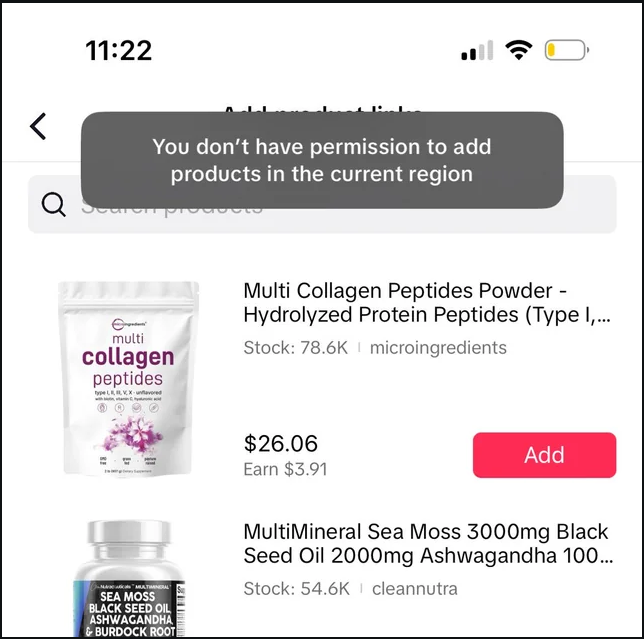
The inability to add direct product links on TikTok is a headache for many sellers and content creators. So why can't you add website links to your TikTok videos?
1.1. Use non-commercial music
One of the common reasons why you can’t add product links on TikTok is because you’re using non-commercial music. TikTok clearly states that only business accounts using music from the platform’s commercial library are allowed full access to features, including product links. Violating this rule can result in your account being restricted, which can greatly hinder your sales and promotions.
1.2. The product on Tiktok Shop is out of stock
If a product on TikTok Shop is out of stock, users will not be able to attach a product link in a video or livestream. This is because TikTok automatically hides or disables the option to attach a link for out-of-stock products to avoid viewers clicking on an invalid link. To fix this, sellers need to quickly restock or update other similar products to continue to take advantage of the attraction from the posted content.
1.3. Products have had their Affiliate campaign removed
Products that have been removed from the Affiliate program will no longer be linked to, as the store may have discontinued the campaign with the creator. In this case, links to that product will automatically become invalid. You can choose similar products from other stores as replacements.
1.4. Less than 1000 followers
On TikTok, to be able to embed product links directly into videos, accounts need to have at least 1,000 followers. This is to ensure that the account has enough engagement and influence to drive commercial activities. For users with fewer than 1,000 followers, TikTok limits this feature, encouraging them to focus on building a following and engagement before using advanced marketing tool
>>> Related Articles:
- Is it legal to run multiple TikTok Shop accounts?
- Multiple TikTok Accounts: Best Practices to Avoid Shadowbans
2. How to fix the error of not attaching product links to Tiktok videos
In this section, we’ll share effective fixes, from increasing your followers to other optimization tips to help you get the most out of your product marketing on TikTok. The process involves just 3 simple steps:
Step 1: Create a product video and post it on your TikTok account. Make sure the video is of good quality and has engaging content to attract viewers and create a viral effect.
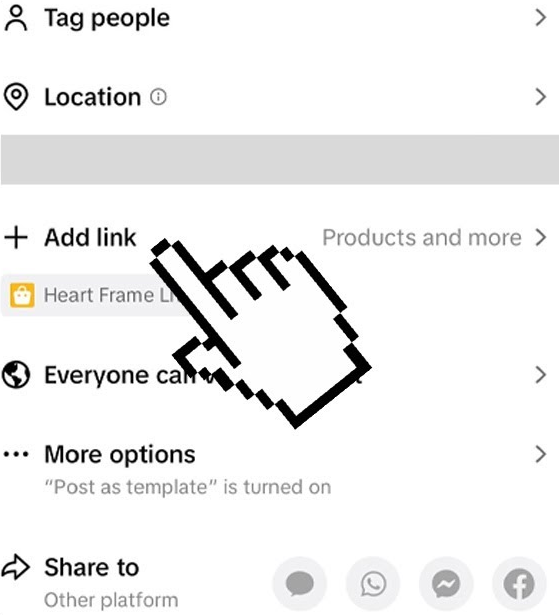
Step 2: When you click on " Add Link ", the screen will show two options:
- " Product " to insert products into your video.
- " Live Event " to add a link in the live stream.
Step 3: Select " Products " and find the appropriate product from your store. Once you have identified the appropriate product, click the " Add " button to complete inserting the product into the video.
Note: If you have followed the steps correctly but still cannot insert the product link, try deleting the app and reinstalling it. Or you can contact TikTok support by phone or email to find out the cause and how to fix it.
3. How to add product link to Tiktok video
To find a way to add product links on TikTok , you need to convert your personal account to a business account by following these steps:
Step 1: Open the TikTok app and go to Profile
Step 2: Tap the menu icon in the top corner of the screen.
Step 3: Select Manage account , then click Switch to Business Account and continue by clicking Next .
Step 4: Select the category that suits your business field, then click Next to complete the conversion.
Once done, you can start adding links to your TikTok profile by following these steps:
Step 5: Access Profile again .
Step 6: Click Edit profile and select Add your website.
Step 7: Enter your website URL and click Save to complete.
4. Notes when adding product links to Tiktok videos
When embedding product links into TikTok videos, there are a few important things to keep in mind to ensure the process goes smoothly and effectively, including:
- Product Name: Product names should be short, under 30 characters, and easy to understand. While TikTok will autofill the product name by default, you can edit it to clarify the material, function, or outstanding features of the product.
- Don't add too many products: Only add one product per video to avoid confusing customers and ensure they focus on the main content.
- Product link and content must match: Make sure that the product linked to matches the video content. Mismatching the content and link may result in a violation of TikTok's policies. If you are an affiliate or selling on TikTok Shop, please pay attention to the latest regulations.
- Only link products that don’t violate policies: Only add links to products that don’t violate TikTok’s policies. Products that require documentation or violate regulations will have a hard time getting approved and may even be penalized for violations.
- Choose easy-to-sell products: If you are new to TikTok, choose products that are easy to sell and do not violate TikTok's policies so that the link approval process is quick and smooth.
Thus, the above article by Hidemyacc has pointed out some common causes of “ Can’t add product links to TikTok Videos?”, and at the same time provided effective solutions to help users overcome these obstacles. We hope that the information in the article will help you better understand the related issues and how to solve them quickly. If you still have any questions or need further support, do not hesitate to contact us immediately!
>>> Read more articles on the topic of Tiktok:
- How to get more views on TikTok for FREE? 15 Tips That Work
- Top 10 best sites to buy TikTok views safely
- TikTok tips for engagement: How to boost your TikTok performance?
- How to monetize on TikTok: Stop missing easy money
- How to buy TikTok accounts safely? Top 10 reliable sites to consider